A Fortress for your Android Application

Jian Wang
Head of Technology, certgate
Business and the Mobile World

Agenda

   About certgate
   Mobile Security Solutions
   Android Security Concept
   certgate Mobile Application Protection Layer
   [Live Demonstration]
   Q&A


                                                   Slide 3
Business and the Mobile World

About certgate

 Mobile IT security innovator
 Founded in 2008, located in Nuremberg, Germany
 certgate is mastering the secure mobile IT device from
  hardware to application level
 Created the first microSD memory card with full
  smartcard capabilities, bringing hardware-based crypto
  functions to smartphones and tablets (Patent
  protected)


                                                     Slide 4
Business and the Mobile World

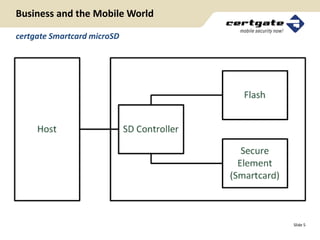
certgate Smartcard microSD


                                Slide 5
Business and the Mobile World

The Challenge

 Most businesses and administrations today
    • Either deploy smartphones and tablets to their employees
    • Or accept their employees to use their own devices for business
      purposes
 Those who don‘t do either have a reason:
    • They don‘t feel safe doing it
    • They would love to introduce new business models and
      applications like mobile e-D, payment, physical access and
      much, much more if only they COULD feel safe


                                                                   Slide 6
Business and the Mobile World

There Are Solutions on the Market

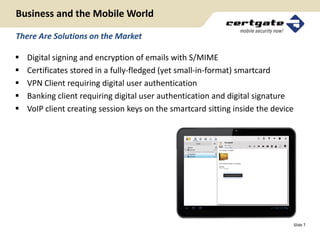
   Digital signing and encryption of emails with S/MIME
   Certificates stored in a fully-fledged (yet small-in-format) smartcard
   VPN Client requiring digital user authentication
   Banking client requiring digital user authentication and digital signature
   VoIP client creating session keys on the smartcard sitting inside the device


                                                                                   Slide 7
certgate – Use Cases
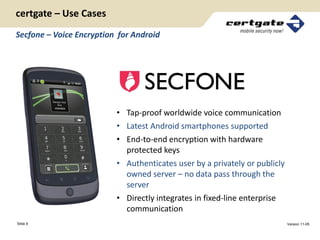
Secfone – Voice Encryption for Android


                          • Tap-proof worldwide voice communication
                          • Latest Android smartphones supported
                          • End-to-end encryption with hardware
                            protected keys
                          • Authenticates user by a privately or publicly
                            owned server – no data pass through the
                            server
                          • Directly integrates in fixed-line enterprise
                            communication
Slide 9                                                                     Version 11-05
certgate – Use Cases
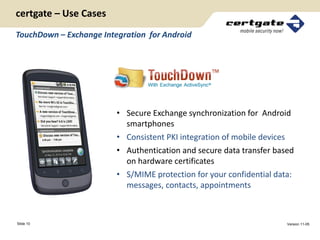
TouchDown – Exchange Integration for Android


                         • Secure Exchange synchronization for Android
                           smartphones
                         • Consistent PKI integration of mobile devices
                         • Authentication and secure data transfer based
                           on hardware certificates
                         • S/MIME protection for your confidential data:
                           messages, contacts, appointments


Slide 10                                                              Version 11-05
certgate MAPL™ for Android

Here Is A New One


                             Slide 11
certgate MAPL™ for Android

Why Did We Do This In the First Place

   Protect confidential data on the device
   Protect an application against unauthorized users
   Provide security with minimal integration effort
   Qualify the device to fit the BYOD concept
   Enable surplus security functions by the same
    hardware token, e.g. S/MIME encryption and
    secure VoIP


                                                        Slide 12
certgate MAPL™ for Android

Android Security Overview

 The Application Sandbox
   •    Each application is assigned with a UID
   •    Each application is running as a user in a separate process
   •    IPC through Binder, Intents, Services, and Content Provider


 The Android Permission Model
   •    Permissions are GIDs
   •    Declared in the app’s Android manifest
   •    Need to be explicitly confirmed by the user


                                                                Slide 13
certgate MAPL™ for Android

Which Concerns Are Being Addressed?

 Extension of rights by „rooting“ the device:
  Allows free access to all system resources

 Shortcomings in platform specific knowledge:
  Process boundaries can be violated e.g. by Intents

 Limitations in cryptographical comprehension:
  Sub-optimal choice of algorithms and cipher modes and
  less than perfect implementation of same


                                                          Slide 14
certgate MAPL™ for Android

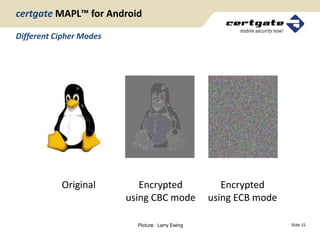
Different Cipher Modes


           Original         Encrypted                Encrypted
                         using CBC mode           using ECB mode

                           Picture: Larry Ewing                    Slide 15
certgate MAPL™ for Android

The Solution

 Mobile Application Protection Layer (MAPL)
  • No app execution without correct user PIN
  • Standard Android API
  • Transparent Encryption of Files and Database
  • Android SharedPreferences encryption
  • Tamper-proof key storage on cgCard™


                                                   Slide 16
certgate MAPL™ for Android

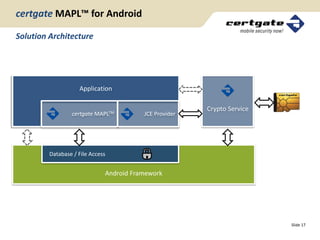
Solution Architecture


                    Application

                                                        Crypto Service
                 certgate MAPLTM         JCE Provider


         Database / File Access


                              Android Framework


                                                                         Slide 17
certgate MAPL™ for Android

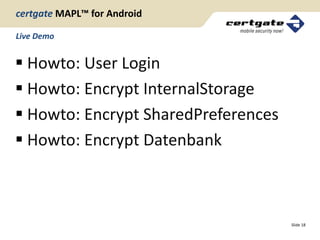
Live Demo


 Howto: User Login
 Howto: Encrypt InternalStorage
 Howto: Encrypt SharedPreferences
 Howto: Encrypt Datenbank


                                     Slide 18
certgate MAPL™ for Android

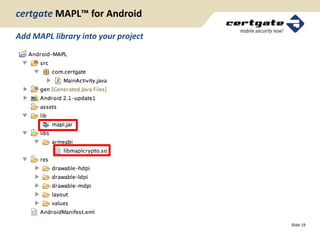
Add MAPL library into your project


                                     Slide 19
certgate MAPL™ for Android

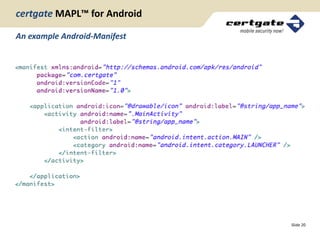
An example Android-Manifest


                              Slide 20
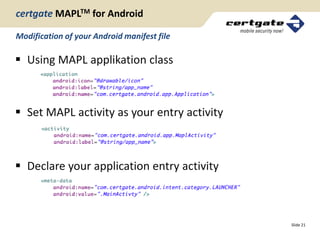
certgate MAPLTM for Android

Modification of your Android manifest file

 Using MAPL applikation class


 Set MAPL activity as your entry activity


 Declare your application entry activity


                                             Slide 21
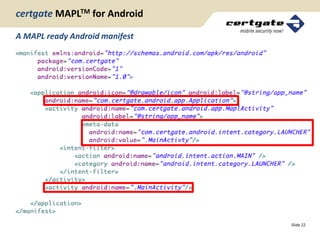
certgate MAPLTM for Android

A MAPL ready Android manifest


                                Slide 22
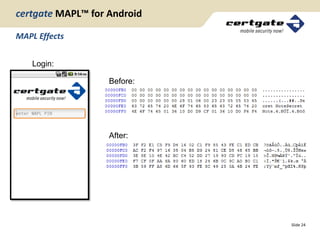
certgate MAPL™ for Android

MAPL Effects


    Login:

                   Before:


                   After:


                             Slide 24
certgate MAPL™ for Android

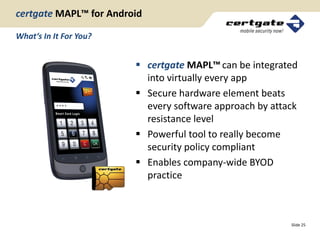
What‘s In It For You?


                         certgate MAPL™ can be integrated
                          into virtually every app
                         Secure hardware element beats
                          every software approach by attack
                          resistance level
                         Powerful tool to really become
                          security policy compliant
                         Enables company-wide BYOD
                          practice


                                                         Slide 25
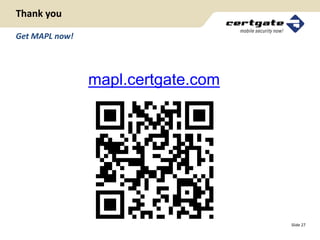
Thank you

Get MAPL now!


                mapl.certgate.com


                                    Slide 27

Certgate

  • 1.
    A Fortress foryour Android Application Jian Wang Head of Technology, certgate
  • 2.
    Business and theMobile World Agenda  About certgate  Mobile Security Solutions  Android Security Concept  certgate Mobile Application Protection Layer  [Live Demonstration]  Q&A Slide 3
  • 3.
    Business and theMobile World About certgate  Mobile IT security innovator  Founded in 2008, located in Nuremberg, Germany  certgate is mastering the secure mobile IT device from hardware to application level  Created the first microSD memory card with full smartcard capabilities, bringing hardware-based crypto functions to smartphones and tablets (Patent protected) Slide 4
  • 4.
    Business and theMobile World certgate Smartcard microSD Slide 5
  • 5.
    Business and theMobile World The Challenge  Most businesses and administrations today • Either deploy smartphones and tablets to their employees • Or accept their employees to use their own devices for business purposes  Those who don‘t do either have a reason: • They don‘t feel safe doing it • They would love to introduce new business models and applications like mobile e-D, payment, physical access and much, much more if only they COULD feel safe Slide 6
  • 6.
    Business and theMobile World There Are Solutions on the Market  Digital signing and encryption of emails with S/MIME  Certificates stored in a fully-fledged (yet small-in-format) smartcard  VPN Client requiring digital user authentication  Banking client requiring digital user authentication and digital signature  VoIP client creating session keys on the smartcard sitting inside the device Slide 7
  • 7.
    certgate – UseCases Secfone – Voice Encryption for Android • Tap-proof worldwide voice communication • Latest Android smartphones supported • End-to-end encryption with hardware protected keys • Authenticates user by a privately or publicly owned server – no data pass through the server • Directly integrates in fixed-line enterprise communication Slide 9 Version 11-05
  • 8.
    certgate – UseCases TouchDown – Exchange Integration for Android • Secure Exchange synchronization for Android smartphones • Consistent PKI integration of mobile devices • Authentication and secure data transfer based on hardware certificates • S/MIME protection for your confidential data: messages, contacts, appointments Slide 10 Version 11-05
  • 9.
    certgate MAPL™ forAndroid Here Is A New One Slide 11
  • 10.
    certgate MAPL™ forAndroid Why Did We Do This In the First Place  Protect confidential data on the device  Protect an application against unauthorized users  Provide security with minimal integration effort  Qualify the device to fit the BYOD concept  Enable surplus security functions by the same hardware token, e.g. S/MIME encryption and secure VoIP Slide 12
  • 11.
    certgate MAPL™ forAndroid Android Security Overview  The Application Sandbox • Each application is assigned with a UID • Each application is running as a user in a separate process • IPC through Binder, Intents, Services, and Content Provider  The Android Permission Model • Permissions are GIDs • Declared in the app’s Android manifest • Need to be explicitly confirmed by the user Slide 13
  • 12.
    certgate MAPL™ forAndroid Which Concerns Are Being Addressed?  Extension of rights by „rooting“ the device: Allows free access to all system resources  Shortcomings in platform specific knowledge: Process boundaries can be violated e.g. by Intents  Limitations in cryptographical comprehension: Sub-optimal choice of algorithms and cipher modes and less than perfect implementation of same Slide 14
  • 13.
    certgate MAPL™ forAndroid Different Cipher Modes Original Encrypted Encrypted using CBC mode using ECB mode Picture: Larry Ewing Slide 15
  • 14.
    certgate MAPL™ forAndroid The Solution  Mobile Application Protection Layer (MAPL) • No app execution without correct user PIN • Standard Android API • Transparent Encryption of Files and Database • Android SharedPreferences encryption • Tamper-proof key storage on cgCard™ Slide 16
  • 15.
    certgate MAPL™ forAndroid Solution Architecture Application Crypto Service certgate MAPLTM JCE Provider Database / File Access Android Framework Slide 17
  • 16.
    certgate MAPL™ forAndroid Live Demo  Howto: User Login  Howto: Encrypt InternalStorage  Howto: Encrypt SharedPreferences  Howto: Encrypt Datenbank Slide 18
  • 17.
    certgate MAPL™ forAndroid Add MAPL library into your project Slide 19
  • 18.
    certgate MAPL™ forAndroid An example Android-Manifest Slide 20
  • 19.
    certgate MAPLTM forAndroid Modification of your Android manifest file  Using MAPL applikation class  Set MAPL activity as your entry activity  Declare your application entry activity Slide 21
  • 20.
    certgate MAPLTM forAndroid A MAPL ready Android manifest Slide 22
  • 21.
    certgate MAPL™ forAndroid MAPL Effects Login: Before: After: Slide 24
  • 22.
    certgate MAPL™ forAndroid What‘s In It For You?  certgate MAPL™ can be integrated into virtually every app  Secure hardware element beats every software approach by attack resistance level  Powerful tool to really become security policy compliant  Enables company-wide BYOD practice Slide 25
  • 23.
    Thank you Get MAPLnow! mapl.certgate.com Slide 27