
(ATS3-PLAT04) Database Connectivity for
       Application Development
                 Ed Kernohan
                Lead Engineer
           ekernohan@accelrys.com
The information on the roadmap and future software development efforts are
intended to outline general product direction and should not be relied on in making
a purchasing decision.
Agenda

• Overview of database connectivity with Accelrys
  Enterprise Platform
• Connection technologies
• Connection types
• Component access
• Data source configuration
• Common pitfalls
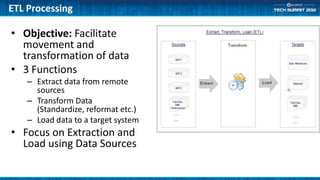
ETL Processing

• Objective: Facilitate
  movement and
  transformation of data
• 3 Functions
    – Extract data from remote
      sources
    – Transform Data
      (Standardize, reformat etc.)
    – Load data to a target system
• Focus on Extraction and
  Load using Data Sources
Database Connectivity
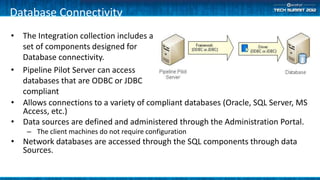
• The Integration collection includes a
  set of components designed for
  Database connectivity.
• Pipeline Pilot Server can access
  databases that are ODBC or JDBC
  compliant
• Allows connections to a variety of compliant databases (Oracle, SQL Server, MS
  Access, etc.)
• Data sources are defined and administered through the Administration Portal.
    – The client machines do not require configuration
• Network databases are accessed through the SQL components through data
  Sources.
Connection Technologies

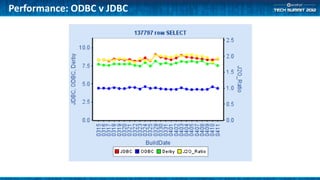
• Open Database Connectivity (ODBC)
   – Better peformance for simple data selection
• Java Database Connectivity (JDBC)
   – Selection of LOB’s
   – Oracle proxy connections
   – Wider array of connections available.

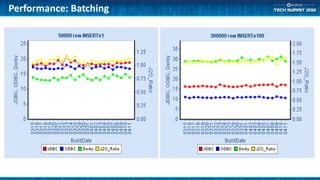
   – Batch insert and update now supported in ODBC and JDBC (8.5)
Performance: ODBC v JDBC
Performance: Batching
Connection Types

• Connection String
   – Configured within components
• DSN
   – Data Source connection manager (Windows)
   – ODBC.ini file (Linux)
• Pipeline Pilot
   – Administration Portal
   – Required for JDBC
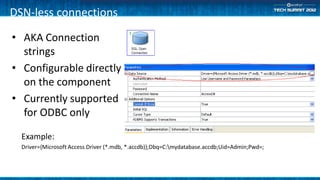
DSN-less connections

• AKA Connection
  strings
• Configurable directly
  on the component
• Currently supported
  for ODBC only

  Example:
  Driver={Microsoft Access Driver (*.mdb, *.accdb)};Dbq=C:mydatabase.accdb;Uid=Admin;Pwd=;
Demo
 • Component Configuration
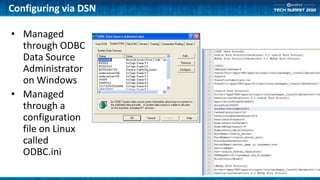
Configuring via DSN

• Managed
  through ODBC
  Data Source
  Administrator
  on Windows
• Managed
  through a
  configuration
  file on Linux
  called
  ODBC.ini
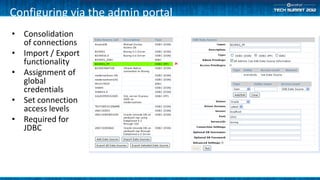
Configuring via the admin portal
• Consolidation
  of connections
• Import / Export
  functionality
• Assignment of
  global
  credentials
• Set connection
  access levels
• Required for
  JDBC
Demo
 • Admin Portal configuration
Common connection problems

•   SQLDescribe Param
•   32-Bit vs. 64-Bit
•   4000 character limitation
•   MySQL community driver
Summary
• What we learned
   – Accelrys Enterprise Platform supports ODBC and JDBC connections
   – Connections can be established 3 ways
       • DSN
       • Connection String
       • Pipeline Pilot Data Source
   – How to manage data source globally through the admin portal
   – How to configure components to use these data sources
• What Now?
   – Contact your account manager to inquire about the integration collection
   – Take a look at our available resources for more information
Available Resources

• Pipeline Pilot Help Center
   – Context Menu: Help-> Help Center within client
   – http://<servername>:<port>/help/docs/
• The Accelrys community
   – http://community.accelrys.com/
• Contact customer support
   – Phone: 1-800-756-4674
   – Email: support@accelrys.com
Q&A

• Any questions?
The information on the roadmap and future software development efforts are
intended to outline general product direction and should not be relied on in making
a purchasing decision.


For more information on the Accelrys Tech Summits and other IT & Developer
information, please visit:
https://community.accelrys.com/groups/it-dev

(ATS3-PLAT04) Database Connectivity for Application Development

  • 1.
    (ATS3-PLAT04) Database Connectivityfor Application Development Ed Kernohan Lead Engineer ekernohan@accelrys.com
  • 2.
    The information onthe roadmap and future software development efforts are intended to outline general product direction and should not be relied on in making a purchasing decision.
  • 3.
    Agenda • Overview ofdatabase connectivity with Accelrys Enterprise Platform • Connection technologies • Connection types • Component access • Data source configuration • Common pitfalls
  • 4.
    ETL Processing • Objective:Facilitate movement and transformation of data • 3 Functions – Extract data from remote sources – Transform Data (Standardize, reformat etc.) – Load data to a target system • Focus on Extraction and Load using Data Sources
  • 5.
    Database Connectivity • TheIntegration collection includes a set of components designed for Database connectivity. • Pipeline Pilot Server can access databases that are ODBC or JDBC compliant • Allows connections to a variety of compliant databases (Oracle, SQL Server, MS Access, etc.) • Data sources are defined and administered through the Administration Portal. – The client machines do not require configuration • Network databases are accessed through the SQL components through data Sources.
  • 6.
    Connection Technologies • OpenDatabase Connectivity (ODBC) – Better peformance for simple data selection • Java Database Connectivity (JDBC) – Selection of LOB’s – Oracle proxy connections – Wider array of connections available. – Batch insert and update now supported in ODBC and JDBC (8.5)
  • 7.
  • 8.
  • 9.
    Connection Types • ConnectionString – Configured within components • DSN – Data Source connection manager (Windows) – ODBC.ini file (Linux) • Pipeline Pilot – Administration Portal – Required for JDBC
  • 10.
    DSN-less connections • AKAConnection strings • Configurable directly on the component • Currently supported for ODBC only Example: Driver={Microsoft Access Driver (*.mdb, *.accdb)};Dbq=C:mydatabase.accdb;Uid=Admin;Pwd=;
  • 11.
    Demo • ComponentConfiguration
  • 12.
    Configuring via DSN •Managed through ODBC Data Source Administrator on Windows • Managed through a configuration file on Linux called ODBC.ini
  • 13.
    Configuring via theadmin portal • Consolidation of connections • Import / Export functionality • Assignment of global credentials • Set connection access levels • Required for JDBC
  • 14.
    Demo • AdminPortal configuration
  • 15.
    Common connection problems • SQLDescribe Param • 32-Bit vs. 64-Bit • 4000 character limitation • MySQL community driver
  • 16.
    Summary • What welearned – Accelrys Enterprise Platform supports ODBC and JDBC connections – Connections can be established 3 ways • DSN • Connection String • Pipeline Pilot Data Source – How to manage data source globally through the admin portal – How to configure components to use these data sources • What Now? – Contact your account manager to inquire about the integration collection – Take a look at our available resources for more information
  • 17.
    Available Resources • PipelinePilot Help Center – Context Menu: Help-> Help Center within client – http://<servername>:<port>/help/docs/ • The Accelrys community – http://community.accelrys.com/ • Contact customer support – Phone: 1-800-756-4674 – Email: support@accelrys.com
  • 18.
  • 19.
    The information onthe roadmap and future software development efforts are intended to outline general product direction and should not be relied on in making a purchasing decision. For more information on the Accelrys Tech Summits and other IT & Developer information, please visit: https://community.accelrys.com/groups/it-dev