Assistive Technology
and Vocational Services
Presenter:
Lorraine Norwich
Assistive Technology Specialist
BSME, MSIS
Community Work Services
Overview
History and Background
Ways to Access Assistive
Technology
Working as a Team
High and Low Tech Assistive
Technology
Vocational Practices
Additional Information
History and Background
What is Assistive
Technology
Any item, piece of equipment, or system,
whether acquired commercially, modified,
or customized, that is commonly used to
increase, maintain, or improve functional
capabilities of individuals with disabilities.
(Tech Act : 1988)
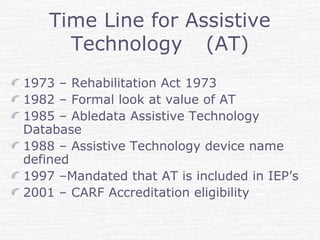
Time Line for Assistive
Technology (AT)
1973 – Rehabilitation Act 1973
1982 – Formal look at value of AT
1985 – Abledata Assistive Technology
Database
1988 – Assistive Technology device name
defined
1997 –Mandated that AT is included in IEP’s
2001 – CARF Accreditation eligibility
Accreditation
In 2001 the Commission of Accrediting
Rehabilitation Facilities (CARF) issued
an Employment and Community
Services Standards manual for Assistive
Technology to review and accredit
Assistive Technology. This
demonstrated the need for quality
control in measuring accuracy for
Assistive Technology services.
Ways to Access Assistive
Technology
Obtaining Assistive
Technology Services
Assistive Technology services are
provided through State Vocational
Rehabilitation Agencies like:
Massachusetts Rehabilitation
Commission
Massachusetts Commission for Blind
Massachusetts Commission for Deaf
and Hard of Hearing
Agencies have criteria for delivery of
services
State Agencies
If you are eligible for services with a
Vocational State Agency you will be
assigned a Counselor and it will be
determined if you are eligible for
Assistive Technology Services
A Vendor or In-house Assistive
Technology specialist will be assigned to
a case to do an evaluation and the
required procurement and training.
Obtaining Assistive
Technology Services –
Additional Sources
Veterans Administration
Working directly with Vocational
Rehabilitation Organizations Assistive
Technology Departments
One Off Designs
Universities work with students to do
Assistive Technology designs for
example Worcester Polytechnic Booth to
see examples
Dedicated designs
http://www.me.wpi.edu/Research/ATRC/Abou
t/tour.html
http://epicsnational.ecn.purdue.edu/ind
ex.php
Beginning of Assistive
Technology
Background on Books: In 1452,
Gutenberg, conceives of the idea for
movable type. He brings together the
technologies of paper, oil-based ink and
the wine-press to print books. Think of
this as Analog books
Background on Computers
1936 – Invented Computer
1958 – Chip design began
1964 _ Computer mouse and windows
(mouse because tail came out)
1971 – Floppy disc allowed flexibility
1985 – Home computers and windows.
History of Computers and
Hand Held Devices
Working as a Team
Need to know:
Medical History of the person
Other therapy the person is going through
Good to interact with others on the team
Helps to:
Set up a realistic goal for the person
Know what kind of equipment to prescribe or
begin working with
Some Considerations when
Selecting Assistive
Technology
Physical limitations
What are their technical skills
Learning Style
Reading level
How motivated are they
Do they think this is a quick fix
What are the goals
“The greatest impediment to a
person’s taking full part in his
society is not his physical flaws,
but rather the issue of myths,
fears and misunderstandings that
society attaches to them”
Assistive Technology
Allows Us To
Take away some
of the stumbling
blocks in life
High Tech
and
Low Tech
Assistive
Technology
Computer Input Devices
Mice and Trackballs
Alternative Keyboards
Speech to Text
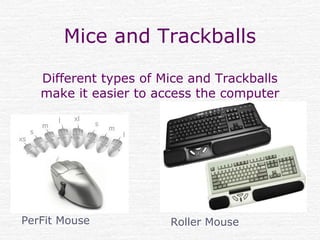
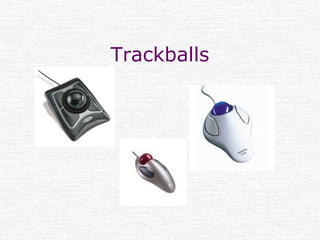
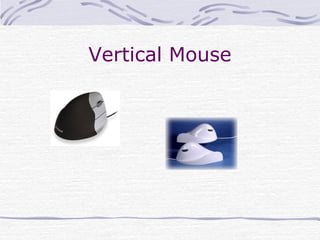
Mice and Trackballs
Different types of Mice and Trackballs
make it easier to access the computer
PerFit Mouse Roller Mouse
Trackballs
Vertical Mouse
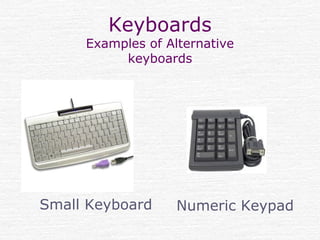
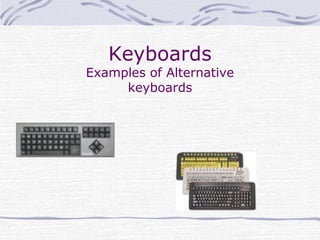
Keyboards
Examples of Alternative
keyboards
Small Keyboard Numeric Keypad
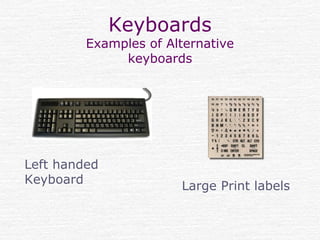
Keyboards
Examples of Alternative
keyboards
Left handed
Keyboard
Large Print labels
Keyboards
Examples of Alternative
keyboards
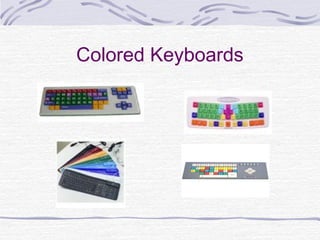
Colored Keyboards
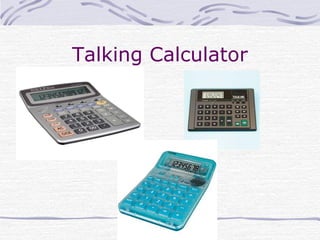
Talking Calculator
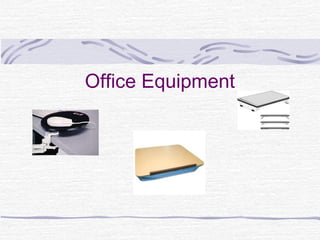
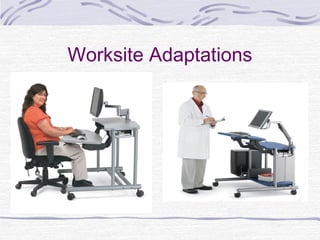
Worksite Adaptations
Office Equipment
Speech on Computer
Computer can make sounds when the
cone of a computer speaker oscillates
Each oscillation creates a sound
Sounds can be heard as simulated voice
on the computer called synthesized
speech.
Synthesized speech allows people to
listen to text, www etc. to being read on
the computer.
Screen Readers
Makes “Text-to-speech” on the
computer
A screen reader is a software program
that uses synthesized speech to "speak"
text and graphics out loud. This type of
program is used by people with learning
disabilities,limited vision and people
who are blind.
Scanning
If you can not get the information from
the hard drive, a disc or the WWW you
may need to scan the information onto
a disc.
Scanning is a proces of using an
electronic input device to convert
analog information such as print
material, maps, photographs, etc., into
a digital format usable by a computer
or hand held device.
E-Books
An ebook is an electronic (or
digital) version of a book. The
term is used ambiguously to refer
to either an individual work in a
digital format, or a device used to
read books in digital format. The
second usage should be
deprecated in favour of the more
precise "ebook device".
Functional Illiteracy
http://www.bentley.edu/events/agin
gbydesign2006/documents/gribbons.
ppt
Learning Disabilities that went
undiagnosed
No longer able to do the jobs that
they could when they were younger
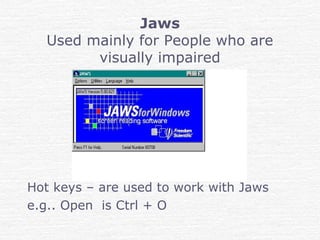
Jaws
Used mainly for People who are
visually impaired
Hot keys – are used to work with Jaws
e.g.. Open is Ctrl + O
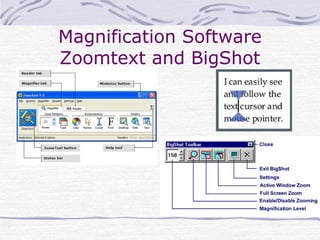
Magnification Software
Zoomtext and BigShot
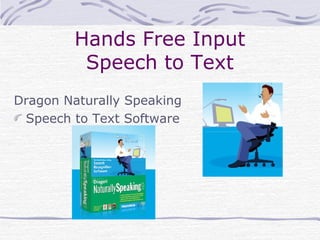
Hands Free Input
Speech to Text
Dragon Naturally Speaking
Speech to Text Software
J-Say
If a person has visual and manual
dexterity problems
http://www.ngtvoice.com/products/soft
Allows people to use Jaws and
Dragon Naturally Speaking
together
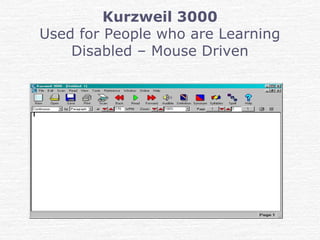
Kurzweil 3000
Used for People who are Learning
Disabled – Mouse Driven
Kurzweil Demonstration
Go to this URL to see a demonstration
http://www.kurzweiledu.com/k300demo/
Read & Write Gold
http://www.texthelp.com/rwg.asp?
q1=products&q2=rwg
Free Screen reader
Narrator
Narrator is the free text-to-speech
found on Microsoft
Narrator included in Windows XP and
can be accessed simply by pressing the
'windows' key and U.
You have to copy what you are going to
listen to
Inbuilt Accessibility
Features
Microsoft
http://www.microsoft.com/enable/products/win
Apple Accessibility
http://www.apple.com/accessibility/
ORCA
Orca is a free, open source, flexible,
extensible, and powerful assistive
technology for people with visual
impairments.
Developed by Sun Microsystems
http://live.gnome.org/Orca/
ReadPlease
Free Version of this Screen reader
Web Site for 2003 version
http://www.readplease.com/
You have to copy what you are going to
listen to
Hand Held Devices
Digital Hand held devices allow students
to walk around and listen to information
Comparison of devices
http://www.rfbdnj.org/equipcompare.html
Comparison of Digital Software Products
http://www.rfbdnj.org/softcompare.html
Vocational Practices
Vocational Evaluations and
Assistive Technology
Vocational Evaluation:
A comprehensive process that
systematically uses standardized tests,
work, either real or simulated, as the
focal point for assessment and
vocational exploration, the purpose of
which is to assist individuals in
vocational development.
Vocational Tests
Reading Comprehension and Number
Operations tests
ABLE – Adult Basic Learning
Examination
WRAT – Wide Range Achievement Test
RAI – Reading and Arithmetic Index
Combining Assistive
Technology and Vocational
Test
Standardized tests can be used with
Assistive Technology to determine
grade point level
Assistive Technology can be used to
determine typing speed
Assistive Technology can be used with
Math
Assistive Technology can be used to
help teach English as second language
Assistive Technology to
determine grade point
level
Tests are scanned into alternate format
Screen reader are used to administer
the tests
Compare test administered without
Assistive Technology
Assistive Technology to
determine typing speed
Dragon Naturally Speaking can be used
with some typing tests
Different input devices like alternate
keyboards – small keys or flat keyboard
show different typing speeds
Assistive Technology with
Vocational Evaluations
Vocational testing can be administered
with Assistive Technology
These tests can help identify areas that
will be helped with Assistive Technology
Job Descriptions
• Look at the areas of need
• Determine what is needed
• Assistive Technology can be one of the
solutions.
Work with the Employer
Work with the existing computer set
up
Work with the IT departments
Work as a consultant to make
technical adaptations without
“interrupting” the security settings
Work as a team
E-Learning
Online course can be used with
Assistive Technology
Courses are set up to be Accessible
and Section 508 compliant
Education of the future for both
teachers and students
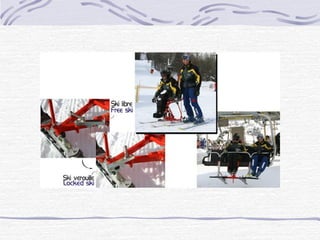
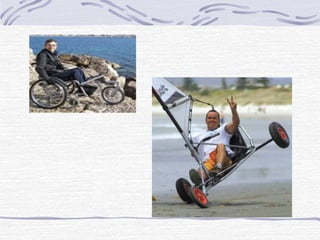
Additional Information
Running the Boston
Marathon
Conclusion
Technology is changing at a very
rapid pace
Assistive Technology
 Off the shelf products or
 Dedicated designs
Help provide some solutions

Assistive Technology-MRC_Arthritis foundation1

  • 1.
    Assistive Technology and VocationalServices Presenter: Lorraine Norwich Assistive Technology Specialist BSME, MSIS Community Work Services
  • 2.
    Overview History and Background Waysto Access Assistive Technology Working as a Team High and Low Tech Assistive Technology Vocational Practices Additional Information
  • 3.
  • 4.
    What is Assistive Technology Anyitem, piece of equipment, or system, whether acquired commercially, modified, or customized, that is commonly used to increase, maintain, or improve functional capabilities of individuals with disabilities. (Tech Act : 1988)
  • 5.
    Time Line forAssistive Technology (AT) 1973 – Rehabilitation Act 1973 1982 – Formal look at value of AT 1985 – Abledata Assistive Technology Database 1988 – Assistive Technology device name defined 1997 –Mandated that AT is included in IEP’s 2001 – CARF Accreditation eligibility
  • 6.
    Accreditation In 2001 theCommission of Accrediting Rehabilitation Facilities (CARF) issued an Employment and Community Services Standards manual for Assistive Technology to review and accredit Assistive Technology. This demonstrated the need for quality control in measuring accuracy for Assistive Technology services.
  • 7.
    Ways to AccessAssistive Technology
  • 8.
    Obtaining Assistive Technology Services AssistiveTechnology services are provided through State Vocational Rehabilitation Agencies like: Massachusetts Rehabilitation Commission Massachusetts Commission for Blind Massachusetts Commission for Deaf and Hard of Hearing Agencies have criteria for delivery of services
  • 9.
    State Agencies If youare eligible for services with a Vocational State Agency you will be assigned a Counselor and it will be determined if you are eligible for Assistive Technology Services A Vendor or In-house Assistive Technology specialist will be assigned to a case to do an evaluation and the required procurement and training.
  • 10.
    Obtaining Assistive Technology Services– Additional Sources Veterans Administration Working directly with Vocational Rehabilitation Organizations Assistive Technology Departments
  • 11.
    One Off Designs Universitieswork with students to do Assistive Technology designs for example Worcester Polytechnic Booth to see examples Dedicated designs http://www.me.wpi.edu/Research/ATRC/Abou t/tour.html http://epicsnational.ecn.purdue.edu/ind ex.php
  • 12.
    Beginning of Assistive Technology Backgroundon Books: In 1452, Gutenberg, conceives of the idea for movable type. He brings together the technologies of paper, oil-based ink and the wine-press to print books. Think of this as Analog books
  • 13.
    Background on Computers 1936– Invented Computer 1958 – Chip design began 1964 _ Computer mouse and windows (mouse because tail came out) 1971 – Floppy disc allowed flexibility 1985 – Home computers and windows. History of Computers and Hand Held Devices
  • 14.
    Working as aTeam Need to know: Medical History of the person Other therapy the person is going through Good to interact with others on the team Helps to: Set up a realistic goal for the person Know what kind of equipment to prescribe or begin working with
  • 15.
    Some Considerations when SelectingAssistive Technology Physical limitations What are their technical skills Learning Style Reading level How motivated are they Do they think this is a quick fix What are the goals
  • 16.
    “The greatest impedimentto a person’s taking full part in his society is not his physical flaws, but rather the issue of myths, fears and misunderstandings that society attaches to them”
  • 17.
    Assistive Technology Allows UsTo Take away some of the stumbling blocks in life
  • 18.
  • 19.
    Computer Input Devices Miceand Trackballs Alternative Keyboards Speech to Text
  • 20.
    Mice and Trackballs Differenttypes of Mice and Trackballs make it easier to access the computer PerFit Mouse Roller Mouse
  • 21.
  • 22.
  • 23.
  • 24.
    Keyboards Examples of Alternative keyboards Lefthanded Keyboard Large Print labels
  • 25.
  • 26.
  • 27.
  • 28.
  • 29.
  • 30.
    Speech on Computer Computercan make sounds when the cone of a computer speaker oscillates Each oscillation creates a sound Sounds can be heard as simulated voice on the computer called synthesized speech. Synthesized speech allows people to listen to text, www etc. to being read on the computer.
  • 31.
    Screen Readers Makes “Text-to-speech”on the computer A screen reader is a software program that uses synthesized speech to "speak" text and graphics out loud. This type of program is used by people with learning disabilities,limited vision and people who are blind.
  • 32.
    Scanning If you cannot get the information from the hard drive, a disc or the WWW you may need to scan the information onto a disc. Scanning is a proces of using an electronic input device to convert analog information such as print material, maps, photographs, etc., into a digital format usable by a computer or hand held device.
  • 33.
    E-Books An ebook isan electronic (or digital) version of a book. The term is used ambiguously to refer to either an individual work in a digital format, or a device used to read books in digital format. The second usage should be deprecated in favour of the more precise "ebook device".
  • 34.
    Functional Illiteracy http://www.bentley.edu/events/agin gbydesign2006/documents/gribbons. ppt Learning Disabilitiesthat went undiagnosed No longer able to do the jobs that they could when they were younger
  • 35.
    Jaws Used mainly forPeople who are visually impaired Hot keys – are used to work with Jaws e.g.. Open is Ctrl + O
  • 36.
  • 37.
    Hands Free Input Speechto Text Dragon Naturally Speaking Speech to Text Software
  • 38.
    J-Say If a personhas visual and manual dexterity problems http://www.ngtvoice.com/products/soft Allows people to use Jaws and Dragon Naturally Speaking together
  • 39.
    Kurzweil 3000 Used forPeople who are Learning Disabled – Mouse Driven
  • 40.
    Kurzweil Demonstration Go tothis URL to see a demonstration http://www.kurzweiledu.com/k300demo/
  • 41.
    Read & WriteGold http://www.texthelp.com/rwg.asp? q1=products&q2=rwg
  • 42.
    Free Screen reader Narrator Narratoris the free text-to-speech found on Microsoft Narrator included in Windows XP and can be accessed simply by pressing the 'windows' key and U. You have to copy what you are going to listen to
  • 43.
  • 44.
    ORCA Orca is afree, open source, flexible, extensible, and powerful assistive technology for people with visual impairments. Developed by Sun Microsystems http://live.gnome.org/Orca/
  • 45.
    ReadPlease Free Version ofthis Screen reader Web Site for 2003 version http://www.readplease.com/ You have to copy what you are going to listen to
  • 46.
    Hand Held Devices DigitalHand held devices allow students to walk around and listen to information Comparison of devices http://www.rfbdnj.org/equipcompare.html Comparison of Digital Software Products http://www.rfbdnj.org/softcompare.html
  • 47.
  • 48.
    Vocational Evaluations and AssistiveTechnology Vocational Evaluation: A comprehensive process that systematically uses standardized tests, work, either real or simulated, as the focal point for assessment and vocational exploration, the purpose of which is to assist individuals in vocational development.
  • 49.
    Vocational Tests Reading Comprehensionand Number Operations tests ABLE – Adult Basic Learning Examination WRAT – Wide Range Achievement Test RAI – Reading and Arithmetic Index
  • 50.
    Combining Assistive Technology andVocational Test Standardized tests can be used with Assistive Technology to determine grade point level Assistive Technology can be used to determine typing speed Assistive Technology can be used with Math Assistive Technology can be used to help teach English as second language
  • 51.
    Assistive Technology to determinegrade point level Tests are scanned into alternate format Screen reader are used to administer the tests Compare test administered without Assistive Technology
  • 52.
    Assistive Technology to determinetyping speed Dragon Naturally Speaking can be used with some typing tests Different input devices like alternate keyboards – small keys or flat keyboard show different typing speeds
  • 53.
    Assistive Technology with VocationalEvaluations Vocational testing can be administered with Assistive Technology These tests can help identify areas that will be helped with Assistive Technology
  • 54.
    Job Descriptions • Lookat the areas of need • Determine what is needed • Assistive Technology can be one of the solutions.
  • 55.
    Work with theEmployer Work with the existing computer set up Work with the IT departments Work as a consultant to make technical adaptations without “interrupting” the security settings Work as a team
  • 56.
    E-Learning Online course canbe used with Assistive Technology Courses are set up to be Accessible and Section 508 compliant Education of the future for both teachers and students
  • 57.
  • 61.
  • 66.
    Conclusion Technology is changingat a very rapid pace Assistive Technology  Off the shelf products or  Dedicated designs Help provide some solutions