CDH


      Application Virtualization
CDH               Smackdown


                   February 2011
CDH                    Quick Facts


About Us           Approach           Partnerships
• 21st Year        • Vendor Neutral   • Microsoft Gold
                                          • Central Region Client
• Grand Rapids &   • Non-reseller           Experience Award Winner
  Royal Oak        • Professional     •    VMware Enterprise
• 30 Staff           Services Only    •    Cisco Premier
                                      •    Novell Platinum
                                      •    Citrix Silver
CDH                    Expertise
  Project Management     Infrastructure


  Collaboration          Access & Identity Management
CDH   CDH   Talks Tech
CDH             Your Presenters

      • Eric Inch
       VCP, MCITP, CISSP
       EricI@cdh.com


      • Jason Cooper
       VCP, MCITP, MCNE
       JasonC@cdh.com
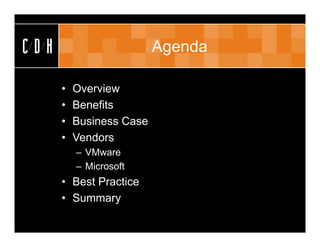
CDH                       Agenda

      •   Overview
      •   Benefits
      •   Business Case
      •   Vendors
          – VMware
          – Microsoft
      • Best Practice
      • Summary
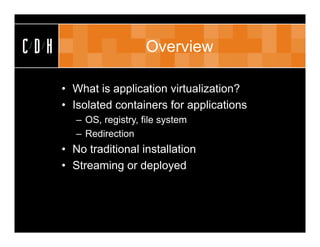
CDH                       Overview

      • What is application virtualization?
      • Isolated containers for applications
         – OS, registry, file system
         – Redirection
      • No traditional installation
      • Streaming or deployed
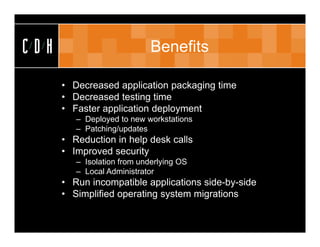
CDH                          Benefits

      • Decreased application packaging time
      • Decreased testing time
      • Faster application deployment
         – Deployed to new workstations
         – Patching/updates
      • Reduction in help desk calls
      • Improved security
         – Isolation from underlying OS
         – Local Administrator
      • Run incompatible applications side-by-side
      • Simplified operating system migrations
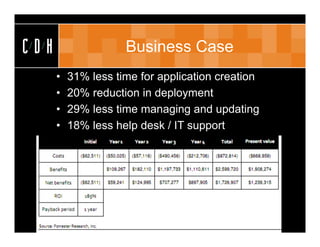
CDH                  Business Case
      •   31% less time for application creation
      •   20% reduction in deployment
      •   29% less time managing and updating
      •   18% less help desk / IT support
CDH                         Vendors

      •   VMware
      •   Microsoft
      •   Citrix
      •   Symantec
      •   Others
          –   Endeavours
          –   Novell
          –   Spoon
          –   Unidesk
          –   InstallFree
CDH                          VMware

      •   VMware overview
      •   Server virtualization
      •   Desktop virtualization
      •   Application virtualization
          – ThinApp
          – Acquisition of Thinstall
      • Other products
          – SRM, Capacity IQ, Chargeback, AppSpeed,
            Configuration Manager, vCloud Director, Service
            Manager, Zimbra
CDH                VMware ThinApp

      •   Agentless
      •   No server infrastructure
      •   Deploy vs. Stream
      •   Thinreg
      •   AppLink
      •   AppSync
      •   Side-by-Side upgrade
CDH                         Microsoft

      •   Microsoft overview
      •   Server virtualization
      •   Desktop virtualization
      •   Application virtualization
          – System Center
          – Acquisition of SoftGrid
      • Other products
          – SCCM, SCOM, SCSM, DPM, VMM, Windows 7,
            Windows Server 2008, RDS, SQL, RMS,
            ForeFront, Office
CDH                  Microsoft App-V

      •   Kernel Mode
      •   Part of MDOP (EA)
      •   Distributed Server Infrastructure
      •   64-Bit Applications
      •   Windows Services
      •   Feature Blocks
      •   Shared Cache
      •   SCCM Integration
      •   Dynamic Suite Composition
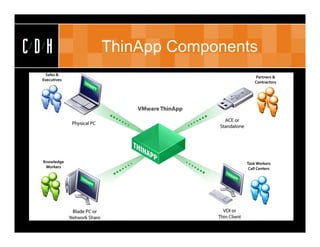
CDH   ThinApp Components
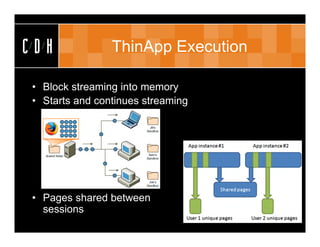
CDH             ThinApp Execution

• Block streaming into memory
• Starts and continues streaming


• Pages shared between
  sessions
CDH   ThinApp Demo
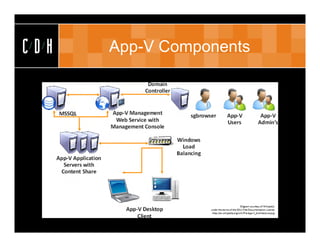
CDH   App-V Components
CDH   App-V Demo
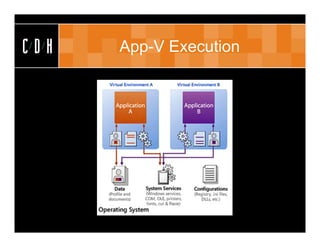
CDH   App-V Execution
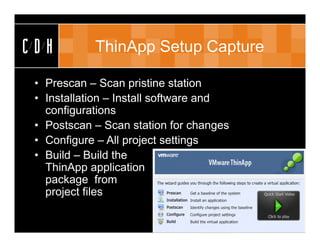
CDH         ThinApp Setup Capture

 • Prescan – Scan pristine station
 • Installation – Install software and
   configurations
 • Postscan – Scan station for changes
 • Configure – All project settings
 • Build – Build the
   ThinApp application
   package from
   project files
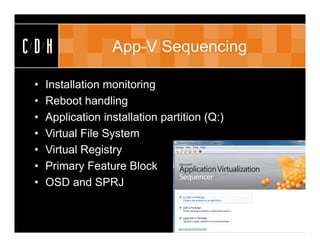
CDH                App-V Sequencing

 •   Installation monitoring
 •   Reboot handling
 •   Application installation partition (Q:)
 •   Virtual File System
 •   Virtual Registry
 •   Primary Feature Block
 •   OSD and SPRJ
CDH   App-V Demo
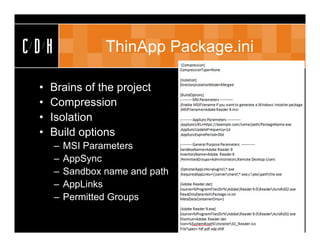
CDH               ThinApp Package.ini

 •   Brains of the project
 •   Compression
 •   Isolation
 •   Build options
      –   MSI Parameters
      –   AppSync
      –   Sandbox name and path
      –   AppLinks
      –   Permitted Groups
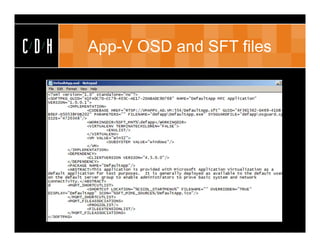
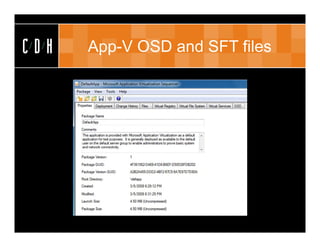
CDH   App-V OSD and SFT files
ThinApp
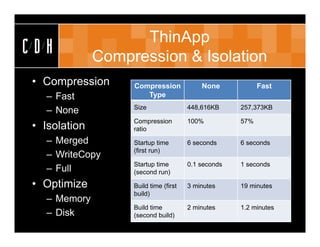
CDH           Compression & Isolation
• Compression      Compression             None            Fast
   – Fast             Type
                   Size                448,616KB     257,373KB
   – None
                   Compression         100%          57%
• Isolation        ratio
   – Merged        Startup time        6 seconds     6 seconds
                   (first run)
   – WriteCopy
                   Startup time        0.1 seconds   1 seconds
   – Full          (second run)

• Optimize         Build time (first   3 minutes     19 minutes
                   build)
   – Memory
                   Build time          2 minutes     1.2 minutes
   – Disk          (second build)
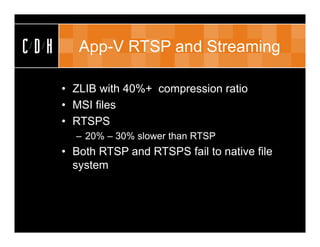
CDH      App-V RTSP and Streaming

      • ZLIB with 40%+ compression ratio
      • MSI files
      • RTSPS
        – 20% – 30% slower than RTSP
      • Both RTSP and RTSPS fail to native file
        system
CDH              ThinApp AppLink

      • Linking dependent applications to main
        app
      • Optional and required
      • Dependencies loaded into memory
        – As listed in Package.ini
        – Wildcard  loaded alphabetically
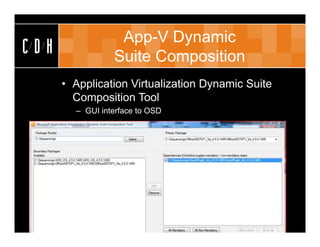
App-V Dynamic
CDH              Suite Composition
      • Application Virtualization Dynamic Suite
        Composition Tool
        – GUI interface to OSD
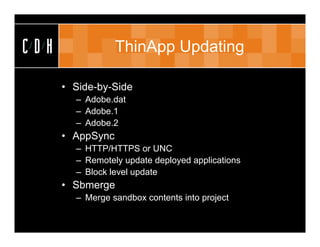
CDH               ThinApp Updating

      • Side-by-Side
        – Adobe.dat
        – Adobe.1
        – Adobe.2
      • AppSync
        – HTTP/HTTPS or UNC
        – Remotely update deployed applications
        – Block level update
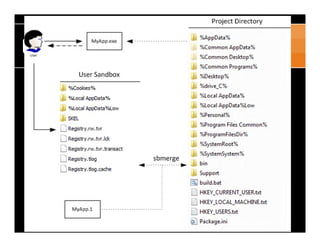
      • Sbmerge
        – Merge sandbox contents into project
CDH
CDH   ThinApp Demo
CDH              App-V Updating

      • Adds additional package (SFT) to App-V
      • Seamless upgrade on next launch
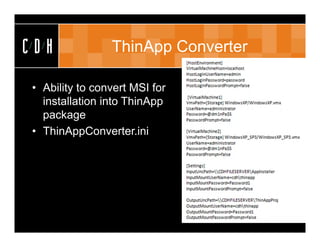
CDH             ThinApp Converter

• Ability to convert MSI for
  installation into ThinApp
  package
• ThinAppConverter.ini
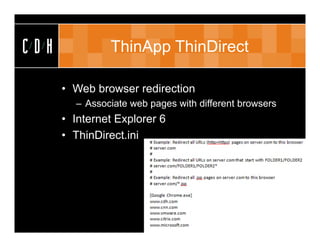
CDH            ThinApp ThinDirect

      • Web browser redirection
        – Associate web pages with different browsers
      • Internet Explorer 6
      • ThinDirect.ini
CDH         App-V Integration Points

      • SCCM
      • RDS
      • Virtual Services
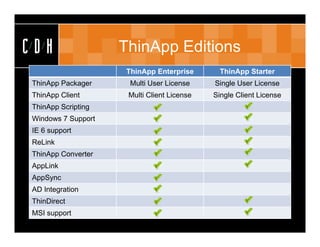
CDH                 ThinApp Editions
                     ThinApp Enterprise       ThinApp Starter
ThinApp Packager      Multi User License    Single User License
ThinApp Client       Multi Client License   Single Client License
ThinApp Scripting
Windows 7 Support
IE 6 support
ReLink
ThinApp Converter
AppLink
AppSync
AD Integration
ThinDirect
MSI support
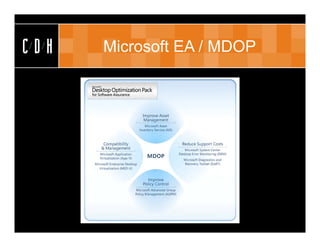
CDH   Microsoft EA / MDOP
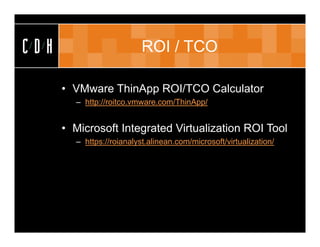
CDH                        ROI / TCO

      • VMware ThinApp ROI/TCO Calculator
        – http://roitco.vmware.com/ThinApp/


      • Microsoft Integrated Virtualization ROI Tool
        – https://roianalyst.alinean.com/microsoft/virtualization/
CDH                     Best Practice

      • ThinApp Deployment Guide
        – http://www.vmware.com/files/pdf/VMware_ThinApp_Dep
          loyment_Guide.pdf
      • Best practices to use for sequencing in
        Microsoft App-V
        – http://support.microsoft.com/kb/932137/
CDH            ThinApp Limitations

      • No reporting
      • Concurrent licensing
      • Price
        – Included with View Premier
      • 16 and 32-Bit only. No 64-Bit
CDH               App-V Limitations

      •   Complex infrastructure
      •   Cannot virtualize Internet Explorer
      •   DSC sequencing
      •   Need to maintain agent updates
CDH             Upcoming Briefings

• Migrating to SharePoint 2010
  – Wednesday, March 23rd – C/D/H Grand Rapids
  – Thursday, March 24th – C/D/H Royal Oak
• Views from the UC Summit
  – Wednesday, April 27th – C/D/H Grand Rapids
  – Thursday, April 28th – C/D/H Royal Oak
• Office 365: The latest and greatest in cloud
  – Wednesday, May 18th – C/D/H Grand Rapids
  – Thursday, May 19th – C/D/H Royal Oak
CDH                         Thank You

 Royal Oak                                  Grand Rapids
 306 S. Washington Ave.                     15 Ionia SW
 Suite 212                                  Suite 270
 Royal Oak, MI 48067                        Grand Rapids, MI 49503
 p: (248) 546-1800                          p: (616) 776-1600


                 www.cdh.com
                   (c) C/D/H 2007. All rights reserved

Application Virtualization Smackdown

  • 1.
    CDH Application Virtualization CDH Smackdown February 2011
  • 2.
    CDH Quick Facts About Us Approach Partnerships • 21st Year • Vendor Neutral • Microsoft Gold • Central Region Client • Grand Rapids & • Non-reseller Experience Award Winner Royal Oak • Professional • VMware Enterprise • 30 Staff Services Only • Cisco Premier • Novell Platinum • Citrix Silver
  • 3.
    CDH Expertise Project Management Infrastructure Collaboration Access & Identity Management
  • 4.
    CDH CDH Talks Tech
  • 5.
    CDH Your Presenters • Eric Inch VCP, MCITP, CISSP EricI@cdh.com • Jason Cooper VCP, MCITP, MCNE JasonC@cdh.com
  • 6.
    CDH Agenda • Overview • Benefits • Business Case • Vendors – VMware – Microsoft • Best Practice • Summary
  • 7.
    CDH Overview • What is application virtualization? • Isolated containers for applications – OS, registry, file system – Redirection • No traditional installation • Streaming or deployed
  • 8.
    CDH Benefits • Decreased application packaging time • Decreased testing time • Faster application deployment – Deployed to new workstations – Patching/updates • Reduction in help desk calls • Improved security – Isolation from underlying OS – Local Administrator • Run incompatible applications side-by-side • Simplified operating system migrations
  • 9.
    CDH Business Case • 31% less time for application creation • 20% reduction in deployment • 29% less time managing and updating • 18% less help desk / IT support
  • 10.
    CDH Vendors • VMware • Microsoft • Citrix • Symantec • Others – Endeavours – Novell – Spoon – Unidesk – InstallFree
  • 11.
    CDH VMware • VMware overview • Server virtualization • Desktop virtualization • Application virtualization – ThinApp – Acquisition of Thinstall • Other products – SRM, Capacity IQ, Chargeback, AppSpeed, Configuration Manager, vCloud Director, Service Manager, Zimbra
  • 12.
    CDH VMware ThinApp • Agentless • No server infrastructure • Deploy vs. Stream • Thinreg • AppLink • AppSync • Side-by-Side upgrade
  • 13.
    CDH Microsoft • Microsoft overview • Server virtualization • Desktop virtualization • Application virtualization – System Center – Acquisition of SoftGrid • Other products – SCCM, SCOM, SCSM, DPM, VMM, Windows 7, Windows Server 2008, RDS, SQL, RMS, ForeFront, Office
  • 14.
    CDH Microsoft App-V • Kernel Mode • Part of MDOP (EA) • Distributed Server Infrastructure • 64-Bit Applications • Windows Services • Feature Blocks • Shared Cache • SCCM Integration • Dynamic Suite Composition
  • 15.
    CDH ThinApp Components
  • 16.
    CDH ThinApp Execution • Block streaming into memory • Starts and continues streaming • Pages shared between sessions
  • 17.
    CDH ThinApp Demo
  • 18.
    CDH App-V Components
  • 19.
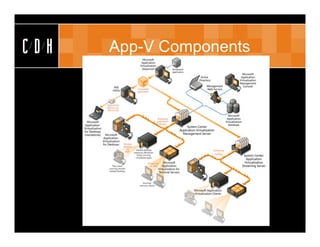
    CDH App-V Components
  • 20.
    CDH App-V Demo
  • 21.
    CDH App-V Execution
  • 22.
    CDH ThinApp Setup Capture • Prescan – Scan pristine station • Installation – Install software and configurations • Postscan – Scan station for changes • Configure – All project settings • Build – Build the ThinApp application package from project files
  • 23.
    CDH App-V Sequencing • Installation monitoring • Reboot handling • Application installation partition (Q:) • Virtual File System • Virtual Registry • Primary Feature Block • OSD and SPRJ
  • 24.
    CDH App-V Demo
  • 25.
    CDH ThinApp Package.ini • Brains of the project • Compression • Isolation • Build options – MSI Parameters – AppSync – Sandbox name and path – AppLinks – Permitted Groups
  • 26.
    CDH App-V OSD and SFT files
  • 27.
    CDH App-V OSD and SFT files
  • 28.
    ThinApp CDH Compression & Isolation • Compression Compression None Fast – Fast Type Size 448,616KB 257,373KB – None Compression 100% 57% • Isolation ratio – Merged Startup time 6 seconds 6 seconds (first run) – WriteCopy Startup time 0.1 seconds 1 seconds – Full (second run) • Optimize Build time (first 3 minutes 19 minutes build) – Memory Build time 2 minutes 1.2 minutes – Disk (second build)
  • 29.
    CDH App-V RTSP and Streaming • ZLIB with 40%+ compression ratio • MSI files • RTSPS – 20% – 30% slower than RTSP • Both RTSP and RTSPS fail to native file system
  • 30.
    CDH ThinApp AppLink • Linking dependent applications to main app • Optional and required • Dependencies loaded into memory – As listed in Package.ini – Wildcard  loaded alphabetically
  • 31.
    App-V Dynamic CDH Suite Composition • Application Virtualization Dynamic Suite Composition Tool – GUI interface to OSD
  • 32.
    CDH ThinApp Updating • Side-by-Side – Adobe.dat – Adobe.1 – Adobe.2 • AppSync – HTTP/HTTPS or UNC – Remotely update deployed applications – Block level update • Sbmerge – Merge sandbox contents into project
  • 33.
  • 34.
    CDH ThinApp Demo
  • 35.
    CDH App-V Updating • Adds additional package (SFT) to App-V • Seamless upgrade on next launch
  • 36.
    CDH ThinApp Converter • Ability to convert MSI for installation into ThinApp package • ThinAppConverter.ini
  • 37.
    CDH ThinApp ThinDirect • Web browser redirection – Associate web pages with different browsers • Internet Explorer 6 • ThinDirect.ini
  • 38.
    CDH App-V Integration Points • SCCM • RDS • Virtual Services
  • 39.
    CDH ThinApp Editions ThinApp Enterprise ThinApp Starter ThinApp Packager Multi User License Single User License ThinApp Client Multi Client License Single Client License ThinApp Scripting Windows 7 Support IE 6 support ReLink ThinApp Converter AppLink AppSync AD Integration ThinDirect MSI support
  • 40.
    CDH Microsoft EA / MDOP
  • 41.
    CDH ROI / TCO • VMware ThinApp ROI/TCO Calculator – http://roitco.vmware.com/ThinApp/ • Microsoft Integrated Virtualization ROI Tool – https://roianalyst.alinean.com/microsoft/virtualization/
  • 42.
    CDH Best Practice • ThinApp Deployment Guide – http://www.vmware.com/files/pdf/VMware_ThinApp_Dep loyment_Guide.pdf • Best practices to use for sequencing in Microsoft App-V – http://support.microsoft.com/kb/932137/
  • 43.
    CDH ThinApp Limitations • No reporting • Concurrent licensing • Price – Included with View Premier • 16 and 32-Bit only. No 64-Bit
  • 44.
    CDH App-V Limitations • Complex infrastructure • Cannot virtualize Internet Explorer • DSC sequencing • Need to maintain agent updates
  • 45.
    CDH Upcoming Briefings • Migrating to SharePoint 2010 – Wednesday, March 23rd – C/D/H Grand Rapids – Thursday, March 24th – C/D/H Royal Oak • Views from the UC Summit – Wednesday, April 27th – C/D/H Grand Rapids – Thursday, April 28th – C/D/H Royal Oak • Office 365: The latest and greatest in cloud – Wednesday, May 18th – C/D/H Grand Rapids – Thursday, May 19th – C/D/H Royal Oak
  • 46.
    CDH Thank You Royal Oak Grand Rapids 306 S. Washington Ave. 15 Ionia SW Suite 212 Suite 270 Royal Oak, MI 48067 Grand Rapids, MI 49503 p: (248) 546-1800 p: (616) 776-1600 www.cdh.com (c) C/D/H 2007. All rights reserved