VMware@Night:
Container und Virtualisierung
Urs Stephan Alder, CEO, Kybernetika
Dennis Zimmer, CEO, Opvizor, dzimmer@opvizor.com
Michael Abmayer, Senior Consultant,opvizor
2
Contents
Container Adoption1
About Container2
Container vs. Virtualization3
Container Pros & Cons4
Deploy and Run Container5
Monitor Container6
Demo Time
3
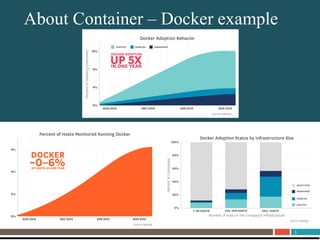
About UnitrendsAbout Container – Docker example
4
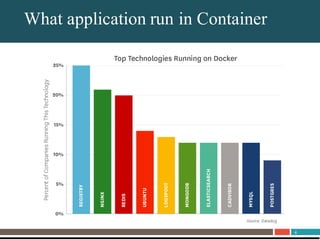
About UnitrendsWhat application run in Container
5
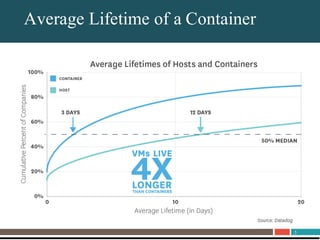
About UnitrendsAverage Lifetime of a Container
6
About Unitrends
What is a
Container??
7
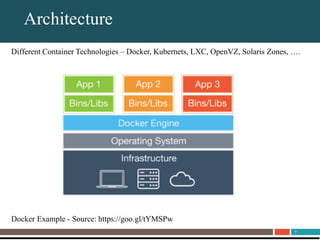
About UnitrendsArchitecture
Different Container Technologies – Docker, Kubernets, LXC, OpenVZ, Solaris Zones, ….
Docker Example - Source: https://goo.gl/tYMSPw
8
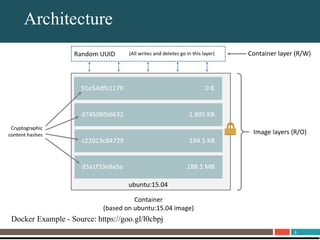
About UnitrendsArchitecture
Docker Example - Source: https://goo.gl/l0cbpj
9
About Unitrends
Container
Virtualization
10
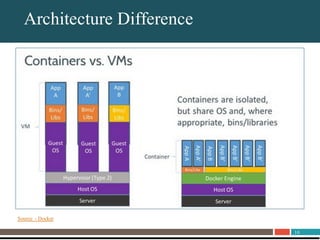
About UnitrendsArchitecture Difference
Source - Docker
11
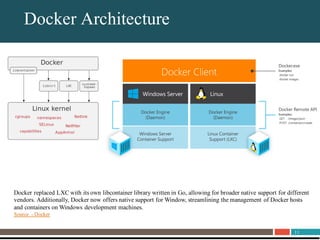
About UnitrendsDocker Architecture
Docker replaced LXC with its own libcontainer library written in Go, allowing for broader native support for different
vendors. Additionally, Docker now offers native support for Window, streamlining the management of Docker hosts
and containers on Windows development machines.
Source - Docker
12
About UnitrendsDeployment Scenarios
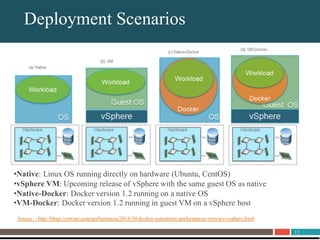
•Native: Linux OS running directly on hardware (Ubuntu, CentOS)
•vSphere VM: Upcoming release of vSphere with the same guest OS as native
•Native-Docker: Docker version 1.2 running on a native OS
•VM-Docker: Docker version 1.2 running in guest VM on a vSphere host
Source - http://blogs.vmware.com/performance/2014/10/docker-containers-performance-vmware-vsphere.html
13
About UnitrendsPerformance – LINPACK Test
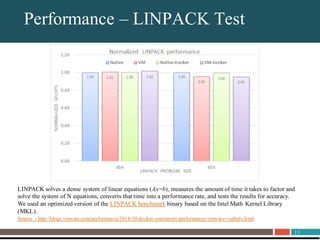
LINPACK solves a dense system of linear equations (Ax=b), measures the amount of time it takes to factor and
solve the system of N equations, converts that time into a performance rate, and tests the results for accuracy.
We used an optimized version of the LINPACK benchmark binary based on the Intel Math Kernel Library
(MKL).
Source - http://blogs.vmware.com/performance/2014/10/docker-containers-performance-vmware-vsphere.html
14
About UnitrendsPerformance – NetPerf / Redis
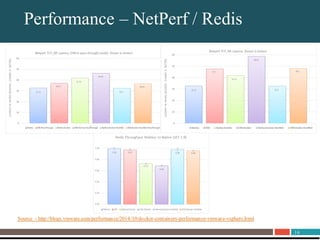
Source - http://blogs.vmware.com/performance/2014/10/docker-containers-performance-vmware-vsphere.html
15
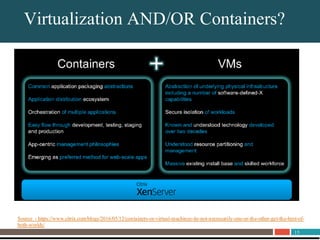
About UnitrendsVirtualization AND/OR Containers?
Source - https://www.citrix.com/blogs/2016/05/12/containers-or-virtual-machines-its-not-necessarily-one-or-the-other-get-the-best-of-
both-worlds/
16
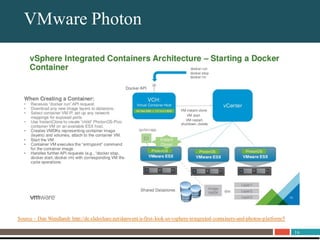
About UnitrendsVMware Photon
Source – Dan Wendlandt http://de.slideshare.net/danwent/a-first-look-at-vsphere-integrated-containers-and-photon-platform/5
17
About Unitrends
Container
Pros and Cons
18
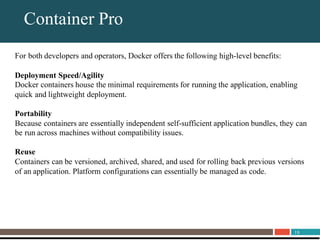
About UnitrendsContainer Pro
For both developers and operators, Docker offers the following high-level benefits:
Deployment Speed/Agility
Docker containers house the minimal requirements for running the application, enabling
quick and lightweight deployment.
Portability
Because containers are essentially independent self-sufficient application bundles, they can
be run across machines without compatibility issues.
Reuse
Containers can be versioned, archived, shared, and used for rolling back previous versions
of an application. Platform configurations can essentially be managed as code.
19
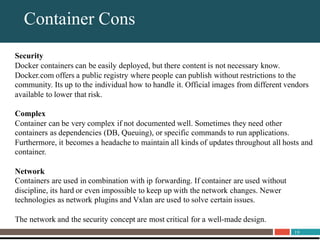
About UnitrendsContainer Cons
Security
Docker containers can be easily deployed, but there content is not necessary know.
Docker.com offers a public registry where people can publish without restrictions to the
community. Its up to the individual how to handle it. Official images from different vendors
available to lower that risk.
Complex
Container can be very complex if not documented well. Sometimes they need other
containers as dependencies (DB, Queuing), or specific commands to run applications.
Furthermore, it becomes a headache to maintain all kinds of updates throughout all hosts and
container.
Network
Containers are used in combination with ip forwarding. If container are used without
discipline, its hard or even impossible to keep up with the network changes. Newer
technologies as network plugins and Vxlan are used to solve certain issues.
The network and the security concept are most critical for a well-made design.
20
About Unitrends
Demo
Time
21
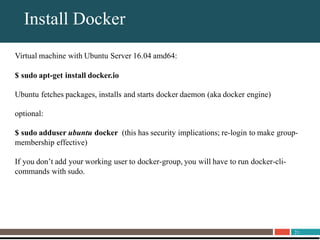
About UnitrendsInstall Docker
Virtual machine with Ubuntu Server 16.04 amd64:
$ sudo apt-get install docker.io
Ubuntu fetches packages, installs and starts docker daemon (aka docker engine)
optional:
$ sudo adduser ubuntu docker (this has security implications; re-login to make group-
membership effective)
If you don’t add your working user to docker-group, you will have to run docker-cli-
commands with sudo.
22
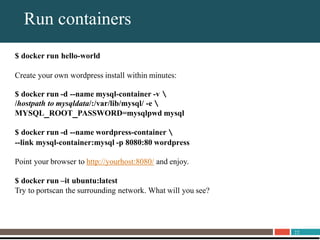
About UnitrendsRun containers
$ docker run hello-world
Create your own wordpress install within minutes:
$ docker run -d --name mysql-container -v 
/hostpath to mysqldata/:/var/lib/mysql/ -e 
MYSQL_ROOT_PASSWORD=mysqlpwd mysql
$ docker run -d --name wordpress-container 
--link mysql-container:mysql -p 8080:80 wordpress
Point your browser to http://yourhost:8080/ and enjoy.
$ docker run –it ubuntu:latest
Try to portscan the surrounding network. What will you see?
23
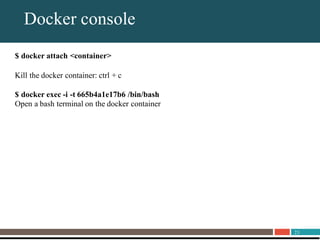
About UnitrendsDocker console
$ docker attach <container>
Kill the docker container: ctrl + c
$ docker exec -i -t 665b4a1e17b6 /bin/bash
Open a bash terminal on the docker container
24
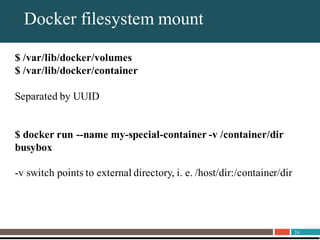
About UnitrendsDocker filesystem mount
$ /var/lib/docker/volumes
$ /var/lib/docker/container
Separated by UUID
$ docker run --name my-special-container -v /container/dir
busybox
-v switch points to external directory, i. e. /host/dir:/container/dir
25
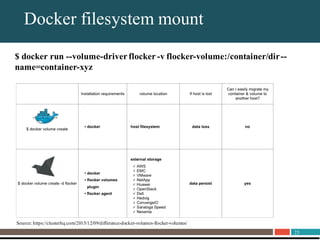
About UnitrendsDocker filesystem mount
$ docker run --volume-driver flocker -v flocker-volume:/container/dir--
name=container-xyz
Source: https://clusterhq.com/2015/12/09/difference-docker-volumes-flocker-volumes/
26
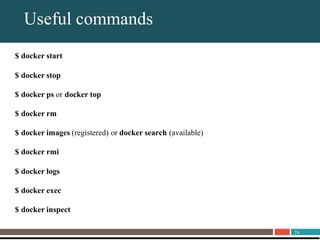
About UnitrendsUseful commands
$ docker start
$ docker stop
$ docker ps or docker top
$ docker rm
$ docker images (registered) or docker search (available)
$ docker rmi
$ docker logs
$ docker exec
$ docker inspect
27
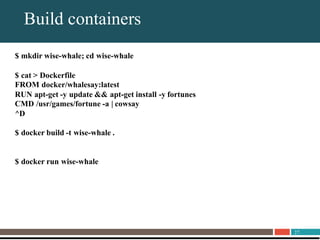
About UnitrendsBuild containers
$ mkdir wise-whale; cd wise-whale
$ cat > Dockerfile
FROM docker/whalesay:latest
RUN apt-get -y update && apt-get install -y fortunes
CMD /usr/games/fortune -a | cowsay
^D
$ docker build -t wise-whale .
$ docker run wise-whale
28
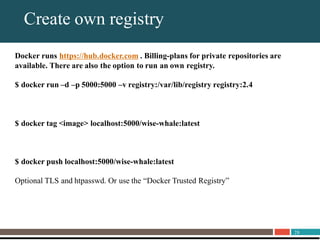
About UnitrendsCreate own registry
Docker runs https://hub.docker.com . Billing-plans for private repositories are
available. There are also the option to run an own registry.
$ docker run –d –p 5000:5000 –v registry:/var/lib/registry registry:2.4
$ docker tag <image> localhost:5000/wise-whale:latest
$ docker push localhost:5000/wise-whale:latest
Optional TLS and htpasswd. Or use the “Docker Trusted Registry”
29
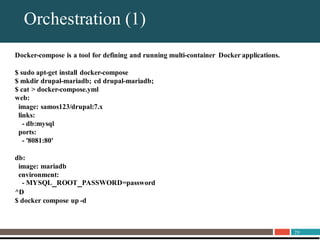
About UnitrendsOrchestration (1)
Docker-compose is a tool for defining and running multi-container Docker applications.
$ sudo apt-get install docker-compose
$ mkdir drupal-mariadb; cd drupal-mariadb;
$ cat > docker-compose.yml
web:
image: samos123/drupal:7.x
links:
- db:mysql
ports:
- '8081:80'
db:
image: mariadb
environment:
- MYSQL_ROOT_PASSWORD=password
^D
$ docker compose up -d
30
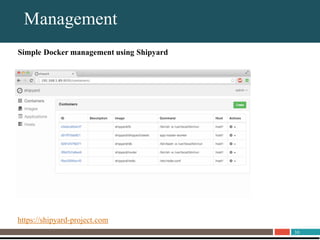
About UnitrendsManagement
Simple Docker management using Shipyard
https://shipyard-project.com
31
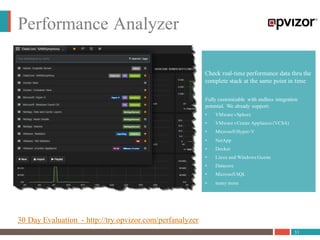
Performance Analyzer
Check real-time performance data thru the
complete stack at the same point in time
Fully customizable with endless integration
potential. We already support:
• ​VMware vSphere
• VMware vCenter Appliance (VCSA)
• Microsoft Hyper-V
• NetApp
• Docker
• Linux and Windows Guests
• Datacore
• Microsoft SQL
• many more
30 Day Evaluation - http://try.opvizor.com/perfanalyzer
32
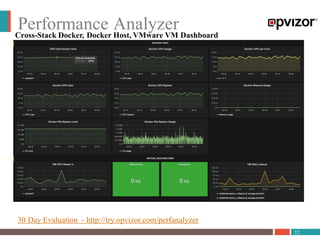
Performance Analyzer
30 Day Evaluation - http://try.opvizor.com/perfanalyzer
Cross-Stack Docker, Docker Host, VMware VM Dashboard
VMware@Night: Container & Virtualisierung

VMware@Night: Container & Virtualisierung

  • 1.
    VMware@Night: Container und Virtualisierung UrsStephan Alder, CEO, Kybernetika Dennis Zimmer, CEO, Opvizor, dzimmer@opvizor.com Michael Abmayer, Senior Consultant,opvizor
  • 2.
    2 Contents Container Adoption1 About Container2 Containervs. Virtualization3 Container Pros & Cons4 Deploy and Run Container5 Monitor Container6 Demo Time
  • 3.
  • 4.
  • 5.
  • 6.
  • 7.
    7 About UnitrendsArchitecture Different ContainerTechnologies – Docker, Kubernets, LXC, OpenVZ, Solaris Zones, …. Docker Example - Source: https://goo.gl/tYMSPw
  • 8.
    8 About UnitrendsArchitecture Docker Example- Source: https://goo.gl/l0cbpj
  • 9.
  • 10.
  • 11.
    11 About UnitrendsDocker Architecture Dockerreplaced LXC with its own libcontainer library written in Go, allowing for broader native support for different vendors. Additionally, Docker now offers native support for Window, streamlining the management of Docker hosts and containers on Windows development machines. Source - Docker
  • 12.
    12 About UnitrendsDeployment Scenarios •Native:Linux OS running directly on hardware (Ubuntu, CentOS) •vSphere VM: Upcoming release of vSphere with the same guest OS as native •Native-Docker: Docker version 1.2 running on a native OS •VM-Docker: Docker version 1.2 running in guest VM on a vSphere host Source - http://blogs.vmware.com/performance/2014/10/docker-containers-performance-vmware-vsphere.html
  • 13.
    13 About UnitrendsPerformance –LINPACK Test LINPACK solves a dense system of linear equations (Ax=b), measures the amount of time it takes to factor and solve the system of N equations, converts that time into a performance rate, and tests the results for accuracy. We used an optimized version of the LINPACK benchmark binary based on the Intel Math Kernel Library (MKL). Source - http://blogs.vmware.com/performance/2014/10/docker-containers-performance-vmware-vsphere.html
  • 14.
    14 About UnitrendsPerformance –NetPerf / Redis Source - http://blogs.vmware.com/performance/2014/10/docker-containers-performance-vmware-vsphere.html
  • 15.
    15 About UnitrendsVirtualization AND/ORContainers? Source - https://www.citrix.com/blogs/2016/05/12/containers-or-virtual-machines-its-not-necessarily-one-or-the-other-get-the-best-of- both-worlds/
  • 16.
    16 About UnitrendsVMware Photon Source– Dan Wendlandt http://de.slideshare.net/danwent/a-first-look-at-vsphere-integrated-containers-and-photon-platform/5
  • 17.
  • 18.
    18 About UnitrendsContainer Pro Forboth developers and operators, Docker offers the following high-level benefits: Deployment Speed/Agility Docker containers house the minimal requirements for running the application, enabling quick and lightweight deployment. Portability Because containers are essentially independent self-sufficient application bundles, they can be run across machines without compatibility issues. Reuse Containers can be versioned, archived, shared, and used for rolling back previous versions of an application. Platform configurations can essentially be managed as code.
  • 19.
    19 About UnitrendsContainer Cons Security Dockercontainers can be easily deployed, but there content is not necessary know. Docker.com offers a public registry where people can publish without restrictions to the community. Its up to the individual how to handle it. Official images from different vendors available to lower that risk. Complex Container can be very complex if not documented well. Sometimes they need other containers as dependencies (DB, Queuing), or specific commands to run applications. Furthermore, it becomes a headache to maintain all kinds of updates throughout all hosts and container. Network Containers are used in combination with ip forwarding. If container are used without discipline, its hard or even impossible to keep up with the network changes. Newer technologies as network plugins and Vxlan are used to solve certain issues. The network and the security concept are most critical for a well-made design.
  • 20.
  • 21.
    21 About UnitrendsInstall Docker Virtualmachine with Ubuntu Server 16.04 amd64: $ sudo apt-get install docker.io Ubuntu fetches packages, installs and starts docker daemon (aka docker engine) optional: $ sudo adduser ubuntu docker (this has security implications; re-login to make group- membership effective) If you don’t add your working user to docker-group, you will have to run docker-cli- commands with sudo.
  • 22.
    22 About UnitrendsRun containers $docker run hello-world Create your own wordpress install within minutes: $ docker run -d --name mysql-container -v /hostpath to mysqldata/:/var/lib/mysql/ -e MYSQL_ROOT_PASSWORD=mysqlpwd mysql $ docker run -d --name wordpress-container --link mysql-container:mysql -p 8080:80 wordpress Point your browser to http://yourhost:8080/ and enjoy. $ docker run –it ubuntu:latest Try to portscan the surrounding network. What will you see?
  • 23.
    23 About UnitrendsDocker console $docker attach <container> Kill the docker container: ctrl + c $ docker exec -i -t 665b4a1e17b6 /bin/bash Open a bash terminal on the docker container
  • 24.
    24 About UnitrendsDocker filesystemmount $ /var/lib/docker/volumes $ /var/lib/docker/container Separated by UUID $ docker run --name my-special-container -v /container/dir busybox -v switch points to external directory, i. e. /host/dir:/container/dir
  • 25.
    25 About UnitrendsDocker filesystemmount $ docker run --volume-driver flocker -v flocker-volume:/container/dir-- name=container-xyz Source: https://clusterhq.com/2015/12/09/difference-docker-volumes-flocker-volumes/
  • 26.
    26 About UnitrendsUseful commands $docker start $ docker stop $ docker ps or docker top $ docker rm $ docker images (registered) or docker search (available) $ docker rmi $ docker logs $ docker exec $ docker inspect
  • 27.
    27 About UnitrendsBuild containers $mkdir wise-whale; cd wise-whale $ cat > Dockerfile FROM docker/whalesay:latest RUN apt-get -y update && apt-get install -y fortunes CMD /usr/games/fortune -a | cowsay ^D $ docker build -t wise-whale . $ docker run wise-whale
  • 28.
    28 About UnitrendsCreate ownregistry Docker runs https://hub.docker.com . Billing-plans for private repositories are available. There are also the option to run an own registry. $ docker run –d –p 5000:5000 –v registry:/var/lib/registry registry:2.4 $ docker tag <image> localhost:5000/wise-whale:latest $ docker push localhost:5000/wise-whale:latest Optional TLS and htpasswd. Or use the “Docker Trusted Registry”
  • 29.
    29 About UnitrendsOrchestration (1) Docker-composeis a tool for defining and running multi-container Docker applications. $ sudo apt-get install docker-compose $ mkdir drupal-mariadb; cd drupal-mariadb; $ cat > docker-compose.yml web: image: samos123/drupal:7.x links: - db:mysql ports: - '8081:80' db: image: mariadb environment: - MYSQL_ROOT_PASSWORD=password ^D $ docker compose up -d
  • 30.
    30 About UnitrendsManagement Simple Dockermanagement using Shipyard https://shipyard-project.com
  • 31.
    31 Performance Analyzer Check real-timeperformance data thru the complete stack at the same point in time Fully customizable with endless integration potential. We already support: • ​VMware vSphere • VMware vCenter Appliance (VCSA) • Microsoft Hyper-V • NetApp • Docker • Linux and Windows Guests • Datacore • Microsoft SQL • many more 30 Day Evaluation - http://try.opvizor.com/perfanalyzer
  • 32.
    32 Performance Analyzer 30 DayEvaluation - http://try.opvizor.com/perfanalyzer Cross-Stack Docker, Docker Host, VMware VM Dashboard