Marius Sandbu
Application virtualization vs Application
layering
Bio
Agenda:
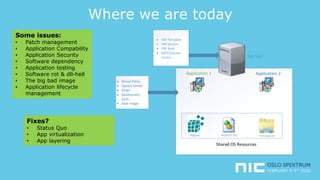
• Where we are today
• Application Virtualization
• ThinApp, App-V
• Application Layering
• Unidesk, AppVolumes, AppDisks
• Demo
• Summary
Where we are today
Application 1 Application 2
 Group Policy
 System Center
 Script
 Deployment
tools
 Base image
Shared OS Resources
MSVCRT.DLLRegistry File explorer
Server
 VM Template
 VM Service
 PXE Boot
 MDT/System
Center
Some issues:
• Patch management
• Application Compability
• Application Security
• Software dependency
• Application testing
• Software rot & dll-hell
• The big bad image
• Application lifecycle
management
Fixes?
• Status Quo
• App virtualization
• App layering
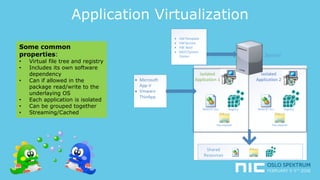
Application Virtualization
Isolated
Application 1
Isolated
Application 2 Microsoft
App-V
 Vmware
ThinApp
MSVCRT.DLL Registry
File explorer
Server
 VM Template
 VM Service
 PXE Boot
 MDT/System
Center
MSVCRT.DLL Registry
File explorer
Shared
Resources
Some common
properties:
• Virtual file tree and registry
• Includes its own software
dependency
• Can if allowed in the
package read/write to the
underlaying OS
• Each application is isolated
• Can be grouped together
• Streaming/Cached
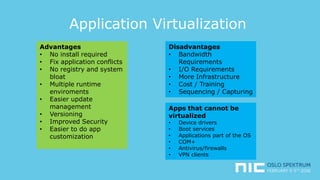
Application Virtualization
Advantages
• No install required
• Fix application conflicts
• No registry and system
bloat
• Multiple runtime
enviroments
• Easier update
management
• Versioning
• Improved Security
• Easier to do app
customization
Disadvantages
• Bandwidth
Requirements
• I/O Requirements
• More Infrastructure
• Cost / Training
• Sequencing / Capturing
Apps that cannot be
virtualized
• Device drivers
• Boot services
• Applications part of the OS
• COM+
• Antivirus/firewalls
• VPN clients
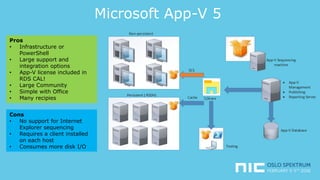
Microsoft App-V 5
App-V Sequencing
machine
 App-V
Management
 Publishing
 Reporting Server
App-V Database
Share
Non-persistent
SCS
Cache
Persistent ( RSDH)
Testing
Pros
• Infrastructure or
PowerShell
• Large support and
integration options
• App-V license included in
RDS CAL!
• Large Community
• Simple with Office
• Many recipies
Cons
• No support for Internet
Explorer sequencing
• Requires a client installed
on each host
• Consumes more disk I/O
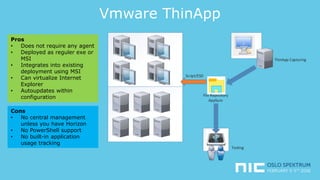
Vmware ThinApp
ThinApp Capturing
File Repository
AppSync
Script/ESD
Testing
Pros
• Does not require any agent
• Deployed as reguler exe or
MSI
• Integrates into existing
deployment using MSI
• Can virtualize Internet
Explorer
• Autoupdates within
configuration
Cons
• No central management
unless you have Horizon
• No PowerShell support
• No built-in application
usage tracking
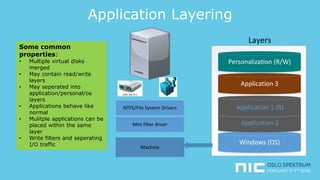
Application Layering
Some common
properties:
• Multiple virtual disks
merged
• May contain read/write
layers
• May seperated into
application/personal/os
layers
• Applications behave like
normal
• Mulitple applications can be
placed within the same
layer
• Write filters and seperating
I/O traffic Windows (OS)
Application 2
Application 1 (R)
Application 3
Personalization (R/W)
Layers
Machine
NTFS/File System Drivers
Mini filter driver
Application Layering
Advantages
• Simpler application
«capture»
• Delivery application
updates
• One image!
• Works with
drivers/services
• Can manage personal
data*
Disadvantages
• Some specific
hypervisor requirement
• No appliation isolation
• Yet another solution?
Things Apps that
cannot be layered
• Depending on the
vendor..
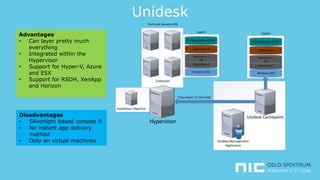
Unidesk
Windows (OS)
Application 2
Application 1
(R)
Application 3
Personalization (R/W)
Layers
Terminal Servers/VDI
Hypervisor
Unidesk Management
Applicance
Unidesk Cachepoint
Windows (OS)
Application 2
Application 1
(R)
Application 3
Personalization (R/W)
Layers
Copy layers to the host
Collection
Installation Machine
Advantages
• Can layer pretty much
everything
• Integrated within the
Hypervisor
• Support for Hyper-V, Azure
and ESX
• Support for RSDH, XenApp
and Horizon
Disadvantages
• Silverlight based console 
• No instant app delivery
method
• Only on virtual machines
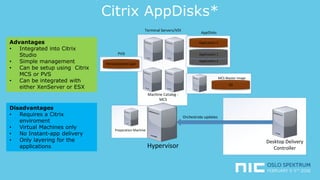
Citrix AppDisks*
Application 2
Application 1
Application 3
AppDisks
Terminal Servers/VDI
Hypervisor
Desktop Delivery
Controller
Orchestrate updates
Machine Catalog -
MCS
OS
MCS Master Image
Personalization layer
PVD
Preparation Machine
Advantages
• Integrated into Citrix
Studio
• Simple management
• Can be setup using Citrix
MCS or PVS
• Can be integrated with
either XenServer or ESX
Disadvantages
• Requires a Citrix
enviroment
• Virtual Machines only
• No Instant-app delivery
• Only layering for the
applications
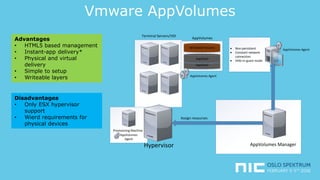
Vmware AppVolumes
 Non-persistent
 Constant network
connection
 VHD-In-guest mode
AppStack
AppStack
Writeable Volume
AppVolumes
Terminal Servers/VDI
Hypervisor AppVolumes Manager
Assign resources
Provisioning Machine
AppVolumes
Agent
AppVolumes Agent
AppVolumes Agent
Advantages
• HTML5 based management
• Instant-app delivery*
• Physical and virtual
delivery
• Simple to setup
• Writeable layers
Disadvantages
• Only ESX hypervisor
support
• Wierd requirements for
physical devices
Demo-time!
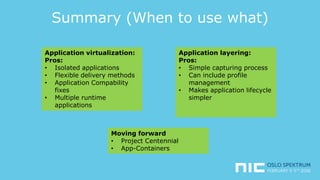
Summary (When to use what)
Application virtualization:
Pros:
• Isolated applications
• Flexible delivery methods
• Application Compability
fixes
• Multiple runtime
applications
Application layering:
Pros:
• Simple capturing process
• Can include profile
management
• Makes application lifecycle
simpler
Moving forward
• Project Centennial
• App-Containers
Q?
Thank you!

Application layering vs Application Isolation

  • 1.
  • 2.
  • 3.
    Agenda: • Where weare today • Application Virtualization • ThinApp, App-V • Application Layering • Unidesk, AppVolumes, AppDisks • Demo • Summary
  • 4.
    Where we aretoday Application 1 Application 2  Group Policy  System Center  Script  Deployment tools  Base image Shared OS Resources MSVCRT.DLLRegistry File explorer Server  VM Template  VM Service  PXE Boot  MDT/System Center Some issues: • Patch management • Application Compability • Application Security • Software dependency • Application testing • Software rot & dll-hell • The big bad image • Application lifecycle management Fixes? • Status Quo • App virtualization • App layering
  • 5.
    Application Virtualization Isolated Application 1 Isolated Application2 Microsoft App-V  Vmware ThinApp MSVCRT.DLL Registry File explorer Server  VM Template  VM Service  PXE Boot  MDT/System Center MSVCRT.DLL Registry File explorer Shared Resources Some common properties: • Virtual file tree and registry • Includes its own software dependency • Can if allowed in the package read/write to the underlaying OS • Each application is isolated • Can be grouped together • Streaming/Cached
  • 6.
    Application Virtualization Advantages • Noinstall required • Fix application conflicts • No registry and system bloat • Multiple runtime enviroments • Easier update management • Versioning • Improved Security • Easier to do app customization Disadvantages • Bandwidth Requirements • I/O Requirements • More Infrastructure • Cost / Training • Sequencing / Capturing Apps that cannot be virtualized • Device drivers • Boot services • Applications part of the OS • COM+ • Antivirus/firewalls • VPN clients
  • 7.
    Microsoft App-V 5 App-VSequencing machine  App-V Management  Publishing  Reporting Server App-V Database Share Non-persistent SCS Cache Persistent ( RSDH) Testing Pros • Infrastructure or PowerShell • Large support and integration options • App-V license included in RDS CAL! • Large Community • Simple with Office • Many recipies Cons • No support for Internet Explorer sequencing • Requires a client installed on each host • Consumes more disk I/O
  • 8.
    Vmware ThinApp ThinApp Capturing FileRepository AppSync Script/ESD Testing Pros • Does not require any agent • Deployed as reguler exe or MSI • Integrates into existing deployment using MSI • Can virtualize Internet Explorer • Autoupdates within configuration Cons • No central management unless you have Horizon • No PowerShell support • No built-in application usage tracking
  • 9.
    Application Layering Some common properties: •Multiple virtual disks merged • May contain read/write layers • May seperated into application/personal/os layers • Applications behave like normal • Mulitple applications can be placed within the same layer • Write filters and seperating I/O traffic Windows (OS) Application 2 Application 1 (R) Application 3 Personalization (R/W) Layers Machine NTFS/File System Drivers Mini filter driver
  • 10.
    Application Layering Advantages • Simplerapplication «capture» • Delivery application updates • One image! • Works with drivers/services • Can manage personal data* Disadvantages • Some specific hypervisor requirement • No appliation isolation • Yet another solution? Things Apps that cannot be layered • Depending on the vendor..
  • 11.
    Unidesk Windows (OS) Application 2 Application1 (R) Application 3 Personalization (R/W) Layers Terminal Servers/VDI Hypervisor Unidesk Management Applicance Unidesk Cachepoint Windows (OS) Application 2 Application 1 (R) Application 3 Personalization (R/W) Layers Copy layers to the host Collection Installation Machine Advantages • Can layer pretty much everything • Integrated within the Hypervisor • Support for Hyper-V, Azure and ESX • Support for RSDH, XenApp and Horizon Disadvantages • Silverlight based console  • No instant app delivery method • Only on virtual machines
  • 12.
    Citrix AppDisks* Application 2 Application1 Application 3 AppDisks Terminal Servers/VDI Hypervisor Desktop Delivery Controller Orchestrate updates Machine Catalog - MCS OS MCS Master Image Personalization layer PVD Preparation Machine Advantages • Integrated into Citrix Studio • Simple management • Can be setup using Citrix MCS or PVS • Can be integrated with either XenServer or ESX Disadvantages • Requires a Citrix enviroment • Virtual Machines only • No Instant-app delivery • Only layering for the applications
  • 13.
    Vmware AppVolumes  Non-persistent Constant network connection  VHD-In-guest mode AppStack AppStack Writeable Volume AppVolumes Terminal Servers/VDI Hypervisor AppVolumes Manager Assign resources Provisioning Machine AppVolumes Agent AppVolumes Agent AppVolumes Agent Advantages • HTML5 based management • Instant-app delivery* • Physical and virtual delivery • Simple to setup • Writeable layers Disadvantages • Only ESX hypervisor support • Wierd requirements for physical devices
  • 14.
  • 15.
    Summary (When touse what) Application virtualization: Pros: • Isolated applications • Flexible delivery methods • Application Compability fixes • Multiple runtime applications Application layering: Pros: • Simple capturing process • Can include profile management • Makes application lifecycle simpler Moving forward • Project Centennial • App-Containers
  • 16.
  • 17.

Editor's Notes

  • #15 Showing and regular machine with adobe reader installed and try to install a new version….. Showing a simple application capturing on app-v and thinapp Showing deployment of app-v using regular setup and SCS on App-V using multiple adobe reader versions Showing I/O and network traffic Showing rollout of ThinApp and auto updates using adobe reader Showing Internet explorer virtualized using ThinApp Showing setup of application layering on appvolumes and and capturing process. Show management and setup an application layering process (App volumes) Show on how to attach and application layering at boot (Appvolumes) Show how to attach an writeable volume to an machine (Appvolumes) Show on how to create an collection of RSDH hosts using different layers in Unidesk management Show how they merge on a virtual machine in Hyper-V manager Login to the virtual machine Add another applicaiton layer, reboot and notice the application
  • #17 Bruke Client performance analyzer for å verifisere at det er en bra connection mot miljøet. Lage en configurasjonsfil for å laste ned office og innstallere med shared computer support (bruk eksisterende configurasjonsfil for å innstallere Office-pakken, UTEN OneDrive) mens den driver å laste inn, bruk tiden til å legge inn Office2016 Group Policy ADMX templates. Når den er ferdig start den. Prøv deretter å innstallere 32-bits, vis at det ikke funker. Visst hvordan vi lager en app-v pakke i 32-bits, start den via App-V) Vis hvilken versjon av Office som ligger der. Start Office365 Pro Plus, vis at shared computer support ikke er aktivert, legg inn reg nøkkel for å fikse det. Vis at det ikke er noen produktnøkkel i imaget via cscript.exe "%programfiles%\Microsoft Office\Office15\ospp.vbs" /dstatus) Authentiser og vis at tokenet blir generert i Lokal. Start Skype for Buisness via RDP start video samtale via andre Pcen. Se på ytelsen som blir startet….Logg av. Start Skype for Buisness via Citrix ICA, logg på Skype for Buisness. Start Video samtale på nytt, vis ytelsen på CPU og minne i sesjonen samt via i Performance monitor at traffiken går lokalt..