
Microservices – Build
Sample App
Application Template Architecture
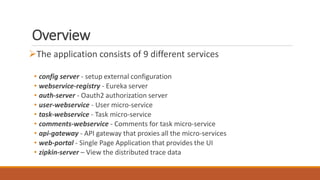
Overview
The application consists of 9 different services
• config server - setup external configuration
• webservice-registry - Eureka server
• auth-server - Oauth2 authorization server
• user-webservice - User micro-service
• task-webservice - Task micro-service
• comments-webservice - Comments for task micro-service
• api-gateway - API gateway that proxies all the micro-services
• web-portal - Single Page Application that provides the UI
• zipkin-server – View the distributed trace data
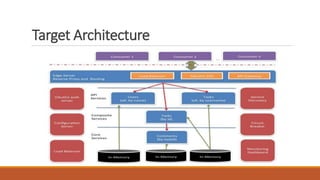
Target Architecture
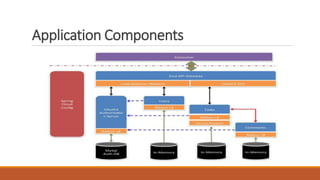
Application Components
Reference Codebase
https://github.com/anilallewar/microservices-basics-
spring-boot
https://github.com/anilallewar/microservices-basics-
cloud-config
Hints
• Code following the instructions in the slides
• If things don’t work or you have questions then refer to the codebase
Distributed Systems
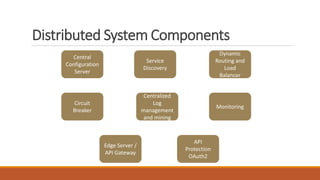
Distributed System Components
Central
Configuration
Server
Circuit
Breaker
Service
Discovery
Dynamic
Routing and
Load
Balancer
Centralized
Log
management
and mining
Monitoring
Edge Server /
API Gateway
API
Protection
OAuth2
Spring Boot
Opinionated framework
• Build on Spring
• Convention over configuration
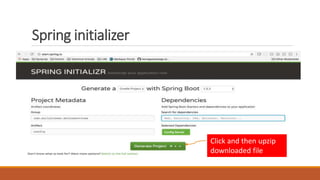
Create Spring initializer project from http://start.spring.io/
Choose gradle project with dependencies as required
Spring initializer
Click and then upzip
downloaded file
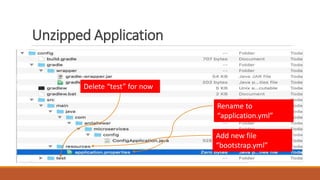
Unzipped Application
Rename to
“application.yml”
Add new file
“bootstrap.yml”
Delete “test” for now
Run Gradle
Use “idea” plugin instead of “eclipse” plugin if using IntelliJ
IDE.
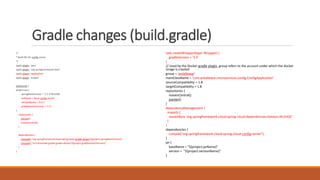
Add the contents in “red” from the build.gradle file
contents on the next slide
Once done run the following command on the project root
folder
• gradle clean eclipse (or idea)
Import project into your IDE and then refresh project
Gradle changes (build.gradle)
/*
* Build file for config server
*/
apply plugin: 'java'
apply plugin: 'org.springframework.boot'
apply plugin: 'application'
apply plugin: 'eclipse'
buildscript {
project.ext {
springBootVersion = '1.5.3.RELEASE'
jarName = 'basic-config-server'
versionName = '0.0.1'
gradleDockerVersion = '1.2'
}
repositories {
jcenter()
mavenCentral()
}
dependencies {
classpath "org.springframework.boot:spring-boot-gradle-plugin:${project.springBootVersion}"
classpath "se.transmode.gradle:gradle-docker:${project.gradleDockerVersion}"
}
}
task createWrapper(type: Wrapper) {
gradleVersion = '3.5'
}
// Used by the Docker gradle plugin, group refers to the account under which the docker
image is created
group = 'anilallewar'
mainClassName = 'com.anilallewar.microservices.config.ConfigApplication'
sourceCompatibility = 1.8
targetCompatibility = 1.8
repositories {
mavenCentral()
jcenter()
}
dependencyManagement {
imports {
mavenBom 'org.springframework.cloud:spring-cloud-dependencies:Dalston.RELEASE'
}
}
dependencies {
compile("org.springframework.cloud:spring-cloud-config-server")
}
jar {
baseName = "${project.jarName}"
version = "${project.versionName}"
}
Config Server
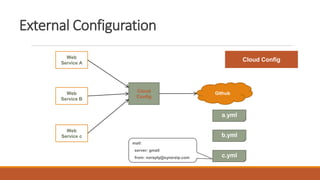
Cloud ConfigWeb
Service A
Web
Service B
Cloud
Config
Web
Service c
Github
a.yml
b.yml
c.yml
mail:
server: gmail
from: noreply@synerzip.com
External Configuration
Setup Config Server
@SpringBootApplication
@EnableConfigServer
public class ConfigApplication {
public static void main(String[] args) {
SpringApplication.run(ConfigApplication.class, args);
}
}
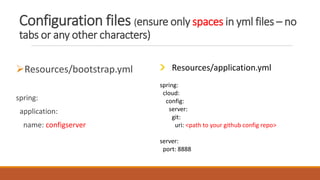
Configuration files (ensure only spaces in yml files – no
tabs or any other characters)
Resources/bootstrap.yml
spring:
application:
name: configserver
Resources/application.yml
spring:
cloud:
config:
server:
git:
uri: <path to your github config repo>
server:
port: 8888
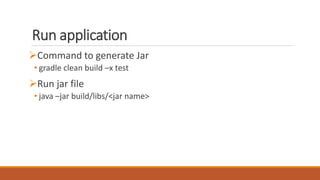
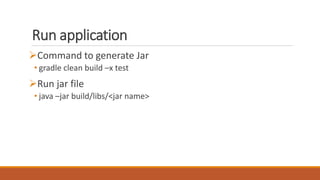
Run application
Command to generate Jar
• gradle clean build –x test
Run jar file
• java –jar build/libs/<jar name>
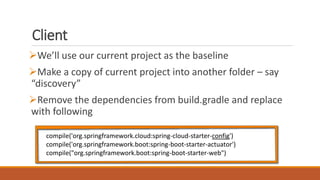
Client
We’ll use our current project as the baseline
Make a copy of current project into another folder – say
“discovery”
Remove the dependencies from build.gradle and replace
with following
compile('org.springframework.cloud:spring-cloud-starter-config')
compile('org.springframework.boot:spring-boot-starter-actuator')
compile("org.springframework.boot:spring-boot-starter-web")
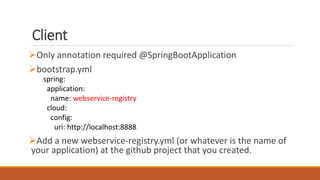
Client
Only annotation required @SpringBootApplication
bootstrap.yml
Add a new webservice-registry.yml (or whatever is the name of
your application) at the github project that you created.
spring:
application:
name: webservice-registry
cloud:
config:
uri: http://localhost:8888
Client
Github repo/webservice-registry.yml
Commit the changes to Github
Start the config server
Then start the client
• Should start on port 8761 instead of default 8080
server:
port: 8761
Discovery Server
Service
Registry/Discovery
(Eureka)
Registry/Di
scovery
(Eureka)
Web
Service A
Ribbon
Web
Service B
Ribbon
Web
Service C
Ribbon
Web
Service D
Ribbon
Web
Service E
Ribbon
A
D
B
E
C
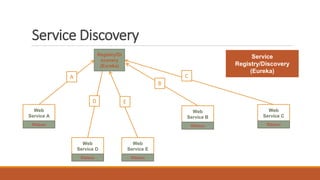
Service Discovery
Service
Registry/Discovery
(Eureka)
Registry/Di
scovery
(Eureka)
Web
Service A
Ribbon
Web
Service B
Ribbon
Web
Service C
Ribbon
Web
Service D
Ribbon
Web
Service E
Ribbon
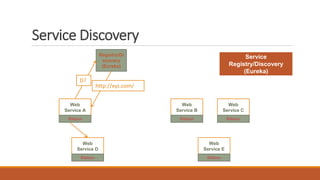
D?
http://xyz.com/
Service Discovery
Client Side Load
Balancing (Ribbon)
Web
Service A
Ribbon
Web
Service D
Ribbon
Web
Service D
Ribbon
Web
Service D
Ribbon
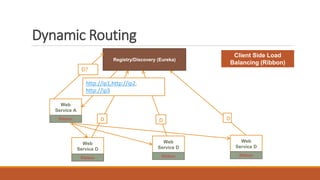
Registry/Discovery (Eureka)
D D D
D?
http://ip1,http://ip2,
http://ip3
Dynamic Routing
Discovery Server
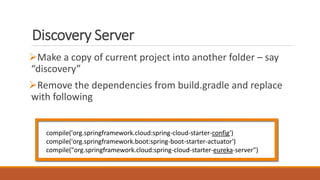
Make a copy of current project into another folder – say
“discovery”
Remove the dependencies from build.gradle and replace
with following
compile('org.springframework.cloud:spring-cloud-starter-config')
compile('org.springframework.boot:spring-boot-starter-actuator')
compile("org.springframework.cloud:spring-cloud-starter-eureka-server")
Setup Discovery Server
@SpringBootApplication
@EnableEurekaServer
public class DiscoveryApplication {
public static void main(String[] args) {
SpringApplication.run(DiscoveryApplication.class, args);
}
}
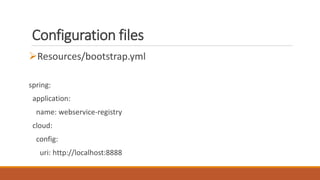
Configuration files
Resources/bootstrap.yml
spring:
application:
name: webservice-registry
cloud:
config:
uri: http://localhost:8888
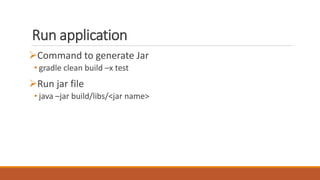
Run application
Command to generate Jar
• gradle clean build –x test
Run jar file
• java –jar build/libs/<jar name>
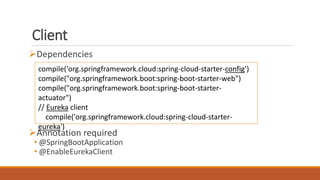
Client
Dependencies
Annotation required
• @SpringBootApplication
• @EnableEurekaClient
compile('org.springframework.cloud:spring-cloud-starter-config')
compile("org.springframework.boot:spring-boot-starter-web")
compile("org.springframework.boot:spring-boot-starter-
actuator")
// Eureka client
compile('org.springframework.cloud:spring-cloud-starter-
eureka')
Client
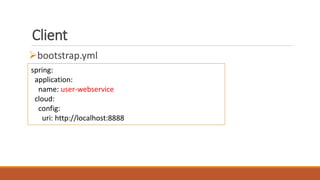
bootstrap.yml
spring:
application:
name: user-webservice
cloud:
config:
uri: http://localhost:8888
Client
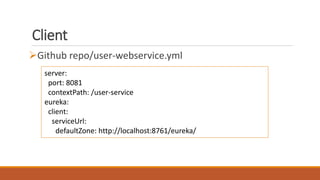
Github repo/user-webservice.yml
server:
port: 8081
contextPath: /user-service
eureka:
client:
serviceUrl:
defaultZone: http://localhost:8761/eureka/
Client
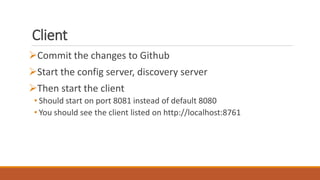
Commit the changes to Github
Start the config server, discovery server
Then start the client
• Should start on port 8081 instead of default 8080
• You should see the client listed on http://localhost:8761
Authorization Server
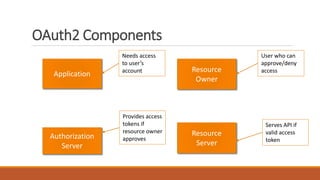
OAuth2 Components
Application
Resource
Owner
Authorization
Server
Resource
Server
Needs access
to user’s
account
User who can
approve/deny
access
Provides access
tokens if
resource owner
approves
Serves API if
valid access
token
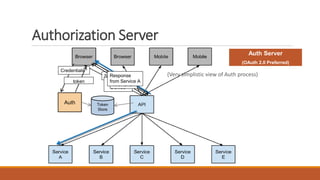
Auth Token
Store
Auth Server
(OAuth 2.0 Preferred)
Service A
Access
Denied
Credentials
token
Service A
With token
Response
from Service A
(Very simplistic view of Auth process)
Authorization Server
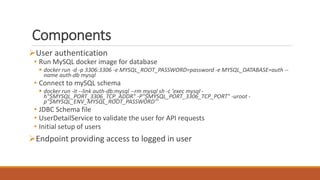
Components
User authentication
• Run MySQL docker image for database
 docker run -d -p 3306:3306 -e MYSQL_ROOT_PASSWORD=password -e MYSQL_DATABASE=auth --
name auth-db mysql
• Connect to mySQL schema
 docker run -it --link auth-db:mysql --rm mysql sh -c 'exec mysql -
h"$MYSQL_PORT_3306_TCP_ADDR" -P"$MYSQL_PORT_3306_TCP_PORT" -uroot -
p"$MYSQL_ENV_MYSQL_ROOT_PASSWORD"'
• JDBC Schema file
• UserDetailService to validate the user for API requests
• Initial setup of users
Endpoint providing access to logged in user
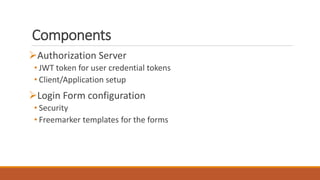
Components
Authorization Server
• JWT token for user credential tokens
• Client/Application setup
Login Form configuration
• Security
• Freemarker templates for the forms
OAuth2 Server
Make a copy of current project into another folder – say
“auth-server”
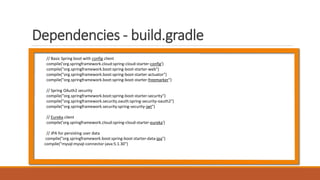
Dependencies - build.gradle
// Basic Spring boot with config client
compile('org.springframework.cloud:spring-cloud-starter-config')
compile("org.springframework.boot:spring-boot-starter-web")
compile("org.springframework.boot:spring-boot-starter-actuator")
compile("org.springframework.boot:spring-boot-starter-freemarker")
// Spring OAuth2 security
compile("org.springframework.boot:spring-boot-starter-security")
compile("org.springframework.security.oauth:spring-security-oauth2")
compile("org.springframework.security:spring-security-jwt")
// Eureka client
compile('org.springframework.cloud:spring-cloud-starter-eureka')
// JPA for persisting user data
compile("org.springframework.boot:spring-boot-starter-data-jpa")
compile("mysql:mysql-connector-java:5.1.30")
Setup Authorization Server
@SpringBootApplication
@EnableEurekaClient
@EnableResourceServer
@SessionAttributes("authorizationRequest")
public class AuthServerApplication {
public static void main(String[] args) {
SpringApplication.run(AuthServerApplication.class, args);
}
}
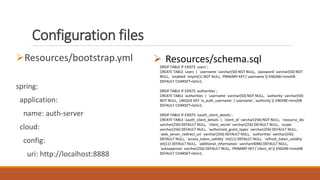
Configuration files
Resources/bootstrap.yml
spring:
application:
name: auth-server
cloud:
config:
uri: http://localhost:8888
 Resources/schema.sql
DROP TABLE IF EXISTS `users`;
CREATE TABLE `users` ( `username` varchar(50) NOT NULL, `password` varchar(50) NOT
NULL, `enabled` tinyint(1) NOT NULL, PRIMARY KEY (`username`)) ENGINE=InnoDB
DEFAULT CHARSET=latin1;
DROP TABLE IF EXISTS `authorities`;
CREATE TABLE `authorities` ( `username` varchar(50) NOT NULL, `authority` varchar(50)
NOT NULL, UNIQUE KEY `ix_auth_username` (`username`,`authority`)) ENGINE=InnoDB
DEFAULT CHARSET=latin1;
DROP TABLE IF EXISTS `oauth_client_details`;
CREATE TABLE `oauth_client_details` ( `client_id` varchar(256) NOT NULL, `resource_ids`
varchar(256) DEFAULT NULL, `client_secret` varchar(256) DEFAULT NULL, `scope`
varchar(256) DEFAULT NULL, `authorized_grant_types` varchar(256) DEFAULT NULL,
`web_server_redirect_uri` varchar(256) DEFAULT NULL, `authorities` varchar(256)
DEFAULT NULL, `access_token_validity` int(11) DEFAULT NULL, `refresh_token_validity`
int(11) DEFAULT NULL, `additional_information` varchar(4096) DEFAULT NULL,
`autoapprove` varchar(256) DEFAULT NULL, PRIMARY KEY (`client_id`)) ENGINE=InnoDB
DEFAULT CHARSET=latin1;
Code changes
https://github.com/anilallewar/microservices-basics-
spring-boot/tree/master/auth-server
Run application
Command to generate Jar
• gradle clean build –x test
Run jar file
• java –jar build/libs/<jar name>
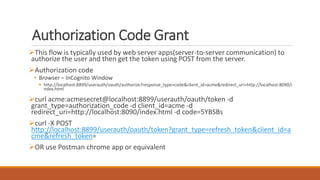
Authorization Code Grant
This flow is typically used by web server apps(server-to-server communication) to
authorize the user and then get the token using POST from the server.
Authorization code
• Browser – InCognito Window
 http://localhost:8899/userauth/oauth/authorize?response_type=code&client_id=acme&redirect_uri=http://localhost:8090/i
ndex.html
curl acme:acmesecret@localhost:8899/userauth/oauth/token -d
grant_type=authorization_code -d client_id=acme -d
redirect_uri=http://localhost:8090/index.html -d code=5YBSBs
curl -X POST
http://localhost:8899/userauth/oauth/token?grant_type=refresh_token&client_id=a
cme&refresh_token=
OR use Postman chrome app or equivalent
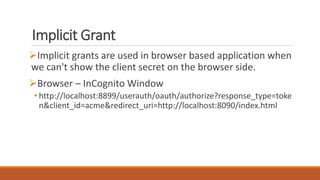
Implicit Grant
Implicit grants are used in browser based application when
we can't show the client secret on the browser side.
Browser – InCognito Window
• http://localhost:8899/userauth/oauth/authorize?response_type=toke
n&client_id=acme&redirect_uri=http://localhost:8090/index.html
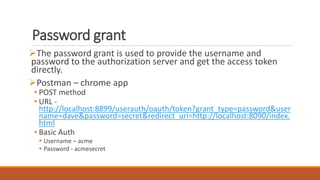
Password grant
The password grant is used to provide the username and
password to the authorization server and get the access token
directly.
Postman – chrome app
• POST method
• URL -
http://localhost:8899/userauth/oauth/token?grant_type=password&user
name=dave&password=secret&redirect_uri=http://localhost:8090/index.
html
• Basic Auth
 Username – acme
 Password - acmesecret
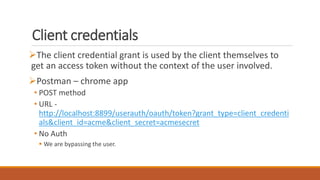
Client credentials
The client credential grant is used by the client themselves to
get an access token without the context of the user involved.
Postman – chrome app
• POST method
• URL -
http://localhost:8899/userauth/oauth/token?grant_type=client_credenti
als&client_id=acme&client_secret=acmesecret
• No Auth
 We are bypassing the user.
UI Server
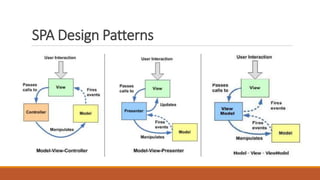
SPA Design Patterns
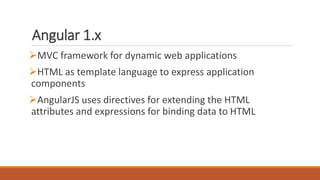
Angular 1.x
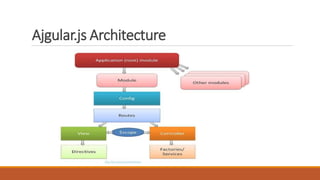
MVC framework for dynamic web applications
HTML as template language to express application
components
AngularJS uses directives for extending the HTML
attributes and expressions for binding data to HTML
Ajgular.js Architecture
Code changes
https://github.com/anilallewar/microservices-basics-
spring-boot/tree/master/web-portal
API Gateway
API Gateway
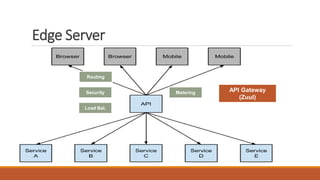
(Zuul)
Routing
MeteringSecurity
Load Bal.
Edge Server
Dependencies
Web, cloud config, zuul (routing)
Spring boot security, security oauth2, spring cloud starter
oauth, spring security jwt
Eureka client
Annotations
@SpringBootApplication
@EnableEurekaClient
@EnableZuulProxy => for routing
@EnableOAuth2Sso => relaying OAuth2 tokens
Security
Same as UI server
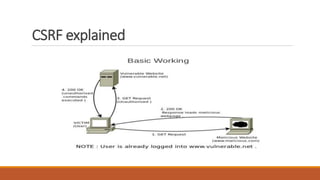
Additionally need to add CSRF (cross site request forgery)
protection
Angular already offers inbuilt CSRF protection – we need to
add support for it on the server
CSRF explained
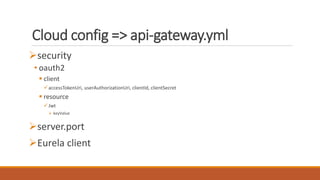
Cloud config => api-gateway.yml
security
• oauth2
 client
accessTokenUri, userAuthorizationUri, clientId, clientSecret
 resource
Jwt
 keyValue
server.port
Eurela client
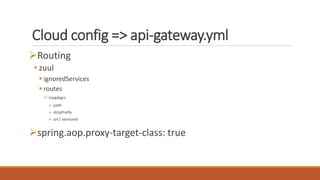
Cloud config => api-gateway.yml
Routing
• zuul
 ignoredServices
 routes
<name>
 path
 stripPrefix
 url / serviceId
spring.aop.proxy-target-class: true
User Service
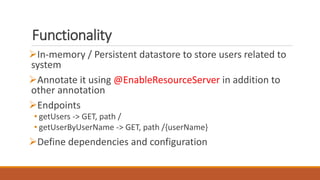
Functionality
In-memory / Persistent datastore to store users related to
system
Annotate it using @EnableResourceServer in addition to
other annotation
Endpoints
• getUsers -> GET, path /
• getUserByUserName -> GET, path /{userName}
Define dependencies and configuration
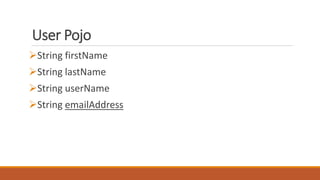
User Pojo
String firstName
String lastName
String userName
String emailAddress
Task Service
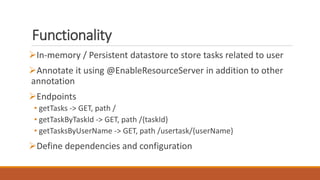
Functionality
In-memory / Persistent datastore to store tasks related to user
Annotate it using @EnableResourceServer in addition to other
annotation
Endpoints
• getTasks -> GET, path /
• getTaskByTaskId -> GET, path /{taskId}
• getTasksByUserName -> GET, path /usertask/{userName}
Define dependencies and configuration
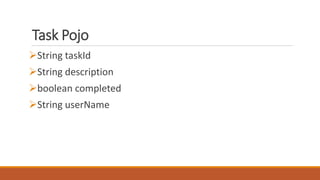
Task Pojo
String taskId
String description
boolean completed
String userName
API-Gateway
Make changes to the api-gateway to forward requests for
these 2 services
User context-root => /user-service
Task context-toot => /task-service
Comments Service
Functionality
In-memory / Persistent datastore to store comments related to
tasks
Annotate it using @EnableResourceServer in addition to other
annotation
Endpoints
• Root path /comments
• getCommentsByTaskId -> GET, path /{taskId}
 Define dependencies and configuration
No changes needed on api-gateway.yml since this is an internal
service
Comment Pojo
String taskId
String comment
Date posted
Task Service – Calling
Comments Service
Changes in Task Service
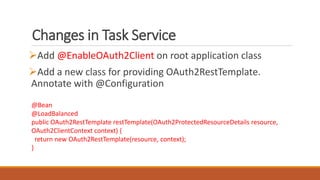
Add @EnableOAuth2Client on root application class
Add a new class for providing OAuth2RestTemplate.
Annotate with @Configuration
@Bean
@LoadBalanced
public OAuth2RestTemplate restTemplate(OAuth2ProtectedResourceDetails resource,
OAuth2ClientContext context) {
return new OAuth2RestTemplate(resource, context);
}
Changes in Task Service
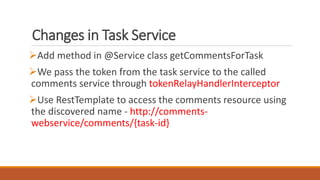
Add method in @Service class getCommentsForTask
We pass the token from the task service to the called
comments service through tokenRelayHandlerInterceptor
Use RestTemplate to access the comments resource using
the discovered name - http://comments-
webservice/comments/{task-id}
Changes in Task Service
if (LOGGER.isLoggable(Level.INFO)) {
LOGGER.info(String.format("Checking comments for taskId [%s]",
taskId));
}
return
restTemplate.getForObject(String.format("http://comments-
webservice/comments/%s", taskId),
CommentCollectionResource.class);
Circuit Breaker
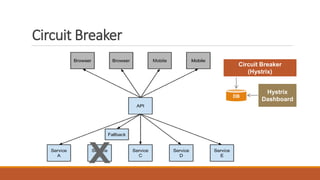
DB
Hystrix
Dashboard
Circuit Breaker
(Hystrix)
Circuit Breaker
Explained
By default the circuit is closed and the original method is
executed.
The original method throws an exception, the fallback
is executed.
Error rate hits the threshold, the circuit opens.
Until the circuit is open the original method is not executed
anymore, only the fallback.
After a predefined amount of time the circuit is closed, and the
flow starts from the beginning.
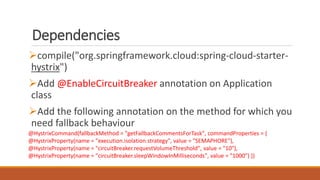
Dependencies
compile("org.springframework.cloud:spring-cloud-starter-
hystrix")
Add @EnableCircuitBreaker annotation on Application
class
Add the following annotation on the method for which you
need fallback behaviour
@HystrixCommand(fallbackMethod = "getFallbackCommentsForTask", commandProperties = {
@HystrixProperty(name = "execution.isolation.strategy", value = "SEMAPHORE"),
@HystrixProperty(name = "circuitBreaker.requestVolumeThreshold", value = "10"),
@HystrixProperty(name = "circuitBreaker.sleepWindowInMilliseconds", value = "1000") })
Containers &
Orchestration
Docker
Containers
• Package software along with all dependencies – both binaries and
runtime
• Independent of Environment / OS
Containerization technology that lets us run containers
using virtualization on the host OS
Docker commands
https://docs.docker.com/engine/reference/commandline/
docker/#description
• docker ps
• docker version
• docker history
• docker images/ container
• docker run/ kill/ start/ stop
• docker rm/ rmi
• ….
Docker Compose
Define and run multi-container applications
Specify images and configuration in a simple YAML file:
• docker-compose.yml
One command to get it all running:
• $ docker-compose up
Rancher
Docker orchestration tool
• Schedule across multiple machines
• High Availability
• Monitoring and restarts of failed containers
• Load balance HTTP/s applications
Runs abstraction over choice of orchestration engines –
Swarm, Kubernetes, Mesos and Cattle
Essential to running Docker in production
Testing
Contact Me
anilallewar@yahoo.co.in
https://www.linkedin.com/in/anilallewar
https://github.com/anilallewar
http://www.slideshare.net/anilallewar
@anilallewar

Building microservices sample application

Editor's Notes

  • #51 MVP Presenter contains UI business logic for view For example, when someone clicks the "Save" button, the event handler delegates to the Presenter's "OnSave" method. Once the save is completed, the Presenter will then call back the View through its interface so that the View can display that the save has completed. Presenter does NOT determine which view is being presented. MVC Controller contains the UI business logic for the View In the MVC, Controller is tightly coupled to the View. I.e. Controller is responsible for determining which View is displayed in response to any action including when the application loads. E.g. backbone.js, angular.js, ember.js MVVC The View binds directly to a Presentation Model E.g knockout.js
  • #53 http://tutorialspointexamples.com/angularjs-architecture-overview-core-concepts-advantages-disadvantages/
  • #60 https://www.google.co.in/url?sa=i&rct=j&q=&esrc=s&source=images&cd=&cad=rja&uact=8&ved=0ahUKEwinpNj8l4jUAhVLvo8KHQPpDXcQjRwIBw&url=https%3A%2F%2Fwww.slideshare.net%2Fnull0x00%2Fcsrf-basics-14161022&psig=AFQjCNEhougx2yzcpQVKzekcsSwJlBZ1Og&ust=1495703302066691
  • #80 http://localhost:8090/hystrix/monitor?stream=http://localhost:8090/turbine.stream