Who
Who
    Kevin van Zonneveld
        t: @kvz          e: kvz@php.net


•   Developer, trapped in a sysadmin’s body

•   company: Hosting provider specialized in
    scalability: http://true.nl

•   cake: Learned from Felix while working on
    http://phpjs.org

•   likes: Reusable code & to Automate everything.
What
What


CakePHP REST Plugin
  Does heavy lifting so you can finally rest.
What
             Design Goals

• Painless drop-in
  Should not bite existing code


• Use existing controller actions
  Just add .json to your URLs and REST kicks in.


• Declarative configuration
  Inject viewVars according to Set::extract()-compatible source & destination
  paths
Why
Why

                REST helps..
• Open up your application
  Let others write the features you don’t have the time for, couldn’t be
  bothered with, or even imagine.
  Bottom line: your product is getting used more, while you are doing less.


• Close down your application
  By making use of existing authentication & authorization code in your app,
  you can restrict anyone from anything.


• Reuse your application
  Let your own little scripts - running on different servers - use the API as
  well. They won’t need database access, and existing Model / caching / logging
  logic will be used at all times.
Why

     What I use it for
• Distributing config files throughout our
  network
• Letting customers edit DNS records,
  reboot servers, through their own interface
• Receiving monitoring status reports and
  updating them through our Cake Models
• Letting customers retrieve statistic
• All bots have their own API-key. Raw
  MySQL connections no longer allowed
How
How

                                 Features
                                       Already implemented


• Logging & Rate-limiting
  Configurable max requests per type of authenticated user.


• Can dump all RESTful controllers
  So your client API can iterate & instantiate them, and make the following
  simple syntax available:
  $Api->Servers->index();
  $Api->Servers->edit(2, array(‘hostname’ => ‘awesome.true.nl’));


• Minimal changes
  ..to your existing Cake App


• Authentication
  Uses the Authorization header just like Amazon S3; have your client set it
  with every request (remember, REST is stateless):
  Authorization: TRUEREST username=john&password=xxx&apikey=247b5a2f72df375279573f2746686daa

  http://docs.amazonwebservices.com/AmazonS3/2006-03-01/index.html?RESTAuthentication.html
How

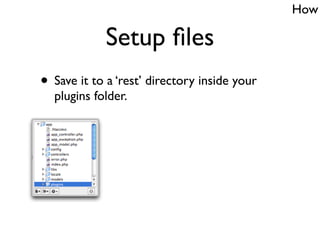
             Setup files
• Save it to a ‘rest’ directory inside your
  plugins folder.
How

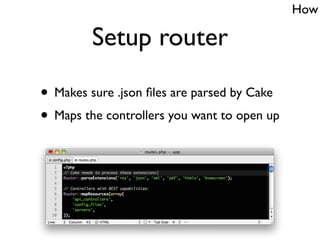
         Setup router

• Makes sure .json files are parsed by Cake
• Maps the controllers you want to open up
How

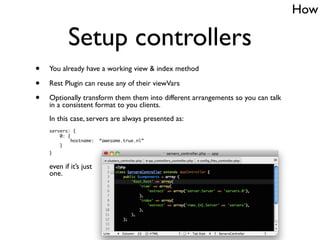
           Setup controllers
•   You already have a working view & index method

•   Rest Plugin can reuse any of their viewVars

•   Optionally transform them them into different arrangements so you can talk
    in a consistent format to you clients.
    In this case, servers are always presented as:
    servers: {
        0: {
             hostname:   “awesome.true.nl”
        }
    }


    even if it’s just
    one.
How

            Reroute errors

• Use one AppController::_flash() method
  From now on, forward all your: ‘No access’, Error & Success messages to
  this method. Let it call setFlash() as you would normally.


• And let it check if REST is active:
        if ($this->_isRest()) {
            // map CSS flash error levels to corresponding rest methods.
            $map = array(
                'failure' => 'error',
                'neutral' => 'info',
                'success' => 'info',
            );
            $func = $map[$type];

            return $this->Rest->{$func}($str);
        }


• REST plugin will take care of the rest ; )
How
 Setup authentication
                                Optional

• Retrieve REST credentials & login
  public function beforeFilter() {
      $credentials = $this->Rest->credentials();
      // Hash them with Security::salt

      $success = $this->Auth->login($credentials);
      // Further handling of return value
  }


• Done!
  The REST client has logged in as an actual user (or not), and from here-on,
  it’s your app’s domain, just like you’re used to. This means whatever ACL or
  other authorization code you have in place, will be respected.
How

                            Todo
• XML
  For now only .json is supported


• Testing
  Expose to more programmers & environments to track issues.
  Unit tests


• HMAC Signed requests
  Could provide additional security (even though you’re probably not doing
  this with regular https requests either, and you are only opening up existing
  functionality, so I consider it secure enough to use over HTTPS as it is)


• IP-based rate-limiter
  Better protection against DDOS attacks than the current api-key based.
Where
Where

                     Here:
•   Fork
    http://github.com/kvz/cakephp-rest-plugin

•   Follow
    http://twitter.com/kvz

•   Subscribe
    http://kevin.vanzonneveld.net

•   Mail
    kvz@php.net

•   Check
    http://true.nl
Questions?
Thank you!

CakePHP REST Plugin

  • 1.
  • 2.
    Who Kevin van Zonneveld t: @kvz e: kvz@php.net • Developer, trapped in a sysadmin’s body • company: Hosting provider specialized in scalability: http://true.nl • cake: Learned from Felix while working on http://phpjs.org • likes: Reusable code & to Automate everything.
  • 3.
  • 4.
    What CakePHP REST Plugin Does heavy lifting so you can finally rest.
  • 5.
    What Design Goals • Painless drop-in Should not bite existing code • Use existing controller actions Just add .json to your URLs and REST kicks in. • Declarative configuration Inject viewVars according to Set::extract()-compatible source & destination paths
  • 6.
  • 7.
    Why REST helps.. • Open up your application Let others write the features you don’t have the time for, couldn’t be bothered with, or even imagine. Bottom line: your product is getting used more, while you are doing less. • Close down your application By making use of existing authentication & authorization code in your app, you can restrict anyone from anything. • Reuse your application Let your own little scripts - running on different servers - use the API as well. They won’t need database access, and existing Model / caching / logging logic will be used at all times.
  • 8.
    Why What I use it for • Distributing config files throughout our network • Letting customers edit DNS records, reboot servers, through their own interface • Receiving monitoring status reports and updating them through our Cake Models • Letting customers retrieve statistic • All bots have their own API-key. Raw MySQL connections no longer allowed
  • 9.
  • 10.
    How Features Already implemented • Logging & Rate-limiting Configurable max requests per type of authenticated user. • Can dump all RESTful controllers So your client API can iterate & instantiate them, and make the following simple syntax available: $Api->Servers->index(); $Api->Servers->edit(2, array(‘hostname’ => ‘awesome.true.nl’)); • Minimal changes ..to your existing Cake App • Authentication Uses the Authorization header just like Amazon S3; have your client set it with every request (remember, REST is stateless): Authorization: TRUEREST username=john&password=xxx&apikey=247b5a2f72df375279573f2746686daa http://docs.amazonwebservices.com/AmazonS3/2006-03-01/index.html?RESTAuthentication.html
  • 11.
    How Setup files • Save it to a ‘rest’ directory inside your plugins folder.
  • 12.
    How Setup router • Makes sure .json files are parsed by Cake • Maps the controllers you want to open up
  • 13.
    How Setup controllers • You already have a working view & index method • Rest Plugin can reuse any of their viewVars • Optionally transform them them into different arrangements so you can talk in a consistent format to you clients. In this case, servers are always presented as: servers: { 0: { hostname: “awesome.true.nl” } } even if it’s just one.
  • 14.
    How Reroute errors • Use one AppController::_flash() method From now on, forward all your: ‘No access’, Error & Success messages to this method. Let it call setFlash() as you would normally. • And let it check if REST is active: if ($this->_isRest()) { // map CSS flash error levels to corresponding rest methods. $map = array( 'failure' => 'error', 'neutral' => 'info', 'success' => 'info', ); $func = $map[$type]; return $this->Rest->{$func}($str); } • REST plugin will take care of the rest ; )
  • 15.
    How Setup authentication Optional • Retrieve REST credentials & login public function beforeFilter() { $credentials = $this->Rest->credentials(); // Hash them with Security::salt $success = $this->Auth->login($credentials); // Further handling of return value } • Done! The REST client has logged in as an actual user (or not), and from here-on, it’s your app’s domain, just like you’re used to. This means whatever ACL or other authorization code you have in place, will be respected.
  • 16.
    How Todo • XML For now only .json is supported • Testing Expose to more programmers & environments to track issues. Unit tests • HMAC Signed requests Could provide additional security (even though you’re probably not doing this with regular https requests either, and you are only opening up existing functionality, so I consider it secure enough to use over HTTPS as it is) • IP-based rate-limiter Better protection against DDOS attacks than the current api-key based.
  • 17.
  • 18.
    Where Here: • Fork http://github.com/kvz/cakephp-rest-plugin • Follow http://twitter.com/kvz • Subscribe http://kevin.vanzonneveld.net • Mail kvz@php.net • Check http://true.nl
  • 19.
  • 20.