BIG DATA INFRASTRUCTURE –
INTRODUCTION TO HADOOP WITH
MAP REDUCE, PIG, AND HIVE
Gil Benghiat
Eric Estabrooks
Chris Bergh
O P E N
D A T A
S C I E N C E
C O N F E R E N C E
BOSTON 2015
@opendatasci
Agenda
Introductions
Hadoop Overview &
Comparisons
What do I use when?
AWS EMR
Hive
Pig
Impala Hive
6/1/2015 2
Doing
Presentation
Introductions
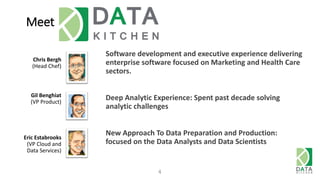
Meet DataKitchen
Chris Bergh
(Head Chef)
4
Gil Benghiat
(VP Product)
Eric Estabrooks
(VP Cloud and
Data Services)
Software development and executive experience delivering
enterprise software focused on Marketing and Health Care
sectors.
Deep Analytic Experience: Spent past decade solving
analytic challenges
New Approach To Data Preparation and Production:
focused on the Data Analysts and Data Scientists
5
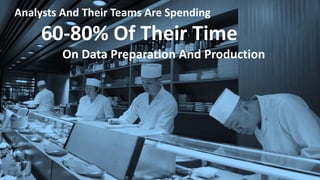
Analysts And Their Teams Are Spending
60-80% Of Their Time
On Data Preparation And Production
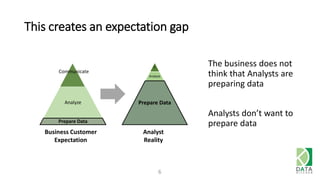
This creates an expectation gap
6
Analyze
Prepare Data
C
Analyze
Prepare Data
Business Customer
Expectation
Analyst
Reality
Communicate
The business does not
think that Analysts are
preparing data
Analysts don’t want to
prepare data
7
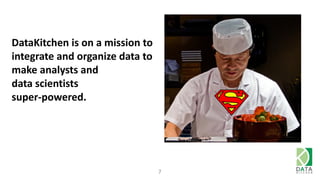
DataKitchen is on a mission to
integrate and organize data to
make analysts and
data scientists
super-powered.
Meet the Audience: A few questions
• Who considers themselves
• Data scientist
• Data analyst
• Programmer / Scripter
• On the Business side
• Who knows SQL – can write a select statement?
• Who used AWS before today?
6/1/2015 8
Hadoop Overview
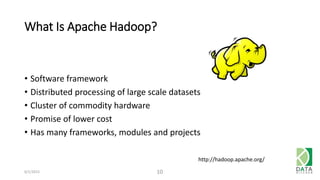
What Is Apache Hadoop?
• Software framework
• Distributed processing of large scale datasets
• Cluster of commodity hardware
• Promise of lower cost
• Has many frameworks, modules and projects
6/1/2015 10
http://hadoop.apache.org/
6/1/2015 11
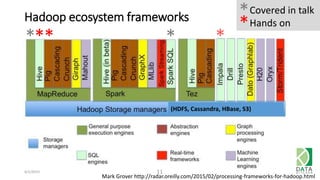
Mark Grover http://radar.oreilly.com/2015/02/processing-frameworks-for-hadoop.html
Hadoop ecosystem frameworks
*** *
*Covered in talk
Hands on*
*
(HDFS, Cassandra, HBase, S3)
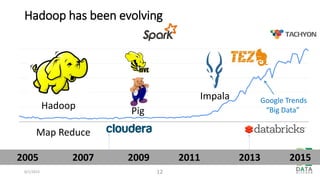
Hadoop has been evolving
6/1/2015 12
Map Reduce
Impala
Hadoop Pig
2005 2007 2009 2011 2013 2015
Google Trends
“Big Data”
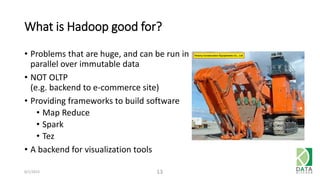
What is Hadoop good for?
• Problems that are huge, and can be run in
parallel over immutable data
• NOT OLTP
(e.g. backend to e-commerce site)
• Providing frameworks to build software
• Map Reduce
• Spark
• Tez
• A backend for visualization tools
6/1/2015 13
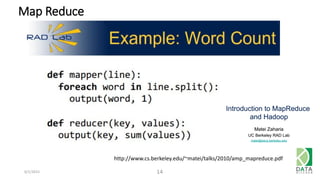
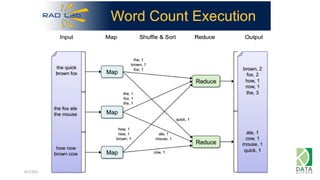
Map Reduce
6/1/2015 14
http://www.cs.berkeley.edu/~matei/talks/2010/amp_mapreduce.pdf
6/1/2015 15
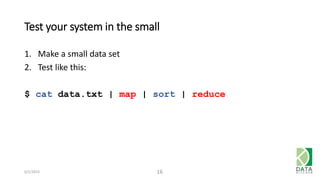
Test your system in the small
1. Make a small data set
2. Test like this:
$ cat data.txt | map | sort | reduce
6/1/2015 16
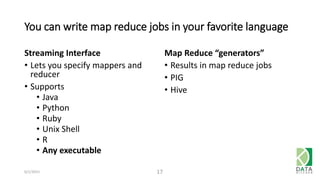
You can write map reduce jobs in your favorite language
Streaming Interface
• Lets you specify mappers and
reducer
• Supports
• Java
• Python
• Ruby
• Unix Shell
• R
• Any executable
Map Reduce “generators”
• Results in map reduce jobs
• PIG
• Hive
6/1/2015 17
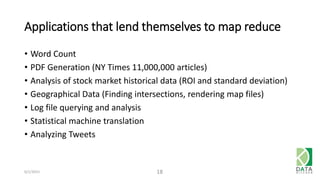
Applications that lend themselves to map reduce
• Word Count
• PDF Generation (NY Times 11,000,000 articles)
• Analysis of stock market historical data (ROI and standard deviation)
• Geographical Data (Finding intersections, rendering map files)
• Log file querying and analysis
• Statistical machine translation
• Analyzing Tweets
6/1/2015 18
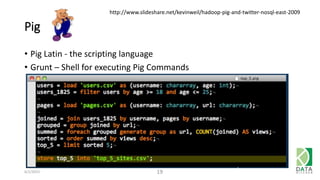
Pig
• Pig Latin - the scripting language
• Grunt – Shell for executing Pig Commands
6/1/2015 19
http://www.slideshare.net/kevinweil/hadoop-pig-and-twitter-nosql-east-2009
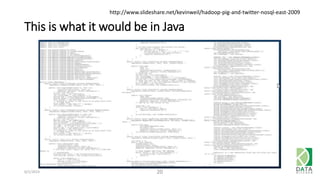
This is what it would be in Java
6/1/2015 20
http://www.slideshare.net/kevinweil/hadoop-pig-and-twitter-nosql-east-2009
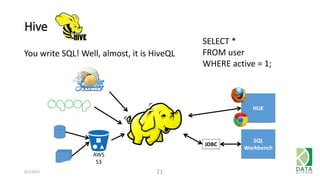
Hive
You write SQL! Well, almost, it is HiveQL
6/1/2015 21
SELECT *
FROM user
WHERE active = 1;
JDBC
SQL
Workbench
HUE
AWS
S3
Impala
• Uses SQL very similar to HiveQL
• Runs 10-100x faster than Hive Map Reduce
• Runs in memory so it may not scale up as well
• Some batch jobs may run faster on Impala than Hive
• Great for developing your code on a small data set
• Can use interactively with Tableau and other BI tools
6/1/2015 22
• Had a version of SQL called Shark
• Shark has been replaced by Spark SQL
• Hive on Spark is under development
• Spark SQL is faster than Shark
• Runs 100x faster than Hive Map Reduce
• Can use interactively with Tableau and other BI tools
6/1/2015 23
Performance Comparisons
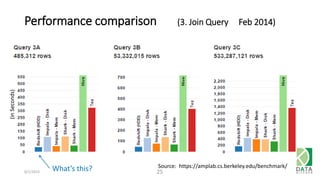
Performance comparison (3. Join Query Feb 2014)
6/1/2015 25
Source: https://amplab.cs.berkeley.edu/benchmark/
What’s this?
(inSeconds)
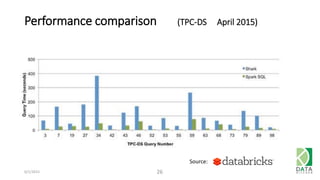
Performance comparison (TPC-DS April 2015)
6/1/2015 26
Source:
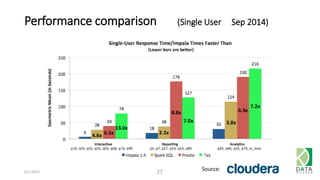
Performance comparison (Single User Sep 2014)
6/1/2015 27 Source:
Amazon EMR
Today, we will use EMR to run Hadoop
• EMR = Elastic Map Reduce
• Amazon does almost all of the work to create a cluster
• Offers a subset of modules and projects
6/1/2015 29
OR
6/1/2015 30
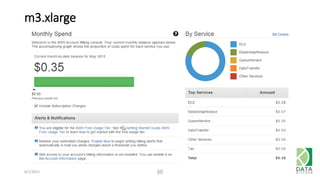
m3.xlarge
What to use when
6/1/2015 32
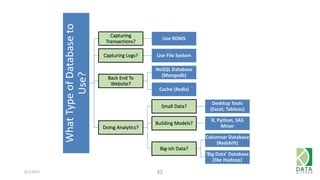
WhatTypeofDatabaseto
Use?
Capturing
Transactions?
Use RDMS
Capturing Logs? Use File System
Back End To
Website?
NoSQL Database
(Mongodb)
Cache (Redis)
Doing Analytics?
Small Data?
Desktop Tools
(Excel, Tableau)
Building Models?
R, Python, SAS
Miner
Big-ish Data?
Columnar Database
(Redshift)
‘Big Data’ Database
(like Hadoop)
6/1/2015 33
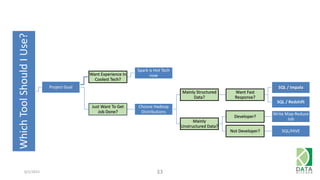
WhichToolShouldIUse?
Project Goal
Want Experience In
Coolest Tech?
Spark is Hot Tech
now
Just Want To Get
Job Done?
Choose Hadoop
Distributions
Mainly Structured
Data?
Want Fast
Response?
SQL / Impala
SQL / Redshift
Mainly
Unstructured Data?
Developer?
Write Map-Reduce
Job
Not Developer? SQL/HIVE
6/1/2015 34
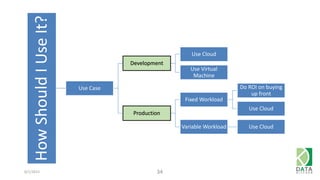
HowShouldIUseIt?
Use Case
Development
Use Cloud
Use Virtual
Machine
Production
Fixed Workload
Do ROI on buying
up front
Use Cloud
Variable Workload Use Cloud
Hands on
Form groups of 3
6/1/2015 36
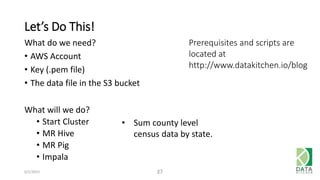
Let’s Do This!
6/1/2015 37
What do we need?
• AWS Account
• Key (.pem file)
• The data file in the S3 bucket
What will we do?
• Start Cluster
• MR Hive
• MR Pig
• Impala
• Sum county level
census data by state.
Prerequisites and scripts are
located at
http://www.datakitchen.io/blog
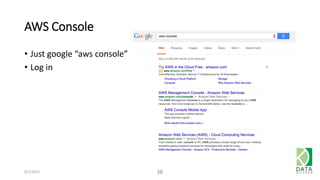
AWS Console
6/1/2015 38
• Just google “aws console”
• Log in
6/1/2015 39
Click Here
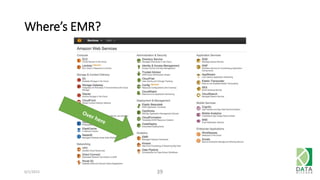
Where’s EMR?
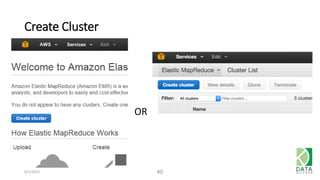
Create Cluster
6/1/2015 40
OR
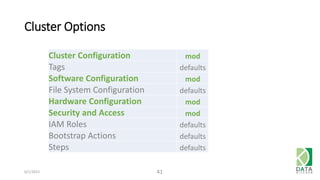
Cluster Options
6/1/2015 41
Cluster Configuration mod
Tags defaults
Software Configuration mod
File System Configuration defaults
Hardware Configuration mod
Security and Access mod
IAM Roles defaults
Bootstrap Actions defaults
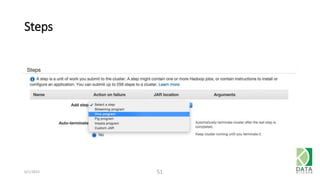
Steps defaults
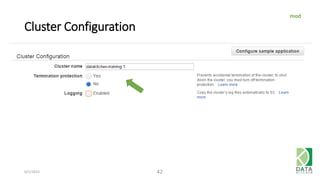
Cluster Configuration
6/1/2015 42
mod
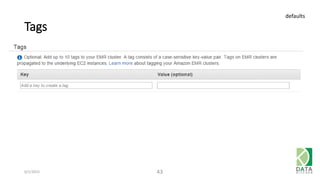
Tags
6/1/2015 43
defaults
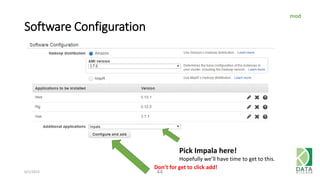
Software Configuration
6/1/2015 44
Pick Impala here!
Hopefully we’ll have time to get to this.
mod
Don’t for get to click add!
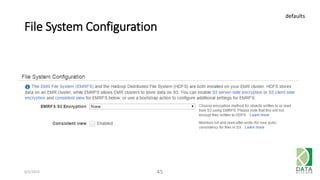
File System Configuration
6/1/2015 45
defaults
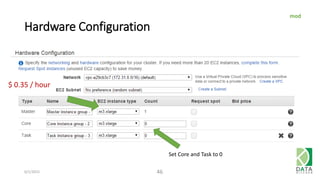
Hardware Configuration
6/1/2015 46
$ 0.35 / hour
Set Core and Task to 0
mod
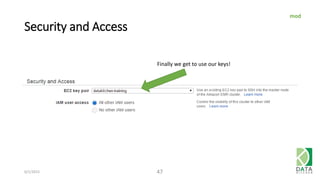
Security and Access
6/1/2015 47
Finally we get to use our keys!
mod
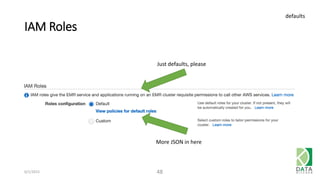
IAM Roles
6/1/2015 48
Just defaults, please
More JSON in here
defaults
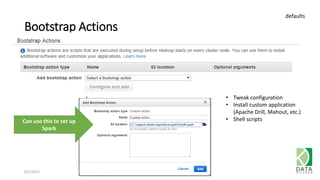
Bootstrap Actions
6/1/2015 49
defaults
• Tweak configuration
• Install custom application
(Apache Drill, Mahout, etc.)
• Shell scriptsCan use this to set up
Spark
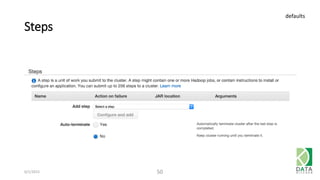
Steps
6/1/2015 50
defaults
Steps
6/1/2015 51
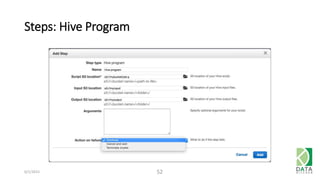
Steps: Hive Program
6/1/2015 52
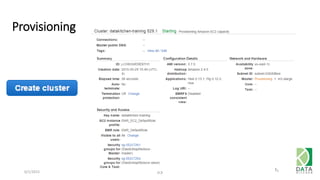
Provisioning
6/1/2015 53
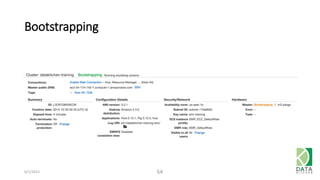
Bootstrapping
6/1/2015 54
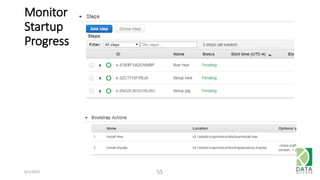
Monitor
Startup
Progress
6/1/2015 55
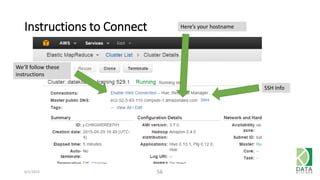
Instructions to Connect
6/1/2015 56
Here’s your hostname
SSH Info
We’ll follow these
instructions
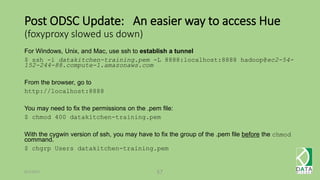
Post ODSC Update: An easier way to access Hue
(foxyproxy slowed us down)
For Windows, Unix, and Mac, use ssh to establish a tunnel
$ ssh -i datakitchen-training.pem -L 8888:localhost:8888 hadoop@ec2-54-
152-244-88.compute-1.amazonaws.com
From the browser, go to
http://localhost:8888
You may need to fix the permissions on the .pem file:
$ chmod 400 datakitchen-training.pem
With the cygwin version of ssh, you may have to fix the group of the .pem file before the chmod
command.
$ chgrp Users datakitchen-training.pem
6/1/2015 57
Post ODSC Update: On Windows, you can use
putty to establish a tunnel
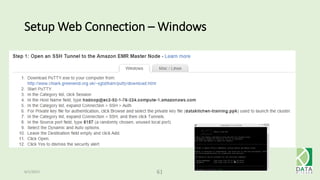
1. Download PuTTY.exe to your computer from:
http://www.chiark.greenend.org.uk/~sgtatham/putty/download.html
2. Start PuTTY.
3. In the Category list, click Session
4. In the Host Name field, type hadoop@ec2-54-152-244-88.compute-1.amazonaws.com
5. In the Category list, expand Connection > SSH > Auth
6. For Private key file for authentication, click Browse and select the private key file (datakitchen-training.ppk) used
to launch the cluster.
7. In the Category list, expand Connection > SSH, and then click Tunnels.
8. In the Source port field, type 8888.
9. In the Destination type localhost:8888
10. Verify the Local and Auto options are selected.
11. Click Add.
12. Click Open.
13. Click Yes to dismiss the security alert.
6/1/2015 58
Now this will work
http://localhost:8888
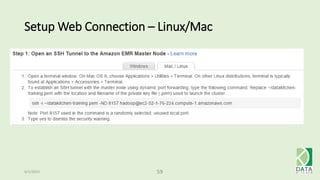
Setup Web Connection – Linux/Mac
6/1/2015 59
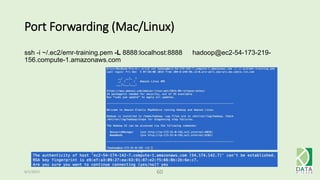
Port Forwarding (Mac/Linux)
6/1/2015 60
ssh -i ~/.ec2/emr-training.pem -L 8888:localhost:8888 hadoop@ec2-54-173-219-
156.compute-1.amazonaws.com
Setup Web Connection – Windows
6/1/2015 61
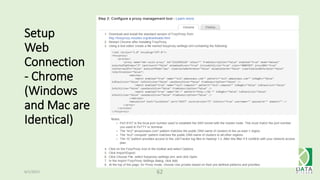
Setup
Web
Connection
- Chrome
(Windows
and Mac are
Identical)
6/1/2015 62
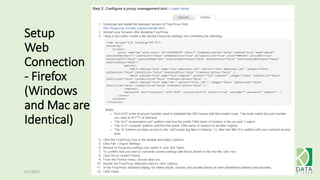
Setup
Web
Connection
- Firefox
(Windows
and Mac are
Identical)
6/1/2015 63
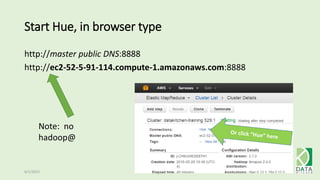
Start Hue, in browser type
http://master public DNS:8888
http://ec2-52-5-91-114.compute-1.amazonaws.com:8888
6/1/2015 64
Note: no
hadoop@
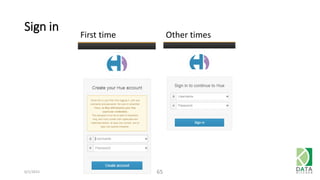
Sign in
6/1/2015 65
First time Other times
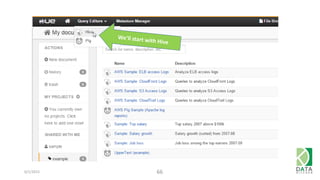
6/1/2015 66
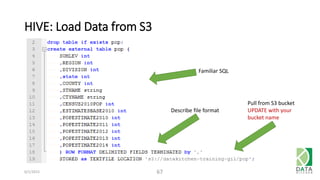
HIVE: Load Data from S3
6/1/2015 67
Familiar SQL
Describe file format
Pull from S3 bucket
UPDATE with your
bucket name
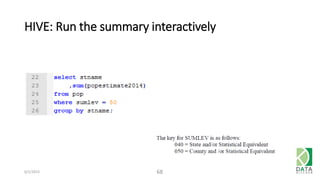
HIVE: Run the summary interactively
6/1/2015 68
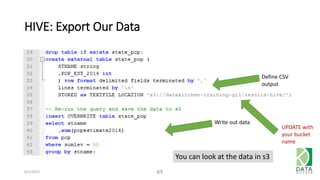
HIVE: Export Our Data
6/1/2015 69
Define CSV
output
Write out data
You can look at the data in s3
UPDATE with
your bucket
name
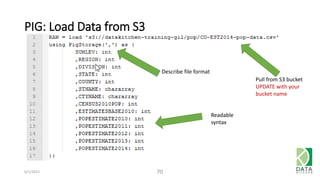
PIG: Load Data from S3
6/1/2015 70
Readable
syntax
Describe file format
Pull from S3 bucket
UPDATE with your
bucket name
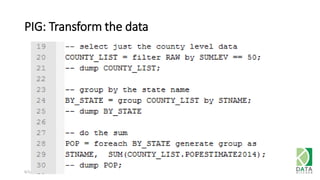
PIG: Transform the data
6/1/2015 71
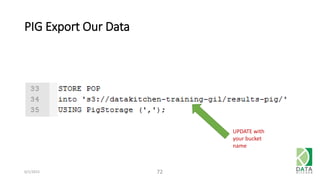
PIG Export Our Data
6/1/2015 72
UPDATE with
your bucket
name
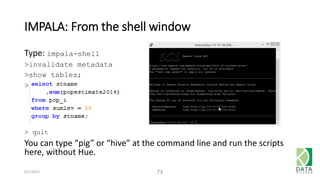
IMPALA: From the shell window
Type: impala-shell
>invalidate metadata
>show tables;
>
> quit
You can type “pig” or “hive” at the command line and run the scripts
here, without Hue.
6/1/2015 73
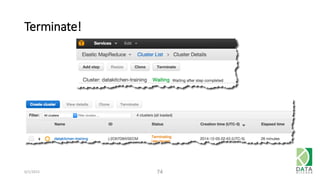
Terminate!
6/1/2015 74
Remember to shut down your clusters
Recap
Presentation
• Hadoop is an evolving ecosystem of projects
• It is well suited for big data
• Use something else for medium or small data
Doing
• Started a Hadoop cluster via the AWS Console (Web UI)
• Loaded Data
• Wrote some queries
6/1/2015 76
77
Thank you!
To continue the discussion,
contact us at
info@datakitchen.io
gil@datakitchen.io
eestabrooks@datakitchen.io
cbergh@datakitchen.io

Open Data Science Conference Big Data Infrastructure – Introduction to Hadoop with Map Reduce, Pig, and Hive

  • 1.
    BIG DATA INFRASTRUCTURE– INTRODUCTION TO HADOOP WITH MAP REDUCE, PIG, AND HIVE Gil Benghiat Eric Estabrooks Chris Bergh O P E N D A T A S C I E N C E C O N F E R E N C E BOSTON 2015 @opendatasci
  • 2.
    Agenda Introductions Hadoop Overview & Comparisons Whatdo I use when? AWS EMR Hive Pig Impala Hive 6/1/2015 2 Doing Presentation
  • 3.
  • 4.
    Meet DataKitchen Chris Bergh (HeadChef) 4 Gil Benghiat (VP Product) Eric Estabrooks (VP Cloud and Data Services) Software development and executive experience delivering enterprise software focused on Marketing and Health Care sectors. Deep Analytic Experience: Spent past decade solving analytic challenges New Approach To Data Preparation and Production: focused on the Data Analysts and Data Scientists
  • 5.
    5 Analysts And TheirTeams Are Spending 60-80% Of Their Time On Data Preparation And Production
  • 6.
    This creates anexpectation gap 6 Analyze Prepare Data C Analyze Prepare Data Business Customer Expectation Analyst Reality Communicate The business does not think that Analysts are preparing data Analysts don’t want to prepare data
  • 7.
    7 DataKitchen is ona mission to integrate and organize data to make analysts and data scientists super-powered.
  • 8.
    Meet the Audience:A few questions • Who considers themselves • Data scientist • Data analyst • Programmer / Scripter • On the Business side • Who knows SQL – can write a select statement? • Who used AWS before today? 6/1/2015 8
  • 9.
  • 10.
    What Is ApacheHadoop? • Software framework • Distributed processing of large scale datasets • Cluster of commodity hardware • Promise of lower cost • Has many frameworks, modules and projects 6/1/2015 10 http://hadoop.apache.org/
  • 11.
    6/1/2015 11 Mark Groverhttp://radar.oreilly.com/2015/02/processing-frameworks-for-hadoop.html Hadoop ecosystem frameworks *** * *Covered in talk Hands on* * (HDFS, Cassandra, HBase, S3)
  • 12.
    Hadoop has beenevolving 6/1/2015 12 Map Reduce Impala Hadoop Pig 2005 2007 2009 2011 2013 2015 Google Trends “Big Data”
  • 13.
    What is Hadoopgood for? • Problems that are huge, and can be run in parallel over immutable data • NOT OLTP (e.g. backend to e-commerce site) • Providing frameworks to build software • Map Reduce • Spark • Tez • A backend for visualization tools 6/1/2015 13
  • 14.
  • 15.
  • 16.
    Test your systemin the small 1. Make a small data set 2. Test like this: $ cat data.txt | map | sort | reduce 6/1/2015 16
  • 17.
    You can writemap reduce jobs in your favorite language Streaming Interface • Lets you specify mappers and reducer • Supports • Java • Python • Ruby • Unix Shell • R • Any executable Map Reduce “generators” • Results in map reduce jobs • PIG • Hive 6/1/2015 17
  • 18.
    Applications that lendthemselves to map reduce • Word Count • PDF Generation (NY Times 11,000,000 articles) • Analysis of stock market historical data (ROI and standard deviation) • Geographical Data (Finding intersections, rendering map files) • Log file querying and analysis • Statistical machine translation • Analyzing Tweets 6/1/2015 18
  • 19.
    Pig • Pig Latin- the scripting language • Grunt – Shell for executing Pig Commands 6/1/2015 19 http://www.slideshare.net/kevinweil/hadoop-pig-and-twitter-nosql-east-2009
  • 20.
    This is whatit would be in Java 6/1/2015 20 http://www.slideshare.net/kevinweil/hadoop-pig-and-twitter-nosql-east-2009
  • 21.
    Hive You write SQL!Well, almost, it is HiveQL 6/1/2015 21 SELECT * FROM user WHERE active = 1; JDBC SQL Workbench HUE AWS S3
  • 22.
    Impala • Uses SQLvery similar to HiveQL • Runs 10-100x faster than Hive Map Reduce • Runs in memory so it may not scale up as well • Some batch jobs may run faster on Impala than Hive • Great for developing your code on a small data set • Can use interactively with Tableau and other BI tools 6/1/2015 22
  • 23.
    • Had aversion of SQL called Shark • Shark has been replaced by Spark SQL • Hive on Spark is under development • Spark SQL is faster than Shark • Runs 100x faster than Hive Map Reduce • Can use interactively with Tableau and other BI tools 6/1/2015 23
  • 24.
  • 25.
    Performance comparison (3.Join Query Feb 2014) 6/1/2015 25 Source: https://amplab.cs.berkeley.edu/benchmark/ What’s this? (inSeconds)
  • 26.
    Performance comparison (TPC-DSApril 2015) 6/1/2015 26 Source:
  • 27.
    Performance comparison (SingleUser Sep 2014) 6/1/2015 27 Source:
  • 28.
  • 29.
    Today, we willuse EMR to run Hadoop • EMR = Elastic Map Reduce • Amazon does almost all of the work to create a cluster • Offers a subset of modules and projects 6/1/2015 29 OR
  • 30.
  • 31.
  • 32.
    6/1/2015 32 WhatTypeofDatabaseto Use? Capturing Transactions? Use RDMS CapturingLogs? Use File System Back End To Website? NoSQL Database (Mongodb) Cache (Redis) Doing Analytics? Small Data? Desktop Tools (Excel, Tableau) Building Models? R, Python, SAS Miner Big-ish Data? Columnar Database (Redshift) ‘Big Data’ Database (like Hadoop)
  • 33.
    6/1/2015 33 WhichToolShouldIUse? Project Goal WantExperience In Coolest Tech? Spark is Hot Tech now Just Want To Get Job Done? Choose Hadoop Distributions Mainly Structured Data? Want Fast Response? SQL / Impala SQL / Redshift Mainly Unstructured Data? Developer? Write Map-Reduce Job Not Developer? SQL/HIVE
  • 34.
    6/1/2015 34 HowShouldIUseIt? Use Case Development UseCloud Use Virtual Machine Production Fixed Workload Do ROI on buying up front Use Cloud Variable Workload Use Cloud
  • 35.
  • 36.
    Form groups of3 6/1/2015 36
  • 37.
    Let’s Do This! 6/1/201537 What do we need? • AWS Account • Key (.pem file) • The data file in the S3 bucket What will we do? • Start Cluster • MR Hive • MR Pig • Impala • Sum county level census data by state. Prerequisites and scripts are located at http://www.datakitchen.io/blog
  • 38.
    AWS Console 6/1/2015 38 •Just google “aws console” • Log in
  • 39.
  • 40.
  • 41.
    Cluster Options 6/1/2015 41 ClusterConfiguration mod Tags defaults Software Configuration mod File System Configuration defaults Hardware Configuration mod Security and Access mod IAM Roles defaults Bootstrap Actions defaults Steps defaults
  • 42.
  • 43.
  • 44.
    Software Configuration 6/1/2015 44 PickImpala here! Hopefully we’ll have time to get to this. mod Don’t for get to click add!
  • 45.
  • 46.
    Hardware Configuration 6/1/2015 46 $0.35 / hour Set Core and Task to 0 mod
  • 47.
    Security and Access 6/1/201547 Finally we get to use our keys! mod
  • 48.
    IAM Roles 6/1/2015 48 Justdefaults, please More JSON in here defaults
  • 49.
    Bootstrap Actions 6/1/2015 49 defaults •Tweak configuration • Install custom application (Apache Drill, Mahout, etc.) • Shell scriptsCan use this to set up Spark
  • 50.
  • 51.
  • 52.
  • 53.
  • 54.
  • 55.
  • 56.
    Instructions to Connect 6/1/201556 Here’s your hostname SSH Info We’ll follow these instructions
  • 57.
    Post ODSC Update:An easier way to access Hue (foxyproxy slowed us down) For Windows, Unix, and Mac, use ssh to establish a tunnel $ ssh -i datakitchen-training.pem -L 8888:localhost:8888 hadoop@ec2-54- 152-244-88.compute-1.amazonaws.com From the browser, go to http://localhost:8888 You may need to fix the permissions on the .pem file: $ chmod 400 datakitchen-training.pem With the cygwin version of ssh, you may have to fix the group of the .pem file before the chmod command. $ chgrp Users datakitchen-training.pem 6/1/2015 57
  • 58.
    Post ODSC Update:On Windows, you can use putty to establish a tunnel 1. Download PuTTY.exe to your computer from: http://www.chiark.greenend.org.uk/~sgtatham/putty/download.html 2. Start PuTTY. 3. In the Category list, click Session 4. In the Host Name field, type hadoop@ec2-54-152-244-88.compute-1.amazonaws.com 5. In the Category list, expand Connection > SSH > Auth 6. For Private key file for authentication, click Browse and select the private key file (datakitchen-training.ppk) used to launch the cluster. 7. In the Category list, expand Connection > SSH, and then click Tunnels. 8. In the Source port field, type 8888. 9. In the Destination type localhost:8888 10. Verify the Local and Auto options are selected. 11. Click Add. 12. Click Open. 13. Click Yes to dismiss the security alert. 6/1/2015 58 Now this will work http://localhost:8888
  • 59.
    Setup Web Connection– Linux/Mac 6/1/2015 59
  • 60.
    Port Forwarding (Mac/Linux) 6/1/201560 ssh -i ~/.ec2/emr-training.pem -L 8888:localhost:8888 hadoop@ec2-54-173-219- 156.compute-1.amazonaws.com
  • 61.
    Setup Web Connection– Windows 6/1/2015 61
  • 62.
  • 63.
  • 64.
    Start Hue, inbrowser type http://master public DNS:8888 http://ec2-52-5-91-114.compute-1.amazonaws.com:8888 6/1/2015 64 Note: no hadoop@
  • 65.
    Sign in 6/1/2015 65 Firsttime Other times
  • 66.
  • 67.
    HIVE: Load Datafrom S3 6/1/2015 67 Familiar SQL Describe file format Pull from S3 bucket UPDATE with your bucket name
  • 68.
    HIVE: Run thesummary interactively 6/1/2015 68
  • 69.
    HIVE: Export OurData 6/1/2015 69 Define CSV output Write out data You can look at the data in s3 UPDATE with your bucket name
  • 70.
    PIG: Load Datafrom S3 6/1/2015 70 Readable syntax Describe file format Pull from S3 bucket UPDATE with your bucket name
  • 71.
    PIG: Transform thedata 6/1/2015 71
  • 72.
    PIG Export OurData 6/1/2015 72 UPDATE with your bucket name
  • 73.
    IMPALA: From theshell window Type: impala-shell >invalidate metadata >show tables; > > quit You can type “pig” or “hive” at the command line and run the scripts here, without Hue. 6/1/2015 73
  • 74.
  • 75.
    Remember to shutdown your clusters
  • 76.
    Recap Presentation • Hadoop isan evolving ecosystem of projects • It is well suited for big data • Use something else for medium or small data Doing • Started a Hadoop cluster via the AWS Console (Web UI) • Loaded Data • Wrote some queries 6/1/2015 76
  • 77.
    77 Thank you! To continuethe discussion, contact us at info@datakitchen.io gil@datakitchen.io eestabrooks@datakitchen.io cbergh@datakitchen.io