Scaling with Solr Cloud Saumitra Srivastav saumitra.srivastav@glassbeam.com Bangalore Apache Solr Group September-2014 Meetup
What is Solr Cloud? 
-set of features which add distributed capabilities in Solr 
-fault tolerance and high availability 
-distributed indexing and search 
-enable and simplify horizontal scaling a search index using sharding and replication
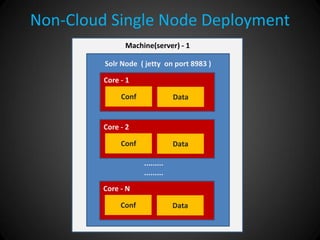
Non-Cloud Single Node Deployment 
Machine(server) - 1 
Solr Node ( jetty on port 8983 ) 
Core - 1 
Conf 
Data 
Core - 2 
Conf 
Data 
Core - N 
Conf 
Data 
......... .........
Use Solr Cloud for ... 
-performance 
-scalability 
-high-availability 
-simplicity 
-elasticity
Solr Cloud Glossary 
-Cluster 
-Node 
-Shard 
-Leader & Replica 
-Overseer 
-Collection 
-Zookeeper
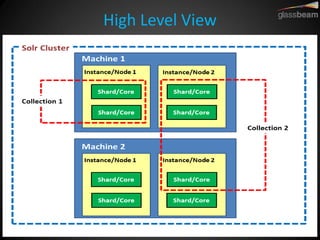
High Level View
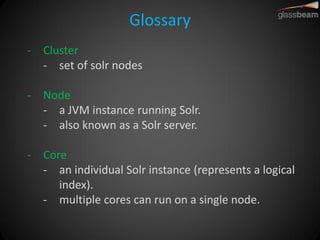
Glossary 
-Cluster 
-set of solr nodes 
-Node 
-a JVM instance running Solr. 
-also known as a Solr server. 
-Core 
-an individual Solr instance (represents a logical index). 
-multiple cores can run on a single node.
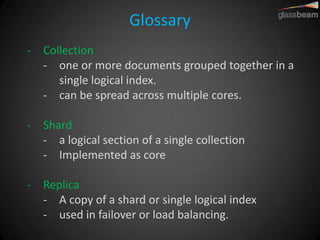
Glossary 
-Collection 
-one or more documents grouped together in a single logical index. 
-can be spread across multiple cores. 
-Shard 
-a logical section of a single collection 
-Implemented as core 
-Replica 
-A copy of a shard or single logical index 
-used in failover or load balancing.
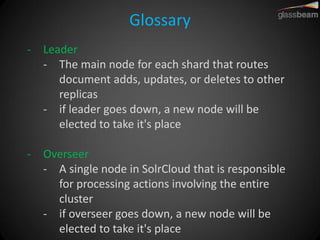
Glossary 
-Leader 
-The main node for each shard that routes document adds, updates, or deletes to other replicas 
-if leader goes down, a new node will be elected to take it's place 
-Overseer 
-A single node in SolrCloud that is responsible for processing actions involving the entire cluster 
-if overseer goes down, a new node will be elected to take it's place
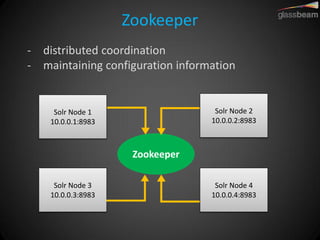
Zookeeper 
-distributed coordination 
-maintaining configuration information 
Solr Node 1 10.0.0.1:8983 
Solr Node 3 10.0.0.3:8983 
Solr Node 2 10.0.0.2:8983 
Solr Node 4 10.0.0.4:8983 
Zookeeper
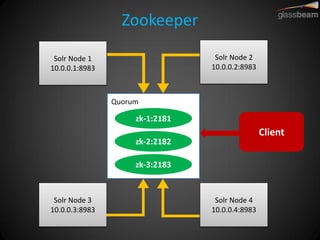
Zookeeper 
Solr Node 1 10.0.0.1:8983 
Solr Node 3 10.0.0.3:8983 
Solr Node 2 10.0.0.2:8983 
Solr Node 4 10.0.0.4:8983 
zk-1:2181 
zk-2:2182 
zk-3:2183 
Quorum 
Client
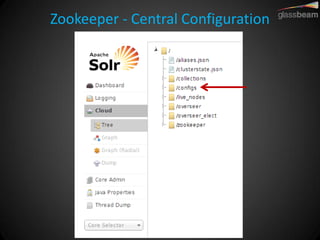
Zookeeper - Central Configuration
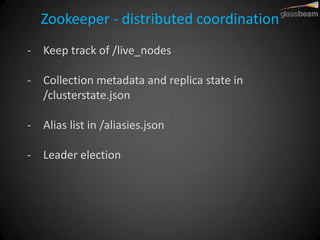
Zookeeper - distributed coordination 
-Keep track of /live_nodes 
-Collection metadata and replica state in /clusterstate.json 
-Alias list in /aliasies.json 
-Leader election
Collections 
-Collection is a distributed index defined by: 
-named configuration 
-stored in ZooKeeper 
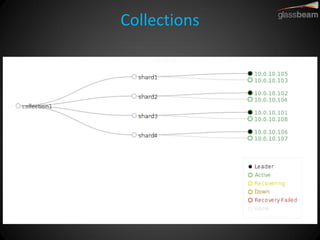
-number of shards 
-replication factor 
-Number of copies of each document in the collection 
-document routing strategy: 
-how documents get assigned to shards
Collections API 
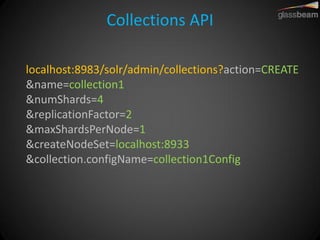
localhost:8983/solr/admin/collections?action=CREATE &name=collection1 &numShards=4 &replicationFactor=2 &maxShardsPerNode=1 &createNodeSet=localhost:8933 &collection.configName=collection1Config
Collections
Sharding 
-Collection has a fixed number of shards 
-existing shards can be split 
-When to shard? 
-Large number of docs 
-Large document sizes 
-Parallelization during indexing and queries 
-Data partitioning (custom hashing)
Replication 
-Why replicate? 
-High-availability 
-Load balancing 
-How does it work in SolrCloud? 
-Near-real-time, NOT master-slave 
-Leader forwards to replicas in parallel, waits for response 
-Error handling during indexing is tricky
Indexing
Indexing 
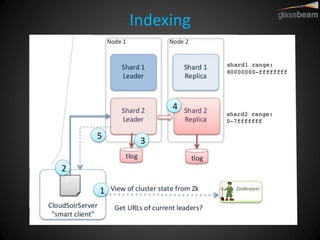
1.Get cluster state from ZK 
2.Route document directly to leader (hash on doc ID) 
3.Persist document on durable storage (tlog) 
4.Forward to healthy replicas 
5.Acknowledge write succeed to client
Querying
Querying 
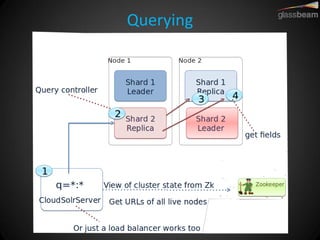
-Query client can be ZK aware or just query via a load balancer 
-Client can send query to any node in the cluster 
-Controller node distributes the query to a replica for each shard to identify documents matching query 
-Controller node sorts the results from step 3 and issues a second query for all fields for a page of results
Transaction Log (tlog) 
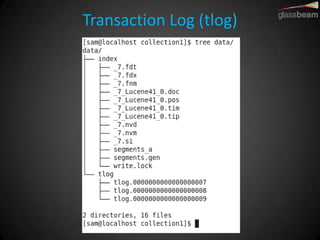
-file where the raw documents are written for recovery purposes 
-each node has its own tlog 
-replayed on server restart 
-in case of non gracefull shutdown 
-“rolled over” automatically on hard commit 
-old one is closed and a new one is opened
Transaction Log (tlog)
Commits 
-Hard Commit & Soft Commit 
-Hard commits are about durability, soft commits are about visibility 
-Further reading: https://lucidworks.com/blog/understanding- transaction-logs-softcommit-and-commit-in- sorlcloud/
What happens on hard Commit? 
-The tlog is truncated. 
-A new tlog is started. 
-Old tlogs will be deleted if there are more than 100 documents in newer tlogs. 
-The current index segment is closed and flushed. 
-Background segment merges may be initiated.
What happens on soft commit? 
-The tlog has NOT been truncated. It will continue to grow. 
-New documents WILL be visible. 
-some caches will have to be reloaded 
-top-level caches will be invalidated.
Shard Splitting 
-Can split shards into two sub-shards 
-Live splitting. No downtime needed. 
-Requests start being forwarded to sub-shards automatically 
-Expensive operation: Use as required during low traffic
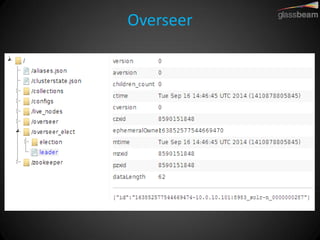
Overseer 
-Persists collection state change events to zooKeeper 
-Controller for Collection API commands 
-One per cluster (for all collections); elected using leader election 
-Asynchronous (pub/sub messaging) 
-Automated failover to a healthy node 
-Can be assigned to a dedicated node
Overseer
Controlling data partitioning 
-Shard vs Replicas 
-Custom Routing 
-Collection Aliasing
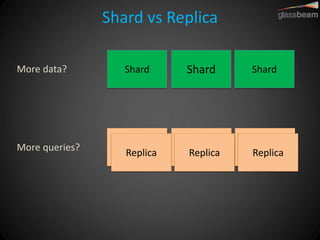
Shard vs Replica 
More data? 
Shard 
Replica 
Replica 
Shard 
Shard 
Replica 
More queries? 
Replica 
Replica 
Replica
Document Routing 
-How to assign documents to shards 
-Default Routing 
-Custom routing 
-Routers 
-CompositeID 
-Implicit
Default Routing 
-Each shard covers a hash-range 
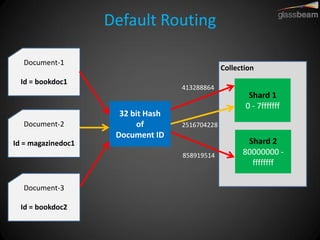
-Hash doc-ID into 32-bit integer, map to range 
-Leads to balanced (roughly) shards
Default Routing 
Shard 1 0 - 7fffffff 
Collection 
Document-1 Id = bookdoc1 
Document-2 Id = magazinedoc1 
Document-3 Id = bookdoc2 
32 bit Hash of Document ID 
Shard 2 80000000 - ffffffff 
858919514 
2516704228 
413288864
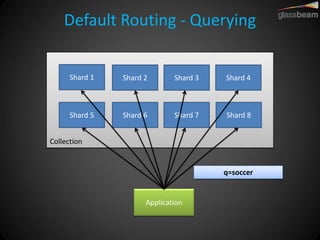
Default Routing - Querying 
Shard 1 
Shard 2 
Shard 3 
Shard 4 
Shard 5 
Shard 6 
Shard 7 
Shard 8 
Collection 
Application 
q=soccer
Custom Routing 
-Route documents to specific shards 
-based on a shard key component in the document ID
Custom Routing 
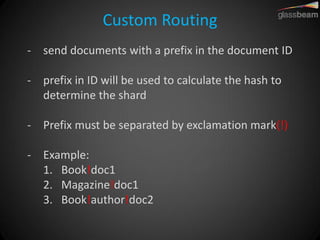
-send documents with a prefix in the document ID 
-prefix in ID will be used to calculate the hash to determine the shard 
-Prefix must be separated by exclamation mark(!) 
-Example: 
1.Book!doc1 
2.Magazine!doc1 
3.Book!author!doc2
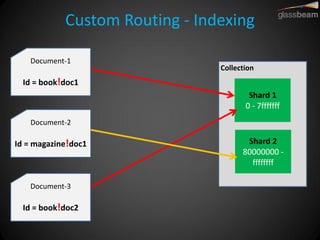
Custom Routing - Indexing 
Shard 1 0 - 7fffffff 
Collection 
Document-1 Id = book!doc1 
Document-2 Id = magazine!doc1 
Document-3 Id = book!doc2 
Shard 2 80000000 - ffffffff
Custom Routing - Querying 
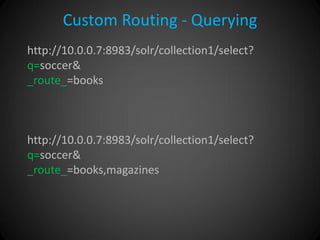
http://10.0.0.7:8983/solr/collection1/select? q=soccer& _route_=books http://10.0.0.7:8983/solr/collection1/select? q=soccer& _route_=books,magazines
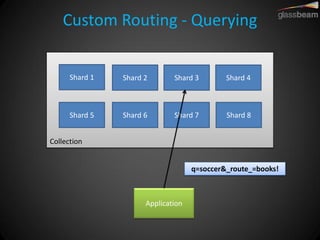
Custom Routing - Querying 
Shard 1 
Shard 2 
Shard 3 
Shard 4 
Shard 5 
Shard 6 
Shard 7 
Shard 8 
Collection 
Application 
q=soccer&_route_=books!
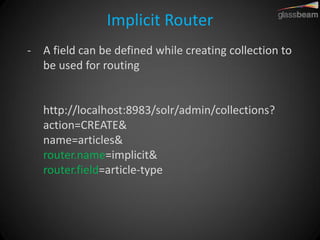
Implicit Router 
-A field can be defined while creating collection to be used for routing http://localhost:8983/solr/admin/collections? action=CREATE& name=articles& router.name=implicit& router.field=article-type
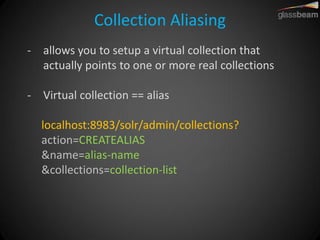
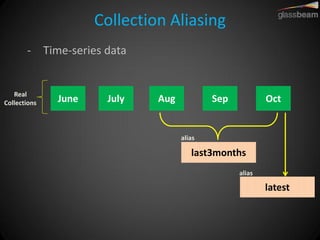
Collection Aliasing 
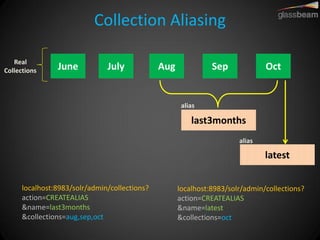
-allows you to setup a virtual collection that actually points to one or more real collections 
-Virtual collection == alias localhost:8983/solr/admin/collections? action=CREATEALIAS &name=alias-name &collections=collection-list
Collection Aliasing 
-Time-series data 
June 
last3months 
latest 
July 
Aug 
Sep 
Oct 
alias 
alias 
Real Collections
Collection Aliasing 
June 
last3months 
latest 
July 
Aug 
Sep 
Oct 
alias 
alias 
Real Collections 
localhost:8983/solr/admin/collections? action=CREATEALIAS &name=last3months &collections=aug,sep,oct 
localhost:8983/solr/admin/collections? action=CREATEALIAS &name=latest &collections=oct
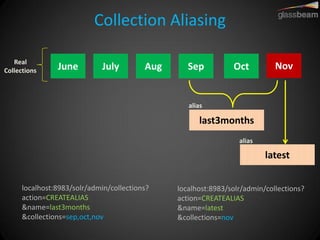
Collection Aliasing 
June 
last3months 
latest 
July 
Aug 
Sep 
Oct 
alias 
alias 
Real Collections 
localhost:8983/solr/admin/collections? action=CREATEALIAS &name=last3months &collections=sep,oct,nov 
localhost:8983/solr/admin/collections? action=CREATEALIAS &name=latest &collections=nov 
Nov
Collection Aliasing 
-Aliases can be: 
•updated on the fly 
•queried just like a normal collection 
•used for indexing as long as it is pointing to a single collection
Other Features 
-Near-Real-Time Search 
-Atomic Updates 
-Optimistic Locking 
-HTTPS 
-Use HDFS for storing indexes 
-Use MapReduce for building index
Thanks 
-Attributions: 
•Shalin Mangar’s slides on “SolrCloud: Searching Big Data” 
•Rafał Kuć’s slides on “Scaling Solr with SolrCloud” 
-Connect 
•saumitra.srivastav@glassbeam.com 
•saumitra.srivastav7@gmail.com 
•https://www.linkedin.com/in/saumitras 
•@_saumitra_ 
-Join: 
•http://www.meetup.com/Bangalore-Apache-Solr-Lucene-Group/

Scaling search with SolrCloud

  • 1.
    Scaling with SolrCloud Saumitra Srivastav saumitra.srivastav@glassbeam.com Bangalore Apache Solr Group September-2014 Meetup
  • 2.
    What is SolrCloud? -set of features which add distributed capabilities in Solr -fault tolerance and high availability -distributed indexing and search -enable and simplify horizontal scaling a search index using sharding and replication
  • 3.
    Non-Cloud Single NodeDeployment Machine(server) - 1 Solr Node ( jetty on port 8983 ) Core - 1 Conf Data Core - 2 Conf Data Core - N Conf Data ......... .........
  • 4.
    Use Solr Cloudfor ... -performance -scalability -high-availability -simplicity -elasticity
  • 5.
    Solr Cloud Glossary -Cluster -Node -Shard -Leader & Replica -Overseer -Collection -Zookeeper
  • 6.
  • 7.
    Glossary -Cluster -setof solr nodes -Node -a JVM instance running Solr. -also known as a Solr server. -Core -an individual Solr instance (represents a logical index). -multiple cores can run on a single node.
  • 8.
    Glossary -Collection -oneor more documents grouped together in a single logical index. -can be spread across multiple cores. -Shard -a logical section of a single collection -Implemented as core -Replica -A copy of a shard or single logical index -used in failover or load balancing.
  • 9.
    Glossary -Leader -Themain node for each shard that routes document adds, updates, or deletes to other replicas -if leader goes down, a new node will be elected to take it's place -Overseer -A single node in SolrCloud that is responsible for processing actions involving the entire cluster -if overseer goes down, a new node will be elected to take it's place
  • 10.
    Zookeeper -distributed coordination -maintaining configuration information Solr Node 1 10.0.0.1:8983 Solr Node 3 10.0.0.3:8983 Solr Node 2 10.0.0.2:8983 Solr Node 4 10.0.0.4:8983 Zookeeper
  • 11.
    Zookeeper Solr Node1 10.0.0.1:8983 Solr Node 3 10.0.0.3:8983 Solr Node 2 10.0.0.2:8983 Solr Node 4 10.0.0.4:8983 zk-1:2181 zk-2:2182 zk-3:2183 Quorum Client
  • 12.
    Zookeeper - CentralConfiguration
  • 13.
    Zookeeper - distributedcoordination -Keep track of /live_nodes -Collection metadata and replica state in /clusterstate.json -Alias list in /aliasies.json -Leader election
  • 14.
    Collections -Collection isa distributed index defined by: -named configuration -stored in ZooKeeper -number of shards -replication factor -Number of copies of each document in the collection -document routing strategy: -how documents get assigned to shards
  • 15.
    Collections API localhost:8983/solr/admin/collections?action=CREATE&name=collection1 &numShards=4 &replicationFactor=2 &maxShardsPerNode=1 &createNodeSet=localhost:8933 &collection.configName=collection1Config
  • 16.
  • 17.
    Sharding -Collection hasa fixed number of shards -existing shards can be split -When to shard? -Large number of docs -Large document sizes -Parallelization during indexing and queries -Data partitioning (custom hashing)
  • 18.
    Replication -Why replicate? -High-availability -Load balancing -How does it work in SolrCloud? -Near-real-time, NOT master-slave -Leader forwards to replicas in parallel, waits for response -Error handling during indexing is tricky
  • 19.
  • 20.
    Indexing 1.Get clusterstate from ZK 2.Route document directly to leader (hash on doc ID) 3.Persist document on durable storage (tlog) 4.Forward to healthy replicas 5.Acknowledge write succeed to client
  • 21.
  • 22.
    Querying -Query clientcan be ZK aware or just query via a load balancer -Client can send query to any node in the cluster -Controller node distributes the query to a replica for each shard to identify documents matching query -Controller node sorts the results from step 3 and issues a second query for all fields for a page of results
  • 23.
    Transaction Log (tlog) -file where the raw documents are written for recovery purposes -each node has its own tlog -replayed on server restart -in case of non gracefull shutdown -“rolled over” automatically on hard commit -old one is closed and a new one is opened
  • 24.
  • 25.
    Commits -Hard Commit& Soft Commit -Hard commits are about durability, soft commits are about visibility -Further reading: https://lucidworks.com/blog/understanding- transaction-logs-softcommit-and-commit-in- sorlcloud/
  • 26.
    What happens onhard Commit? -The tlog is truncated. -A new tlog is started. -Old tlogs will be deleted if there are more than 100 documents in newer tlogs. -The current index segment is closed and flushed. -Background segment merges may be initiated.
  • 27.
    What happens onsoft commit? -The tlog has NOT been truncated. It will continue to grow. -New documents WILL be visible. -some caches will have to be reloaded -top-level caches will be invalidated.
  • 28.
    Shard Splitting -Cansplit shards into two sub-shards -Live splitting. No downtime needed. -Requests start being forwarded to sub-shards automatically -Expensive operation: Use as required during low traffic
  • 29.
    Overseer -Persists collectionstate change events to zooKeeper -Controller for Collection API commands -One per cluster (for all collections); elected using leader election -Asynchronous (pub/sub messaging) -Automated failover to a healthy node -Can be assigned to a dedicated node
  • 30.
  • 31.
    Controlling data partitioning -Shard vs Replicas -Custom Routing -Collection Aliasing
  • 32.
    Shard vs Replica More data? Shard Replica Replica Shard Shard Replica More queries? Replica Replica Replica
  • 33.
    Document Routing -Howto assign documents to shards -Default Routing -Custom routing -Routers -CompositeID -Implicit
  • 34.
    Default Routing -Eachshard covers a hash-range -Hash doc-ID into 32-bit integer, map to range -Leads to balanced (roughly) shards
  • 35.
    Default Routing Shard1 0 - 7fffffff Collection Document-1 Id = bookdoc1 Document-2 Id = magazinedoc1 Document-3 Id = bookdoc2 32 bit Hash of Document ID Shard 2 80000000 - ffffffff 858919514 2516704228 413288864
  • 36.
    Default Routing -Querying Shard 1 Shard 2 Shard 3 Shard 4 Shard 5 Shard 6 Shard 7 Shard 8 Collection Application q=soccer
  • 37.
    Custom Routing -Routedocuments to specific shards -based on a shard key component in the document ID
  • 38.
    Custom Routing -senddocuments with a prefix in the document ID -prefix in ID will be used to calculate the hash to determine the shard -Prefix must be separated by exclamation mark(!) -Example: 1.Book!doc1 2.Magazine!doc1 3.Book!author!doc2
  • 39.
    Custom Routing -Indexing Shard 1 0 - 7fffffff Collection Document-1 Id = book!doc1 Document-2 Id = magazine!doc1 Document-3 Id = book!doc2 Shard 2 80000000 - ffffffff
  • 40.
    Custom Routing -Querying http://10.0.0.7:8983/solr/collection1/select? q=soccer& _route_=books http://10.0.0.7:8983/solr/collection1/select? q=soccer& _route_=books,magazines
  • 41.
    Custom Routing -Querying Shard 1 Shard 2 Shard 3 Shard 4 Shard 5 Shard 6 Shard 7 Shard 8 Collection Application q=soccer&_route_=books!
  • 42.
    Implicit Router -Afield can be defined while creating collection to be used for routing http://localhost:8983/solr/admin/collections? action=CREATE& name=articles& router.name=implicit& router.field=article-type
  • 43.
    Collection Aliasing -allowsyou to setup a virtual collection that actually points to one or more real collections -Virtual collection == alias localhost:8983/solr/admin/collections? action=CREATEALIAS &name=alias-name &collections=collection-list
  • 44.
    Collection Aliasing -Time-seriesdata June last3months latest July Aug Sep Oct alias alias Real Collections
  • 45.
    Collection Aliasing June last3months latest July Aug Sep Oct alias alias Real Collections localhost:8983/solr/admin/collections? action=CREATEALIAS &name=last3months &collections=aug,sep,oct localhost:8983/solr/admin/collections? action=CREATEALIAS &name=latest &collections=oct
  • 46.
    Collection Aliasing June last3months latest July Aug Sep Oct alias alias Real Collections localhost:8983/solr/admin/collections? action=CREATEALIAS &name=last3months &collections=sep,oct,nov localhost:8983/solr/admin/collections? action=CREATEALIAS &name=latest &collections=nov Nov
  • 47.
    Collection Aliasing -Aliasescan be: •updated on the fly •queried just like a normal collection •used for indexing as long as it is pointing to a single collection
  • 48.
    Other Features -Near-Real-TimeSearch -Atomic Updates -Optimistic Locking -HTTPS -Use HDFS for storing indexes -Use MapReduce for building index
  • 49.
    Thanks -Attributions: •ShalinMangar’s slides on “SolrCloud: Searching Big Data” •Rafał Kuć’s slides on “Scaling Solr with SolrCloud” -Connect •saumitra.srivastav@glassbeam.com •saumitra.srivastav7@gmail.com •https://www.linkedin.com/in/saumitras •@_saumitra_ -Join: •http://www.meetup.com/Bangalore-Apache-Solr-Lucene-Group/