S
Running Solr in SolrCloud
Mode
Local File System
version 4.10.3
German A Gutierrez - SolrCloud
Agenda
S Introduction
S SolrCloud High-Level Overview
S Live SolrCloud Demo
S Solr Directory Structure
S SolrCloud Parameters
S Solr Logging
S Sample SolrCloud Start-up script
S Resources
German A Gutierrez - SolrCloud
SolrCloud High-Level
Overview
S Scalable
S Fault Tolerant
S Data Redundancy
S Advance
analysis/tokenization
capabilities
S Automatic Load Balancing
S NoSQL Database
German A Gutierrez - SolrCloud
S Easy to integrate with new and
existing systems.
S Requires very little effort to
setup a small SolrCloud
cluster.
S Runs on Linus, OS X and
Windows
S Local File System
S Cloudera HDFS
S Hortonworks HDFS
SolrCloud High-Level
Overview
German A Gutierrez - SolrCloud
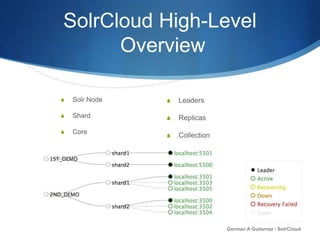
S Leaders
S Replicas
S Collection
S Solr Node
S Shard
S Core
SolrCloud Overview
S solrconfig.xml
S schema.xml
S solr.xml
S core.properties
German A Gutierrez - SolrCloud
Instructs Solr How to behave
Downloads
S Download Solr version 4.10.3
http://lucene.apache.org/solr/
S Download Zookeeper version 3.4.6
http://zookeeper.apache.org/
S Download sample SolrCloud scripts
https://github.com/gutierrezga00/SolrCloud_LocalFileSystem
S Unzip Files preferably to your Desktop
German A Gutierrez - SolrCloud
Live Demo
German A Gutierrez - SolrCloud
Zookeeper Configurations
S Create a “zookeeper” folder under your /tmp directory.
S Create a “data” sub-folder under your /tmp/zookeeper directory.
S Make a copy of the zoo_sample.cfg file and name it zoo.cfg
Location: zookeeper-3.4.6/conf/zoo_sample.cfg
S Modified the zoo.cfg file and set the following parameter names:
dataDir=/tmp/zookeeper/data
clientPort=9181
German A Gutierrez - SolrCloud
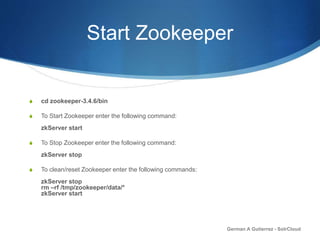
Start Zookeeper
S cd zookeeper-3.4.6/bin
S To Start Zookeeper enter the following command:
zkServer start
S To Stop Zookeeper enter the following command:
zkServer stop
S To clean/reset Zookeeper enter the following commands:
zkServer stop
rm –rf /tmp/zookeeper/data/*
zkServer start
German A Gutierrez - SolrCloud
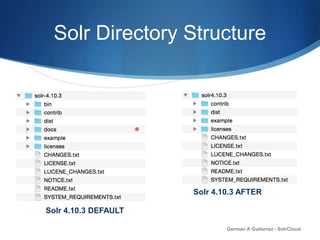
Solr Directory Structure
German A Gutierrez - SolrCloud
Solr 4.10.3 DEFAULT
Solr 4.10.3 AFTER
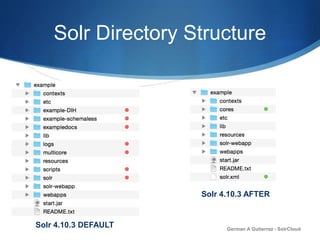
Solr Directory Structure
German A Gutierrez - SolrCloud
Solr 4.10.3 DEFAULT
Solr 4.10.3 AFTER
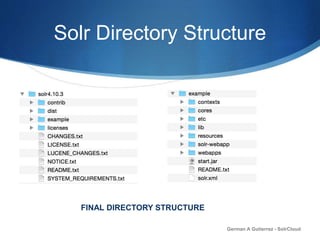
Solr Directory Structure
German A Gutierrez - SolrCloud
FINAL DIRECTORY STRUCTURE
SolrCloud Parameters
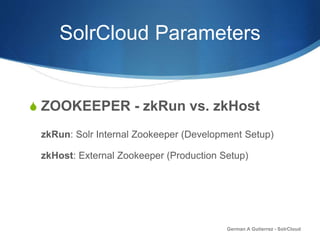
S ZOOKEEPER - zkRun vs. zkHost
zkRun: Solr Internal Zookeeper (Development Setup)
zkHost: External Zookeeper (Production Setup)
German A Gutierrez - SolrCloud
SolrCloud Parameters
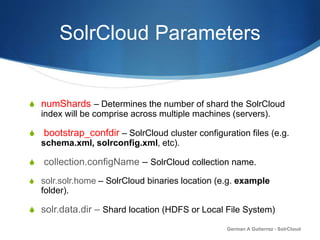
S numShards – Determines the number of shard the SolrCloud
index will be comprise across multiple machines (servers).
S bootstrap_confdir – SolrCloud cluster configuration files (e.g.
schema.xml, solrconfig.xml, etc).
S collection.configName – SolrCloud collection name.
S solr.solr.home – SolrCloud binaries location (e.g. example
folder).
S solr.data.dir – Shard location (HDFS or Local File System)
German A Gutierrez - SolrCloud
SolrCloud Parameters
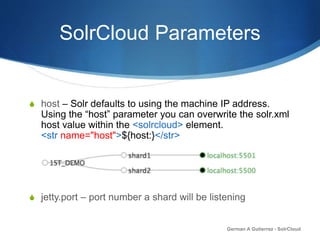
S host – Solr defaults to using the machine IP address.
Using the “host” parameter you can overwrite the solr.xml
host value within the <solrcloud> element.
<str name="host">${host:}</str>
S jetty.port – port number a shard will be listening
German A Gutierrez - SolrCloud
SolrCloud Logging
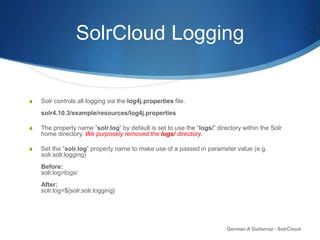
S Solr controls all logging via the log4j.properties file.
solr4.10.3/example/resources/log4j.properties
S The property name “solr.log” by default is set to use the “logs/” directory within the Solr
home directory. We purposely removed the logs/ directory.
S Set the “solr.log” property name to make use of a passed in parameter value (e.g.
solr.solr.logging)
Before:
solr.log=logs/
After:
solr.log=${solr.solr.logging}
German A Gutierrez - SolrCloud
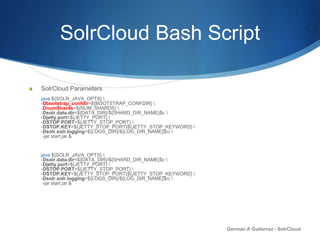
SolrCloud Bash Script
S SolrCloud Parameters
java ${SOLR_JAVA_OPTS} 
-Dbootstrap_confdir=${BOOTSTRAP_CONFDIR} 
-DnumShards=${NUM_SHARDS} 
-Dsolr.data.dir=${DATA_DIR}/${SHARD_DIR_NAME}$c 
-Djetty.port=${JETTY_PORT} 
-DSTOP.PORT=${JETTY_STOP_PORT} 
-DSTOP.KEY=${JETTY_STOP_PORT}${JETTY_STOP_KEYWORD} 
-Dsolr.solr.logging=${LOGS_DIR}/${LOG_DIR_NAME}$c/ 
-jar start.jar &
java ${SOLR_JAVA_OPTS} 
-Dsolr.data.dir=${DATA_DIR}/${SHARD_DIR_NAME}$c 
-Djetty.port=${JETTY_PORT} 
-DSTOP.PORT=${JETTY_STOP_PORT} 
-DSTOP.KEY=${JETTY_STOP_PORT}${JETTY_STOP_KEYWORD} 
-Dsolr.solr.logging=${LOGS_DIR}/${LOG_DIR_NAME}$c/ 
-jar start.jar &
German A Gutierrez - SolrCloud
Resources
S Download presentation material
https://github.com/gutierrezga00/SolrCloud_LocalFileSystem
S Zookeeper:
http://zookeeper.apache.org
S Solr:
http://lucene.apache.org/solr
S Documentation:
Solr Reference Guide
https://www.apache.org/dyn/closer.cgi/lucene/solr/ref-guide
German A Gutierrez - SolrCloud
Q&A
S German Gutierrez
email: gutierrezga00@gmail.com
German A Gutierrez - SolrCloud

Solr 4: Run Solr in SolrCloud Mode on your local file system.

  • 1.
    S Running Solr inSolrCloud Mode Local File System version 4.10.3 German A Gutierrez - SolrCloud
  • 2.
    Agenda S Introduction S SolrCloudHigh-Level Overview S Live SolrCloud Demo S Solr Directory Structure S SolrCloud Parameters S Solr Logging S Sample SolrCloud Start-up script S Resources German A Gutierrez - SolrCloud
  • 3.
    SolrCloud High-Level Overview S Scalable SFault Tolerant S Data Redundancy S Advance analysis/tokenization capabilities S Automatic Load Balancing S NoSQL Database German A Gutierrez - SolrCloud S Easy to integrate with new and existing systems. S Requires very little effort to setup a small SolrCloud cluster. S Runs on Linus, OS X and Windows S Local File System S Cloudera HDFS S Hortonworks HDFS
  • 4.
    SolrCloud High-Level Overview German AGutierrez - SolrCloud S Leaders S Replicas S Collection S Solr Node S Shard S Core
  • 5.
    SolrCloud Overview S solrconfig.xml Sschema.xml S solr.xml S core.properties German A Gutierrez - SolrCloud Instructs Solr How to behave
  • 6.
    Downloads S Download Solrversion 4.10.3 http://lucene.apache.org/solr/ S Download Zookeeper version 3.4.6 http://zookeeper.apache.org/ S Download sample SolrCloud scripts https://github.com/gutierrezga00/SolrCloud_LocalFileSystem S Unzip Files preferably to your Desktop German A Gutierrez - SolrCloud
  • 7.
    Live Demo German AGutierrez - SolrCloud
  • 8.
    Zookeeper Configurations S Createa “zookeeper” folder under your /tmp directory. S Create a “data” sub-folder under your /tmp/zookeeper directory. S Make a copy of the zoo_sample.cfg file and name it zoo.cfg Location: zookeeper-3.4.6/conf/zoo_sample.cfg S Modified the zoo.cfg file and set the following parameter names: dataDir=/tmp/zookeeper/data clientPort=9181 German A Gutierrez - SolrCloud
  • 9.
    Start Zookeeper S cdzookeeper-3.4.6/bin S To Start Zookeeper enter the following command: zkServer start S To Stop Zookeeper enter the following command: zkServer stop S To clean/reset Zookeeper enter the following commands: zkServer stop rm –rf /tmp/zookeeper/data/* zkServer start German A Gutierrez - SolrCloud
  • 10.
    Solr Directory Structure GermanA Gutierrez - SolrCloud Solr 4.10.3 DEFAULT Solr 4.10.3 AFTER
  • 11.
    Solr Directory Structure GermanA Gutierrez - SolrCloud Solr 4.10.3 DEFAULT Solr 4.10.3 AFTER
  • 12.
    Solr Directory Structure GermanA Gutierrez - SolrCloud FINAL DIRECTORY STRUCTURE
  • 13.
    SolrCloud Parameters S ZOOKEEPER- zkRun vs. zkHost zkRun: Solr Internal Zookeeper (Development Setup) zkHost: External Zookeeper (Production Setup) German A Gutierrez - SolrCloud
  • 14.
    SolrCloud Parameters S numShards– Determines the number of shard the SolrCloud index will be comprise across multiple machines (servers). S bootstrap_confdir – SolrCloud cluster configuration files (e.g. schema.xml, solrconfig.xml, etc). S collection.configName – SolrCloud collection name. S solr.solr.home – SolrCloud binaries location (e.g. example folder). S solr.data.dir – Shard location (HDFS or Local File System) German A Gutierrez - SolrCloud
  • 15.
    SolrCloud Parameters S host– Solr defaults to using the machine IP address. Using the “host” parameter you can overwrite the solr.xml host value within the <solrcloud> element. <str name="host">${host:}</str> S jetty.port – port number a shard will be listening German A Gutierrez - SolrCloud
  • 16.
    SolrCloud Logging S Solrcontrols all logging via the log4j.properties file. solr4.10.3/example/resources/log4j.properties S The property name “solr.log” by default is set to use the “logs/” directory within the Solr home directory. We purposely removed the logs/ directory. S Set the “solr.log” property name to make use of a passed in parameter value (e.g. solr.solr.logging) Before: solr.log=logs/ After: solr.log=${solr.solr.logging} German A Gutierrez - SolrCloud
  • 17.
    SolrCloud Bash Script SSolrCloud Parameters java ${SOLR_JAVA_OPTS} -Dbootstrap_confdir=${BOOTSTRAP_CONFDIR} -DnumShards=${NUM_SHARDS} -Dsolr.data.dir=${DATA_DIR}/${SHARD_DIR_NAME}$c -Djetty.port=${JETTY_PORT} -DSTOP.PORT=${JETTY_STOP_PORT} -DSTOP.KEY=${JETTY_STOP_PORT}${JETTY_STOP_KEYWORD} -Dsolr.solr.logging=${LOGS_DIR}/${LOG_DIR_NAME}$c/ -jar start.jar & java ${SOLR_JAVA_OPTS} -Dsolr.data.dir=${DATA_DIR}/${SHARD_DIR_NAME}$c -Djetty.port=${JETTY_PORT} -DSTOP.PORT=${JETTY_STOP_PORT} -DSTOP.KEY=${JETTY_STOP_PORT}${JETTY_STOP_KEYWORD} -Dsolr.solr.logging=${LOGS_DIR}/${LOG_DIR_NAME}$c/ -jar start.jar & German A Gutierrez - SolrCloud
  • 18.
    Resources S Download presentationmaterial https://github.com/gutierrezga00/SolrCloud_LocalFileSystem S Zookeeper: http://zookeeper.apache.org S Solr: http://lucene.apache.org/solr S Documentation: Solr Reference Guide https://www.apache.org/dyn/closer.cgi/lucene/solr/ref-guide German A Gutierrez - SolrCloud
  • 19.
    Q&A S German Gutierrez email:gutierrezga00@gmail.com German A Gutierrez - SolrCloud