Views NotwithstandingA Programmer’s guide to working with MySQL Tables in Drupal using PHP and SQL-- Srikanth Bangalore.Bangalore.srikanth@gmail.comDrupal ID: bangalos
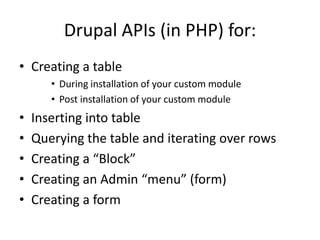
Drupal APIs (in PHP) for:Creating a tableDuring installation of your custom modulePost installation of your custom moduleInserting into tableQuerying the table and iterating over rowsCreating a “Block”Creating an Admin “menu” (form)Creating a form
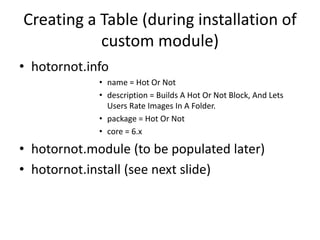
Creating a Table (during installation of custom module)hotornot.infoname = Hot Or Notdescription = Builds A Hot Or Not Block, And Lets Users Rate Images In A Folder.package = Hot Or Notcore = 6.xhotornot.module (to be populated later)hotornot.install (see next slide)
Hotornot.install<?phpfunction hotornot_install() {  switch ($GLOBALS['db_type']) {    case 'mysql':    case 'mysqli':      // the {tablename} syntax is so multisite installs can add a prefix to the table name as set in the settings.php filedb_query("CREATE TABLE {hotornot_filelist} (file_idint unsigned NOT NULL AUTO_INCREMENT PRIMARY KEY,file_pathvarchar(256) NOT NULL DEFAULT './.',present_or_notsmallint unsigned NOT NULL DEFAULT 1,          title varchar(256),          description text        ) /*!40100 DEFAULT CHARACTER SET utf8 */;");break;  }}
Adding Another Table laterfunction hotornot_update_1() {  switch ($GLOBALS['db_type']) {    case 'mysql':    case 'mysqli':db_query ("CREATE TABLE {hotornot_userchoice} (file_idint unsigned NOT NULL DEFAULT 0,uidint unsigned NOT NULL DEFAULT 0,hot_or_notsmallint unsigned NOT NULL DEFAULT 0,          PRIMARY KEY (file_id, uid)        ) /*!40100 DEFAULT CHARACTER SET utf8 */;");      break;  }}
Things To Remember …db_query function accepts an SQL statement as input, and executes it.
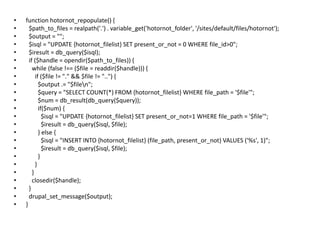
function hotornot_repopulate() {  $path_to_files = realpath('.') . variable_get('hotornot_folder', '/sites/default/files/hotornot');  $output = "";  $isql = "UPDATE {hotornot_filelist} SET present_or_not = 0 WHERE file_id>0";  $iresult = db_query($isql);  if ($handle = opendir($path_to_files)) {    while (false !== ($file = readdir($handle))) {      if ($file != "." && $file != "..") {        $output .= "$file\n";        $query = "SELECT COUNT(*) FROM {hotornot_filelist} WHERE file_path = '$file'";        $num = db_result(db_query($query));        if($num) {          $isql = "UPDATE {hotornot_filelist} SET present_or_not=1 WHERE file_path = '$file'";          $iresult = db_query($isql, $file);        } else {          $isql = "INSERT INTO {hotornot_filelist} (file_path, present_or_not) VALUES ('%s', 1)";          $iresult = db_query($isql, $file);}      }    }closedir($handle);  }drupal_set_message($output);}
Things To Remember …db_query function accepts an SQL statement as input, and executes it.db_result(db_query($sql)) extracts the SINGLE value of the db_query result.variable_get function is used to get the value of a programmer-defined variable. (see later).
hotornot.module – part 1: adding the admin menu (a)<?phpfunction hotornot_menu() {  $items = array();  $items['admin/settings/hotornot'] = array(    'title' => t('Hot Or Not'),    'description' => t('Select The Hot Or Not Image Folder'),    'page callback' => 'drupal_get_form',    'page arguments' => array('hotornot_admin_settings'),    'access arguments' => array('administer site configuration'),  );  return $items;}….(see next slide)
hotornot.module – part 1: adding the admin menu (b)function hotornot_admin_settings() {  $form = array();  $form['hotornot_folder'] = array(    '#type' => 'textfield',    '#title' => t('The folder where all the images for the Hot Or Not are Stored'),    '#default_value' => variable_get('hotornot_folder', 'sites/default/files/hotornot'),  );  $form['hotornot_repopulate'] = array(    '#type' => 'submit',    '#value' => 'Repopulate',  );  $form['#submit'][] = 'hotornot_admin_settings_submit_handler';  return system_settings_form($form);}function hotornot_admin_settings_submit_handler(&$form, &$form_state) {  if ($form_state['clicked_button']['#id'] == 'edit-hotornot-repopulate') {hotornot_repopulate();  }}
Things to remember …Use drupal forms api to build the forms, even the Admin forms.3 steps to having your own module’s admin settings form:Define path + form_builder_function in hook_menu();Build your form using the forms API. Remember to wrap your form with  “system_settings_form”Do your “stuff” in the submit handler.
hotornot.module – part 2adding the block (a)function hotornot_block($op = 'list', $delta = 0, $edit = array()) {  switch ($op) {    case 'list':      $blocks[0]['info'] = t('Rate this!');      return $blocks;    case 'view':      if ($delta == 0 ) {         $block[0]['subject'] = t("Do you like ...");        $block[0]['content'] = drupal_get_form('hotornot_hotornotform');      }      return $block[$delta];  }}
hotornot.module – part 2adding the block (b)function hotornot_hotornotform(&$form_state) {$form = array();   global $user;$sql = "SELECT filelist.file_path AS filename, filelist.file_id AS file_id, filelist.title AS file_title FROM {hotornot_filelist} as filelist WHERE filelist.present_or_not > 0 AND (filelist.file_id not in (SELECT file_id FROM {hotornot_userchoice} WHERE uid=%d)) ORDER BY RAND() LIMIT 1";$result = db_query($sql, $user->uid);  $atleastoneexists = FALSE;  while ($row = db_fetch_array($result)) {    $atleastoneexists = TRUE;    $form['my_fileid'] = array(      '#type' => 'hidden',      '#value' => $row['file_id']);
hotornot.module – part 2adding the block (c)  $form['picture'] = array(      '#type' => 'markup',      '#value' => '<img width="100%" src="' . base_path() . variable_get('hotornot_folder', '/sites/default/files/hotornot') . '/' . $row['filename'] . '"/><br/><strong>...'. $row['file_title'] . ' ?</strong><br/>',    );    break;  }if ($atleastoneexists) {    $form['ishot'] = array(      '#type' => 'submit',      '#value' => t('Yes')    );    $form['isnot'] = array(      '#type' => 'submit',      '#value' => t('No')    );  } else {    $form['picture'] = array(    '#type' => 'markup',    '#value' => '<p>Currently, you have seen all the items. Thank you.</p>',     );  }  return $form;}
hotornot.module – part 2adding the block (d)function hotornot_hotornotform_submit(&$form, &$form_state) {   global $user;   if ($form_state['clicked_button']['#id'] == 'edit-ishot') {       $ishot = 1;   } else {    $ishot = 0;   }   $fileid = $form_state['clicked_button']['#post']['my_fileid'];   $isql = "REPLACE INTO {hotornot_userchoice} (file_id, uid, hot_or_not) VALUES (%d, %d, %d)";   $iresult = db_query($isql, $fileid, $user->uid, $ishot);}
Things To Remember …db_query function accepts an SQL statement as input, and executes it.db_result(db_query($sql)) extracts the SINGLE value of the db_query result.To get the rows of the query result in an iterator.$result = db_query($sql); while ($row = db_fetch_array($result)) {    $val = $row[‘column_name’]}
hotornot.module – part 3adding a page to enter title/desc (a)function hotornot_menu() {  $items = array();  // ...code...$items['hotornot/administer'] = array(    'title' => t('Hot Or Not Administration'),    'description' => t('Add Or Edit Title And Descriptions to Hot Or Not Items'),    'page callback' => 'local_hotornot_administer_description_form',    'access arguments' => array('access content'),    'type' => MENU_CALLBACK,  );  // ...code...  return $items;}function local_hotornot_administer_description_form() {  return drupal_get_form('hotornot_administer_description_form');}
hotornot.module – part 3adding a page to enter title/desc (b)function hotornot_administer_description_form(&$form_state) {  $form = array();  global $user;  $form['blurb'] = array (    '#type' => 'markup',    '#value' => '<p>You will be shown one picture at a time that does not have any title or description. You just have to enter a title and description and hit submit.</p>' ,  );  $sql = "SELECT filelist.file_path AS filename, filelist.file_id AS file_id, filelist.title AS title FROM {hotornot_filelist} as filelist WHERE filelist.present_or_not > 0 AND filelist.title is NULL LIMIT 1";  $result = db_query($sql);  $atleastoneexists = FALSE;  while ($row = db_fetch_array($result)) {
hotornot.module – part 3adding a page to enter title/desc (c) $atleastoneexists = TRUE;    $form['fileid'] = array(      '#type' => 'hidden',      '#value' => $row['file_id']    );    $form['picture'] = array(      '#type' => 'markup',      '#value' => '<imgsrc="' . base_path() . variable_get('hotornot_folder', '/sites/default/files/hotornot') . '/' . $row['filename'] . '"/>',    );    $form['title'] = array(      '#type' => 'textfield',      '#title' => 'Title',      '#default_value' => $row['title'],    );  }  if ($atleastoneexists) {    $form['submit'] = array(      '#type' => 'submit',      '#value' => 'Submit',    );
hotornot.module – part 3adding a page to enter title/desc (d) } else {    $form['picture'] = array(    '#type' => 'markup',    '#value' => '<p>Currently, you have seen all the items. Thank you.</p>',    );  }  return $form;}function hotornot_administer_description_form_submit(&$form, &$form_state) {   $fileid = $form_state['values']['fileid'];   $title = $form_state['values']['title'];   $isql = "UPDATE {hotornot_filelist} SET title='%s' WHERE file_id=%d";   $iresult = db_query($isql, $title, $fileid);}
SummaryWe learnt how to create a new table at the time of installing our moduleHow to use db_query, db_result, db_fetch_arrayHow to create user blocks and user pagesHow to create Admin menus and define new variablesHow to use Forms API
Drupal 7 changesSwitch(db_type) does not work!Db_result() is replaced with ->fetchField();Db_query (“adb=%d,%s”, $a, $b) is replaced withDb_query(“abd=:a,:b”, array(‘:a’=>$a, ‘:b’=>$b));

Views notwithstanding

  • 1.
    Views NotwithstandingA Programmer’sguide to working with MySQL Tables in Drupal using PHP and SQL-- Srikanth Bangalore.Bangalore.srikanth@gmail.comDrupal ID: bangalos
  • 2.
    Drupal APIs (inPHP) for:Creating a tableDuring installation of your custom modulePost installation of your custom moduleInserting into tableQuerying the table and iterating over rowsCreating a “Block”Creating an Admin “menu” (form)Creating a form
  • 3.
    Creating a Table(during installation of custom module)hotornot.infoname = Hot Or Notdescription = Builds A Hot Or Not Block, And Lets Users Rate Images In A Folder.package = Hot Or Notcore = 6.xhotornot.module (to be populated later)hotornot.install (see next slide)
  • 4.
    Hotornot.install<?phpfunction hotornot_install() { switch ($GLOBALS['db_type']) { case 'mysql': case 'mysqli': // the {tablename} syntax is so multisite installs can add a prefix to the table name as set in the settings.php filedb_query("CREATE TABLE {hotornot_filelist} (file_idint unsigned NOT NULL AUTO_INCREMENT PRIMARY KEY,file_pathvarchar(256) NOT NULL DEFAULT './.',present_or_notsmallint unsigned NOT NULL DEFAULT 1, title varchar(256), description text ) /*!40100 DEFAULT CHARACTER SET utf8 */;");break; }}
  • 5.
    Adding Another Tablelaterfunction hotornot_update_1() { switch ($GLOBALS['db_type']) { case 'mysql': case 'mysqli':db_query ("CREATE TABLE {hotornot_userchoice} (file_idint unsigned NOT NULL DEFAULT 0,uidint unsigned NOT NULL DEFAULT 0,hot_or_notsmallint unsigned NOT NULL DEFAULT 0, PRIMARY KEY (file_id, uid) ) /*!40100 DEFAULT CHARACTER SET utf8 */;"); break; }}
  • 6.
    Things To Remember…db_query function accepts an SQL statement as input, and executes it.
  • 7.
    function hotornot_repopulate() { $path_to_files = realpath('.') . variable_get('hotornot_folder', '/sites/default/files/hotornot'); $output = ""; $isql = "UPDATE {hotornot_filelist} SET present_or_not = 0 WHERE file_id>0"; $iresult = db_query($isql); if ($handle = opendir($path_to_files)) { while (false !== ($file = readdir($handle))) { if ($file != "." && $file != "..") { $output .= "$file\n"; $query = "SELECT COUNT(*) FROM {hotornot_filelist} WHERE file_path = '$file'"; $num = db_result(db_query($query)); if($num) { $isql = "UPDATE {hotornot_filelist} SET present_or_not=1 WHERE file_path = '$file'"; $iresult = db_query($isql, $file); } else { $isql = "INSERT INTO {hotornot_filelist} (file_path, present_or_not) VALUES ('%s', 1)"; $iresult = db_query($isql, $file);} } }closedir($handle); }drupal_set_message($output);}
  • 8.
    Things To Remember…db_query function accepts an SQL statement as input, and executes it.db_result(db_query($sql)) extracts the SINGLE value of the db_query result.variable_get function is used to get the value of a programmer-defined variable. (see later).
  • 9.
    hotornot.module – part1: adding the admin menu (a)<?phpfunction hotornot_menu() { $items = array(); $items['admin/settings/hotornot'] = array( 'title' => t('Hot Or Not'), 'description' => t('Select The Hot Or Not Image Folder'), 'page callback' => 'drupal_get_form', 'page arguments' => array('hotornot_admin_settings'), 'access arguments' => array('administer site configuration'), ); return $items;}….(see next slide)
  • 10.
    hotornot.module – part1: adding the admin menu (b)function hotornot_admin_settings() { $form = array(); $form['hotornot_folder'] = array( '#type' => 'textfield', '#title' => t('The folder where all the images for the Hot Or Not are Stored'), '#default_value' => variable_get('hotornot_folder', 'sites/default/files/hotornot'), ); $form['hotornot_repopulate'] = array( '#type' => 'submit', '#value' => 'Repopulate', ); $form['#submit'][] = 'hotornot_admin_settings_submit_handler'; return system_settings_form($form);}function hotornot_admin_settings_submit_handler(&$form, &$form_state) { if ($form_state['clicked_button']['#id'] == 'edit-hotornot-repopulate') {hotornot_repopulate(); }}
  • 11.
    Things to remember…Use drupal forms api to build the forms, even the Admin forms.3 steps to having your own module’s admin settings form:Define path + form_builder_function in hook_menu();Build your form using the forms API. Remember to wrap your form with “system_settings_form”Do your “stuff” in the submit handler.
  • 12.
    hotornot.module – part2adding the block (a)function hotornot_block($op = 'list', $delta = 0, $edit = array()) { switch ($op) { case 'list': $blocks[0]['info'] = t('Rate this!'); return $blocks; case 'view': if ($delta == 0 ) { $block[0]['subject'] = t("Do you like ..."); $block[0]['content'] = drupal_get_form('hotornot_hotornotform'); } return $block[$delta]; }}
  • 13.
    hotornot.module – part2adding the block (b)function hotornot_hotornotform(&$form_state) {$form = array(); global $user;$sql = "SELECT filelist.file_path AS filename, filelist.file_id AS file_id, filelist.title AS file_title FROM {hotornot_filelist} as filelist WHERE filelist.present_or_not > 0 AND (filelist.file_id not in (SELECT file_id FROM {hotornot_userchoice} WHERE uid=%d)) ORDER BY RAND() LIMIT 1";$result = db_query($sql, $user->uid); $atleastoneexists = FALSE; while ($row = db_fetch_array($result)) { $atleastoneexists = TRUE; $form['my_fileid'] = array( '#type' => 'hidden', '#value' => $row['file_id']);
  • 14.
    hotornot.module – part2adding the block (c) $form['picture'] = array( '#type' => 'markup', '#value' => '<img width="100%" src="' . base_path() . variable_get('hotornot_folder', '/sites/default/files/hotornot') . '/' . $row['filename'] . '"/><br/><strong>...'. $row['file_title'] . ' ?</strong><br/>', ); break; }if ($atleastoneexists) { $form['ishot'] = array( '#type' => 'submit', '#value' => t('Yes') ); $form['isnot'] = array( '#type' => 'submit', '#value' => t('No') ); } else { $form['picture'] = array( '#type' => 'markup', '#value' => '<p>Currently, you have seen all the items. Thank you.</p>', ); } return $form;}
  • 15.
    hotornot.module – part2adding the block (d)function hotornot_hotornotform_submit(&$form, &$form_state) { global $user; if ($form_state['clicked_button']['#id'] == 'edit-ishot') { $ishot = 1; } else { $ishot = 0; } $fileid = $form_state['clicked_button']['#post']['my_fileid']; $isql = "REPLACE INTO {hotornot_userchoice} (file_id, uid, hot_or_not) VALUES (%d, %d, %d)"; $iresult = db_query($isql, $fileid, $user->uid, $ishot);}
  • 16.
    Things To Remember…db_query function accepts an SQL statement as input, and executes it.db_result(db_query($sql)) extracts the SINGLE value of the db_query result.To get the rows of the query result in an iterator.$result = db_query($sql); while ($row = db_fetch_array($result)) { $val = $row[‘column_name’]}
  • 17.
    hotornot.module – part3adding a page to enter title/desc (a)function hotornot_menu() { $items = array(); // ...code...$items['hotornot/administer'] = array( 'title' => t('Hot Or Not Administration'), 'description' => t('Add Or Edit Title And Descriptions to Hot Or Not Items'), 'page callback' => 'local_hotornot_administer_description_form', 'access arguments' => array('access content'), 'type' => MENU_CALLBACK, ); // ...code... return $items;}function local_hotornot_administer_description_form() { return drupal_get_form('hotornot_administer_description_form');}
  • 18.
    hotornot.module – part3adding a page to enter title/desc (b)function hotornot_administer_description_form(&$form_state) { $form = array(); global $user; $form['blurb'] = array ( '#type' => 'markup', '#value' => '<p>You will be shown one picture at a time that does not have any title or description. You just have to enter a title and description and hit submit.</p>' , ); $sql = "SELECT filelist.file_path AS filename, filelist.file_id AS file_id, filelist.title AS title FROM {hotornot_filelist} as filelist WHERE filelist.present_or_not > 0 AND filelist.title is NULL LIMIT 1"; $result = db_query($sql); $atleastoneexists = FALSE; while ($row = db_fetch_array($result)) {
  • 19.
    hotornot.module – part3adding a page to enter title/desc (c) $atleastoneexists = TRUE; $form['fileid'] = array( '#type' => 'hidden', '#value' => $row['file_id'] ); $form['picture'] = array( '#type' => 'markup', '#value' => '<imgsrc="' . base_path() . variable_get('hotornot_folder', '/sites/default/files/hotornot') . '/' . $row['filename'] . '"/>', ); $form['title'] = array( '#type' => 'textfield', '#title' => 'Title', '#default_value' => $row['title'], ); } if ($atleastoneexists) { $form['submit'] = array( '#type' => 'submit', '#value' => 'Submit', );
  • 20.
    hotornot.module – part3adding a page to enter title/desc (d) } else { $form['picture'] = array( '#type' => 'markup', '#value' => '<p>Currently, you have seen all the items. Thank you.</p>', ); } return $form;}function hotornot_administer_description_form_submit(&$form, &$form_state) { $fileid = $form_state['values']['fileid']; $title = $form_state['values']['title']; $isql = "UPDATE {hotornot_filelist} SET title='%s' WHERE file_id=%d"; $iresult = db_query($isql, $title, $fileid);}
  • 21.
    SummaryWe learnt howto create a new table at the time of installing our moduleHow to use db_query, db_result, db_fetch_arrayHow to create user blocks and user pagesHow to create Admin menus and define new variablesHow to use Forms API
  • 22.
    Drupal 7 changesSwitch(db_type)does not work!Db_result() is replaced with ->fetchField();Db_query (“adb=%d,%s”, $a, $b) is replaced withDb_query(“abd=:a,:b”, array(‘:a’=>$a, ‘:b’=>$b));