Workshop
Yasas Senarath
Visiting Instructor & Research Assistant
Dept. of Computer Science and Engineering,
University of Moratuwa
Solr
Introduction [Recall]
● Search Platform
● Open-Source
● Search Applications
● Built on top of Lucene
● Why…
○ Enterprise-ready
○ Fast
○ Highly Scalable
● Search + NoSQL
○ Non Relational Data Storage
Features of Apache Solr [Recall]
● Restful APIs
○ No Java programming skills Required
● Full text search
○ tokens, phrases, spell check, wildcard, and auto-complete
● Enterprise ready
● Flexible and Extensible
● NoSQL database
● Admin Interface
● Highly Scalable
● Text-Centric and Sorted by Relevance
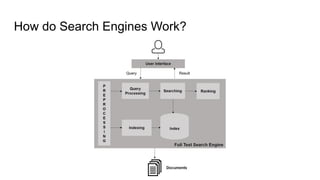
How do Search Engines Work?
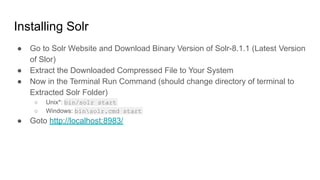
Installing Solr
● Go to Solr Website and Download Binary Version of Solr-8.1.1 (Latest Version
of Slor)
● Extract the Downloaded Compressed File to Your System
● Now in the Terminal Run Command (should change directory of terminal to
Extracted Solr Folder)
○ Unix*: bin/solr start
○ Windows: binsolr.cmd start
● Goto http://localhost:8983/
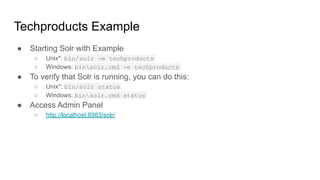
Techproducts Example
● Starting Solr with Example
○ Unix*: bin/solr -e techproducts
○ Windows: binsolr.cmd -e techproducts
● To verify that Solr is running, you can do this:
○ Unix*: bin/solr status
○ Windows: binsolr.cmd status
● Access Admin Panel
○ http://localhost:8983/solr/
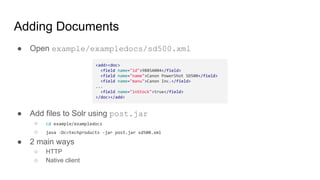
Adding Documents
● Open example/exampledocs/sd500.xml
● Add files to Solr using post.jar
○ cd example/exampledocs
○ java -Dc=techproducts -jar post.jar sd500.xml
● 2 main ways
○ HTTP
○ Native client
<add><doc>
<field name="id">9885A004</field>
<field name="name">Canon PowerShot SD500</field>
<field name="manu">Canon Inc.</field>
...
<field name="inStock">true</field>
</doc></add>
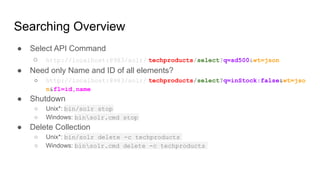
Searching Overview
● Select API Command
○ http://localhost:8983/solr/ techproducts/select?q=sd500&wt=json
● Need only Name and ID of all elements?
○ http://localhost:8983/solr/ techproducts/select?q=inStock:false&wt=jso
n&fl=id,name
● Shutdown
○ Unix*: bin/solr stop
○ Windows: binsolr.cmd stop
● Delete Collection
○ Unix*: bin/solr delete -c techproducts
○ Windows: binsolr.cmd delete -c techproducts
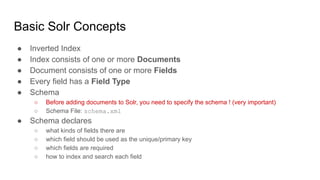
Basic Solr Concepts
● Inverted Index
● Index consists of one or more Documents
● Document consists of one or more Fields
● Every field has a Field Type
● Schema
○ Before adding documents to Solr, you need to specify the schema ! (very important)
○ Schema File: schema.xml
● Schema declares
○ what kinds of fields there are
○ which field should be used as the unique/primary key
○ which fields are required
○ how to index and search each field
Basic Solr Concepts [Contd..]
● Field Types
○ float
○ long
○ double
○ date
○ Text
● Define new field types!
<fieldtype name="phonetic" stored="false" indexed="true" class="solr.TextField" >
<analyzer>
<tokenizer class="solr.StandardTokenizerFactory"/>
<filter class="solr.DoubleMetaphoneFilterFactory" inject="false"/>
</analyzer>
</fieldtype>
Basic Solr Concepts [Contd..]
● Defining a Field
○ name: Name of the field
○ type: Field type
○ indexed: Should this field be added to the inverted index?
○ stored: Should the original value of this field be stored?
○ multiValued: Can this field have multiple values
<field name="id" type="text" indexed="true" stored="true" multiValued="true"/>
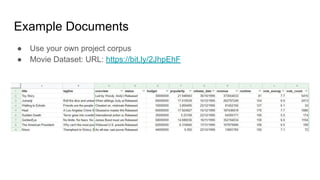
Example Documents
● Use your own project corpus
● Movie Dataset: URL: https://bit.ly/2JhpEhF
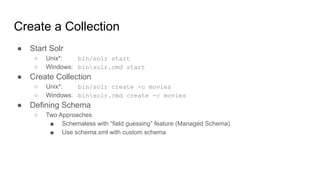
Create a Collection
● Start Solr
○ Unix*: bin/solr start
○ Windows: binsolr.cmd start
● Create Collection
○ Unix*: bin/solr create -c movies
○ Windows: binsolr.cmd create -c movies
● Defining Schema
○ Two Approaches
■ Schemaless with “field guessing” feature (Managed Schema)
■ Use schema.xml with custom schema
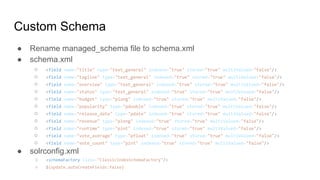
Custom Schema
● Rename managed_schema file to schema.xml
● schema.xml
○ <field name="title" type="text_general" indexed="true" stored="true" multiValued="false"/>
○ <field name="tagline" type="text_general" indexed="true" stored="true" multiValued="false"/>
○ <field name="overview" type="text_general" indexed="true" stored="true" multiValued="false"/>
○ <field name="status" type="text_general" indexed="true" stored="true" multiValued="false"/>
○ <field name="budget" type="plong" indexed="true" stored="true" multiValued="false"/>
○ <field name="popularity" type="pdouble" indexed="true" stored="true" multiValued="false"/>
○ <field name="release_date" type="pdate" indexed="true" stored="true" multiValued="false"/>
○ <field name="revenue" type="plong" indexed="true" stored="true" multiValued="false"/>
○ <field name="runtime" type="pint" indexed="true" stored="true" multiValued="false"/>
○ <field name="vote_average" type="pfloat" indexed="true" stored="true" multiValued="false"/>
○ <field name="vote_count" type="pint" indexed="true" stored="true" multiValued="false"/>
● solrconfig.xml
○ <schemaFactory class="ClassicIndexSchemaFactory"/>
○ ${update.autoCreateFields:false}
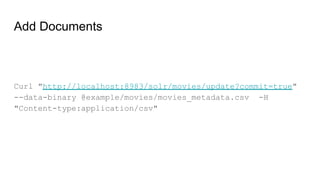
Add Documents
Curl "http://localhost:8983/solr/movies/update?commit=true"
--data-binary @example/movies/movies_metadata.csv -H
"Content-type:application/csv"
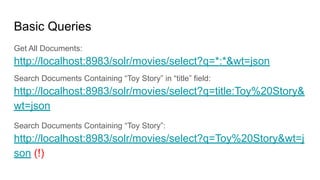
Basic Queries
Get All Documents:
http://localhost:8983/solr/movies/select?q=*:*&wt=json
Search Documents Containing “Toy Story” in “title” field:
http://localhost:8983/solr/movies/select?q=title:Toy%20Story&
wt=json
Search Documents Containing “Toy Story”:
http://localhost:8983/solr/movies/select?q=Toy%20Story&wt=j
son (!)
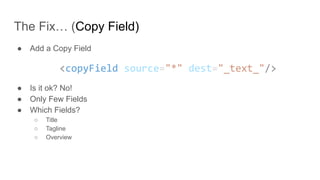
The Fix… (Copy Field)
● Add a Copy Field
<copyField source="*" dest="_text_"/>
● Is it ok? No!
● Only Few Fields
● Which Fields?
○ Title
○ Tagline
○ Overview
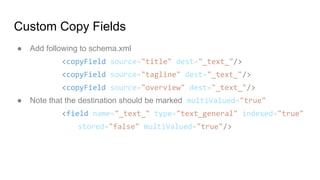
Custom Copy Fields
● Add following to schema.xml
<copyField source="title" dest="_text_"/>
<copyField source="tagline" dest="_text_"/>
<copyField source="overview" dest="_text_"/>
● Note that the destination should be marked multiValued="true"
<field name="_text_" type="text_general" indexed="true"
stored="false" multiValued="true"/>
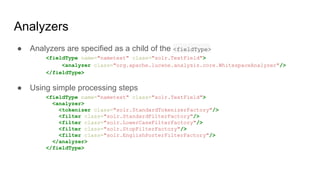
Analyzers
● Analyzers are specified as a child of the <fieldType>
<fieldType name="nametext" class="solr.TextField">
<analyzer class="org.apache.lucene.analysis.core.WhitespaceAnalyzer"/>
</fieldType>
● Using simple processing steps
<fieldType name="nametext" class="solr.TextField">
<analyzer>
<tokenizer class="solr.StandardTokenizerFactory"/>
<filter class="solr.StandardFilterFactory"/>
<filter class="solr.LowerCaseFilterFactory"/>
<filter class="solr.StopFilterFactory"/>
<filter class="solr.EnglishPorterFilterFactory"/>
</analyzer>
</fieldType>
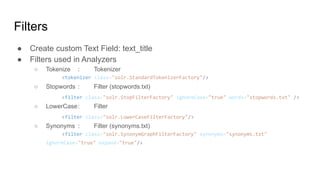
● Create custom Text Field: text_title
● Filters used in Analyzers
○ Tokenize : Tokenizer
<tokenizer class="solr.StandardTokenizerFactory"/>
○ Stopwords : Filter (stopwords.txt)
<filter class="solr.StopFilterFactory" ignoreCase="true" words="stopwords.txt" />
○ LowerCase: Filter
<filter class="solr.LowerCaseFilterFactory"/>
○ Synonyms : Filter (synonyms.txt)
<filter class="solr.SynonymGraphFilterFactory" synonyms="synonyms.txt"
ignoreCase="true" expand="true"/>
Filters
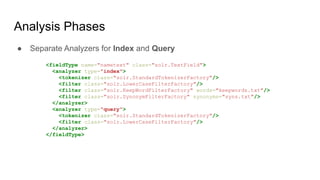
Analysis Phases
● Separate Analyzers for Index and Query
<fieldType name="nametext" class="solr.TextField">
<analyzer type="index">
<tokenizer class="solr.StandardTokenizerFactory"/>
<filter class="solr.LowerCaseFilterFactory"/>
<filter class="solr.KeepWordFilterFactory" words="keepwords.txt"/>
<filter class="solr.SynonymFilterFactory" synonyms="syns.txt"/>
</analyzer>
<analyzer type="query">
<tokenizer class="solr.StandardTokenizerFactory"/>
<filter class="solr.LowerCaseFilterFactory"/>
</analyzer>
</fieldType>
Synonyms (synonyms.txt)
● Add Some Synonyms to synonyms.txt
○ story, story, tale, fiction
○ heat, heat, hot, warm
○ se7en, se7en, seven, 7
● Spell correction with Synonyms
○ stores => stories
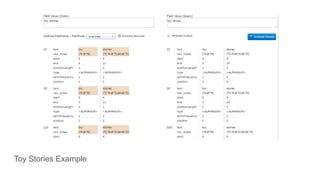
Toy Stories Example
Advanced Queries
● Search title:Mask AND tagline:hero
○ title:Mask AND tagline:hero
○ http://localhost:8983/solr/movies/select?q=title%3AMask%20AND%20tagline%3Ahero
● Search The Mask in title or Mask in title with hero in tagline
○ title:Mask AND tagline:hero
○ http://localhost:8983/solr/movies/select?q=(title%3AMask%20AND%20tagline%3Ahero)%20O
R%20title%3A%22The%20Mask%22
● Wildcard matching: Search movies that have a title starting with “The”
○ title: ^the
○ http://localhost:8983/solr/movies/select?q=title%3A%22the*%22
● Proximity matching: Search “exorcist spirits" with proximity of 4 words in the
overview field
○ “exorcist spirits"~4
○ http://localhost:8983/solr/movies/select?q=overview%3A%22exorcist%20spirits%22~4
● Range Queries
○ Inclusive Range Query: Square brackets [ & ]
■ budget:[500000 TO *]
○ Exclusive Range Query: Curly brackets { & }
■ budget:{500000 TO *}
● Boosting a Term with ^
○ Want a term to be more relevant?
■ toy^4 story
● For more about Queries:
○ https://lucene.apache.org/solr/guide/6_6/the-standard-query-parser.html
Advanced Queries
The Schemaless Approach
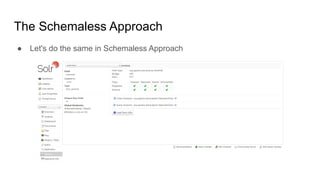
● Let's do the same in Schemaless Approach
Questions?
Yasas Senarath
Visiting Instructor & Research Assistant
Dept. of Computer Science and Engineering,
University of Moratuwa

Solr workshop

  • 1.
    Workshop Yasas Senarath Visiting Instructor& Research Assistant Dept. of Computer Science and Engineering, University of Moratuwa Solr
  • 2.
    Introduction [Recall] ● SearchPlatform ● Open-Source ● Search Applications ● Built on top of Lucene ● Why… ○ Enterprise-ready ○ Fast ○ Highly Scalable ● Search + NoSQL ○ Non Relational Data Storage
  • 3.
    Features of ApacheSolr [Recall] ● Restful APIs ○ No Java programming skills Required ● Full text search ○ tokens, phrases, spell check, wildcard, and auto-complete ● Enterprise ready ● Flexible and Extensible ● NoSQL database ● Admin Interface ● Highly Scalable ● Text-Centric and Sorted by Relevance
  • 4.
    How do SearchEngines Work?
  • 5.
    Installing Solr ● Goto Solr Website and Download Binary Version of Solr-8.1.1 (Latest Version of Slor) ● Extract the Downloaded Compressed File to Your System ● Now in the Terminal Run Command (should change directory of terminal to Extracted Solr Folder) ○ Unix*: bin/solr start ○ Windows: binsolr.cmd start ● Goto http://localhost:8983/
  • 6.
    Techproducts Example ● StartingSolr with Example ○ Unix*: bin/solr -e techproducts ○ Windows: binsolr.cmd -e techproducts ● To verify that Solr is running, you can do this: ○ Unix*: bin/solr status ○ Windows: binsolr.cmd status ● Access Admin Panel ○ http://localhost:8983/solr/
  • 7.
    Adding Documents ● Openexample/exampledocs/sd500.xml ● Add files to Solr using post.jar ○ cd example/exampledocs ○ java -Dc=techproducts -jar post.jar sd500.xml ● 2 main ways ○ HTTP ○ Native client <add><doc> <field name="id">9885A004</field> <field name="name">Canon PowerShot SD500</field> <field name="manu">Canon Inc.</field> ... <field name="inStock">true</field> </doc></add>
  • 8.
    Searching Overview ● SelectAPI Command ○ http://localhost:8983/solr/ techproducts/select?q=sd500&wt=json ● Need only Name and ID of all elements? ○ http://localhost:8983/solr/ techproducts/select?q=inStock:false&wt=jso n&fl=id,name ● Shutdown ○ Unix*: bin/solr stop ○ Windows: binsolr.cmd stop ● Delete Collection ○ Unix*: bin/solr delete -c techproducts ○ Windows: binsolr.cmd delete -c techproducts
  • 9.
    Basic Solr Concepts ●Inverted Index ● Index consists of one or more Documents ● Document consists of one or more Fields ● Every field has a Field Type ● Schema ○ Before adding documents to Solr, you need to specify the schema ! (very important) ○ Schema File: schema.xml ● Schema declares ○ what kinds of fields there are ○ which field should be used as the unique/primary key ○ which fields are required ○ how to index and search each field
  • 10.
    Basic Solr Concepts[Contd..] ● Field Types ○ float ○ long ○ double ○ date ○ Text ● Define new field types! <fieldtype name="phonetic" stored="false" indexed="true" class="solr.TextField" > <analyzer> <tokenizer class="solr.StandardTokenizerFactory"/> <filter class="solr.DoubleMetaphoneFilterFactory" inject="false"/> </analyzer> </fieldtype>
  • 11.
    Basic Solr Concepts[Contd..] ● Defining a Field ○ name: Name of the field ○ type: Field type ○ indexed: Should this field be added to the inverted index? ○ stored: Should the original value of this field be stored? ○ multiValued: Can this field have multiple values <field name="id" type="text" indexed="true" stored="true" multiValued="true"/>
  • 12.
    Example Documents ● Useyour own project corpus ● Movie Dataset: URL: https://bit.ly/2JhpEhF
  • 13.
    Create a Collection ●Start Solr ○ Unix*: bin/solr start ○ Windows: binsolr.cmd start ● Create Collection ○ Unix*: bin/solr create -c movies ○ Windows: binsolr.cmd create -c movies ● Defining Schema ○ Two Approaches ■ Schemaless with “field guessing” feature (Managed Schema) ■ Use schema.xml with custom schema
  • 14.
    Custom Schema ● Renamemanaged_schema file to schema.xml ● schema.xml ○ <field name="title" type="text_general" indexed="true" stored="true" multiValued="false"/> ○ <field name="tagline" type="text_general" indexed="true" stored="true" multiValued="false"/> ○ <field name="overview" type="text_general" indexed="true" stored="true" multiValued="false"/> ○ <field name="status" type="text_general" indexed="true" stored="true" multiValued="false"/> ○ <field name="budget" type="plong" indexed="true" stored="true" multiValued="false"/> ○ <field name="popularity" type="pdouble" indexed="true" stored="true" multiValued="false"/> ○ <field name="release_date" type="pdate" indexed="true" stored="true" multiValued="false"/> ○ <field name="revenue" type="plong" indexed="true" stored="true" multiValued="false"/> ○ <field name="runtime" type="pint" indexed="true" stored="true" multiValued="false"/> ○ <field name="vote_average" type="pfloat" indexed="true" stored="true" multiValued="false"/> ○ <field name="vote_count" type="pint" indexed="true" stored="true" multiValued="false"/> ● solrconfig.xml ○ <schemaFactory class="ClassicIndexSchemaFactory"/> ○ ${update.autoCreateFields:false}
  • 15.
    Add Documents Curl "http://localhost:8983/solr/movies/update?commit=true" --data-binary@example/movies/movies_metadata.csv -H "Content-type:application/csv"
  • 16.
    Basic Queries Get AllDocuments: http://localhost:8983/solr/movies/select?q=*:*&wt=json Search Documents Containing “Toy Story” in “title” field: http://localhost:8983/solr/movies/select?q=title:Toy%20Story& wt=json Search Documents Containing “Toy Story”: http://localhost:8983/solr/movies/select?q=Toy%20Story&wt=j son (!)
  • 17.
    The Fix… (CopyField) ● Add a Copy Field <copyField source="*" dest="_text_"/> ● Is it ok? No! ● Only Few Fields ● Which Fields? ○ Title ○ Tagline ○ Overview
  • 18.
    Custom Copy Fields ●Add following to schema.xml <copyField source="title" dest="_text_"/> <copyField source="tagline" dest="_text_"/> <copyField source="overview" dest="_text_"/> ● Note that the destination should be marked multiValued="true" <field name="_text_" type="text_general" indexed="true" stored="false" multiValued="true"/>
  • 19.
    Analyzers ● Analyzers arespecified as a child of the <fieldType> <fieldType name="nametext" class="solr.TextField"> <analyzer class="org.apache.lucene.analysis.core.WhitespaceAnalyzer"/> </fieldType> ● Using simple processing steps <fieldType name="nametext" class="solr.TextField"> <analyzer> <tokenizer class="solr.StandardTokenizerFactory"/> <filter class="solr.StandardFilterFactory"/> <filter class="solr.LowerCaseFilterFactory"/> <filter class="solr.StopFilterFactory"/> <filter class="solr.EnglishPorterFilterFactory"/> </analyzer> </fieldType>
  • 20.
    ● Create customText Field: text_title ● Filters used in Analyzers ○ Tokenize : Tokenizer <tokenizer class="solr.StandardTokenizerFactory"/> ○ Stopwords : Filter (stopwords.txt) <filter class="solr.StopFilterFactory" ignoreCase="true" words="stopwords.txt" /> ○ LowerCase: Filter <filter class="solr.LowerCaseFilterFactory"/> ○ Synonyms : Filter (synonyms.txt) <filter class="solr.SynonymGraphFilterFactory" synonyms="synonyms.txt" ignoreCase="true" expand="true"/> Filters
  • 21.
    Analysis Phases ● SeparateAnalyzers for Index and Query <fieldType name="nametext" class="solr.TextField"> <analyzer type="index"> <tokenizer class="solr.StandardTokenizerFactory"/> <filter class="solr.LowerCaseFilterFactory"/> <filter class="solr.KeepWordFilterFactory" words="keepwords.txt"/> <filter class="solr.SynonymFilterFactory" synonyms="syns.txt"/> </analyzer> <analyzer type="query"> <tokenizer class="solr.StandardTokenizerFactory"/> <filter class="solr.LowerCaseFilterFactory"/> </analyzer> </fieldType>
  • 22.
    Synonyms (synonyms.txt) ● AddSome Synonyms to synonyms.txt ○ story, story, tale, fiction ○ heat, heat, hot, warm ○ se7en, se7en, seven, 7 ● Spell correction with Synonyms ○ stores => stories
  • 23.
  • 24.
    Advanced Queries ● Searchtitle:Mask AND tagline:hero ○ title:Mask AND tagline:hero ○ http://localhost:8983/solr/movies/select?q=title%3AMask%20AND%20tagline%3Ahero ● Search The Mask in title or Mask in title with hero in tagline ○ title:Mask AND tagline:hero ○ http://localhost:8983/solr/movies/select?q=(title%3AMask%20AND%20tagline%3Ahero)%20O R%20title%3A%22The%20Mask%22 ● Wildcard matching: Search movies that have a title starting with “The” ○ title: ^the ○ http://localhost:8983/solr/movies/select?q=title%3A%22the*%22 ● Proximity matching: Search “exorcist spirits" with proximity of 4 words in the overview field ○ “exorcist spirits"~4 ○ http://localhost:8983/solr/movies/select?q=overview%3A%22exorcist%20spirits%22~4
  • 25.
    ● Range Queries ○Inclusive Range Query: Square brackets [ & ] ■ budget:[500000 TO *] ○ Exclusive Range Query: Curly brackets { & } ■ budget:{500000 TO *} ● Boosting a Term with ^ ○ Want a term to be more relevant? ■ toy^4 story ● For more about Queries: ○ https://lucene.apache.org/solr/guide/6_6/the-standard-query-parser.html Advanced Queries
  • 26.
    The Schemaless Approach ●Let's do the same in Schemaless Approach
  • 27.
    Questions? Yasas Senarath Visiting Instructor& Research Assistant Dept. of Computer Science and Engineering, University of Moratuwa