APA Referencing in Microsoft Word 2007Brisbane Grammar School Library
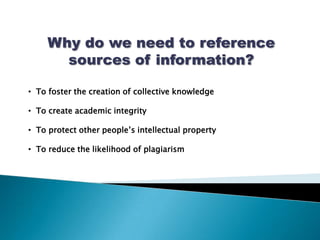
Why do we need to reference sources of information?  To foster the creation of collective knowledge
  To create academic integrity
  To protect other people’s intellectual property
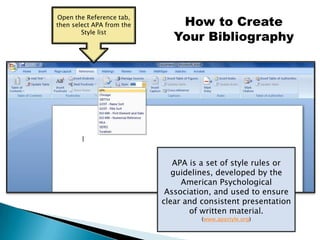
  To reduce the likelihood of plagiarismOpen the Reference tab, then select APA from the Style listHow to Create Your BibliographyAPA is a set of style rules or guidelines, developed by the American Psychological Association, and used to ensure clear and consistent presentation of written material.(www.apastyle.org)
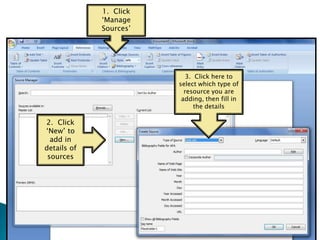
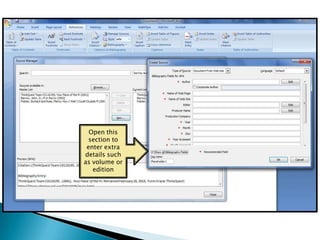
1.  Click ‘Manage Sources’ 3.  Click here to select which type of resource you are adding, then fill in the details2.  Click ‘New’ to add in details of sources
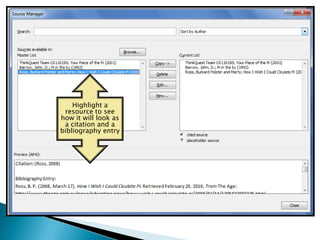
Highlight a resource to see  how it will look as a citation and a bibliography entry
Open this section to enter extra details such as volume or edition
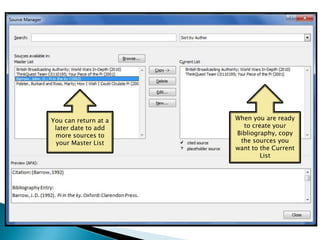
When you are ready to create your Bibliography, copy the sources you want to the Current ListYou can return at a later date to add more sources to your Master List
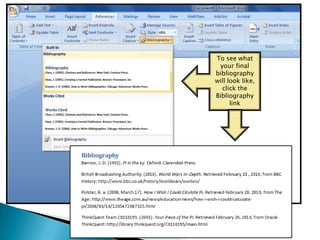
To see what your final bibliography will look like, click the Bibliography link
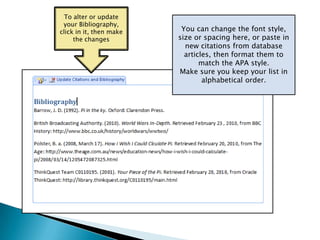
To alter or update your Bibliography, click in it, then make the changesYou can change the font style, size or spacing here, or paste in new citations from database articles, then format them to match the APA style.Make sure you keep your list in alphabetical order.
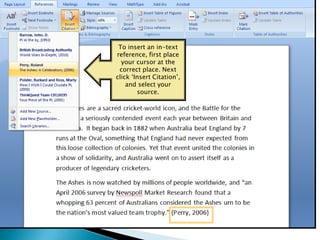
To insert an in-text reference, first place your cursor at the correct place. Next click ‘Insert Citation’, and select your source.

APA Referencing In Microsoft Word 2007

  • 1.
    APA Referencing inMicrosoft Word 2007Brisbane Grammar School Library
  • 2.
    Why do weneed to reference sources of information? To foster the creation of collective knowledge
  • 3.
    Tocreate academic integrity
  • 4.
    Toprotect other people’s intellectual property
  • 5.
    Toreduce the likelihood of plagiarismOpen the Reference tab, then select APA from the Style listHow to Create Your BibliographyAPA is a set of style rules or guidelines, developed by the American Psychological Association, and used to ensure clear and consistent presentation of written material.(www.apastyle.org)
  • 6.
    1. Click‘Manage Sources’ 3. Click here to select which type of resource you are adding, then fill in the details2. Click ‘New’ to add in details of sources
  • 7.
    Highlight a resourceto see how it will look as a citation and a bibliography entry
  • 8.
    Open this sectionto enter extra details such as volume or edition
  • 9.
    When you areready to create your Bibliography, copy the sources you want to the Current ListYou can return at a later date to add more sources to your Master List
  • 10.
    To see whatyour final bibliography will look like, click the Bibliography link
  • 11.
    To alter orupdate your Bibliography, click in it, then make the changesYou can change the font style, size or spacing here, or paste in new citations from database articles, then format them to match the APA style.Make sure you keep your list in alphabetical order.
  • 12.
    To insert anin-text reference, first place your cursor at the correct place. Next click ‘Insert Citation’, and select your source.