Ansible Roles done right
Ansible Berlin Meetup
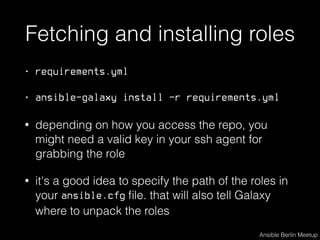
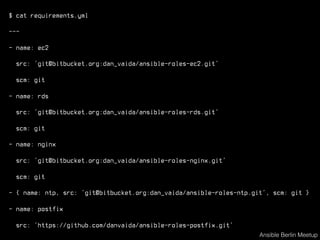
Fetching and installing roles
• requirements.yml
• ansible-galaxy install -r requirements.yml
• depending on how you access the repo, you
might need a valid key in your ssh agent for
grabbing the role
• it's a good idea to specify the path of the roles in
your ansible.cfg file. that will also tell Galaxy
where to unpack the roles
Ansible Berlin Meetup
$ cat requirements.yml
---
- name: ec2
src: ‘git@bitbucket.org:dan_vaida/ansible-roles-ec2.git’
scm: git
- name: rds
src: ‘git@bitbucket.org:dan_vaida/ansible-roles-rds.git’
scm: git
- name: nginx
src: ‘git@bitbucket.org:dan_vaida/ansible-roles-nginx.git’
scm: git
- { name: ntp, src: ‘git@bitbucket.org:dan_vaida/ansible-roles-ntp.git’, scm: git }
- name: postfix
src: ‘https://github.com/danvaida/ansible-roles-postfix.git’
Ansible Berlin Meetup
$ cat ansible.cfg
[defaults]
roles_path = ./roles
retry_files_enabled = False
$ ansible-galaxy install -r requirements.yml
- extracting ec2 to /Users/dvaida/work/ansible_berlin/ansible-pim/roles/ec2
- ec2 was installed successfully
- extracting rds to /Users/dvaida/work/ansible_berlin/ansible-pim/roles/rds
- rds was installed successfully
- nginx is already installed, skipping.
$ cat .gitignore
roles/ec2
roles/rds
roles/nginx
Ansible Berlin Meetup
Docker containers
FROM debian:wheezy
RUN apt-get -y update
RUN apt-get -y install python-pip=1.1-3 
python-dev=2.7.3-4+deb7u1 
libffi-dev=3.0.10-3
RUN pip install ansible==2.1
ADD run-tests.sh run-tests.sh
CMD ["./run-tests.sh"]
Ansible Berlin Meetup
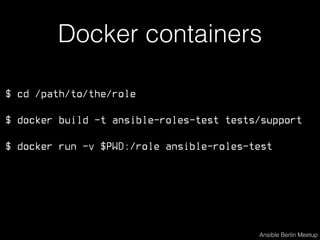
$ cd /path/to/the/role
$ docker build -t ansible-roles-test tests/support
$ docker run -v $PWD:/role ansible-roles-test
Ansible Berlin Meetup
Docker containers
Docker containers
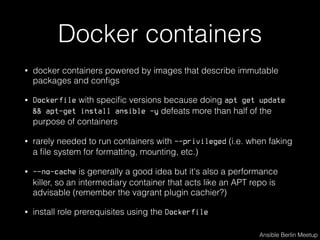
• docker containers powered by images that describe immutable
packages and configs
• Dockerfile with specific versions because doing apt get update
&& apt-get install ansible -y defeats more than half of the
purpose of containers
• rarely needed to run containers with --privileged (i.e. when faking
a file system for formatting, mounting, etc.)
• --no-cache is generally a good idea but it's also a performance
killer, so an intermediary container that acts like an APT repo is
advisable (remember the vagrant plugin cachier?)
• install role prerequisites using the Dockerfile
Ansible Berlin Meetup
Wrapper bash script
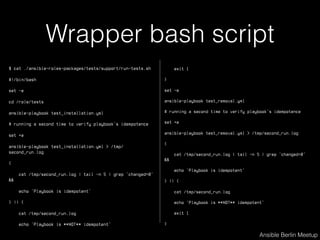
$ cat ./ansible-roles-packages/tests/support/run-tests.sh
#!/bin/bash
set -e
cd /role/tests
ansible-playbook test_installation.yml
# running a second time to verify playbook's idempotence
set +e
ansible-playbook test_installation.yml > /tmp/
second_run.log
{
cat /tmp/second_run.log | tail -n 5 | grep 'changed=0'
&&
echo 'Playbook is idempotent'
} || {
cat /tmp/second_run.log
echo 'Playbook is **NOT** idempotent'
Ansible Berlin Meetup
exit 1
}
set -e
ansible-playbook test_removal.yml
# running a second time to verify playbook's idempotence
set +e
ansible-playbook test_removal.yml > /tmp/second_run.log
{
cat /tmp/second_run.log | tail -n 5 | grep 'changed=0'
&&
echo 'Playbook is idempotent'
} || {
cat /tmp/second_run.log
echo 'Playbook is **NOT** idempotent'
exit 1
}
Wrapper bash script
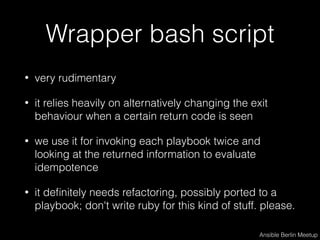
• very rudimentary
• it relies heavily on alternatively changing the exit
behaviour when a certain return code is seen
• we use it for invoking each playbook twice and
looking at the returned information to evaluate
idempotence
• it definitely needs refactoring, possibly ported to a
playbook; don't write ruby for this kind of stuff. please.
Ansible Berlin Meetup
changed=0 unreachable=0 failed=0
• Idempotence means f(x)=f(f(x))
• The tests that ship with the roles are like unit-
tests in the big picture
• You must write integration tests, too. They will
prove that your roles’ interconnection actually
works by testing your application's health.
Ansible Berlin Meetup
Custom modules, plugins
• sometimes a role uses an unpublished, custom
role you wrote
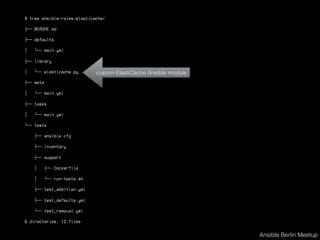
• simply place it in the library directory located in
the root of the role. the tests will be able to use it,
too
• same goes for some plugins like callbacks
• don't forget to include tests for your modules
Ansible Berlin Meetup
$ tree ansible-roles-elasticache/
├── README.md
├── defaults
│   └── main.yml
├── library
│   └── elasticache.py
├── meta
│   └── main.yml
├── tasks
│   └── main.yml
└── tests
├── ansible.cfg
├── inventory
├── support
│   ├── Dockerfile
│   └── run-tests.sh
├── test_addition.yml
├── test_defaults.yml
└── test_removal.yml
6 directories, 12 files
Ansible Berlin Meetup
custom ElastiCache Ansible module
Standards
• Readability, easiness of editing, VCS-friendliness, deprecation warnings
• Example:
• only have True and False not yes, No, TRUE, etc.
• stick with your chosen way of writing tasks (foldable scalars (>), shorthand/
one-line (=) or structured map/list (:)
• use single-quotes for vars containing non-alphanumerical chars and
doube-quotes for dynamic vars
• prefix variables used within a role with the role’s name
• use tags with confidence
• …
Ansible Berlin Meetup
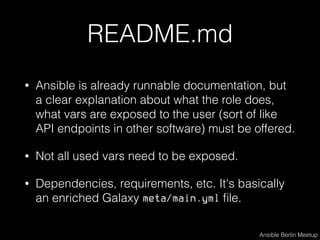
README.md
• Ansible is already runnable documentation, but
a clear explanation about what the role does,
what vars are exposed to the user (sort of like
API endpoints in other software) must be offered.
• Not all used vars need to be exposed.
• Dependencies, requirements, etc. It's basically
an enriched Galaxy meta/main.yml file.
Ansible Berlin Meetup
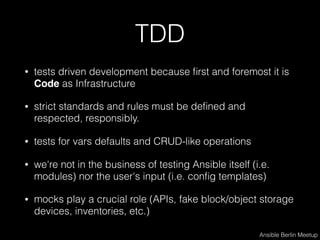
TDD
• tests driven development because first and foremost it is
Code as Infrastructure
• strict standards and rules must be defined and
respected, responsibly.
• tests for vars defaults and CRUD-like operations
• we're not in the business of testing Ansible itself (i.e.
modules) nor the user's input (i.e. config templates)
• mocks play a crucial role (APIs, fake block/object storage
devices, inventories, etc.)
Ansible Berlin Meetup
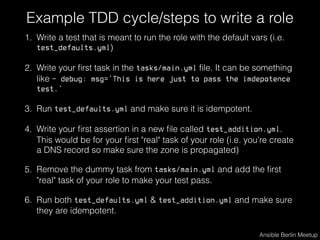
Example TDD cycle/steps to write a role
1. Write a test that is meant to run the role with the default vars (i.e.
test_defaults.yml)
2. Write your first task in the tasks/main.yml file. It can be something
like - debug: msg='This is here just to pass the imdepotence
test.’
3. Run test_defaults.yml and make sure it is idempotent.
4. Write your first assertion in a new file called test_addition.yml.
This would be for your first "real" task of your role (i.e. you’re create
a DNS record so make sure the zone is propagated)
5. Remove the dummy task from tasks/main.yml and add the first
"real" task of your role to make your test pass.
6. Run both test_defaults.yml & test_addition.yml and make sure
they are idempotent.
Ansible Berlin Meetup
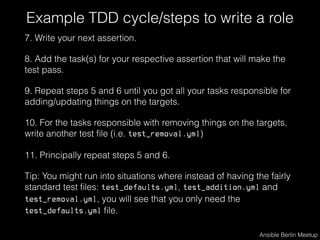
Example TDD cycle/steps to write a role
7. Write your next assertion.
8. Add the task(s) for your respective assertion that will make the
test pass.
9. Repeat steps 5 and 6 until you got all your tasks responsible for
adding/updating things on the targets.
10. For the tasks responsible with removing things on the targets,
write another test file (i.e. test_removal.yml)
11. Principally repeat steps 5 and 6.
Tip: You might run into situations where instead of having the fairly
standard test files: test_defaults.yml, test_addition.yml and
test_removal.yml, you will see that you only need the
test_defaults.yml file.
Ansible Berlin Meetup
CI via Jenkins
• the complete flow includes automatic runs of the
docker containers which implicitly execute the role tests
• this is typically happening when a PR is made, a
branch is merged into the master branch.
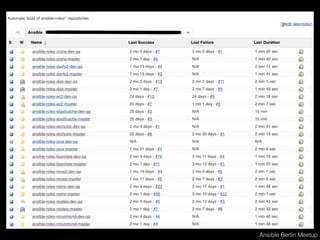
• a working solution is to have two Jenkins jobs.
Example:
• ansible-roles-logrotate-dev-qa (runs against PRs)
• ansible-roles-logrotate-master (runs against master)
Ansible Berlin Meetup
CI via Jenkins
• Jenkins plugins used to integrate with BitBucket:
• Bitbucket Approve Plugin
• Bitbucket Plugin
• Bitbucket Pullrequest Builder Plugin
• embeddable-build-status
• ChuckNorris Plugin
Ansible Berlin Meetup
"It works on my machine" always holds true for Chuck Norris.
Ansible Berlin Meetup
ansible-container
• Ansible’s new stab at Docker containers
• Builds and orchestrates containers in Docker
Compose style
• It’s well under heavy development
• Comes with init|build|run|push|shipit params
• Install and try it: pip install ansible-container
Ansible Berlin Meetup
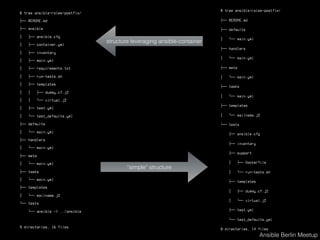
$ tree ansible-roles-postfix/
├── README.md
├── ansible
│   ├── ansible.cfg
│   ├── container.yml
│   ├── inventory
│   ├── main.yml
│   ├── requirements.txt
│   ├── run-tests.sh
│   ├── templates
│   │   ├── dummy.cf.j2
│   │   └── virtual.j2
│   ├── test.yml
│   └── test_defaults.yml
├── defaults
│   └── main.yml
├── handlers
│   └── main.yml
├── meta
│   └── main.yml
├── tasks
│   └── main.yml
├── templates
│   └── mailname.j2
└── tests
└── ansible -> ../ansible
9 directories, 16 files
Ansible Berlin Meetup
$ tree ansible-roles-postfix/
├── README.md
├── defaults
│   └── main.yml
├── handlers
│   └── main.yml
├── meta
│   └── main.yml
├── tasks
│   └── main.yml
├── templates
│   └── mailname.j2
└── tests
├── ansible.cfg
├── inventory
├── support
│   ├── Dockerfile
│   └── run-tests.sh
├── templates
│   ├── dummy.cf.j2
│   └── virtual.j2
├── test.yml
└── test_defaults.yml
8 directories, 14 files
structure leveraging ansible-container
“simple” structure
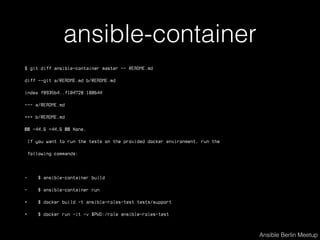
ansible-container
$ git diff ansible-container master -- README.md
diff --git a/README.md b/README.md
index f8935b4..f104728 100644
--- a/README.md
+++ b/README.md
@@ -44,6 +44,6 @@ None.
If you want to run the tests on the provided docker environment, run the
following commands:
- $ ansible-container build
- $ ansible-container run
+ $ docker build -t ansible-roles-test tests/support
+ $ docker run -it -v $PWD:/role ansible-roles-test
Ansible Berlin Meetup
Questions?
Ansible Berlin Meetup
Thanks.
@ansible_berlin
meetup.com/Ansible-Berlin
Ansible Berlin Meetup

Ansible roles done right

  • 1.
    Ansible Roles doneright Ansible Berlin Meetup
  • 2.
    Fetching and installingroles • requirements.yml • ansible-galaxy install -r requirements.yml • depending on how you access the repo, you might need a valid key in your ssh agent for grabbing the role • it's a good idea to specify the path of the roles in your ansible.cfg file. that will also tell Galaxy where to unpack the roles Ansible Berlin Meetup
  • 3.
    $ cat requirements.yml --- -name: ec2 src: ‘git@bitbucket.org:dan_vaida/ansible-roles-ec2.git’ scm: git - name: rds src: ‘git@bitbucket.org:dan_vaida/ansible-roles-rds.git’ scm: git - name: nginx src: ‘git@bitbucket.org:dan_vaida/ansible-roles-nginx.git’ scm: git - { name: ntp, src: ‘git@bitbucket.org:dan_vaida/ansible-roles-ntp.git’, scm: git } - name: postfix src: ‘https://github.com/danvaida/ansible-roles-postfix.git’ Ansible Berlin Meetup
  • 4.
    $ cat ansible.cfg [defaults] roles_path= ./roles retry_files_enabled = False $ ansible-galaxy install -r requirements.yml - extracting ec2 to /Users/dvaida/work/ansible_berlin/ansible-pim/roles/ec2 - ec2 was installed successfully - extracting rds to /Users/dvaida/work/ansible_berlin/ansible-pim/roles/rds - rds was installed successfully - nginx is already installed, skipping. $ cat .gitignore roles/ec2 roles/rds roles/nginx Ansible Berlin Meetup
  • 5.
    Docker containers FROM debian:wheezy RUNapt-get -y update RUN apt-get -y install python-pip=1.1-3 python-dev=2.7.3-4+deb7u1 libffi-dev=3.0.10-3 RUN pip install ansible==2.1 ADD run-tests.sh run-tests.sh CMD ["./run-tests.sh"] Ansible Berlin Meetup
  • 6.
    $ cd /path/to/the/role $docker build -t ansible-roles-test tests/support $ docker run -v $PWD:/role ansible-roles-test Ansible Berlin Meetup Docker containers
  • 7.
    Docker containers • dockercontainers powered by images that describe immutable packages and configs • Dockerfile with specific versions because doing apt get update && apt-get install ansible -y defeats more than half of the purpose of containers • rarely needed to run containers with --privileged (i.e. when faking a file system for formatting, mounting, etc.) • --no-cache is generally a good idea but it's also a performance killer, so an intermediary container that acts like an APT repo is advisable (remember the vagrant plugin cachier?) • install role prerequisites using the Dockerfile Ansible Berlin Meetup
  • 8.
    Wrapper bash script $cat ./ansible-roles-packages/tests/support/run-tests.sh #!/bin/bash set -e cd /role/tests ansible-playbook test_installation.yml # running a second time to verify playbook's idempotence set +e ansible-playbook test_installation.yml > /tmp/ second_run.log { cat /tmp/second_run.log | tail -n 5 | grep 'changed=0' && echo 'Playbook is idempotent' } || { cat /tmp/second_run.log echo 'Playbook is **NOT** idempotent' Ansible Berlin Meetup exit 1 } set -e ansible-playbook test_removal.yml # running a second time to verify playbook's idempotence set +e ansible-playbook test_removal.yml > /tmp/second_run.log { cat /tmp/second_run.log | tail -n 5 | grep 'changed=0' && echo 'Playbook is idempotent' } || { cat /tmp/second_run.log echo 'Playbook is **NOT** idempotent' exit 1 }
  • 9.
    Wrapper bash script •very rudimentary • it relies heavily on alternatively changing the exit behaviour when a certain return code is seen • we use it for invoking each playbook twice and looking at the returned information to evaluate idempotence • it definitely needs refactoring, possibly ported to a playbook; don't write ruby for this kind of stuff. please. Ansible Berlin Meetup
  • 10.
    changed=0 unreachable=0 failed=0 •Idempotence means f(x)=f(f(x)) • The tests that ship with the roles are like unit- tests in the big picture • You must write integration tests, too. They will prove that your roles’ interconnection actually works by testing your application's health. Ansible Berlin Meetup
  • 11.
    Custom modules, plugins •sometimes a role uses an unpublished, custom role you wrote • simply place it in the library directory located in the root of the role. the tests will be able to use it, too • same goes for some plugins like callbacks • don't forget to include tests for your modules Ansible Berlin Meetup
  • 12.
    $ tree ansible-roles-elasticache/ ├──README.md ├── defaults │   └── main.yml ├── library │   └── elasticache.py ├── meta │   └── main.yml ├── tasks │   └── main.yml └── tests ├── ansible.cfg ├── inventory ├── support │   ├── Dockerfile │   └── run-tests.sh ├── test_addition.yml ├── test_defaults.yml └── test_removal.yml 6 directories, 12 files Ansible Berlin Meetup custom ElastiCache Ansible module
  • 13.
    Standards • Readability, easinessof editing, VCS-friendliness, deprecation warnings • Example: • only have True and False not yes, No, TRUE, etc. • stick with your chosen way of writing tasks (foldable scalars (>), shorthand/ one-line (=) or structured map/list (:) • use single-quotes for vars containing non-alphanumerical chars and doube-quotes for dynamic vars • prefix variables used within a role with the role’s name • use tags with confidence • … Ansible Berlin Meetup
  • 14.
    README.md • Ansible isalready runnable documentation, but a clear explanation about what the role does, what vars are exposed to the user (sort of like API endpoints in other software) must be offered. • Not all used vars need to be exposed. • Dependencies, requirements, etc. It's basically an enriched Galaxy meta/main.yml file. Ansible Berlin Meetup
  • 15.
    TDD • tests drivendevelopment because first and foremost it is Code as Infrastructure • strict standards and rules must be defined and respected, responsibly. • tests for vars defaults and CRUD-like operations • we're not in the business of testing Ansible itself (i.e. modules) nor the user's input (i.e. config templates) • mocks play a crucial role (APIs, fake block/object storage devices, inventories, etc.) Ansible Berlin Meetup
  • 16.
    Example TDD cycle/stepsto write a role 1. Write a test that is meant to run the role with the default vars (i.e. test_defaults.yml) 2. Write your first task in the tasks/main.yml file. It can be something like - debug: msg='This is here just to pass the imdepotence test.’ 3. Run test_defaults.yml and make sure it is idempotent. 4. Write your first assertion in a new file called test_addition.yml. This would be for your first "real" task of your role (i.e. you’re create a DNS record so make sure the zone is propagated) 5. Remove the dummy task from tasks/main.yml and add the first "real" task of your role to make your test pass. 6. Run both test_defaults.yml & test_addition.yml and make sure they are idempotent. Ansible Berlin Meetup
  • 17.
    Example TDD cycle/stepsto write a role 7. Write your next assertion. 8. Add the task(s) for your respective assertion that will make the test pass. 9. Repeat steps 5 and 6 until you got all your tasks responsible for adding/updating things on the targets. 10. For the tasks responsible with removing things on the targets, write another test file (i.e. test_removal.yml) 11. Principally repeat steps 5 and 6. Tip: You might run into situations where instead of having the fairly standard test files: test_defaults.yml, test_addition.yml and test_removal.yml, you will see that you only need the test_defaults.yml file. Ansible Berlin Meetup
  • 18.
    CI via Jenkins •the complete flow includes automatic runs of the docker containers which implicitly execute the role tests • this is typically happening when a PR is made, a branch is merged into the master branch. • a working solution is to have two Jenkins jobs. Example: • ansible-roles-logrotate-dev-qa (runs against PRs) • ansible-roles-logrotate-master (runs against master) Ansible Berlin Meetup
  • 19.
    CI via Jenkins •Jenkins plugins used to integrate with BitBucket: • Bitbucket Approve Plugin • Bitbucket Plugin • Bitbucket Pullrequest Builder Plugin • embeddable-build-status • ChuckNorris Plugin Ansible Berlin Meetup
  • 20.
  • 21.
    "It works onmy machine" always holds true for Chuck Norris. Ansible Berlin Meetup
  • 22.
    ansible-container • Ansible’s newstab at Docker containers • Builds and orchestrates containers in Docker Compose style • It’s well under heavy development • Comes with init|build|run|push|shipit params • Install and try it: pip install ansible-container Ansible Berlin Meetup
  • 23.
    $ tree ansible-roles-postfix/ ├──README.md ├── ansible │   ├── ansible.cfg │   ├── container.yml │   ├── inventory │   ├── main.yml │   ├── requirements.txt │   ├── run-tests.sh │   ├── templates │   │   ├── dummy.cf.j2 │   │   └── virtual.j2 │   ├── test.yml │   └── test_defaults.yml ├── defaults │   └── main.yml ├── handlers │   └── main.yml ├── meta │   └── main.yml ├── tasks │   └── main.yml ├── templates │   └── mailname.j2 └── tests └── ansible -> ../ansible 9 directories, 16 files Ansible Berlin Meetup $ tree ansible-roles-postfix/ ├── README.md ├── defaults │   └── main.yml ├── handlers │   └── main.yml ├── meta │   └── main.yml ├── tasks │   └── main.yml ├── templates │   └── mailname.j2 └── tests ├── ansible.cfg ├── inventory ├── support │   ├── Dockerfile │   └── run-tests.sh ├── templates │   ├── dummy.cf.j2 │   └── virtual.j2 ├── test.yml └── test_defaults.yml 8 directories, 14 files structure leveraging ansible-container “simple” structure
  • 24.
    ansible-container $ git diffansible-container master -- README.md diff --git a/README.md b/README.md index f8935b4..f104728 100644 --- a/README.md +++ b/README.md @@ -44,6 +44,6 @@ None. If you want to run the tests on the provided docker environment, run the following commands: - $ ansible-container build - $ ansible-container run + $ docker build -t ansible-roles-test tests/support + $ docker run -it -v $PWD:/role ansible-roles-test Ansible Berlin Meetup
  • 25.
  • 26.