Getting Started with
Ansible
Andrew Hamilton
Who Am I?
Ops at Prevoty
Former SRE @Twitter and Sys Adm at
Eucalyptus
What We’ll Discuss
Why Ansible?
The basics of Ansible
Moving past the basics
Ansible is an IT automation tool. It can
configure systems, deploy software,
and orchestrate more advanced IT
tasks such as continuous deployments
or zero downtime rolling updates.
http://docs.ansible.com/
One Tool, Multiple Jobs
Ad-hoc commands
Configuration Management
Deployments
Agentless
Agentless
Cloud native
Great for ad-hoc commands
SSH based
Idempotent
Idempotent
Well mostly…
Allows you to run most
modules multiple times without
fear
Extensible
Extensible
Large community
Lots of prebuilt modules (100s)
Easy to build custom modules
Modules are “Polygot”
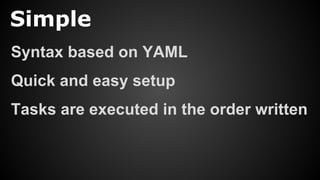
Simple
Simple
Syntax based on YAML
Quick and easy setup
Tasks are executed in the order written
It isn’t eventually
convergent
1. Setup nginx repo
2. Install nginx
3. Configure vhost
4. Copy over the site files
2. Install nginx
1. Setup nginx repo
4. Copy over the site files
3. Configure vhost
2. Install nginx
1. Setup nginx repo
4. Copy over the site files
3. Configure nginx
2. Install nginx
1. Setup nginx repo
4. Copy over the site files
3. Configure nginx
2. Install nginx
1. Setup nginx repo
4. Copy over the site files
3. Configure nginx
Installation
Installation: Packages
$ pip install ansible
# yum install ansible
# aptitude install ansible
$ brew install ansible
Installation: Source
$ git clone 
> https://github.com/ansible/ansible
$ source ansible/hacking/env-setup
Inventory
Inventory
A list of systems built into groups
Either static or dynamic
Inventory: Static
[my_hosts]
host1.example.com
host2.example.com
[webservers]
www1.example.com
www2.example.com
[dbs]
db1.example.com
db2.example.com
Inventory: Dynamic
Builds a JSON inventory of hosts
Provided: AWS, GCE, Azure,
OpenStack, VMWare, Rackspace,
Linode, Digital Ocean, Cobbler,
Vagrant, Fleet, Consul, ...
Run an ad-hoc task
Run an ad-hoc task
$ ansible -i <inventory> 
> -m <module> 
> -a <args> 
> <hosts_identifier>
Run an ad-hoc task
$ ansible -i my_inventory 
> -m ping 
> all
But what if I want to run
a command often or
multiple commands?
Playbooks
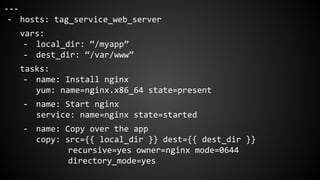
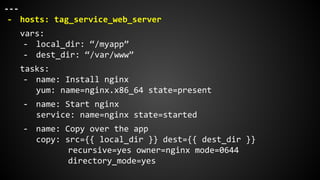
---
- hosts: tag_service_web_server
vars:
- local_dir: “/myapp”
- dest_dir: “/var/www”
tasks:
- name: Install nginx
yum: name=nginx.x86_64 state=present
- name: Start nginx
service: name=nginx state=started
- name: Copy over the app
copy: src={{ local_dir }} dest={{ dest_dir }}
recursive=yes owner=nginx mode=0644
directory_mode=yes
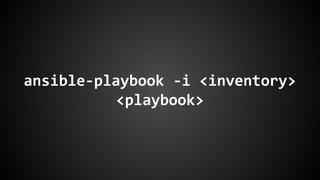
ansible-playbook -i <inventory>
<playbook>
Hosts
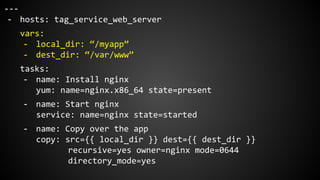
---
- hosts: tag_service_web_server
vars:
- local_dir: “/myapp”
- dest_dir: “/var/www”
tasks:
- name: Install nginx
yum: name=nginx.x86_64 state=present
- name: Start nginx
service: name=nginx state=started
- name: Copy over the app
copy: src={{ local_dir }} dest={{ dest_dir }}
recursive=yes owner=nginx mode=0644
directory_mode=yes
Hosts
Allows you to specify groups of hosts
Uses the provided inventory
Vars
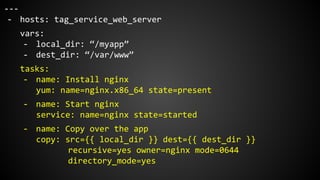
---
- hosts: tag_service_web_server
vars:
- local_dir: “/myapp”
- dest_dir: “/var/www”
tasks:
- name: Install nginx
yum: name=nginx.x86_64 state=present
- name: Start nginx
service: name=nginx state=started
- name: Copy over the app
copy: src={{ local_dir }} dest={{ dest_dir }}
recursive=yes owner=nginx mode=0644
directory_mode=yes
Vars
Allows you to dynamically change values
Can be used in playbooks and templates
Different types of variables for different
workloads
Vars: Runtime
You can add variables from the CLI at runtime
Runtime variables take precedence
$ ansible-playbook -i <inventory> 
> -e key1=value1 playbook.yml
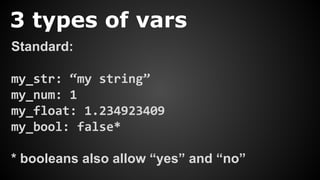
3 types of vars
Standard:
my_str: “my string”
my_num: 1
my_float: 1.234923409
my_bool: false*
* booleans also allow “yes” and “no”
3 types of vars
Lists:
a_list: [‘one’, ‘two’, ‘three’]
another: [1, 2, 3]
3 types of vars
Hashes (Dictionaries):
a_hash: { “key”: “value”, }
hashing_it_up: { “such”: “wow”,
“chosen”: 1, }
3 types of vars
Combining them together
my_var: “Here”
complex: [
{ “key”: “value”, },
{ “key”: “blah”, },
{ “key”: my_var },
]
Jinja templating for vars
Use “{{ <var> }}” to access variables
{{ my_var }}
{{ my_list[0] }}
{{ my_hash[“key”] }}
Tasks
---
- hosts: tag_service_web_server
vars:
- local_dir: “/myapp”
- dest_dir: “/var/www”
tasks:
- name: Install nginx
yum: name=nginx.x86_64 state=present
- name: Start nginx
service: name=nginx state=started
- name: Copy over the app
copy: src={{ local_dir }} dest={{ dest_dir }}
recursive=yes owner=nginx mode=0644
directory_mode=yes
Tasks
Uses modules to complete tasks
100s of prebuilt modules
Examples: template, copy, yum, apt, pip, ec2,
elb, docker
Can use custom modules in tasks too
Tasks
Required:
- <module_name>: <key1>=<value1>
<key2>=<value2> …
Tasks
Optional:
name, become, become_user,
connection, delegate_to, etc
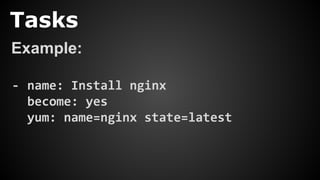
Tasks
Example:
- name: Install nginx
become: yes
yum: name=nginx state=latest
Questions?
http://www.slideshare.net/ahamilton55
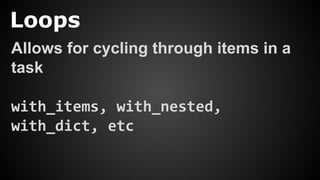
Loops
Loops
Allows for cycling through items in a
task
with_items, with_nested,
with_dict, etc
Loops
with_items:
- <item1>
- <item2>
- <item3>
Loops
- name: Install nginx
yum: name=nginx.x86_64 state=latest
- name: Install php5
yum: name=php5.x86_64 state=latest
- name: Install Laravel
yum: name=php5-laravel.x86_64 state=latest
Loops
- name: Install packages
yum: name={{ item }} state=latest
with_items:
- nginx.x86_64
- php5.x86_64
- php5-laravel.x86_64
Loops
- name: Install packages
yum: name={{ item.name }} state={{ item.ver }}
with_items:
- { “name”: ”nginx.x86_64”, “ver”: ”latest” }
- { “name”: ”php5.x86_64”, “ver”: ”5.4-1” }
- { “name”: ”php5-laravel.x86_64”, ver”: ”5.4-123-1” }
Conditionals
Conditionals
Allows you to run tasks only when
constraints are met
when
Conditionals
when: <some boolean logic>
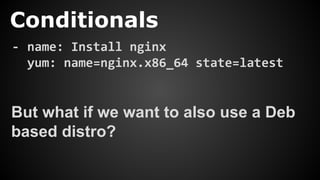
Conditionals
- name: Install nginx
yum: name=nginx.x86_64 state=latest
But what if we want to also use a Deb
based distro?
Conditionals
- name: Install nginx (RH)
yum: name=nginx.x86_64 state=latest
when: ansible_os_family == “RedHat”
- name: Install nginx (Deb)
apt: name=nginx state=latest
when: ansible_os_family == “Debian”
Variables Files
Variables Files
Just files full of variables…
Makes using a large number of
variables easier
Cleans up your playbooks
Variables Files
Multiple level:
- Site
- Group
- Host
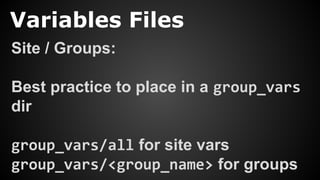
Variables Files
Site / Groups:
Best practice to place in a group_vars
dir
group_vars/all for site vars
group_vars/<group_name> for groups
Variables Files
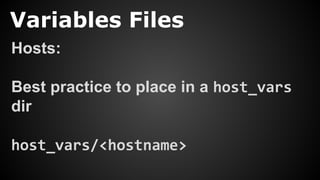
Hosts:
Best practice to place in a host_vars
dir
host_vars/<hostname>
Variables Files: webserver
index_page: index.html
domains: [
‘example.com’,
‘www.example.com’
]
server_names: “{{ domains|join(‘ ‘) }}”
vhost_root_dir: “/usr/local/www/{{ domains[0] }}
/htdocs”
Variables Files
- hosts: webservers
vars_files:
- group_vars/all
- group_vars/webservers
tasks:
- name: Install nginx
yum: name=nginx state=latest
Roles
Roles
Used as a way to organize playbooks
Allows for portability and reuse
Roles
Download roles from the community at
https://galaxy.ansible.com/
Use ansible-galaxy CLI too
Roles
<role_name>/
files/
templates/
tasks/
handlers/
vars/
defaults/
meta/
Roles
Create this directory structure easily
$ ansible-galaxy init <role_name>
Roles
By default the main.yml file will be run
Can create multiple playbooks in a role
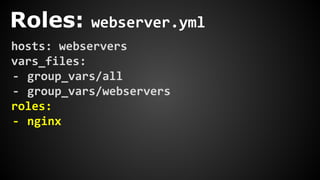
Roles: webserver.yml
hosts: webservers
vars_files:
- group_vars/all
- group_vars/webservers
roles:
- nginx
Roles
nginx/
templates/
nginx.conf
tasks/
main.yml
redhat.yml
debian.yml
handlers/
main.yml
Roles: templates/nginx.conf
http {
index {{ index_page }};
server {
server_name {{ server_names }};
access_log logs/{{ main_domain }}.access.log main;
root {{ vhost_root_dir }};
}
}
Roles: tasks/redhat.yml
---
- name: Install nginx
yum: name=nginx state=latest
notify:
- start nginx
- enable nginx
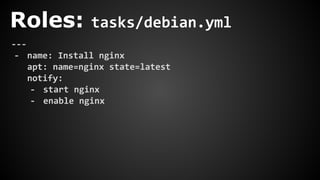
Roles: tasks/debian.yml
---
- name: Install nginx
apt: name=nginx state=latest
notify:
- start nginx
- enable nginx
Roles: tasks/main.yml
---
- include: redhat.yml
when: ansible_os_family == “RedHat”
- include: debian.yml
when: ansible_os_family == “Debian"
- name: Copy over the nginx.conf template
template: src=nginx.conf dest=/etc/nginx/nginx.conf
notify: restart nginx
Roles: handlers/main.yml
---
- include: redhat.yml
when: ansible_os_family == “RedHat”
- include: debian.yml
when: ansible_os_family == “Debian”
- name: start nginx
service: name=nginx state=started
- name: restart nginx
service: name=nginx state=restarted
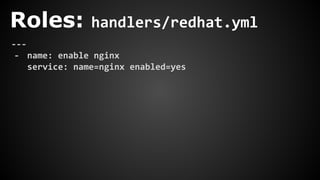
Roles: handlers/redhat.yml
---
- name: enable nginx
service: name=nginx enabled=yes
Roles: handlers/debian.yml
---
- name: enable nginx
command: update-rc.d nginx enable
Secrets
Secrets
$ANSIBLE_VAULT;1.1;AES256
34383662653437316564366265636337386662663939653539306333633633316264383235346638
6631366536656336353137363462643435376164363339360a303264343761336135386564653138
39326461396165643066663938333965346530333061333336633036613138303335376164346362
3161373230353036640a643961306466646639386163303461353461396665393335383731653266
39646464353438373238656130613131373465353432396533343763643239323162383861613037
64343665346666333231333461636634353061313332613934313433343834366434623866636366
31393665646336383234313064313963653536343233386131343034303337656661376462316161
65653764663838333061643865326566623064373334643431393763626139336539646435363432
65623438346634616462313965643038366265646264636538636238306330306430343439633165
32333032353961616533303935626161333239333237663363643665663661363961343866333531
65326435363262646465366365366230613836616565346331306635343161626462366366313238
66336530393562636565636166646637616465313037396339633264643731366436623030326633
39393434643763666363656333383230316563363730306534373232353964383464306661373436
33666439336135333436313039306237656162383236333936383337336638356166373066356664
66636633323437343665646433383637623932316139363639323565663230656432363731623230
Secrets
Builtin support for using AES256
encrypted variables files
Files kept in group_vars files for easy
access
Pass in password at execution
Secrets
ansible-vault CLI tool
Easy to edit, view, encrypt, decrypt,
create and rekey files
Secrets
ansible-playbook --ask-vault-pass …
ansible-playbook --vault-password-file ...
Also, I’m hiring
andrew@prevoty.com

Getting Started with Ansible