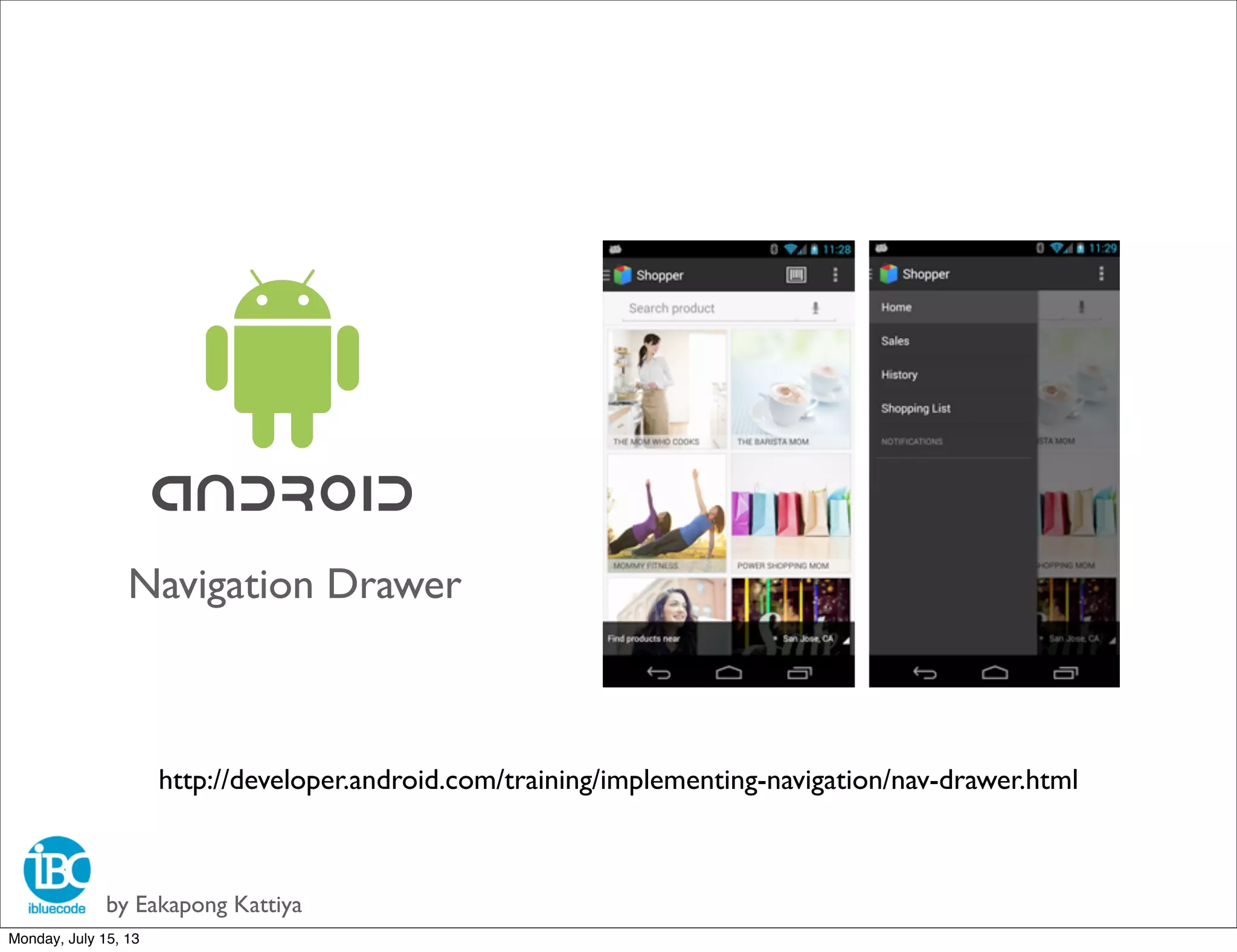
Navigation Drawer
by Eakapong Kattiya
http://developer.android.com/training/implementing-navigation/nav-drawer.html
Monday, July 15, 13
by Eakapong Kattiya
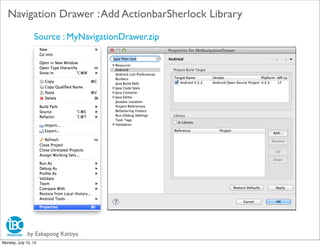
Navigation Drawer :Add ActionbarSherlock Library
Source : MyNavigationDrawer.zip
Monday, July 15, 13
by Eakapong Kattiya
Navigation Drawer :Add ActionbarSherlock Library
Monday, July 15, 13
by Eakapong Kattiya
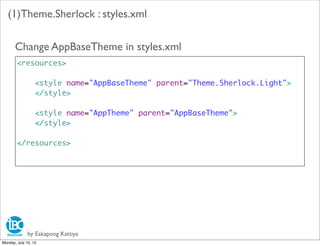
(1)Theme.Sherlock : styles.xml
<resources>
<style name="AppBaseTheme" parent="Theme.Sherlock.Light">
</style>
<style name="AppTheme" parent="AppBaseTheme">
</style>
</resources>
Change AppBaseTheme in styles.xml
Monday, July 15, 13
by Eakapong Kattiya
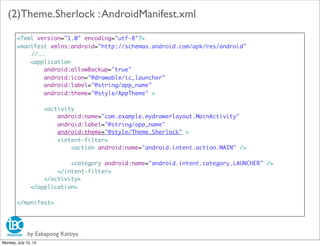
(2)Theme.Sherlock :AndroidManifest.xml
<?xml version="1.0" encoding="utf-8"?>
<manifest xmlns:android="http://schemas.android.com/apk/res/android"
//..
<application
android:allowBackup="true"
android:icon="@drawable/ic_launcher"
android:label="@string/app_name"
android:theme="@style/AppTheme" >
<activity
android:name="com.example.mydrawerlayout.MainActivity"
android:label="@string/app_name"
android:theme="@style/Theme.Sherlock" >
<intent-filter>
<action android:name="android.intent.action.MAIN" />
<category android:name="android.intent.category.LAUNCHER" />
</intent-filter>
</activity>
</application>
</manifest>
Monday, July 15, 13
by Eakapong Kattiya
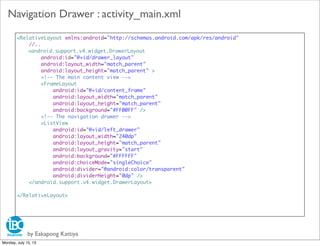
Navigation Drawer : activity_main.xml
<RelativeLayout xmlns:android="http://schemas.android.com/apk/res/android"
//..
<android.support.v4.widget.DrawerLayout
android:id="@+id/drawer_layout"
android:layout_width="match_parent"
android:layout_height="match_parent" >
<!-- The main content view -->
<FrameLayout
android:id="@+id/content_frame"
android:layout_width="match_parent"
android:layout_height="match_parent"
android:background="#FF00FF" />
<!-- The navigation drawer -->
<ListView
android:id="@+id/left_drawer"
android:layout_width="240dp"
android:layout_height="match_parent"
android:layout_gravity="start"
android:background="#FFFFFF"
android:choiceMode="singleChoice"
android:divider="@android:color/transparent"
android:dividerHeight="0dp" />
</android.support.v4.widget.DrawerLayout>
</RelativeLayout>
Monday, July 15, 13
by Eakapong Kattiya
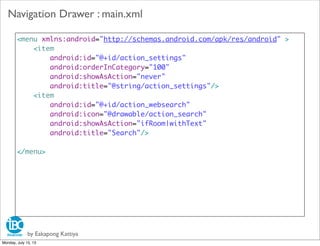
Navigation Drawer : main.xml
<menu xmlns:android="http://schemas.android.com/apk/res/android" >
<item
android:id="@+id/action_settings"
android:orderInCategory="100"
android:showAsAction="never"
android:title="@string/action_settings"/>
<item
android:id="@+id/action_websearch"
android:icon="@drawable/action_search"
android:showAsAction="ifRoom|withText"
android:title="Search"/>
</menu>
Monday, July 15, 13
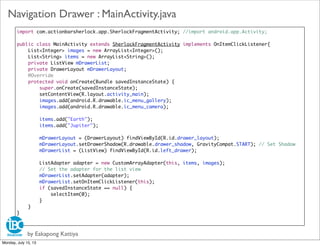
import com.actionbarsherlock.app.SherlockFragmentActivity; //import android.app.Activity;
public class MainActivity extends SherlockFragmentActivity implements OnItemClickListener{
	 List<Integer> images = new ArrayList<Integer>();
	 List<String> items = new ArrayList<String>();
	 private ListView mDrawerList;
	 private DrawerLayout mDrawerLayout;
	 @Override
	 protected void onCreate(Bundle savedInstanceState) {
	 	 super.onCreate(savedInstanceState);
	 	 setContentView(R.layout.activity_main);
	 	 images.add(android.R.drawable.ic_menu_gallery);
	 	 images.add(android.R.drawable.ic_menu_camera);
	 	 items.add("Earth");
	 	 items.add("Jupiter");
	 	 mDrawerLayout = (DrawerLayout) findViewById(R.id.drawer_layout);
	 	 mDrawerLayout.setDrawerShadow(R.drawable.drawer_shadow, GravityCompat.START); // Set Shadow
	 	 mDrawerList = (ListView) findViewById(R.id.left_drawer);
	 	 ListAdapter adapter = new CustomArrayAdapter(this, items, images);
	 	 // Set the adapter for the list view
	 	 mDrawerList.setAdapter(adapter);
	 	 mDrawerList.setOnItemClickListener(this);
if (savedInstanceState == null) {
selectItem(0);
}
	 }
}
by Eakapong Kattiya
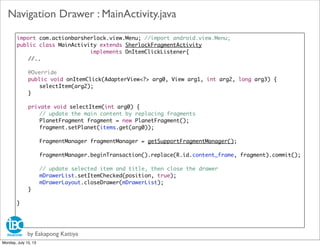
Navigation Drawer : MainActivity.java
Monday, July 15, 13
import com.actionbarsherlock.view.Menu; //import android.view.Menu;
public class MainActivity extends SherlockFragmentActivity
implements OnItemClickListener{
//..
@Override
	 public boolean onCreateOptionsMenu(Menu menu) {
	 	 //getMenuInflater().inflate(R.menu.main, menu);
	 	 getSupportMenuInflater().inflate(R.menu.main, menu);
	 	 return true;
	 }
}
by Eakapong Kattiya
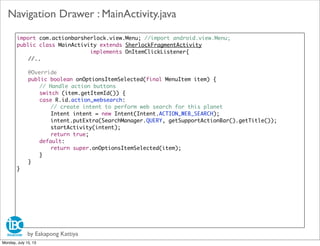
Navigation Drawer : MainActivity.java
Monday, July 15, 13
import com.actionbarsherlock.view.Menu; //import android.view.Menu;
public class MainActivity extends SherlockFragmentActivity
implements OnItemClickListener{
//..
	 @Override
	 public void onItemClick(AdapterView<?> arg0, View arg1, int arg2, long arg3) {
	 	 selectItem(arg2);
	 }
	 private void selectItem(int arg0) {
	 	 // update the main content by replacing fragments
	 	 PlanetFragment fragment = new PlanetFragment();
	 	 fragment.setPlanet(items.get(arg0));
	 	
	 	 FragmentManager fragmentManager = getSupportFragmentManager();
	 	 fragmentManager.beginTransaction().replace(R.id.content_frame, fragment).commit();
	 	 // update selected item and title, then close the drawer
	 	 mDrawerList.setItemChecked(position, true);
	 	 mDrawerLayout.closeDrawer(mDrawerList);
	 }
}
by Eakapong Kattiya
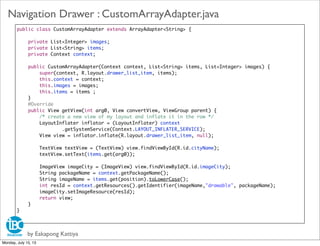
Navigation Drawer : MainActivity.java
Monday, July 15, 13
import com.actionbarsherlock.view.Menu; //import android.view.Menu;
public class MainActivity extends SherlockFragmentActivity
implements OnItemClickListener{
//..
	 @Override
	 public boolean onOptionsItemSelected(final MenuItem item) {
	 	 // Handle action buttons
	 	 switch (item.getItemId()) {
	 	 case R.id.action_websearch:
	 	 	 // create intent to perform web search for this planet
	 	 	 Intent intent = new Intent(Intent.ACTION_WEB_SEARCH);
	 	 	 intent.putExtra(SearchManager.QUERY, getSupportActionBar().getTitle());
	 	 	 startActivity(intent);
	 	 	 return true;
	 	 default:
	 	 	 return super.onOptionsItemSelected(item);
	 	 }
	 }
}
by Eakapong Kattiya
Navigation Drawer : MainActivity.java
Monday, July 15, 13
public class CustomArrayAdapter extends ArrayAdapter<String> {
	 private List<Integer> images;
	 private List<String> items;
	 private Context context;
	 public CustomArrayAdapter(Context context, List<String> items, List<Integer> images) {
	 	 super(context, R.layout.drawer_list_item, items);
	 	 this.context = context;
	 	 this.images = images;
	 	 this.items = items ;
	 }
	 @Override
	 public View getView(int arg0, View convertView, ViewGroup parent) {
	 	 /* create a new view of my layout and inflate it in the row */
	 	 LayoutInflater inflator = (LayoutInflater) context
	 	 	 	 .getSystemService(Context.LAYOUT_INFLATER_SERVICE);
	 	 View view = inflator.inflate(R.layout.drawer_list_item, null);
	 	
	 	 TextView textView = (TextView) view.findViewById(R.id.cityName);
	 	 textView.setText(items.get(arg0));
	 	
	 	 ImageView imageCity = (ImageView) view.findViewById(R.id.imageCity);
	 	 String packageName = context.getPackageName();
	 	 String imageName = items.get(position).toLowerCase();
	 	 int resId = context.getResources().getIdentifier(imageName,"drawable", packageName);
	 	 imageCity.setImageResource(resId);
	 	 return view;
	 }
}
by Eakapong Kattiya
Navigation Drawer : CustomArrayAdapter.java
Monday, July 15, 13
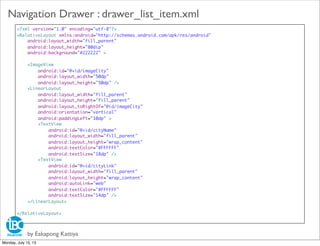
<?xml version="1.0" encoding="utf-8"?>
<RelativeLayout xmlns:android="http://schemas.android.com/apk/res/android"
android:layout_width="fill_parent"
android:layout_height="80dip"
android:background="#222222" >
<ImageView
android:id="@+id/imageCity"
android:layout_width="50dp"
android:layout_height="50dp" />
<LinearLayout
android:layout_width="fill_parent"
android:layout_height="fill_parent"
android:layout_toRightOf="@id/imageCity"
android:orientation="vertical"
android:paddingLeft="10dp" >
<TextView
android:id="@+id/cityName"
android:layout_width="fill_parent"
android:layout_height="wrap_content"
android:textColor="#FFFFFF"
android:textSize="18dp" />
<TextView
android:id="@+id/cityLink"
android:layout_width="fill_parent"
android:layout_height="wrap_content"
android:autoLink="web"
android:textColor="#FFFFFF"
android:textSize="14dp" />
</LinearLayout>
</RelativeLayout>
by Eakapong Kattiya
Navigation Drawer : drawer_list_item.xml
Monday, July 15, 13
by Eakapong Kattiya
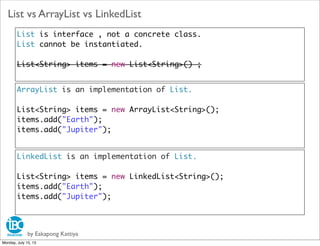
List vs ArrayList vs LinkedList
List is interface , not a concrete class.
List cannot be instantiated.
List<String> items = new List<String>() ;
ArrayList is an implementation of List.
List<String> items = new ArrayList<String>();
items.add("Earth");
items.add("Jupiter");
LinkedList is an implementation of List.
List<String> items = new LinkedList<String>();
items.add("Earth");
items.add("Jupiter");
Monday, July 15, 13
by Eakapong Kattiya
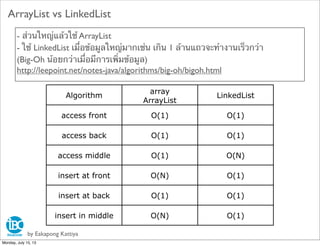
ArrayList vs LinkedList
- ส่วนใหญ่แล้วใช้ ArrayList
- ใช้ LinkedList เมื่อข้อมูลใหญ่มากเช่น เกิน 1 ล้านแถวจะทํางานเร็วกว่า
(Big-Oh น้อยกว่าเมื่อมีการเพิ่มข้อมูล)
http://leepoint.net/notes-java/algorithms/big-oh/bigoh.html
Algorithm
array
ArrayList
LinkedList
access front O(1) O(1)
access back O(1) O(1)
access middle O(1) O(N)
insert at front O(N) O(1)
insert at back O(1) O(1)
insert in middle O(N) O(1)
Monday, July 15, 13
by Eakapong Kattiya
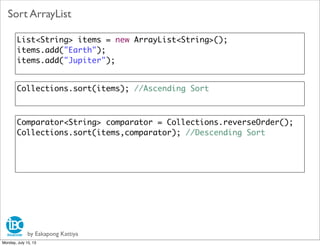
Sort ArrayList
List<String> items = new ArrayList<String>();
items.add("Earth");
items.add("Jupiter");
Collections.sort(items); //Ascending Sort
Comparator<String> comparator = Collections.reverseOrder();
Collections.sort(items,comparator); //Descending Sort
Monday, July 15, 13
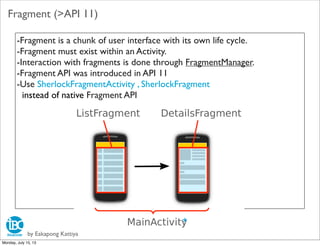
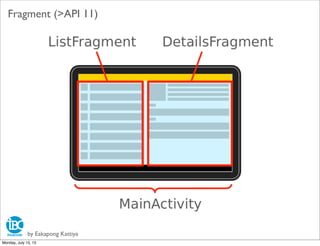
-Fragment is a chunk of user interface with its own life cycle.
-Fragment must exist within an Activity.
-Interaction with fragments is done through FragmentManager.
-Fragment API was introduced in API 11
-Use SherlockFragmentActivity , SherlockFragment
instead of native Fragment API
by Eakapong Kattiya
Fragment (>API 11)
Monday, July 15, 13
by Eakapong Kattiya
Fragment (>API 11)
Monday, July 15, 13
by Eakapong Kattiya
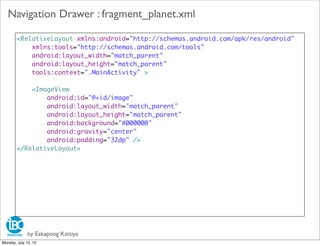
Navigation Drawer : fragment_planet.xml
<RelativeLayout xmlns:android="http://schemas.android.com/apk/res/android"
xmlns:tools="http://schemas.android.com/tools"
android:layout_width="match_parent"
android:layout_height="match_parent"
tools:context=".MainActivity" >
<ImageView
android:id="@+id/image"
android:layout_width="match_parent"
android:layout_height="match_parent"
android:background="#000000"
android:gravity="center"
android:padding="32dp" />
</RelativeLayout>
Monday, July 15, 13
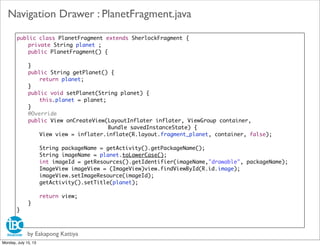
public class PlanetFragment extends SherlockFragment {
	 private String planet ;
	 public PlanetFragment() {
	
	 }
	 public String getPlanet() {
	 	 return planet;
	 }
	 public void setPlanet(String planet) {
	 	 this.planet = planet;
	 }
	 @Override
	 public View onCreateView(LayoutInflater inflater, ViewGroup container,
	 	 	 Bundle savedInstanceState) {
	 	 View view = inflater.inflate(R.layout.fragment_planet, container, false);
	 	 String packageName = getActivity().getPackageName();
	 	 String imageName = planet.toLowerCase();
	 	 int imageId = getResources().getIdentifier(imageName,"drawable", packageName);
	 	 ImageView imageView = (ImageView)view.findViewById(R.id.image);
	 	 imageView.setImageResource(imageId);
	 	 getActivity().setTitle(planet);
	 	 return view;
	 }
}
by Eakapong Kattiya
Navigation Drawer : PlanetFragment.java
Monday, July 15, 13
ImageView imageCity = (ImageView) view.findViewById(R.id.imageCity);
Drawable image = context.getResources().getDrawable(android.R.drawable.ic_dialog_email);
imageCity.setImageDrawable(image);
by Eakapong Kattiya
ImageView
List<Integer> images = new ArrayList<Integer>();
images.add(android.R.drawable.ic_menu_gallery);
images.add(android.R.drawable.ic_menu_camera);
ImageView imageCity = (ImageView) view.findViewById(R.id.imageCity);
Drawable image = context.getResources().getDrawable(images.get(0));
imageCity.setImageDrawable(image);
ImageView imageCity = (ImageView) view.findViewById(R.id.imageCity);
String packageName = context.getPackageName();
String imageName = items.get(position).toLowerCase();
int resId = context.getResources().getIdentifier(imageName,"drawable", packageName);
imageCity.setImageResource(resId);
Fixed Resource id
Dynamic Resource id
Choose image name
Monday, July 15, 13
by Eakapong Kattiya
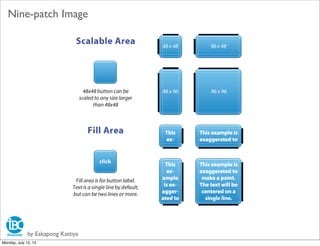
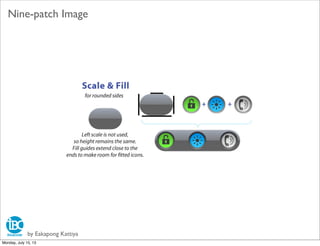
Nine-patch Image
Monday, July 15, 13
by Eakapong Kattiya
Nine-patch Image
Monday, July 15, 13
by Eakapong Kattiya
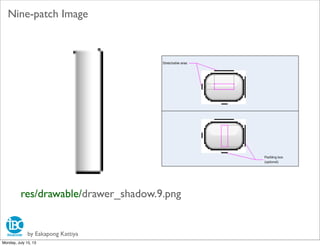
Nine-patch Image
res/drawable/drawer_shadow.9.png
Monday, July 15, 13
by Eakapong Kattiya
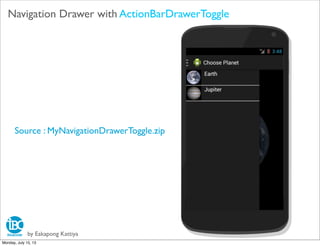
Navigation Drawer with ActionBarDrawerToggle
Source : MyNavigationDrawerToggle.zip
Monday, July 15, 13

Android basic 4 Navigation Drawer

  • 1.
    Navigation Drawer by EakapongKattiya http://developer.android.com/training/implementing-navigation/nav-drawer.html Monday, July 15, 13
  • 2.
    by Eakapong Kattiya NavigationDrawer :Add ActionbarSherlock Library Source : MyNavigationDrawer.zip Monday, July 15, 13
  • 3.
    by Eakapong Kattiya NavigationDrawer :Add ActionbarSherlock Library Monday, July 15, 13
  • 4.
    by Eakapong Kattiya (1)Theme.Sherlock: styles.xml <resources> <style name="AppBaseTheme" parent="Theme.Sherlock.Light"> </style> <style name="AppTheme" parent="AppBaseTheme"> </style> </resources> Change AppBaseTheme in styles.xml Monday, July 15, 13
  • 5.
    by Eakapong Kattiya (2)Theme.Sherlock:AndroidManifest.xml <?xml version="1.0" encoding="utf-8"?> <manifest xmlns:android="http://schemas.android.com/apk/res/android" //.. <application android:allowBackup="true" android:icon="@drawable/ic_launcher" android:label="@string/app_name" android:theme="@style/AppTheme" > <activity android:name="com.example.mydrawerlayout.MainActivity" android:label="@string/app_name" android:theme="@style/Theme.Sherlock" > <intent-filter> <action android:name="android.intent.action.MAIN" /> <category android:name="android.intent.category.LAUNCHER" /> </intent-filter> </activity> </application> </manifest> Monday, July 15, 13
  • 6.
    by Eakapong Kattiya NavigationDrawer : activity_main.xml <RelativeLayout xmlns:android="http://schemas.android.com/apk/res/android" //.. <android.support.v4.widget.DrawerLayout android:id="@+id/drawer_layout" android:layout_width="match_parent" android:layout_height="match_parent" > <!-- The main content view --> <FrameLayout android:id="@+id/content_frame" android:layout_width="match_parent" android:layout_height="match_parent" android:background="#FF00FF" /> <!-- The navigation drawer --> <ListView android:id="@+id/left_drawer" android:layout_width="240dp" android:layout_height="match_parent" android:layout_gravity="start" android:background="#FFFFFF" android:choiceMode="singleChoice" android:divider="@android:color/transparent" android:dividerHeight="0dp" /> </android.support.v4.widget.DrawerLayout> </RelativeLayout> Monday, July 15, 13
  • 7.
    by Eakapong Kattiya NavigationDrawer : main.xml <menu xmlns:android="http://schemas.android.com/apk/res/android" > <item android:id="@+id/action_settings" android:orderInCategory="100" android:showAsAction="never" android:title="@string/action_settings"/> <item android:id="@+id/action_websearch" android:icon="@drawable/action_search" android:showAsAction="ifRoom|withText" android:title="Search"/> </menu> Monday, July 15, 13
  • 8.
    import com.actionbarsherlock.app.SherlockFragmentActivity; //importandroid.app.Activity; public class MainActivity extends SherlockFragmentActivity implements OnItemClickListener{ List<Integer> images = new ArrayList<Integer>(); List<String> items = new ArrayList<String>(); private ListView mDrawerList; private DrawerLayout mDrawerLayout; @Override protected void onCreate(Bundle savedInstanceState) { super.onCreate(savedInstanceState); setContentView(R.layout.activity_main); images.add(android.R.drawable.ic_menu_gallery); images.add(android.R.drawable.ic_menu_camera); items.add("Earth"); items.add("Jupiter"); mDrawerLayout = (DrawerLayout) findViewById(R.id.drawer_layout); mDrawerLayout.setDrawerShadow(R.drawable.drawer_shadow, GravityCompat.START); // Set Shadow mDrawerList = (ListView) findViewById(R.id.left_drawer); ListAdapter adapter = new CustomArrayAdapter(this, items, images); // Set the adapter for the list view mDrawerList.setAdapter(adapter); mDrawerList.setOnItemClickListener(this); if (savedInstanceState == null) { selectItem(0); } } } by Eakapong Kattiya Navigation Drawer : MainActivity.java Monday, July 15, 13
  • 9.
    import com.actionbarsherlock.view.Menu; //importandroid.view.Menu; public class MainActivity extends SherlockFragmentActivity implements OnItemClickListener{ //.. @Override public boolean onCreateOptionsMenu(Menu menu) { //getMenuInflater().inflate(R.menu.main, menu); getSupportMenuInflater().inflate(R.menu.main, menu); return true; } } by Eakapong Kattiya Navigation Drawer : MainActivity.java Monday, July 15, 13
  • 10.
    import com.actionbarsherlock.view.Menu; //importandroid.view.Menu; public class MainActivity extends SherlockFragmentActivity implements OnItemClickListener{ //.. @Override public void onItemClick(AdapterView<?> arg0, View arg1, int arg2, long arg3) { selectItem(arg2); } private void selectItem(int arg0) { // update the main content by replacing fragments PlanetFragment fragment = new PlanetFragment(); fragment.setPlanet(items.get(arg0)); FragmentManager fragmentManager = getSupportFragmentManager(); fragmentManager.beginTransaction().replace(R.id.content_frame, fragment).commit(); // update selected item and title, then close the drawer mDrawerList.setItemChecked(position, true); mDrawerLayout.closeDrawer(mDrawerList); } } by Eakapong Kattiya Navigation Drawer : MainActivity.java Monday, July 15, 13
  • 11.
    import com.actionbarsherlock.view.Menu; //importandroid.view.Menu; public class MainActivity extends SherlockFragmentActivity implements OnItemClickListener{ //.. @Override public boolean onOptionsItemSelected(final MenuItem item) { // Handle action buttons switch (item.getItemId()) { case R.id.action_websearch: // create intent to perform web search for this planet Intent intent = new Intent(Intent.ACTION_WEB_SEARCH); intent.putExtra(SearchManager.QUERY, getSupportActionBar().getTitle()); startActivity(intent); return true; default: return super.onOptionsItemSelected(item); } } } by Eakapong Kattiya Navigation Drawer : MainActivity.java Monday, July 15, 13
  • 12.
    public class CustomArrayAdapterextends ArrayAdapter<String> { private List<Integer> images; private List<String> items; private Context context; public CustomArrayAdapter(Context context, List<String> items, List<Integer> images) { super(context, R.layout.drawer_list_item, items); this.context = context; this.images = images; this.items = items ; } @Override public View getView(int arg0, View convertView, ViewGroup parent) { /* create a new view of my layout and inflate it in the row */ LayoutInflater inflator = (LayoutInflater) context .getSystemService(Context.LAYOUT_INFLATER_SERVICE); View view = inflator.inflate(R.layout.drawer_list_item, null); TextView textView = (TextView) view.findViewById(R.id.cityName); textView.setText(items.get(arg0)); ImageView imageCity = (ImageView) view.findViewById(R.id.imageCity); String packageName = context.getPackageName(); String imageName = items.get(position).toLowerCase(); int resId = context.getResources().getIdentifier(imageName,"drawable", packageName); imageCity.setImageResource(resId); return view; } } by Eakapong Kattiya Navigation Drawer : CustomArrayAdapter.java Monday, July 15, 13
  • 13.
    <?xml version="1.0" encoding="utf-8"?> <RelativeLayoutxmlns:android="http://schemas.android.com/apk/res/android" android:layout_width="fill_parent" android:layout_height="80dip" android:background="#222222" > <ImageView android:id="@+id/imageCity" android:layout_width="50dp" android:layout_height="50dp" /> <LinearLayout android:layout_width="fill_parent" android:layout_height="fill_parent" android:layout_toRightOf="@id/imageCity" android:orientation="vertical" android:paddingLeft="10dp" > <TextView android:id="@+id/cityName" android:layout_width="fill_parent" android:layout_height="wrap_content" android:textColor="#FFFFFF" android:textSize="18dp" /> <TextView android:id="@+id/cityLink" android:layout_width="fill_parent" android:layout_height="wrap_content" android:autoLink="web" android:textColor="#FFFFFF" android:textSize="14dp" /> </LinearLayout> </RelativeLayout> by Eakapong Kattiya Navigation Drawer : drawer_list_item.xml Monday, July 15, 13
  • 14.
    by Eakapong Kattiya Listvs ArrayList vs LinkedList List is interface , not a concrete class. List cannot be instantiated. List<String> items = new List<String>() ; ArrayList is an implementation of List. List<String> items = new ArrayList<String>(); items.add("Earth"); items.add("Jupiter"); LinkedList is an implementation of List. List<String> items = new LinkedList<String>(); items.add("Earth"); items.add("Jupiter"); Monday, July 15, 13
  • 15.
    by Eakapong Kattiya ArrayListvs LinkedList - ส่วนใหญ่แล้วใช้ ArrayList - ใช้ LinkedList เมื่อข้อมูลใหญ่มากเช่น เกิน 1 ล้านแถวจะทํางานเร็วกว่า (Big-Oh น้อยกว่าเมื่อมีการเพิ่มข้อมูล) http://leepoint.net/notes-java/algorithms/big-oh/bigoh.html Algorithm array ArrayList LinkedList access front O(1) O(1) access back O(1) O(1) access middle O(1) O(N) insert at front O(N) O(1) insert at back O(1) O(1) insert in middle O(N) O(1) Monday, July 15, 13
  • 16.
    by Eakapong Kattiya SortArrayList List<String> items = new ArrayList<String>(); items.add("Earth"); items.add("Jupiter"); Collections.sort(items); //Ascending Sort Comparator<String> comparator = Collections.reverseOrder(); Collections.sort(items,comparator); //Descending Sort Monday, July 15, 13
  • 17.
    -Fragment is achunk of user interface with its own life cycle. -Fragment must exist within an Activity. -Interaction with fragments is done through FragmentManager. -Fragment API was introduced in API 11 -Use SherlockFragmentActivity , SherlockFragment instead of native Fragment API by Eakapong Kattiya Fragment (>API 11) Monday, July 15, 13
  • 18.
    by Eakapong Kattiya Fragment(>API 11) Monday, July 15, 13
  • 19.
    by Eakapong Kattiya NavigationDrawer : fragment_planet.xml <RelativeLayout xmlns:android="http://schemas.android.com/apk/res/android" xmlns:tools="http://schemas.android.com/tools" android:layout_width="match_parent" android:layout_height="match_parent" tools:context=".MainActivity" > <ImageView android:id="@+id/image" android:layout_width="match_parent" android:layout_height="match_parent" android:background="#000000" android:gravity="center" android:padding="32dp" /> </RelativeLayout> Monday, July 15, 13
  • 20.
    public class PlanetFragmentextends SherlockFragment { private String planet ; public PlanetFragment() { } public String getPlanet() { return planet; } public void setPlanet(String planet) { this.planet = planet; } @Override public View onCreateView(LayoutInflater inflater, ViewGroup container, Bundle savedInstanceState) { View view = inflater.inflate(R.layout.fragment_planet, container, false); String packageName = getActivity().getPackageName(); String imageName = planet.toLowerCase(); int imageId = getResources().getIdentifier(imageName,"drawable", packageName); ImageView imageView = (ImageView)view.findViewById(R.id.image); imageView.setImageResource(imageId); getActivity().setTitle(planet); return view; } } by Eakapong Kattiya Navigation Drawer : PlanetFragment.java Monday, July 15, 13
  • 21.
    ImageView imageCity =(ImageView) view.findViewById(R.id.imageCity); Drawable image = context.getResources().getDrawable(android.R.drawable.ic_dialog_email); imageCity.setImageDrawable(image); by Eakapong Kattiya ImageView List<Integer> images = new ArrayList<Integer>(); images.add(android.R.drawable.ic_menu_gallery); images.add(android.R.drawable.ic_menu_camera); ImageView imageCity = (ImageView) view.findViewById(R.id.imageCity); Drawable image = context.getResources().getDrawable(images.get(0)); imageCity.setImageDrawable(image); ImageView imageCity = (ImageView) view.findViewById(R.id.imageCity); String packageName = context.getPackageName(); String imageName = items.get(position).toLowerCase(); int resId = context.getResources().getIdentifier(imageName,"drawable", packageName); imageCity.setImageResource(resId); Fixed Resource id Dynamic Resource id Choose image name Monday, July 15, 13
  • 22.
    by Eakapong Kattiya Nine-patchImage Monday, July 15, 13
  • 23.
    by Eakapong Kattiya Nine-patchImage Monday, July 15, 13
  • 24.
    by Eakapong Kattiya Nine-patchImage res/drawable/drawer_shadow.9.png Monday, July 15, 13
  • 25.
    by Eakapong Kattiya NavigationDrawer with ActionBarDrawerToggle Source : MyNavigationDrawerToggle.zip Monday, July 15, 13