Android Support Library:
Using ActionBarCompat
Christophe Beyls
DevFest Belgium 2013
About the speaker
● Mobile developer living in Brussels.
● Regular attendee of GTUG
and Café Numerique.
● Developed Brussels Transports for Android
during my spare time.

@BladeCoder
plus.google.com/+ChristopheBeyls
Agenda
● Introduction to the support library
● ActionBarCompat vs
ActionBarSherlock
● Setup & detailed usage
● Limitations & workarounds
● Migrating from ActionBarSherlock to
ActionBarCompat
● Bugs & fixes
The Android Support Library - Features
Mandatory library for (almost) any kind of
Android project.
● Brings Fragments and Loaders to Android
1.6+
● Utility classes to use newer Android
features only if available
○ TaskStackBuilder, NavUtils (navigation)
○ NotificationCompat
○ ShareCompat
The Android Support Library - Features
● General utility classes
○
○
○
○

LocalBroadcastManager (message bus)
LruCache (backport)
LongSparseArray (backport)
WakefulBroadcastReceiver

● New UI widgets

○ ViewPager (+ PagerTabStrip, PagerTitleStrip)
○ SlidingPaneLayout
○ DrawerLayout
ActionBarCompat

http://developer.android.com/guide/topics/ui/actionbar.html

● Introduced in may 2013 as part of the
Android support library v18
● Requires & extends android-support-v4.jar
● Provides ActionBar support for Android 2.1+
(API 7+)
● Mimics the native ActionBar API
ActionBarCompat vs
ActionBarSherlock
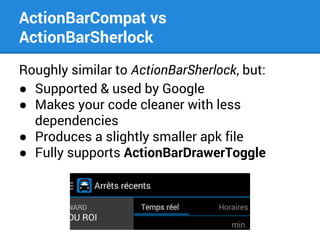
Roughly similar to ActionBarSherlock, but:
● Supported & used by Google
● Makes your code cleaner with less
dependencies
● Produces a slightly smaller apk file
● Fully supports ActionBarDrawerToggle
ActionBarCompat vs
ActionBarSherlock
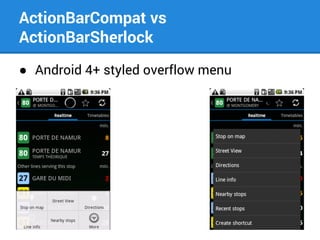
● Android 4+ styled overflow menu
Behaviour
ActionBarCompat works in two different
modes depending on the Android version.
● Android 2.1 to 3.2
A compatibility ActionBar will be used.
It is drawn inside the main content view.
● Android 4+
The native ActionBar will be used.
Method calls will be routed to the native
implementation.
Project Setup
Update Android Support Library to the latest version.
● Eclipse
Import library project from local folder:
[sdk]/extras/android/support/v7/appcompat
/android-support-v7-appcompat

● Android Studio
Add dependency to build.gradle:
dependencies {
compile "com.android.support:appcompat-v7:18.0.+"
...
}
Usage - Styles
First, make your app styles inherit from
ActionBarCompat styles.
/res/values/styles.xml
<style name="AppTheme" parent="@style/Theme.AppCompat">
...
</style>

● Theme.AppCompat
● Theme.AppCompat.Light
● Theme.AppCompat.Light.DarkActionBar
Usage - Styles
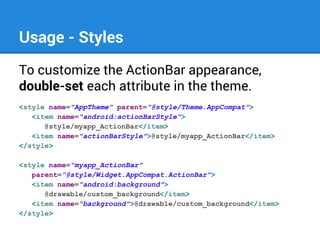
To customize the ActionBar appearance,
double-set each attribute in the theme.
<style name="AppTheme" parent="@style/Theme.AppCompat">
<item name="android:actionBarStyle">
@style/myapp_ActionBar</item>
<item name="actionBarStyle">@style/myapp_ActionBar</item>
</style>
<style name="myapp_ActionBar"
parent="@style/Widget.AppCompat.ActionBar">
<item name="android:background">
@drawable/custom_background</item>
<item name="background">@drawable/custom_background</item>
</style>
Usage - ActionBarActivity
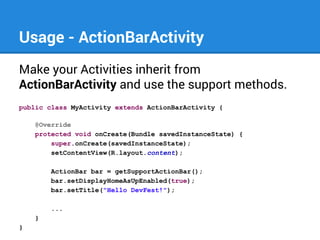
Make your Activities inherit from
ActionBarActivity and use the support methods.
public class MyActivity extends ActionBarActivity {
@Override
protected void onCreate(Bundle savedInstanceState) {
super.onCreate(savedInstanceState);
setContentView(R.layout.content);
ActionBar bar = getSupportActionBar();
bar.setDisplayHomeAsUpEnabled(true);
bar.setTitle("Hello DevFest!");
...
}
}
Usage - ActionBarActivity
ActionBar-related support methods
● getSupportActionBar()
● supportInvalidateOptionsMenu()
● supportRequestWindowFeature() [not in ABS]
● setSupportProgress()
● setSupportProgressBarIndeterminateVisibility()
● startSupportActionMode()
Never call the corresponding native methods
if you use ActionBarCompat!
Always call these methods after super.onCreate()
Usage - ActionBarActivity
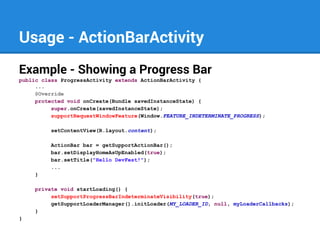
Example - Showing a Progress Bar
public class ProgressActivity extends ActionBarActivity {
...
@Override
protected void onCreate(Bundle savedInstanceState) {
super.onCreate(savedInstanceState);
supportRequestWindowFeature(Window.FEATURE_INDETERMINATE_PROGRESS);
setContentView(R.layout.content);
ActionBar bar = getSupportActionBar();
bar.setDisplayHomeAsUpEnabled(true);
bar.setTitle("Hello DevFest!");
...
}
private void startLoading() {
setSupportProgressBarIndeterminateVisibility(true);
getSupportLoaderManager().initLoader(MY_LOADER_ID, null, myLoaderCallbacks);
}
}
Usage - ActionBarActivity
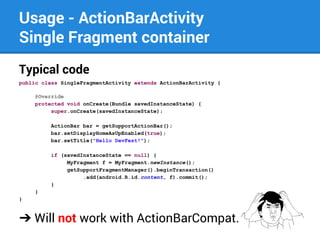
Single Fragment container
Typical code
public class SingleFragmentActivity extends ActionBarActivity {
@Override
protected void onCreate(Bundle savedInstanceState) {
super.onCreate(savedInstanceState);
ActionBar bar = getSupportActionBar();
bar.setDisplayHomeAsUpEnabled(true);
bar.setTitle("Hello DevFest!");
if (savedInstanceState == null) {
MyFragment f = MyFragment.newInstance();
getSupportFragmentManager().beginTransaction()
.add(android.R.id.content, f).commit();
}
}
}

➔ Will not work with ActionBarCompat.
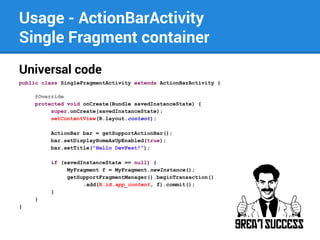
Usage - ActionBarActivity
Single Fragment container
Universal code
public class SingleFragmentActivity extends ActionBarActivity {
@Override
protected void onCreate(Bundle savedInstanceState) {
super.onCreate(savedInstanceState);
setContentView(R.layout.content);
ActionBar bar = getSupportActionBar();
bar.setDisplayHomeAsUpEnabled(true);
bar.setTitle("Hello DevFest!");
if (savedInstanceState == null) {
MyFragment f = MyFragment.newInstance();
getSupportFragmentManager().beginTransaction()
.add(R.id.app_content, f).commit();
}
}
}
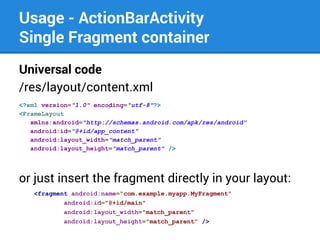
Usage - ActionBarActivity
Single Fragment container
Universal code
/res/layout/content.xml
<?xml version="1.0" encoding="utf-8"?>
<FrameLayout
xmlns:android="http://schemas.android.com/apk/res/android"
android:id="@+id/app_content"
android:layout_width="match_parent"
android:layout_height="match_parent" />

or just insert the fragment directly in your layout:
<fragment android:name="com.example.myapp.MyFragment"
android:id="@+id/main"
android:layout_width="match_parent"
android:layout_height="match_parent" />
Usage - Fragments
Just inherit from the standard Fragment class
of the Support Library.
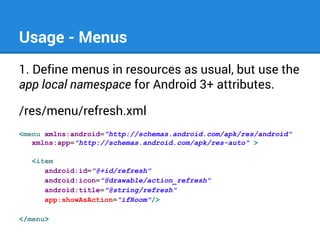
Usage - Menus
1. Define menus in resources as usual, but use the
app local namespace for Android 3+ attributes.
/res/menu/refresh.xml
<menu xmlns:android="http://schemas.android.com/apk/res/android"
xmlns:app="http://schemas.android.com/apk/res-auto" >
<item
android:id="@+id/refresh"
android:icon="@drawable/action_refresh"
android:title="@string/refresh"
app:showAsAction="ifRoom"/>
</menu>
Usage - Menus
Android 3+ menu items attributes:
● showAsAction
● actionLayout
● actionViewClass
● actionProviderClass
Usage - Menus
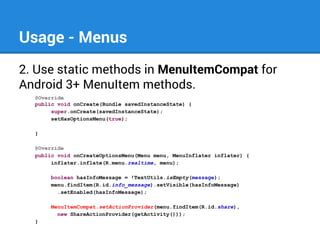
2. Use static methods in MenuItemCompat for
Android 3+ MenuItem methods.
@Override
public void onCreate(Bundle savedInstanceState) {
super.onCreate(savedInstanceState);
setHasOptionsMenu(true);
}
@Override
public void onCreateOptionsMenu(Menu menu, MenuInflater inflater) {
inflater.inflate(R.menu.realtime, menu);
boolean hasInfoMessage = !TextUtils.isEmpty(message);
menu.findItem(R.id.info_message).setVisible(hasInfoMessage)
.setEnabled(hasInfoMessage);
MenuItemCompat.setActionProvider(menu.findItem(R.id.share),
new ShareActionProvider(getActivity()));
}
Usage - Menus
Android 3+ MenuItem methods:
● setActionProvider()
● getActionProvider()
● setActionView()
● getActionView()
● expandActionView()
● collapseActionView()
● isActionViewExpanded()
● setOnActionExpandListener()
● setShowAsAction()
Migrating from ActionBarSherlock
to ActionBarCompat
In 7 steps
1. Styles resources
Theme.Sherlock.* ➔ Theme.AppCompat.*
Widget.Sherlock.* ➔ Widget.AppCompat.*
2. SherlockActivity ➔ ActionBarActivity
3. Sherlock*Fragment ➔ *Fragment
4. requestWindowFeature() ➔
supportRequestWindowFeature()
and move the call after super.onCreate()
Migrating from ActionBarSherlock
to ActionBarCompat
5. Remove references to the top-level android.
R.id.content and use a custom top
container layout instead.
6. Menu resources
Replace the android: namespace with the
app local namespace for Android 3+ attributes.
7. Menu items code
Replace the ActionBarSherlock MenuItems
with the native MenuItems
+ MenuItemCompat static methods, if needed.
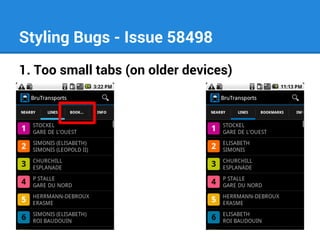
Styling Bugs - Issue 58498
1. Too small tabs (on older devices)
Styling Bugs
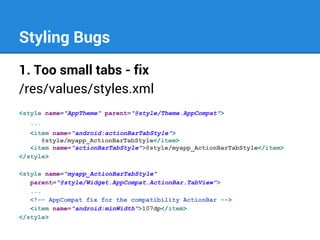
1. Too small tabs - fix
/res/values/styles.xml
<style name="AppTheme" parent="@style/Theme.AppCompat">
...
<item name="android:actionBarTabStyle">
@style/myapp_ActionBarTabStyle</item>
<item name="actionBarTabStyle">@style/myapp_ActionBarTabStyle</item>
</style>
<style name="myapp_ActionBarTabStyle"
parent="@style/Widget.AppCompat.ActionBar.TabView">
...
<!-- AppCompat fix for the compatibility ActionBar -->
<item name="android:minWidth">107dp</item>
</style>
Styling Bugs
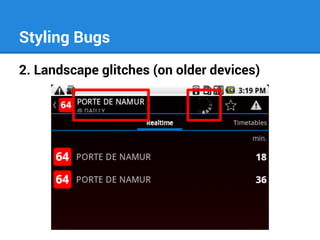
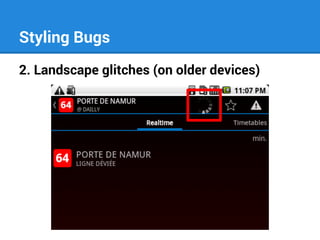
2. Landscape glitches (on older devices)
Styling Bugs
2. Landscape glitches (on older devices)
Styling Bugs
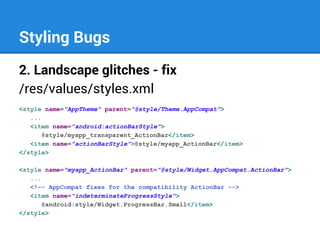
2. Landscape glitches - fix
/res/values/styles.xml
<style name="AppTheme" parent="@style/Theme.AppCompat">
...
<item name="android:actionBarStyle">
@style/myapp_transparent_ActionBar</item>
<item name="actionBarStyle">@style/myapp_ActionBar</item>
</style>
<style name="myapp_ActionBar" parent="@style/Widget.AppCompat.ActionBar">
...
<!-- AppCompat fixes for the compatibility ActionBar -->
<item name="indeterminateProgressStyle">
@android:style/Widget.ProgressBar.Small</item>
</style>
One more thing…
Missing feature
No support for preference screens ?
➔ PreferenceActivity is mandatory to support
preference screens on older devices.
➔ There is no ActionBarPreferenceActivity, so:
◆ Either you get no ActionBar at all on the preferences
screen
◆ Or you create two preference activities and use a
native ActionBar on newer devices.
◆ You need to override the styles.
Missing feature
Alternative: use a custom PreferenceFragment
● I created a simple PreferenceFragment for
the support library.
● Based on the platform’s
PreferenceFragment with some reflection to
access a few protected methods.
● Works with ActionBarActivity.
● Source code can be found here:
https://gist.github.com/cbeyls
The End

Thanks for watching!

@BladeCoder - plus.google.com/+ChristopheBeyls

Android Support Library: Using ActionBarCompat

  • 1.
    Android Support Library: UsingActionBarCompat Christophe Beyls DevFest Belgium 2013
  • 2.
    About the speaker ●Mobile developer living in Brussels. ● Regular attendee of GTUG and Café Numerique. ● Developed Brussels Transports for Android during my spare time. @BladeCoder plus.google.com/+ChristopheBeyls
  • 3.
    Agenda ● Introduction tothe support library ● ActionBarCompat vs ActionBarSherlock ● Setup & detailed usage ● Limitations & workarounds ● Migrating from ActionBarSherlock to ActionBarCompat ● Bugs & fixes
  • 4.
    The Android SupportLibrary - Features Mandatory library for (almost) any kind of Android project. ● Brings Fragments and Loaders to Android 1.6+ ● Utility classes to use newer Android features only if available ○ TaskStackBuilder, NavUtils (navigation) ○ NotificationCompat ○ ShareCompat
  • 5.
    The Android SupportLibrary - Features ● General utility classes ○ ○ ○ ○ LocalBroadcastManager (message bus) LruCache (backport) LongSparseArray (backport) WakefulBroadcastReceiver ● New UI widgets ○ ViewPager (+ PagerTabStrip, PagerTitleStrip) ○ SlidingPaneLayout ○ DrawerLayout
  • 6.
    ActionBarCompat http://developer.android.com/guide/topics/ui/actionbar.html ● Introduced inmay 2013 as part of the Android support library v18 ● Requires & extends android-support-v4.jar ● Provides ActionBar support for Android 2.1+ (API 7+) ● Mimics the native ActionBar API
  • 7.
    ActionBarCompat vs ActionBarSherlock Roughly similarto ActionBarSherlock, but: ● Supported & used by Google ● Makes your code cleaner with less dependencies ● Produces a slightly smaller apk file ● Fully supports ActionBarDrawerToggle
  • 8.
  • 9.
    Behaviour ActionBarCompat works intwo different modes depending on the Android version. ● Android 2.1 to 3.2 A compatibility ActionBar will be used. It is drawn inside the main content view. ● Android 4+ The native ActionBar will be used. Method calls will be routed to the native implementation.
  • 10.
    Project Setup Update AndroidSupport Library to the latest version. ● Eclipse Import library project from local folder: [sdk]/extras/android/support/v7/appcompat /android-support-v7-appcompat ● Android Studio Add dependency to build.gradle: dependencies { compile "com.android.support:appcompat-v7:18.0.+" ... }
  • 11.
    Usage - Styles First,make your app styles inherit from ActionBarCompat styles. /res/values/styles.xml <style name="AppTheme" parent="@style/Theme.AppCompat"> ... </style> ● Theme.AppCompat ● Theme.AppCompat.Light ● Theme.AppCompat.Light.DarkActionBar
  • 12.
    Usage - Styles Tocustomize the ActionBar appearance, double-set each attribute in the theme. <style name="AppTheme" parent="@style/Theme.AppCompat"> <item name="android:actionBarStyle"> @style/myapp_ActionBar</item> <item name="actionBarStyle">@style/myapp_ActionBar</item> </style> <style name="myapp_ActionBar" parent="@style/Widget.AppCompat.ActionBar"> <item name="android:background"> @drawable/custom_background</item> <item name="background">@drawable/custom_background</item> </style>
  • 13.
    Usage - ActionBarActivity Makeyour Activities inherit from ActionBarActivity and use the support methods. public class MyActivity extends ActionBarActivity { @Override protected void onCreate(Bundle savedInstanceState) { super.onCreate(savedInstanceState); setContentView(R.layout.content); ActionBar bar = getSupportActionBar(); bar.setDisplayHomeAsUpEnabled(true); bar.setTitle("Hello DevFest!"); ... } }
  • 14.
    Usage - ActionBarActivity ActionBar-relatedsupport methods ● getSupportActionBar() ● supportInvalidateOptionsMenu() ● supportRequestWindowFeature() [not in ABS] ● setSupportProgress() ● setSupportProgressBarIndeterminateVisibility() ● startSupportActionMode() Never call the corresponding native methods if you use ActionBarCompat! Always call these methods after super.onCreate()
  • 15.
    Usage - ActionBarActivity Example- Showing a Progress Bar public class ProgressActivity extends ActionBarActivity { ... @Override protected void onCreate(Bundle savedInstanceState) { super.onCreate(savedInstanceState); supportRequestWindowFeature(Window.FEATURE_INDETERMINATE_PROGRESS); setContentView(R.layout.content); ActionBar bar = getSupportActionBar(); bar.setDisplayHomeAsUpEnabled(true); bar.setTitle("Hello DevFest!"); ... } private void startLoading() { setSupportProgressBarIndeterminateVisibility(true); getSupportLoaderManager().initLoader(MY_LOADER_ID, null, myLoaderCallbacks); } }
  • 16.
    Usage - ActionBarActivity SingleFragment container Typical code public class SingleFragmentActivity extends ActionBarActivity { @Override protected void onCreate(Bundle savedInstanceState) { super.onCreate(savedInstanceState); ActionBar bar = getSupportActionBar(); bar.setDisplayHomeAsUpEnabled(true); bar.setTitle("Hello DevFest!"); if (savedInstanceState == null) { MyFragment f = MyFragment.newInstance(); getSupportFragmentManager().beginTransaction() .add(android.R.id.content, f).commit(); } } } ➔ Will not work with ActionBarCompat.
  • 17.
    Usage - ActionBarActivity SingleFragment container Universal code public class SingleFragmentActivity extends ActionBarActivity { @Override protected void onCreate(Bundle savedInstanceState) { super.onCreate(savedInstanceState); setContentView(R.layout.content); ActionBar bar = getSupportActionBar(); bar.setDisplayHomeAsUpEnabled(true); bar.setTitle("Hello DevFest!"); if (savedInstanceState == null) { MyFragment f = MyFragment.newInstance(); getSupportFragmentManager().beginTransaction() .add(R.id.app_content, f).commit(); } } }
  • 18.
    Usage - ActionBarActivity SingleFragment container Universal code /res/layout/content.xml <?xml version="1.0" encoding="utf-8"?> <FrameLayout xmlns:android="http://schemas.android.com/apk/res/android" android:id="@+id/app_content" android:layout_width="match_parent" android:layout_height="match_parent" /> or just insert the fragment directly in your layout: <fragment android:name="com.example.myapp.MyFragment" android:id="@+id/main" android:layout_width="match_parent" android:layout_height="match_parent" />
  • 19.
    Usage - Fragments Justinherit from the standard Fragment class of the Support Library.
  • 20.
    Usage - Menus 1.Define menus in resources as usual, but use the app local namespace for Android 3+ attributes. /res/menu/refresh.xml <menu xmlns:android="http://schemas.android.com/apk/res/android" xmlns:app="http://schemas.android.com/apk/res-auto" > <item android:id="@+id/refresh" android:icon="@drawable/action_refresh" android:title="@string/refresh" app:showAsAction="ifRoom"/> </menu>
  • 21.
    Usage - Menus Android3+ menu items attributes: ● showAsAction ● actionLayout ● actionViewClass ● actionProviderClass
  • 22.
    Usage - Menus 2.Use static methods in MenuItemCompat for Android 3+ MenuItem methods. @Override public void onCreate(Bundle savedInstanceState) { super.onCreate(savedInstanceState); setHasOptionsMenu(true); } @Override public void onCreateOptionsMenu(Menu menu, MenuInflater inflater) { inflater.inflate(R.menu.realtime, menu); boolean hasInfoMessage = !TextUtils.isEmpty(message); menu.findItem(R.id.info_message).setVisible(hasInfoMessage) .setEnabled(hasInfoMessage); MenuItemCompat.setActionProvider(menu.findItem(R.id.share), new ShareActionProvider(getActivity())); }
  • 23.
    Usage - Menus Android3+ MenuItem methods: ● setActionProvider() ● getActionProvider() ● setActionView() ● getActionView() ● expandActionView() ● collapseActionView() ● isActionViewExpanded() ● setOnActionExpandListener() ● setShowAsAction()
  • 24.
    Migrating from ActionBarSherlock toActionBarCompat In 7 steps 1. Styles resources Theme.Sherlock.* ➔ Theme.AppCompat.* Widget.Sherlock.* ➔ Widget.AppCompat.* 2. SherlockActivity ➔ ActionBarActivity 3. Sherlock*Fragment ➔ *Fragment 4. requestWindowFeature() ➔ supportRequestWindowFeature() and move the call after super.onCreate()
  • 25.
    Migrating from ActionBarSherlock toActionBarCompat 5. Remove references to the top-level android. R.id.content and use a custom top container layout instead. 6. Menu resources Replace the android: namespace with the app local namespace for Android 3+ attributes. 7. Menu items code Replace the ActionBarSherlock MenuItems with the native MenuItems + MenuItemCompat static methods, if needed.
  • 26.
    Styling Bugs -Issue 58498 1. Too small tabs (on older devices)
  • 27.
    Styling Bugs 1. Toosmall tabs - fix /res/values/styles.xml <style name="AppTheme" parent="@style/Theme.AppCompat"> ... <item name="android:actionBarTabStyle"> @style/myapp_ActionBarTabStyle</item> <item name="actionBarTabStyle">@style/myapp_ActionBarTabStyle</item> </style> <style name="myapp_ActionBarTabStyle" parent="@style/Widget.AppCompat.ActionBar.TabView"> ... <!-- AppCompat fix for the compatibility ActionBar --> <item name="android:minWidth">107dp</item> </style>
  • 28.
    Styling Bugs 2. Landscapeglitches (on older devices)
  • 29.
    Styling Bugs 2. Landscapeglitches (on older devices)
  • 30.
    Styling Bugs 2. Landscapeglitches - fix /res/values/styles.xml <style name="AppTheme" parent="@style/Theme.AppCompat"> ... <item name="android:actionBarStyle"> @style/myapp_transparent_ActionBar</item> <item name="actionBarStyle">@style/myapp_ActionBar</item> </style> <style name="myapp_ActionBar" parent="@style/Widget.AppCompat.ActionBar"> ... <!-- AppCompat fixes for the compatibility ActionBar --> <item name="indeterminateProgressStyle"> @android:style/Widget.ProgressBar.Small</item> </style>
  • 31.
    One more thing… Missingfeature No support for preference screens ? ➔ PreferenceActivity is mandatory to support preference screens on older devices. ➔ There is no ActionBarPreferenceActivity, so: ◆ Either you get no ActionBar at all on the preferences screen ◆ Or you create two preference activities and use a native ActionBar on newer devices. ◆ You need to override the styles.
  • 32.
    Missing feature Alternative: usea custom PreferenceFragment ● I created a simple PreferenceFragment for the support library. ● Based on the platform’s PreferenceFragment with some reflection to access a few protected methods. ● Works with ActionBarActivity. ● Source code can be found here: https://gist.github.com/cbeyls
  • 33.
    The End Thanks forwatching! @BladeCoder - plus.google.com/+ChristopheBeyls