Gradle
1.What is this?
General purpose build system made in groovy that allows you to execute the needed commands to build software.
Manages:
- Build process
- Dependencies
- Project files
1.What is this?
Similar products:
- Ant
- Maven
- Gant
- Ivy
- Rake
- Buildr
- ...
1.What is this?
Big win
It is a full language itself, not a configuration file.
Gradle just provides a lifecycle and some classes to help you
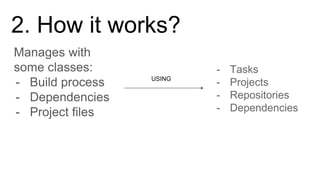
2. How it works?
Manages with
some classes:
- Build process
- Dependencies
- Project files
USING
- Tasks
- Projects
- Repositories
- Dependencies
Key concepts:
- BuildScript
- Project
- Repositories
- Tasks
- Plugin
2. How it works?
BuildScript
2. How it works?
Setup script to add dependencies on the building
process. Ex. plugin dependencies
Project
2. How it works?
Element that represents the current project and is
considered the top level item. Contains all the
important information, plugins, files and source
directories.
Repositories
2. How it works?
Defines which are the sources of the possible
dependencies. Ex. MavenCentral, jCenter (bintray)
Tasks
2. How it works?
Pieces of code that are able to perform some action
defined. Tasks can be dependent from each other
and they can receive actions before or after.
Plugins
2. How it works?
Programs that evaluates during the build process
and are able to add behaviour and tasks to the
current project.
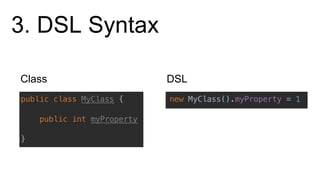
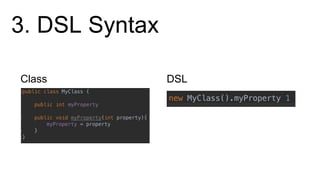
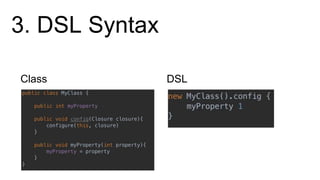
DSL based on Groovy but...
- You can do whatever you can do in the Groovy
language
- Use the DSL to make it look like a configuration
file
3. DSL Syntax
Class DSL
3. DSL Syntax
Class DSL
3. DSL Syntax
Class DSL
3. DSL Syntax
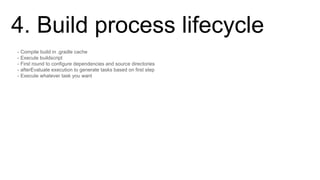
4. Build process lifecycle
- Compile build in .gradle cache
- Execute buildscript
- First round to configure dependencies and source directories
- afterEvaluate execution to generate tasks based on first step
- Execute whatever task you want
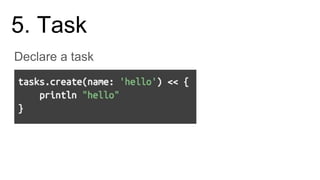
5. Task
Declare a task
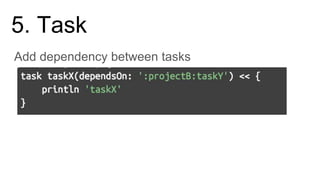
5. Task
Add dependency between tasks
5. Task
- taks.doFirst
- task.doLast (<<)
- project.findBy..name, path...
- extend tasks
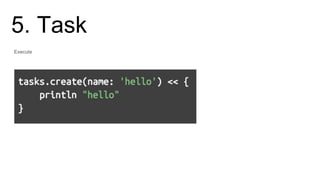
5. Task
Execute
./gradlew hello
hello
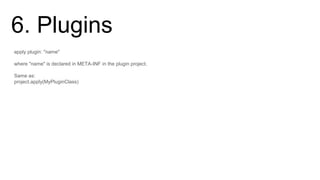
6. Plugins
apply plugin: "name"
where "name" is declared in META-INF in the plugin project.
Same as:
project.apply(MyPluginClass)
6. Plugins
public class MyPlugin extends Plugin<Project> {
@Override
public void apply(Project project){
}
}
7. Android plugin
- Android DSL
- Build types
- Flavors
- Dimensions
- Default configuration properties
7. Android plugin
Build type
- Application build configuration
- Default build types are debug and release
DSL: http://google.github.io/android-gradle-dsl/current/com.android.build.gradle.internal.dsl.BuildType.html
7. Android plugin
Flavor
- Specific files for the build
- Version code, variables, dimensions
- No needed/No default
DSL: http://google.github.io/android-gradle-dsl/current/com.android.build.gradle.internal.dsl.ProductFlavor.html
7. Android plugin
Dimension
- Mix different flavors in a single one
- Descriptor for a flavor
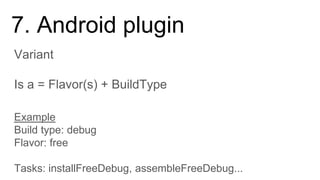
7. Android plugin
Is a = Flavor(s) + BuildType
Variant
Example
Build type: debug
Flavor: free
Tasks: installFreeDebug, assembleFreeDebug...
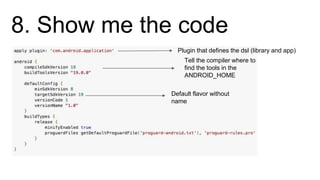
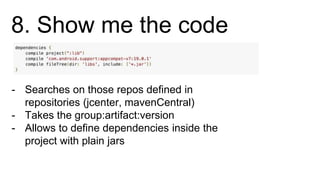
8. Show me the code
Default flavor without
name
Tell the compiler where to
find the tools in the
ANDROID_HOME
Plugin that defines the dsl (library and app)
8. Show me the code
- Searches on those repos defined in
repositories (jcenter, mavenCentral)
- Takes the group:artifact:version
- Allows to define dependencies inside the
project with plain jars
Black Magic with gradle
When integration with third parties sucks
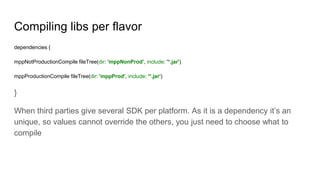
Compiling libs per flavor
dependencies {
mppNotProductionCompile fileTree(dir: 'mppNonProd', include: '*.jar')
mppProductionCompile fileTree(dir: 'mppProd', include: '*.jar')
}
When third parties give several SDK per platform. As it is a dependency it’s an
unique, so values cannot override the others, you just need to choose what to
compile
Use resources per flavor
Usually you can define resources per flavor just making a folder matching the
flavor. In case you need to reuse in a different way you can iterate between flavors
in the sourceSets. For example:
[qaUat, qaApplauseTestersqa, qaMppQaAlpha].each { item ->
item.res.srcDirs = ['res_qa'] }
[prod, prodMppInt, prodMppPreprod, prodMppQa].each { item ->
item.res.srcDirs = ['res_prod'] }
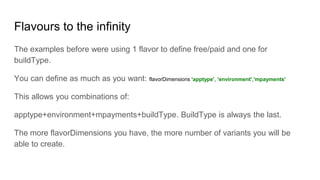
Flavours to the infinity
The examples before were using 1 flavor to define free/paid and one for
buildType.
You can define as much as you want: flavorDimensions 'apptype', 'environment','mpayments'
This allows you combinations of:
apptype+environment+mpayments+buildType. BuildType is always the last.
The more flavorDimensions you have, the more number of variants you will be
able to create.

Android presentation - Gradle ++

  • 1.
  • 2.
    1.What is this? Generalpurpose build system made in groovy that allows you to execute the needed commands to build software. Manages: - Build process - Dependencies - Project files
  • 3.
    1.What is this? Similarproducts: - Ant - Maven - Gant - Ivy - Rake - Buildr - ...
  • 4.
    1.What is this? Bigwin It is a full language itself, not a configuration file. Gradle just provides a lifecycle and some classes to help you
  • 5.
    2. How itworks? Manages with some classes: - Build process - Dependencies - Project files USING - Tasks - Projects - Repositories - Dependencies
  • 6.
    Key concepts: - BuildScript -Project - Repositories - Tasks - Plugin 2. How it works?
  • 7.
    BuildScript 2. How itworks? Setup script to add dependencies on the building process. Ex. plugin dependencies
  • 8.
    Project 2. How itworks? Element that represents the current project and is considered the top level item. Contains all the important information, plugins, files and source directories.
  • 9.
    Repositories 2. How itworks? Defines which are the sources of the possible dependencies. Ex. MavenCentral, jCenter (bintray)
  • 10.
    Tasks 2. How itworks? Pieces of code that are able to perform some action defined. Tasks can be dependent from each other and they can receive actions before or after.
  • 11.
    Plugins 2. How itworks? Programs that evaluates during the build process and are able to add behaviour and tasks to the current project.
  • 12.
    DSL based onGroovy but... - You can do whatever you can do in the Groovy language - Use the DSL to make it look like a configuration file 3. DSL Syntax
  • 13.
  • 14.
  • 15.
  • 16.
    4. Build processlifecycle - Compile build in .gradle cache - Execute buildscript - First round to configure dependencies and source directories - afterEvaluate execution to generate tasks based on first step - Execute whatever task you want
  • 17.
  • 18.
  • 19.
    5. Task - taks.doFirst -task.doLast (<<) - project.findBy..name, path... - extend tasks
  • 20.
  • 21.
    6. Plugins apply plugin:"name" where "name" is declared in META-INF in the plugin project. Same as: project.apply(MyPluginClass)
  • 22.
    6. Plugins public classMyPlugin extends Plugin<Project> { @Override public void apply(Project project){ } }
  • 23.
    7. Android plugin -Android DSL - Build types - Flavors - Dimensions - Default configuration properties
  • 24.
    7. Android plugin Buildtype - Application build configuration - Default build types are debug and release DSL: http://google.github.io/android-gradle-dsl/current/com.android.build.gradle.internal.dsl.BuildType.html
  • 25.
    7. Android plugin Flavor -Specific files for the build - Version code, variables, dimensions - No needed/No default DSL: http://google.github.io/android-gradle-dsl/current/com.android.build.gradle.internal.dsl.ProductFlavor.html
  • 26.
    7. Android plugin Dimension -Mix different flavors in a single one - Descriptor for a flavor
  • 27.
    7. Android plugin Isa = Flavor(s) + BuildType Variant Example Build type: debug Flavor: free Tasks: installFreeDebug, assembleFreeDebug...
  • 28.
    8. Show methe code Default flavor without name Tell the compiler where to find the tools in the ANDROID_HOME Plugin that defines the dsl (library and app)
  • 29.
    8. Show methe code - Searches on those repos defined in repositories (jcenter, mavenCentral) - Takes the group:artifact:version - Allows to define dependencies inside the project with plain jars
  • 30.
    Black Magic withgradle When integration with third parties sucks
  • 31.
    Compiling libs perflavor dependencies { mppNotProductionCompile fileTree(dir: 'mppNonProd', include: '*.jar') mppProductionCompile fileTree(dir: 'mppProd', include: '*.jar') } When third parties give several SDK per platform. As it is a dependency it’s an unique, so values cannot override the others, you just need to choose what to compile
  • 32.
    Use resources perflavor Usually you can define resources per flavor just making a folder matching the flavor. In case you need to reuse in a different way you can iterate between flavors in the sourceSets. For example: [qaUat, qaApplauseTestersqa, qaMppQaAlpha].each { item -> item.res.srcDirs = ['res_qa'] } [prod, prodMppInt, prodMppPreprod, prodMppQa].each { item -> item.res.srcDirs = ['res_prod'] }
  • 33.
    Flavours to theinfinity The examples before were using 1 flavor to define free/paid and one for buildType. You can define as much as you want: flavorDimensions 'apptype', 'environment','mpayments' This allows you combinations of: apptype+environment+mpayments+buildType. BuildType is always the last. The more flavorDimensions you have, the more number of variants you will be able to create.