Gradle (http://www.gradle.org)
Maxim Stepanenko, Architect


           www.ExigenServices.com
Traditional build systems


•   Make, autotools
•   Ant (build, deploy), ant + ivy (dependency mgmt.)
•   Maven (dependency and lifecycle mgmt.)
•   Can be extended using plugins


Plug-in architectures severely limit the ability for build tools to grow gracefully as projects
become more complex. We have come to feel that plug-ins are
the wrong level of abstraction, and prefer language-based tools
like Gradle and Rake instead, because they offer finer-grained
abstractions and more flexibility long term.

http://thoughtworks.fileburst.com/assets/technology-radar-october-2012.pdf


2
Alternative build systems


•   Gradle (DSL + groovy + Ivy)
•   Rake (DSL + ruby)
•   Apache Buildr (DSL + ruby)
•   Scons (DSL + python)
•   Simple Build Tool (Scala + DSL)
•   All this systems based on a true languages: ruby, python etc.


3
Brief Gradle benefits


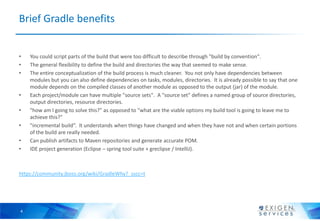
•   You could script parts of the build that were too difficult to describe through "build by convention".
•   The general flexibility to define the build and directories the way that seemed to make sense.
•   The entire conceptualization of the build process is much cleaner. You not only have dependencies between
    modules but you can also define dependencies on tasks, modules, directories. It is already possible to say that one
    module depends on the compiled classes of another module as opposed to the output (jar) of the module.
•   Each project/module can have multiple "source sets". A "source set" defines a named group of source directories,
    output directories, resource directories.
•   "how am I going to solve this?" as opposed to "what are the viable options my build tool is going to leave me to
    achieve this?"
•   "incremental build“. It understands when things have changed and when they have not and when certain portions
    of the build are really needed.
•   Can publish artifacts to Maven repositories and generate accurate POM.
•   IDE project generation (Eclipse – spring tool suite + greclipse / IntelliJ).


https://community.jboss.org/wiki/GradleWhy?_sscc=t


4
Gradle usage in real world


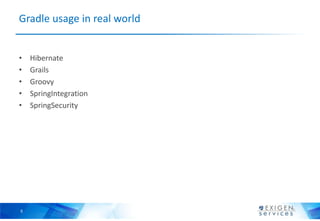
•   Hibernate
•   Grails
•   Groovy
•   SpringIntegration
•   SpringSecurity


5
Gradle build file 1
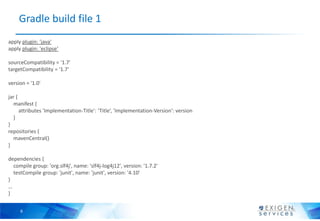
apply plugin: 'java'
apply plugin: 'eclipse‘

sourceCompatibility = '1.7'
targetCompatibility = '1.7'

version = '1.0'

jar {
  manifest {
      attributes 'Implementation-Title': ‘Title’, 'Implementation-Version': version
  }
}
repositories {
  mavenCentral()
}

dependencies {
  compile group: 'org.slf4j', name: 'slf4j-log4j12', version: '1.7.2'
  testCompile group: 'junit', name: 'junit', version: '4.10'
}
…
}


     6
Gradle build file 2


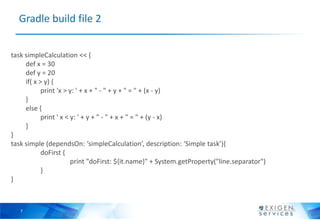
task simpleCalculation << {
     def x = 30
     def y = 20
     if( x > y) {
            print 'x > y: ' + x + " - " + y + " = " + (x - y)
     }
     else {
            print ' x < y: ' + y + " - " + x + " = " + (y - x)
     }
}
task simple (dependsOn: ‘simpleCalculation’, description: ‘Simple task’){
            doFirst {
                        print "doFirst: ${it.name}" + System.getProperty("line.separator")
            }
}


   7
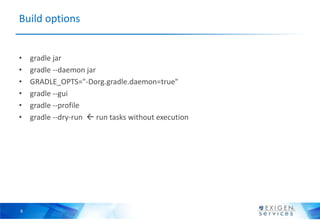
Build options


•   gradle jar
•   gradle --daemon jar
•   GRADLE_OPTS="-Dorg.gradle.daemon=true"
•   gradle --gui
•   gradle --profile
•   gradle --dry-run  run tasks without execution


8
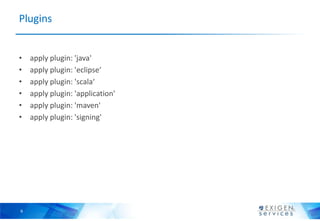
Plugins


•   apply plugin: 'java'
•   apply plugin: 'eclipse‘
•   apply plugin: 'scala‘
•   apply plugin: 'application'
•   apply plugin: 'maven'
•   apply plugin: 'signing'


9
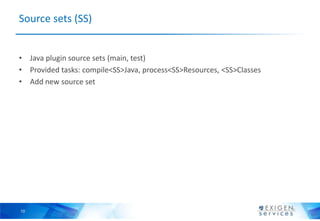
Source sets (SS)


• Java plugin source sets (main, test)
• Provided tasks: compile<SS>Java, process<SS>Resources, <SS>Classes
• Add new source set


10
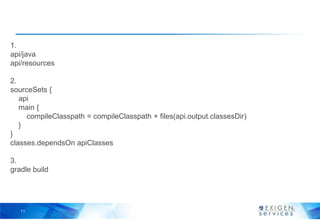
1.
api/java
api/resources

2.
sourceSets {
   api
   main {
     compileClasspath = compileClasspath + files(api.output.classesDir)
   }
}
classes.dependsOn apiClasses

3.
gradle build


   11
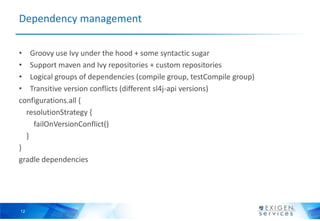
Dependency management

• Groovy use Ivy under the hood + some syntactic sugar
• Support maven and Ivy repositories + custom repositories
• Logical groups of dependencies (compile group, testCompile group)
• Transitive version conflicts (different sl4j-api versions)
configurations.all {
  resolutionStrategy {
    failOnVersionConflict()
  }
}
gradle dependencies


12
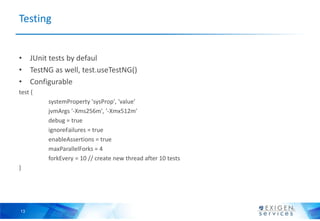
Testing


• JUnit tests by defaul
• TestNG as well, test.useTestNG()
• Configurable
test {
         systemProperty 'sysProp', 'value'
         jvmArgs '-Xms256m', '-Xmx512m'
         debug = true
         ignoreFailures = true
         enableAssertions = true
         maxParallelForks = 4
         forkEvery = 10 // create new thread after 10 tests
}


13
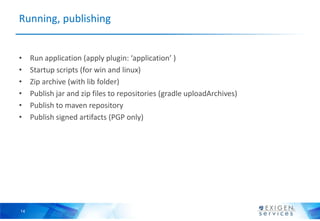
Running, publishing


•    Run application (apply plugin: ‘application’ )
•    Startup scripts (for win and linux)
•    Zip archive (with lib folder)
•    Publish jar and zip files to repositories (gradle uploadArchives)
•    Publish to maven repository
•    Publish signed artifacts (PGP only)


14
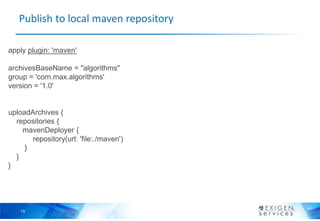
Publish to local maven repository

apply plugin: 'maven'

archivesBaseName = "algorithms"
group = 'com.max.algorithms'
version = '1.0'


uploadArchives {
  repositories {
    mavenDeployer {
       repository(url: 'file:./maven')
     }
  }
}


    15
Multi-project builds


•    DAG full dependency traversation
•    Hierarchical structure
•    Flat structure
•    Possible to have one build file per multi module project
•    Define dependencies between tasks in different projects
•    Compile/runtime dependencies between projects


16
Mixed languages projects


• C++, scala, groovy
• Cross compiled source bases
• Fast scala compilation (similar to SBT)

     apply plugin: 'scala‘
     ext.scala_version = '2.9.2'
     sourceSets.main.scala.srcDir "src/main/java"
     sourceSets.main.java.srcDirs = []

     dependencies {
       scalaTools group: 'org.scala-lang', name: 'scala-compiler', version: scala_version
       scalaTools group: 'org.scala-lang', name: 'scala-library', version: scala_version

         compile group: 'org.scalatra', name: 'scalatra_2.9.1', version: '2.1.0.M1'
         runtime group: 'org.scalatra', name: 'scalatra_2.9.1', version: '2.1.0.M1'
     }
17
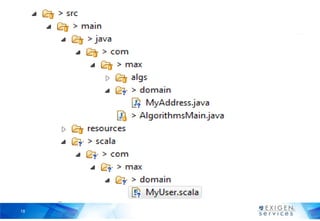
18
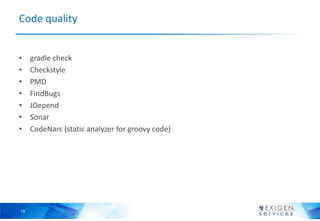
Code quality


•    gradle check
•    Checkstyle
•    PMD
•    FindBugs
•    JDepend
•    Sonar
•    CodeNarc (static analyzer for groovy code)


19
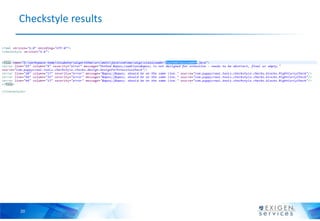
Checkstyle results


20
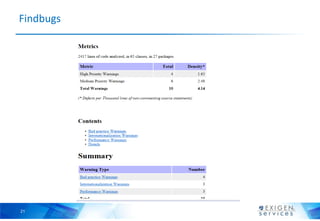
Findbugs


21
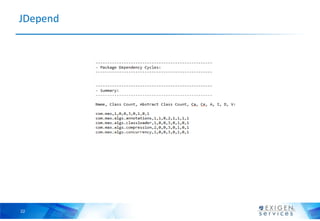
JDepend


22
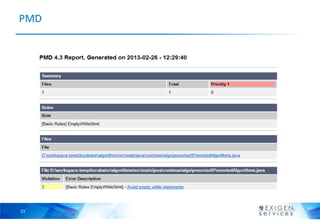
PMD


23
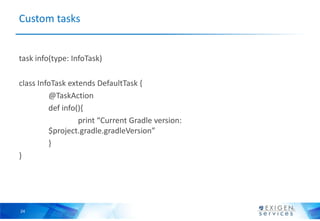
Custom tasks


task info(type: InfoTask)

class InfoTask extends DefaultTask {
         @TaskAction
         def info(){
                  print “Current Gradle version:
         $project.gradle.gradleVersion”
         }
}


24
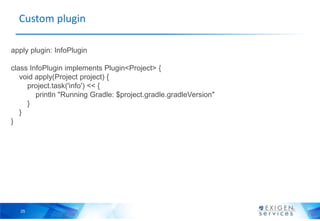
Custom plugin

apply plugin: InfoPlugin

class InfoPlugin implements Plugin<Project> {
   void apply(Project project) {
     project.task('info') << {
        println "Running Gradle: $project.gradle.gradleVersion"
     }
   }
}


  25
Continuous integration


• Jenkins (gradle plugin)
• JetBrains TeamCity
• Atlassian Bamboo


26

Gradle

  • 1.
    Gradle (http://www.gradle.org) Maxim Stepanenko,Architect www.ExigenServices.com
  • 2.
    Traditional build systems • Make, autotools • Ant (build, deploy), ant + ivy (dependency mgmt.) • Maven (dependency and lifecycle mgmt.) • Can be extended using plugins Plug-in architectures severely limit the ability for build tools to grow gracefully as projects become more complex. We have come to feel that plug-ins are the wrong level of abstraction, and prefer language-based tools like Gradle and Rake instead, because they offer finer-grained abstractions and more flexibility long term. http://thoughtworks.fileburst.com/assets/technology-radar-october-2012.pdf 2
  • 3.
    Alternative build systems • Gradle (DSL + groovy + Ivy) • Rake (DSL + ruby) • Apache Buildr (DSL + ruby) • Scons (DSL + python) • Simple Build Tool (Scala + DSL) • All this systems based on a true languages: ruby, python etc. 3
  • 4.
    Brief Gradle benefits • You could script parts of the build that were too difficult to describe through "build by convention". • The general flexibility to define the build and directories the way that seemed to make sense. • The entire conceptualization of the build process is much cleaner. You not only have dependencies between modules but you can also define dependencies on tasks, modules, directories. It is already possible to say that one module depends on the compiled classes of another module as opposed to the output (jar) of the module. • Each project/module can have multiple "source sets". A "source set" defines a named group of source directories, output directories, resource directories. • "how am I going to solve this?" as opposed to "what are the viable options my build tool is going to leave me to achieve this?" • "incremental build“. It understands when things have changed and when they have not and when certain portions of the build are really needed. • Can publish artifacts to Maven repositories and generate accurate POM. • IDE project generation (Eclipse – spring tool suite + greclipse / IntelliJ). https://community.jboss.org/wiki/GradleWhy?_sscc=t 4
  • 5.
    Gradle usage inreal world • Hibernate • Grails • Groovy • SpringIntegration • SpringSecurity 5
  • 6.
    Gradle build file1 apply plugin: 'java' apply plugin: 'eclipse‘ sourceCompatibility = '1.7' targetCompatibility = '1.7' version = '1.0' jar { manifest { attributes 'Implementation-Title': ‘Title’, 'Implementation-Version': version } } repositories { mavenCentral() } dependencies { compile group: 'org.slf4j', name: 'slf4j-log4j12', version: '1.7.2' testCompile group: 'junit', name: 'junit', version: '4.10' } … } 6
  • 7.
    Gradle build file2 task simpleCalculation << { def x = 30 def y = 20 if( x > y) { print 'x > y: ' + x + " - " + y + " = " + (x - y) } else { print ' x < y: ' + y + " - " + x + " = " + (y - x) } } task simple (dependsOn: ‘simpleCalculation’, description: ‘Simple task’){ doFirst { print "doFirst: ${it.name}" + System.getProperty("line.separator") } } 7
  • 8.
    Build options • gradle jar • gradle --daemon jar • GRADLE_OPTS="-Dorg.gradle.daemon=true" • gradle --gui • gradle --profile • gradle --dry-run  run tasks without execution 8
  • 9.
    Plugins • apply plugin: 'java' • apply plugin: 'eclipse‘ • apply plugin: 'scala‘ • apply plugin: 'application' • apply plugin: 'maven' • apply plugin: 'signing' 9
  • 10.
    Source sets (SS) •Java plugin source sets (main, test) • Provided tasks: compile<SS>Java, process<SS>Resources, <SS>Classes • Add new source set 10
  • 11.
    1. api/java api/resources 2. sourceSets { api main { compileClasspath = compileClasspath + files(api.output.classesDir) } } classes.dependsOn apiClasses 3. gradle build 11
  • 12.
    Dependency management • Groovyuse Ivy under the hood + some syntactic sugar • Support maven and Ivy repositories + custom repositories • Logical groups of dependencies (compile group, testCompile group) • Transitive version conflicts (different sl4j-api versions) configurations.all { resolutionStrategy { failOnVersionConflict() } } gradle dependencies 12
  • 13.
    Testing • JUnit testsby defaul • TestNG as well, test.useTestNG() • Configurable test { systemProperty 'sysProp', 'value' jvmArgs '-Xms256m', '-Xmx512m' debug = true ignoreFailures = true enableAssertions = true maxParallelForks = 4 forkEvery = 10 // create new thread after 10 tests } 13
  • 14.
    Running, publishing • Run application (apply plugin: ‘application’ ) • Startup scripts (for win and linux) • Zip archive (with lib folder) • Publish jar and zip files to repositories (gradle uploadArchives) • Publish to maven repository • Publish signed artifacts (PGP only) 14
  • 15.
    Publish to localmaven repository apply plugin: 'maven' archivesBaseName = "algorithms" group = 'com.max.algorithms' version = '1.0' uploadArchives { repositories { mavenDeployer { repository(url: 'file:./maven') } } } 15
  • 16.
    Multi-project builds • DAG full dependency traversation • Hierarchical structure • Flat structure • Possible to have one build file per multi module project • Define dependencies between tasks in different projects • Compile/runtime dependencies between projects 16
  • 17.
    Mixed languages projects •C++, scala, groovy • Cross compiled source bases • Fast scala compilation (similar to SBT) apply plugin: 'scala‘ ext.scala_version = '2.9.2' sourceSets.main.scala.srcDir "src/main/java" sourceSets.main.java.srcDirs = [] dependencies { scalaTools group: 'org.scala-lang', name: 'scala-compiler', version: scala_version scalaTools group: 'org.scala-lang', name: 'scala-library', version: scala_version compile group: 'org.scalatra', name: 'scalatra_2.9.1', version: '2.1.0.M1' runtime group: 'org.scalatra', name: 'scalatra_2.9.1', version: '2.1.0.M1' } 17
  • 18.
  • 19.
    Code quality • gradle check • Checkstyle • PMD • FindBugs • JDepend • Sonar • CodeNarc (static analyzer for groovy code) 19
  • 20.
  • 21.
  • 22.
  • 23.
  • 24.
    Custom tasks task info(type:InfoTask) class InfoTask extends DefaultTask { @TaskAction def info(){ print “Current Gradle version: $project.gradle.gradleVersion” } } 24
  • 25.
    Custom plugin apply plugin:InfoPlugin class InfoPlugin implements Plugin<Project> { void apply(Project project) { project.task('info') << { println "Running Gradle: $project.gradle.gradleVersion" } } } 25
  • 26.
    Continuous integration • Jenkins(gradle plugin) • JetBrains TeamCity • Atlassian Bamboo 26