DIGITAL MEDIA FOR THE CLASSROOM:
How to Tell your Story Using Film,
Photography, Blogs and Podcasts
Spotlight on Media Literacy –
Enhance Your Teaching Tool Kit
for 21st
Century Learning
October 23, 2010
Reisa Levine – Producer » CitizenShift / Parole citoyenne
reisa@citizenshift.org
@reisa101
http://www.delicious.com/reisa101
In This Workshop…
• Digital Storytelling – the basics
– What
– Why
– How You Can use Digital Stories
– Some examples
• The Production Process
– Scripting/Storyboarding
– Shooting
– Editing
– Sharing
• Resources
Before we start, a couple of
background references…
Michael Wesch’s 2008 article entitled :
Anti-teaching: confronting the crisis of significance
The Digital Life Show - Radio Program - interview with André Roux on digital
tools in the classroom. (see video by Michael Wesch entitled: A Portrait of
Students Today)
Digital Literacy in Canada: From Inclusion to Transformation (2010) Media
Awareness Network - A discussion paper calling for federal leadership in the
creation of a national digital literacy strategy to ensure all Canadians have the
necessary skills to use digital technologies to their fullest potential.
What is media literacy?
Why is media literacy important?
Media Literacy includes topics such as: online safety, ethical use,
electronic privacy, authenticating and evaluating information, marketing
to young people and critical thinking approaches to Internet use.
If we understand how media works:
 We can decode the messages that are constantly being
bombarded at us in our media saturated world.
 We can create media for our own needs; to express
ourselves, to document an event or situation, to inform others. Sharing
our media creations can help us to feel more connected.
From Wikipedia
Digital Storytelling refers to using digital tools so
that ordinary people can tell their own real-life
stories.
• "Digital Storytelling" is an emerging term, one that arises from a
grassroots movement that uses new digital tools to help ordinary
people tell their own 'true stories' in a compelling and emotionally
engaging form.
• The term can also be a broader journalistic reference to the variety
of emergent new forms of digital narratives (web-based stories,
interactive stories, hypertexts, and narrative computer games).
• As an emerging area of creative work, the definition of digital
storytelling is still the subject of much debate.
What is Digital Storytelling?
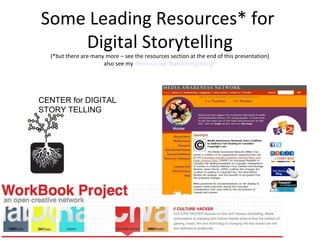
Some Leading Resources* for
Digital Storytelling
(*but there are many more – see the resources section at the end of this presentation)
also see my delicious tag ‘digitalstorytelling’
CENTER for DIGITAL
STORY TELLING
How You Can Use Digital Stories
• Projects and activities
• Group building
• Chronicling a series of events (timeline), a
personal history, changes over time
• Promotion for your organization or group
• Campaign for social change
• Public Service Announcement
• Publicity for an event
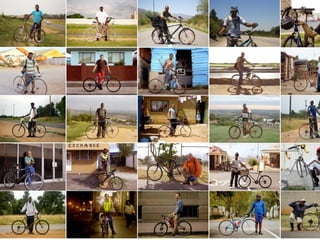
Examples
• The Center for Digital Storytelling - Regent Park
• The Girl Effect
• Amy’s Choice
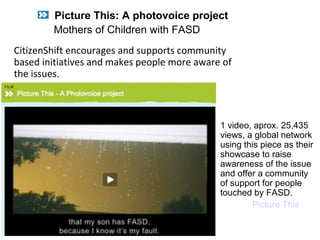
CitizenShift encourages and supports community
based initiatives and makes people more aware of
the issues.
1 video, aprox. 25,435
views, a global network
using this piece as their
showcase to raise
awareness of the issue
and offer a community
of support for people
touched by FASD.
Picture This
Picture This: A photovoice project
Mothers of Children with FASD
Tech literacy Vs. Media Literacy
• Before you create media, understand how to “read” media
• Share resources and learn how to find resources on your own.
• DON’T BE AFRAID OF TECHNOLOGY! (even if you’re not a ‘techno-whizz’)
Teachers know WHAT TO teach (AND WHY they want to teach it)
Students know HOW TO use the tools
– exchange strengths and work together!
What to look for when analyzing a film clip:
• What are some of the unique characteristics of this clip?
• How do these techniques contribute to the story?
• Are these techniques effective in producing an emotional response?
• What other messages do the shots convey?
• Who are the characters and what do we know about them from this clip?
• What other elements stand out?: Music? Dialogue? Costumes? Lighting?
Sets?
Let’s Talk Media
The Production Process
- Scripting/Storyboarding
- Shooting
- Editing
- Sharing
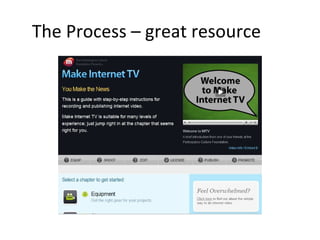
The Process – great resource
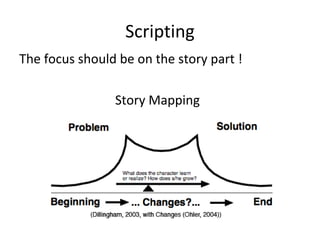
Scripting
The focus should be on the story part !
Story Mapping
Storyboarding
• How to compose your shots
– Think creatively
• Use a combination of shots:
– establishing shots, close-up’s, medium shots, ‘B-role’
complimentary footage, etc
• Use text, found footage/photos (Avoid copyrighted
materials – use Creative Commons and other open
repositories)
• Use sound effects, narration, music etc
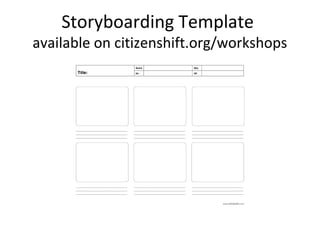
Storyboarding Template
available on citizenshift.org/workshops
The Production Process - Shooting
Cameras, mics & other equipment
• The Kodak Zi8 pocket video HD camera (with external sound
in jack)
• Flip Cam
• ‘Prosumer’ type mini DV (or memory card) video camera
• Your photo camera’s video mode or your cell phone
• Use an external microphone – not the camera’s mic (get good
sound ! This is crucial – use headphones to monitor levels)
• Location scouting
• Composing your shots
• Use a tripod whenever possible
(don’t forget; batteries, or to charge your cameras/recorders)
Working with Sound
• Podcasting (audio production)
– Tools:
• Audacity (free, all platforms)
• Ardour (Mac, Linux)
• WavePad (PC)
• Adobe Audition (more expensive)
Editing
Free and easy to use software:
• imovie (Mac)
• Movie Maker (PC)
• Online editing tools
– YouTube
About file formats and transcoding !
– A few popluar viewable formats include:
mov, mp4, avi
Sharing
• Put your film online (YouTube, Vimeo,
Facebook, other site)
• Share in your blog
• Help spread the word – newsletters, emails,
Facebook, Twitter, other social networks
Outreach
Communications, support and
cross channel promotion (social marketing)
• The importance of Outreach - it’s all about
making connections
– Just because you have a great story, doesn’t mean
people will find it!
– You (the teacher) have to be your communities’ first
and most active contributor
– If possible, have a dedicated person/team working
exclusively on social media outreach & marketing:
The Community Manager
VoiceThread
VoiceThread – online interactive and
collaborative story building environment
A digital storytelling voicethread
Resources
This PowerPoint presentation can be found on My slideshare:
http://slideshare.net/reisa101
All documents referred to in this presentation are available at:
http://citizenshift.org/workshops/media-in-action-resources
Examples of Digital Storytelling Sites:
http://www.delicious.com/reisa101/digitalstorytelling
• The Center for Digital Storytelling - http://www.storycenter.org/index1.html
• VoiceThread - https://voicethread.com/?#q.b46225.i249486
• SFETT - http://www.sfett.com/html_movie/Ican2/Bee.html
• Learning through digitial storytelling - Article by Sharyn Mehner
• DigiTales - http://www.digitales.us/gallery/other_story_sites.php
• The Workbook Project - Culture Hacking - a ‘new’ way of looking at digital storytelling - Background
article by Pheobe, Tedx talk by Elan Lee
Resources cont…
Web Sites
• Media Awareness Network - http://www.media-awareness.ca/
• Make Internet TV (Participatory Culture Foundation) -
http://makeinternettv.org/equipment/video.php
• PBS Frontline Documentary entitled: Digital Nation -
http://www.pbs.org/wgbh/pages/frontline/digitalnation/
• Film Education – promotes use of film within the curriculum (UK Film Industry)
http://www.filmeducation.org/
• Adbusters – great psa’s and examples - www.adbusters.org
• Concerned Children’s Advertisers - http://www.cca-kids.ca/psas/index.html
• Youth Produced PSA’s
http://listenup.org/screeningroom/index.php?view=0a6ef5ce0e9a13962ca8f7cecd919981
NetSmartz - http://www.netsmartz.org
Software tutorials:
iMovie (mac)
http://www.apple.com/support/ilife/tutorials/imovie/
http://www.apple.com/ilife/tutorials/#imovie
http://www.ischool.utexas.edu/technology/tutorials/graphics/imovie/1create.html
http://movies.atomiclearning.com/k12/imovie3x
Movie Maker (Microsoft)
Free Download:
http://en.kioskea.net/telecharger/telechargement-124-windows-movie-maker
Tutorials:
http://www.microsoft.com/education/teachers/guides/windows_movie_maker.aspx?WT.mc_id=moviemakergu
http://explore.live.com/windows-live-essentials-xp
http://movies.atomiclearning.com/k12/moviemaker2
http://www.kent.k12.wa.us/staff/donnapirog/Story_Movie/use_moviemaker.htm
http://www.kent.k12.wa.us/KSD/IT/TSC/prof_dev/tutorials.html#movies
Other Software
Audacity (sound editing software) - http://audacity.courcefourge.net
Tutorial - http://audacity.sourcefourge.net/help/tutorials
Scratch (create, share) - http://scratch.mit.edu
Tutorial - http://scratch.mit.edu/howto
PhotoStory 3 for Windows (photo albums and essays)
http://www.microsoft.com/windowsxp/using/digitalphotography/photostory/default.mspx
Resources cont…
Resources cont…
Places to find Copyright free Materials:
Creative Commons Search - http://search.creativecommons.org/
Online movie converter - http://www.movavi.com/
Free Sound Project - http://www.freesound.org/
Incompetech - http://incompetech.com/m/c/royalty-free/
FreePlay Music - http://freeplaymusic.com/
Internet Archive - http://www.archive.org/
Wikimedia Commons - http://commons.wikimedia.org/wiki/Main_page
Greenbuttonmusic - http://www.greenbuttonmusic.com/
Browser-based editors:
Youtube.com/editor
Kaltura
Movie Masher
Aviary
Pixorial
JayCut
Reisa Levine
CitizenShift / Parole citoyenne
reisa101@gmail.com
Twitter - @reisa101
http://www.delicious.com/reisa101
Thanks for participating !

Aml oise digital_media_rlevine

  • 1.
    DIGITAL MEDIA FORTHE CLASSROOM: How to Tell your Story Using Film, Photography, Blogs and Podcasts Spotlight on Media Literacy – Enhance Your Teaching Tool Kit for 21st Century Learning October 23, 2010 Reisa Levine – Producer » CitizenShift / Parole citoyenne reisa@citizenshift.org @reisa101 http://www.delicious.com/reisa101
  • 2.
    In This Workshop… •Digital Storytelling – the basics – What – Why – How You Can use Digital Stories – Some examples • The Production Process – Scripting/Storyboarding – Shooting – Editing – Sharing • Resources
  • 3.
    Before we start,a couple of background references… Michael Wesch’s 2008 article entitled : Anti-teaching: confronting the crisis of significance The Digital Life Show - Radio Program - interview with André Roux on digital tools in the classroom. (see video by Michael Wesch entitled: A Portrait of Students Today) Digital Literacy in Canada: From Inclusion to Transformation (2010) Media Awareness Network - A discussion paper calling for federal leadership in the creation of a national digital literacy strategy to ensure all Canadians have the necessary skills to use digital technologies to their fullest potential.
  • 4.
    What is medialiteracy? Why is media literacy important? Media Literacy includes topics such as: online safety, ethical use, electronic privacy, authenticating and evaluating information, marketing to young people and critical thinking approaches to Internet use. If we understand how media works:  We can decode the messages that are constantly being bombarded at us in our media saturated world.  We can create media for our own needs; to express ourselves, to document an event or situation, to inform others. Sharing our media creations can help us to feel more connected.
  • 5.
    From Wikipedia Digital Storytellingrefers to using digital tools so that ordinary people can tell their own real-life stories. • "Digital Storytelling" is an emerging term, one that arises from a grassroots movement that uses new digital tools to help ordinary people tell their own 'true stories' in a compelling and emotionally engaging form. • The term can also be a broader journalistic reference to the variety of emergent new forms of digital narratives (web-based stories, interactive stories, hypertexts, and narrative computer games). • As an emerging area of creative work, the definition of digital storytelling is still the subject of much debate. What is Digital Storytelling?
  • 6.
    Some Leading Resources*for Digital Storytelling (*but there are many more – see the resources section at the end of this presentation) also see my delicious tag ‘digitalstorytelling’ CENTER for DIGITAL STORY TELLING
  • 7.
    How You CanUse Digital Stories • Projects and activities • Group building • Chronicling a series of events (timeline), a personal history, changes over time • Promotion for your organization or group • Campaign for social change • Public Service Announcement • Publicity for an event
  • 8.
    Examples • The Centerfor Digital Storytelling - Regent Park • The Girl Effect • Amy’s Choice
  • 10.
    CitizenShift encourages andsupports community based initiatives and makes people more aware of the issues. 1 video, aprox. 25,435 views, a global network using this piece as their showcase to raise awareness of the issue and offer a community of support for people touched by FASD. Picture This Picture This: A photovoice project Mothers of Children with FASD
  • 11.
    Tech literacy Vs.Media Literacy • Before you create media, understand how to “read” media • Share resources and learn how to find resources on your own. • DON’T BE AFRAID OF TECHNOLOGY! (even if you’re not a ‘techno-whizz’) Teachers know WHAT TO teach (AND WHY they want to teach it) Students know HOW TO use the tools – exchange strengths and work together! What to look for when analyzing a film clip: • What are some of the unique characteristics of this clip? • How do these techniques contribute to the story? • Are these techniques effective in producing an emotional response? • What other messages do the shots convey? • Who are the characters and what do we know about them from this clip? • What other elements stand out?: Music? Dialogue? Costumes? Lighting? Sets? Let’s Talk Media
  • 12.
    The Production Process -Scripting/Storyboarding - Shooting - Editing - Sharing
  • 13.
    The Process –great resource
  • 14.
    Scripting The focus shouldbe on the story part ! Story Mapping
  • 15.
    Storyboarding • How tocompose your shots – Think creatively • Use a combination of shots: – establishing shots, close-up’s, medium shots, ‘B-role’ complimentary footage, etc • Use text, found footage/photos (Avoid copyrighted materials – use Creative Commons and other open repositories) • Use sound effects, narration, music etc
  • 16.
    Storyboarding Template available oncitizenshift.org/workshops
  • 17.
    The Production Process- Shooting Cameras, mics & other equipment • The Kodak Zi8 pocket video HD camera (with external sound in jack) • Flip Cam • ‘Prosumer’ type mini DV (or memory card) video camera • Your photo camera’s video mode or your cell phone • Use an external microphone – not the camera’s mic (get good sound ! This is crucial – use headphones to monitor levels) • Location scouting • Composing your shots • Use a tripod whenever possible (don’t forget; batteries, or to charge your cameras/recorders)
  • 18.
    Working with Sound •Podcasting (audio production) – Tools: • Audacity (free, all platforms) • Ardour (Mac, Linux) • WavePad (PC) • Adobe Audition (more expensive)
  • 19.
    Editing Free and easyto use software: • imovie (Mac) • Movie Maker (PC) • Online editing tools – YouTube About file formats and transcoding ! – A few popluar viewable formats include: mov, mp4, avi
  • 20.
    Sharing • Put yourfilm online (YouTube, Vimeo, Facebook, other site) • Share in your blog • Help spread the word – newsletters, emails, Facebook, Twitter, other social networks
  • 21.
    Outreach Communications, support and crosschannel promotion (social marketing) • The importance of Outreach - it’s all about making connections – Just because you have a great story, doesn’t mean people will find it! – You (the teacher) have to be your communities’ first and most active contributor – If possible, have a dedicated person/team working exclusively on social media outreach & marketing: The Community Manager
  • 22.
    VoiceThread VoiceThread – onlineinteractive and collaborative story building environment A digital storytelling voicethread
  • 23.
    Resources This PowerPoint presentationcan be found on My slideshare: http://slideshare.net/reisa101 All documents referred to in this presentation are available at: http://citizenshift.org/workshops/media-in-action-resources Examples of Digital Storytelling Sites: http://www.delicious.com/reisa101/digitalstorytelling • The Center for Digital Storytelling - http://www.storycenter.org/index1.html • VoiceThread - https://voicethread.com/?#q.b46225.i249486 • SFETT - http://www.sfett.com/html_movie/Ican2/Bee.html • Learning through digitial storytelling - Article by Sharyn Mehner • DigiTales - http://www.digitales.us/gallery/other_story_sites.php • The Workbook Project - Culture Hacking - a ‘new’ way of looking at digital storytelling - Background article by Pheobe, Tedx talk by Elan Lee
  • 24.
    Resources cont… Web Sites •Media Awareness Network - http://www.media-awareness.ca/ • Make Internet TV (Participatory Culture Foundation) - http://makeinternettv.org/equipment/video.php • PBS Frontline Documentary entitled: Digital Nation - http://www.pbs.org/wgbh/pages/frontline/digitalnation/ • Film Education – promotes use of film within the curriculum (UK Film Industry) http://www.filmeducation.org/ • Adbusters – great psa’s and examples - www.adbusters.org • Concerned Children’s Advertisers - http://www.cca-kids.ca/psas/index.html • Youth Produced PSA’s http://listenup.org/screeningroom/index.php?view=0a6ef5ce0e9a13962ca8f7cecd919981 NetSmartz - http://www.netsmartz.org
  • 25.
    Software tutorials: iMovie (mac) http://www.apple.com/support/ilife/tutorials/imovie/ http://www.apple.com/ilife/tutorials/#imovie http://www.ischool.utexas.edu/technology/tutorials/graphics/imovie/1create.html http://movies.atomiclearning.com/k12/imovie3x MovieMaker (Microsoft) Free Download: http://en.kioskea.net/telecharger/telechargement-124-windows-movie-maker Tutorials: http://www.microsoft.com/education/teachers/guides/windows_movie_maker.aspx?WT.mc_id=moviemakergu http://explore.live.com/windows-live-essentials-xp http://movies.atomiclearning.com/k12/moviemaker2 http://www.kent.k12.wa.us/staff/donnapirog/Story_Movie/use_moviemaker.htm http://www.kent.k12.wa.us/KSD/IT/TSC/prof_dev/tutorials.html#movies Other Software Audacity (sound editing software) - http://audacity.courcefourge.net Tutorial - http://audacity.sourcefourge.net/help/tutorials Scratch (create, share) - http://scratch.mit.edu Tutorial - http://scratch.mit.edu/howto PhotoStory 3 for Windows (photo albums and essays) http://www.microsoft.com/windowsxp/using/digitalphotography/photostory/default.mspx Resources cont…
  • 26.
    Resources cont… Places tofind Copyright free Materials: Creative Commons Search - http://search.creativecommons.org/ Online movie converter - http://www.movavi.com/ Free Sound Project - http://www.freesound.org/ Incompetech - http://incompetech.com/m/c/royalty-free/ FreePlay Music - http://freeplaymusic.com/ Internet Archive - http://www.archive.org/ Wikimedia Commons - http://commons.wikimedia.org/wiki/Main_page Greenbuttonmusic - http://www.greenbuttonmusic.com/ Browser-based editors: Youtube.com/editor Kaltura Movie Masher Aviary Pixorial JayCut
  • 27.
    Reisa Levine CitizenShift /Parole citoyenne reisa101@gmail.com Twitter - @reisa101 http://www.delicious.com/reisa101 Thanks for participating !

Editor's Notes

  • #9 Girl effect on youtube - http://www.youtube.com/watch?v=WIvmE4_KMNw
  • #10 http://www.kickstarter.com/ http://www.dayonepublications.com/Bicycle_Portraits/Home.html