AHB Protocol
Advanced High-performance Bus Protocol
About AHB Protocol
• AMBA AHB is a bus interface suitable for high-performance
synthesizable designs.
• It is used for High-Frequency Design.
• It defines the interface between components, such as
Managers, interconnects, and Subordinates.
• It supports multiple Bus Master, Burst transfer and pipelined
operations.
Key Differences between AHB & APB
• Bandwidth:
• AHB: Supports up to 64-bit data transfers.
• APB: Supports up to 32-bit data transfers.
• Performance:
• AHB: Designed for high-performance applications.
• APB: Designed for low-bandwidth, low-power applications.
• Features:
• AHB: Provides some advanced features burst transfer and pipelined operations..
• APB: A simpler protocol without features like burst transactions and pipelined operation.
• Power Consumption:
• AHB: Designed to be power-efficient.
• APB: Optimized for low-power consumption.
• Complexity:
• AHB: More complex than APB.
• APB: The simplest protocol between the two.
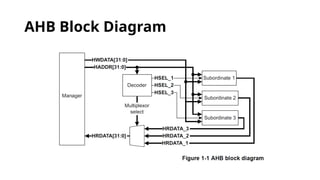
AHB Block Diagram
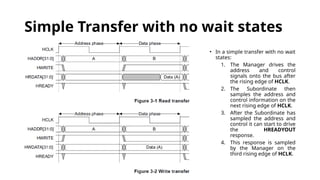
Simple Transfer with no wait states
• In a simple transfer with no wait
states:
1. The Manager drives the
address and control
signals onto the bus after
the rising edge of HCLK.
2. The Subordinate then
samples the address and
control information on the
next rising edge of HCLK.
3. After the Subordinate has
sampled the address and
control it can start to drive
the HREADYOUT
response.
4. This response is sampled
by the Manager on the
third rising edge of HCLK.
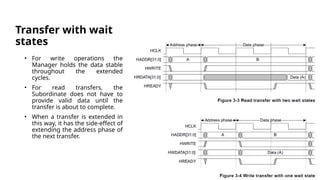
Transfer with wait
states
• For write operations the
Manager holds the data stable
throughout the extended
cycles.
• For read transfers, the
Subordinate does not have to
provide valid data until the
transfer is about to complete.
• When a transfer is extended in
this way, it has the side-effect of
extending the address phase of
the next transfer.
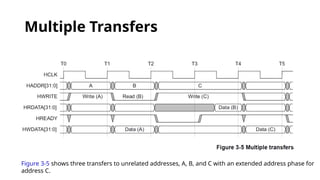
Multiple Transfers
Figure 3-5 shows three transfers to unrelated addresses, A, B, and C with an extended address phase for
address C.
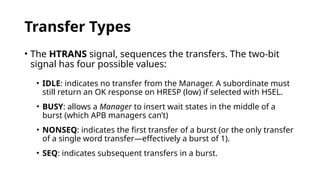
Transfer Types
• The HTRANS signal, sequences the transfers. The two-bit
signal has four possible values:
• IDLE: indicates no transfer from the Manager. A subordinate must
still return an OK response on HRESP (low) if selected with HSEL.
• BUSY: allows a Manager to insert wait states in the middle of a
burst (which APB managers can’t)
• NONSEQ: indicates the first transfer of a burst (or the only transfer
of a single word transfer—effectively a burst of 1).
• SEQ: indicates subsequent transfers in a burst.
Transfer Types
Transfer Types
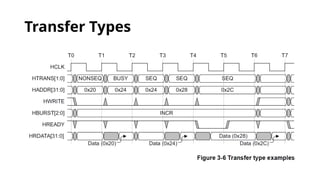
In Figure 3-
6:
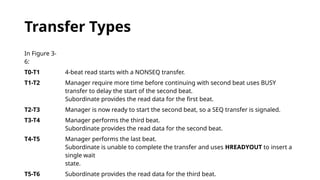
T0-T1 4-beat read starts with a NONSEQ transfer.
T1-T2 Manager require more time before continuing with second beat uses BUSY
transfer to delay the start of the second beat.
Subordinate provides the read data for the first beat.
T2-T3 Manager is now ready to start the second beat, so a SEQ transfer is signaled.
T3-T4 Manager performs the third beat.
Subordinate provides the read data for the second beat.
T4-T5 Manager performs the last beat.
Subordinate is unable to complete the transfer and uses HREADYOUT to insert a
single wait
state.
T5-T6 Subordinate provides the read data for the third beat.
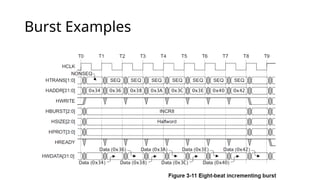
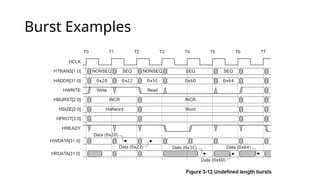
Burst Examples
Burst Examples
Burst Examples
Burst Examples
Burst Examples
Waited Transfers
• Subordinates use HREADYOUT to insert wait states if they
require more time to provide or sample the data.
• During a waited transfer, the Manager is restricted to what
changes it can make to the transfer type and address.
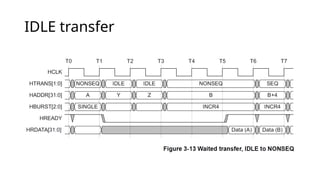
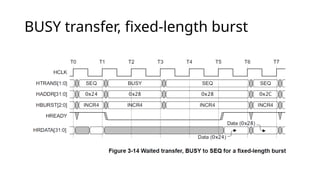
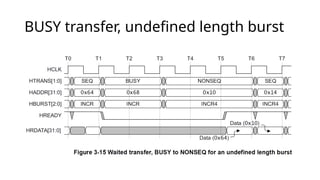
Transfer type changes during wait
states
When the Subordinate is requesting wait states, the Manager must not change the transfer
type, except in these cases:
• IDLE transfer
• BUSY transfer, fixed-length burst
• BUSY transfer, undefined length burst
IDLE transfer
BUSY transfer, fixed-length burst
BUSY transfer, undefined length burst
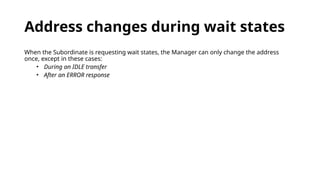
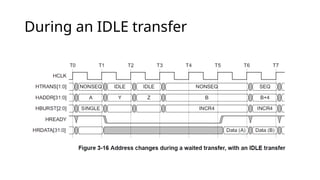
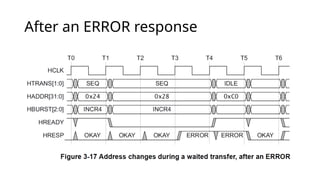
Address changes during wait states
When the Subordinate is requesting wait states, the Manager can only change the address
once, except in these cases:
• During an IDLE transfer
• After an ERROR response
During an IDLE transfer
After an ERROR response
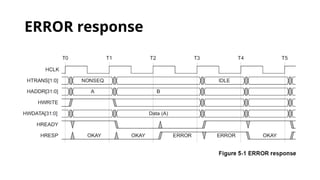
ERROR response

AMBA Advanced High-performance Bus (AHB) protocol

  • 1.
  • 2.
    About AHB Protocol •AMBA AHB is a bus interface suitable for high-performance synthesizable designs. • It is used for High-Frequency Design. • It defines the interface between components, such as Managers, interconnects, and Subordinates. • It supports multiple Bus Master, Burst transfer and pipelined operations.
  • 3.
    Key Differences betweenAHB & APB • Bandwidth: • AHB: Supports up to 64-bit data transfers. • APB: Supports up to 32-bit data transfers. • Performance: • AHB: Designed for high-performance applications. • APB: Designed for low-bandwidth, low-power applications. • Features: • AHB: Provides some advanced features burst transfer and pipelined operations.. • APB: A simpler protocol without features like burst transactions and pipelined operation. • Power Consumption: • AHB: Designed to be power-efficient. • APB: Optimized for low-power consumption. • Complexity: • AHB: More complex than APB. • APB: The simplest protocol between the two.
  • 4.
  • 5.
    Simple Transfer withno wait states • In a simple transfer with no wait states: 1. The Manager drives the address and control signals onto the bus after the rising edge of HCLK. 2. The Subordinate then samples the address and control information on the next rising edge of HCLK. 3. After the Subordinate has sampled the address and control it can start to drive the HREADYOUT response. 4. This response is sampled by the Manager on the third rising edge of HCLK.
  • 6.
    Transfer with wait states •For write operations the Manager holds the data stable throughout the extended cycles. • For read transfers, the Subordinate does not have to provide valid data until the transfer is about to complete. • When a transfer is extended in this way, it has the side-effect of extending the address phase of the next transfer.
  • 7.
    Multiple Transfers Figure 3-5shows three transfers to unrelated addresses, A, B, and C with an extended address phase for address C.
  • 8.
    Transfer Types • TheHTRANS signal, sequences the transfers. The two-bit signal has four possible values: • IDLE: indicates no transfer from the Manager. A subordinate must still return an OK response on HRESP (low) if selected with HSEL. • BUSY: allows a Manager to insert wait states in the middle of a burst (which APB managers can’t) • NONSEQ: indicates the first transfer of a burst (or the only transfer of a single word transfer—effectively a burst of 1). • SEQ: indicates subsequent transfers in a burst.
  • 9.
  • 10.
    Transfer Types In Figure3- 6: T0-T1 4-beat read starts with a NONSEQ transfer. T1-T2 Manager require more time before continuing with second beat uses BUSY transfer to delay the start of the second beat. Subordinate provides the read data for the first beat. T2-T3 Manager is now ready to start the second beat, so a SEQ transfer is signaled. T3-T4 Manager performs the third beat. Subordinate provides the read data for the second beat. T4-T5 Manager performs the last beat. Subordinate is unable to complete the transfer and uses HREADYOUT to insert a single wait state. T5-T6 Subordinate provides the read data for the third beat.
  • 11.
  • 12.
  • 13.
  • 14.
  • 15.
  • 16.
    Waited Transfers • Subordinatesuse HREADYOUT to insert wait states if they require more time to provide or sample the data. • During a waited transfer, the Manager is restricted to what changes it can make to the transfer type and address.
  • 17.
    Transfer type changesduring wait states When the Subordinate is requesting wait states, the Manager must not change the transfer type, except in these cases: • IDLE transfer • BUSY transfer, fixed-length burst • BUSY transfer, undefined length burst
  • 18.
  • 19.
  • 20.
  • 21.
    Address changes duringwait states When the Subordinate is requesting wait states, the Manager can only change the address once, except in these cases: • During an IDLE transfer • After an ERROR response
  • 22.
  • 23.
  • 24.