3/28/2013
1
Assessing Network Readiness
Copyright 2012 by InfoComm International®
Network Readiness - Introduction
• This session includes the following topics:
• Service Level Agreements
• Service Target Levels
• Ports and Protocols
3/28/2013
2
Service Level Agreements
Copyright 2012 by InfoComm International®
The Importance of Documentation
When you install a new service or system:
– How often does the system need to work perfectly?
– How long should the system last?
– Whose fault is it if it stops working?
– How soon does it need to be fixed?
Revolutionary idea: the customer is NOT always right.
3/28/2013
3
Copyright 2012 by InfoComm International®
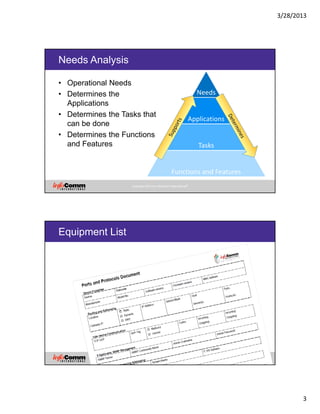
Needs Analysis
• Operational Needs
• Determines the
Applications
• Determines the Tasks that
can be done
• Determines the Functions
and Features
Needs
Applications
Tasks
Functions and Features
Copyright 2012 by InfoComm International®
Equipment List
3/28/2013
4
Copyright 2012 by InfoComm International®
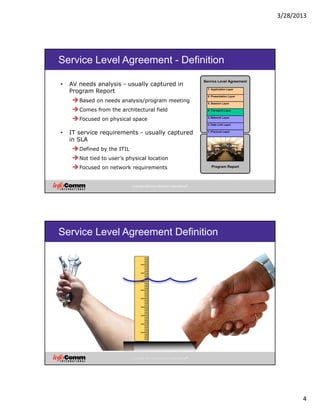
Service Level Agreement - Definition
• AV needs analysis - usually captured in
Program Report
Based on needs analysis/program meeting
Comes from the architectural field
Focused on physical space
• IT service requirements - usually captured
in SLA
Defined by the ITIL
Not tied to user's physical location
Focused on network requirements
Copyright 2012 by InfoComm International®
Service Level Agreement Definition
3/28/2013
5
Copyright 2012 by InfoComm International®
Service Level Agreement Definition
It’s a contract!
Copyright 2012 by InfoComm International®
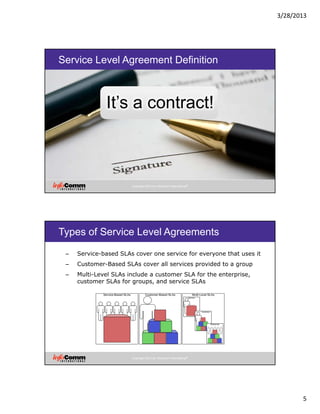
Types of Service Level Agreements
– Service-based SLAs cover one service for everyone that uses it
– Customer-Based SLAs cover all services provided to a group
– Multi-Level SLAs include a customer SLA for the enterprise,
customer SLAs for groups, and service SLAs
3/28/2013
6
Copyright 2012 by InfoComm International®
Service-Based SLA
• A fixed level of
service offered to a
wide range of users
• Standardized
services offered at
standardized prices
Copyright 2012 by InfoComm International®
Customer-Based
• Services
specific to the
individual
customer’s
needs
• Not necessarily
transferrable to
a class of
customers
3/28/2013
7
Copyright 2012 by InfoComm International®
SLA Use Guidelines
All types of service providers should use SLAs.
Any time a new service is added to the network, an SLA
is updated or created.
SLAs can exist in hierarchies.
SLAs thoroughly document system limitations.
SLAs evolve over time.
Copyright 2012 by InfoComm International®
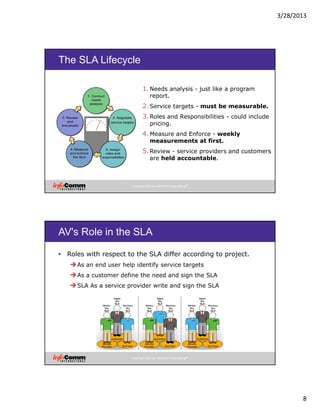
Service Level Agreement Components
3/28/2013
8
Copyright 2012 by InfoComm International®
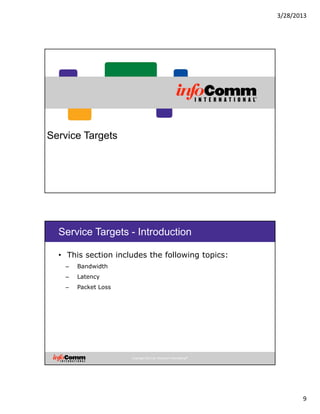
The SLA Lifecycle
1.Needs analysis - just like a program
report.
2.Service targets - must be measurable.
3.Roles and Responsibilities - could include
pricing.
4.Measure and Enforce - weekly
measurements at first.
5.Review - service providers and customers
are held accountable.
Copyright 2012 by InfoComm International®
AV's Role in the SLA
• Roles with respect to the SLA differ according to project.
As an end user help identify service targets
As a customer define the need and sign the SLA
SLA As a service provider write and sign the SLA
3/28/2013
9
Service Targets
Copyright 2012 by InfoComm International®
Service Targets - Introduction
• This section includes the following topics:
– Bandwidth
– Latency
– Packet Loss
3/28/2013
10
Copyright 2012 by InfoComm International®
Bandwidth Usage Target Factors
Traffic is bursty.
You cant specify the whole capacity for use.
How much can you specify? 70%? 50%?
Using VLANs, QoS, and traffic shaping, more bandwidth
can be specd for use.
Consult the network manager.
Copyright 2012 by InfoComm International®
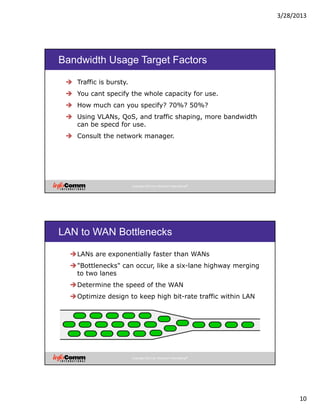
LAN to WAN Bottlenecks
LANs are exponentially faster than WANs
"Bottlenecks" can occur, like a six-lane highway merging
to two lanes
Determine the speed of the WAN
Optimize design to keep high bit-rate traffic within LAN
3/28/2013
11
Copyright 2012 by InfoComm International®
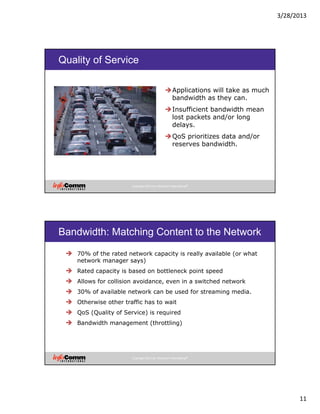
Quality of Service
Applications will take as much
bandwidth as they can.
Insufficient bandwidth mean
lost packets and/or long
delays.
QoS prioritizes data and/or
reserves bandwidth.
Copyright 2012 by InfoComm International®
Bandwidth: Matching Content to the Network
70% of the rated network capacity is really available (or what
network manager says)
Rated capacity is based on bottleneck point speed
Allows for collision avoidance, even in a switched network
30% of available network can be used for streaming media.
Otherwise other traffic has to wait
QoS (Quality of Service) is required
Bandwidth management (throttling)
3/28/2013
12
Copyright 2012 by InfoComm International®
Streaming and QoS
Has QoS been implemented?
Existing differentiated service classes
Resource Reservation Protocol (RSVP)
Policy-based QoS rules
Traffic shaping
Copyright 2012 by InfoComm International®
Conferencing and Bandwidth
– QoS is required – videoconferencing should
have its own class of service
– Bandwidth is only relevant in terms of network
segment
• 4 Mbps on one segment + 4 Mbps on another segment = 4 Mbps total
– Your goal is to find per segment usage
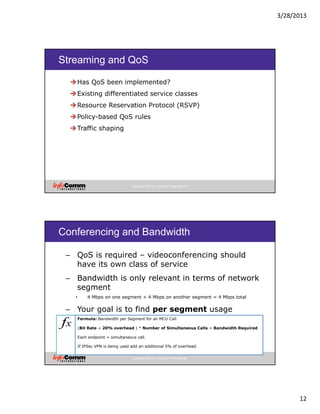
Formula: Bandwidth per Segment for an MCU Call
(Bit Rate + 20% overhead ) * Number of Simultaneous Calls = Bandwidth Required
Each endpoint = simultaneous call.
If IPSec VPN is being used add an additional 5% of overhead.
3/28/2013
13
Copyright 2012 by InfoComm International®
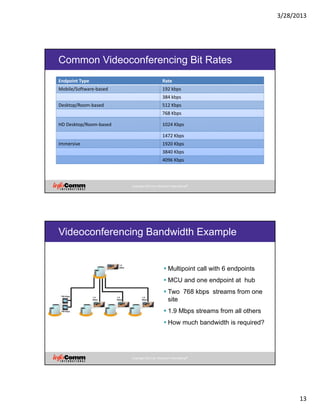
Common Videoconferencing Bit Rates
Endpoint Type Rate
Mobile/Software‐based 192 kbps
384 kbps
Desktop/Room‐based 512 Kbps
768 Kbps
HD Desktop/Room‐based 1024 Kbps
1472 Kbps
Immersive 1920 Kbps
3840 Kbps
4096 Kbps
Copyright 2012 by InfoComm International®
Videoconferencing Bandwidth Example
Multipoint call with 6 endpoints
MCU and one endpoint at hub
Two 768 kbps streams from one
site
1.9 Mbps streams from all others
How much bandwidth is required?
3/28/2013
14
Copyright 2012 by InfoComm International®
Videoconferencing Bandwidth Example
• Hub Site LAN
• [(0.768 + (0.768 * 0.2)) * 2] + [(1.9 + (1.9 * 0.2)) * 4] =
• [(0.768 + 0.154) * 2] + [(1.9 + 0.4) * 4] =
• [(0.922) * 2] + [(2.3) * 4] =
• 1.844 + 9.2 =
• 11 Mbps
Copyright 2012 by InfoComm International®
Videoconferencing Bandwidth Example
Branch to Hub WAN Spokes
[0.768 + (0.768 * 0.2)] * 2 = 
(0.768 + 0.154) * 2 = 
0.922 * 2 = 
1.844 Mbps 
[1.9 + (1.9 * 0.2)] * 1 = 
[1.9 + (0.4)] * 1 = 
2.3 * 1 = 
2.3 Mbps 
3/28/2013
15
Copyright 2012 by InfoComm International®
Dedicated Network Links for
Videoconferencing
Video can use up to 70% of a dedicated link
Audio can use even more
If MPLS is used, make sure dedicated links have their
own access link to the MPLS provider
Copyright 2012 by InfoComm International®
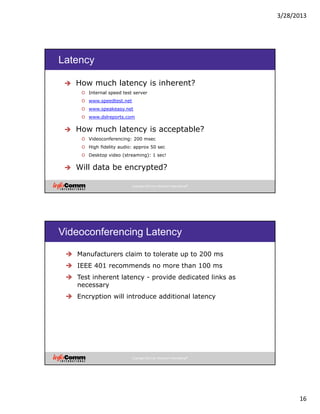
Latency Target Factors
Network response time
Is there QoS?
Is there packet shaping?
Presentation layer latency
Application specific factors
3/28/2013
16
Copyright 2012 by InfoComm International®
Latency
How much latency is inherent?
o Internal speed test server
o www.speedtest.net
o www.speakeasy.net
o www.dslreports.com
How much latency is acceptable?
o Videoconferencing: 200 msec
o High fidelity audio: approx 50 sec
o Desktop video (streaming): 1 sec!
Will data be encrypted?
Copyright 2012 by InfoComm International®
Videoconferencing Latency
Manufacturers claim to tolerate up to 200 ms
IEEE 401 recommends no more than 100 ms
Test inherent latency - provide dedicated links as
necessary
Encryption will introduce additional latency
3/28/2013
17
Copyright 2012 by InfoComm International®
Packet Loss Target Factors
How many packets can your application can be expected
to drop?
Calculate peak and average bandwidth consumption
Compare to peak and average available throughput
Assess impact of dropped packets
Reserve bandwidth or reduce scale if necessary
Ports and Protocols
3/28/2013
18
Copyright 2012 by InfoComm International®
Ports and Protocols - Introduction
• This section includes the following topics:
– Ports and Protocols
– Firewalls
– Ports and Protocols Document
Copyright 2012 by InfoComm International®
Ports
• Port number - indicates the application that
sent/will use the data
System ports (0 - 1023) - assigned to standards track
protocols
User ports (1024 - 49151) - assigned to application upon
request
Dynamic ports (49152 - 65535) - cannot be assigned
• Socket – combination of Port and IP address; identifies a
unique session
3/28/2013
19
Copyright 2012 by InfoComm International®
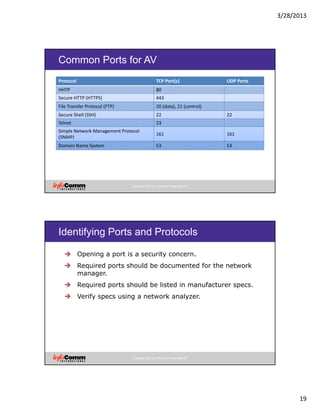
Common Ports for AV
Protocol  TCP Port(s)  UDP Ports 
HHTP 80
Secure HTTP (HTTPS) 443
File Transfer Protocol (FTP) 20 (data), 21 (control)
Secure Shell (SSH) 22 22
Telnet 23
Simple Network Management Protocol 
(SNMP)
161 161
Domain Name System 53 53
Copyright 2012 by InfoComm International®
Identifying Ports and Protocols
Opening a port is a security concern.
Required ports should be documented for the network
manager.
Required ports should be listed in manufacturer specs.
Verify specs using a network analyzer.
3/28/2013
20
Copyright 2012 by InfoComm International®
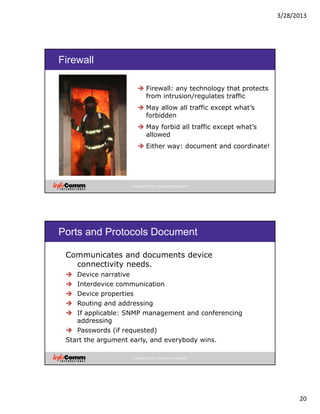
Firewall
Firewall: any technology that protects
from intrusion/regulates traffic
May allow all traffic except what’s
forbidden
May forbid all traffic except what’s
allowed
Either way: document and coordinate!
Copyright 2012 by InfoComm International®
Ports and Protocols Document
Communicates and documents device
connectivity needs.
Device narrative
Interdevice communication
Device properties
Routing and addressing
If applicable: SNMP management and conferencing
addressing
Passwords (if requested)
Start the argument early, and everybody wins.
3/28/2013
21
Copyright 2012 by InfoComm International®
Network Readiness - Summary
• This section includes the following topics:
– Service Level Agreements
– Service Targets
– Ports and Protocols
• Questions?

Assessing Network Readiness

  • 1.
    3/28/2013 1 Assessing Network Readiness Copyright2012 by InfoComm International® Network Readiness - Introduction • This session includes the following topics: • Service Level Agreements • Service Target Levels • Ports and Protocols
  • 2.
    3/28/2013 2 Service Level Agreements Copyright2012 by InfoComm International® The Importance of Documentation When you install a new service or system: – How often does the system need to work perfectly? – How long should the system last? – Whose fault is it if it stops working? – How soon does it need to be fixed? Revolutionary idea: the customer is NOT always right.
  • 3.
    3/28/2013 3 Copyright 2012 byInfoComm International® Needs Analysis • Operational Needs • Determines the Applications • Determines the Tasks that can be done • Determines the Functions and Features Needs Applications Tasks Functions and Features Copyright 2012 by InfoComm International® Equipment List
  • 4.
    3/28/2013 4 Copyright 2012 byInfoComm International® Service Level Agreement - Definition • AV needs analysis - usually captured in Program Report Based on needs analysis/program meeting Comes from the architectural field Focused on physical space • IT service requirements - usually captured in SLA Defined by the ITIL Not tied to user's physical location Focused on network requirements Copyright 2012 by InfoComm International® Service Level Agreement Definition
  • 5.
    3/28/2013 5 Copyright 2012 byInfoComm International® Service Level Agreement Definition It’s a contract! Copyright 2012 by InfoComm International® Types of Service Level Agreements – Service-based SLAs cover one service for everyone that uses it – Customer-Based SLAs cover all services provided to a group – Multi-Level SLAs include a customer SLA for the enterprise, customer SLAs for groups, and service SLAs
  • 6.
    3/28/2013 6 Copyright 2012 byInfoComm International® Service-Based SLA • A fixed level of service offered to a wide range of users • Standardized services offered at standardized prices Copyright 2012 by InfoComm International® Customer-Based • Services specific to the individual customer’s needs • Not necessarily transferrable to a class of customers
  • 7.
    3/28/2013 7 Copyright 2012 byInfoComm International® SLA Use Guidelines All types of service providers should use SLAs. Any time a new service is added to the network, an SLA is updated or created. SLAs can exist in hierarchies. SLAs thoroughly document system limitations. SLAs evolve over time. Copyright 2012 by InfoComm International® Service Level Agreement Components
  • 8.
    3/28/2013 8 Copyright 2012 byInfoComm International® The SLA Lifecycle 1.Needs analysis - just like a program report. 2.Service targets - must be measurable. 3.Roles and Responsibilities - could include pricing. 4.Measure and Enforce - weekly measurements at first. 5.Review - service providers and customers are held accountable. Copyright 2012 by InfoComm International® AV's Role in the SLA • Roles with respect to the SLA differ according to project. As an end user help identify service targets As a customer define the need and sign the SLA SLA As a service provider write and sign the SLA
  • 9.
    3/28/2013 9 Service Targets Copyright 2012by InfoComm International® Service Targets - Introduction • This section includes the following topics: – Bandwidth – Latency – Packet Loss
  • 10.
    3/28/2013 10 Copyright 2012 byInfoComm International® Bandwidth Usage Target Factors Traffic is bursty. You cant specify the whole capacity for use. How much can you specify? 70%? 50%? Using VLANs, QoS, and traffic shaping, more bandwidth can be specd for use. Consult the network manager. Copyright 2012 by InfoComm International® LAN to WAN Bottlenecks LANs are exponentially faster than WANs "Bottlenecks" can occur, like a six-lane highway merging to two lanes Determine the speed of the WAN Optimize design to keep high bit-rate traffic within LAN
  • 11.
    3/28/2013 11 Copyright 2012 byInfoComm International® Quality of Service Applications will take as much bandwidth as they can. Insufficient bandwidth mean lost packets and/or long delays. QoS prioritizes data and/or reserves bandwidth. Copyright 2012 by InfoComm International® Bandwidth: Matching Content to the Network 70% of the rated network capacity is really available (or what network manager says) Rated capacity is based on bottleneck point speed Allows for collision avoidance, even in a switched network 30% of available network can be used for streaming media. Otherwise other traffic has to wait QoS (Quality of Service) is required Bandwidth management (throttling)
  • 12.
    3/28/2013 12 Copyright 2012 byInfoComm International® Streaming and QoS Has QoS been implemented? Existing differentiated service classes Resource Reservation Protocol (RSVP) Policy-based QoS rules Traffic shaping Copyright 2012 by InfoComm International® Conferencing and Bandwidth – QoS is required – videoconferencing should have its own class of service – Bandwidth is only relevant in terms of network segment • 4 Mbps on one segment + 4 Mbps on another segment = 4 Mbps total – Your goal is to find per segment usage Formula: Bandwidth per Segment for an MCU Call (Bit Rate + 20% overhead ) * Number of Simultaneous Calls = Bandwidth Required Each endpoint = simultaneous call. If IPSec VPN is being used add an additional 5% of overhead.
  • 13.
    3/28/2013 13 Copyright 2012 byInfoComm International® Common Videoconferencing Bit Rates Endpoint Type Rate Mobile/Software‐based 192 kbps 384 kbps Desktop/Room‐based 512 Kbps 768 Kbps HD Desktop/Room‐based 1024 Kbps 1472 Kbps Immersive 1920 Kbps 3840 Kbps 4096 Kbps Copyright 2012 by InfoComm International® Videoconferencing Bandwidth Example Multipoint call with 6 endpoints MCU and one endpoint at hub Two 768 kbps streams from one site 1.9 Mbps streams from all others How much bandwidth is required?
  • 14.
    3/28/2013 14 Copyright 2012 byInfoComm International® Videoconferencing Bandwidth Example • Hub Site LAN • [(0.768 + (0.768 * 0.2)) * 2] + [(1.9 + (1.9 * 0.2)) * 4] = • [(0.768 + 0.154) * 2] + [(1.9 + 0.4) * 4] = • [(0.922) * 2] + [(2.3) * 4] = • 1.844 + 9.2 = • 11 Mbps Copyright 2012 by InfoComm International® Videoconferencing Bandwidth Example Branch to Hub WAN Spokes [0.768 + (0.768 * 0.2)] * 2 =  (0.768 + 0.154) * 2 =  0.922 * 2 =  1.844 Mbps  [1.9 + (1.9 * 0.2)] * 1 =  [1.9 + (0.4)] * 1 =  2.3 * 1 =  2.3 Mbps 
  • 15.
    3/28/2013 15 Copyright 2012 byInfoComm International® Dedicated Network Links for Videoconferencing Video can use up to 70% of a dedicated link Audio can use even more If MPLS is used, make sure dedicated links have their own access link to the MPLS provider Copyright 2012 by InfoComm International® Latency Target Factors Network response time Is there QoS? Is there packet shaping? Presentation layer latency Application specific factors
  • 16.
    3/28/2013 16 Copyright 2012 byInfoComm International® Latency How much latency is inherent? o Internal speed test server o www.speedtest.net o www.speakeasy.net o www.dslreports.com How much latency is acceptable? o Videoconferencing: 200 msec o High fidelity audio: approx 50 sec o Desktop video (streaming): 1 sec! Will data be encrypted? Copyright 2012 by InfoComm International® Videoconferencing Latency Manufacturers claim to tolerate up to 200 ms IEEE 401 recommends no more than 100 ms Test inherent latency - provide dedicated links as necessary Encryption will introduce additional latency
  • 17.
    3/28/2013 17 Copyright 2012 byInfoComm International® Packet Loss Target Factors How many packets can your application can be expected to drop? Calculate peak and average bandwidth consumption Compare to peak and average available throughput Assess impact of dropped packets Reserve bandwidth or reduce scale if necessary Ports and Protocols
  • 18.
    3/28/2013 18 Copyright 2012 byInfoComm International® Ports and Protocols - Introduction • This section includes the following topics: – Ports and Protocols – Firewalls – Ports and Protocols Document Copyright 2012 by InfoComm International® Ports • Port number - indicates the application that sent/will use the data System ports (0 - 1023) - assigned to standards track protocols User ports (1024 - 49151) - assigned to application upon request Dynamic ports (49152 - 65535) - cannot be assigned • Socket – combination of Port and IP address; identifies a unique session
  • 19.
    3/28/2013 19 Copyright 2012 byInfoComm International® Common Ports for AV Protocol  TCP Port(s)  UDP Ports  HHTP 80 Secure HTTP (HTTPS) 443 File Transfer Protocol (FTP) 20 (data), 21 (control) Secure Shell (SSH) 22 22 Telnet 23 Simple Network Management Protocol  (SNMP) 161 161 Domain Name System 53 53 Copyright 2012 by InfoComm International® Identifying Ports and Protocols Opening a port is a security concern. Required ports should be documented for the network manager. Required ports should be listed in manufacturer specs. Verify specs using a network analyzer.
  • 20.
    3/28/2013 20 Copyright 2012 byInfoComm International® Firewall Firewall: any technology that protects from intrusion/regulates traffic May allow all traffic except what’s forbidden May forbid all traffic except what’s allowed Either way: document and coordinate! Copyright 2012 by InfoComm International® Ports and Protocols Document Communicates and documents device connectivity needs. Device narrative Interdevice communication Device properties Routing and addressing If applicable: SNMP management and conferencing addressing Passwords (if requested) Start the argument early, and everybody wins.
  • 21.
    3/28/2013 21 Copyright 2012 byInfoComm International® Network Readiness - Summary • This section includes the following topics: – Service Level Agreements – Service Targets – Ports and Protocols • Questions?