Top-Down Network Design

               Chapter Two

   Analyzing Technical Goals and Tradeoffs


        Copyright 2010 Cisco Press & Priscilla Oppenheimer
Technical Goals
•   Scalability
•   Availability
•   Performance
•   Security
•   Manageability
•   Usability
•   Adaptability
•   Affordability
Scalability
• Scalability refers to the ability to grow
• Some technologies are more scalable
  – Flat network designs, for example, don’t scale
    well
• Try to learn
  –   Number of sites to be added
  –   What will be needed at each of these sites
  –   How many users will be added
  –   How many more servers will be added
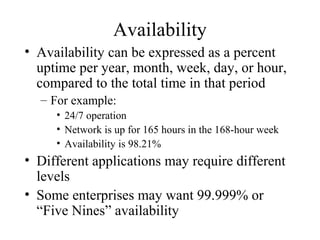
Availability
• Availability can be expressed as a percent
  uptime per year, month, week, day, or hour,
  compared to the total time in that period
  – For example:
     • 24/7 operation
     • Network is up for 165 hours in the 168-hour week
     • Availability is 98.21%
• Different applications may require different
  levels
• Some enterprises may want 99.999% or
  “Five Nines” availability
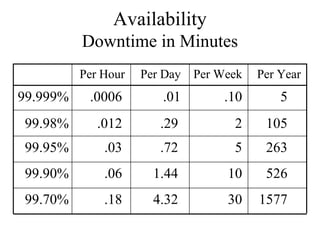
Availability
          Downtime in Minutes
          Per Hour   Per Day   Per Week   Per Year
99.999%    .0006        .01         .10       5
99.98%       .012       .29          2     105
99.95%        .03       .72          5     263
99.90%        .06      1.44         10     526
99.70%        .18      4.32         30    1577
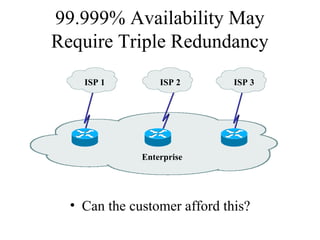
99.999% Availability May
Require Triple Redundancy
    ISP 1         ISP 2       ISP 3


              Enterprise


  • Can the customer afford this?
Availability
• Availability can also be expressed as a
  mean time between failure (MTBF) and
  mean time to repair (MTTR)
• Availability = MTBF/(MTBF + MTTR)
  – For example:
     • The network should not fail more than once every
       4,000 hours (166 days) and it should be fixed within
       one hour
     • 4,000/4,001 = 99.98% availability
Network Performance
• Common performance factors include
  –   Bandwidth
  –   Throughput
  –   Bandwidth utilization
  –   Offered load
  –   Accuracy
  –   Efficiency
  –   Delay (latency) and delay variation
  –   Response time
Bandwidth Vs. Throughput
• Bandwidth and throughput are not the same
  thing
• Bandwidth is the data carrying capacity of a
  circuit
     • Usually specified in bits per second
• Throughput is the quantity of error free data
  transmitted per unit of time
     • Measured in bps, Bps, or packets per second (pps)
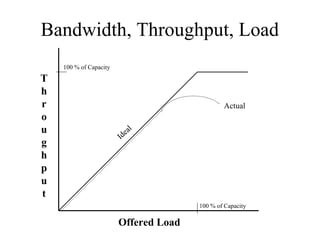
Bandwidth, Throughput, Load
    100 % of Capacity

T
h
r                                              Actual
o
u                           a   l
                        Ide
g
h
p
u
t
                                       100 % of Capacity

                        Offered Load
Other Factors that Affect
               Throughput
•   The size of packets
•   Inter-frame gaps between packets
•   Packets-per-second ratings of devices that forward packets
•   Client speed (CPU, memory, and HD access speeds)
•   Server speed (CPU, memory, and HD access speeds)
•   Network design
•   Protocols
•   Distance
•   Errors
•   Time of day, etc., etc., etc.
Throughput Vs. Goodput
• You need to decide what you mean by
  throughput
• Are you referring to bytes per second,
  regardless of whether the bytes are user data
  bytes or packet header bytes
  – Or are you concerned with application-layer
    throughput of user bytes, sometimes called
    “goodput”
     • In that case, you have to consider that bandwidth is
       being “wasted” by the headers in every packet
Performance (continued)
• Efficiency
  – How much overhead is required to deliver an
    amount of data?
  – How large can packets be?
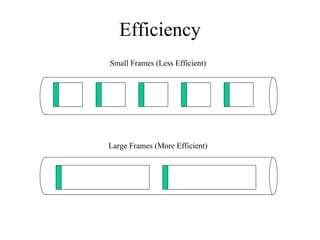
     • Larger better for efficiency (and goodput)
     • But too large means too much data is lost if a packet
       is damaged
     • How many packets can be sent in one bunch without
       an acknowledgment?
Efficiency
Small Frames (Less Efficient)


Large Frames (More Efficient)
Delay from the User’s Point of
            View
               • Response Time
                 – A function of the
                   application and the
                   equipment the
                   application is
                   running on, not just
                   the network
                 – Most users expect
                   to see something on
                   the screen in 100 to
                   200 milliseconds
Delay from the Engineer’s Point
           of View
• Propagation delay
  – A signal travels in a cable at about 2/3 the
    speed of light in a vacuum
• Transmission delay (also known as
  serialization delay)
  – Time to put digital data onto a transmission line
     • For example, it takes about 5 ms to output a 1,024
       byte packet on a 1.544 Mbps T1 line
• Packet-switching delay
• Queuing delay
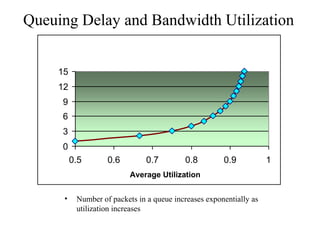
Queuing Delay and Bandwidth Utilization


     15
     12
      9
      6
      3
      0
    Average Queue Depth
           0.5       0.6         0.7        0.8         0.9           1
                            Average Utilization


       •    Number of packets in a queue increases exponentially as
            utilization increases
Example
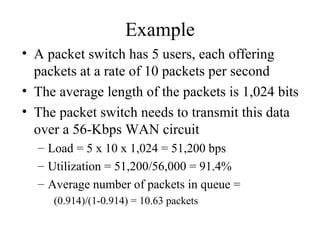
• A packet switch has 5 users, each offering
  packets at a rate of 10 packets per second
• The average length of the packets is 1,024 bits
• The packet switch needs to transmit this data
  over a 56-Kbps WAN circuit
  – Load = 5 x 10 x 1,024 = 51,200 bps
  – Utilization = 51,200/56,000 = 91.4%
  – Average number of packets in queue =
     (0.914)/(1-0.914) = 10.63 packets
Delay Variation
• The amount of time average delay varies
  – Also known as jitter
• Voice, video, and audio are
  intolerant of delay variation
• So forget everything we said
  about maximizing packet sizes
  – There are always tradeoffs
  – Efficiency for high-volume applications
    versus low and non-varying delay for
    multimedia
Security

• Focus on requirements first
• Detailed security planning later (Chapter 8)
• Identify network assets
  – Including their value and the expected cost
    associated with losing them due to a security
    problem
• Analyze security risks
Network Assets
•   Hardware
•   Software
•   Applications
•   Data
•   Intellectual property
•   Trade secrets
•   Company’s reputation
Security Risks
• Hacked network devices
  – Data can be intercepted, analyzed, altered, or
    deleted
  – User passwords can be compromised
  – Device configurations can be changed
• Reconnaissance attacks
• Denial-of-service attacks
Manageability

•   Fault management
•   Configuration management
•   Accounting management
•   Performance management
•   Security management
Usability

• Usability: the ease of use with which
  network users can access the network and
  services
• Networks should make users’ jobs easier
• Some design decisions will have a negative
  affect on usability:
  – Strict security, for example
Adaptability
• Avoid incorporating any design elements
  that would make it hard to implement new
  technologies in the future
• Change can come in the form of new
  protocols, new business practices, new
  fiscal goals, new legislation
• A flexible design can adapt to changing
  traffic patterns and Quality of Service
  (QoS) requirements
Affordability
• A network should carry the maximum
  amount of traffic possible for a given
  financial cost
• Affordability is especially important in
  campus network designs
• WANs are expected to cost more, but costs
  can be reduced with the proper use of
  technology
  – Quiet routing protocols, for example
Network Applications
                   Technical Requirements

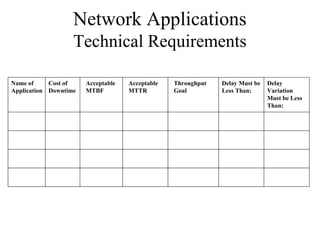
Name of     Cost of    Acceptable   Acceptable   Throughput   Delay Must be   Delay
Application Downtime   MTBF         MTTR         Goal         Less Than:      Variation
                                                                              Must be Less
                                                                              Than:
Making Tradeoffs
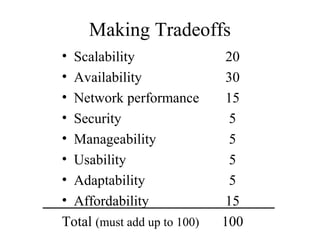
•Scalability                 20
•Availability                30
•Network performance         15
•Security                     5
•Manageability                5
•Usability                    5
•Adaptability                 5
•Affordability               15
Total (must add up to 100)   100
Summary

• Continue to use a systematic, top-down
  approach
• Don’t select products until you understand
  goals for scalability, availability, performance,
  security, manageability, usability,
  adaptability, and affordability
• Tradeoffs are almost always necessary
Review Questions
• What are some typical technical goals for
  organizations today?
• How do bandwidth and throughput differ?
• How can one improve network efficiency?
• What tradeoffs may be necessary in order to improve
  network efficiency?

Chapter02

  • 1.
    Top-Down Network Design Chapter Two Analyzing Technical Goals and Tradeoffs Copyright 2010 Cisco Press & Priscilla Oppenheimer
  • 2.
    Technical Goals • Scalability • Availability • Performance • Security • Manageability • Usability • Adaptability • Affordability
  • 3.
    Scalability • Scalability refersto the ability to grow • Some technologies are more scalable – Flat network designs, for example, don’t scale well • Try to learn – Number of sites to be added – What will be needed at each of these sites – How many users will be added – How many more servers will be added
  • 4.
    Availability • Availability canbe expressed as a percent uptime per year, month, week, day, or hour, compared to the total time in that period – For example: • 24/7 operation • Network is up for 165 hours in the 168-hour week • Availability is 98.21% • Different applications may require different levels • Some enterprises may want 99.999% or “Five Nines” availability
  • 5.
    Availability Downtime in Minutes Per Hour Per Day Per Week Per Year 99.999% .0006 .01 .10 5 99.98% .012 .29 2 105 99.95% .03 .72 5 263 99.90% .06 1.44 10 526 99.70% .18 4.32 30 1577
  • 6.
    99.999% Availability May RequireTriple Redundancy ISP 1 ISP 2 ISP 3 Enterprise • Can the customer afford this?
  • 7.
    Availability • Availability canalso be expressed as a mean time between failure (MTBF) and mean time to repair (MTTR) • Availability = MTBF/(MTBF + MTTR) – For example: • The network should not fail more than once every 4,000 hours (166 days) and it should be fixed within one hour • 4,000/4,001 = 99.98% availability
  • 8.
    Network Performance • Commonperformance factors include – Bandwidth – Throughput – Bandwidth utilization – Offered load – Accuracy – Efficiency – Delay (latency) and delay variation – Response time
  • 9.
    Bandwidth Vs. Throughput •Bandwidth and throughput are not the same thing • Bandwidth is the data carrying capacity of a circuit • Usually specified in bits per second • Throughput is the quantity of error free data transmitted per unit of time • Measured in bps, Bps, or packets per second (pps)
  • 10.
    Bandwidth, Throughput, Load 100 % of Capacity T h r Actual o u a l Ide g h p u t 100 % of Capacity Offered Load
  • 11.
    Other Factors thatAffect Throughput • The size of packets • Inter-frame gaps between packets • Packets-per-second ratings of devices that forward packets • Client speed (CPU, memory, and HD access speeds) • Server speed (CPU, memory, and HD access speeds) • Network design • Protocols • Distance • Errors • Time of day, etc., etc., etc.
  • 12.
    Throughput Vs. Goodput •You need to decide what you mean by throughput • Are you referring to bytes per second, regardless of whether the bytes are user data bytes or packet header bytes – Or are you concerned with application-layer throughput of user bytes, sometimes called “goodput” • In that case, you have to consider that bandwidth is being “wasted” by the headers in every packet
  • 13.
    Performance (continued) • Efficiency – How much overhead is required to deliver an amount of data? – How large can packets be? • Larger better for efficiency (and goodput) • But too large means too much data is lost if a packet is damaged • How many packets can be sent in one bunch without an acknowledgment?
  • 14.
    Efficiency Small Frames (LessEfficient) Large Frames (More Efficient)
  • 15.
    Delay from theUser’s Point of View • Response Time – A function of the application and the equipment the application is running on, not just the network – Most users expect to see something on the screen in 100 to 200 milliseconds
  • 16.
    Delay from theEngineer’s Point of View • Propagation delay – A signal travels in a cable at about 2/3 the speed of light in a vacuum • Transmission delay (also known as serialization delay) – Time to put digital data onto a transmission line • For example, it takes about 5 ms to output a 1,024 byte packet on a 1.544 Mbps T1 line • Packet-switching delay • Queuing delay
  • 17.
    Queuing Delay andBandwidth Utilization 15 12 9 6 3 0 Average Queue Depth 0.5 0.6 0.7 0.8 0.9 1 Average Utilization • Number of packets in a queue increases exponentially as utilization increases
  • 18.
    Example • A packetswitch has 5 users, each offering packets at a rate of 10 packets per second • The average length of the packets is 1,024 bits • The packet switch needs to transmit this data over a 56-Kbps WAN circuit – Load = 5 x 10 x 1,024 = 51,200 bps – Utilization = 51,200/56,000 = 91.4% – Average number of packets in queue = (0.914)/(1-0.914) = 10.63 packets
  • 19.
    Delay Variation • Theamount of time average delay varies – Also known as jitter • Voice, video, and audio are intolerant of delay variation • So forget everything we said about maximizing packet sizes – There are always tradeoffs – Efficiency for high-volume applications versus low and non-varying delay for multimedia
  • 20.
    Security • Focus onrequirements first • Detailed security planning later (Chapter 8) • Identify network assets – Including their value and the expected cost associated with losing them due to a security problem • Analyze security risks
  • 21.
    Network Assets • Hardware • Software • Applications • Data • Intellectual property • Trade secrets • Company’s reputation
  • 22.
    Security Risks • Hackednetwork devices – Data can be intercepted, analyzed, altered, or deleted – User passwords can be compromised – Device configurations can be changed • Reconnaissance attacks • Denial-of-service attacks
  • 23.
    Manageability • Fault management • Configuration management • Accounting management • Performance management • Security management
  • 24.
    Usability • Usability: theease of use with which network users can access the network and services • Networks should make users’ jobs easier • Some design decisions will have a negative affect on usability: – Strict security, for example
  • 25.
    Adaptability • Avoid incorporatingany design elements that would make it hard to implement new technologies in the future • Change can come in the form of new protocols, new business practices, new fiscal goals, new legislation • A flexible design can adapt to changing traffic patterns and Quality of Service (QoS) requirements
  • 26.
    Affordability • A networkshould carry the maximum amount of traffic possible for a given financial cost • Affordability is especially important in campus network designs • WANs are expected to cost more, but costs can be reduced with the proper use of technology – Quiet routing protocols, for example
  • 27.
    Network Applications Technical Requirements Name of Cost of Acceptable Acceptable Throughput Delay Must be Delay Application Downtime MTBF MTTR Goal Less Than: Variation Must be Less Than:
  • 28.
    Making Tradeoffs •Scalability 20 •Availability 30 •Network performance 15 •Security 5 •Manageability 5 •Usability 5 •Adaptability 5 •Affordability 15 Total (must add up to 100) 100
  • 29.
    Summary • Continue touse a systematic, top-down approach • Don’t select products until you understand goals for scalability, availability, performance, security, manageability, usability, adaptability, and affordability • Tradeoffs are almost always necessary
  • 30.
    Review Questions • Whatare some typical technical goals for organizations today? • How do bandwidth and throughput differ? • How can one improve network efficiency? • What tradeoffs may be necessary in order to improve network efficiency?

Editor's Notes

  • #3 Scalability: How much growth a network design must support. Availability: The amount of time a network is available to users, often expressed as a percent uptime, or as a mean time between failure (MTBF) and mean time to repair (MTTR). Availability goals can also document any monetary cost associated with network downtime. Security: Goals for protecting the organization's ability to conduct business without interference from intruders inappropriately accessing or damaging equipment, data, or operations. Specific security risks should be documented. Manageability: Goals for fault, configuration, accounting, performance, and security (FCAPS) management Usability: Goals regarding the ease with which network users can access the network and its services, including goals for simplifying user tasks related to network addressing, naming, and resource discovery. Adaptability: The ease with which a network design and implementation can adapt to network faults, changing traffic patterns, additional business or technical requirements, new business practices, and other changes. Affordability: The importance of containing the costs associated with purchasing and operating network equipment and services.
  • #6 99.70% availability sounds pretty good, but it could mean that the network is down for 0.18 minutes every hour. This is 11 seconds. If those 11 seconds were spread out over the hour, nobody would notice possibly. But if there were some bug, for example, that caused the network to fail for 11 seconds every hour on the hour, people would notice. Users these days are very impatient. Notice that 99.70% availability also could mean one catastrophic problem caused the network to be down for 1577 minutes all at once. That’s 26 hours. If it were on a Saturday and the network was never down for the rest of the year, that might actually be OK. So, you have to consider time frames with percent availability numbers. Consider the holy grail: 99.999% availability. That’s 5 minutes downtime per year! Be sure to explain to the customer that scheduled maintenance and upgrades don’t count! Either that or plan for a network with triple redundancy (that could be extremely expensive to implement and operate).
  • #7 In the event of failure of the primary router, the secondary becomes the primary and still has a backup. Fix the previous primary and have it become the tertiary. This helps with maintenance too. Pull out the tertiary and upgrade it. The primary still has a backup. After extensive testing, put the tertiary back in as the primary. Pull out the original primary and upgrade it. Put it back as the secondary. Finally pull out the original secondary and upgrade it. Of course, the picture brings up all sorts of other questions because it uses an ISP example. Does the customer have provider independent addressing? Does the customer have an autonomous system number? Are the ISPs really independent? Is there true circuit diversity? Are the speeds the same on the three links to the ISPs so that performance degradation is minimized during upgrades or failures? Can load balancing be used when all three routers are operational? What are the routing protocols inside the enterprise network? Can traffic really get to all three routers, regardless of failures inside the enterprise network? Can the routing protocols adjust to changes? Will traffic flow out the “closest” router? Will traffic come in from the Internet via the “closest” entry? Instructor note: The slide is not meant to be a design recommendation! It’s just a slide to get a discussion going on the ramifications of 99.999% availability.