with	Digital	Signage	Installations	&	Content
AVOIDING
PITFALLS
QUICK FACTS
ABOUT ALMO PROAV:
Number of Year’s Almo’s been in
Business
Number of Warehouse
Locations Nationwide73
100
50
10
10
50
20
11
Percentage of our Sales Team that’s
InfoComm trained
Percentage of our Sales Team that’s
CTS Certified
Average number of year’s experience
our sales staff has in Pro A/V
Outside Sales
Representatives
Inside Sales
Representatives
Business Development
Managers
Todd Heberlein
CTS, DMC-D-4K, DSCE
Business Development Manager
PHONE: 888-420-2566 x6205
EMAIL: theberlein@almo.com
THE 5 Ds OF A
SIGNAGE SOLUTION
• Discover
• Design
• Develop
• Deployment
• Diagnose
DISCOVERY
Observing or finding something unknown
This is the question & answer
phase of your signage project.
PITFALL #1
Failure to get a clear understanding of the goal(s) of
the signage, including how success will be measured.
CHALLENGE
Set clear goals for the digital signage.
KEY POINTS
• Create a questionnaire with both open ended and
multiple choice questions to help secure the
answers needed.
• Make sure at least one question covers how
success will be measured.
QUESTIONNAIRE
TIP
Include Key Individuals
• CEO
• IT	manager
• Marketing	Manager
• Content	creation	team
• Administrative	personnel
• People	using	the	CMS	to	
manage	the	content
Measure Success
• Some	may	shy	away	from	measuring	
success	due	to	fear	of	failure
• Measuring	Success	can	be	elusive
• Quantify	success
DESIGN
Determining the overall look of the content, as
well as the infrastructure, layout, and hardware
of the digital signage solution.
PITFALL #2
Designing a system with hardware and software
(CMS) in mind, instead of focusing on the content or
functionality needs first.
CHALLENGE
Designing around content and functionality helps the
hardware / CMS portion fall into place
KEY POINT
• Many signage solutions
have limitations on
content they work with.
Determining content
allows you to narrow
your focus.
REMINDER
Once again, a detailed
questionnaire can guide
the conversation and help
determine the needs of
the system.
DEVELOP
The initial creation of content, securing of
marketing assets and digital signage hardware.
PITFALL #3
Developing content piecemeal, without the ultimate
goals in mind.
CHALLENGE
Create of a cohesive design that both fits the design
palette of the end user, as well as meets the ultimate
goals of the digital signage.
TIP
Create	a	graphical	and	written	depiction	of	what	the	signage	is	to	
look	like,	labeling	each	zone	and	listing	the	content	to	be	played	in	
that	zone,	before	the	content	creation	starts.
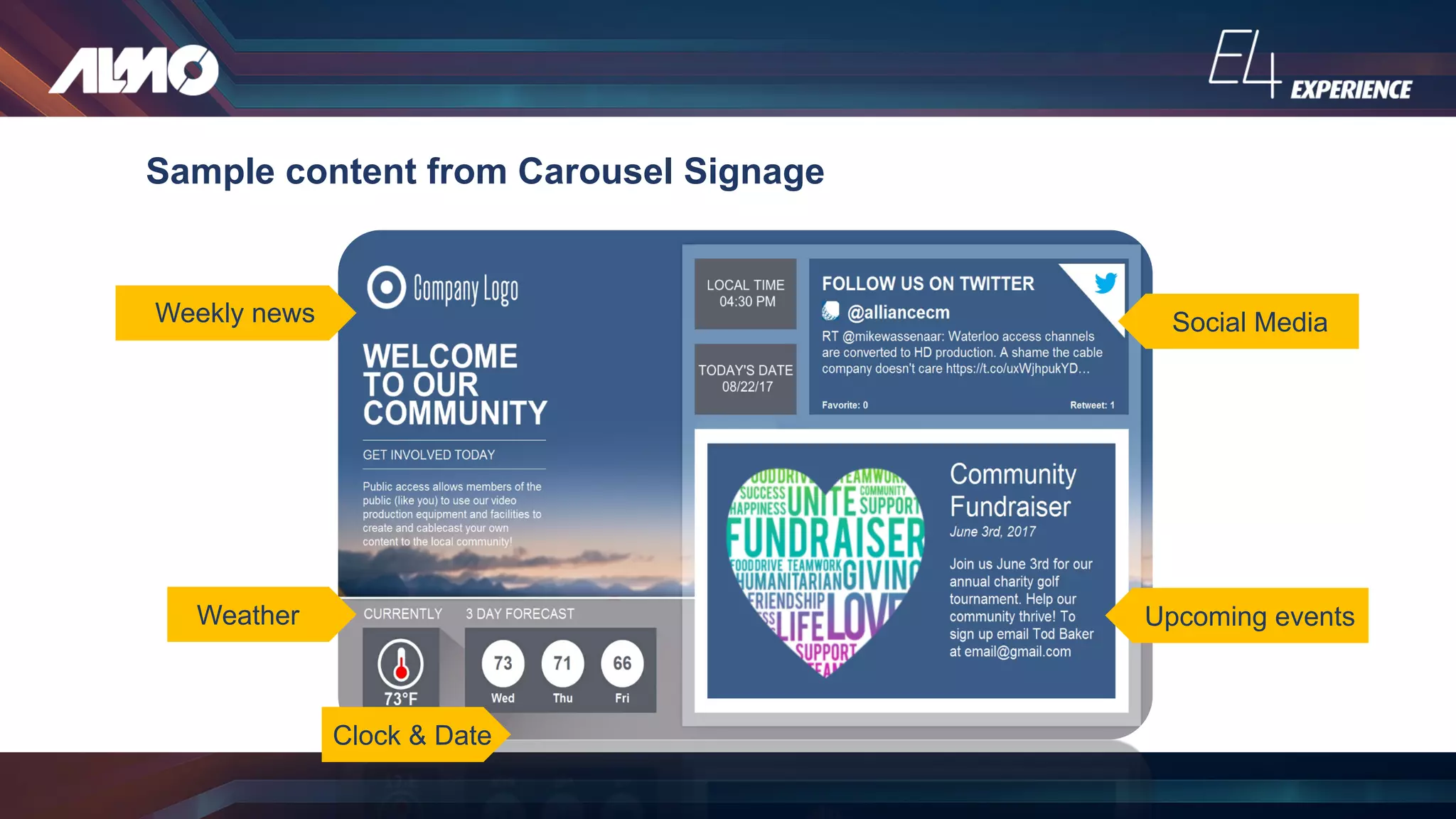
Sample content from Carousel Signage
Weekly news
Weather
Clock & Date
Social Media
Upcoming events
KEY POINTS
• Less can be more.
• Less information on the screen at one time allows
the message to be conveyed clearly.
• Images and graphics can make faster, longer
lasting impact
DEPLOYMENT
• the movement of troops or equipment to a place or position
for military action.
• the action of bringing resources into effective action.
PITFALL #4
Attempting to deploy a full system before testing the
system in a “lab.”
CHALLENGE
Develop a deployment plan that anticipates roadblocks, limits
delays and ensures that the system is up and running in the
shortest amount of time.
KEY POINTS
1. Create a “lab” with DS equipment, within the same
infrastructure (network, etc.), and test for an
extended period of time with various content.
2. Create a flow chart of the various steps needed to
deploy the signage solution based on what was
learned in the lab.
DIAGNOSIS
Reviewing the goals of the digital signage, and
determining if it currently meets those goals.
PITFALL #5
Keeping the status quo.
“If it ain’t broke, don’t fix it.”
CHALLENGES
1. Comparing the goals set at the beginning with the
actual performance of the digital sign, and making
necessary adjustments needed when it falls short.
2. Adjusting current goals, or creating new goals to
fit the ever changing needs and capabilities of
digital signage.
KEY POINTS
1. Know how to measure your success BEFORE the
deployment.
2. Pre-schedule regular reviews with key people.
3. For items that are not quantifiable, have the team
rate the overall success of each goal using a
scale.
Create a questionnaire with leading and open ended questions to elicit the
necessary information.
Design a system with the content and signage goals in mind.
Create a written and illustrated depiction of the content needed to
reach signage goals.
Deploy a signage “lab” that mirrors the true infrastructure of the actual deployment
and test for an extended period of time.
Schedule time to diagnose the success of your signage deployment at regular
intervals and make adjustments when necessary.
Q&A
FOLLOW US ON
THANK
YOU

Avoiding Pitfalls in Digital Signage Installations and Content

  • 1.
  • 2.
    QUICK FACTS ABOUT ALMOPROAV: Number of Year’s Almo’s been in Business Number of Warehouse Locations Nationwide73 100 50 10 10 50 20 11 Percentage of our Sales Team that’s InfoComm trained Percentage of our Sales Team that’s CTS Certified Average number of year’s experience our sales staff has in Pro A/V Outside Sales Representatives Inside Sales Representatives Business Development Managers
  • 3.
    Todd Heberlein CTS, DMC-D-4K,DSCE Business Development Manager PHONE: 888-420-2566 x6205 EMAIL: theberlein@almo.com
  • 4.
    THE 5 DsOF A SIGNAGE SOLUTION • Discover • Design • Develop • Deployment • Diagnose
  • 5.
    DISCOVERY Observing or findingsomething unknown This is the question & answer phase of your signage project.
  • 6.
    PITFALL #1 Failure toget a clear understanding of the goal(s) of the signage, including how success will be measured. CHALLENGE Set clear goals for the digital signage.
  • 7.
    KEY POINTS • Createa questionnaire with both open ended and multiple choice questions to help secure the answers needed. • Make sure at least one question covers how success will be measured.
  • 8.
  • 9.
    TIP Include Key Individuals •CEO • IT manager • Marketing Manager • Content creation team • Administrative personnel • People using the CMS to manage the content Measure Success • Some may shy away from measuring success due to fear of failure • Measuring Success can be elusive • Quantify success
  • 10.
    DESIGN Determining the overalllook of the content, as well as the infrastructure, layout, and hardware of the digital signage solution.
  • 11.
    PITFALL #2 Designing asystem with hardware and software (CMS) in mind, instead of focusing on the content or functionality needs first. CHALLENGE Designing around content and functionality helps the hardware / CMS portion fall into place
  • 12.
    KEY POINT • Manysignage solutions have limitations on content they work with. Determining content allows you to narrow your focus. REMINDER Once again, a detailed questionnaire can guide the conversation and help determine the needs of the system.
  • 13.
    DEVELOP The initial creationof content, securing of marketing assets and digital signage hardware.
  • 14.
    PITFALL #3 Developing contentpiecemeal, without the ultimate goals in mind. CHALLENGE Create of a cohesive design that both fits the design palette of the end user, as well as meets the ultimate goals of the digital signage.
  • 15.
  • 16.
    Sample content fromCarousel Signage Weekly news Weather Clock & Date Social Media Upcoming events
  • 17.
    KEY POINTS • Lesscan be more. • Less information on the screen at one time allows the message to be conveyed clearly. • Images and graphics can make faster, longer lasting impact
  • 18.
    DEPLOYMENT • the movementof troops or equipment to a place or position for military action. • the action of bringing resources into effective action.
  • 19.
    PITFALL #4 Attempting todeploy a full system before testing the system in a “lab.” CHALLENGE Develop a deployment plan that anticipates roadblocks, limits delays and ensures that the system is up and running in the shortest amount of time.
  • 20.
    KEY POINTS 1. Createa “lab” with DS equipment, within the same infrastructure (network, etc.), and test for an extended period of time with various content. 2. Create a flow chart of the various steps needed to deploy the signage solution based on what was learned in the lab.
  • 21.
    DIAGNOSIS Reviewing the goalsof the digital signage, and determining if it currently meets those goals.
  • 22.
    PITFALL #5 Keeping thestatus quo. “If it ain’t broke, don’t fix it.”
  • 23.
    CHALLENGES 1. Comparing thegoals set at the beginning with the actual performance of the digital sign, and making necessary adjustments needed when it falls short. 2. Adjusting current goals, or creating new goals to fit the ever changing needs and capabilities of digital signage.
  • 24.
    KEY POINTS 1. Knowhow to measure your success BEFORE the deployment. 2. Pre-schedule regular reviews with key people. 3. For items that are not quantifiable, have the team rate the overall success of each goal using a scale.
  • 26.
    Create a questionnairewith leading and open ended questions to elicit the necessary information. Design a system with the content and signage goals in mind. Create a written and illustrated depiction of the content needed to reach signage goals. Deploy a signage “lab” that mirrors the true infrastructure of the actual deployment and test for an extended period of time. Schedule time to diagnose the success of your signage deployment at regular intervals and make adjustments when necessary.
  • 27.
  • 28.
  • 29.