All About Shortcut Keys Nilabh Verma (Assistant Manager - IT)
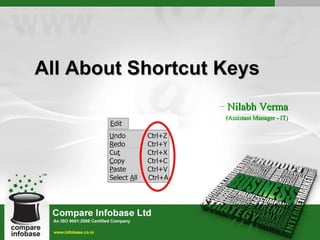
Basic PC shortcut keys Alt/F10: Activates menu bar.  Ctrl + A: Select all text. Ctrl + X/Shift + Del: Cut selected item.  Ctrl + C/Ctrl + Ins: Copy selected item. Ctrl + V/Shift + Ins: Paste. Ctrl + P: Print. Ctrl + S: Save. F5: Refresh. Ctrl + Alt + Del: Restart system/open task manager.  Del: Delete selected item. Esc: Terminate most of the operations. Enter: Execute a program. Home/End: Goes to beginning/end of current line.  Tab/Shift + Tab: Select the next/previous item. Page up/page down: Goes to the top/bottom of the document/window. Ctrl + Z/Ctrl + Y: Undo/Redo.
Function   keys F1: Universal help key, sometimes also used to open the Task Pane.  F2: In Windows, commonly used to rename.  F3: Often opens a search feature. Also generally used to cancel any running installation.  F4: Open find window.  Alt + F4 will close the program currently active in Microsoft Windows. F5: In all modern browsers, F5 refreshes/reload the page. Open the find/ replace/go to window in Microsoft Word. Starts a slideshow in PowerPoint. F6: Move the cursor to the Address bar in Internet Explorer and Mozilla Firefox. Used to save file in MS-DOS.
F7: Commonly used to spell check and grammar check a document  in Microsoft office programs.  F8: Generally used to enter the Windows start-up menu while booting.  F9: Opens the Measurements toolbar in Quark 5.0 (DTP). Update the  Inbox in Lotus Notes. F10: In Microsoft Windows activates the menu bar of an open application. F11: Full-screen mode in all modern Internet browsers.  F12: Open the Save as window in Microsoft Word.
MacOS shortcut keys Open Apple + ?: Mac help  Open Apple + M: Minimize window  Open Apple + N: New finder window  Open Apple + Shift + N: New folder  Open Apple + W: Close the current window.  Open Apple + C: Copy the elected item to the clipboard.  Open Apple + X: Cut the selected item. Open Apple + V: Paste item from the clipboard. Open Apple + L: Make alias.  Open Apple + T: Add to favorites.  Open Apple + O: Open the selected icon.  Open Apple + F: Display the find dialog box.  Open Apple + G: Repeat the last find operation.
Linux shortcut keys Ctrl + Alt + F1...F6: Switch among the text terminals.  Ctrl + Alt + F7...F12: Switch to GUI mode. Tab: Auto-complete the command. Up/Down Arrow: Show previous/next command history.  Ctrl + Alt + (+)/(-): Increase/decrease the screen resolution (GUI). Ctrl + Alt + Del: Restart the system. Ctrl + C: Kill the current process. Ctrl + D: Log off from current terminal. Ctrl + Z: Send the current process to the background. Ctrl + Tab: Go to the next virtual desktop (GUI). Ctrl + Shift + Tab: Go to the previous virtual desktop (GUI). Ctrl + Alt + L: Lock the desktop (GUI).  Ctrl + S: Stop the transfer process to the terminal. Ctrl + Q: Resume the transfer process.  Shift + Page up/down: Go to top/bottom of the terminal.
Windows shortcut keys Alt + Tab: Switch between open applications.  Alt + double-click: Display the properties of the object.  Alt + Print Screen: Create a screen shot only for the program you are currently in.  Ctrl + Print Screen/Print Screen: Creates a screen shot of the entire screen  Ctrl + Alt + Del: Reboot the computer and/or bring up the Windows task manager.  Ctrl + Shift + Esc: Immediately bring up the Windows task manager.  Ctrl + Esc: Bring up the Windows Start menu. Alt + Esc: Switch Between open applications on taskbar.  F3: Starts find from desktop.  F5: Refresh Contents to where you were on the page.  Shift + F10: Same as right-click on selected item.  F4: Select a different location to browse in the Windows Explorer toolbar. Right Shift key for 8 seconds: Turn filter key on/off (repeat rate).
Windows shortcut keys (c..) Alt + Enter: Opens properties window of selected icon or program.  Shift + Del: Delete files without throwing them into the Recycle bin.  Alt + Down arrow: Display all available options on drop down menu.  * (on the keypad): Expands all folders on the currently selected folder or drive in Windows Explorer.  + (on the keypad): Expands only the currently selected folder in Windows Explorer.  - (on the keypad): Collapses the currently selected folder in Windows Explorer. Alt + F4: Closes Current open program. Ctrl + F4: Closes single window in Program.  F6: Move cursor to different Windows Explorer pane (similar as tab).  Alt + Spacebar: Drops down the main window control menu. Left Alt + Left Shift + PrtScr: Turn high contrast on/off. Left Alt + Left Shift + Num Lock: Turn mouse key on/off. Shift 5 times: Turn sticky key on/off (no need to press keys together). Shift when you insert CD: Stop automatically play.
Windows shortcut keys (c..) WINKEY: Open Start.  WINKEY + D: Brings the desktop to the top of all other windows.  WINKEY + M: Minimizes all windows.  WINKEY + SHIFT + M: Undo the minimize done by WINKEY + M and WINKEY + D.  WINKEY + E: Open Microsoft Explorer.  WINKEY + Tab: Cycle through open programs through the taskbar.  WINKEY + F: Display the Windows Search / Find feature.  WINKEY + CTRL + F: Display the search for computers window. WINKEY + F1: Display the Microsoft Windows help.  WINKEY + R: Open the run window.  WINKEY + Pause/Break key: Open the system properties window.  WINKEY + U: Open Utility Manager.  WINKEY + L: Lock the computer (Windows XP and above only). Num Lock for 5 seconds: Turn toggle key on/off (make sound). Ctrl + Mouse scroll wheel: Zoom in/Zoom out.
MS-Excel shortcut keys F2: Edit the selected cell.  F5: Ask for a specific cell. For example, C6.  F7: Spell check selected text and/or document.  F11: Create chart in a new tab.  Ctrl + Shift + ; - Enter the current time.  Ctrl + ; - Enter the current date.  Alt + Shift + F1: Insert New Worksheet.  Shift + F3: Open the Excel formula window. Shift + F5/Ctrl + F: Bring up search box.  Ctrl + A: Select all contents of the worksheet.  Ctrl + B: Bold highlighted selection.  Ctrl + I: Italic highlighted selection. Ctrl + K: Insert link.  Ctrl + U: Underline highlighted selection.  Ctrl + 5: Strike through highlighted selection.
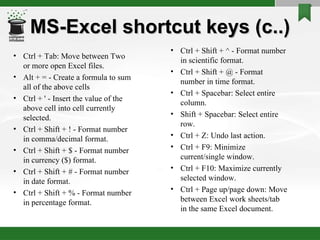
MS-Excel shortcut keys (c..) Ctrl + Tab: Move between Two or more open Excel files.  Alt + = - Create a formula to sum all of the above cells  Ctrl + ' - Insert the value of the above cell into cell currently selected.  Ctrl + Shift + ! - Format number in comma/decimal format.  Ctrl + Shift + $ - Format number in currency ($) format.  Ctrl + Shift + # - Format number in date format.  Ctrl + Shift + % - Format number in percentage format.  Ctrl + Shift + ^ - Format number in scientific format.  Ctrl + Shift + @ - Format number in time format.  Ctrl + Spacebar: Select entire column.  Shift + Spacebar: Select entire row. Ctrl + Z: Undo last action.  Ctrl + F9: Minimize current/single window.  Ctrl + F10: Maximize currently selected window.  Ctrl + Page up/page down: Move between Excel work sheets/tab in the same Excel document.
MS-Word shortcut keys Ctrl + B: Bold highlighted selection.  Ctrl + E: Aligns the line or selected text to the center of the screen.  Ctrl + F: Open find box.  Ctrl + I: Italic highlighted selection.  Ctrl + J: Aligns the selected text or line to justify the screen.  Ctrl + K: Insert link.  Ctrl + L: Aligns the line or selected text to the left of the screen.  Ctrl + R: Aligns the line or selected text to the right of the screen. Ctrl + M: Indent the paragraph.  Ctrl + T: Justification bar move right.  Ctrl + U: Underline highlighted selection. Ctrl + Y: Redo the last action performed. Ctrl + Z: Undo last action. Ctrl + Shift + F: Change the font. Ctrl + ]/[ - Increase/decrease selected font +1pts.
MS-Word shortcut keys (c..) Ctrl + Del: Deletes one word to right of cursor.  Ctrl + Backspace: Deletes one word to left of cursor.  Ctrl + End: Moves the cursor to the end of the document.  Ctrl + Home: Moves the cursor to the beginning of the document.  Ctrl + Spacebar: Clear the format of highlighted text to the default. Ctrl + 1/2/5: 1.0/2.5/1.5 line spacing respectively.  Ctrl + Alt + 1/2/3: Changes text to heading 1/2/3 respectively. Ctrl + F1: Open the Task Pane.  F1: Open Help.  Alt + Ctrl + F2: Open new document. Ctrl + Shift + >/< - Increase/decrease selected font +1pts up to 12pt and then increases font +2pts.  Ctrl + left arrow/right arrow: Moves one word to the left/right. Ctrl + up arrow/down arrow: Moves up/down from the beginning of the line or paragraph.
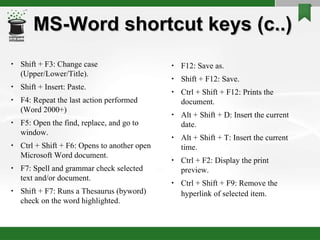
MS-Word shortcut keys (c..) Shift + F3: Change case (Upper/Lower/Title).  Shift + Insert: Paste.  F4: Repeat the last action performed (Word 2000+)  F5: Open the find, replace, and go to window.  Ctrl + Shift + F6: Opens to another open Microsoft Word document.  F7: Spell and grammar check selected text and/or document.  Shift + F7: Runs a Thesaurus (byword) check on the word highlighted. F12: Save as.  Shift + F12: Save.  Ctrl + Shift + F12: Prints the document.  Alt + Shift + D: Insert the current date.  Alt + Shift + T: Insert the current time.  Ctrl + F2: Display the print preview.  Ctrl + Shift + F9: Remove the hyperlink of selected item.
IE/Mozilla shortcut keys Alt + Left Arrow/Backspace: Back a page. Alt + Right Arrow: Forward a page.  F5/Ctrl + R: Refresh current page, frame, or tab.  F11: Display the current website in full screen mode. Pressing F11 again will exit this mode.  Esc: Stop page or download from loading.  Ctrl + (- or +) - Increase or decrease the font size, pressing '-' will decrease and '+' will increase.  Ctrl + Enter: Quickly complete an address. For example, type microsoft in the address bar and press CTRL + ENTER to get http://www.microsoft.com.  Ctrl + D: Add a Favorite for the page currently opened. F4: Opens the drive selection when browsing. Ctrl + I: Display available bookmarks. Ctrl + N: Open New browser window. Ctrl + H: Open the History bar.
IE/Mozilla shortcut keys (c..) Shift + Enter: Complete a .net instead of a .com address (Mozilla).  Ctrl + Shift + Enter: Complete a .org address (Mozilla).  Ctrl + Shift + Del: Open the Clear Data window to quickly clear private data.  Ctrl + J: Display the download window (Mozilla).  Ctrl + F4/Ctrl + W: Closes the currently selected tab.  Ctrl + Shift + T: Undo the close of a window (Mozilla). Ctrl + T: Opens a new tab.  Ctrl + F4: Closes the currently selected tab.  Ctrl + Tab: Moves through each of the open tabs.  Alt + Down arrow: Display all previous text entered in a text box and/or available options on drop down menu.  Alt + D: Highlights the text in the address bar. Ctrl + B: Open the Organize Favorites dialog box. Ctrl + E: Open the Search bar. Crtl + F: Start the Find utility
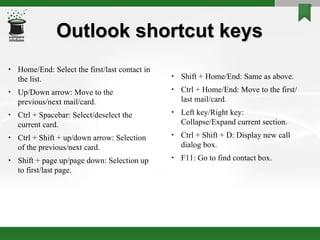
Outlook shortcut keys Home/End: Select the first/last contact in the list. Up/Down arrow: Move to the previous/next mail/card.  Ctrl + Spacebar: Select/deselect the current card. Ctrl + Shift + up/down arrow: Selection of the previous/next card. Shift + page up/page down: Selection up to first/last page.  Shift + Home/End: Same as above. Ctrl + Home/End: Move to the first/last mail/card.  Left key/Right key: Collapse/Expand current section.  Ctrl + Shift + D: Display new call dialog box. F11: Go to find contact box.
Run command shortcuts Calculator: calc Character Map: charmap  Command Prompt: cmd Date and Time Properties: timedate.cpl Disk Cleanup Utility: cleanmgr  Control Panel: control Display Properties: control desktop/desk.cpl Fonts: control fonts/fonts Internet Properties: inetcpl.cpl Log out Windows: logoff Network Connections: control netconnections/ncpa.cpl Notepad: notepad On Screen Keyboard: osk  Printers and Faxes: control printers/printers  Regional Settings: intl.cpl
Run command shortcuts (c..) Remote Desktop: mstsc Services: services.msc Shut Down Windows: shutdown Sounds and Audio: mmsys.cpl System Properties: sysdm.cpl Task Manager: taskmgr  Windows Update Launch: wupdmgr Wordpad: write MS-Word: winword MS-Excel: excel MS-Outlook: outlook MS-Powerpoint: powerpnt Microsoft Picture Manager: ois Windows Explorer: explorer Opens your home drive: %homedrive%
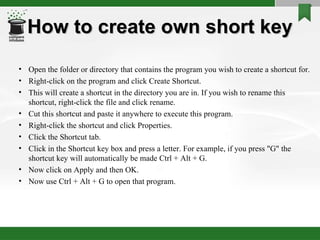
How to create own short key Open the folder or directory that contains the program you wish to create a shortcut for.  Right-click on the program and click Create Shortcut.  This will create a shortcut in the directory you are in. If you wish to rename this shortcut, right-click the file and click rename.  Cut this shortcut and paste it anywhere to execute this program.  Right-click the shortcut and click Properties.  Click the Shortcut tab.  Click in the Shortcut key box and press a letter. For example, if you press &quot;G&quot; the shortcut key will automatically be made Ctrl + Alt + G. Now click on Apply and then OK.  Now use Ctrl + Alt + G to open that program.
Did you know? We have a shortcut to turn off the computer.
 

All About Short Keys

  • 1.
    All About ShortcutKeys Nilabh Verma (Assistant Manager - IT)
  • 2.
    Basic PC shortcutkeys Alt/F10: Activates menu bar. Ctrl + A: Select all text. Ctrl + X/Shift + Del: Cut selected item. Ctrl + C/Ctrl + Ins: Copy selected item. Ctrl + V/Shift + Ins: Paste. Ctrl + P: Print. Ctrl + S: Save. F5: Refresh. Ctrl + Alt + Del: Restart system/open task manager. Del: Delete selected item. Esc: Terminate most of the operations. Enter: Execute a program. Home/End: Goes to beginning/end of current line. Tab/Shift + Tab: Select the next/previous item. Page up/page down: Goes to the top/bottom of the document/window. Ctrl + Z/Ctrl + Y: Undo/Redo.
  • 3.
    Function keys F1: Universal help key, sometimes also used to open the Task Pane. F2: In Windows, commonly used to rename. F3: Often opens a search feature. Also generally used to cancel any running installation. F4: Open find window. Alt + F4 will close the program currently active in Microsoft Windows. F5: In all modern browsers, F5 refreshes/reload the page. Open the find/ replace/go to window in Microsoft Word. Starts a slideshow in PowerPoint. F6: Move the cursor to the Address bar in Internet Explorer and Mozilla Firefox. Used to save file in MS-DOS.
  • 4.
    F7: Commonly usedto spell check and grammar check a document in Microsoft office programs. F8: Generally used to enter the Windows start-up menu while booting. F9: Opens the Measurements toolbar in Quark 5.0 (DTP). Update the Inbox in Lotus Notes. F10: In Microsoft Windows activates the menu bar of an open application. F11: Full-screen mode in all modern Internet browsers. F12: Open the Save as window in Microsoft Word.
  • 5.
    MacOS shortcut keysOpen Apple + ?: Mac help Open Apple + M: Minimize window Open Apple + N: New finder window Open Apple + Shift + N: New folder Open Apple + W: Close the current window. Open Apple + C: Copy the elected item to the clipboard. Open Apple + X: Cut the selected item. Open Apple + V: Paste item from the clipboard. Open Apple + L: Make alias. Open Apple + T: Add to favorites. Open Apple + O: Open the selected icon. Open Apple + F: Display the find dialog box. Open Apple + G: Repeat the last find operation.
  • 6.
    Linux shortcut keysCtrl + Alt + F1...F6: Switch among the text terminals. Ctrl + Alt + F7...F12: Switch to GUI mode. Tab: Auto-complete the command. Up/Down Arrow: Show previous/next command history. Ctrl + Alt + (+)/(-): Increase/decrease the screen resolution (GUI). Ctrl + Alt + Del: Restart the system. Ctrl + C: Kill the current process. Ctrl + D: Log off from current terminal. Ctrl + Z: Send the current process to the background. Ctrl + Tab: Go to the next virtual desktop (GUI). Ctrl + Shift + Tab: Go to the previous virtual desktop (GUI). Ctrl + Alt + L: Lock the desktop (GUI). Ctrl + S: Stop the transfer process to the terminal. Ctrl + Q: Resume the transfer process. Shift + Page up/down: Go to top/bottom of the terminal.
  • 7.
    Windows shortcut keysAlt + Tab: Switch between open applications. Alt + double-click: Display the properties of the object. Alt + Print Screen: Create a screen shot only for the program you are currently in. Ctrl + Print Screen/Print Screen: Creates a screen shot of the entire screen Ctrl + Alt + Del: Reboot the computer and/or bring up the Windows task manager. Ctrl + Shift + Esc: Immediately bring up the Windows task manager. Ctrl + Esc: Bring up the Windows Start menu. Alt + Esc: Switch Between open applications on taskbar. F3: Starts find from desktop. F5: Refresh Contents to where you were on the page. Shift + F10: Same as right-click on selected item. F4: Select a different location to browse in the Windows Explorer toolbar. Right Shift key for 8 seconds: Turn filter key on/off (repeat rate).
  • 8.
    Windows shortcut keys(c..) Alt + Enter: Opens properties window of selected icon or program. Shift + Del: Delete files without throwing them into the Recycle bin. Alt + Down arrow: Display all available options on drop down menu. * (on the keypad): Expands all folders on the currently selected folder or drive in Windows Explorer. + (on the keypad): Expands only the currently selected folder in Windows Explorer. - (on the keypad): Collapses the currently selected folder in Windows Explorer. Alt + F4: Closes Current open program. Ctrl + F4: Closes single window in Program. F6: Move cursor to different Windows Explorer pane (similar as tab). Alt + Spacebar: Drops down the main window control menu. Left Alt + Left Shift + PrtScr: Turn high contrast on/off. Left Alt + Left Shift + Num Lock: Turn mouse key on/off. Shift 5 times: Turn sticky key on/off (no need to press keys together). Shift when you insert CD: Stop automatically play.
  • 9.
    Windows shortcut keys(c..) WINKEY: Open Start. WINKEY + D: Brings the desktop to the top of all other windows. WINKEY + M: Minimizes all windows. WINKEY + SHIFT + M: Undo the minimize done by WINKEY + M and WINKEY + D. WINKEY + E: Open Microsoft Explorer. WINKEY + Tab: Cycle through open programs through the taskbar. WINKEY + F: Display the Windows Search / Find feature. WINKEY + CTRL + F: Display the search for computers window. WINKEY + F1: Display the Microsoft Windows help. WINKEY + R: Open the run window. WINKEY + Pause/Break key: Open the system properties window. WINKEY + U: Open Utility Manager. WINKEY + L: Lock the computer (Windows XP and above only). Num Lock for 5 seconds: Turn toggle key on/off (make sound). Ctrl + Mouse scroll wheel: Zoom in/Zoom out.
  • 10.
    MS-Excel shortcut keysF2: Edit the selected cell. F5: Ask for a specific cell. For example, C6. F7: Spell check selected text and/or document. F11: Create chart in a new tab. Ctrl + Shift + ; - Enter the current time. Ctrl + ; - Enter the current date. Alt + Shift + F1: Insert New Worksheet. Shift + F3: Open the Excel formula window. Shift + F5/Ctrl + F: Bring up search box. Ctrl + A: Select all contents of the worksheet. Ctrl + B: Bold highlighted selection. Ctrl + I: Italic highlighted selection. Ctrl + K: Insert link. Ctrl + U: Underline highlighted selection. Ctrl + 5: Strike through highlighted selection.
  • 11.
    MS-Excel shortcut keys(c..) Ctrl + Tab: Move between Two or more open Excel files. Alt + = - Create a formula to sum all of the above cells Ctrl + ' - Insert the value of the above cell into cell currently selected. Ctrl + Shift + ! - Format number in comma/decimal format. Ctrl + Shift + $ - Format number in currency ($) format. Ctrl + Shift + # - Format number in date format. Ctrl + Shift + % - Format number in percentage format. Ctrl + Shift + ^ - Format number in scientific format. Ctrl + Shift + @ - Format number in time format. Ctrl + Spacebar: Select entire column. Shift + Spacebar: Select entire row. Ctrl + Z: Undo last action. Ctrl + F9: Minimize current/single window. Ctrl + F10: Maximize currently selected window. Ctrl + Page up/page down: Move between Excel work sheets/tab in the same Excel document.
  • 12.
    MS-Word shortcut keysCtrl + B: Bold highlighted selection. Ctrl + E: Aligns the line or selected text to the center of the screen. Ctrl + F: Open find box. Ctrl + I: Italic highlighted selection. Ctrl + J: Aligns the selected text or line to justify the screen. Ctrl + K: Insert link. Ctrl + L: Aligns the line or selected text to the left of the screen. Ctrl + R: Aligns the line or selected text to the right of the screen. Ctrl + M: Indent the paragraph. Ctrl + T: Justification bar move right. Ctrl + U: Underline highlighted selection. Ctrl + Y: Redo the last action performed. Ctrl + Z: Undo last action. Ctrl + Shift + F: Change the font. Ctrl + ]/[ - Increase/decrease selected font +1pts.
  • 13.
    MS-Word shortcut keys(c..) Ctrl + Del: Deletes one word to right of cursor. Ctrl + Backspace: Deletes one word to left of cursor. Ctrl + End: Moves the cursor to the end of the document. Ctrl + Home: Moves the cursor to the beginning of the document. Ctrl + Spacebar: Clear the format of highlighted text to the default. Ctrl + 1/2/5: 1.0/2.5/1.5 line spacing respectively. Ctrl + Alt + 1/2/3: Changes text to heading 1/2/3 respectively. Ctrl + F1: Open the Task Pane. F1: Open Help. Alt + Ctrl + F2: Open new document. Ctrl + Shift + >/< - Increase/decrease selected font +1pts up to 12pt and then increases font +2pts. Ctrl + left arrow/right arrow: Moves one word to the left/right. Ctrl + up arrow/down arrow: Moves up/down from the beginning of the line or paragraph.
  • 14.
    MS-Word shortcut keys(c..) Shift + F3: Change case (Upper/Lower/Title). Shift + Insert: Paste. F4: Repeat the last action performed (Word 2000+) F5: Open the find, replace, and go to window. Ctrl + Shift + F6: Opens to another open Microsoft Word document. F7: Spell and grammar check selected text and/or document. Shift + F7: Runs a Thesaurus (byword) check on the word highlighted. F12: Save as. Shift + F12: Save. Ctrl + Shift + F12: Prints the document. Alt + Shift + D: Insert the current date. Alt + Shift + T: Insert the current time. Ctrl + F2: Display the print preview. Ctrl + Shift + F9: Remove the hyperlink of selected item.
  • 15.
    IE/Mozilla shortcut keysAlt + Left Arrow/Backspace: Back a page. Alt + Right Arrow: Forward a page. F5/Ctrl + R: Refresh current page, frame, or tab. F11: Display the current website in full screen mode. Pressing F11 again will exit this mode. Esc: Stop page or download from loading. Ctrl + (- or +) - Increase or decrease the font size, pressing '-' will decrease and '+' will increase. Ctrl + Enter: Quickly complete an address. For example, type microsoft in the address bar and press CTRL + ENTER to get http://www.microsoft.com. Ctrl + D: Add a Favorite for the page currently opened. F4: Opens the drive selection when browsing. Ctrl + I: Display available bookmarks. Ctrl + N: Open New browser window. Ctrl + H: Open the History bar.
  • 16.
    IE/Mozilla shortcut keys(c..) Shift + Enter: Complete a .net instead of a .com address (Mozilla). Ctrl + Shift + Enter: Complete a .org address (Mozilla). Ctrl + Shift + Del: Open the Clear Data window to quickly clear private data. Ctrl + J: Display the download window (Mozilla). Ctrl + F4/Ctrl + W: Closes the currently selected tab. Ctrl + Shift + T: Undo the close of a window (Mozilla). Ctrl + T: Opens a new tab. Ctrl + F4: Closes the currently selected tab. Ctrl + Tab: Moves through each of the open tabs. Alt + Down arrow: Display all previous text entered in a text box and/or available options on drop down menu. Alt + D: Highlights the text in the address bar. Ctrl + B: Open the Organize Favorites dialog box. Ctrl + E: Open the Search bar. Crtl + F: Start the Find utility
  • 17.
    Outlook shortcut keysHome/End: Select the first/last contact in the list. Up/Down arrow: Move to the previous/next mail/card. Ctrl + Spacebar: Select/deselect the current card. Ctrl + Shift + up/down arrow: Selection of the previous/next card. Shift + page up/page down: Selection up to first/last page. Shift + Home/End: Same as above. Ctrl + Home/End: Move to the first/last mail/card. Left key/Right key: Collapse/Expand current section. Ctrl + Shift + D: Display new call dialog box. F11: Go to find contact box.
  • 18.
    Run command shortcutsCalculator: calc Character Map: charmap Command Prompt: cmd Date and Time Properties: timedate.cpl Disk Cleanup Utility: cleanmgr Control Panel: control Display Properties: control desktop/desk.cpl Fonts: control fonts/fonts Internet Properties: inetcpl.cpl Log out Windows: logoff Network Connections: control netconnections/ncpa.cpl Notepad: notepad On Screen Keyboard: osk Printers and Faxes: control printers/printers Regional Settings: intl.cpl
  • 19.
    Run command shortcuts(c..) Remote Desktop: mstsc Services: services.msc Shut Down Windows: shutdown Sounds and Audio: mmsys.cpl System Properties: sysdm.cpl Task Manager: taskmgr Windows Update Launch: wupdmgr Wordpad: write MS-Word: winword MS-Excel: excel MS-Outlook: outlook MS-Powerpoint: powerpnt Microsoft Picture Manager: ois Windows Explorer: explorer Opens your home drive: %homedrive%
  • 20.
    How to createown short key Open the folder or directory that contains the program you wish to create a shortcut for. Right-click on the program and click Create Shortcut. This will create a shortcut in the directory you are in. If you wish to rename this shortcut, right-click the file and click rename. Cut this shortcut and paste it anywhere to execute this program. Right-click the shortcut and click Properties. Click the Shortcut tab. Click in the Shortcut key box and press a letter. For example, if you press &quot;G&quot; the shortcut key will automatically be made Ctrl + Alt + G. Now click on Apply and then OK. Now use Ctrl + Alt + G to open that program.
  • 21.
    Did you know?We have a shortcut to turn off the computer.
  • 22.