Week 4 :
Design and understand the need of
Flowcharts and Algorithms
Computers
• Computers are capable of handling various complex problems which are tedious and routine in nature.
• In order that a computer solve a problem, a method for the solution and a detailed procedure has to be prepared by the
programmer.
• The problem solving Involves :
• - Detailed study of the problem
• - Problem redefinition
• - Identification of input data, output requirements and conditions and limitations
• - Alternative methods of solution
• - Selection of the most suitable method
• - Preparation of a list of procedures and steps to obtain the solution
• - Generating the output
Algorithm has the following characteristics
• Input: An algorithm may or may not require input
• Output: Each algorithm is expected to produce at least one result
• Definiteness: Each instruction must be clear and unambiguous.
• Finiteness: If the instructions of an algorithm are executed, the algorithm
should terminate after finite number of steps
algorithm
• An algorithm is a sequence of steps to solve a
particular problem or algorithm is an ordered set
of unambiguous steps that produces a result and
terminates in a finite time
Advantages of algorithm
• It is a step-wise representation of a solution to a given problem, which makes it
easy to understand.
• An algorithm uses a definite procedure.
• It is not dependent on any programming language, so it is easy to understand
for anyone even without programming knowledge.
• Every step in an algorithm has its own logical sequence so it is easy to debug
Flowchart
• Flowchart uses different symbols to design a solution to a problem. It is
another commonly used programming tool.
• By looking at a Flowchart one can understand the operations and
sequence of operations performed in a system.
• Flowchart is often considered as a blueprint of a design used for solving a
specific problem.
Advantages of flowchart:
• Flowchart is an excellent way of communicating the logic of a program.
• Easy and efficient to analyze problem using flowchart.
• During program development cycle, the flowchart plays the role of a
blueprint, which makes program development process easier.
• After successful development of a program, it needs continuous timely
maintenance during the course of its operation. The flowchart makes
program or system maintenance easier.
• It is easy to convert the flowchart into any programming language code
Flowchart
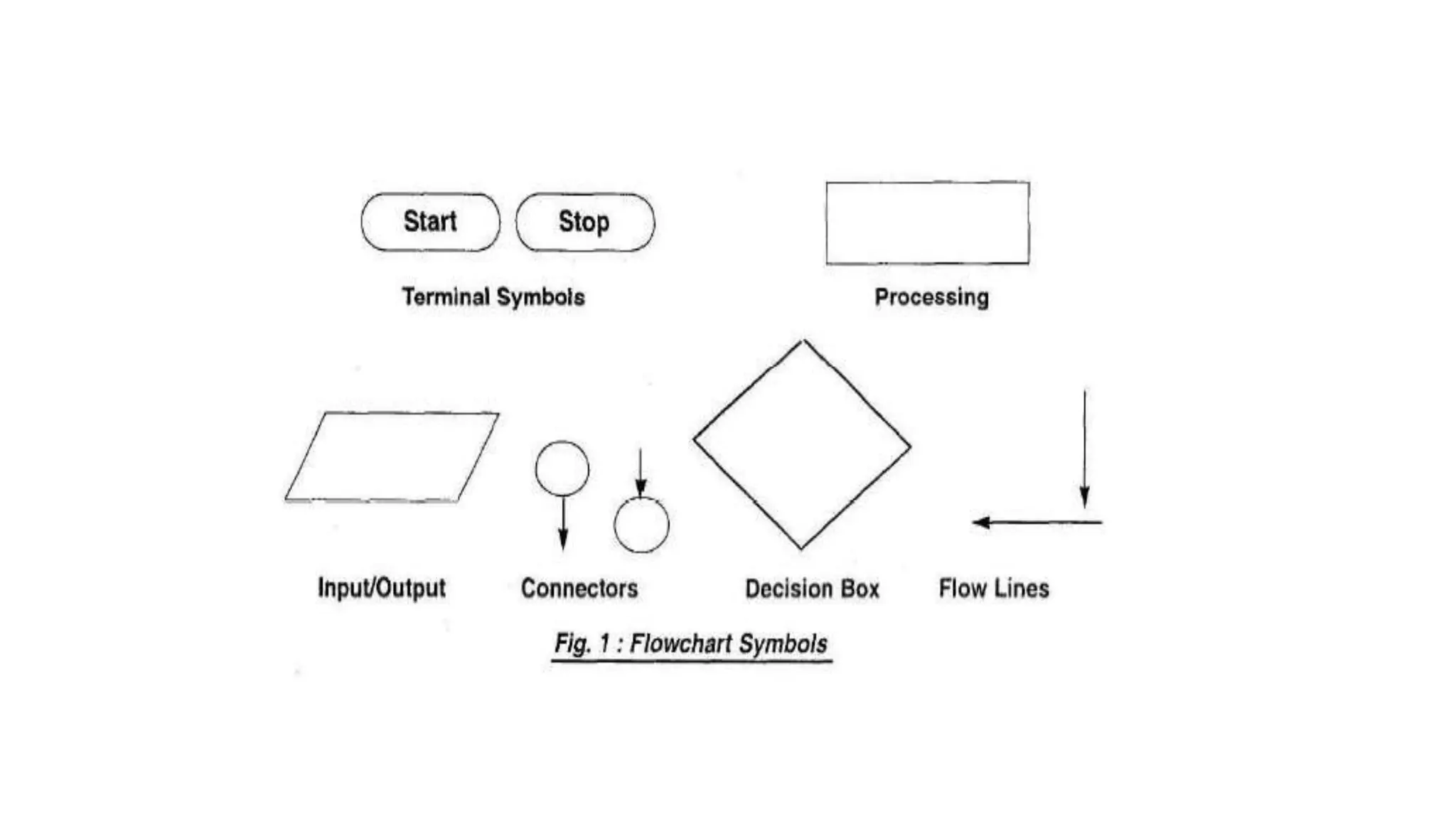
• Flowchart is diagrammatic /Graphical representation of sequence of
steps to solve a problem. To draw a flowchart following standard
symbols are use.
DEVELOPING FLOWCHARTS
• In developing the flowcharts following points have to be considered:
• - Defining the problem.
• - Identify the various steps required to form a solution.
• - Determine the required input and output parameters.
• - Get expected input data values and output result.
• - Determine the various computations and decisions involved.
FLOWCHARTS.pptx
FLOWCHARTS.pptx

FLOWCHARTS.pptx

  • 1.
    Week 4 : Designand understand the need of Flowcharts and Algorithms
  • 2.
    Computers • Computers arecapable of handling various complex problems which are tedious and routine in nature. • In order that a computer solve a problem, a method for the solution and a detailed procedure has to be prepared by the programmer. • The problem solving Involves : • - Detailed study of the problem • - Problem redefinition • - Identification of input data, output requirements and conditions and limitations • - Alternative methods of solution • - Selection of the most suitable method • - Preparation of a list of procedures and steps to obtain the solution • - Generating the output
  • 3.
    Algorithm has thefollowing characteristics • Input: An algorithm may or may not require input • Output: Each algorithm is expected to produce at least one result • Definiteness: Each instruction must be clear and unambiguous. • Finiteness: If the instructions of an algorithm are executed, the algorithm should terminate after finite number of steps
  • 4.
    algorithm • An algorithmis a sequence of steps to solve a particular problem or algorithm is an ordered set of unambiguous steps that produces a result and terminates in a finite time
  • 5.
    Advantages of algorithm •It is a step-wise representation of a solution to a given problem, which makes it easy to understand. • An algorithm uses a definite procedure. • It is not dependent on any programming language, so it is easy to understand for anyone even without programming knowledge. • Every step in an algorithm has its own logical sequence so it is easy to debug
  • 6.
    Flowchart • Flowchart usesdifferent symbols to design a solution to a problem. It is another commonly used programming tool. • By looking at a Flowchart one can understand the operations and sequence of operations performed in a system. • Flowchart is often considered as a blueprint of a design used for solving a specific problem.
  • 7.
    Advantages of flowchart: •Flowchart is an excellent way of communicating the logic of a program. • Easy and efficient to analyze problem using flowchart. • During program development cycle, the flowchart plays the role of a blueprint, which makes program development process easier. • After successful development of a program, it needs continuous timely maintenance during the course of its operation. The flowchart makes program or system maintenance easier. • It is easy to convert the flowchart into any programming language code
  • 8.
    Flowchart • Flowchart isdiagrammatic /Graphical representation of sequence of steps to solve a problem. To draw a flowchart following standard symbols are use.
  • 9.
    DEVELOPING FLOWCHARTS • Indeveloping the flowcharts following points have to be considered: • - Defining the problem. • - Identify the various steps required to form a solution. • - Determine the required input and output parameters. • - Get expected input data values and output result. • - Determine the various computations and decisions involved.