


www.realdolmen.com


                      Introduction to FAST Search
                              Server 2010

                        Joris.Poelmans@realdolmen.com


NOVEMBER 28, 2011 | SLIDE 1
ABOUT ME
       ECM Unit Manager @ RealDolmen
       SharePoint Server MVP
       Blog – http://jopx.blogspot.com
       Co-founder BIWUG – www.biwug.be
       Co-author
          Real World SharePoint 2010 (November 2010, Wrox)
          Real World SharePoint 2007 (August 2007, Wrox)
          SharePoint 2007, The definitive guide (September 2007,
           O’Reilly)


NOVEMBER 28, 2011 | SLIDE 2
AGENDA
       Improvement areas 2007 vs 2010
       Microsoft Enterprise Search – Products
       FAST Search for SharePoint 2010 (FS4SP)-
        architecture
       FS4SP - SharePoint/FAST differentation
       Extending FAST Search


NOVEMBER 28, 2011 | SLIDE 3
IMPROVEMENT AREAS 2007 VS 2010
       Social – Connect with people and expertise
          Address-book style name lookup with phonetic matching
          Improved expertise matching - mined e-mail inbox data
          Social behavior improves search; search improves My Sites
       Refinement – Find information faster
          Metadata-based refiners provide drill-down
          Related query suggestions show popular queries
       Relevance – Provide great search results
          New ingredients, more experience -> better OOB search
          Better wordbreakers in more languages
          Social Distance, tagging, click-through influence relevance


NOVEMBER 28, 2011 | SLIDE 4
IMPROVEMENT AREAS 2007 VS 2010 (CTD.)
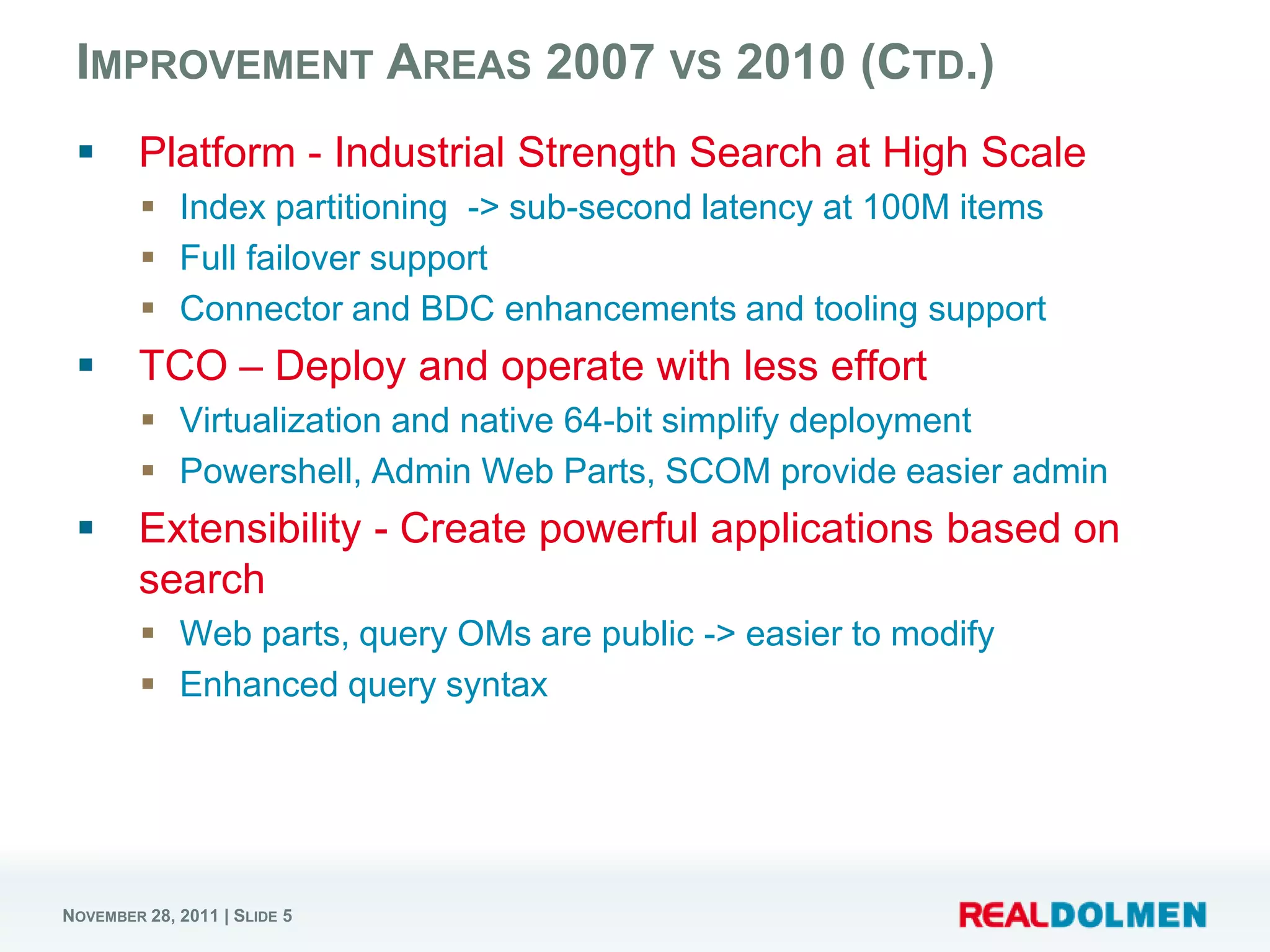
       Platform - Industrial Strength Search at High Scale
          Index partitioning -> sub-second latency at 100M items
          Full failover support
          Connector and BDC enhancements and tooling support
       TCO – Deploy and operate with less effort
          Virtualization and native 64-bit simplify deployment
          Powershell, Admin Web Parts, SCOM provide easier admin
       Extensibility - Create powerful applications based on
        search
          Web parts, query OMs are public -> easier to modify
          Enhanced query syntax


NOVEMBER 28, 2011 | SLIDE 5
DEMO


NOVEMBER 28, 2011 | SLIDE 6
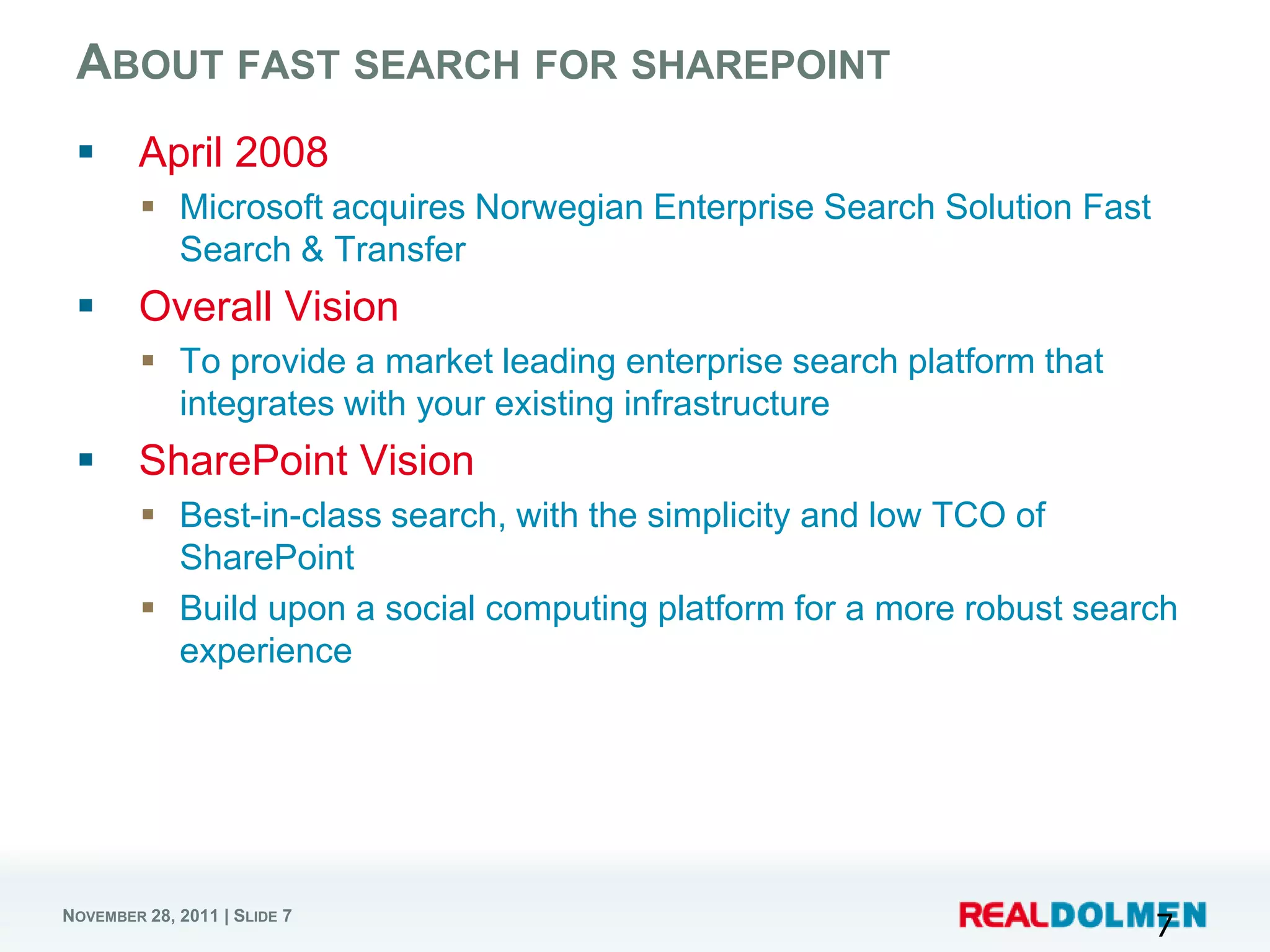
ABOUT FAST SEARCH FOR SHAREPOINT
       April 2008
          Microsoft acquires Norwegian Enterprise Search Solution Fast
           Search & Transfer
       Overall Vision
          To provide a market leading enterprise search platform that
           integrates with your existing infrastructure
       SharePoint Vision
          Best-in-class search, with the simplicity and low TCO of
           SharePoint
          Build upon a social computing platform for a more robust search
           experience


NOVEMBER 28, 2011 | SLIDE 7
                                                                          7
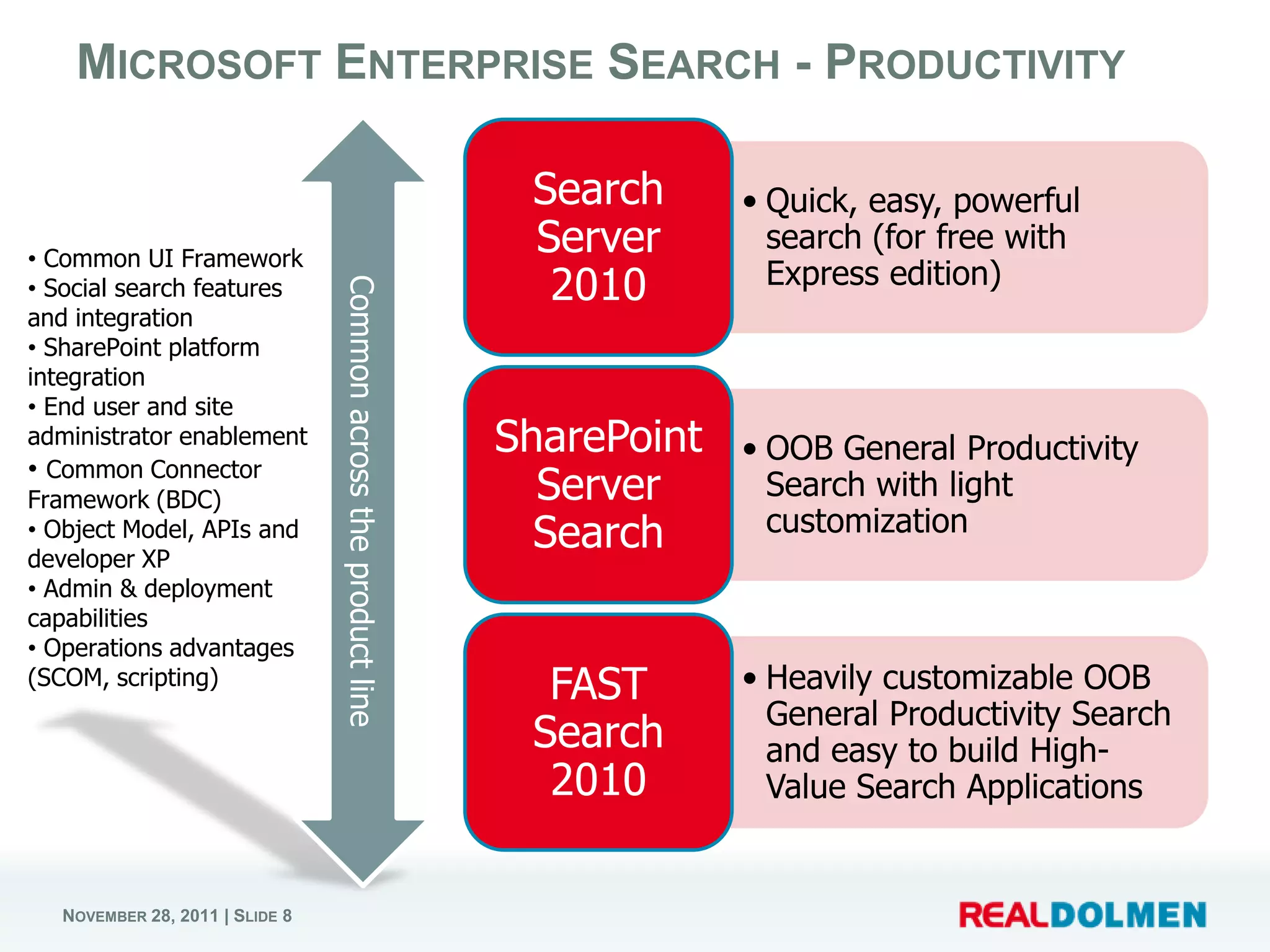
MICROSOFT ENTERPRISE SEARCH - PRODUCTIVITY

                                                                  Search      • Quick, easy, powerful
• Common UI Framework
                                                                  Server        search (for free with
• Social search features                                           2010         Express edition)
                                Common across the product line
and integration
• SharePoint platform
integration
• End user and site
administrator enablement                                         SharePoint   • OOB General Productivity
• Common Connector
Framework (BDC)                                                    Server       Search with light
• Object Model, APIs and                                           Search       customization
developer XP
• Admin & deployment
capabilities
• Operations advantages
(SCOM, scripting)
                                                                   FAST       • Heavily customizable OOB
                                                                                General Productivity Search
                                                                  Search        and easy to build High-
                                                                   2010         Value Search Applications


  NOVEMBER 28, 2011 | SLIDE 8
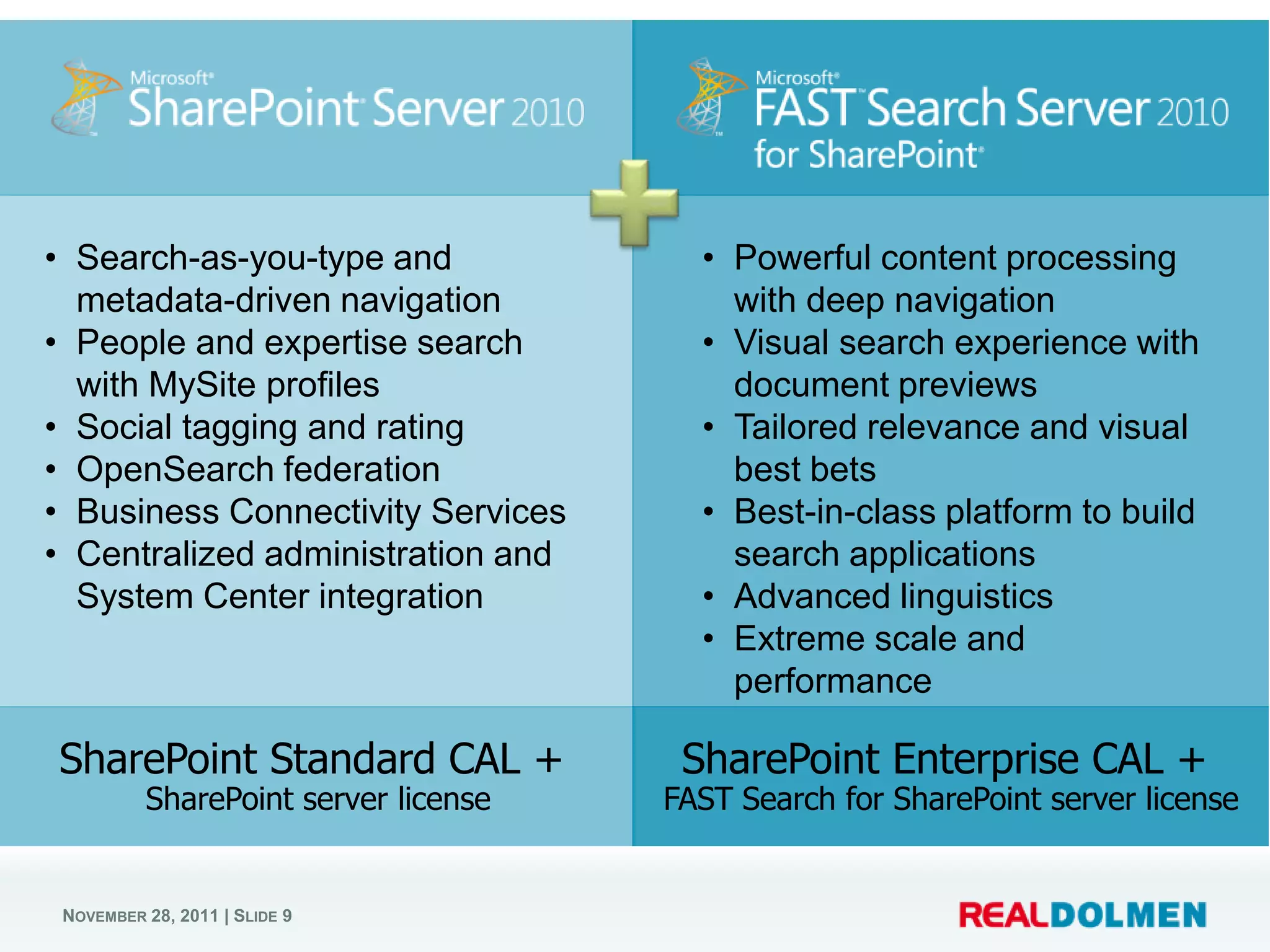
• Search-as-you-type and                • Powerful content processing
  metadata-driven navigation              with deep navigation
• People and expertise search           • Visual search experience with
  with MySite profiles                    document previews
• Social tagging and rating             • Tailored relevance and visual
• OpenSearch federation                   best bets
• Business Connectivity Services        • Best-in-class platform to build
• Centralized administration and          search applications
  System Center integration             • Advanced linguistics
                                        • Extreme scale and
                                          performance

SharePoint Standard CAL +              SharePoint Enterprise CAL +
          SharePoint server license   FAST Search for SharePoint server license


 NOVEMBER 28, 2011 | SLIDE 9
FS4SP ARCHITECTURE


NOVEMBER 28, 2011 | SLIDE 10
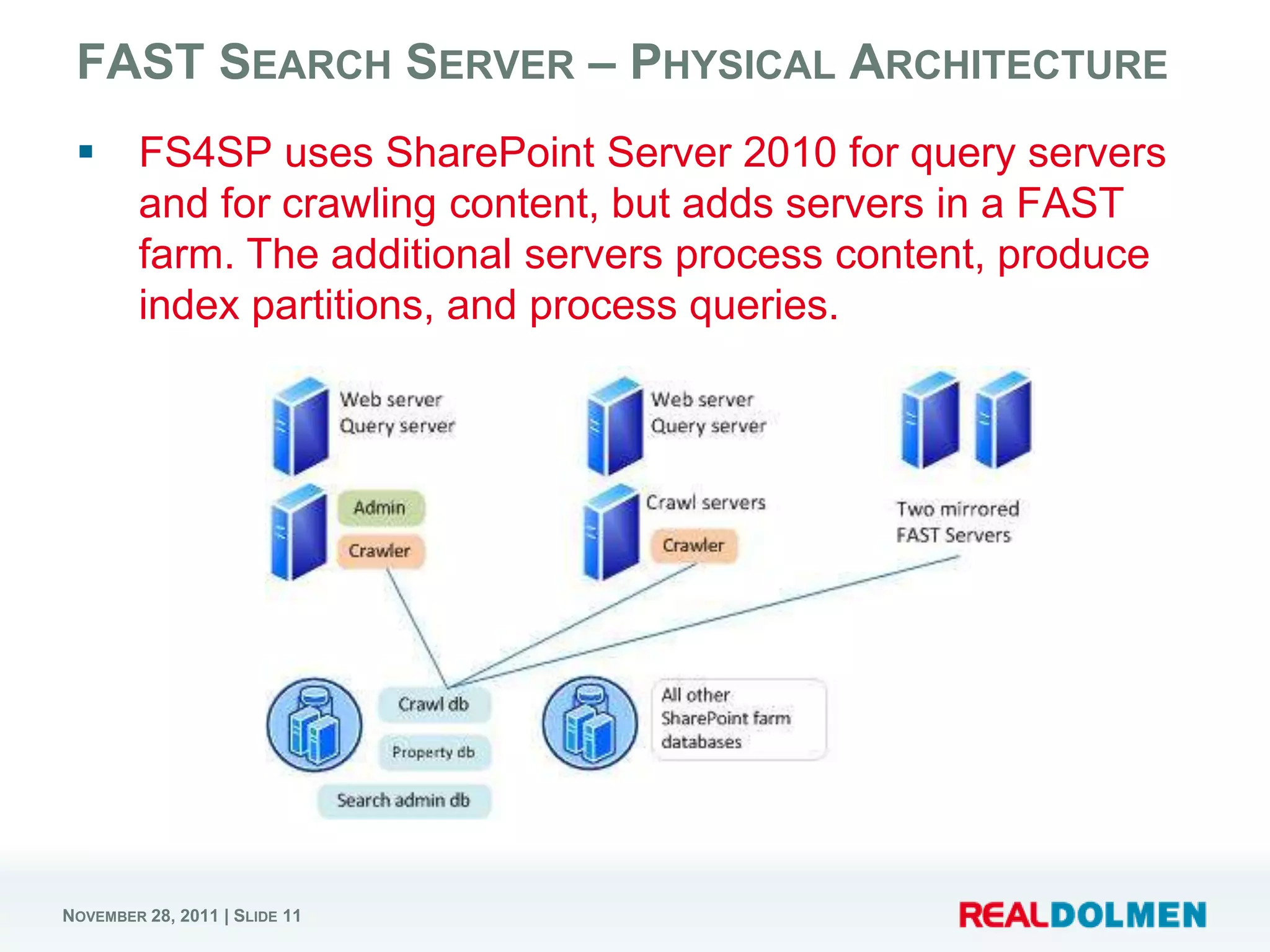
FAST SEARCH SERVER – PHYSICAL ARCHITECTURE
       FS4SP uses SharePoint Server 2010 for query servers
        and for crawling content, but adds servers in a FAST
        farm. The additional servers process content, produce
        index partitions, and process queries.


NOVEMBER 28, 2011 | SLIDE 11
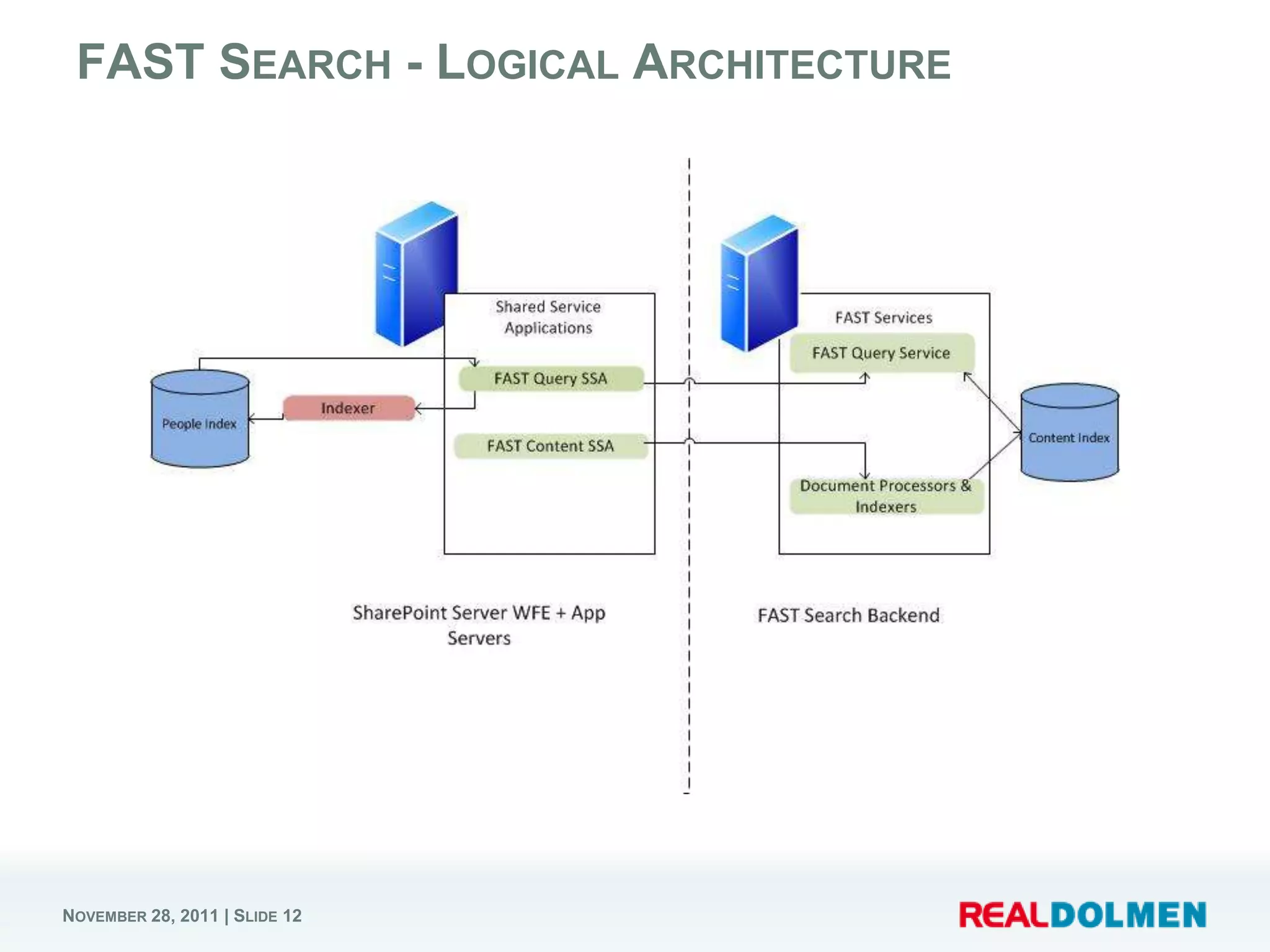
FAST SEARCH - LOGICAL ARCHITECTURE


NOVEMBER 28, 2011 | SLIDE 12
SHAREPOINT SEARCH SERVICE APPLICATIONS

       FAST Search Connector (SSA)
          Crawls the content and feeds it into the FAST Search Server
           2010 for SharePoint back-end
       FAST Search Query (SSA)
          The Query SSA provides query results from the content that is
           crawled by the Content SSA


NOVEMBER 28, 2011 | SLIDE 13
                                                                           13
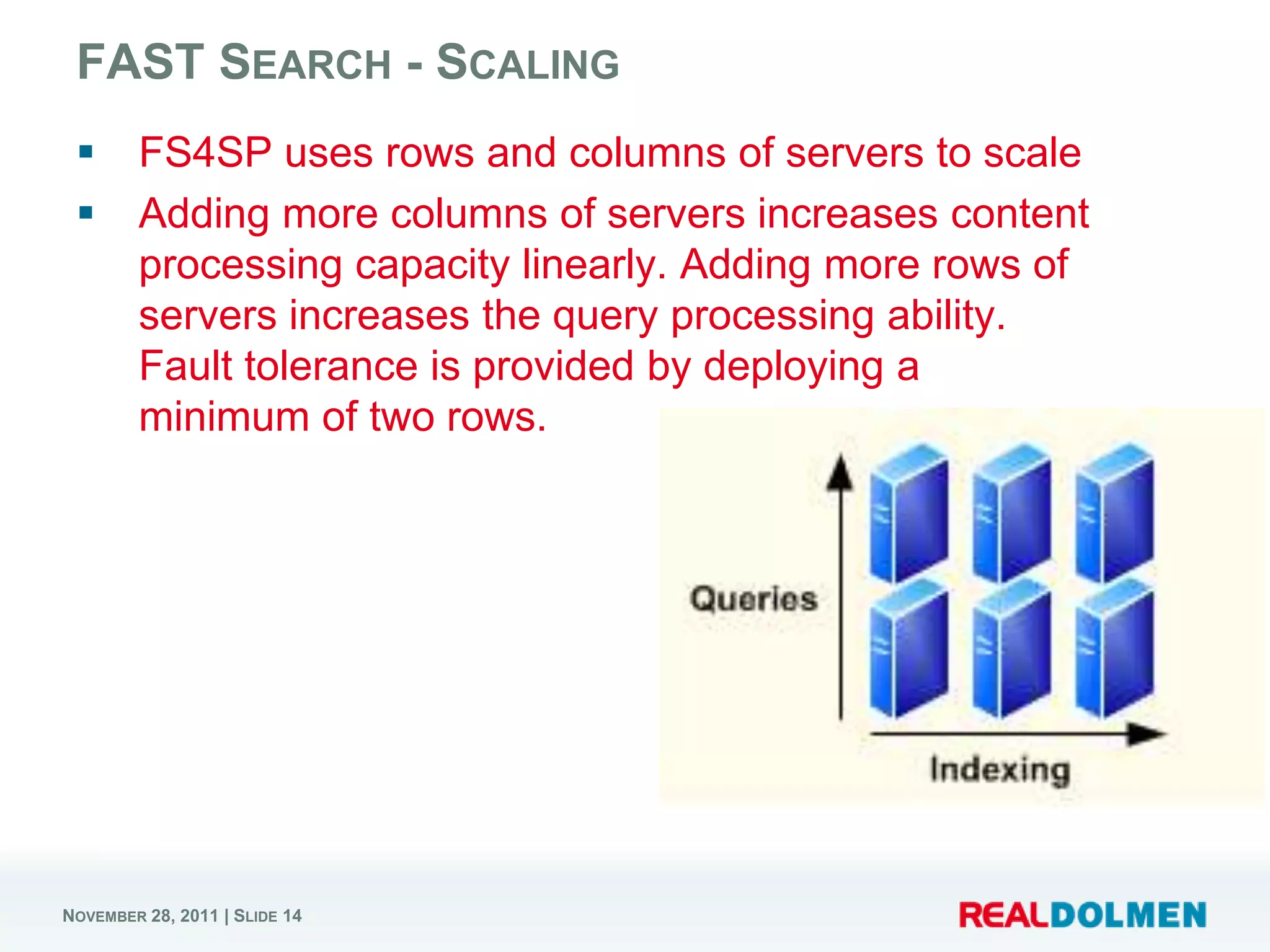
FAST SEARCH - SCALING
       FS4SP uses rows and columns of servers to scale
       Adding more columns of servers increases content
        processing capacity linearly. Adding more rows of
        servers increases the query processing ability.
        Fault tolerance is provided by deploying a
        minimum of two rows.


NOVEMBER 28, 2011 | SLIDE 14
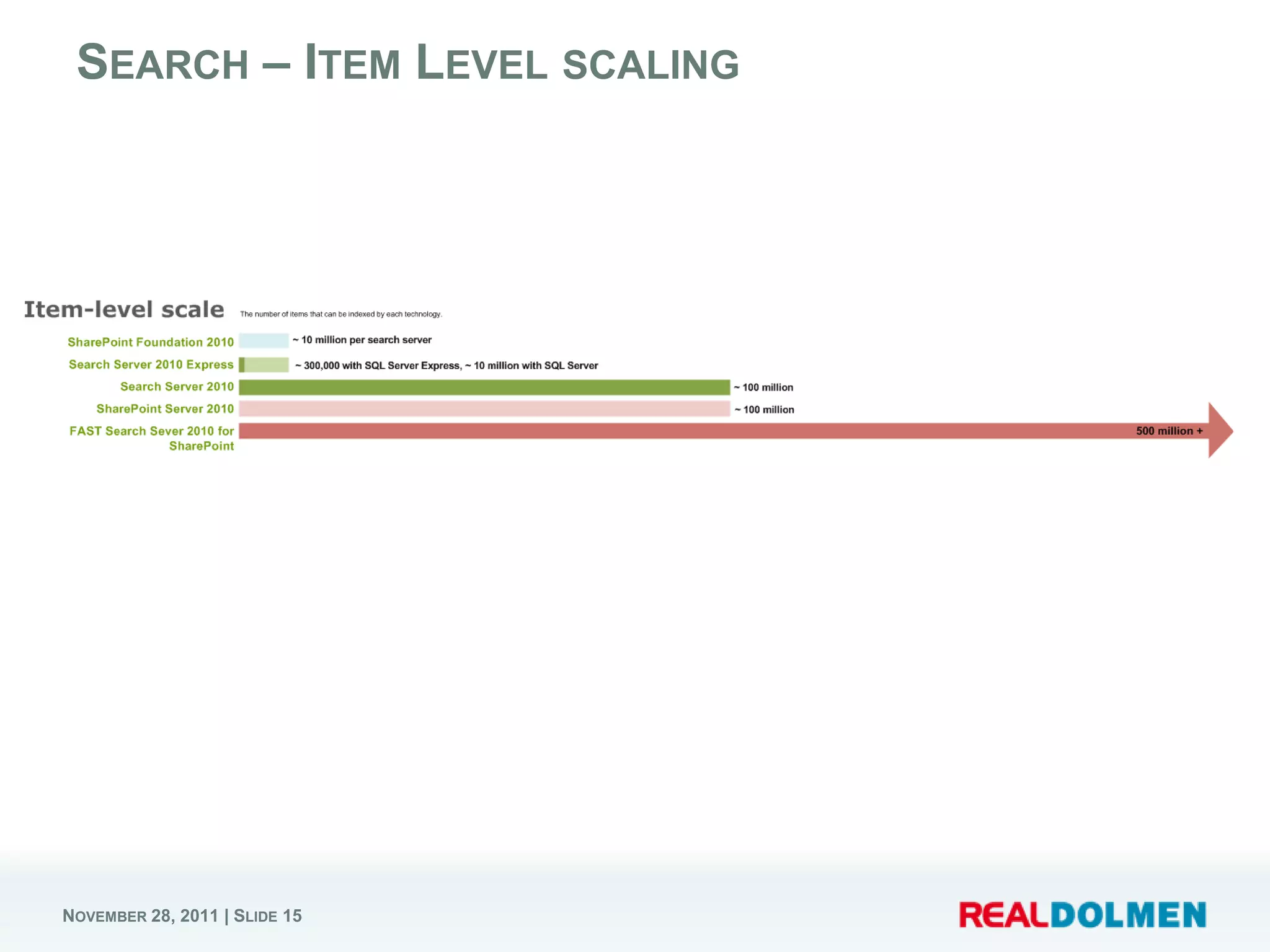
SEARCH – ITEM LEVEL SCALING


NOVEMBER 28, 2011 | SLIDE 15
FAST/SHAREPOINT
     DIFFERENTATION

NOVEMBER 28, 2011 | SLIDE 16
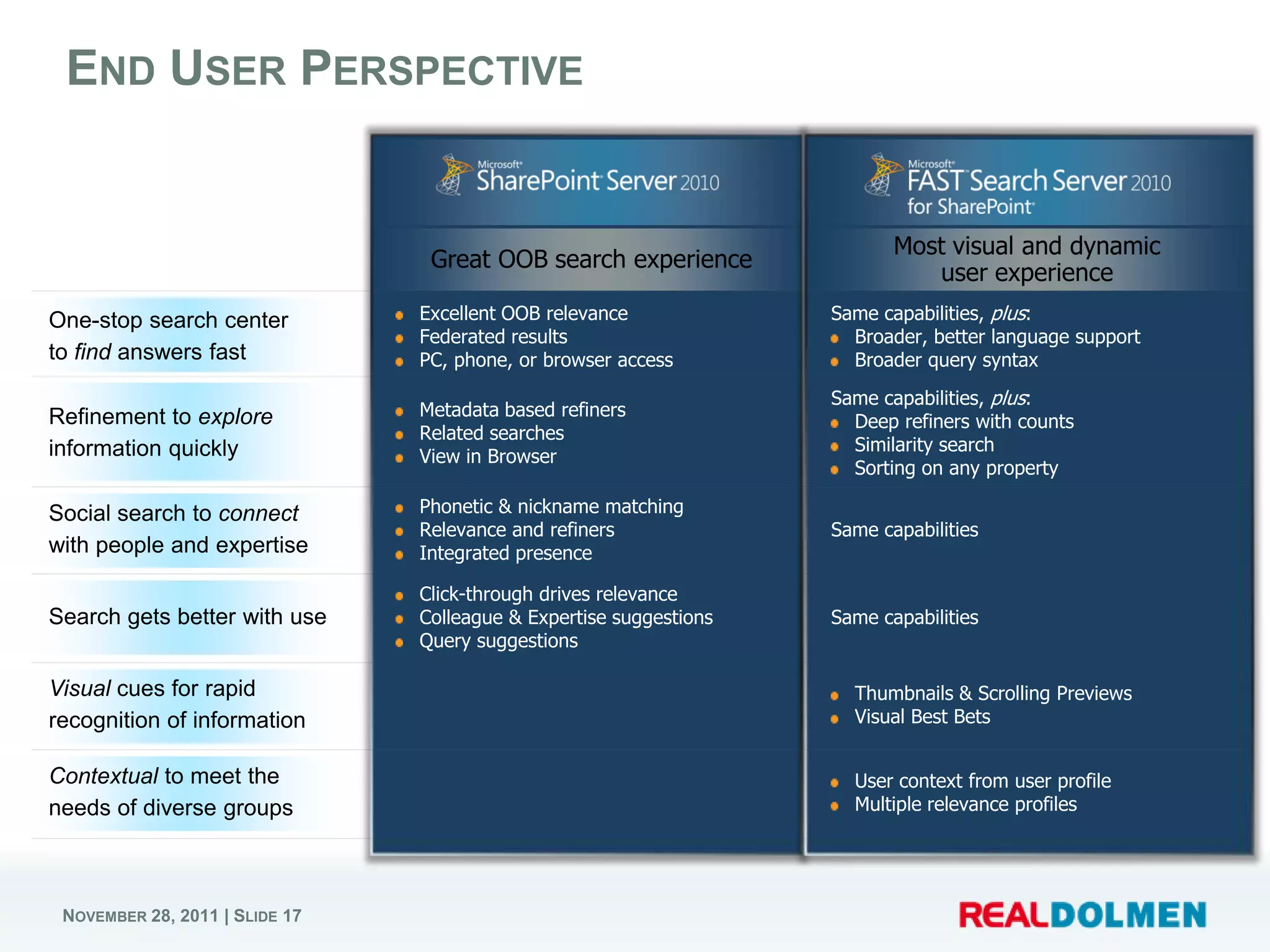
END USER PERSPECTIVE


                               Excellent OOB relevance             Same capabilities, plus:
                               Federated results                     Broader, better language support
                               PC, phone, or browser access          Broader query syntax
                                                                   Same capabilities, plus:
                               Metadata based refiners
                                                                     Deep refiners with counts
                               Related searches
                                                                     Similarity search
                               View in Browser
                                                                     Sorting on any property
                               Phonetic & nickname matching
                               Relevance and refiners              Same capabilities
                               Integrated presence

                               Click-through drives relevance
                               Colleague & Expertise suggestions   Same capabilities
                               Query suggestions

                                                                     Thumbnails & Scrolling Previews
                                                                     Visual Best Bets


                                                                     User context from user profile
                                                                     Multiple relevance profiles


NOVEMBER 28, 2011 | SLIDE 17
FAST SEARCH – END USER
     PERSPECTIVE DEMO

NOVEMBER 28, 2011 | SLIDE 18
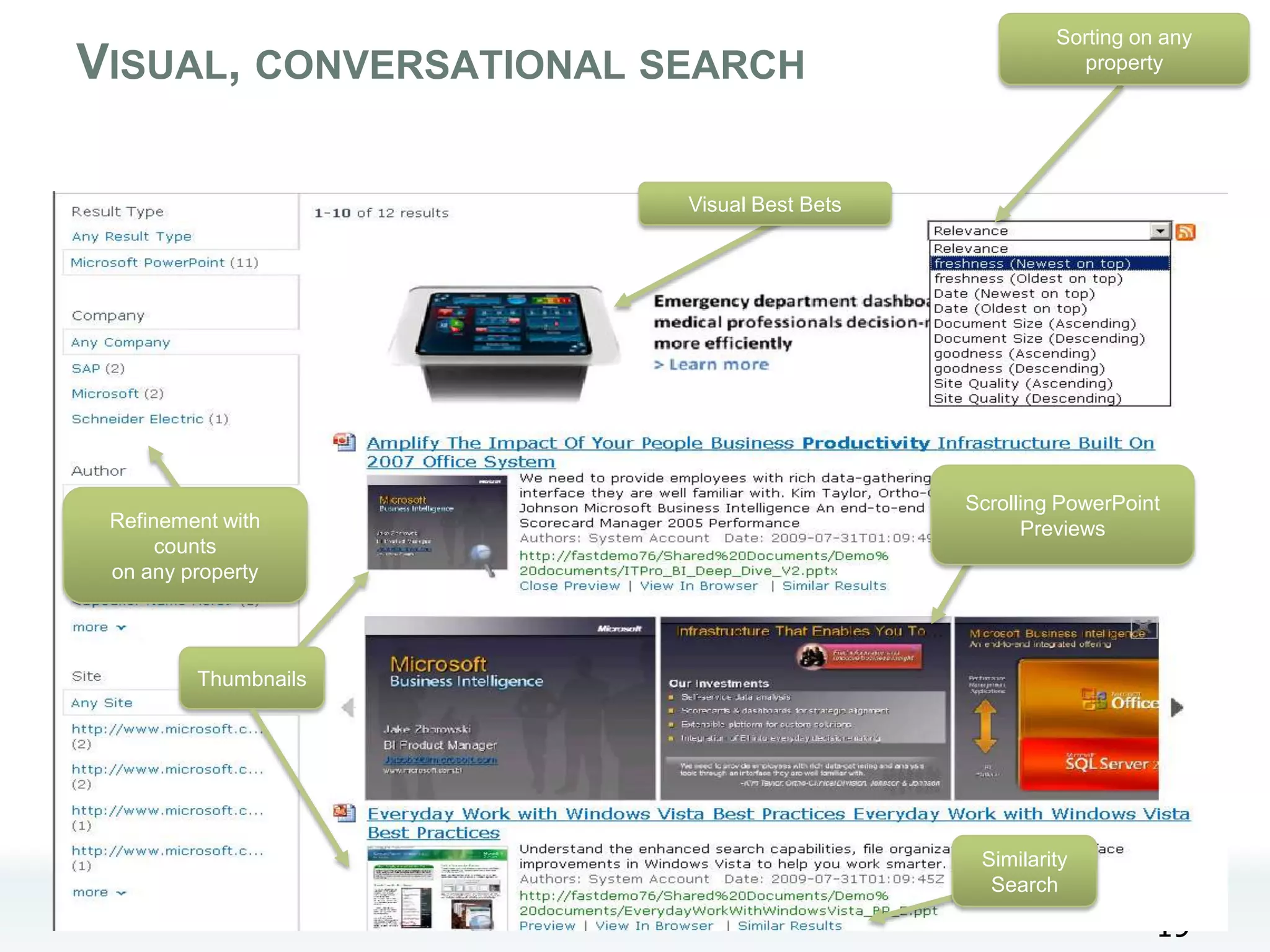
Sorting on any
 VISUAL, CONVERSATIONAL SEARCH                               property


                               Visual Best Bets


                                                  Scrolling PowerPoint
     Refinement with                                    Previews
          counts
     on any property


               Thumbnails


                                                   Similarity
                                                    Search
NOVEMBER 28, 2011 | SLIDE 19
                                                                     19
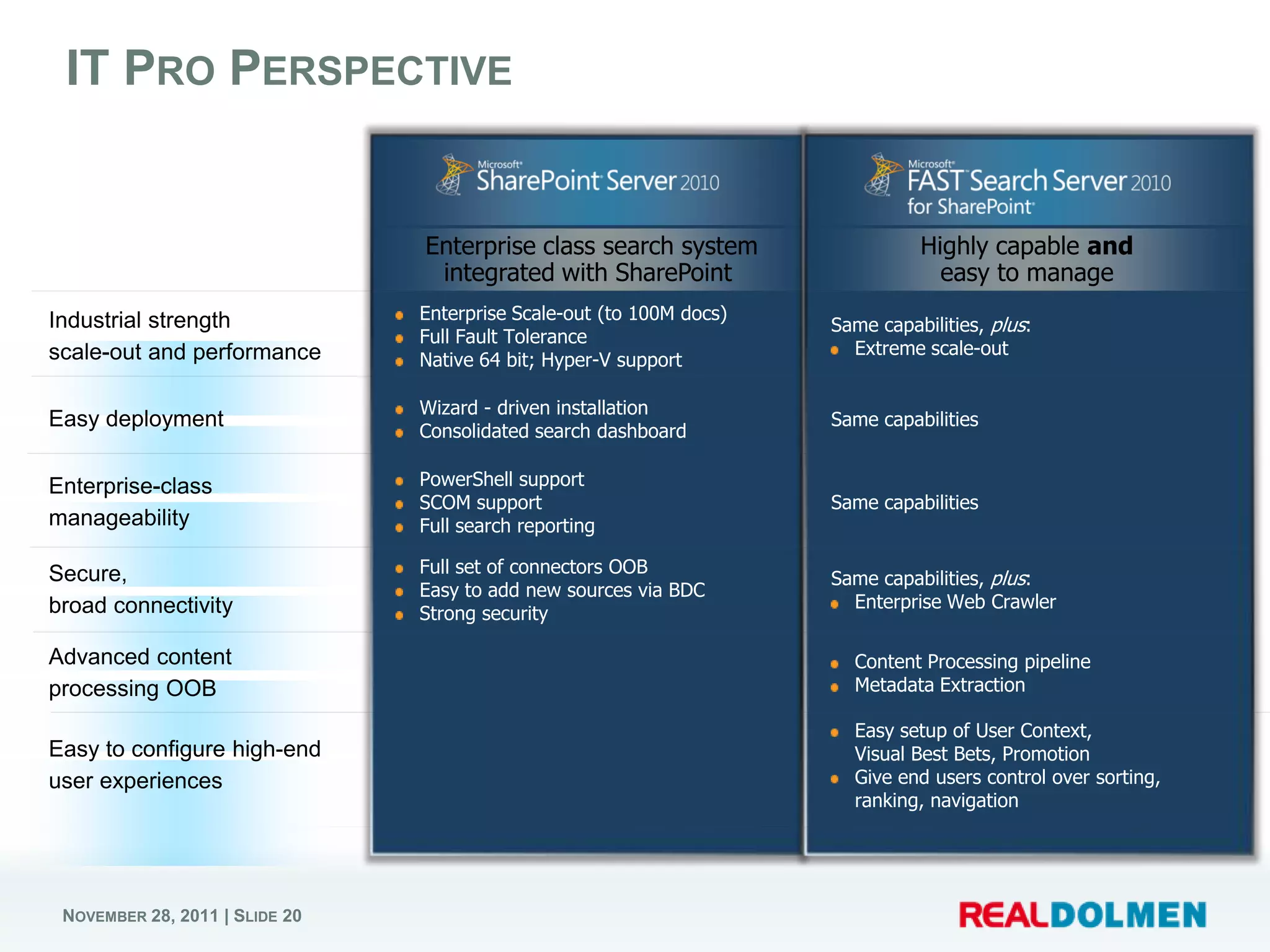
IT PRO PERSPECTIVE


                               Enterprise Scale-out (to 100M docs)
                                                                     Same capabilities, plus:
                               Full Fault Tolerance
                                                                       Extreme scale-out
                               Native 64 bit; Hyper-V support

                               Wizard - driven installation
                                                                     Same capabilities
                               Consolidated search dashboard

                               PowerShell support
                               SCOM support                          Same capabilities
                               Full search reporting

                               Full set of connectors OOB
                                                                     Same capabilities, plus:
                               Easy to add new sources via BDC
                                                                       Enterprise Web Crawler
                               Strong security

                                                                       Content Processing pipeline
                                                                       Metadata Extraction

                                                                       Easy setup of User Context,
                                                                       Visual Best Bets, Promotion
                                                                       Give end users control over sorting,
                                                                       ranking, navigation


NOVEMBER 28, 2011 | SLIDE 20
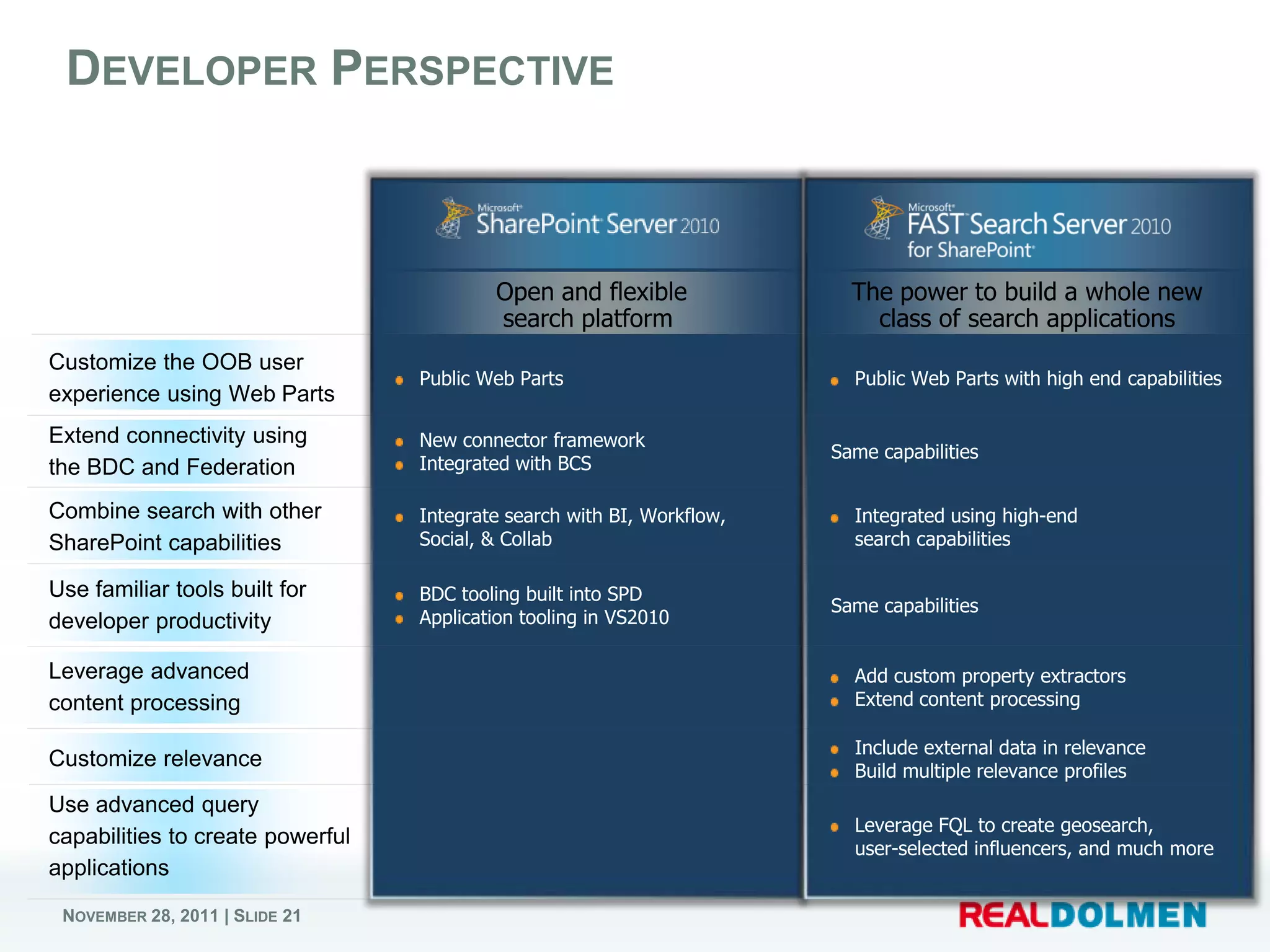
DEVELOPER PERSPECTIVE


                               Public Web Parts                        Public Web Parts with high end capabilities


                               New connector framework
                                                                     Same capabilities
                               Integrated with BCS

                               Integrate search with BI, Workflow,     Integrated using high-end
                               Social, & Collab                        search capabilities

                               BDC tooling built into SPD
                                                                     Same capabilities
                               Application tooling in VS2010


                                                                       Add custom property extractors
                                                                       Extend content processing

                                                                       Include external data in relevance
                                                                       Build multiple relevance profiles

                                                                       Leverage FQL to create geosearch,
                                                                       user-selected influencers, and much more


NOVEMBER 28, 2011 | SLIDE 21
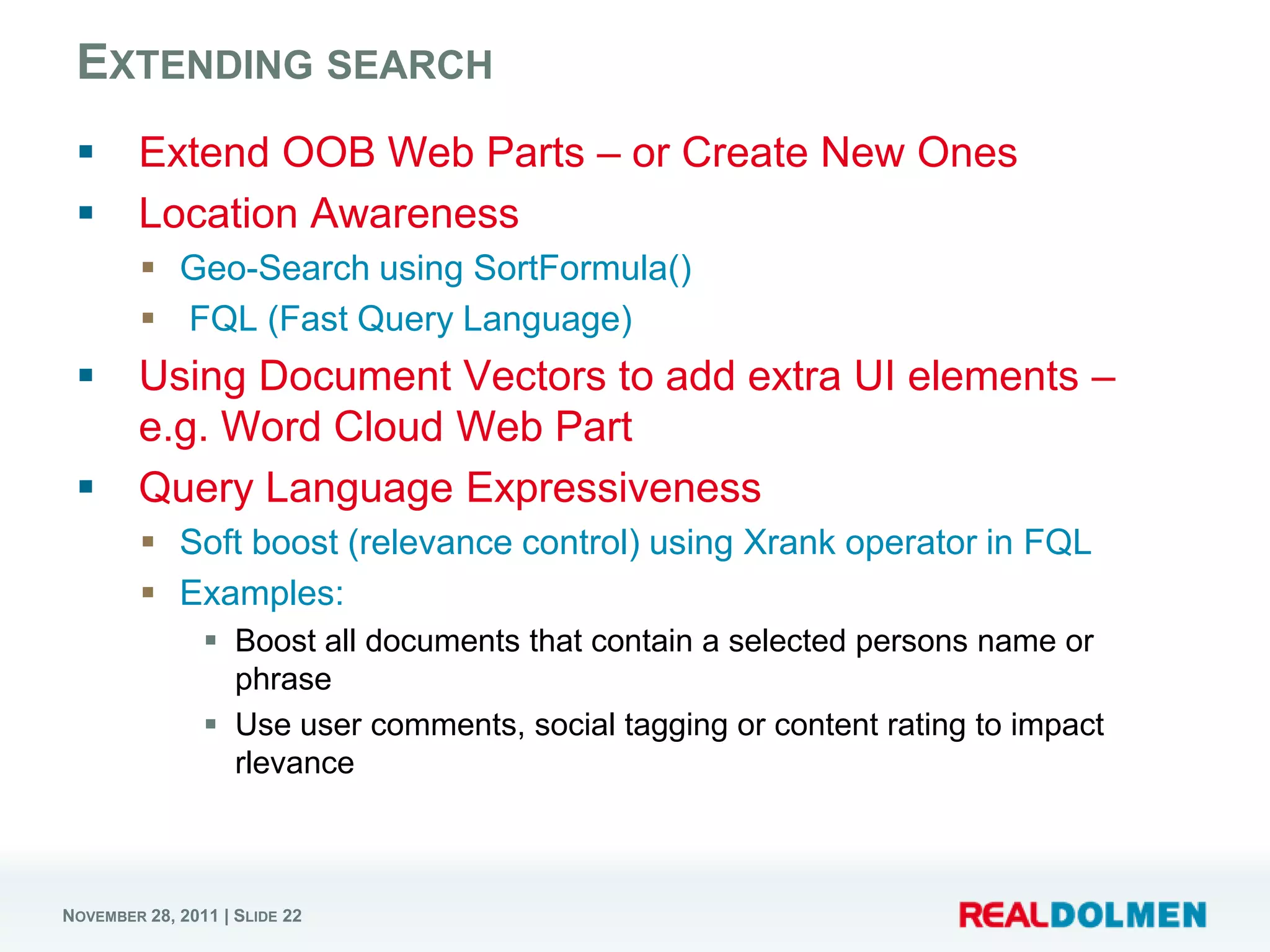
EXTENDING SEARCH
       Extend OOB Web Parts – or Create New Ones
       Location Awareness
          Geo-Search using SortFormula()
          FQL (Fast Query Language)
       Using Document Vectors to add extra UI elements –
        e.g. Word Cloud Web Part
       Query Language Expressiveness
          Soft boost (relevance control) using Xrank operator in FQL
          Examples:
                 Boost all documents that contain a selected persons name or
                  phrase
                 Use user comments, social tagging or content rating to impact
                  rlevance


NOVEMBER 28, 2011 | SLIDE 22
USEFUL RESOURCES
       FAST Search Server for SharePoint
        Deployment & Configuration Guide
            http://www.microsoft.com/downloads/details.aspx?FamilyI
             D=a65aef6f-bc99-4b29-81bb-
             37fce8ad6ea7&displaylang=en
       FAST Search Server for SharePoint
        Known Issues
            http://www.microsoft.com/downloads/details.aspx?FamilyI
             D=8101DA55-1AF2-41A1-89EF-
             15536A8000F2&displaylang=en
       FAST Search Server for SharePoint
        Cmdlets Overview
            http://www.microsoft.com/downloads/details.aspx?familyid
             =0A91AE47-8C6F-447E-8084-
             2EF7208837AE&displaylang=en
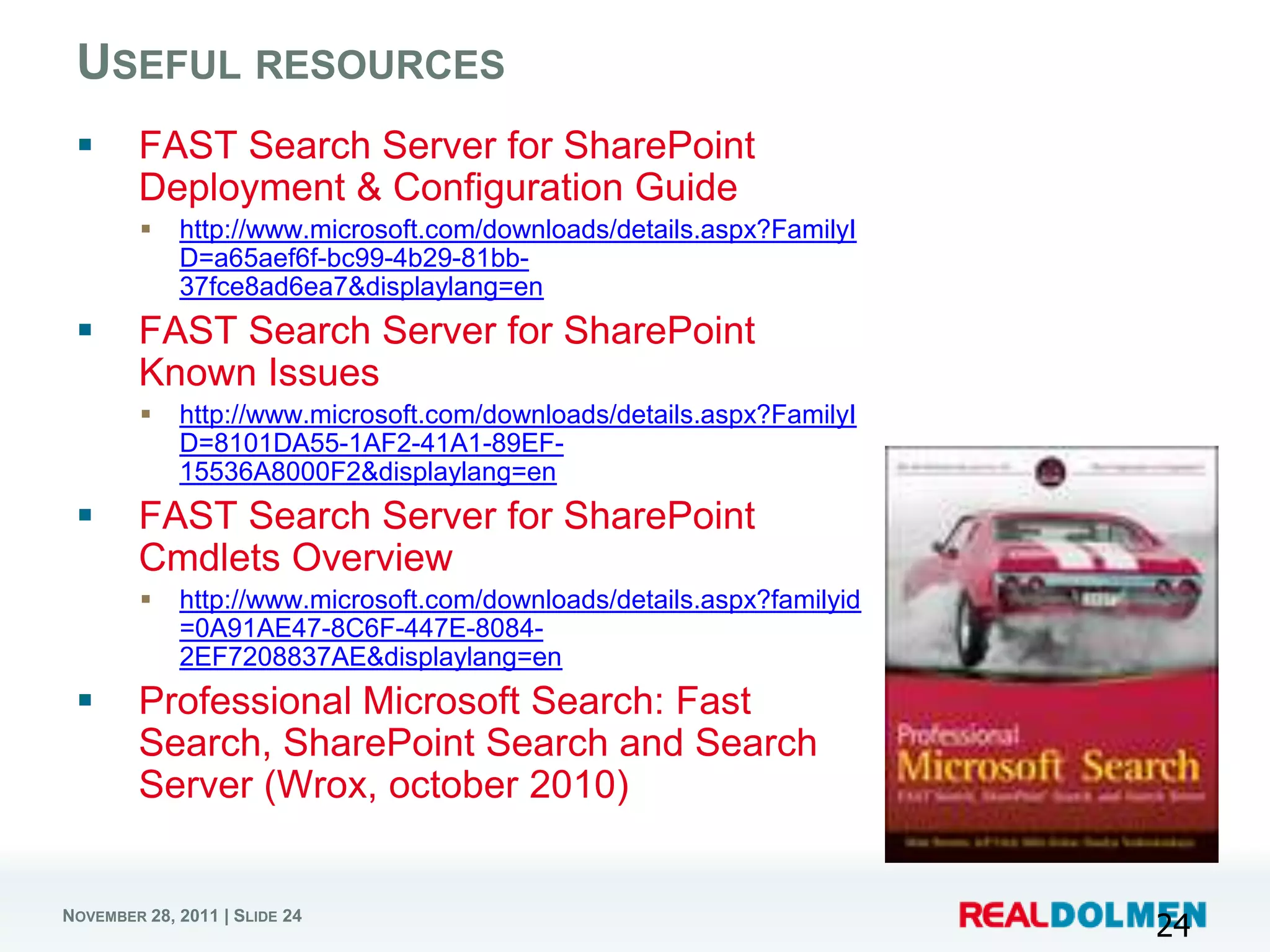
       Professional Microsoft Search: Fast
        Search, SharePoint Search and Search
        Server (Wrox, october 2010)


NOVEMBER 28, 2011 | SLIDE 24
                                                                        24

Introduction to FAST Search for SharePoint 2010

  • 1.
    www.realdolmen.com Introduction to FAST Search Server 2010 Joris.Poelmans@realdolmen.com NOVEMBER 28, 2011 | SLIDE 1
  • 2.
    ABOUT ME  ECM Unit Manager @ RealDolmen  SharePoint Server MVP  Blog – http://jopx.blogspot.com  Co-founder BIWUG – www.biwug.be  Co-author  Real World SharePoint 2010 (November 2010, Wrox)  Real World SharePoint 2007 (August 2007, Wrox)  SharePoint 2007, The definitive guide (September 2007, O’Reilly) NOVEMBER 28, 2011 | SLIDE 2
  • 3.
    AGENDA  Improvement areas 2007 vs 2010  Microsoft Enterprise Search – Products  FAST Search for SharePoint 2010 (FS4SP)- architecture  FS4SP - SharePoint/FAST differentation  Extending FAST Search NOVEMBER 28, 2011 | SLIDE 3
  • 4.
    IMPROVEMENT AREAS 2007VS 2010  Social – Connect with people and expertise  Address-book style name lookup with phonetic matching  Improved expertise matching - mined e-mail inbox data  Social behavior improves search; search improves My Sites  Refinement – Find information faster  Metadata-based refiners provide drill-down  Related query suggestions show popular queries  Relevance – Provide great search results  New ingredients, more experience -> better OOB search  Better wordbreakers in more languages  Social Distance, tagging, click-through influence relevance NOVEMBER 28, 2011 | SLIDE 4
  • 5.
    IMPROVEMENT AREAS 2007VS 2010 (CTD.)  Platform - Industrial Strength Search at High Scale  Index partitioning -> sub-second latency at 100M items  Full failover support  Connector and BDC enhancements and tooling support  TCO – Deploy and operate with less effort  Virtualization and native 64-bit simplify deployment  Powershell, Admin Web Parts, SCOM provide easier admin  Extensibility - Create powerful applications based on search  Web parts, query OMs are public -> easier to modify  Enhanced query syntax NOVEMBER 28, 2011 | SLIDE 5
  • 6.
  • 7.
    ABOUT FAST SEARCHFOR SHAREPOINT  April 2008  Microsoft acquires Norwegian Enterprise Search Solution Fast Search & Transfer  Overall Vision  To provide a market leading enterprise search platform that integrates with your existing infrastructure  SharePoint Vision  Best-in-class search, with the simplicity and low TCO of SharePoint  Build upon a social computing platform for a more robust search experience NOVEMBER 28, 2011 | SLIDE 7 7
  • 8.
    MICROSOFT ENTERPRISE SEARCH- PRODUCTIVITY Search • Quick, easy, powerful • Common UI Framework Server search (for free with • Social search features 2010 Express edition) Common across the product line and integration • SharePoint platform integration • End user and site administrator enablement SharePoint • OOB General Productivity • Common Connector Framework (BDC) Server Search with light • Object Model, APIs and Search customization developer XP • Admin & deployment capabilities • Operations advantages (SCOM, scripting) FAST • Heavily customizable OOB General Productivity Search Search and easy to build High- 2010 Value Search Applications NOVEMBER 28, 2011 | SLIDE 8
  • 9.
    • Search-as-you-type and • Powerful content processing metadata-driven navigation with deep navigation • People and expertise search • Visual search experience with with MySite profiles document previews • Social tagging and rating • Tailored relevance and visual • OpenSearch federation best bets • Business Connectivity Services • Best-in-class platform to build • Centralized administration and search applications System Center integration • Advanced linguistics • Extreme scale and performance SharePoint Standard CAL + SharePoint Enterprise CAL + SharePoint server license FAST Search for SharePoint server license NOVEMBER 28, 2011 | SLIDE 9
  • 10.
  • 11.
    FAST SEARCH SERVER– PHYSICAL ARCHITECTURE  FS4SP uses SharePoint Server 2010 for query servers and for crawling content, but adds servers in a FAST farm. The additional servers process content, produce index partitions, and process queries. NOVEMBER 28, 2011 | SLIDE 11
  • 12.
    FAST SEARCH -LOGICAL ARCHITECTURE NOVEMBER 28, 2011 | SLIDE 12
  • 13.
    SHAREPOINT SEARCH SERVICEAPPLICATIONS  FAST Search Connector (SSA)  Crawls the content and feeds it into the FAST Search Server 2010 for SharePoint back-end  FAST Search Query (SSA)  The Query SSA provides query results from the content that is crawled by the Content SSA NOVEMBER 28, 2011 | SLIDE 13 13
  • 14.
    FAST SEARCH -SCALING  FS4SP uses rows and columns of servers to scale  Adding more columns of servers increases content processing capacity linearly. Adding more rows of servers increases the query processing ability. Fault tolerance is provided by deploying a minimum of two rows. NOVEMBER 28, 2011 | SLIDE 14
  • 15.
    SEARCH – ITEMLEVEL SCALING NOVEMBER 28, 2011 | SLIDE 15
  • 16.
    FAST/SHAREPOINT DIFFERENTATION NOVEMBER 28, 2011 | SLIDE 16
  • 17.
    END USER PERSPECTIVE Excellent OOB relevance Same capabilities, plus: Federated results Broader, better language support PC, phone, or browser access Broader query syntax Same capabilities, plus: Metadata based refiners Deep refiners with counts Related searches Similarity search View in Browser Sorting on any property Phonetic & nickname matching Relevance and refiners Same capabilities Integrated presence Click-through drives relevance Colleague & Expertise suggestions Same capabilities Query suggestions Thumbnails & Scrolling Previews Visual Best Bets User context from user profile Multiple relevance profiles NOVEMBER 28, 2011 | SLIDE 17
  • 18.
    FAST SEARCH –END USER PERSPECTIVE DEMO NOVEMBER 28, 2011 | SLIDE 18
  • 19.
    Sorting on any VISUAL, CONVERSATIONAL SEARCH property Visual Best Bets Scrolling PowerPoint Refinement with Previews counts on any property Thumbnails Similarity Search NOVEMBER 28, 2011 | SLIDE 19 19
  • 20.
    IT PRO PERSPECTIVE Enterprise Scale-out (to 100M docs) Same capabilities, plus: Full Fault Tolerance Extreme scale-out Native 64 bit; Hyper-V support Wizard - driven installation Same capabilities Consolidated search dashboard PowerShell support SCOM support Same capabilities Full search reporting Full set of connectors OOB Same capabilities, plus: Easy to add new sources via BDC Enterprise Web Crawler Strong security Content Processing pipeline Metadata Extraction Easy setup of User Context, Visual Best Bets, Promotion Give end users control over sorting, ranking, navigation NOVEMBER 28, 2011 | SLIDE 20
  • 21.
    DEVELOPER PERSPECTIVE Public Web Parts Public Web Parts with high end capabilities New connector framework Same capabilities Integrated with BCS Integrate search with BI, Workflow, Integrated using high-end Social, & Collab search capabilities BDC tooling built into SPD Same capabilities Application tooling in VS2010 Add custom property extractors Extend content processing Include external data in relevance Build multiple relevance profiles Leverage FQL to create geosearch, user-selected influencers, and much more NOVEMBER 28, 2011 | SLIDE 21
  • 22.
    EXTENDING SEARCH  Extend OOB Web Parts – or Create New Ones  Location Awareness  Geo-Search using SortFormula()  FQL (Fast Query Language)  Using Document Vectors to add extra UI elements – e.g. Word Cloud Web Part  Query Language Expressiveness  Soft boost (relevance control) using Xrank operator in FQL  Examples:  Boost all documents that contain a selected persons name or phrase  Use user comments, social tagging or content rating to impact rlevance NOVEMBER 28, 2011 | SLIDE 22
  • 23.
    USEFUL RESOURCES  FAST Search Server for SharePoint Deployment & Configuration Guide  http://www.microsoft.com/downloads/details.aspx?FamilyI D=a65aef6f-bc99-4b29-81bb- 37fce8ad6ea7&displaylang=en  FAST Search Server for SharePoint Known Issues  http://www.microsoft.com/downloads/details.aspx?FamilyI D=8101DA55-1AF2-41A1-89EF- 15536A8000F2&displaylang=en  FAST Search Server for SharePoint Cmdlets Overview  http://www.microsoft.com/downloads/details.aspx?familyid =0A91AE47-8C6F-447E-8084- 2EF7208837AE&displaylang=en  Professional Microsoft Search: Fast Search, SharePoint Search and Search Server (Wrox, october 2010) NOVEMBER 28, 2011 | SLIDE 24 24

Editor's Notes

  • #10 Summary of SharePoint/FAST Differentiation- in TDM deck