Explore SharePoint 2010 Enterprise & Document Management features K. Mohamed FaizalLead Consultant NCS (P) Ltd.http://faizal-comeacross.blogspot.com/ kmdfaizal@yahoo.com @kmdfaizal
AgendaEnterprise & Document Management features Metadata Management Term Store, Term Sets & TermsContent Hub Content Type SyndicationDocument IDsDocument Sets Document CenterContent organizerSent to Location
Enterprise Content Management
SharePoint 2007 vs SharePoint 2010All the previous functionality from SharePoint 2007 has been included:Major and minor versioningRequired checkoutContent typesInformation management policiesBuilt-in workflowsIncoming e-mail supportNew features that have been added in SharePoint 2010 include the following:Document IDsDocument setsMetadata navigationRelational listsMultiple check-inContent organizer; rule-based submissionOffline management
Enterprise Content ManagementSignificant investments in both platform & features for ECM in SharePoint Server 2010Enterprise content typesDefine once for the enterprise, use in multiple site collections in the same or different farmsMetadata everywhereManaged MetadataDocument Sets Unique document ID ServiceFeaturization of MOSS 2007 RM specific capabilitiesAdvanced RoutingAuditing, retention, expiration, reporting, eDiscovery, holds, recordization
Managed Metadata ServiceManaged Metadata Service ApplicationTerm StoreContent type syndicationTerm Store Management ToolTerm & keyword field support in Office 2010  clientsImport of Metadata into a term store using CSV filesNew managed metadata field type bound to a term set
Metadata EverywhereHuge investments in metadata across the platformMetadata based navigationEasier for users as content is more discoverableContent stewards help in creating indices on metadata fields for enhanced nav. performanceUsers can now filter search results using metadata of result setLocation based metadataContent stewards create helpers for libraries & content types
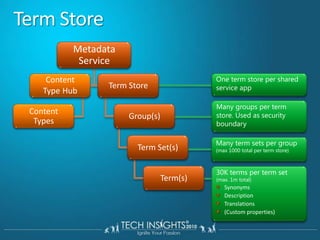
Term Store, Term Sets & TermsService Application (Term Store) Âť Groups Âť 	Term Sets Âť TermsLocations Âť Cities Âť RedmondAdministrators & users create term stores & termsFlat list or hierarchical listDisambiguating, reusing, merging & deprecating termsCustom properties available from OMTerm store facilitates the management & retrieval of metadata & relationshipsTerms can belong to one or more term setsTranslations & synonyms
Term StoreMetadata ServiceOne term store per shared service appTerm StoreContentTypeHubMany groups per term store. Used as security boundaryContent TypesGroup(s)Many term sets per group (max 1000 total per term store)Term Set(s)30K terms per term set (max. 1m total)SynonymsDescriptionTranslations(Custom properties)Term(s)
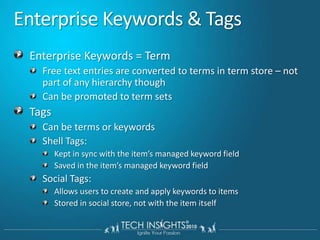
Enterprise Keywords & TagsEnterprise Keywords = TermFree text entries are converted to terms in term store – not part of any hierarchy thoughCan be promoted to term setsTagsCan be terms or keywordsShell Tags:Kept in sync with the item’s managed keyword fieldSaved in the item’s managed keyword fieldSocial Tags:Allows users to create and apply keywords to itemsStored in social store, not with the item itself
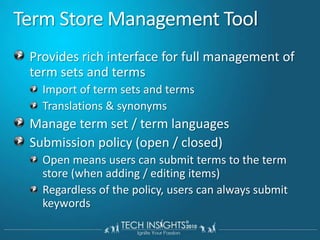
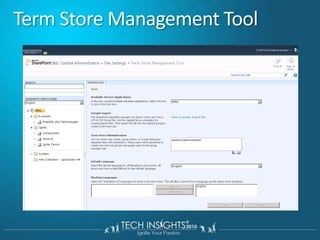
Term Store Management ToolProvides rich interface for full management of term sets and termsImport of term sets and termsTranslations & synonymsManage term set / term languagesSubmission policy (open / closed)Open means users can submit terms to the term store (when adding / editing items)Regardless of the policy, users can always submit keywords
Term Store Management Tool
DEMOManaged Metadata Service and Term Store Management
Content Type
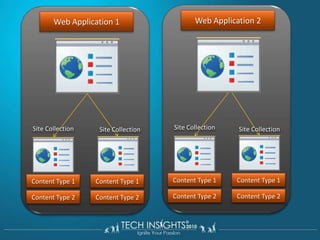
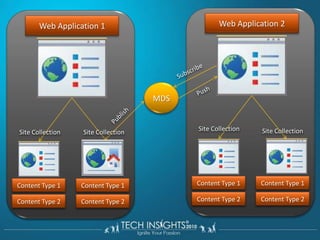
Enterprise Content TypesContent types were scoped at the site-level (SPSite) in WSS 3.0Site-level content types still exist in SPF2010New MM Service Application allows syndication of “enterprise” content types across sites, site collections, Web apps & farmsDefine one site collection as the content type hubEnterprise content types are read only in sitesSites can have enterprise and local content types in sitesLocal content types can inherit from enterprise content types
Web Application 2Web Application 1Site CollectionSite CollectionSite CollectionSite CollectionContent Type 1Content Type 1Content Type 1Content Type 1Content Type 2Content Type 2Content Type 2Content Type 2
Web Application 2Web Application 1SubscribeMDSPushPublishSite CollectionSite CollectionSite CollectionSite CollectionContent Type 1Content Type 1Content Type 1Content Type 1Content Type 2Content Type 2Content Type 2Content Type 2
Content Type Content type hub / Content Type SyndicationMaximum of 1 Hub per Metadata Shared Application ServiceContent Type with all the corresponding columnsIncluding Document Set Content TypePoliciesAnd workflow associations (not the workflows)From the hubPublish UnpublishRepublishRoll-up errors from consuming site collections
‟Content Type Syndication … How it Works” Farm 1Farm 2Metadata ServiceSite Collections 1a/bWeb App 1aWeb App 2aConnection ProxySite Collections 2aSite Collections 2bSite Collections 1cWeb App 1bWeb App 2b
DEMOContent Hub / Content Type Syndication
Document ID provider
Unique Document ID ServiceBusiness caseUnique numbering for documents which I can format in any wayStore documents in any location and referenced by the original URL that assigned From an compliance, Records Management and Document Management perspective ensure a unique identifier that can trace the document, through the entire DM lifecycle.Documents required to keep their original ID across Sites, Site Collections and even Web Applications.
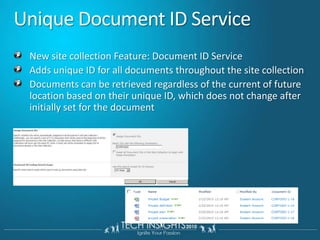
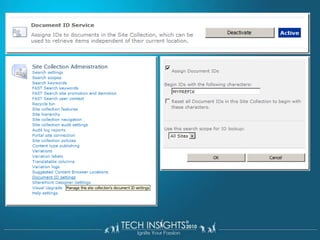
Unique Document ID ServiceNew site collection Feature: Document ID ServiceAdds unique ID for all documents throughout the site collectionDocuments can be retrieved regardless of the current of future location based on their unique ID, which does not change after initially set for the document
LimitationsONLY content types that are derived from the Document Content Type will have unique ID’s
Creating custom document ID providerCustom document provider can be implemented to replace the OOB funcitonalityInherit your provider from the Microsoft.Office.DocumentManagement.DocumentIdProviderReplace provider using Microsoft.Office.DocumentManagement.DocumentId.SetProvider()Applies change in Site Collection level
DEMODocument ID provider
Document Sets
Introducing Document SetsScenario OverviewNew object to manage work products made up of multiple documentsThink Folder++Key ScenariosTight collection of documentsA sales proposal that includes documents (proposal), spreadsheets (quotation), and presentationsHeterogeneous file types not usually assembledCompound documentsA user manual that is an assembled roll-up of separate sectionsHow can doc sets manage the unmanaged?Automate repetitive content creationGuide users through complex processesProvide process insightsManage related work productsFoundation for document assembly
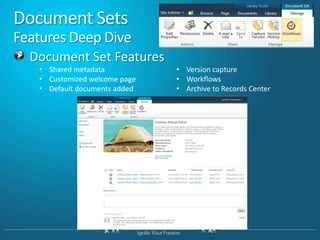
Document SetsFeatures Deep DiveDocument Set Features
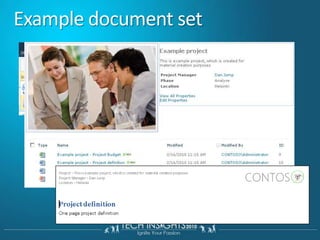
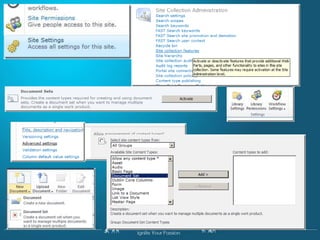
Example document set
Document Sets – Templates, VersioningDocument Templates:Admins can provide users document templates for creating new items for the work productDocument Set Versioning:Set owners can capture the state of the set at different points in the lifecycleAbility to see point-in-time history of the setSet owners can restore to a previous version of the set
Document Sets - WorkflowSpecial OOTB activities for working with document sets provided for SharePoint Designer authored workflowsOOTB workflow provided for working with document sets
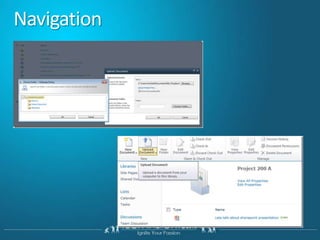
Navigation
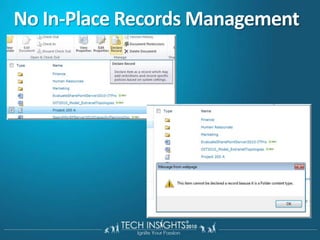
No In-Place Records Management
Creating document sets declarativelyDocument sets are content typesAdditional xml element structures available to define and customize the behavior
Can Document set contain other document sets? Unfortunately it doesn'tCan we Download all documents of a document set compressed into a ZIP file ?Out of the box  “No”Deploy SharePoint SDK provide sample code
DEMOCreating document sets
Content organizer
Content organizerEnable Content Organizer featureDrop Off Library (DOL).Automatically routes documents that are based on the Document content type Documents can be automatically routed to different libraries, and folders within those librariesControl the number of documents in a specific folder
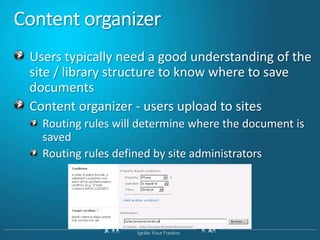
Content organizerUsers typically need a good understanding of the site / library structure to know where to save documentsContent organizer - users upload to sitesRouting rules will determine where the document is savedRouting rules defined by site administrators
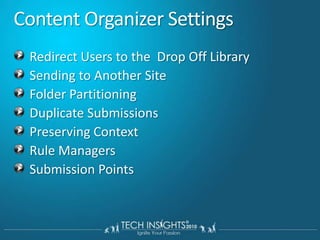
Content Organizer SettingsRedirect Users to theDrop Off LibrarySending to Another SiteFolder PartitioningDuplicate SubmissionsPreserving ContextRule ManagersSubmission Points
LimitationsSupports only document content type
Send to Location
DEMOSend to Location
Document Center
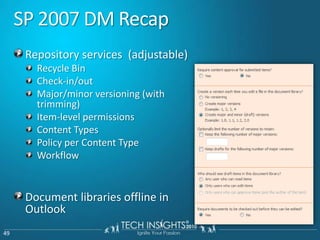
SP 2007 DM RecapRepository services  (adjustable)Recycle BinCheck-in/outMajor/minor versioning (with trimming)Item-level permissionsContent TypesPolicy per Content TypeWorkflowDocument libraries offline in Outlook
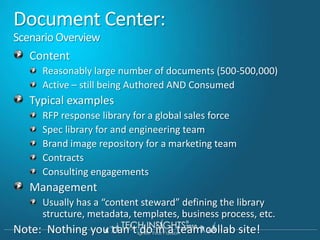
Document Center:Scenario OverviewContentReasonably large number of documents (500-500,000)Active – still being Authored AND ConsumedTypical examplesRFP response library for a global sales forceSpec library for and engineering teamBrand image repository for a marketing teamContractsConsulting engagementsManagementUsually has a “content steward” defining the library structure, metadata, templates, business process, etc.Note:  Nothing you can’t do in a team collab site!
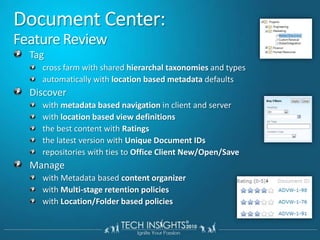
Document Center:Feature ReviewTagcross farm with shared hierarchal taxonomies and typesautomatically with location based metadata defaultsDiscoverwith metadata based navigation in client and serverwith location based view definitionsthe best content with Ratingsthe latest version with Unique Document IDsrepositories with ties to Office Client New/Open/SaveManagewith Metadata based content organizerwith Multi-stage retention policieswith Location/Folder based policies
DEMODocument Center
Q&AQuestions & Answers
ResourcesRequired slideSharePoint Developer CentreLearn about ECM http://chrislcap.spaces.live.com/http://faizal-comeacross.blogspot.com/Custom Document ID http://www.zimmergren.net/

Explore SharePoint 2010 Enterprise & Document Management features

  • 2.
    Explore SharePoint 2010Enterprise & Document Management features K. Mohamed FaizalLead Consultant NCS (P) Ltd.http://faizal-comeacross.blogspot.com/ kmdfaizal@yahoo.com @kmdfaizal
  • 3.
    AgendaEnterprise & DocumentManagement features Metadata Management Term Store, Term Sets & TermsContent Hub Content Type SyndicationDocument IDsDocument Sets Document CenterContent organizerSent to Location
  • 4.
  • 5.
    SharePoint 2007 vsSharePoint 2010All the previous functionality from SharePoint 2007 has been included:Major and minor versioningRequired checkoutContent typesInformation management policiesBuilt-in workflowsIncoming e-mail supportNew features that have been added in SharePoint 2010 include the following:Document IDsDocument setsMetadata navigationRelational listsMultiple check-inContent organizer; rule-based submissionOffline management
  • 6.
    Enterprise Content ManagementSignificantinvestments in both platform & features for ECM in SharePoint Server 2010Enterprise content typesDefine once for the enterprise, use in multiple site collections in the same or different farmsMetadata everywhereManaged MetadataDocument Sets Unique document ID ServiceFeaturization of MOSS 2007 RM specific capabilitiesAdvanced RoutingAuditing, retention, expiration, reporting, eDiscovery, holds, recordization
  • 7.
    Managed Metadata ServiceManagedMetadata Service ApplicationTerm StoreContent type syndicationTerm Store Management ToolTerm & keyword field support in Office 2010 clientsImport of Metadata into a term store using CSV filesNew managed metadata field type bound to a term set
  • 8.
    Metadata EverywhereHuge investmentsin metadata across the platformMetadata based navigationEasier for users as content is more discoverableContent stewards help in creating indices on metadata fields for enhanced nav. performanceUsers can now filter search results using metadata of result setLocation based metadataContent stewards create helpers for libraries & content types
  • 9.
    Term Store, TermSets & TermsService Application (Term Store) Âť Groups Âť Term Sets Âť TermsLocations Âť Cities Âť RedmondAdministrators & users create term stores & termsFlat list or hierarchical listDisambiguating, reusing, merging & deprecating termsCustom properties available from OMTerm store facilitates the management & retrieval of metadata & relationshipsTerms can belong to one or more term setsTranslations & synonyms
  • 10.
    Term StoreMetadata ServiceOneterm store per shared service appTerm StoreContentTypeHubMany groups per term store. Used as security boundaryContent TypesGroup(s)Many term sets per group (max 1000 total per term store)Term Set(s)30K terms per term set (max. 1m total)SynonymsDescriptionTranslations(Custom properties)Term(s)
  • 11.
    Enterprise Keywords &TagsEnterprise Keywords = TermFree text entries are converted to terms in term store – not part of any hierarchy thoughCan be promoted to term setsTagsCan be terms or keywordsShell Tags:Kept in sync with the item’s managed keyword fieldSaved in the item’s managed keyword fieldSocial Tags:Allows users to create and apply keywords to itemsStored in social store, not with the item itself
  • 12.
    Term Store ManagementToolProvides rich interface for full management of term sets and termsImport of term sets and termsTranslations & synonymsManage term set / term languagesSubmission policy (open / closed)Open means users can submit terms to the term store (when adding / editing items)Regardless of the policy, users can always submit keywords
  • 13.
  • 14.
    DEMOManaged Metadata Serviceand Term Store Management
  • 15.
  • 16.
    Enterprise Content TypesContenttypes were scoped at the site-level (SPSite) in WSS 3.0Site-level content types still exist in SPF2010New MM Service Application allows syndication of “enterprise” content types across sites, site collections, Web apps & farmsDefine one site collection as the content type hubEnterprise content types are read only in sitesSites can have enterprise and local content types in sitesLocal content types can inherit from enterprise content types
  • 17.
    Web Application 2WebApplication 1Site CollectionSite CollectionSite CollectionSite CollectionContent Type 1Content Type 1Content Type 1Content Type 1Content Type 2Content Type 2Content Type 2Content Type 2
  • 18.
    Web Application 2WebApplication 1SubscribeMDSPushPublishSite CollectionSite CollectionSite CollectionSite CollectionContent Type 1Content Type 1Content Type 1Content Type 1Content Type 2Content Type 2Content Type 2Content Type 2
  • 19.
    Content Type Contenttype hub / Content Type SyndicationMaximum of 1 Hub per Metadata Shared Application ServiceContent Type with all the corresponding columnsIncluding Document Set Content TypePoliciesAnd workflow associations (not the workflows)From the hubPublish UnpublishRepublishRoll-up errors from consuming site collections
  • 20.
    ‟Content Type Syndication… How it Works” Farm 1Farm 2Metadata ServiceSite Collections 1a/bWeb App 1aWeb App 2aConnection ProxySite Collections 2aSite Collections 2bSite Collections 1cWeb App 1bWeb App 2b
  • 21.
    DEMOContent Hub /Content Type Syndication
  • 22.
  • 23.
    Unique Document IDServiceBusiness caseUnique numbering for documents which I can format in any wayStore documents in any location and referenced by the original URL that assigned From an compliance, Records Management and Document Management perspective ensure a unique identifier that can trace the document, through the entire DM lifecycle.Documents required to keep their original ID across Sites, Site Collections and even Web Applications.
  • 24.
    Unique Document IDServiceNew site collection Feature: Document ID ServiceAdds unique ID for all documents throughout the site collectionDocuments can be retrieved regardless of the current of future location based on their unique ID, which does not change after initially set for the document
  • 26.
    LimitationsONLY content typesthat are derived from the Document Content Type will have unique ID’s
  • 27.
    Creating custom documentID providerCustom document provider can be implemented to replace the OOB funcitonalityInherit your provider from the Microsoft.Office.DocumentManagement.DocumentIdProviderReplace provider using Microsoft.Office.DocumentManagement.DocumentId.SetProvider()Applies change in Site Collection level
  • 28.
  • 29.
  • 30.
    Introducing Document SetsScenarioOverviewNew object to manage work products made up of multiple documentsThink Folder++Key ScenariosTight collection of documentsA sales proposal that includes documents (proposal), spreadsheets (quotation), and presentationsHeterogeneous file types not usually assembledCompound documentsA user manual that is an assembled roll-up of separate sectionsHow can doc sets manage the unmanaged?Automate repetitive content creationGuide users through complex processesProvide process insightsManage related work productsFoundation for document assembly
  • 31.
    Document SetsFeatures DeepDiveDocument Set Features
  • 32.
  • 33.
    Document Sets –Templates, VersioningDocument Templates:Admins can provide users document templates for creating new items for the work productDocument Set Versioning:Set owners can capture the state of the set at different points in the lifecycleAbility to see point-in-time history of the setSet owners can restore to a previous version of the set
  • 34.
    Document Sets -WorkflowSpecial OOTB activities for working with document sets provided for SharePoint Designer authored workflowsOOTB workflow provided for working with document sets
  • 36.
  • 37.
  • 38.
    Creating document setsdeclarativelyDocument sets are content typesAdditional xml element structures available to define and customize the behavior
  • 39.
    Can Document setcontain other document sets? Unfortunately it doesn'tCan we Download all documents of a document set compressed into a ZIP file ?Out of the box “No”Deploy SharePoint SDK provide sample code
  • 40.
  • 41.
  • 42.
    Content organizerEnable ContentOrganizer featureDrop Off Library (DOL).Automatically routes documents that are based on the Document content type Documents can be automatically routed to different libraries, and folders within those librariesControl the number of documents in a specific folder
  • 43.
    Content organizerUsers typicallyneed a good understanding of the site / library structure to know where to save documentsContent organizer - users upload to sitesRouting rules will determine where the document is savedRouting rules defined by site administrators
  • 44.
    Content Organizer SettingsRedirectUsers to theDrop Off LibrarySending to Another SiteFolder PartitioningDuplicate SubmissionsPreserving ContextRule ManagersSubmission Points
  • 45.
  • 46.
  • 47.
  • 48.
  • 49.
    SP 2007 DMRecapRepository services (adjustable)Recycle BinCheck-in/outMajor/minor versioning (with trimming)Item-level permissionsContent TypesPolicy per Content TypeWorkflowDocument libraries offline in Outlook
  • 50.
    Document Center:Scenario OverviewContentReasonablylarge number of documents (500-500,000)Active – still being Authored AND ConsumedTypical examplesRFP response library for a global sales forceSpec library for and engineering teamBrand image repository for a marketing teamContractsConsulting engagementsManagementUsually has a “content steward” defining the library structure, metadata, templates, business process, etc.Note: Nothing you can’t do in a team collab site!
  • 51.
    Document Center:Feature ReviewTagcrossfarm with shared hierarchal taxonomies and typesautomatically with location based metadata defaultsDiscoverwith metadata based navigation in client and serverwith location based view definitionsthe best content with Ratingsthe latest version with Unique Document IDsrepositories with ties to Office Client New/Open/SaveManagewith Metadata based content organizerwith Multi-stage retention policieswith Location/Folder based policies
  • 52.
  • 53.
  • 54.
    ResourcesRequired slideSharePoint DeveloperCentreLearn about ECM http://chrislcap.spaces.live.com/http://faizal-comeacross.blogspot.com/Custom Document ID http://www.zimmergren.net/

Editor's Notes

  • #14 In MOSS 2007 there was always the issue of how do we synchronize Content Types across Sit Collections. This was really problematic as it required either some custom coding or alternatively lots of manual configuration. This was also one of the many reasons that clients resorted to using as few Site Collections as possiblePublishing content types through the Managed Metadata Service is an extremly powerful feature of SharePoint 2010 but it does require some steps. The ability now to control content types from a central location and control all aspects of publishing is an amazing feature so check it out!I have broken this down into three sections: Configuring the Managed Metadata Service, Configuring the Content Type Hub and finally configuring receiving site collections since you need to do all three to get this working, but once you do you can easily update your content types cross site collections and even cross farms!
  • #24 Document ID's in SharePoint Server 2010 provide you with the ability to tag documents with a unique identification number. Something a lot of my clients have done manually or by implementing custom solutions to take care of in SharePoint 2007. With this new feature, you get all the required functionality to tag documents with unique identification numbers based on a specific pre-set formula with a custom prefix.
  • #28 Document Set enables users to group multiple documents, that support a single project or task, together into a single entity. All documents in a Document Set share the metadata and the entire set can also be versioned. Some example where document set might be useful to manage information would be:RFP response: managing multiple documents like proposal (.docx), presentation (.pptx), estimates and pricing (.xlsx) which are part of the response to a RFP Product documentation: managing multiple documents like TDM/BDM brochure (.docx/.pdf), evaluation guides (.docx), various presentations (.pptx), feature comparison sheets (.xlsx)  etc. which need to be created as part of product release Document sets are built on SharePoint Server 2010 content types, and you can create multiple unique document set content types as part of your implementation. Note: Document Set feature is not available in SharePoint Foundation 2010.
  • #43 Information routing, or content routing, is a very powerful capability. Those of you who are familiarwith and use Outlook are very familiar with content routing. Outlook’s rule capability enablesthe automatic routing of different types of e‑mail messages to different folders. This is extremelyefficient for organizing and managing your Outlook Inbox. In SharePoint 2007, the Records Centersite template has a routing engine that routes records to the proper location within the RecordsCenter site collection. The Content Organizer feature in SharePoint 2010 is a new routing featurethat extends, enhances, and makes more broadly available the routing engine used in the RecordsCenter site template from SharePoint 2007.
  • #55 Presenters please use this slide to direct participants to websites, books, trials, product pages etc as a follow through to your presentation