Disclaimer
The Content, Demonstration, Source Code and Programs presented here is "AS IS" without
any warranty or conditions of any kind. Also the views/ideas/knowledge expressed here are
solely of the trainer’s only and nothing to do with the company or the organization in which
the trainer is currently working.
However in no circumstances neither the Trainer nor Cysinfo is responsible for any damage or
loss caused due to use or misuse of the information presented here.
Acknowledgement
 Special thanks to Null community for their extended support and co-operation.
 Special thanks to ThoughtWorks for the beautiful venue.
 Thanks to all the trainers who have devoted their precious time and countless hours to make it
happen.
Advanced Malware Analysis Training
This presentation is part of our Advanced Malware Analysis Training program. Currently it
is delivered only during our local meets for FREE of cost.
Who am I
Monnappa K A
 Member of Cysinfo
 Info Security Investigator @ Cisco
 Reverse Engineering, Malware Analysis, Memory Forensics
 GREM, CEH
 Email: monnappa22@gmail.com
 Twitter: @monnappa22
 LinkedIn: http://www.linkedin.com/pub/monnappa-ka-grem-ceh/42/45a/1b8
 Why Memory Forensics?
 Steps in Memory Forensics
 Volatility Quick Overview
 Volatility help and plugins
 Demo 1
 Demo 2
 Finding and extracting forensic artefacts
 Helps in malware analysis
 Determining process, network, registry activities
 Reconstructing original state of the system
 Assists with unpacking, rootkit detection and reverse engineering
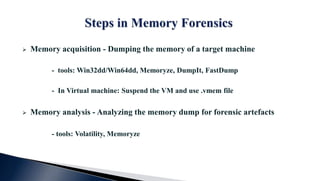
 Memory acquisition - Dumping the memory of a target machine
- tools: Win32dd/Win64dd, Memoryze, DumpIt, FastDump
- In Virtual machine: Suspend the VM and use .vmem file
 Memory analysis - Analyzing the memory dump for forensic artefacts
- tools: Volatility, Memoryze
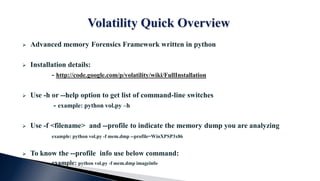
 Advanced memory Forensics Framework written in python
 Installation details:
- http://code.google.com/p/volatility/wiki/FullInstallation
 Use -h or --help option to get list of command-line switches
- example: python vol.py –h
 Use -f <filename> and --profile to indicate the memory dump you are analyzing
example: python vol.py -f mem.dmp --profile=WinXPSP3x86
 To know the --profile info use below command:
example: python vol.py -f mem.dmp imageinfo
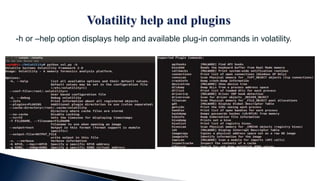
-h or –help option displays help and available plug-in commands in volatility.
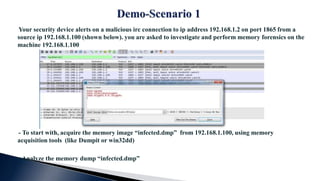
Your security device alerts on a malicious irc connection to ip address 192.168.1.2 on port 1865 from a
source ip 192.168.1.100 (shown below). you are asked to investigate and perform memory forensics on the
machine 192.168.1.100
- To start with, acquire the memory image “infected.dmp” from 192.168.1.100, using memory
acquisition tools (like Dumpit or win32dd)
- Analyze the memory dump “infected.dmp”
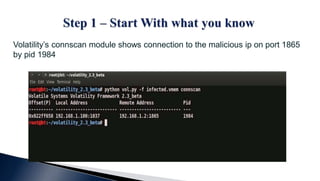
Volatility’s connscan module shows connection to the malicious ip on port 1865
by pid 1984
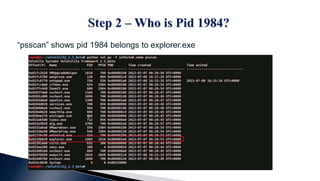
“psscan” shows pid 1984 belongs to explorer.exe
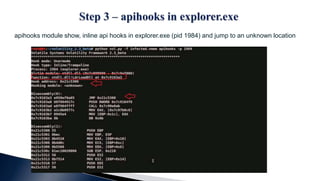
apihooks module show, inline api hooks in explorer.exe (pid 1984) and jump to an unknown location
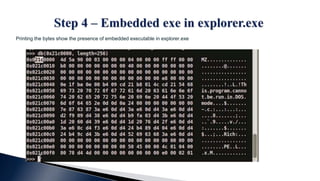
Printing the bytes show the presence of embedded executable in explorer.exe
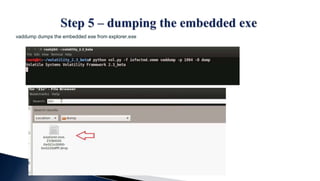
vaddump dumps the embedded exe from explorer.exe
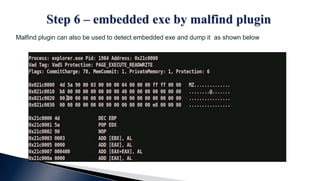
Malfind plugin can also be used to detect embedded exe and dump it as shown below
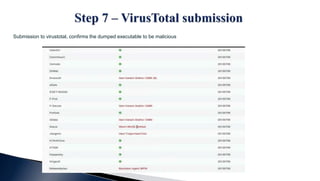
Submission to virustotal, confirms the dumped executable to be malicious
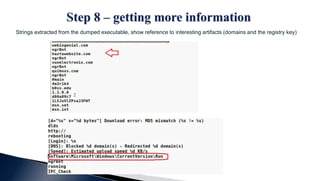
Strings extracted from the dumped executable, show reference to interesting artifacts (domains and the registry key)
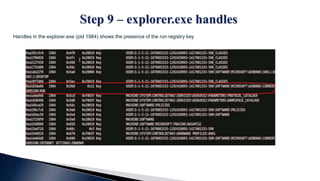
Handles in the explorer.exe (pid 1984) shows the presence of the run registry key
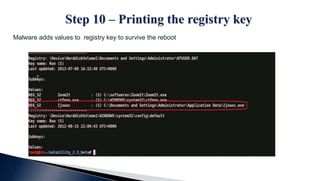
Malware adds values to registry key to survive the reboot
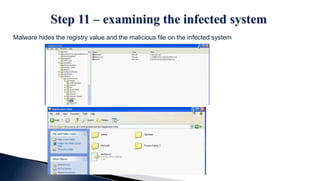
Malware hides the registry value and the malicious file on the infected system
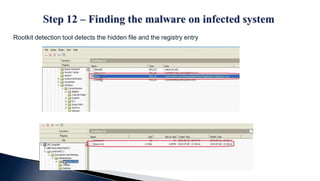
Rootkit detection tool detects the hidden file and the registry entry
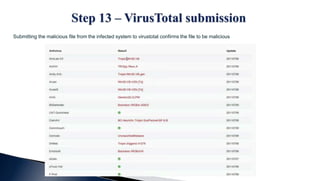
Submitting the malicious file from the infected system to virustotal confirms the file to be malicious
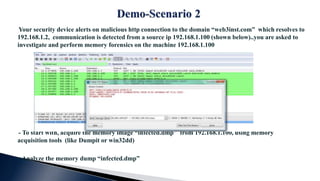
Your security device alerts on malicious http connection to the domain “web3inst.com” which resolves to
192.168.1.2, communication is detected from a source ip 192.168.1.100 (shown below)..you are asked to
investigate and perform memory forensics on the machine 192.168.1.100
- To start with, acquire the memory image “infected.dmp” from 192.168.1.100, using memory
acquisition tools (like Dumpit or win32dd)
- Analyze the memory dump “infected.dmp”
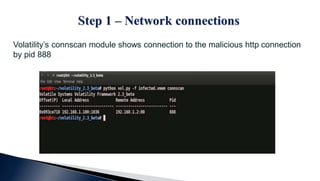
Volatility’s connscan module shows connection to the malicious http connection
by pid 888
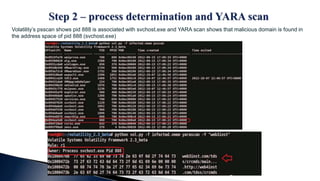
Volatility’s psscan shows pid 888 is associated with svchost.exe and YARA scan shows that malicious domain is found in
the address space of pid 888 (svchost.exe)
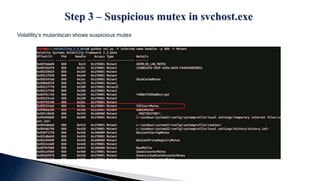
Volatility’s mutantscan shows suspicious mutex
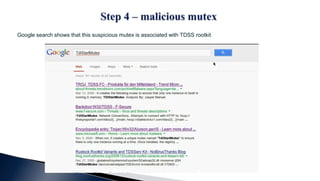
Google search shows that this suspicious mutex is associated with TDSS rootkit
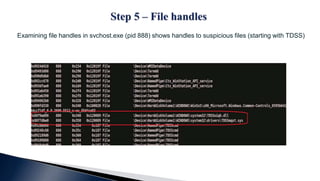
Examining file handles in svchost.exe (pid 888) shows handles to suspicious files (starting with TDSS)
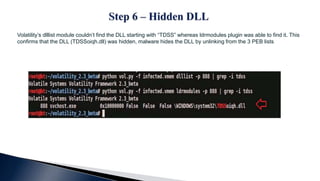
Volatility’s dlllist module couldn’t find the DLL starting with “TDSS” whereas ldrmodules plugin was able to find it. This
confirms that the DLL (TDSSoiqh.dll) was hidden, malware hides the DLL by unlinking from the 3 PEB lists
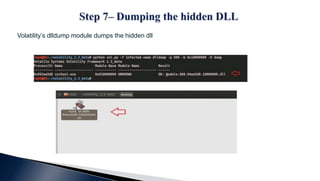
Volatility’s dlldump module dumps the hidden dll
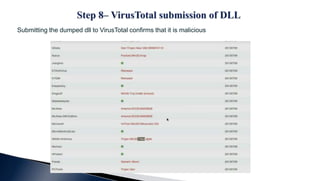
Submitting the dumped dll to VirusTotal confirms that it is malicious
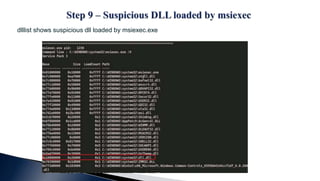
dlllist shows suspicious dll loaded by msiexec.exe
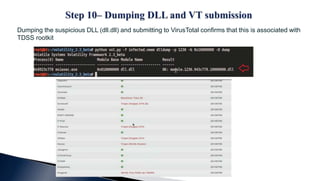
Dumping the suspicious DLL (dll.dll) and submitting to VirusTotal confirms that this is associated with
TDSS rootkit
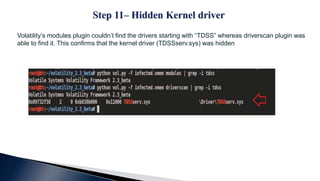
Volatility’s modules plugin couldn’t find the drivers starting with “TDSS” whereas driverscan plugin was
able to find it. This confirms that the kernel driver (TDSSserv.sys) was hidden
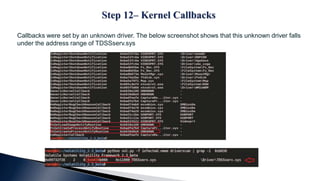
Callbacks were set by an unknown driver. The below screenshot shows that this unknown driver falls
under the address range of TDSSserv.sys
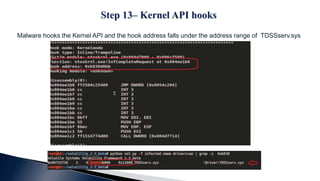
Malware hooks the Kernel API and the hook address falls under the address range of TDSSserv.sys
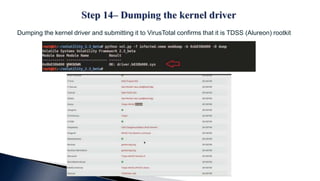
Dumping the kernel driver and submitting it to VirusTotal confirms that it is TDSS (Alureon) rootkit
Thank You !

Advanced malware analysis training session 7 malware memory forensics

  • 2.
    Disclaimer The Content, Demonstration,Source Code and Programs presented here is "AS IS" without any warranty or conditions of any kind. Also the views/ideas/knowledge expressed here are solely of the trainer’s only and nothing to do with the company or the organization in which the trainer is currently working. However in no circumstances neither the Trainer nor Cysinfo is responsible for any damage or loss caused due to use or misuse of the information presented here.
  • 3.
    Acknowledgement  Special thanksto Null community for their extended support and co-operation.  Special thanks to ThoughtWorks for the beautiful venue.  Thanks to all the trainers who have devoted their precious time and countless hours to make it happen.
  • 4.
    Advanced Malware AnalysisTraining This presentation is part of our Advanced Malware Analysis Training program. Currently it is delivered only during our local meets for FREE of cost.
  • 5.
    Who am I MonnappaK A  Member of Cysinfo  Info Security Investigator @ Cisco  Reverse Engineering, Malware Analysis, Memory Forensics  GREM, CEH  Email: monnappa22@gmail.com  Twitter: @monnappa22  LinkedIn: http://www.linkedin.com/pub/monnappa-ka-grem-ceh/42/45a/1b8
  • 6.
     Why MemoryForensics?  Steps in Memory Forensics  Volatility Quick Overview  Volatility help and plugins  Demo 1  Demo 2
  • 7.
     Finding andextracting forensic artefacts  Helps in malware analysis  Determining process, network, registry activities  Reconstructing original state of the system  Assists with unpacking, rootkit detection and reverse engineering
  • 8.
     Memory acquisition- Dumping the memory of a target machine - tools: Win32dd/Win64dd, Memoryze, DumpIt, FastDump - In Virtual machine: Suspend the VM and use .vmem file  Memory analysis - Analyzing the memory dump for forensic artefacts - tools: Volatility, Memoryze
  • 9.
     Advanced memoryForensics Framework written in python  Installation details: - http://code.google.com/p/volatility/wiki/FullInstallation  Use -h or --help option to get list of command-line switches - example: python vol.py –h  Use -f <filename> and --profile to indicate the memory dump you are analyzing example: python vol.py -f mem.dmp --profile=WinXPSP3x86  To know the --profile info use below command: example: python vol.py -f mem.dmp imageinfo
  • 10.
    -h or –helpoption displays help and available plug-in commands in volatility.
  • 12.
    Your security devicealerts on a malicious irc connection to ip address 192.168.1.2 on port 1865 from a source ip 192.168.1.100 (shown below). you are asked to investigate and perform memory forensics on the machine 192.168.1.100 - To start with, acquire the memory image “infected.dmp” from 192.168.1.100, using memory acquisition tools (like Dumpit or win32dd) - Analyze the memory dump “infected.dmp”
  • 13.
    Volatility’s connscan moduleshows connection to the malicious ip on port 1865 by pid 1984
  • 14.
    “psscan” shows pid1984 belongs to explorer.exe
  • 15.
    apihooks module show,inline api hooks in explorer.exe (pid 1984) and jump to an unknown location
  • 16.
    Printing the bytesshow the presence of embedded executable in explorer.exe
  • 17.
    vaddump dumps theembedded exe from explorer.exe
  • 18.
    Malfind plugin canalso be used to detect embedded exe and dump it as shown below
  • 19.
    Submission to virustotal,confirms the dumped executable to be malicious
  • 20.
    Strings extracted fromthe dumped executable, show reference to interesting artifacts (domains and the registry key)
  • 21.
    Handles in theexplorer.exe (pid 1984) shows the presence of the run registry key
  • 22.
    Malware adds valuesto registry key to survive the reboot
  • 23.
    Malware hides theregistry value and the malicious file on the infected system
  • 24.
    Rootkit detection tooldetects the hidden file and the registry entry
  • 25.
    Submitting the maliciousfile from the infected system to virustotal confirms the file to be malicious
  • 27.
    Your security devicealerts on malicious http connection to the domain “web3inst.com” which resolves to 192.168.1.2, communication is detected from a source ip 192.168.1.100 (shown below)..you are asked to investigate and perform memory forensics on the machine 192.168.1.100 - To start with, acquire the memory image “infected.dmp” from 192.168.1.100, using memory acquisition tools (like Dumpit or win32dd) - Analyze the memory dump “infected.dmp”
  • 28.
    Volatility’s connscan moduleshows connection to the malicious http connection by pid 888
  • 29.
    Volatility’s psscan showspid 888 is associated with svchost.exe and YARA scan shows that malicious domain is found in the address space of pid 888 (svchost.exe)
  • 30.
  • 31.
    Google search showsthat this suspicious mutex is associated with TDSS rootkit
  • 32.
    Examining file handlesin svchost.exe (pid 888) shows handles to suspicious files (starting with TDSS)
  • 33.
    Volatility’s dlllist modulecouldn’t find the DLL starting with “TDSS” whereas ldrmodules plugin was able to find it. This confirms that the DLL (TDSSoiqh.dll) was hidden, malware hides the DLL by unlinking from the 3 PEB lists
  • 34.
  • 35.
    Submitting the dumpeddll to VirusTotal confirms that it is malicious
  • 36.
    dlllist shows suspiciousdll loaded by msiexec.exe
  • 37.
    Dumping the suspiciousDLL (dll.dll) and submitting to VirusTotal confirms that this is associated with TDSS rootkit
  • 38.
    Volatility’s modules plugincouldn’t find the drivers starting with “TDSS” whereas driverscan plugin was able to find it. This confirms that the kernel driver (TDSSserv.sys) was hidden
  • 39.
    Callbacks were setby an unknown driver. The below screenshot shows that this unknown driver falls under the address range of TDSSserv.sys
  • 40.
    Malware hooks theKernel API and the hook address falls under the address range of TDSSserv.sys
  • 41.
    Dumping the kerneldriver and submitting it to VirusTotal confirms that it is TDSS (Alureon) rootkit
  • 42.