Advanced Malware Analysis Training Series


        www.SecurityXploded.com
Disclaimer
The Content, Demonstration, Source Code and Programs presented here is "AS IS" without
any warranty or conditions of any kind. Also the views/ideas/knowledge expressed here are
solely of the trainer’s only and nothing to do with the company or the organization in which
the trainer is currently working.

However in no circumstances neither the Trainer nor SecurityXploded is responsible for any
damage or loss caused due to use or misuse of the information presented here.


                                        www.SecurityXploded.com
Acknowledgement
 Special thanks to Null community for their extended support and co-operation.


 Special thanks to ThoughtWorks for the beautiful venue.


 Thanks to all the trainers who have devoted their precious time and countless hours to make it
  happen.


                                        www.SecurityXploded.com
Advanced Malware Analysis Training

This presentation is part of our Advanced Malware Analysis Training program. Currently it
is delivered only during our local meets for FREE of cost.


For complete details of this course, visit our Security Training page.

                                          www.SecurityXploded.com
Who am I?
Harsimran Walia
     Member, SecurityXploded
     Research Scientist, McAfee Labs
     Reversing, Malware Analysis, Exploit Analysis/Development etc.
     Personal site: http://harsimranwalia.info
     E-mail: walia.harsimran@gmail.com
     Twitter: b44nz0r


                                        www.SecurityXploded.com
Content
   Automation
     Python scripts

     Use of modules

   Tools/Modules discussed
     PEfile

     PyDbg

     IDAPython


                                www.SecurityXploded.com
PEfile
   Python module to read and work with Portable Executable (PE) files

   pefile requires understanding of the layout of a PE file (already covered)

   Tasks that pefile makes possible are:
     Modifying and writing back to the PE image
     Header Inspection
     Sections analysis
     Retrieving data
     Warnings for suspicious and malformed values
     Packer detection with PEiD’s signatures


                                            www.SecurityXploded.com
Pefile (hands-on)
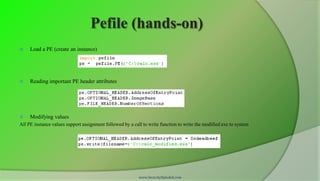
    Load a PE (create an instance)


    Reading important PE header attributes


    Modifying values
All PE instance values support assignment followed by a call to write function to write the modified exe to system


                                                           www.SecurityXploded.com
Pefile (hands-on)
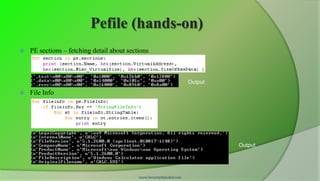
   PE sections – fetching detail about sections


                                                                      Output
   File Info


                                                                               Output


                                            www.SecurityXploded.com
Pefile (hands-on)
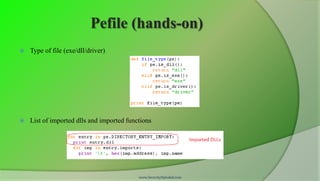
   Type of file (exe/dll/driver)


   List of imported dlls and imported functions


                                           www.SecurityXploded.com
Pydbg
   Open Source Python debugger

   Developed by Pedram Amini as the main component of PaiMei framework

   It uses user-defined callback functions

   These functions can implement actions to take on hitting a breakpoint, exception
    etc

   Upon execution of the callback function the control is passed back to pydbg to
    execute the program normally


                                         www.SecurityXploded.com
Pydbg installation
 Download or git clone: https://github.com/OpenRCE/pydbg
 Pre-reqs
     Python 2.7
     c-types python library
   Copy the pydbg files to Python-2.7Libsite-packagespydbg
 pydasm.pyd is compiled for Python 2.6, lets fix this!
 Open pydasm.pyd in any hex-editor(010 etc) and search python
     Change python26.dll to python27.dll
     Save and replace with original


                                       www.SecurityXploded.com
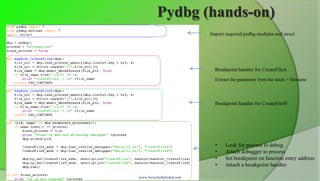
Pydbg (hands-on)
                          Import required pydbg modules and struct


                            Breakpoint handler for CreateFileA
                            Extract the parameter from the stack = filename


                            Breakpoint handler for CreateFileW


                            •    Look for process to debug
                            •    Attach debugger to process
                            •    Set breakpoint on function entry address
                            •    Attach a breakpoint handler

www.SecurityXploded.com
IDA Python
   An IDA Pro plugin

   Integrates Python, allowing scripts to run in IDA Pro

   IDAPython Scripts have access to
     IDA Plugin API,

     IDC and all modules available for Python


                                             www.SecurityXploded.com
Installation
   Download the plugin from https://code.google.com/p/idapython

   Match the IDAPro and python version before downloading

   Copy the ''python'' directory from the extracted plugin to the IDA Pro install
    directory (%IDADIR%)

   Copy the plugin executable to ''%IDADIR%plugins''


                                        www.SecurityXploded.com
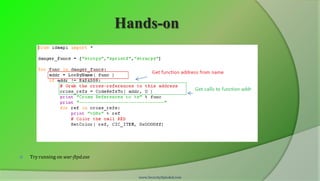
Hands-on
   Utility functions
     ScreenEA()
       ○   Obtains the address of where your cursor is currently positioned on the IDA screen.
     GetInputFileMD5()
       ○   Returns the MD5 hash of the binary loaded in IDA, which is useful for tracking changes in the binary


   Functions
     Functions( long StartAddress, long EndAddress )
       ○   Returns a list of all function start addresses contained between StartAddress and EndAddress.
     LocByName( string FunctionName )
       ○   Returns the address of a function based on its name.
     GetFunctionName( long Address )
       ○   Given an address, returns the name of the function the address belongs to.


                                                      www.SecurityXploded.com
Hands-on


   Try running on war-ftpd.exe


                                     www.SecurityXploded.com
Demo..
   ExeScan

     http://www.securityxploded.com/exe-scan.php


   Malpimp

     http://www.securityxploded.com/malpimp.php


                                  www.SecurityXploded.com
Reference
Complete Reference Guide for Advanced Malware Analysis Training
[Include links for all the Demos & Tools]


                                            www.SecurityXploded.com
Thank You !


www.SecurityXploded.com


       www.SecurityXploded.com

Advanced Malware Analysis Training Session 5 - Reversing Automation

  • 1.
    Advanced Malware AnalysisTraining Series www.SecurityXploded.com
  • 2.
    Disclaimer The Content, Demonstration,Source Code and Programs presented here is "AS IS" without any warranty or conditions of any kind. Also the views/ideas/knowledge expressed here are solely of the trainer’s only and nothing to do with the company or the organization in which the trainer is currently working. However in no circumstances neither the Trainer nor SecurityXploded is responsible for any damage or loss caused due to use or misuse of the information presented here. www.SecurityXploded.com
  • 3.
    Acknowledgement  Special thanksto Null community for their extended support and co-operation.  Special thanks to ThoughtWorks for the beautiful venue.  Thanks to all the trainers who have devoted their precious time and countless hours to make it happen. www.SecurityXploded.com
  • 4.
    Advanced Malware AnalysisTraining This presentation is part of our Advanced Malware Analysis Training program. Currently it is delivered only during our local meets for FREE of cost. For complete details of this course, visit our Security Training page. www.SecurityXploded.com
  • 5.
    Who am I? HarsimranWalia  Member, SecurityXploded  Research Scientist, McAfee Labs  Reversing, Malware Analysis, Exploit Analysis/Development etc.  Personal site: http://harsimranwalia.info  E-mail: walia.harsimran@gmail.com  Twitter: b44nz0r www.SecurityXploded.com
  • 6.
    Content  Automation  Python scripts  Use of modules  Tools/Modules discussed  PEfile  PyDbg  IDAPython www.SecurityXploded.com
  • 7.
    PEfile  Python module to read and work with Portable Executable (PE) files  pefile requires understanding of the layout of a PE file (already covered)  Tasks that pefile makes possible are:  Modifying and writing back to the PE image  Header Inspection  Sections analysis  Retrieving data  Warnings for suspicious and malformed values  Packer detection with PEiD’s signatures www.SecurityXploded.com
  • 8.
    Pefile (hands-on)  Load a PE (create an instance)  Reading important PE header attributes  Modifying values All PE instance values support assignment followed by a call to write function to write the modified exe to system www.SecurityXploded.com
  • 9.
    Pefile (hands-on)  PE sections – fetching detail about sections Output  File Info Output www.SecurityXploded.com
  • 10.
    Pefile (hands-on)  Type of file (exe/dll/driver)  List of imported dlls and imported functions www.SecurityXploded.com
  • 11.
    Pydbg  Open Source Python debugger  Developed by Pedram Amini as the main component of PaiMei framework  It uses user-defined callback functions  These functions can implement actions to take on hitting a breakpoint, exception etc  Upon execution of the callback function the control is passed back to pydbg to execute the program normally www.SecurityXploded.com
  • 12.
    Pydbg installation  Downloador git clone: https://github.com/OpenRCE/pydbg  Pre-reqs  Python 2.7  c-types python library  Copy the pydbg files to Python-2.7Libsite-packagespydbg  pydasm.pyd is compiled for Python 2.6, lets fix this!  Open pydasm.pyd in any hex-editor(010 etc) and search python  Change python26.dll to python27.dll  Save and replace with original www.SecurityXploded.com
  • 13.
    Pydbg (hands-on) Import required pydbg modules and struct Breakpoint handler for CreateFileA Extract the parameter from the stack = filename Breakpoint handler for CreateFileW • Look for process to debug • Attach debugger to process • Set breakpoint on function entry address • Attach a breakpoint handler www.SecurityXploded.com
  • 14.
    IDA Python  An IDA Pro plugin  Integrates Python, allowing scripts to run in IDA Pro  IDAPython Scripts have access to  IDA Plugin API,  IDC and all modules available for Python www.SecurityXploded.com
  • 15.
    Installation  Download the plugin from https://code.google.com/p/idapython  Match the IDAPro and python version before downloading  Copy the ''python'' directory from the extracted plugin to the IDA Pro install directory (%IDADIR%)  Copy the plugin executable to ''%IDADIR%plugins'' www.SecurityXploded.com
  • 16.
    Hands-on  Utility functions  ScreenEA() ○ Obtains the address of where your cursor is currently positioned on the IDA screen.  GetInputFileMD5() ○ Returns the MD5 hash of the binary loaded in IDA, which is useful for tracking changes in the binary  Functions  Functions( long StartAddress, long EndAddress ) ○ Returns a list of all function start addresses contained between StartAddress and EndAddress.  LocByName( string FunctionName ) ○ Returns the address of a function based on its name.  GetFunctionName( long Address ) ○ Given an address, returns the name of the function the address belongs to. www.SecurityXploded.com
  • 17.
    Hands-on  Try running on war-ftpd.exe www.SecurityXploded.com
  • 18.
    Demo..  ExeScan  http://www.securityxploded.com/exe-scan.php  Malpimp  http://www.securityxploded.com/malpimp.php www.SecurityXploded.com
  • 19.
    Reference Complete Reference Guidefor Advanced Malware Analysis Training [Include links for all the Demos & Tools] www.SecurityXploded.com
  • 20.
    Thank You ! www.SecurityXploded.com www.SecurityXploded.com