LIBVIRT and KVM
For FredLug by Peter Larsen
October 2017
2
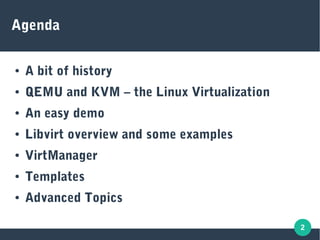
Agenda
● A bit of history
● QEMU and KVM – the Linux Virtualization
● An easy demo
● Libvirt overview and some examples
● VirtManager
● Templates
● Advanced Topics
3
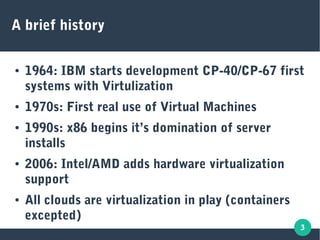
A brief history
● 1964: IBM starts development CP-40/CP-67 first
systems with Virtulization
● 1970s: First real use of Virtual Machines
● 1990s: x86 begins it’s domination of server
installs
● 2006: Intel/AMD adds hardware virtualization
support
● All clouds are virtualization in play (containers
excepted)
4
What’s the big deal?
● Provision systems using an API (= automation)
● Higher density – better utalization of hardware
● Cool tricks like snap-shotting and quick
provision from templates
● Easy to manipulate “external” hardware, adding
more disk, network interfaces, CPUs etc. with a
click
● Portability/independence of hardware
5
How does it work?
● Simulation of hardware – hard drives, network,
memory, CPU (type, features) etc.
● Hardware Virtualization has processor support
for switching and simulated hardware addressing
etc.
● Emulation (QEMU) of hardware allows running
different processor architectures
6
Beginning is easy (demo)
7
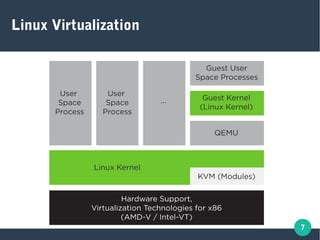
Linux Virtualization
8
Does your processor support Virtualization?
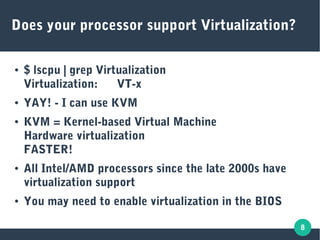
● $ lscpu | grep Virtualization
Virtualization: VT-x
● YAY! - I can use KVM
● KVM = Kernel-based Virtual Machine
Hardware virtualization
FASTER!
● All Intel/AMD processors since the late 2000s have
virtualization support
● You may need to enable virtualization in the BIOS
9
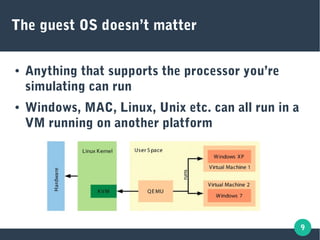
The guest OS doesn’t matter
● Anything that supports the processor you’re
simulating can run
● Windows, MAC, Linux, Unix etc. can all run in a
VM running on another platform
10
QEMU
Quick EMUlator
11
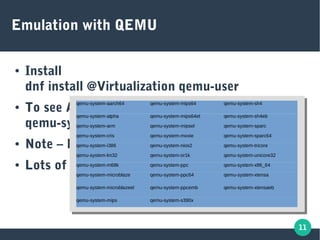
Emulation with QEMU
● Install
dnf install @Virtualization qemu-user
● To see ARM emulators:
qemu-system-arm -M help
● Note – NO NEED FOR ROOT!
● Lots of emulators!
qemu-system-aarch64 qemu-system-mips64 qemu-system-sh4
qemu-system-alpha qemu-system-mips64el qemu-system-sh4eb
qemu-system-arm qemu-system-mipsel qemu-system-sparc
qemu-system-cris qemu-system-moxie qemu-system-sparc64
qemu-system-i386 qemu-system-nios2 qemu-system-tricore
qemu-system-lm32 qemu-system-or1k qemu-system-unicore32
qemu-system-m68k qemu-system-ppc qemu-system-x86_64
qemu-system-microblaze qemu-system-ppc64 qemu-system-xtensa
qemu-system-microblazeel qemu-system-ppcemb qemu-system-xtensaeb
qemu-system-mips qemu-system-s390x
12
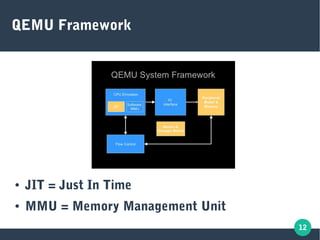
QEMU Framework
● JIT = Just In Time
● MMU = Memory Management Unit
13
● $ qemu-system-aarch64 -M help | wc -l
51
● Lots of ARM processors!
● Great for testing compilers and code generators
for using optimal code for a given hardware
platform
● Run:
qemu-system-aarch64 -m <memory size> -M <machine name> -drive if=none,file=<hard drive file name>,id=hd0

-device virtio-blk-device,drive=hd0 -netdev type=tap,id=net0 -device virtio-net-device,netdev=net0
Lots of families of types of processors
14
It’s SLOOOOOW
● Emulation means defining each OP code, in
“high level assembler”. This slows things down
50-100x or more.
● NEVER run X in an emulator! You’ll probably be
going to bed before it’s done loading!
● Emulation starts fast – great for testing new
kernels and kernel modules
15
Introducing KVM
● Kernel module
● Is meant for native emulation – running X86_64
VMs on an X86_64 processor.
● Passthrough of OP codes to hardware – no
emulation
● FAST
● Same interface as emulation. Pretty cool!
16
I’m not a hardware guy ..
● No need for emulation?
● Not into hardware architectures?
● Want simple command lines?
● LIBVIRT is the answer
17
LIBVIRT (and gang)
18
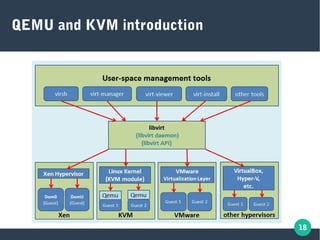
QEMU and KVM introduction
19
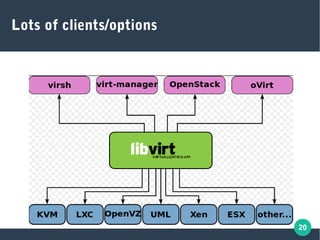
What is Libvirt?
● Standard library for talking to different
hypervisors
● One toolset to rule all the APIs!
● Mostly used with KVM today
● Defines networking, disks, graphical and other
devices in a declartive way
20
Lots of clients/options
21
Lots of tools for libvirt
● libvirtd – main daemon all API talks to
● Virt-manager – GUI manager
● Guestfish – Guest File System access
● Virsh – Virtualization shell (cli for libvirt)
● Virt-install / virt-clone / virt-convert
● Qemu-img – Disk management
22
Libvirt
● Guestfish and qemu-img
● Networking
● Storage setup
● Located in /etc/libvirt
●
23
VirtManager
● Easiest way to manage Vms
● Virsh – alternative command line method (more
options)
●
24
Boxes
● User space Vms – even easier than virt-manager
● Fewer options
● Great for basic desktop virtualization needs
● Let’s take a look (DEMO)
25
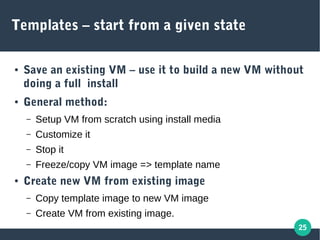
Templates – start from a given state
● Save an existing VM – use it to build a new VM without
doing a full install
● General method:
– Setup VM from scratch using install media
– Customize it
– Stop it
– Freeze/copy VM image => template name
● Create new VM from existing image
– Copy template image to new VM image
– Create VM from existing image.
26
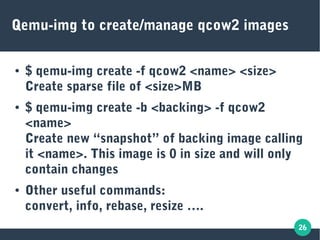
Qemu-img to create/manage qcow2 images
● $ qemu-img create -f qcow2 <name> <size>
Create sparse file of <size>MB
● $ qemu-img create -b <backing> -f qcow2
<name>
Create new “snapshot” of backing image calling
it <name>. This image is 0 in size and will only
contain changes
● Other useful commands:
convert, info, rebase, resize ….
27
Advanced topics
28
Advanced topics
● Security – SELinux, svirt etc
● Bridging networks
● Remote control
29
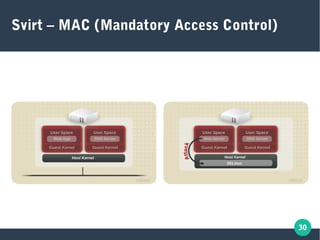
Security
● SELinux rules the roost
● Advanced rules (svirt) creates locks preventing one VM from accessing
other Vms
● Lots of “virt*” sebools to manage what virtualization is allowed to do:
virt_use_nfs, virt_use_usb etc
● Important context labels (man libvirt-selinux):
– virt_image_t – all images (default /var/lib/libvirt/images)
– virt_content_t – files used to start/run a VM
– virt_etc_t - /etc/libvirt files (there are subtypes)
– $ semanage fcontext -l | grep “virt_”
for a nice long list
● Get in trouble? Relabel!
– # fixfiles onboot
30
Svirt – MAC (Mandatory Access Control)
31
Enable svirt
● Set “security_default_confined=1” and
“security_require_confined=1” in
/etc/libvirt/qemu.conf
● Uses MCS to separate VM processes
● $ dnf install virt-sandbox
Great way to create fully isolated VM
●
32
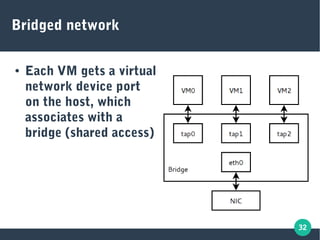
Bridged network
● Each VM gets a virtual
network device port
on the host, which
associates with a
bridge (shared access)
33
Remote access
● Use ssh keys to establish a secured access to the
remote host
● Use virt-manager and add the remote as:
qemu+ssh://<user>@<host>/system
● User on remote system must be allowed to
access libvirtd
34
Questions?
THANK YOU!

Kvm and libvirt

  • 1.
    LIBVIRT and KVM ForFredLug by Peter Larsen October 2017
  • 2.
    2 Agenda ● A bitof history ● QEMU and KVM – the Linux Virtualization ● An easy demo ● Libvirt overview and some examples ● VirtManager ● Templates ● Advanced Topics
  • 3.
    3 A brief history ●1964: IBM starts development CP-40/CP-67 first systems with Virtulization ● 1970s: First real use of Virtual Machines ● 1990s: x86 begins it’s domination of server installs ● 2006: Intel/AMD adds hardware virtualization support ● All clouds are virtualization in play (containers excepted)
  • 4.
    4 What’s the bigdeal? ● Provision systems using an API (= automation) ● Higher density – better utalization of hardware ● Cool tricks like snap-shotting and quick provision from templates ● Easy to manipulate “external” hardware, adding more disk, network interfaces, CPUs etc. with a click ● Portability/independence of hardware
  • 5.
    5 How does itwork? ● Simulation of hardware – hard drives, network, memory, CPU (type, features) etc. ● Hardware Virtualization has processor support for switching and simulated hardware addressing etc. ● Emulation (QEMU) of hardware allows running different processor architectures
  • 6.
  • 7.
  • 8.
    8 Does your processorsupport Virtualization? ● $ lscpu | grep Virtualization Virtualization: VT-x ● YAY! - I can use KVM ● KVM = Kernel-based Virtual Machine Hardware virtualization FASTER! ● All Intel/AMD processors since the late 2000s have virtualization support ● You may need to enable virtualization in the BIOS
  • 9.
    9 The guest OSdoesn’t matter ● Anything that supports the processor you’re simulating can run ● Windows, MAC, Linux, Unix etc. can all run in a VM running on another platform
  • 10.
  • 11.
    11 Emulation with QEMU ●Install dnf install @Virtualization qemu-user ● To see ARM emulators: qemu-system-arm -M help ● Note – NO NEED FOR ROOT! ● Lots of emulators! qemu-system-aarch64 qemu-system-mips64 qemu-system-sh4 qemu-system-alpha qemu-system-mips64el qemu-system-sh4eb qemu-system-arm qemu-system-mipsel qemu-system-sparc qemu-system-cris qemu-system-moxie qemu-system-sparc64 qemu-system-i386 qemu-system-nios2 qemu-system-tricore qemu-system-lm32 qemu-system-or1k qemu-system-unicore32 qemu-system-m68k qemu-system-ppc qemu-system-x86_64 qemu-system-microblaze qemu-system-ppc64 qemu-system-xtensa qemu-system-microblazeel qemu-system-ppcemb qemu-system-xtensaeb qemu-system-mips qemu-system-s390x
  • 12.
    12 QEMU Framework ● JIT= Just In Time ● MMU = Memory Management Unit
  • 13.
    13 ● $ qemu-system-aarch64-M help | wc -l 51 ● Lots of ARM processors! ● Great for testing compilers and code generators for using optimal code for a given hardware platform ● Run: qemu-system-aarch64 -m <memory size> -M <machine name> -drive if=none,file=<hard drive file name>,id=hd0 -device virtio-blk-device,drive=hd0 -netdev type=tap,id=net0 -device virtio-net-device,netdev=net0 Lots of families of types of processors
  • 14.
    14 It’s SLOOOOOW ● Emulationmeans defining each OP code, in “high level assembler”. This slows things down 50-100x or more. ● NEVER run X in an emulator! You’ll probably be going to bed before it’s done loading! ● Emulation starts fast – great for testing new kernels and kernel modules
  • 15.
    15 Introducing KVM ● Kernelmodule ● Is meant for native emulation – running X86_64 VMs on an X86_64 processor. ● Passthrough of OP codes to hardware – no emulation ● FAST ● Same interface as emulation. Pretty cool!
  • 16.
    16 I’m not ahardware guy .. ● No need for emulation? ● Not into hardware architectures? ● Want simple command lines? ● LIBVIRT is the answer
  • 17.
  • 18.
    18 QEMU and KVMintroduction
  • 19.
    19 What is Libvirt? ●Standard library for talking to different hypervisors ● One toolset to rule all the APIs! ● Mostly used with KVM today ● Defines networking, disks, graphical and other devices in a declartive way
  • 20.
  • 21.
    21 Lots of toolsfor libvirt ● libvirtd – main daemon all API talks to ● Virt-manager – GUI manager ● Guestfish – Guest File System access ● Virsh – Virtualization shell (cli for libvirt) ● Virt-install / virt-clone / virt-convert ● Qemu-img – Disk management
  • 22.
    22 Libvirt ● Guestfish andqemu-img ● Networking ● Storage setup ● Located in /etc/libvirt ●
  • 23.
    23 VirtManager ● Easiest wayto manage Vms ● Virsh – alternative command line method (more options) ●
  • 24.
    24 Boxes ● User spaceVms – even easier than virt-manager ● Fewer options ● Great for basic desktop virtualization needs ● Let’s take a look (DEMO)
  • 25.
    25 Templates – startfrom a given state ● Save an existing VM – use it to build a new VM without doing a full install ● General method: – Setup VM from scratch using install media – Customize it – Stop it – Freeze/copy VM image => template name ● Create new VM from existing image – Copy template image to new VM image – Create VM from existing image.
  • 26.
    26 Qemu-img to create/manageqcow2 images ● $ qemu-img create -f qcow2 <name> <size> Create sparse file of <size>MB ● $ qemu-img create -b <backing> -f qcow2 <name> Create new “snapshot” of backing image calling it <name>. This image is 0 in size and will only contain changes ● Other useful commands: convert, info, rebase, resize ….
  • 27.
  • 28.
    28 Advanced topics ● Security– SELinux, svirt etc ● Bridging networks ● Remote control
  • 29.
    29 Security ● SELinux rulesthe roost ● Advanced rules (svirt) creates locks preventing one VM from accessing other Vms ● Lots of “virt*” sebools to manage what virtualization is allowed to do: virt_use_nfs, virt_use_usb etc ● Important context labels (man libvirt-selinux): – virt_image_t – all images (default /var/lib/libvirt/images) – virt_content_t – files used to start/run a VM – virt_etc_t - /etc/libvirt files (there are subtypes) – $ semanage fcontext -l | grep “virt_” for a nice long list ● Get in trouble? Relabel! – # fixfiles onboot
  • 30.
    30 Svirt – MAC(Mandatory Access Control)
  • 31.
    31 Enable svirt ● Set“security_default_confined=1” and “security_require_confined=1” in /etc/libvirt/qemu.conf ● Uses MCS to separate VM processes ● $ dnf install virt-sandbox Great way to create fully isolated VM ●
  • 32.
    32 Bridged network ● EachVM gets a virtual network device port on the host, which associates with a bridge (shared access)
  • 33.
    33 Remote access ● Usessh keys to establish a secured access to the remote host ● Use virt-manager and add the remote as: qemu+ssh://<user>@<host>/system ● User on remote system must be allowed to access libvirtd
  • 34.