Accounting IAccounting I
Chapter 12 – Posting to
General & Subsidiary
Ledgers
TTERMS REVIEWERMS REVIEW
subsidiary ledger
accounts payable ledger
accounts receivable ledger
controlling account
Lesson 12-1, page 279Lesson 12-1, page 279
TTERMS REVIEWERMS REVIEW
Subsidiary LedgerSubsidiary Ledger
A ledger that is summarized in a
single general ledger account.
Lesson 12-1, page 274Lesson 12-1, page 274
TTERMS REVIEWERMS REVIEW
Accounts Payable LedgerAccounts Payable Ledger
A subsidiary ledger containing
only accounts for vendors from
whom items are purchased or
bought on account.
Lesson 12-1, page 274Lesson 12-1, page 274
TTERMS REVIEWERMS REVIEW
Accounts Receivable LedgerAccounts Receivable Ledger
A subsidiary ledger containing
only accounts for charge
customers.
Lesson 12-1, page 274Lesson 12-1, page 274
TTERMS REVIEWERMS REVIEW
Controlling AccountControlling Account
An account in a general ledger
that summarizes all accounts in a
subsidiary ledger.
Lesson 12-1, page 274Lesson 12-1, page 274
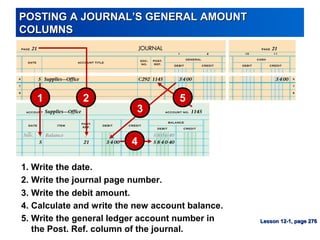
POSTING A JOURNAL’S GENERAL AMOUNTPOSTING A JOURNAL’S GENERAL AMOUNT
COLUMNSCOLUMNS
3. Write the debit amount.
1. Write the date.
4. Calculate and write the new account balance.
2. Write the journal page number.
5. Write the general ledger account number in
the Post. Ref. column of the journal.
1 2
4
5
3
Lesson 12-1, page 276Lesson 12-1, page 276
POSTING A JOURNAL’S SPECIAL AMOUNT COLUMNSPOSTING A JOURNAL’S SPECIAL AMOUNT COLUMNS
3. Write the Cash Credit column total.
1. Write the date.
4. Calculate and write the new account balance.
2. Write the journal page number.
5. Return to the journal and write the general ledger account
number in parentheses below the Cash Credit column total.
1
2
3
4
5
Lesson 12-1, page 277Lesson 12-1, page 277
RULES FOR POSTING A JOURNAL’S COLUMNRULES FOR POSTING A JOURNAL’S COLUMN
TOTALSTOTALS
General amount
column totals ARE
NOT posted
Special amount
column totals
ARE posted
Lesson 12-1, page 278Lesson 12-1, page 278
STARTING A NEW PAGE FOR AN ACCOUNT IN ASTARTING A NEW PAGE FOR AN ACCOUNT IN A
GENERAL LEDGERGENERAL LEDGER
5
1
3
4
2
3. Write the date.
1. Write the account title.
5. Place a check mark in the Post. Ref. column.
2. Write the account number.
6. Write the account balance.
6
4. Write Balance.
Lesson 12-1, page 278Lesson 12-1, page 278
Work Together &Work Together &
On Your Own –On Your Own –
Page 279Page 279
ACCOUNTS PAYABLE LEDGER AND GENERALACCOUNTS PAYABLE LEDGER AND GENERAL
LEDGER CONTROLLING ACCOUNTLEDGER CONTROLLING ACCOUNT
Lesson 12-2, page 280Lesson 12-2, page 280
OPENING ACCOUNTS PAYABLE LEDGER FORMSOPENING ACCOUNTS PAYABLE LEDGER FORMS
Lesson 12-2, page 281Lesson 12-2, page 281
1. Vendor Name 2. Vendor Number
1 2
POSTING A CREDIT TO AN ACCOUNTS PAYABLEPOSTING A CREDIT TO AN ACCOUNTS PAYABLE
LEDGERLEDGER
Lesson 12-2, page 282Lesson 12-2, page 282
1 2
3
4
5
3. Write the credit amount.
1. Write the date.
4. Calculate and write the new account balance.
2. Write the journal page number.
5. Write the vendor number.
POSTING A DEBIT TO AN ACCOUNTS PAYABLEPOSTING A DEBIT TO AN ACCOUNTS PAYABLE
LEDGERLEDGER
Lesson 12-2, page 283Lesson 12-2, page 283
1 2
3
4
5
3. Write the debit amount.
1. Write the date.
4. Calculate and write the new account balance.
2. Write the journal page number.
5. Write the vendor number.
STARTING A NEW PAGE FOR A VENDOR IN ANSTARTING A NEW PAGE FOR A VENDOR IN AN
ACCOUNTS PAYABLE LEDGERACCOUNTS PAYABLE LEDGER
Lesson 12-2, page 283Lesson 12-2, page 283
5
1
3
4
2
3. Write the date.
1. Write the vendor name.
5. Place a check mark in the Post. Ref. column.
2. Write the vendor number.
6. Write the account balance.
6
4. Write Balance.
COMPLETED ACCOUNTS PAYABLE LEDGERCOMPLETED ACCOUNTS PAYABLE LEDGER
Lesson 12-2, page 284Lesson 12-2, page 284
Work Together &Work Together &
On Your Own –On Your Own –
Page 285Page 285
ACCOUNTS RECEIVABLE LEDGER AND GENERALACCOUNTS RECEIVABLE LEDGER AND GENERAL
LEDGER CONTROLLING ACCOUNTLEDGER CONTROLLING ACCOUNT
Lesson 12-3, page 286Lesson 12-3, page 286
OPENING ACCOUNTS RECEIVABLE LEDGER FORMSOPENING ACCOUNTS RECEIVABLE LEDGER FORMS
1. Customer Name 2. Customer Number
1 2
Lesson 12-3, page 287Lesson 12-3, page 287
POSTING A DEBIT TO AN ACCOUNTS RECEIVABLEPOSTING A DEBIT TO AN ACCOUNTS RECEIVABLE
LEDGERLEDGER
Lesson 12-3, page 288Lesson 12-3, page 288
1 2
3
4
5
3. Write the debit amount.
1. Write the date.
4. Calculate and write the new account balance.
2. Write the journal page number.
5. Write the customer number.
POSTING A CREDIT TO AN ACCOUNTS RECEIVABLEPOSTING A CREDIT TO AN ACCOUNTS RECEIVABLE
LEDGERLEDGER
Lesson 12-3, page 289Lesson 12-3, page 289
1 2
3
4
5
3. Write the credit amount.
1. Write the date.
4. Calculate and write the new account balance.
2. Write the journal page number.
5. Write the customer number.
COMPLETED ACCOUNTS RECEIVABLE LEDGERCOMPLETED ACCOUNTS RECEIVABLE LEDGER
Lesson 12-3, page 290Lesson 12-3, page 290
Work Together &Work Together &
On Your Own –On Your Own –
Page 291Page 291
TTERMS REVIEWERMS REVIEW
schedule of accounts payable
schedule of accounts receivable
Lesson 12-4, page 294Lesson 12-4, page 294
TTERMS REVIEWERMS REVIEW
Schedule of Accounts PayableSchedule of Accounts Payable
A listing of vendor accounts,
account balances, and total
amount due all vendors.
Lesson 12-4, page 292Lesson 12-4, page 292
TTERMS REVIEWERMS REVIEW
Schedule of Accounts ReceivableSchedule of Accounts Receivable
A listing of customer accounts,
account balances, and total
amount due from all customers.
Lesson 12-4, page 293Lesson 12-4, page 293
PROVING THE ACCOUNTS PAYABLE LEDGERPROVING THE ACCOUNTS PAYABLE LEDGER
Lesson 12-4, page 292Lesson 12-4, page 292
PROVING THE ACCOUNTS RECEIVABLE LEDGERPROVING THE ACCOUNTS RECEIVABLE LEDGER
Lesson 12-4, page 293Lesson 12-4, page 293
Work Together &Work Together &
On Your Own –On Your Own –
Page 294Page 294

Acct20-Chapter12

  • 1.
    Accounting IAccounting I Chapter12 – Posting to General & Subsidiary Ledgers
  • 2.
    TTERMS REVIEWERMS REVIEW subsidiaryledger accounts payable ledger accounts receivable ledger controlling account Lesson 12-1, page 279Lesson 12-1, page 279
  • 3.
    TTERMS REVIEWERMS REVIEW SubsidiaryLedgerSubsidiary Ledger A ledger that is summarized in a single general ledger account. Lesson 12-1, page 274Lesson 12-1, page 274
  • 4.
    TTERMS REVIEWERMS REVIEW AccountsPayable LedgerAccounts Payable Ledger A subsidiary ledger containing only accounts for vendors from whom items are purchased or bought on account. Lesson 12-1, page 274Lesson 12-1, page 274
  • 5.
    TTERMS REVIEWERMS REVIEW AccountsReceivable LedgerAccounts Receivable Ledger A subsidiary ledger containing only accounts for charge customers. Lesson 12-1, page 274Lesson 12-1, page 274
  • 6.
    TTERMS REVIEWERMS REVIEW ControllingAccountControlling Account An account in a general ledger that summarizes all accounts in a subsidiary ledger. Lesson 12-1, page 274Lesson 12-1, page 274
  • 7.
    POSTING A JOURNAL’SGENERAL AMOUNTPOSTING A JOURNAL’S GENERAL AMOUNT COLUMNSCOLUMNS 3. Write the debit amount. 1. Write the date. 4. Calculate and write the new account balance. 2. Write the journal page number. 5. Write the general ledger account number in the Post. Ref. column of the journal. 1 2 4 5 3 Lesson 12-1, page 276Lesson 12-1, page 276
  • 8.
    POSTING A JOURNAL’SSPECIAL AMOUNT COLUMNSPOSTING A JOURNAL’S SPECIAL AMOUNT COLUMNS 3. Write the Cash Credit column total. 1. Write the date. 4. Calculate and write the new account balance. 2. Write the journal page number. 5. Return to the journal and write the general ledger account number in parentheses below the Cash Credit column total. 1 2 3 4 5 Lesson 12-1, page 277Lesson 12-1, page 277
  • 9.
    RULES FOR POSTINGA JOURNAL’S COLUMNRULES FOR POSTING A JOURNAL’S COLUMN TOTALSTOTALS General amount column totals ARE NOT posted Special amount column totals ARE posted Lesson 12-1, page 278Lesson 12-1, page 278
  • 10.
    STARTING A NEWPAGE FOR AN ACCOUNT IN ASTARTING A NEW PAGE FOR AN ACCOUNT IN A GENERAL LEDGERGENERAL LEDGER 5 1 3 4 2 3. Write the date. 1. Write the account title. 5. Place a check mark in the Post. Ref. column. 2. Write the account number. 6. Write the account balance. 6 4. Write Balance. Lesson 12-1, page 278Lesson 12-1, page 278
  • 11.
    Work Together &WorkTogether & On Your Own –On Your Own – Page 279Page 279
  • 12.
    ACCOUNTS PAYABLE LEDGERAND GENERALACCOUNTS PAYABLE LEDGER AND GENERAL LEDGER CONTROLLING ACCOUNTLEDGER CONTROLLING ACCOUNT Lesson 12-2, page 280Lesson 12-2, page 280
  • 13.
    OPENING ACCOUNTS PAYABLELEDGER FORMSOPENING ACCOUNTS PAYABLE LEDGER FORMS Lesson 12-2, page 281Lesson 12-2, page 281 1. Vendor Name 2. Vendor Number 1 2
  • 14.
    POSTING A CREDITTO AN ACCOUNTS PAYABLEPOSTING A CREDIT TO AN ACCOUNTS PAYABLE LEDGERLEDGER Lesson 12-2, page 282Lesson 12-2, page 282 1 2 3 4 5 3. Write the credit amount. 1. Write the date. 4. Calculate and write the new account balance. 2. Write the journal page number. 5. Write the vendor number.
  • 15.
    POSTING A DEBITTO AN ACCOUNTS PAYABLEPOSTING A DEBIT TO AN ACCOUNTS PAYABLE LEDGERLEDGER Lesson 12-2, page 283Lesson 12-2, page 283 1 2 3 4 5 3. Write the debit amount. 1. Write the date. 4. Calculate and write the new account balance. 2. Write the journal page number. 5. Write the vendor number.
  • 16.
    STARTING A NEWPAGE FOR A VENDOR IN ANSTARTING A NEW PAGE FOR A VENDOR IN AN ACCOUNTS PAYABLE LEDGERACCOUNTS PAYABLE LEDGER Lesson 12-2, page 283Lesson 12-2, page 283 5 1 3 4 2 3. Write the date. 1. Write the vendor name. 5. Place a check mark in the Post. Ref. column. 2. Write the vendor number. 6. Write the account balance. 6 4. Write Balance.
  • 17.
    COMPLETED ACCOUNTS PAYABLELEDGERCOMPLETED ACCOUNTS PAYABLE LEDGER Lesson 12-2, page 284Lesson 12-2, page 284
  • 18.
    Work Together &WorkTogether & On Your Own –On Your Own – Page 285Page 285
  • 19.
    ACCOUNTS RECEIVABLE LEDGERAND GENERALACCOUNTS RECEIVABLE LEDGER AND GENERAL LEDGER CONTROLLING ACCOUNTLEDGER CONTROLLING ACCOUNT Lesson 12-3, page 286Lesson 12-3, page 286
  • 20.
    OPENING ACCOUNTS RECEIVABLELEDGER FORMSOPENING ACCOUNTS RECEIVABLE LEDGER FORMS 1. Customer Name 2. Customer Number 1 2 Lesson 12-3, page 287Lesson 12-3, page 287
  • 21.
    POSTING A DEBITTO AN ACCOUNTS RECEIVABLEPOSTING A DEBIT TO AN ACCOUNTS RECEIVABLE LEDGERLEDGER Lesson 12-3, page 288Lesson 12-3, page 288 1 2 3 4 5 3. Write the debit amount. 1. Write the date. 4. Calculate and write the new account balance. 2. Write the journal page number. 5. Write the customer number.
  • 22.
    POSTING A CREDITTO AN ACCOUNTS RECEIVABLEPOSTING A CREDIT TO AN ACCOUNTS RECEIVABLE LEDGERLEDGER Lesson 12-3, page 289Lesson 12-3, page 289 1 2 3 4 5 3. Write the credit amount. 1. Write the date. 4. Calculate and write the new account balance. 2. Write the journal page number. 5. Write the customer number.
  • 23.
    COMPLETED ACCOUNTS RECEIVABLELEDGERCOMPLETED ACCOUNTS RECEIVABLE LEDGER Lesson 12-3, page 290Lesson 12-3, page 290
  • 24.
    Work Together &WorkTogether & On Your Own –On Your Own – Page 291Page 291
  • 25.
    TTERMS REVIEWERMS REVIEW scheduleof accounts payable schedule of accounts receivable Lesson 12-4, page 294Lesson 12-4, page 294
  • 26.
    TTERMS REVIEWERMS REVIEW Scheduleof Accounts PayableSchedule of Accounts Payable A listing of vendor accounts, account balances, and total amount due all vendors. Lesson 12-4, page 292Lesson 12-4, page 292
  • 27.
    TTERMS REVIEWERMS REVIEW Scheduleof Accounts ReceivableSchedule of Accounts Receivable A listing of customer accounts, account balances, and total amount due from all customers. Lesson 12-4, page 293Lesson 12-4, page 293
  • 28.
    PROVING THE ACCOUNTSPAYABLE LEDGERPROVING THE ACCOUNTS PAYABLE LEDGER Lesson 12-4, page 292Lesson 12-4, page 292
  • 29.
    PROVING THE ACCOUNTSRECEIVABLE LEDGERPROVING THE ACCOUNTS RECEIVABLE LEDGER Lesson 12-4, page 293Lesson 12-4, page 293
  • 30.
    Work Together &WorkTogether & On Your Own –On Your Own – Page 294Page 294