LESSON 11-1
Posting to an Accounts
Payable Ledger

CENTURY 21 ACCOUNTING © 2009 South-Western, Cengage Learning
2
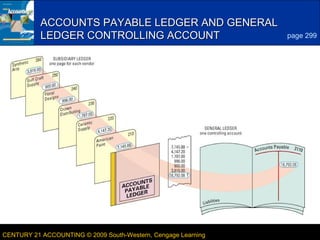
ACCOUNTS PAYABLE LEDGER AND GENERAL
LEDGER CONTROLLING ACCOUNT

CENTURY 21 ACCOUNTING © 2009 South-Western, Cengage Learning

page 299

LESSON 11-1
3

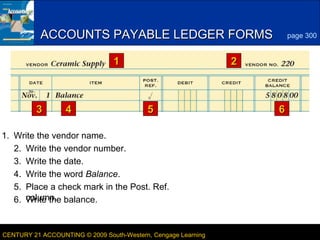
ACCOUNTS PAYABLE LEDGER FORMS
1

3

4

page 300

2

5

6

1. Write the vendor name.
2. Write the vendor number.
3. Write the date.
4. Write the word Balance.
5. Place a check mark in the Post. Ref.
6. column. balance.
Write the

CENTURY 21 ACCOUNTING © 2009 South-Western, Cengage Learning

LESSON 11-1
4

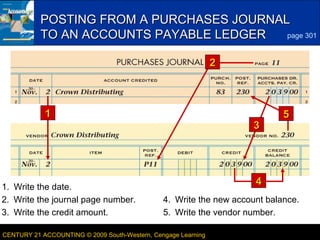
POSTING FROM A PURCHASES JOURNAL
page 301
TO AN ACCOUNTS PAYABLE LEDGER
2

1

1. Write the date.
2. Write the journal page number.
3. Write the credit amount.

3

5

4
4. Write the new account balance.
5. Write the vendor number.

CENTURY 21 ACCOUNTING © 2009 South-Western, Cengage Learning

LESSON 11-1
5
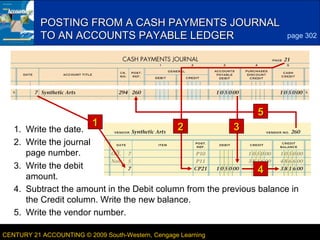
POSTING FROM A CASH PAYMENTS JOURNAL
TO AN ACCOUNTS PAYABLE LEDGER

1

page 302

5

2
3
1. Write the date.
2. Write the journal
page number.
3. Write the debit
4
amount.
4. Subtract the amount in the Debit column from the previous balance in
the Credit column. Write the new balance.
5. Write the vendor number.
CENTURY 21 ACCOUNTING © 2009 South-Western, Cengage Learning

LESSON 11-1
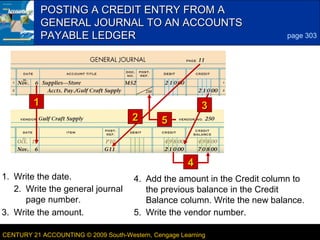
POSTING A CREDIT ENTRY FROM A
GENERAL JOURNAL TO AN ACCOUNTS
PAYABLE LEDGER

1
2

6
page 303

3
5

4
1. Write the date.
2. Write the general journal
page number.
3. Write the amount.

4. Add the amount in the Credit column to
the previous balance in the Credit
Balance column. Write the new balance.
5. Write the vendor number.

CENTURY 21 ACCOUNTING © 2009 South-Western, Cengage Learning

LESSON 11-1
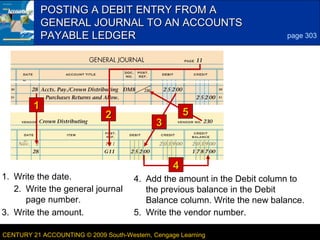
POSTING A DEBIT ENTRY FROM A
GENERAL JOURNAL TO AN ACCOUNTS
PAYABLE LEDGER

1

2

1. Write the date.
2. Write the general journal
page number.
3. Write the amount.

7
page 303

5

3

4
4. Add the amount in the Debit column to
the previous balance in the Debit
Balance column. Write the new balance.
5. Write the vendor number.

CENTURY 21 ACCOUNTING © 2009 South-Western, Cengage Learning

LESSON 11-1
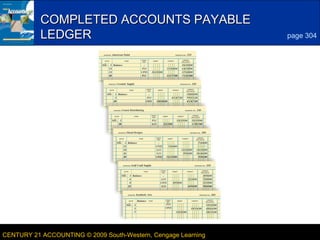
COMPLETED ACCOUNTS PAYABLE
LEDGER

CENTURY 21 ACCOUNTING © 2009 South-Western, Cengage Learning

8
page 304

LESSON 11-1
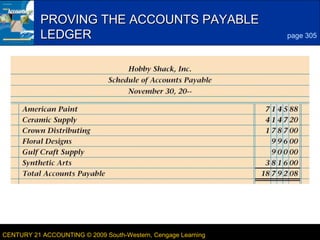
9

PROVING THE ACCOUNTS PAYABLE
LEDGER

CENTURY 21 ACCOUNTING © 2009 South-Western, Cengage Learning

page 305

LESSON 11-1
10

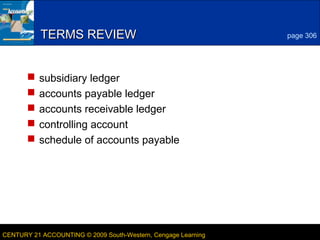
TERMS REVIEW






page 306

subsidiary ledger
accounts payable ledger
accounts receivable ledger
controlling account
schedule of accounts payable

CENTURY 21 ACCOUNTING © 2009 South-Western, Cengage Learning

LESSON 11-1

Lesson 11 1

  • 1.
    LESSON 11-1 Posting toan Accounts Payable Ledger CENTURY 21 ACCOUNTING © 2009 South-Western, Cengage Learning
  • 2.
    2 ACCOUNTS PAYABLE LEDGERAND GENERAL LEDGER CONTROLLING ACCOUNT CENTURY 21 ACCOUNTING © 2009 South-Western, Cengage Learning page 299 LESSON 11-1
  • 3.
    3 ACCOUNTS PAYABLE LEDGERFORMS 1 3 4 page 300 2 5 6 1. Write the vendor name. 2. Write the vendor number. 3. Write the date. 4. Write the word Balance. 5. Place a check mark in the Post. Ref. 6. column. balance. Write the CENTURY 21 ACCOUNTING © 2009 South-Western, Cengage Learning LESSON 11-1
  • 4.
    4 POSTING FROM APURCHASES JOURNAL page 301 TO AN ACCOUNTS PAYABLE LEDGER 2 1 1. Write the date. 2. Write the journal page number. 3. Write the credit amount. 3 5 4 4. Write the new account balance. 5. Write the vendor number. CENTURY 21 ACCOUNTING © 2009 South-Western, Cengage Learning LESSON 11-1
  • 5.
    5 POSTING FROM ACASH PAYMENTS JOURNAL TO AN ACCOUNTS PAYABLE LEDGER 1 page 302 5 2 3 1. Write the date. 2. Write the journal page number. 3. Write the debit 4 amount. 4. Subtract the amount in the Debit column from the previous balance in the Credit column. Write the new balance. 5. Write the vendor number. CENTURY 21 ACCOUNTING © 2009 South-Western, Cengage Learning LESSON 11-1
  • 6.
    POSTING A CREDITENTRY FROM A GENERAL JOURNAL TO AN ACCOUNTS PAYABLE LEDGER 1 2 6 page 303 3 5 4 1. Write the date. 2. Write the general journal page number. 3. Write the amount. 4. Add the amount in the Credit column to the previous balance in the Credit Balance column. Write the new balance. 5. Write the vendor number. CENTURY 21 ACCOUNTING © 2009 South-Western, Cengage Learning LESSON 11-1
  • 7.
    POSTING A DEBITENTRY FROM A GENERAL JOURNAL TO AN ACCOUNTS PAYABLE LEDGER 1 2 1. Write the date. 2. Write the general journal page number. 3. Write the amount. 7 page 303 5 3 4 4. Add the amount in the Debit column to the previous balance in the Debit Balance column. Write the new balance. 5. Write the vendor number. CENTURY 21 ACCOUNTING © 2009 South-Western, Cengage Learning LESSON 11-1
  • 8.
    COMPLETED ACCOUNTS PAYABLE LEDGER CENTURY21 ACCOUNTING © 2009 South-Western, Cengage Learning 8 page 304 LESSON 11-1
  • 9.
    9 PROVING THE ACCOUNTSPAYABLE LEDGER CENTURY 21 ACCOUNTING © 2009 South-Western, Cengage Learning page 305 LESSON 11-1
  • 10.
    10 TERMS REVIEW      page 306 subsidiaryledger accounts payable ledger accounts receivable ledger controlling account schedule of accounts payable CENTURY 21 ACCOUNTING © 2009 South-Western, Cengage Learning LESSON 11-1