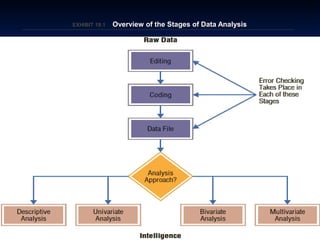
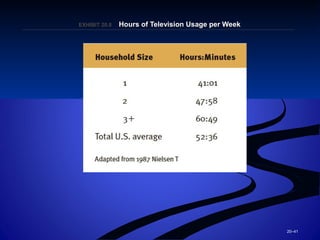
The document outlines 31 learning outcomes for data analysis. It discusses key concepts in data analysis including editing raw data, coding qualitative responses, constructing data files, and descriptive statistical analysis. The goal is for students to understand processes for preparing and summarizing data including editing, coding, and descriptive statistics.
Data AnalysisData AnalysisDataAnalysisData Analysis
ABDM4064 BUSINESS RESEARCHABDM4064 BUSINESS RESEARCH
by
Stephen Ong
Principal Lecturer (Specialist)
Visiting Professor, Shenzhen
2.
19–2
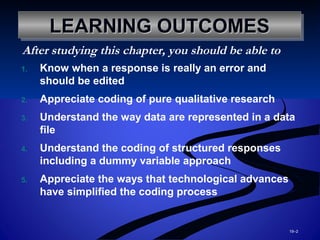
LEARNING OUTCOMESLEARNING OUTCOMESLEARNINGOUTCOMESLEARNING OUTCOMES
1. Know when a response is really an error and
should be edited
2. Appreciate coding of pure qualitative research
3. Understand the way data are represented in a data
file
4. Understand the coding of structured responses
including a dummy variable approach
5. Appreciate the ways that technological advances
have simplified the coding process
After studying this chapter, you should be able to
3.
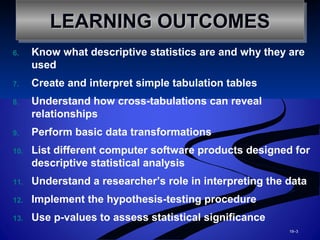
6. Know whatdescriptive statistics are and why they are
used
7. Create and interpret simple tabulation tables
8. Understand how cross-tabulations can reveal
relationships
9. Perform basic data transformations
10. List different computer software products designed for
descriptive statistical analysis
11. Understand a researcher’s role in interpreting the data
12. Implement the hypothesis-testing procedure
13. Use p-values to assess statistical significance
19–3
LEARNING OUTCOMESLEARNING OUTCOMESLEARNING OUTCOMESLEARNING OUTCOMES
4.
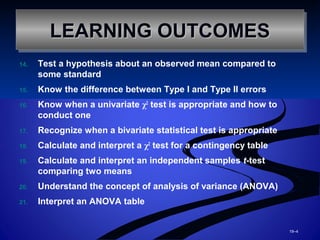
14. Test ahypothesis about an observed mean compared to
some standard
15. Know the difference between Type I and Type II errors
16. Know when a univariate χ2
test is appropriate and how to
conduct one
17. Recognize when a bivariate statistical test is appropriate
18. Calculate and interpret a χ2
test for a contingency table
19. Calculate and interpret an independent samples t-test
comparing two means
20. Understand the concept of analysis of variance (ANOVA)
21. Interpret an ANOVA table
19–4
LEARNING OUTCOMESLEARNING OUTCOMESLEARNING OUTCOMESLEARNING OUTCOMES
5.
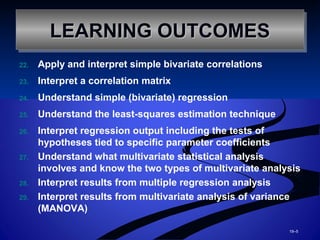
22. Apply andinterpret simple bivariate correlations
23. Interpret a correlation matrix
24. Understand simple (bivariate) regression
25. Understand the least-squares estimation technique
26. Interpret regression output including the tests of
hypotheses tied to specific parameter coefficients
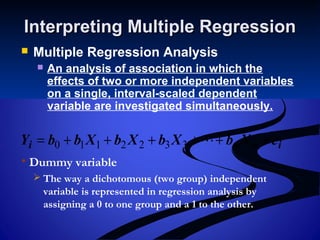
27. Understand what multivariate statistical analysis
involves and know the two types of multivariate analysis
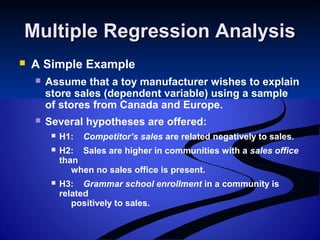
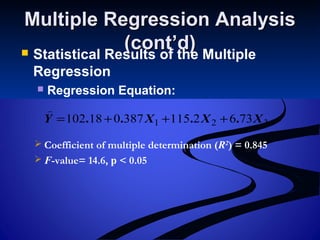
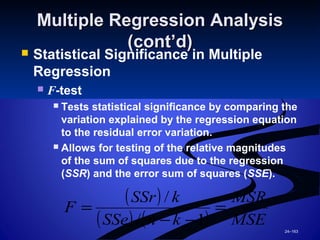
28. Interpret results from multiple regression analysis
29. Interpret results from multivariate analysis of variance
(MANOVA)
19–5
LEARNING OUTCOMESLEARNING OUTCOMESLEARNING OUTCOMESLEARNING OUTCOMES
6.
30. Interpret basicexploratory factor
analysis results
31. Know what multiple discriminant
analysis can be used to do
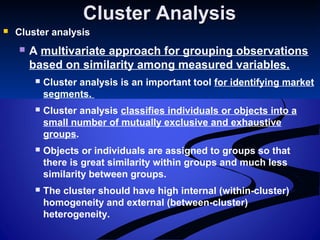
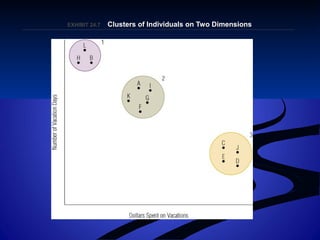
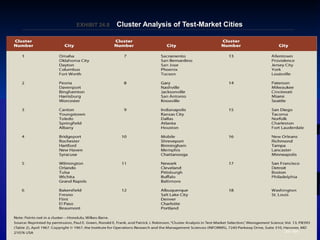
32. Understand how cluster analysis can
identify market segments
19–6
LEARNING OUTCOMESLEARNING OUTCOMESLEARNING OUTCOMESLEARNING OUTCOMES
7.
Remember this,Remember this,
Garbage in, garbage out!Garbage in, garbage out!
If data is collected improperly, or codedIf data is collected improperly, or coded
incorrectly, then the research resultsincorrectly, then the research results
are “garbage”.are “garbage”.
8.
Stages of DataAnalysisStages of Data Analysis
Raw Data
The unedited responses from a respondent
exactly as indicated by that respondent.
Nonrespondent Error
Error that the respondent is not responsible
for creating, such as when the interviewer
marks a response incorrectly.
Data Integrity
The notion that the data file actually contains
the information that the researcher is trying to
obtain to adequately address research
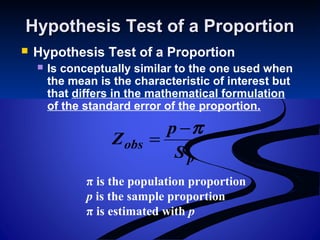
questions.
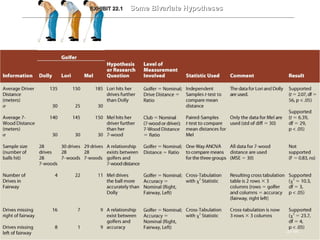
EditingEditing
Editing
Theprocess of checking the completeness,
consistency, and legibility of data and
making the data ready for coding and
transfer to storage.
E.g. How long you have stayed at your current
address? 45
The researchers need to make
adjustment/reconstruct responses
Field Editing – useful in personal interview
Preliminary editing by a field supervisor on
the same day as the interview to catch
technical omissions, check legibility of
handwriting, and clarify responses that are
logically or conceptually inconsistent.
11.
In-House Editing
A rigorous editing job performed by a
centralized office staff.
12.
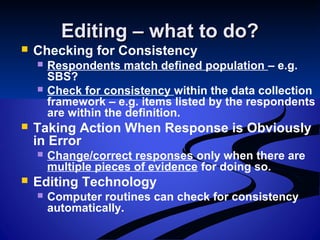
Editing – whatto do?Editing – what to do?
Checking for Consistency
Respondents match defined population – e.g.
SBS?
Check for consistency within the data collection
framework – e.g. items listed by the respondents
are within the definition.
Taking Action When Response is Obviously
in Error
Change/correct responses only when there are
multiple pieces of evidence for doing so.
Editing Technology
Computer routines can check for consistency
automatically.
13.
19–13
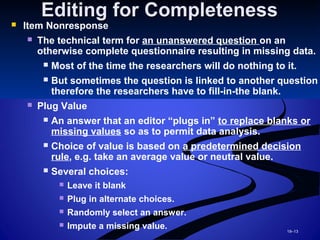
Editing for CompletenessEditingfor Completeness
Item Nonresponse
The technical term for an unanswered question on an
otherwise complete questionnaire resulting in missing data.
Most of the time the researchers will do nothing to it.
But sometimes the question is linked to another question
therefore the researchers have to fill-in-the blank.
Plug Value
An answer that an editor “plugs in” to replace blanks or
missing values so as to permit data analysis.
Choice of value is based on a predetermined decision
rule, e.g. take an average value or neutral value.
Several choices:
Leave it blank
Plug in alternate choices.
Randomly select an answer.
Impute a missing value.
14.
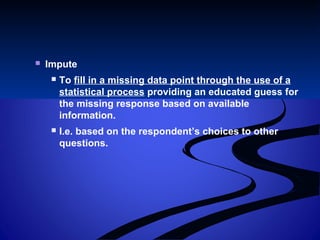
Impute
Tofill in a missing data point through the use of a
statistical process providing an educated guess for
the missing response based on available
information.
I.e. based on the respondent’s choices to other
questions.
15.
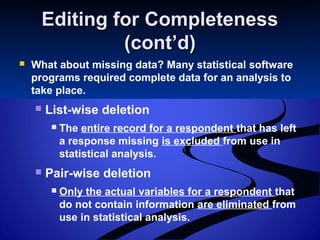
Editing for CompletenessEditingfor Completeness
(cont’d)(cont’d)
What about missing data? Many statistical software
programs required complete data for an analysis to
take place.
List-wise deletion
The entire record for a respondent that has left
a response missing is excluded from use in
statistical analysis.
Pair-wise deletion
Only the actual variables for a respondent that
do not contain information are eliminated from
use in statistical analysis.
16.
Please take note,Pleasetake note,
When a questionnaire has too manyWhen a questionnaire has too many
missing answer, it may not be suitablemissing answer, it may not be suitable
for the planned data analysis. In suchfor the planned data analysis. In such
situation, that particular questionnairesituation, that particular questionnaire
has to be dropped from the sample.has to be dropped from the sample.
17.
Facilitating the CodingFacilitatingthe Coding
ProcessProcess
Editing And Tabulating “Don’t Know”
Answers
Legitimate don’t know (no opinion)
Reluctant don’t know (refusal to answer)
Confused don’t know (does not
understand)
18.
Editing (cont’d)Editing (cont’d)
Pitfalls of Editing
Allowing subjectivity to enter into the editing process.
Data editors should be intelligent, experienced, and
objective.
A systematic procedure for assessing the
questionnaire should be developed by the research
analyst so that the editor has clearly defined decision
rules.
Pretesting Edit
Editing during the pretest stage can prove very
valuable for improving questionnaire format,
identifying poor instructions or inappropriate question
wording.
19.
Coding Qualitative ResponsesCodingQualitative Responses
Coding
The process of assigning a numerical score
or other character symbol to previously
edited data.
Codes
Rules for interpreting, classifying, and
recording data in the coding process.
The actual numerical or other character
symbols assigned to raw data.
Dummy Coding
Numeric “1” or “0” coding where each
number represents an alternate response
such as “female” or “male.”
If k is the number of categories for a
qualitative variable, k-1 dummy variables are
needed.
20.
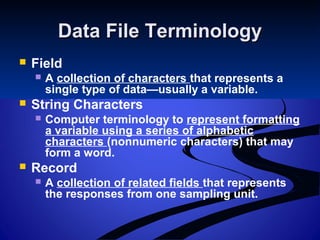
Data File TerminologyDataFile Terminology
Field
A collection of characters that represents a
single type of data—usually a variable.
String Characters
Computer terminology to represent formatting
a variable using a series of alphabetic
characters (nonnumeric characters) that may
form a word.
Record
A collection of related fields that represents
the responses from one sampling unit.
21.
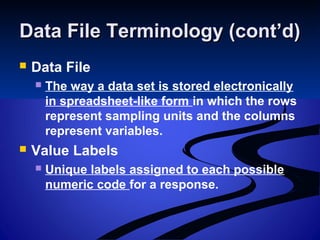
Data File Terminology(cont’d)Data File Terminology (cont’d)
Data File
The way a data set is stored electronically
in spreadsheet-like form in which the rows
represent sampling units and the columns
represent variables.
Value Labels
Unique labels assigned to each possible
numeric code for a response.
22.
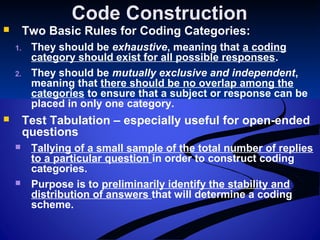
Code ConstructionCode Construction
Two Basic Rules for Coding Categories:
1. They should be exhaustive, meaning that a coding
category should exist for all possible responses.
2. They should be mutually exclusive and independent,
meaning that there should be no overlap among the
categories to ensure that a subject or response can be
placed in only one category.
Test Tabulation – especially useful for open-ended
questions
Tallying of a small sample of the total number of replies
to a particular question in order to construct coding
categories.
Purpose is to preliminarily identify the stability and
distribution of answers that will determine a coding
scheme.
23.
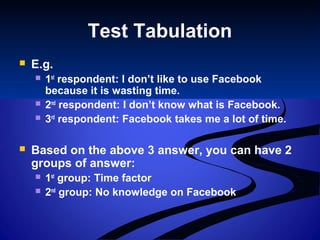
Test Tabulation
E.g.
1st
respondent: I don’t like to use Facebook
because it is wasting time.
2nd
respondent: I don’t know what is Facebook.
3rd
respondent: Facebook takes me a lot of time.
Based on the above 3 answer, you can have 2
groups of answer:
1st
group: Time factor
2nd
group: No knowledge on Facebook
24.
Devising the CodingSchemeDevising the Coding Scheme
A coding scheme should not be too
elaborate.
The coder’s task is only to summarize the
data.
Categories should be sufficiently
unambiguous that coders will not classify
items in different ways.
Code book
Identifies each variable in a study and gives
the variable’s description, code name, and
position in the data matrix.
25.
The Nature ofDescriptiveThe Nature of Descriptive
AnalysisAnalysis
Descriptive Analysis
The elementary transformation of raw data
in a way that describes the basic
characteristics such as central tendency,
distribution, and variability.
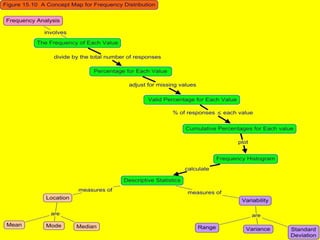
Histogram
A graphical way of showing a frequency
distribution in which the height of a bar
corresponds to the observed frequency of
the category.
26.
20–26
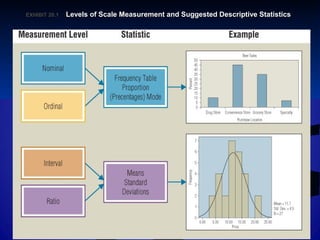
EXHIBIT 20.EXHIBIT 20.11Levels of Scale Measurement and Suggested Descriptive StatisticsLevels of Scale Measurement and Suggested Descriptive Statistics
27.
Creating and InterpretingCreatingand Interpreting
TabulationTabulation
Tabulation
The orderly arrangement of data in a table or
other summary format showing the number of
responses to each response category.
Tallying is the term when the process is done
by hand.
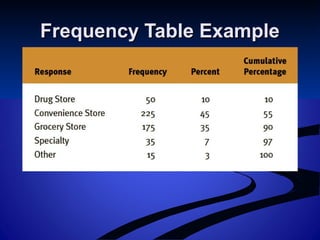
Frequency Table
A table showing the different ways
respondents answered a question.
Sometimes called a marginal tabulation.
Cross-TabulationCross-Tabulation
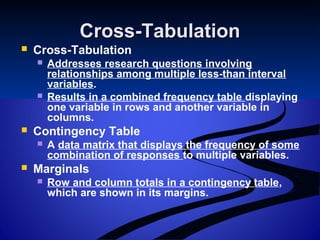
Cross-Tabulation
Addressesresearch questions involving
relationships among multiple less-than interval
variables.
Results in a combined frequency table displaying
one variable in rows and another variable in
columns.
Contingency Table
A data matrix that displays the frequency of some
combination of responses to multiple variables.
Marginals
Row and column totals in a contingency table,
which are shown in its margins.
30.
20–30
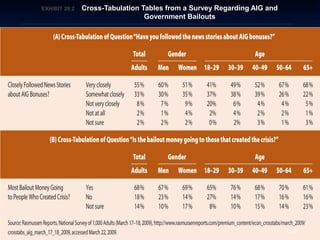
EXHIBIT 20.EXHIBIT 20.22Cross-Tabulation Tables from a Survey Regarding AIG andCross-Tabulation Tables from a Survey Regarding AIG and
Government BailoutsGovernment Bailouts
31.
20–31
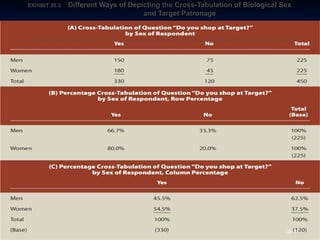
EXHIBIT 20.EXHIBIT 20.33Different Ways of Depicting the Cross-Tabulation of Biological SexDifferent Ways of Depicting the Cross-Tabulation of Biological Sex
and Target Patronageand Target Patronage
32.
Cross-Tabulation (cont’d)Cross-Tabulation (cont’d)
Percentage Cross-Tabulations
Statistical base – the number of respondents
or observations (in a row or column) used as
a basis for computing percentages.
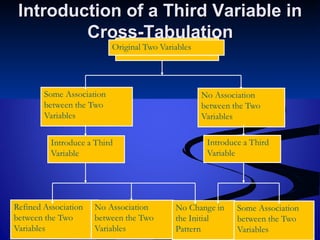
Elaboration and Refinement
Elaboration analysis – an analysis of the basic
cross-tabulation for each level of a variable
not previously considered, such as
subgroups of the sample.
Moderator variable – a third variable that
changes the nature of a relationship between
the original independent and dependent
variables.
33.
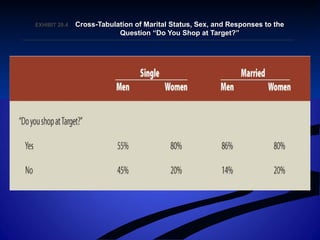
EXHIBIT 20.EXHIBIT 20.44Cross-Tabulation of Marital Status, Sex, and Responses to theCross-Tabulation of Marital Status, Sex, and Responses to the
Question “Do You Shop at Target?”Question “Do You Shop at Target?”
34.
Cross-Tabulation (cont’d)Cross-Tabulation (cont’d)
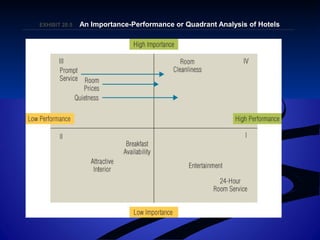
How Many Cross-Tabulations?
Every possible response becomes a possible
explanatory variable.
When hypotheses involve relationships
among two categorical variables, cross-
tabulations are the right tool for the job.
Quadrant Analysis
An extension of cross-tabulation in which
responses to two rating-scale questions are
plotted in four quadrants of a two-dimensional
table.
Importance-performance analysis
35.
EXHIBIT 20.EXHIBIT 20.55An Importance-Performance or Quadrant Analysis of HotelsAn Importance-Performance or Quadrant Analysis of Hotels
36.
20–36
Data TransformationData Transformation
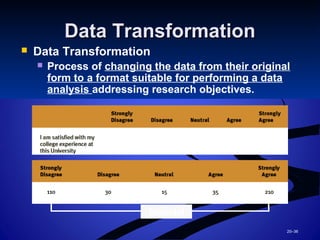
Data Transformation
Process of changing the data from their original
form to a format suitable for performing a data
analysis addressing research objectives.
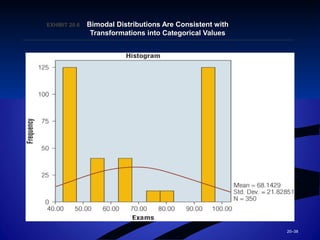
Bimodal
37.
20–37
Problems with DataProblemswith Data
TransformationsTransformations
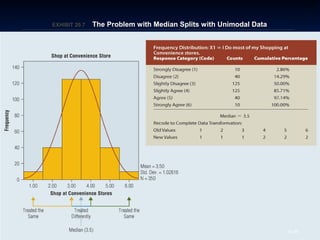
Median Split
Dividing a data set into two categories by placing
respondents below the median in one category
and respondents above the median in another.
The approach is best applied only when the data
do indeed exhibit bimodal characteristics.
Inappropriate collapsing of continuous variables
into categorical variables ignores the information
contained within the untransformed values.
38.
20–38
EXHIBIT 20.EXHIBIT 20.66Bimodal Distributions Are Consistent withBimodal Distributions Are Consistent with
Transformations into Categorical ValuesTransformations into Categorical Values
39.
20–39
EXHIBIT 20.EXHIBIT 20.77The Problem with Median Splits with Unimodal DataThe Problem with Median Splits with Unimodal Data
40.
20–40
Index NumbersIndex Numbers
Index Numbers
Scores or observations recalibrated to
indicate how they relate to a base number.
Price indexes
Represent simple data transformations that
allow researchers to track a variable’s value
over time and compare a variable(s) with

other variables.
Recalibration allows scores or observations
to be related to a certain base period or base
number.
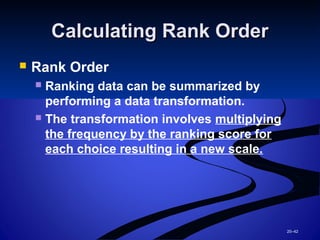
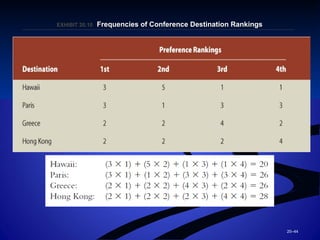
20–42
Calculating Rank OrderCalculatingRank Order
Rank Order
Ranking data can be summarized by
performing a data transformation.
The transformation involves multiplying
the frequency by the ranking score for
each choice resulting in a new scale.
43.
20–43
EXHIBIT 20.EXHIBIT 20.99Executive Rankings of Potential Conference DestinationsExecutive Rankings of Potential Conference Destinations
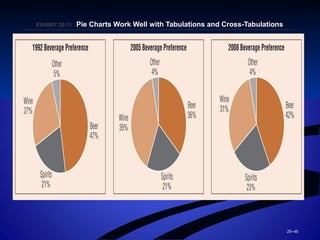
20–45
EXHIBIT 20.EXHIBIT 20.1111Pie Charts Work Well with Tabulations and Cross-TabulationsPie Charts Work Well with Tabulations and Cross-Tabulations
46.
20–46
Computer Programs forComputerPrograms for
AnalysisAnalysis Statistical
Packages
Spreadsheets
Excel
Statistical software:
SAS
SPSS (Statistical
Package for Social
Sciences)
MINITAB
47.
20–47
Computer Graphics andComputerGraphics and
Computer MappingComputer Mapping
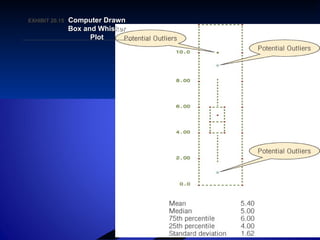
Box and Whisker Plots
Graphic representations of central
tendencies, percentiles, variabilities, and
the shapes of frequency distributions.
Interquartile Range
A measure of variability.
Outlier
A value that lies outside the normal range
of the data.
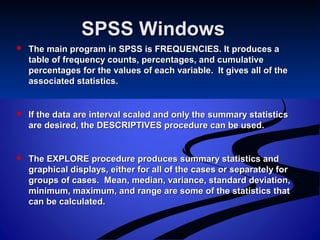
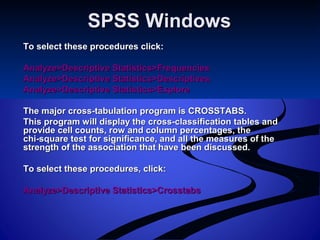
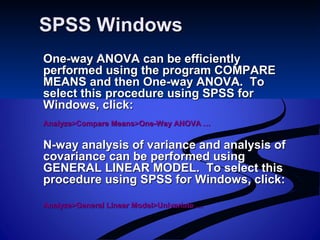
SPSS WindowsSPSS Windows
The main program in SPSS is FREQUENCIES. It produces aThe main program in SPSS is FREQUENCIES. It produces a
table of frequency counts, percentages, and cumulativetable of frequency counts, percentages, and cumulative
percentages for the values of each variable. It gives all of thepercentages for the values of each variable. It gives all of the
associated statistics.associated statistics.
If the data are interval scaled and only the summary statisticsIf the data are interval scaled and only the summary statistics
are desired, the DESCRIPTIVES procedure can be used.are desired, the DESCRIPTIVES procedure can be used.
The EXPLORE procedure produces summary statistics andThe EXPLORE procedure produces summary statistics and
graphical displays, either for all of the cases or separately forgraphical displays, either for all of the cases or separately for
groups of cases. Mean, median, variance, standard deviation,groups of cases. Mean, median, variance, standard deviation,
minimum, maximum, and range are some of the statistics thatminimum, maximum, and range are some of the statistics that
can be calculated.can be calculated.
50.
SPSS WindowsSPSS Windows
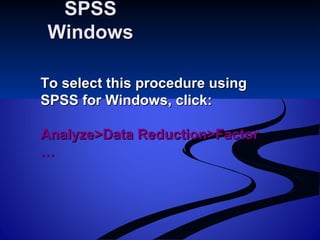
Toselect these procedures click:To select these procedures click:
Analyze>Descriptive Statistics>FrequenciesAnalyze>Descriptive Statistics>Frequencies
Analyze>Descriptive Statistics>DescriptivesAnalyze>Descriptive Statistics>Descriptives
Analyze>Descriptive Statistics>ExploreAnalyze>Descriptive Statistics>Explore
The major cross-tabulation program is CROSSTABS.The major cross-tabulation program is CROSSTABS.
This program will display the cross-classification tables andThis program will display the cross-classification tables and
provide cell counts, row and column percentages, theprovide cell counts, row and column percentages, the
chi-square test for significance, and all the measures of thechi-square test for significance, and all the measures of the
strength of the association that have been discussed.strength of the association that have been discussed.
To select these procedures, click:To select these procedures, click:
Analyze>Descriptive Statistics>CrosstabsAnalyze>Descriptive Statistics>Crosstabs
51.
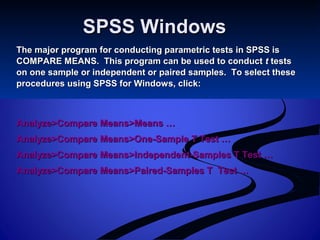
SPSS WindowsSPSS Windows
Themajor program for conducting parametric tests in SPSS isThe major program for conducting parametric tests in SPSS is
COMPARE MEANS. This program can be used to conductCOMPARE MEANS. This program can be used to conduct tt teststests
on one sample or independent or paired samples. To select theseon one sample or independent or paired samples. To select these
procedures using SPSS for Windows, click:procedures using SPSS for Windows, click:
Analyze>Compare Means>Means …Analyze>Compare Means>Means …
Analyze>Compare Means>One-Sample T Test …Analyze>Compare Means>One-Sample T Test …
Analyze>Compare Means>Independent-Samples T Test …Analyze>Compare Means>Independent-Samples T Test …
Analyze>Compare Means>Paired-Samples T Test …Analyze>Compare Means>Paired-Samples T Test …
52.
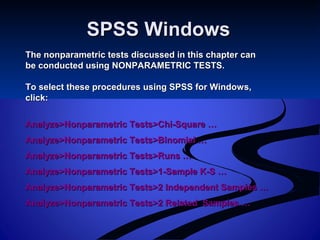
SPSS WindowsSPSS Windows
Thenonparametric tests discussed in this chapter canThe nonparametric tests discussed in this chapter can
be conducted using NONPARAMETRIC TESTS.be conducted using NONPARAMETRIC TESTS.
To select these procedures using SPSS for Windows,To select these procedures using SPSS for Windows,
click:click:
Analyze>Nonparametric Tests>Chi-Square …Analyze>Nonparametric Tests>Chi-Square …
Analyze>Nonparametric Tests>Binomial …Analyze>Nonparametric Tests>Binomial …
Analyze>Nonparametric Tests>Runs …Analyze>Nonparametric Tests>Runs …
Analyze>Nonparametric Tests>1-Sample K-S …Analyze>Nonparametric Tests>1-Sample K-S …
Analyze>Nonparametric Tests>2 Independent Samples …Analyze>Nonparametric Tests>2 Independent Samples …
Analyze>Nonparametric Tests>2 Related Samples …Analyze>Nonparametric Tests>2 Related Samples …
SPSS Windows:SPSS Windows:
FrequenciesFrequencies
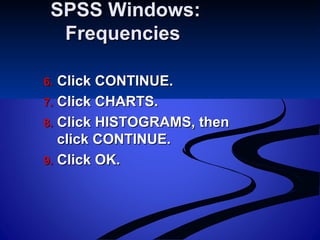
1.1.Select ANALYZE on the SPSS menu bar.Select ANALYZE on the SPSS menu bar.
2.2. Click DESCRIPTIVE STATISTICS andClick DESCRIPTIVE STATISTICS and
select FREQUENCIES.select FREQUENCIES.
3.3. Move the variable “Familiarity [familiar]”Move the variable “Familiarity [familiar]”
to the VARIABLE(s) box.to the VARIABLE(s) box.
4.4. Click STATISTICS.Click STATISTICS.
5.5. Select MEAN, MEDIAN, MODE, STD.Select MEAN, MEDIAN, MODE, STD.
DEVIATION, VARIANCE, and RANGE.DEVIATION, VARIANCE, and RANGE.
SPSS Windows: Cross-SPSSWindows: Cross-
tabulationstabulations
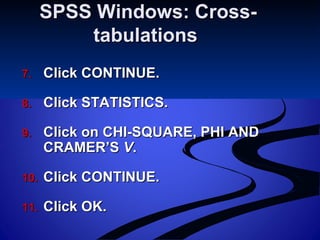
1.1. Select ANALYZE on the SPSS menu bar.Select ANALYZE on the SPSS menu bar.
2.2. Click on DESCRIPTIVE STATISTICS and selectClick on DESCRIPTIVE STATISTICS and select
CROSSTABS.CROSSTABS.
3.3. Move the variable “Internet Usage Group [iusagegr]” toMove the variable “Internet Usage Group [iusagegr]” to
the ROW(S) box.the ROW(S) box.
4.4. Move the variable “Sex[sex]” to the COLUMN(S) box.Move the variable “Sex[sex]” to the COLUMN(S) box.
5.5. Click on CELLS.Click on CELLS.
6.6. Select OBSERVED under COUNTS and COLUMN underSelect OBSERVED under COUNTS and COLUMN under
PERCENTAGES.PERCENTAGES.
59.
SPSS Windows: Cross-SPSSWindows: Cross-
tabulationstabulations
7.7. Click CONTINUE.Click CONTINUE.
8.8. Click STATISTICS.Click STATISTICS.
9.9. Click on CHI-SQUARE, PHI ANDClick on CHI-SQUARE, PHI AND
CRAMER’SCRAMER’S VV..
10.10. Click CONTINUE.Click CONTINUE.
11.11. Click OK.Click OK.
60.
20–60
InterpretationInterpretation
Interpretation
Theprocess of drawing inferences from
the analysis results.
Inferences drawn from interpretations
lead to managerial implications and
decisions.
From a management perspective, the
qualitative meaning of the data and their
managerial implications are an important
aspect of the interpretation.
61.
Hypothesis TestingHypothesis Testing
Types of Hypotheses
Relational hypotheses
Examine how changes in one variable vary with
changes in another.
Hypotheses about differences between
groups
Examine how some variable varies from one group
to another.
Hypotheses about differences from some
standard
Examine how some variable differs from some
preconceived standard. These tests typify
univariate statistical tests.
62.
21–62
Types of StatisticalAnalysisTypes of Statistical Analysis
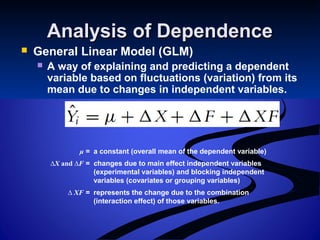
Univariate Statistical Analysis
Tests of hypotheses involving only one
variable.
Testing of statistical significance
Bivariate Statistical Analysis
Tests of hypotheses involving two variables.
Multivariate Statistical Analysis
Statistical analysis involving three or more
variables or sets of variables.
63.
21–63
The Hypothesis-TestingThe Hypothesis-Testing
ProcedureProcedure
Process
1. The specifically stated hypothesis is derived
from the research objectives.
2. A sample is obtained and the relevant
variable is measured.
3. The measured sample value is compared to
the value either stated explicitly or implied in
the hypothesis.
If the value is consistent with the hypothesis, the
hypothesis is supported.
If the value is not consistent with the hypothesis,
the hypothesis is not supported.
64.
21–64
Statistical Analysis: KeyTermsStatistical Analysis: Key Terms
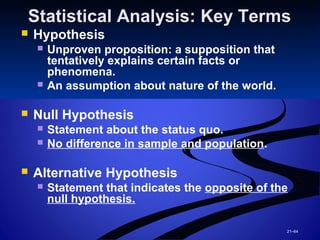
Hypothesis
Unproven proposition: a supposition that
tentatively explains certain facts or
phenomena.
An assumption about nature of the world.
Null Hypothesis
Statement about the status quo.
No difference in sample and population.
Alternative Hypothesis
Statement that indicates the opposite of the
null hypothesis.
65.
21–65
Significance Levels andp-Significance Levels and p-
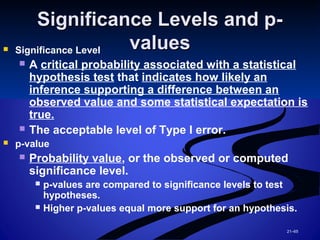
valuesvalues Significance Level
A critical probability associated with a statistical
hypothesis test that indicates how likely an
inference supporting a difference between an
observed value and some statistical expectation is
true.
The acceptable level of Type I error.
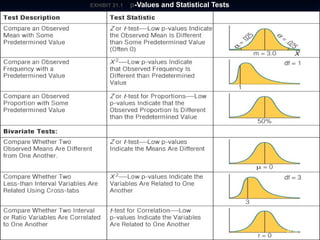
p-value
Probability value, or the observed or computed
significance level.
p-values are compared to significance levels to test
hypotheses.
Higher p-values equal more support for an hypothesis.
21–67
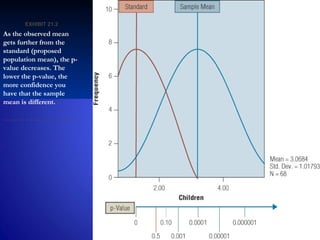
EXHIBIT 21.EXHIBIT 21.22
Asthe observed mean
gets further from the
standard (proposed
population mean), the p-
value decreases. The
lower the p-value, the
more confidence you
have that the sample
mean is different.
68.
21–68
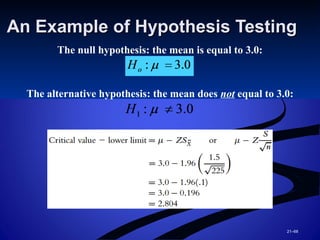
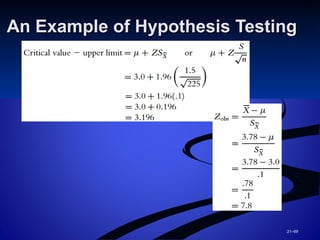
An Example ofHypothesis TestingAn Example of Hypothesis Testing
The null hypothesis: the mean is equal to 3.0:
The alternative hypothesis: the mean does not equal to 3.0:
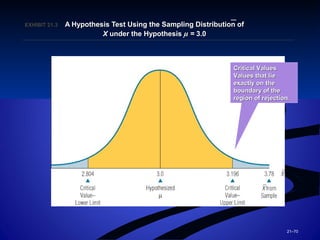
21–70
EXHIBIT 21.EXHIBIT 21.33A Hypothesis Test Using the Sampling Distribution ofA Hypothesis Test Using the Sampling Distribution of
XX under the Hypothesisunder the Hypothesis µµ == 3.03.0
—
Critical ValuesCritical Values
Values that lieValues that lie
exactly on theexactly on the
boundary of theboundary of the
region of rejection.region of rejection.
71.
Type I andType II ErrorsType I and Type II Errors
Type I Error
An error caused by rejecting the null
hypothesis when it is true.
Has a probability of alpha (α).
Practically, a Type I error occurs when the
researcher concludes that a relationship or
difference exists in the population when in
reality it does not exist.
““There really are no monsters under the bed.”There really are no monsters under the bed.”
72.
Type I andType II ErrorsType I and Type II Errors
(cont’d)(cont’d)
Type II Error
An error caused by failing to reject the null
hypothesis when the alternative hypothesis is
true.
Has a probability of beta (β).
Practically, a Type II error occurs when a
researcher concludes that no relationship or
difference exists when in fact one does exist.
““There really are monsters under the bed.”There really are monsters under the bed.”
73.
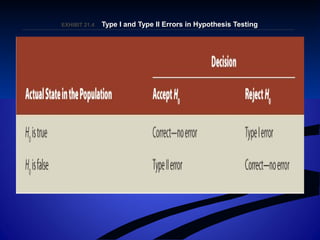
EXHIBIT 21.EXHIBIT 21.44Type I and Type II Errors in Hypothesis TestingType I and Type II Errors in Hypothesis Testing
74.
21–74
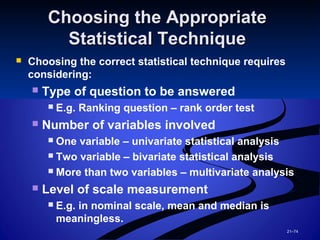
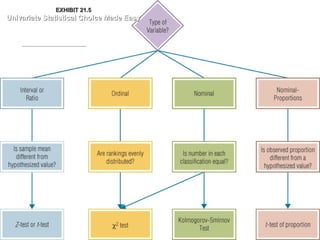
Choosing the AppropriateChoosingthe Appropriate
Statistical TechniqueStatistical Technique
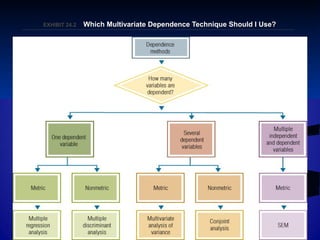
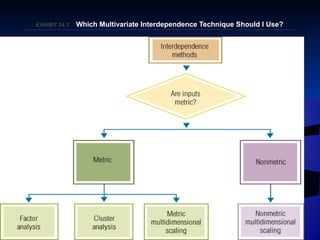
Choosing the correct statistical technique requires
considering:
Type of question to be answered
E.g. Ranking question – rank order test
Number of variables involved
One variable – univariate statistical analysis
Two variable – bivariate statistical analysis
More than two variables – multivariate analysis
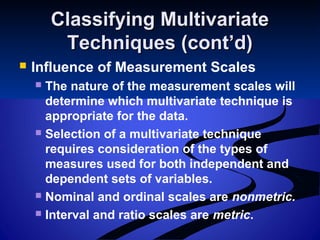
Level of scale measurement
E.g. in nominal scale, mean and median is
meaningless.
75.
21–75
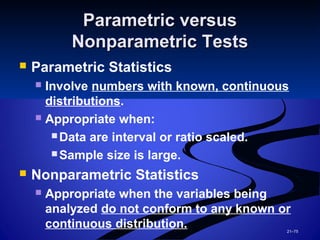
Parametric versusParametric versus
NonparametricTestsNonparametric Tests
Parametric Statistics
Involve numbers with known, continuous
distributions.
Appropriate when:
Data are interval or ratio scaled.
Sample size is large.
Nonparametric Statistics
Appropriate when the variables being
analyzed do not conform to any known or
continuous distribution.
21–77
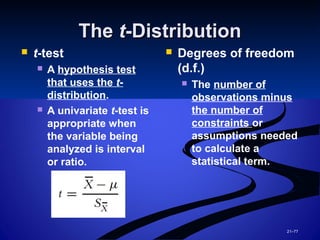
TheThe tt-Distribution-Distribution
t-test
A hypothesis test
that uses the t-
distribution.
A univariate t-test is
appropriate when
the variable being
analyzed is interval
or ratio.
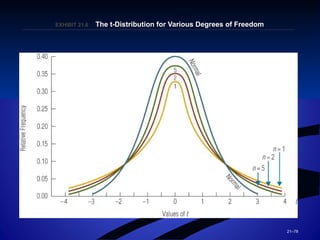
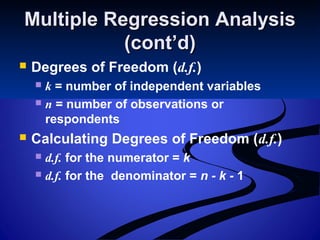
Degrees of freedom
(d.f.)
The number of
observations minus
the number of
constraints or
assumptions needed
to calculate a
statistical term.
78.
21–78
EXHIBIT 21.EXHIBIT 21.66The t-Distribution for Various Degrees of FreedomThe t-Distribution for Various Degrees of Freedom
79.
21–79
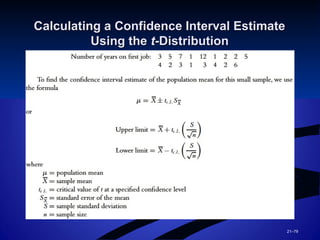
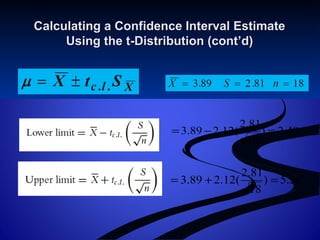
Calculating a ConfidenceInterval EstimateCalculating a Confidence Interval Estimate
Using theUsing the tt-Distribution-Distribution
80.
Calculating a ConfidenceInterval EstimateCalculating a Confidence Interval Estimate
Using the t-Distribution (cont’d)Using the t-Distribution (cont’d)
28.5)
18
81.2
(12.289.3 =+=
49.2)
18
81.2
(12.289.3 =−=
81.
21–81
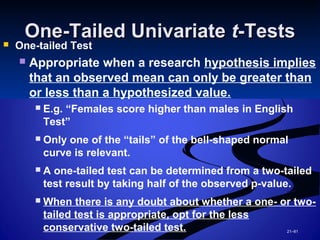
One-Tailed UnivariateOne-Tailed Univariatett-Tests-Tests One-tailed Test
Appropriate when a research hypothesis implies
that an observed mean can only be greater than
or less than a hypothesized value.
E.g. “Females score higher than males in English
Test”
Only one of the “tails” of the bell-shaped normal
curve is relevant.
A one-tailed test can be determined from a two-tailed
test result by taking half of the observed p-value.
When there is any doubt about whether a one- or two-
tailed test is appropriate, opt for the less
conservative two-tailed test.
82.
21–82
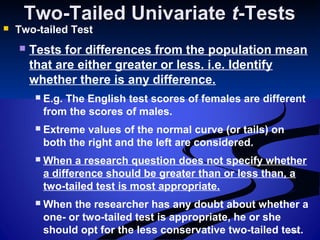
Two-Tailed UnivariateTwo-Tailed Univariatett-Tests-Tests
Two-tailed Test
Tests for differences from the population mean
that are either greater or less. i.e. Identify
whether there is any difference.
E.g. The English test scores of females are different
from the scores of males.
Extreme values of the normal curve (or tails) on
both the right and the left are considered.
When a research question does not specify whether
a difference should be greater than or less than, a
two-tailed test is most appropriate.
When the researcher has any doubt about whether a
one- or two-tailed test is appropriate, he or she
should opt for the less conservative two-tailed test.
83.
Univariate Hypothesis TestUnivariateHypothesis Test
Utilizing theUtilizing the tt-Distribution-Distribution
Example:
Suppose a Pizza Inn manager believes the
average number of returned pizzas each day
to be 20.
The store records the number of defective
assemblies for each of the 25 days it was
opened in a given month.
The mean was calculated to be 22, and the
standard deviation to be 5.
84.
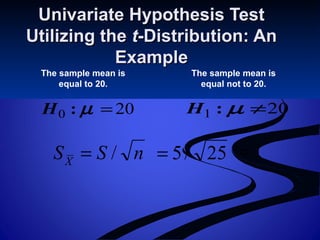
200 =µ:H
Univariate HypothesisTestUnivariate Hypothesis Test
Utilizing theUtilizing the tt-Distribution: An-Distribution: An
ExampleExample
The sample mean is
equal to 20.
The sample mean is
equal not to 20.
201 ≠µ:H
nSSX
/= 25/5= 1=
85.
Univariate Hypothesis TestUnivariateHypothesis Test
Utilizing theUtilizing the tt-Distribution: An-Distribution: An
Example (cont’d)Example (cont’d)
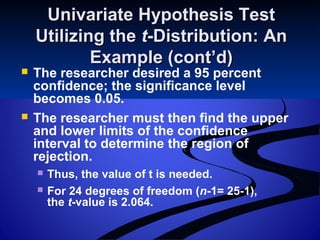
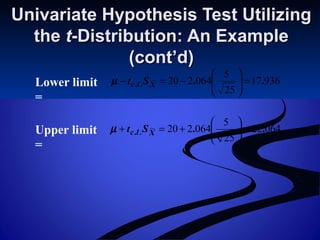
The researcher desired a 95 percent
confidence; the significance level
becomes 0.05.
The researcher must then find the upper
and lower limits of the confidence
interval to determine the region of
rejection.
Thus, the value of t is needed.
For 24 degrees of freedom (n-1= 25-1),
the t-value is 2.064.
Univariate Hypothesis TestUnivariateHypothesis Test
Utilizing theUtilizing the tt-Distribution:-Distribution:
An Example (cont’d)An Example (cont’d)
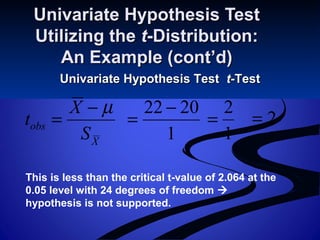
Univariate Hypothesis TestUnivariate Hypothesis Test tt-Test-Test
X
obs
S
X
t
µ−
=
1
2022 −
=
1
2
= 2=
This is less than the critical t-value of 2.064 at the
0.05 level with 24 degrees of freedom
hypothesis is not supported.
88.
21–88
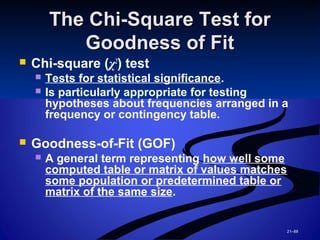
The Chi-Square TestforThe Chi-Square Test for
Goodness of FitGoodness of Fit
Chi-square (χ2
) test
Tests for statistical significance.
Is particularly appropriate for testing
hypotheses about frequencies arranged in a
frequency or contingency table.
Goodness-of-Fit (GOF)
A general term representing how well some
computed table or matrix of values matches
some population or predetermined table or
matrix of the same size.
89.
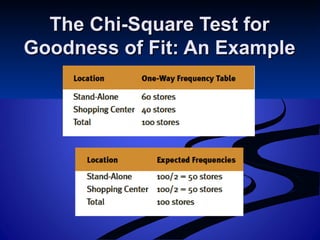
The Chi-Square TestforThe Chi-Square Test for
Goodness of Fit: An ExampleGoodness of Fit: An Example
90.
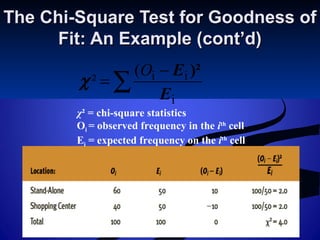
The Chi-Square Testfor Goodness ofThe Chi-Square Test for Goodness of
Fit: An Example (cont’d)Fit: An Example (cont’d)
∑
−
=
i
ii(
²
E
E )²O
χ
χ² = chi-square statistics
Oi = observed frequency in the ith
cell
Ei = expected frequency on the ith
cell
91.
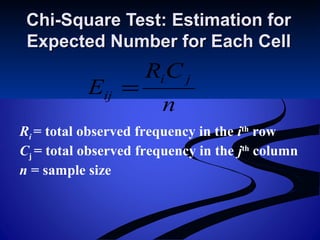
n
CR
E
ji
ij =
Chi-Square Test:Estimation forChi-Square Test: Estimation for
Expected Number for Each CellExpected Number for Each Cell
Ri = total observed frequency in the ith
row
Cj = total observed frequency in the jth
column
n = sample size
92.
Hypothesis Test ofa ProportionHypothesis Test of a Proportion
Hypothesis Test of a Proportion
Is conceptually similar to the one used when
the mean is the characteristic of interest but
that differs in the mathematical formulation
of the standard error of the proportion.
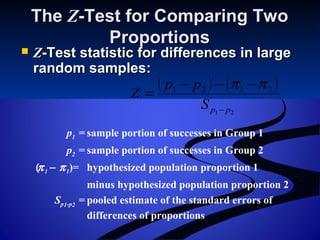
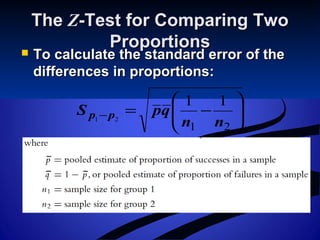
p
obs
S
p
Z
π−
=
π is the population proportion
p is the sample proportion
π is estimated with p
93.
What Is theAppropriate TestWhat Is the Appropriate Test
of Difference?of Difference?
Test of Differences
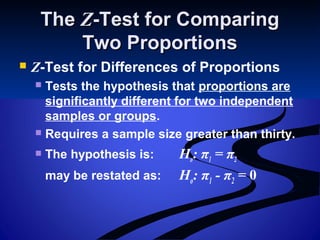
An investigation of a hypothesis that two (or
more) groups differ with respect to measures
on a variable.
Behaviour, characteristics, beliefs, opinions,
emotions, or attitudes
Bivariate Tests of Differences
Involve only two variables: a variable that acts
like a dependent variable and a variable that
acts as a classification variable.
Differences in mean scores between groups or in
comparing how two groups’ scores are distributed
across possible response categories.
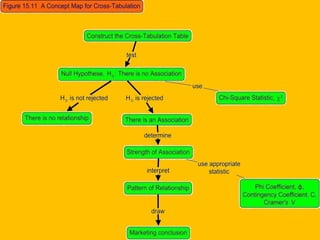
Cross-Tabulation Tables: TheCross-TabulationTables: The χχ22
Test for Goodness-of-FitTest for Goodness-of-Fit
Cross-Tabulation (Contingency) Table
A joint frequency distribution of observations
on two more variables.
χ2
Distribution
Provides a means for testing the statistical
significance of a contingency table.
Involves comparing observed frequencies (Oi)
with expected frequencies (Ei) in each cell of the
table.
Captures the goodness- (or closeness-) of-fit of
the observed distribution with the expected
distribution.
96.
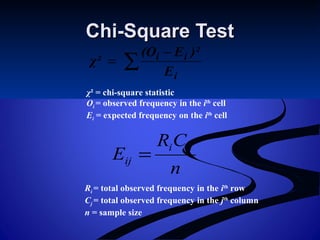
Chi-Square TestChi-Square Test
∑
−
=
i
ii
E
)²E(O
χ²
χ²= chi-square statistic
Oi = observed frequency in the ith
cell
Ei = expected frequency on the ith
cell
n
CR
E
ji
ij =
Ri = total observed frequency in the ith
row
Cj = total observed frequency in the jth
column
n = sample size
97.
Degrees of Freedom(d.f.)Degrees of Freedom (d.f.)
d.f.=(R-1)(C-1)d.f.=(R-1)(C-1)
98.
22–98
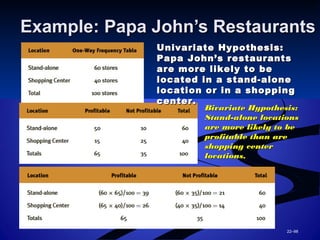
Example: Papa John’sRestaurantsExample: Papa John’s Restaurants
Univariate Hypothesis:Univariate Hypothesis:
Papa John’s restaurantsPapa John’s restaurants
are more likely to beare more likely to be
located in a stand-alonelocated in a stand-alone
location or in a shoppinglocation or in a shopping
center.center.
Bivariate Hypothesis:Bivariate Hypothesis:
Stand-alone locationsStand-alone locations
are more likely to beare more likely to be
profitable than areprofitable than are
shopping centershopping center
locations.locations.
99.
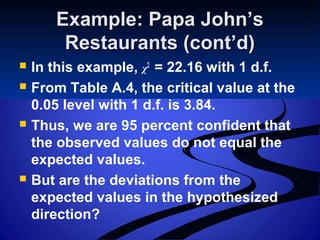
Example: Papa John’sExample:Papa John’s
Restaurants (cont’d)Restaurants (cont’d)
In this example, χ2
= 22.16 with 1 d.f.
From Table A.4, the critical value at the
0.05 level with 1 d.f. is 3.84.
Thus, we are 95 percent confident that
the observed values do not equal the
expected values.
But are the deviations from the
expected values in the hypothesized
direction?
100.
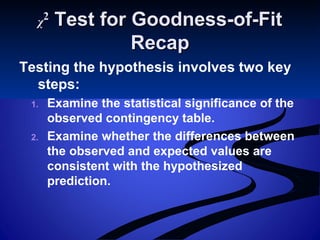
χχ22
Test for Goodness-of-FitTestfor Goodness-of-Fit
RecapRecap
Testing the hypothesis involves two key
steps:
1. Examine the statistical significance of the
observed contingency table.
2. Examine whether the differences between
the observed and expected values are
consistent with the hypothesized
prediction.
Editor's Notes
#2 This "Deco" border was drawn on the Slide master using PowerPoint's Rectangle and Line tools. A smaller version was placed on the Notes Master by selecting all of the elements (using Select All from the Edit menu), deselecting the unwanted elements such as the Title (holding down the Shift key and clicking on the unwanted elements), and then using Paste as Picture from the Edit menu to place the border on the Notes Master. After pasting as a picture, we used the resize handles (with Shift to maintain the proportions) to reduce it to the size you see. Be sure to delete this word processing box before using this template for your own presentation.