A second look at Oracle RAC 12c 
Copyright © 2013 World Wide Technology, Inc. All rights reserved. 
Leighton L. Nelson Lead DBA 
World Wide Technology, Inc.
About me 
• Oracle DBA 
• Oracle ACE 
• Speaker 
• Co-Author – Expert Oracle Enterprise 
Manager Cloud Control 12c 
• RAC Attack Ninja 
http://blogs.griddba.com 
linkedin.com/pub/leighton-nelson/4/6b8/a7a 
@leight0nn
Agenda 
• Oracle RAC 12c Features 
• Management Tools 
• SRVCTL 
• CRSCTL 
• Support Tools 
• ORAchk 
• TFA 
• ADR 
• PDBs and Services in RAC 
• What’s New in 12.1.0.2
Oracle RAC 12c Overview 
• The sexy stuff
Oracle RAC 12c Overview 
• Flex Cluster 
• Flex ASM 
• Application Continuity and Transaction Guard 
• Oracle Multi-tenant
Management Tools 
• SRVCTL enhanced to accept full-word options 
• New SRVCTL commands have full-word options only 
• Existing SRVCTL commands support single letters for backwards compatibility 
• More intuitive 
• Single letter options confusing at times 
• Inconsistent 
• Allows for more options
Management Tools 
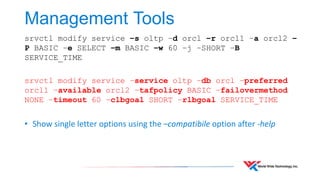
srvctl modify service –s oltp –d orcl –r orcl1 –a orcl2 – 
P BASIC –e SELECT –m BASIC –w 60 –j –SHORT –B 
SERVICE_TIME
Management Tools 
srvctl modify service –s oltp –d orcl –r orcl1 –a orcl2 – 
P BASIC –e SELECT –m BASIC –w 60 –j –SHORT –B 
SERVICE_TIME 
srvctl modify service –service oltp –db orcl –preferred 
orcl1 –available orcl2 –tafpolicy BASIC –failovermethod 
NONE –timeout 60 –clbgoal SHORT –rlbgoal SERVICE_TIME 
• Show single letter options using the –compatibile option after -help
Management Tools 
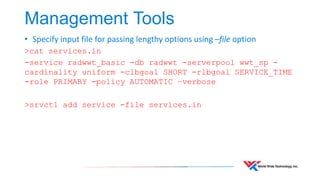
• Specify input file for passing lengthy options using –file option 
>cat services.in 
-service radwwt_basic -db radwwt -serverpool wwt_sp - 
cardinality uniform -clbgoal SHORT -rlbgoal SERVICE_TIME 
-role PRIMARY -policy AUTOMATIC –verbose 
>srvctl add service -file services.in
Management Tools 
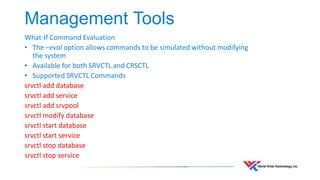
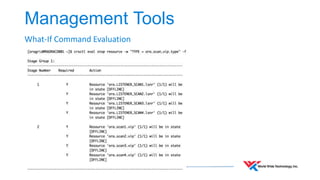
What-If Command Evaluation 
• The –eval option allows commands to be simulated without modifying 
the system 
• Available for both SRVCTL and CRSCTL 
• Supported SRVCTL Commands 
srvctl add database 
srvctl add service 
srvctl add srvpool 
srvctl modify database 
srvctl start database 
srvctl start service 
srvctl stop database 
srvctl stop service
Management Tools 
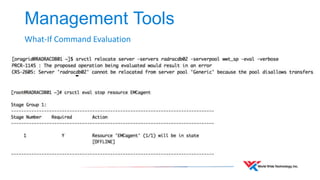
What-If Command Evaluation
Management Tools 
What-If Command Evaluation
Management Tools 
• Using CRSCTL some attributes can be modified online without a restart 
• Modification of ora.* resources enforced 
• crsctl modify ora.* resource fails with CRS-4995 in 12.1.0.2 and above (Doc ID 
1918102.1) 
• Only user-defined resources can be modified 
• There are exceptions 
• CRS_STAT commands deprecated as of 11.2 
• Replaced with CRSCTL status resource
Management Tools 
Back to the future
Management Tools 
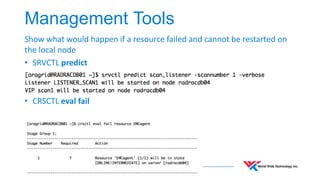
Show what would happen if a resource failed and cannot be restarted on 
the local node 
• SRVCTL predict 
• CRSCTL eval fail
Support Tools 
• ORAchk aka RACcheck 
• Trace File Analyzer (TFA) Collector 
• Automatic Diagnostics Repository (ADR)
Support Tools 
• ORAchk provides health checks for Oracle stack 
• Databases (Single Instance and RAC) 
• Enterprise Manager Repository 
• E-Business Suite 
• ORAchk now included in 12c binaries 
• $ORACLE_HOME/suptools 
• Latest version can be downloaded from MOS 
• ORAchk - Health Checks for the Oracle Stack (Doc ID 1268927.2)
Support Tools 
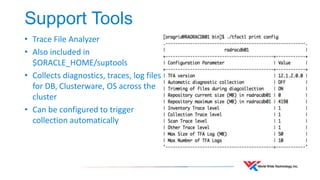
• Trace File Analyzer 
• Also included in 
$ORACLE_HOME/suptools 
• Collects diagnostics, traces, log files 
for DB, Clusterware, OS across the 
cluster 
• Can be configured to trigger 
collection automatically
Support Tools 
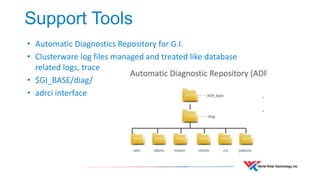
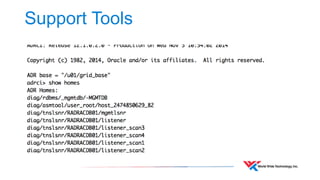
• Automatic Diagnostics Repository for G.I. 
• Clusterware log files managed and treated like database 
related logs, trace 
• $GI_BASE/diag/ 
• adrci interface
Support Tools
PDBs and Services in RAC 
• PDBs can only be accessed remotely using service names 
• A single CDB can have 0 or more PDBs 
• Each PDB has 1 or more services 
• PDBs are mounted by default 
• Starting a service opens the PDB 
• SINGLETON service opens PDB on the node it runs on 
• Use UNIFORM service to access PDB on more than one node 
• Stopping a service doesn’t close the PDB 
• PDB remains open but inaccessible
What’s new in 12.1.0.2 
• Ping Targets 
• Probe nodes in Virtual Cluster for network failure 
• Detects reachability for targets on public network 
• Rapid Home Cloning 
• Store gold images of database software in RHP server 
• Deploy images to dev/test environments 
• GIMR mandatory 
• Single instance CDB with 1 PDB 
• Collect diagnostics for Cluster Health Monitor (CHM)
References 
• Oracle RAC 12c 
http://www.oracle.com/technetwork/database/options/clustering/rac-wp- 
12c-1896129.pdf 
• Oracle® Clusterware Administration and Deployment Guide 12c Release 1 
(12.1) 
• Oracle RAC 12c Operational Best Practices 
http://www.slideshare.net/MarkusMichalewicz 
• Oracle RAC, Oracle Data Guard, and Pluggable Databases: When MAA 
Meets Oracle Multitenant http://www.ludovicocaldara.net/dba/maa-multitenant- 
presentation/

A Second Look at Oracle RAC 12c

  • 1.
    A second lookat Oracle RAC 12c Copyright © 2013 World Wide Technology, Inc. All rights reserved. Leighton L. Nelson Lead DBA World Wide Technology, Inc.
  • 2.
    About me •Oracle DBA • Oracle ACE • Speaker • Co-Author – Expert Oracle Enterprise Manager Cloud Control 12c • RAC Attack Ninja http://blogs.griddba.com linkedin.com/pub/leighton-nelson/4/6b8/a7a @leight0nn
  • 3.
    Agenda • OracleRAC 12c Features • Management Tools • SRVCTL • CRSCTL • Support Tools • ORAchk • TFA • ADR • PDBs and Services in RAC • What’s New in 12.1.0.2
  • 4.
    Oracle RAC 12cOverview • The sexy stuff
  • 5.
    Oracle RAC 12cOverview • Flex Cluster • Flex ASM • Application Continuity and Transaction Guard • Oracle Multi-tenant
  • 6.
    Management Tools •SRVCTL enhanced to accept full-word options • New SRVCTL commands have full-word options only • Existing SRVCTL commands support single letters for backwards compatibility • More intuitive • Single letter options confusing at times • Inconsistent • Allows for more options
  • 7.
    Management Tools srvctlmodify service –s oltp –d orcl –r orcl1 –a orcl2 – P BASIC –e SELECT –m BASIC –w 60 –j –SHORT –B SERVICE_TIME
  • 8.
    Management Tools srvctlmodify service –s oltp –d orcl –r orcl1 –a orcl2 – P BASIC –e SELECT –m BASIC –w 60 –j –SHORT –B SERVICE_TIME srvctl modify service –service oltp –db orcl –preferred orcl1 –available orcl2 –tafpolicy BASIC –failovermethod NONE –timeout 60 –clbgoal SHORT –rlbgoal SERVICE_TIME • Show single letter options using the –compatibile option after -help
  • 9.
    Management Tools •Specify input file for passing lengthy options using –file option >cat services.in -service radwwt_basic -db radwwt -serverpool wwt_sp - cardinality uniform -clbgoal SHORT -rlbgoal SERVICE_TIME -role PRIMARY -policy AUTOMATIC –verbose >srvctl add service -file services.in
  • 10.
    Management Tools What-IfCommand Evaluation • The –eval option allows commands to be simulated without modifying the system • Available for both SRVCTL and CRSCTL • Supported SRVCTL Commands srvctl add database srvctl add service srvctl add srvpool srvctl modify database srvctl start database srvctl start service srvctl stop database srvctl stop service
  • 11.
    Management Tools What-IfCommand Evaluation
  • 12.
    Management Tools What-IfCommand Evaluation
  • 13.
    Management Tools •Using CRSCTL some attributes can be modified online without a restart • Modification of ora.* resources enforced • crsctl modify ora.* resource fails with CRS-4995 in 12.1.0.2 and above (Doc ID 1918102.1) • Only user-defined resources can be modified • There are exceptions • CRS_STAT commands deprecated as of 11.2 • Replaced with CRSCTL status resource
  • 14.
    Management Tools Backto the future
  • 15.
    Management Tools Showwhat would happen if a resource failed and cannot be restarted on the local node • SRVCTL predict • CRSCTL eval fail
  • 16.
    Support Tools •ORAchk aka RACcheck • Trace File Analyzer (TFA) Collector • Automatic Diagnostics Repository (ADR)
  • 17.
    Support Tools •ORAchk provides health checks for Oracle stack • Databases (Single Instance and RAC) • Enterprise Manager Repository • E-Business Suite • ORAchk now included in 12c binaries • $ORACLE_HOME/suptools • Latest version can be downloaded from MOS • ORAchk - Health Checks for the Oracle Stack (Doc ID 1268927.2)
  • 18.
    Support Tools •Trace File Analyzer • Also included in $ORACLE_HOME/suptools • Collects diagnostics, traces, log files for DB, Clusterware, OS across the cluster • Can be configured to trigger collection automatically
  • 19.
    Support Tools •Automatic Diagnostics Repository for G.I. • Clusterware log files managed and treated like database related logs, trace • $GI_BASE/diag/ • adrci interface
  • 20.
  • 21.
    PDBs and Servicesin RAC • PDBs can only be accessed remotely using service names • A single CDB can have 0 or more PDBs • Each PDB has 1 or more services • PDBs are mounted by default • Starting a service opens the PDB • SINGLETON service opens PDB on the node it runs on • Use UNIFORM service to access PDB on more than one node • Stopping a service doesn’t close the PDB • PDB remains open but inaccessible
  • 22.
    What’s new in12.1.0.2 • Ping Targets • Probe nodes in Virtual Cluster for network failure • Detects reachability for targets on public network • Rapid Home Cloning • Store gold images of database software in RHP server • Deploy images to dev/test environments • GIMR mandatory • Single instance CDB with 1 PDB • Collect diagnostics for Cluster Health Monitor (CHM)
  • 23.
    References • OracleRAC 12c http://www.oracle.com/technetwork/database/options/clustering/rac-wp- 12c-1896129.pdf • Oracle® Clusterware Administration and Deployment Guide 12c Release 1 (12.1) • Oracle RAC 12c Operational Best Practices http://www.slideshare.net/MarkusMichalewicz • Oracle RAC, Oracle Data Guard, and Pluggable Databases: When MAA Meets Oracle Multitenant http://www.ludovicocaldara.net/dba/maa-multitenant- presentation/

Editor's Notes

  • #7 Deprecation of single-letter SRVCTL CLI options All SRVCTL commands have been enhanced to accept full-word options instead of the single-letter options. All new SRVCTL command options added in this release support full-word options, only, and do not have single-letter equivalents. The use of single-letter options with SRVCTL commands might be desupported in a future release.
  • #10 You want to run a command with very long parameter values or a command with numerous parameters You want to bypass shell processing of certain special characters
  • #11 CRSCTL –eval commands useful for cluster administrators who need to manage resources SRVCTL –eval commands useful for DB administrators who just like to see the effect of a specific object such as database, listener, service Level of information between the two differs
  • #12 CRSCTL eval options limited to non-ora resources If nothing is returned after executing using –eval then that usually means the command will succeed.
  • #13 Use crsctl eval –help to see valid options
  • #14 crsctl status resource –init ora.storage 1 ONLINE ONLINE radracdb01 STABLE --------------------------------------------------------------------------------
  • #19 Adds web server on port 5000