ORACLE ENTERPRISE MANAGER

WRITE POWERFUL SCRIPTS
WITH EMCLI
Gökhan Atıl
GÖKHAN ATIL
➤ DBA Team Lead with 15+ years of experience
➤ Oracle ACE Director (2016)

ACE (2011)
➤ 10g/11g and R12 OCP
➤ Founding Member and Vice President of TROUG
➤ Blogger (since 2008) gokhanatil.com
➤ Twitter: @gokhanatil
➤ Co-author of “Expert Oracle Enterprise Manager 12c”
AGENDA
➤ Introduction to EMCLI
➤ EMCLI Verbs
➤ How much Python do I need to know? (Python Cheatsheet)
➤ Sample Scripts
➤ Further Reading
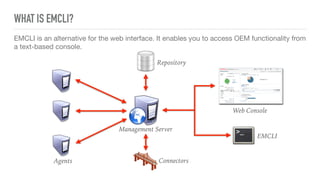
EMCLI is an alternative for the web interface. It enables you to access OEM functionality from
a text-based console.
WHAT IS EMCLI?
Repository
EMCLI
Agents
Web Console
Management Server
Connectors
ALREADY INSTALLED
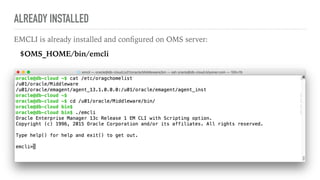
EMCLI is already installed and configured on OMS server:
$OMS_HOME/bin/emcli
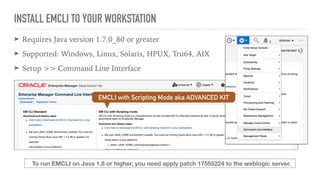
INSTALL EMCLI TO YOUR WORKSTATION
➤ Requires Java version 1.7.0_80 or greater
➤ Supported: Windows, Linux, Solaris, HPUX, Tru64, AIX
➤ Setup >> Command Line Interface
To run EMCLI on Java 1.8 or higher, you need apply patch 17555224 to the weblogic server.
EMCLI with Scripting Mode aka ADVANCED KIT
INSTALL AND CONFIGURE
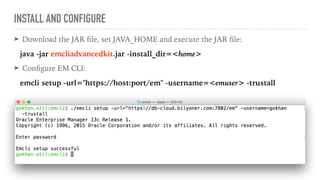
➤ Download the JAR file, set JAVA_HOME and execute the JAR file:
java -jar emcliadvancedkit.jar -install_dir=<home>
➤ Configure EM CLI:
emcli setup -url="https://host:port/em" -username=<emuser> -trustall
WHY ADVANCED KIT?
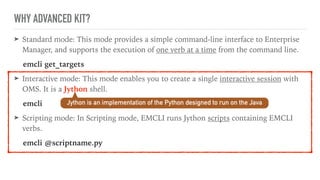
➤ Standard mode: This mode provides a simple command-line interface to Enterprise
Manager, and supports the execution of one verb at a time from the command line.
emcli get_targets
➤ Interactive mode: This mode enables you to create a single interactive session with
OMS. It is a Jython shell.
emcli
➤ Scripting mode: In Scripting mode, EMCLI runs Jython scripts containing EMCLI
verbs.
emcli @scriptname.py
Jython is an implementation of the Python designed to run on the Java
EMCLI VERBS
and Python
EMCLI VERBS
➤ A verb is a task or action in the form of a user command that exposes Enterprise
Manager functionality.
➤ In Standard mode, EMCLI expect you enter a verb as the first parameter. Verbs may
take zero or more arguments as input:
emcli verb -1st_argument="value" 

[ -2nd_ argument="value" ]

[ -3th_ argument ]
➤ In Scripting mode, EMCLI verbs are defined as Python functions, and arguments
are entered as function parameters:
verb( 1st_argument="value", 2nd_ argument="value")
400+ VERBS IN 75+ CATEGORIES
➤ Add Host Verbs
➤ Agent Administration Verbs
➤ Agent Upgrade Verbs
➤ BI Publisher Reports Verbs
➤ Blackout Verbs
➤ Credential Verbs
➤ Incident Rules Verbs
➤ Job Verbs
➤ Metric Extension Verbs
➤ Monitoring Templates Verbs
➤ Oracle Cloud Verbs
➤ Provisioning Verbs
➤ Self Update Verbs
➤ User Administration Verbs
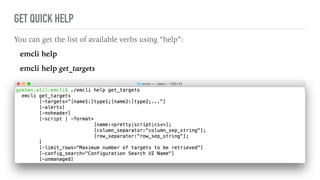
GET QUICK HELP
You can get the list of available verbs using “help”:
emcli help
emcli help get_targets
➤ EMCLI verbs returns emcli.response.Response object:
result = emcli.response.Response
.error()

.exit_code()

.isJson()

.out()
➤ In scripting mode, default output format type is JSON for the verbs resulting a list of
items. In interactive mode, to change the output format to JSON, you need to run the
following command:
set_client_property('EMCLI_OUTPUT_TYPE', 'JSON')
JSON - DICT
EMCLI RESPONSE OBJECT
error text

error code (0=success)

is JSON? true/false

JSON or text
[“data”] - LIST
DICT
DICT
DICT
result.out():

{ 'data':
[{'Status': 'Up', 'Warning': '2', 'Status ID': '1',
'Target Type': 'oracle_database', 'Critical':
'1', 'Target Name': 'db000002'},
{'Status': 'Up', 'Warning': '2', 'Status ID': '1',
'Target Type': 'oracle_database', 'Critical': '2',
'Target Name': 'db000001'},
{'Status': 'Up', 'Warning': '2', 'Status ID': '1',
'Target Type': 'oracle_database', 'Critical': '0',
'Target Name': 'db000000'}] }
PYTHON DICTIONARY AND LIST OBJECTS, AND EMCLI RESPONSE
List:

L = [1000,1001,1002,1003]
L[0] is 1000
Dictionary:
D = { "keyA": "red", "keyB": "green" }
D["keyA"] is "red"
Dict containing List containing Dict:
R = { "car":
[ { "brand", "BMW" }, { "brand", "Audi" } ] }
R["car"][0]["brand"] is "BMW"
result.out()["data"][0]
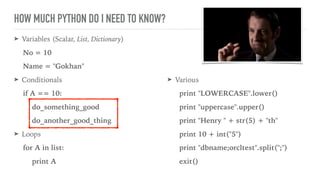
HOW MUCH PYTHON DO I NEED TO KNOW?
➤ Variables (Scalar, List, Dictionary)
No = 10
Name = "Gokhan"
➤ Conditionals
if A == 10:
do_something_good
do_another_good_thing
➤ Loops
for A in list:
print A
➤ Various
print "LOWERCASE".lower()
print "uppercase".upper()
print "Henry " + str(5) + "th"
print 10 + int("5")
print "dbname;orcltest".split(";")
exit()
SAMPLE SCRIPTS
LET’S WRITE OUR FIRST EMCLI SCRIPT!
➤ Goal: Clear stateless alerts of all database targets
➤ Login to OMS (The EMCLI client should be logged in to OMS before executing other
EMCLI verbs)
login( username="GOKHAN", password="123456" )
➤ Get list of all database targets
get_targets( target="oracle_database" )
➤ Clear stateless alert of each database target
clear_stateless_alerts( target_name, target_type, older_than )
➤ Logout
logout()
.out()["data"]
loop
CLEAR STATELESS ALERTS
clearalerts.py
if login( username="GOKHAN", password="123456" ).exit_code()==0:
for target in get_targets( targets="oracle_database" ).out()["data"]:
print "Clearing stateless alerts for " + target["Target Name"]
clear_stateless_alerts(target_name= target["Target Name"],
target_type= target["Target Type"], older_than="0" )
logout()
SAMPLE EMCLI SCRIPT #2
➤ Goal: Apply default host template to all host targets
➤ Login to OMS
➤ Get list of all host templates to find the default template
list_templates(target_type="host")
➤ If it's "default" template, assign it to a variable
➤ Get list of all host targets
get_targets(target="hosts" ).out()["data"]
➤ Apply host tempate to all hosts
apply_template( name, targets, replace_metrics)
➤ Logout
loop
loop
APPLY DEFAULT TEMPLATE TO ALL HOSTS
applyhosttemplate.py
if login( username="GOKHAN", password="123456" ).exit_code()==0:
for template in list_templates( target_type="host" ).out()["data"]:
if template["Default Template"] == "yes":
defaulttemplate = template["Template Name"]
for host in get_targets( targets="host").out()["data"]:
apply_template( name=defaulttemplate, replace_metrics="1",
targets=host["Target Name"] + ":host")
logout()
APPLY DEFAULT TEMPLATE TO ALL HOSTS
applyhosttemplate.py
if login( username="GOKHAN", password="123456" ).exit_code()==0:
for template in list_templates( target_type="host" ).out()["data"]:
if template["Default Template"] == "yes":
defaulttemplate = template["Template Name"]
print defaulttemplate + " will be applied to the following hosts:"
for host in get_targets( targets="host").out()["data"]:
apply_template( name=defaulttemplate, replace_metrics="1",
targets=host["Target Name"] + ":host")
print host["Target Name"]
logout()
SAMPLE EMCLI SCRIPT #3
➤ Goal: Promote all discovered (but unmanaged) single database targets
➤ Login to OMS
➤ Get list of all unmanaged targets (with properties)
get_targets("unmanaged","properties",

target="oracle_database" ).out()["data"]
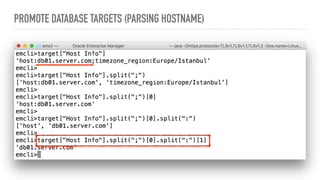
➤ Parse Hostname from host info
host:db01.server.com;timezone_region:Europe/Istanbul
➤ Promote the database target
add_target( name, type, host, properties,

credentials="UserName:dbsnmp;password:xyz;Role:Normal")
➤ Logout
loop
PROMOTE DATABASE TARGETS
promotetargets.py
if login( username="GOKHAN", password="mypassword" ).exit_code()==0:
for target in get_targets("unmanaged","properties",
targets="oracle_database").out()["data"]:
add_target( name=target['Target Name'], type=target['Target Type'],
host=target['Host Info'],
properties=target['Properties'],
credentials="UserName:dbsnmp;password:xyz;Role:Normal")
logout()
PROMOTE DATABASE TARGETS (PARSING HOSTNAME)
PROMOTE DATABASE TARGETS
promotetargets.py
if login( username="GOKHAN", password="mypassword" ).exit_code()==0:
for target in get_targets("unmanaged","properties",
targets="oracle_database").out()["data"]:
print "Promoting " + target['Target Name']
add_target( name=target['Target Name'], type=target['Target Type'],
host=target['Host Info'].split(';')[0].split(':')[1],
properties=target['Properties'],
credentials="UserName:dbsnmp;password:xyz;Role:Normal")
logout()
SAMPLE EMCLI SCRIPT #4
➤ Goal: Change DBSMP (database user) passwords of all database targets
➤ Login to OMS
➤ Get list of all database targets
get_targets( target="oracle_database" ).out()["data"]
➤ Update DBSNMP user password
update_db_password(target_name,target_type, user_name,

change_at_target, old_password, new_password

retype_new_password)
➤ Logout
➤ Optional: Read old and new password from command line
➤ Optional: Catch Exceptions (in case, user entered wrong password)
loop
CHANGE DBSNMP PASSWORDS
changedbsnmp.py
if login( username="GOKHAN", password="123456" ).exit_code()==0:
for db in get_targets( targets="oracle_database").out()["data"]:
update_db_password (target_name= db["Target Name"],
target_type= db["Target Type"],
change_at_target="yes", user_name="dbsnmp",
old_password="oldpassword",
new_password="newpassword", retype_new_password="newpassword")
logout()
secure programming!?
CHANGE DBSNMP PASSWORDS
changedbsnmp.py
if len(sys.argv) <> 2:
print "Usage: emcli @changedbsnmp.py oldpwd newpwd"
exit()
if login( username="GOKHAN", password="123456" ).exit_code()==0:
for db in get_targets( targets="oracle_database").out()["data"]:
print "Updating dbsnmp password on " + db["Target Name"]
update_db_password (target_name=db["Target Name"], target_type=db["Target Type"],
change_at_target="yes", user_name="dbsnmp", old_password=sys.argv[0],
new_password=sys.argv[1], retype_new_password=sys.argv[1])
logout()
CHANGE DBSNMP PASSWORDS
changedbsnmp.py
if len(sys.argv) <> 2:
print "Usage: emcli @changedbsnmp.py oldpwd newpwd"
exit()
if login( username="GOKHAN", password="mypassword" ).exit_code()==0:
for db in get_targets( targets="oracle_database").out()["data"]:
try:
print "Updating dbsnmp password on " + db["Target Name"]
update_db_password (target_name=db["Target Name"],
target_type=db["Target Type"], change_at_target="yes",user_name="dbsnmp",
old_password=sys.argv[0], new_password=sys.argv[1], retype_new_password=sys.argv[1])
except emcli.exception.VerbExecutionError, e:
print e.error()
logout()
exception block
SAMPLE EMCLI SCRIPT #5
➤ Goal: List databases running on a specific Operating System
➤ Read OS name from run parameters
➤ Login to OMS
➤ Get list of all database targets from the Targets resource
list( resource="Targets", search ).out()["data"]
➤ Find the OS information from the Targets resource (will return one row)
list( resource="Targets", search ).out()["data"][0]
➤ Compare OS names and print target info if they match
➤ Logout
loop
LIST
➤ Lists avaliable "resources" (data sources/management views)
emcli list -help or list( "help" )
➤ Lists columns of a resource
emcli list -resource="Targets" -help
or list( "help", resource="Targets" ) or list( resource="Targets", help=True )
➤ Selection and Projection
list( resource="Targets",columns="TARGET_NAME,TARGET_TYPE",

search="TARGET_TYPE='oracle_database'")
➤ Run SQL query
list( "select * from mgmt$target where target_type='oracle_database'" )
LIST DATABASES
listdatabases.py
if (len(sys.argv) <> 1 ):
print "Usage: emcli @list_targets.py OSname"
exit()
if login( username="gokhan", password="123456" ).exit_code()==0:
for db in list( resource="Targets", search="TARGET_TYPE='oracle_database'" ).out()['data']:
OS = list( resource="Targets",
search="TARGET_NAME='" + db['HOST_NAME'] + "'" ).out()['data'][0]['TYPE_QUALIFIER1']
if ( OS.lower() == sys.argv[0].lower() ):
print db['TARGET_NAME'], OS
logout()
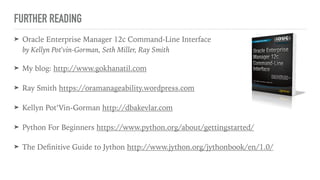
FURTHER READING
➤ Oracle Enterprise Manager 12c Command-Line Interface

by Kellyn Pot'vin-Gorman, Seth Miller, Ray Smith
➤ My blog: http://www.gokhanatil.com
➤ Ray Smith https://oramanageability.wordpress.com
➤ Kellyn Pot’Vin-Gorman http://dbakevlar.com
➤ Python For Beginners https://www.python.org/about/gettingstarted/
➤ The Definitive Guide to Jython http://www.jython.org/jythonbook/en/1.0/
THANK YOU FOR ATTENDING!
ANY QUESTIONS?

EM13c: Write Powerful Scripts with EMCLI

  • 1.
    ORACLE ENTERPRISE MANAGER
 WRITEPOWERFUL SCRIPTS WITH EMCLI Gökhan Atıl
  • 2.
    GÖKHAN ATIL ➤ DBATeam Lead with 15+ years of experience ➤ Oracle ACE Director (2016)
 ACE (2011) ➤ 10g/11g and R12 OCP ➤ Founding Member and Vice President of TROUG ➤ Blogger (since 2008) gokhanatil.com ➤ Twitter: @gokhanatil ➤ Co-author of “Expert Oracle Enterprise Manager 12c”
  • 3.
    AGENDA ➤ Introduction toEMCLI ➤ EMCLI Verbs ➤ How much Python do I need to know? (Python Cheatsheet) ➤ Sample Scripts ➤ Further Reading
  • 4.
    EMCLI is analternative for the web interface. It enables you to access OEM functionality from a text-based console. WHAT IS EMCLI? Repository EMCLI Agents Web Console Management Server Connectors
  • 5.
    ALREADY INSTALLED EMCLI isalready installed and configured on OMS server: $OMS_HOME/bin/emcli
  • 6.
    INSTALL EMCLI TOYOUR WORKSTATION ➤ Requires Java version 1.7.0_80 or greater ➤ Supported: Windows, Linux, Solaris, HPUX, Tru64, AIX ➤ Setup >> Command Line Interface To run EMCLI on Java 1.8 or higher, you need apply patch 17555224 to the weblogic server. EMCLI with Scripting Mode aka ADVANCED KIT
  • 7.
    INSTALL AND CONFIGURE ➤Download the JAR file, set JAVA_HOME and execute the JAR file: java -jar emcliadvancedkit.jar -install_dir=<home> ➤ Configure EM CLI: emcli setup -url="https://host:port/em" -username=<emuser> -trustall
  • 8.
    WHY ADVANCED KIT? ➤Standard mode: This mode provides a simple command-line interface to Enterprise Manager, and supports the execution of one verb at a time from the command line. emcli get_targets ➤ Interactive mode: This mode enables you to create a single interactive session with OMS. It is a Jython shell. emcli ➤ Scripting mode: In Scripting mode, EMCLI runs Jython scripts containing EMCLI verbs. emcli @scriptname.py Jython is an implementation of the Python designed to run on the Java
  • 9.
  • 10.
    EMCLI VERBS ➤ Averb is a task or action in the form of a user command that exposes Enterprise Manager functionality. ➤ In Standard mode, EMCLI expect you enter a verb as the first parameter. Verbs may take zero or more arguments as input: emcli verb -1st_argument="value" 
 [ -2nd_ argument="value" ]
 [ -3th_ argument ] ➤ In Scripting mode, EMCLI verbs are defined as Python functions, and arguments are entered as function parameters: verb( 1st_argument="value", 2nd_ argument="value")
  • 11.
    400+ VERBS IN75+ CATEGORIES ➤ Add Host Verbs ➤ Agent Administration Verbs ➤ Agent Upgrade Verbs ➤ BI Publisher Reports Verbs ➤ Blackout Verbs ➤ Credential Verbs ➤ Incident Rules Verbs ➤ Job Verbs ➤ Metric Extension Verbs ➤ Monitoring Templates Verbs ➤ Oracle Cloud Verbs ➤ Provisioning Verbs ➤ Self Update Verbs ➤ User Administration Verbs
  • 12.
    GET QUICK HELP Youcan get the list of available verbs using “help”: emcli help emcli help get_targets
  • 13.
    ➤ EMCLI verbsreturns emcli.response.Response object: result = emcli.response.Response .error()
 .exit_code()
 .isJson()
 .out() ➤ In scripting mode, default output format type is JSON for the verbs resulting a list of items. In interactive mode, to change the output format to JSON, you need to run the following command: set_client_property('EMCLI_OUTPUT_TYPE', 'JSON') JSON - DICT EMCLI RESPONSE OBJECT error text
 error code (0=success)
 is JSON? true/false
 JSON or text [“data”] - LIST DICT DICT DICT
  • 14.
    result.out():
 { 'data': [{'Status': 'Up','Warning': '2', 'Status ID': '1', 'Target Type': 'oracle_database', 'Critical': '1', 'Target Name': 'db000002'}, {'Status': 'Up', 'Warning': '2', 'Status ID': '1', 'Target Type': 'oracle_database', 'Critical': '2', 'Target Name': 'db000001'}, {'Status': 'Up', 'Warning': '2', 'Status ID': '1', 'Target Type': 'oracle_database', 'Critical': '0', 'Target Name': 'db000000'}] } PYTHON DICTIONARY AND LIST OBJECTS, AND EMCLI RESPONSE List:
 L = [1000,1001,1002,1003] L[0] is 1000 Dictionary: D = { "keyA": "red", "keyB": "green" } D["keyA"] is "red" Dict containing List containing Dict: R = { "car": [ { "brand", "BMW" }, { "brand", "Audi" } ] } R["car"][0]["brand"] is "BMW" result.out()["data"][0]
  • 15.
    HOW MUCH PYTHONDO I NEED TO KNOW? ➤ Variables (Scalar, List, Dictionary) No = 10 Name = "Gokhan" ➤ Conditionals if A == 10: do_something_good do_another_good_thing ➤ Loops for A in list: print A ➤ Various print "LOWERCASE".lower() print "uppercase".upper() print "Henry " + str(5) + "th" print 10 + int("5") print "dbname;orcltest".split(";") exit()
  • 16.
  • 17.
    LET’S WRITE OURFIRST EMCLI SCRIPT! ➤ Goal: Clear stateless alerts of all database targets ➤ Login to OMS (The EMCLI client should be logged in to OMS before executing other EMCLI verbs) login( username="GOKHAN", password="123456" ) ➤ Get list of all database targets get_targets( target="oracle_database" ) ➤ Clear stateless alert of each database target clear_stateless_alerts( target_name, target_type, older_than ) ➤ Logout logout() .out()["data"] loop
  • 18.
    CLEAR STATELESS ALERTS clearalerts.py iflogin( username="GOKHAN", password="123456" ).exit_code()==0: for target in get_targets( targets="oracle_database" ).out()["data"]: print "Clearing stateless alerts for " + target["Target Name"] clear_stateless_alerts(target_name= target["Target Name"], target_type= target["Target Type"], older_than="0" ) logout()
  • 19.
    SAMPLE EMCLI SCRIPT#2 ➤ Goal: Apply default host template to all host targets ➤ Login to OMS ➤ Get list of all host templates to find the default template list_templates(target_type="host") ➤ If it's "default" template, assign it to a variable ➤ Get list of all host targets get_targets(target="hosts" ).out()["data"] ➤ Apply host tempate to all hosts apply_template( name, targets, replace_metrics) ➤ Logout loop loop
  • 20.
    APPLY DEFAULT TEMPLATETO ALL HOSTS applyhosttemplate.py if login( username="GOKHAN", password="123456" ).exit_code()==0: for template in list_templates( target_type="host" ).out()["data"]: if template["Default Template"] == "yes": defaulttemplate = template["Template Name"] for host in get_targets( targets="host").out()["data"]: apply_template( name=defaulttemplate, replace_metrics="1", targets=host["Target Name"] + ":host") logout()
  • 21.
    APPLY DEFAULT TEMPLATETO ALL HOSTS applyhosttemplate.py if login( username="GOKHAN", password="123456" ).exit_code()==0: for template in list_templates( target_type="host" ).out()["data"]: if template["Default Template"] == "yes": defaulttemplate = template["Template Name"] print defaulttemplate + " will be applied to the following hosts:" for host in get_targets( targets="host").out()["data"]: apply_template( name=defaulttemplate, replace_metrics="1", targets=host["Target Name"] + ":host") print host["Target Name"] logout()
  • 22.
    SAMPLE EMCLI SCRIPT#3 ➤ Goal: Promote all discovered (but unmanaged) single database targets ➤ Login to OMS ➤ Get list of all unmanaged targets (with properties) get_targets("unmanaged","properties",
 target="oracle_database" ).out()["data"] ➤ Parse Hostname from host info host:db01.server.com;timezone_region:Europe/Istanbul ➤ Promote the database target add_target( name, type, host, properties,
 credentials="UserName:dbsnmp;password:xyz;Role:Normal") ➤ Logout loop
  • 23.
    PROMOTE DATABASE TARGETS promotetargets.py iflogin( username="GOKHAN", password="mypassword" ).exit_code()==0: for target in get_targets("unmanaged","properties", targets="oracle_database").out()["data"]: add_target( name=target['Target Name'], type=target['Target Type'], host=target['Host Info'], properties=target['Properties'], credentials="UserName:dbsnmp;password:xyz;Role:Normal") logout()
  • 24.
    PROMOTE DATABASE TARGETS(PARSING HOSTNAME)
  • 25.
    PROMOTE DATABASE TARGETS promotetargets.py iflogin( username="GOKHAN", password="mypassword" ).exit_code()==0: for target in get_targets("unmanaged","properties", targets="oracle_database").out()["data"]: print "Promoting " + target['Target Name'] add_target( name=target['Target Name'], type=target['Target Type'], host=target['Host Info'].split(';')[0].split(':')[1], properties=target['Properties'], credentials="UserName:dbsnmp;password:xyz;Role:Normal") logout()
  • 26.
    SAMPLE EMCLI SCRIPT#4 ➤ Goal: Change DBSMP (database user) passwords of all database targets ➤ Login to OMS ➤ Get list of all database targets get_targets( target="oracle_database" ).out()["data"] ➤ Update DBSNMP user password update_db_password(target_name,target_type, user_name,
 change_at_target, old_password, new_password
 retype_new_password) ➤ Logout ➤ Optional: Read old and new password from command line ➤ Optional: Catch Exceptions (in case, user entered wrong password) loop
  • 27.
    CHANGE DBSNMP PASSWORDS changedbsnmp.py iflogin( username="GOKHAN", password="123456" ).exit_code()==0: for db in get_targets( targets="oracle_database").out()["data"]: update_db_password (target_name= db["Target Name"], target_type= db["Target Type"], change_at_target="yes", user_name="dbsnmp", old_password="oldpassword", new_password="newpassword", retype_new_password="newpassword") logout() secure programming!?
  • 28.
    CHANGE DBSNMP PASSWORDS changedbsnmp.py iflen(sys.argv) <> 2: print "Usage: emcli @changedbsnmp.py oldpwd newpwd" exit() if login( username="GOKHAN", password="123456" ).exit_code()==0: for db in get_targets( targets="oracle_database").out()["data"]: print "Updating dbsnmp password on " + db["Target Name"] update_db_password (target_name=db["Target Name"], target_type=db["Target Type"], change_at_target="yes", user_name="dbsnmp", old_password=sys.argv[0], new_password=sys.argv[1], retype_new_password=sys.argv[1]) logout()
  • 29.
    CHANGE DBSNMP PASSWORDS changedbsnmp.py iflen(sys.argv) <> 2: print "Usage: emcli @changedbsnmp.py oldpwd newpwd" exit() if login( username="GOKHAN", password="mypassword" ).exit_code()==0: for db in get_targets( targets="oracle_database").out()["data"]: try: print "Updating dbsnmp password on " + db["Target Name"] update_db_password (target_name=db["Target Name"], target_type=db["Target Type"], change_at_target="yes",user_name="dbsnmp", old_password=sys.argv[0], new_password=sys.argv[1], retype_new_password=sys.argv[1]) except emcli.exception.VerbExecutionError, e: print e.error() logout() exception block
  • 30.
    SAMPLE EMCLI SCRIPT#5 ➤ Goal: List databases running on a specific Operating System ➤ Read OS name from run parameters ➤ Login to OMS ➤ Get list of all database targets from the Targets resource list( resource="Targets", search ).out()["data"] ➤ Find the OS information from the Targets resource (will return one row) list( resource="Targets", search ).out()["data"][0] ➤ Compare OS names and print target info if they match ➤ Logout loop
  • 31.
    LIST ➤ Lists avaliable"resources" (data sources/management views) emcli list -help or list( "help" ) ➤ Lists columns of a resource emcli list -resource="Targets" -help or list( "help", resource="Targets" ) or list( resource="Targets", help=True ) ➤ Selection and Projection list( resource="Targets",columns="TARGET_NAME,TARGET_TYPE",
 search="TARGET_TYPE='oracle_database'") ➤ Run SQL query list( "select * from mgmt$target where target_type='oracle_database'" )
  • 32.
    LIST DATABASES listdatabases.py if (len(sys.argv)<> 1 ): print "Usage: emcli @list_targets.py OSname" exit() if login( username="gokhan", password="123456" ).exit_code()==0: for db in list( resource="Targets", search="TARGET_TYPE='oracle_database'" ).out()['data']: OS = list( resource="Targets", search="TARGET_NAME='" + db['HOST_NAME'] + "'" ).out()['data'][0]['TYPE_QUALIFIER1'] if ( OS.lower() == sys.argv[0].lower() ): print db['TARGET_NAME'], OS logout()
  • 33.
    FURTHER READING ➤ OracleEnterprise Manager 12c Command-Line Interface
 by Kellyn Pot'vin-Gorman, Seth Miller, Ray Smith ➤ My blog: http://www.gokhanatil.com ➤ Ray Smith https://oramanageability.wordpress.com ➤ Kellyn Pot’Vin-Gorman http://dbakevlar.com ➤ Python For Beginners https://www.python.org/about/gettingstarted/ ➤ The Definitive Guide to Jython http://www.jython.org/jythonbook/en/1.0/
  • 34.
    THANK YOU FORATTENDING! ANY QUESTIONS?