Migrating from Oracle
Enterprise Manager 10g
  to 12c Cloud Control
       Leighton L. Nelson
About Me
•    Oracle DBA for 10+ years
•    Oracle RAC SIG US Events Chair/IOUG Liaison
•    Blogs at blogs.griddba.com
•    Started presenting in 2012 (Collaborate 12)
Agenda
•  Oracle Enterprise Manger Cloud Control12c
   Architecture
•  Upgrade Path
   •  Overview
•  Pre-Requisites
   •  Patches
   •  Certification Matrix
•  2-System Upgrade
   •  Repository Database Upgrade
   •  OMS Migration & Upgrade
•  Lessons Learned
•  Managing Databases (Demo)
Current and Proposed States
•  Current Architecture (IBM JS21 Blades)
      •    OMS – 10.2.0.5 / AIX 6.1
      •    Repository Database – 11.1.0.6 / AIX 6.1
      •    Agents – 100 (AIX + Linux)
      •    Targets – 500+
•  Proposed Architecture (VMware vSphere)
      •    OMS – 12.1.0.2 / RHEL 6.2
      •    Repository Database – 11.2.0.3 / RHEL 6.2
      •    Agents – 100 (AIX + Linux)
      •    Targets – 500+


•  Database + OS + EM Upgrade = Trinity!
Enterprise Manager 12c Upgrade
Paths
•  1-System Upgrade
   •  Upgrade done on same host as 10.2.0.5/11.1 EM
   •  All agents, OMS and repository upgraded at once
   •  Requires significant downtime
•  2-System Upgrade
   •  New OMS created on separate host (platform migration
      possible)
   •  Both 10.2.0.5/11.1 and 12.1 EM run concurrently
   •  Requires almost zero downtime
   •  Migrates existing metrics, jobs, report etc.
Which Path to Choose?
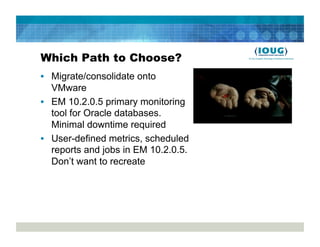
•  Migrate/consolidate onto
   VMware
•  EM 10.2.0.5 primary monitoring
   tool for Oracle databases.
   Minimal downtime required
•  User-defined metrics, scheduled
   reports and jobs in EM 10.2.0.5.
   Don’t want to recreate
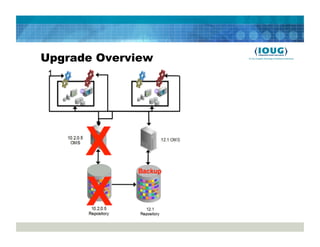
Upgrade Overview
1.  Apply Upgrade Console patch to 10.2.0.5 OMS
2.  Deploy 12.1 agents to monitored targets from
    Upgrade Console
   •  Only 12c agents monitored by EM 12c
3.  Backup repository database. This will be used as the
    12.1 repository.
   •  DBCA, RMAN can be used for backups (same platform)
   •  Datapump, Cross-Platform tablespaces/databases (different
      platforms)
4.  Install and upgrade OMS on new RHEL 6.2 host
5.  Shutdown 10.2.0.5 agents and startup 12c agents
6.  Decommission 10.2.0.x agents/OMS or rollback
Upgrade Overview
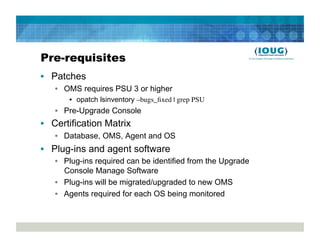
Pre-requisites
•  Patches
   •  OMS requires PSU 3 or higher
       •  opatch lsinventory –bugs_fixed | grep PSU
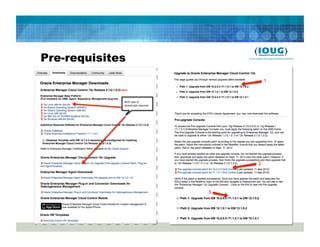
   •  Pre-Upgrade Console
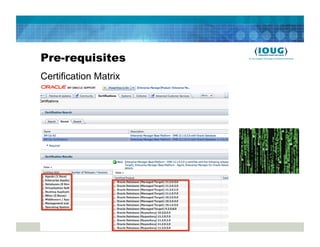
•  Certification Matrix
   •  Database, OMS, Agent and OS
•  Plug-ins and agent software
   •  Plug-ins required can be identified from the Upgrade
      Console Manage Software
   •  Plug-ins will be migrated/upgraded to new OMS
   •  Agents required for each OS being monitored
Pre-requisites
Certification Matrix
Pre-requisites
2-System Upgrade
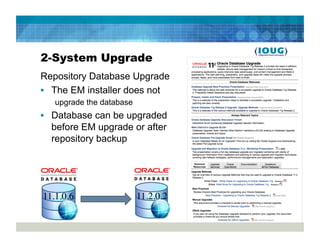
Repository Database Upgrade
•  The EM installer does not
   upgrade the database
•  Database can be upgraded
   before EM upgrade or after
   repository backup


11.1.0.6	

               11.2.0.2
2-System Upgrade
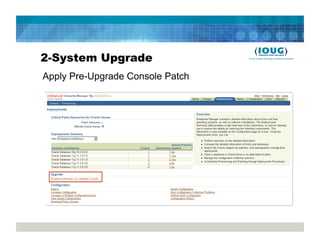
Apply Pre-Upgrade Console Patch
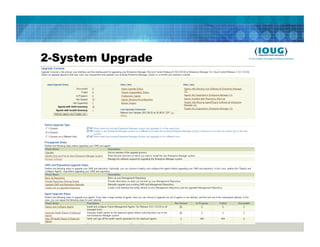
2-System Upgrade
2-System Upgrade
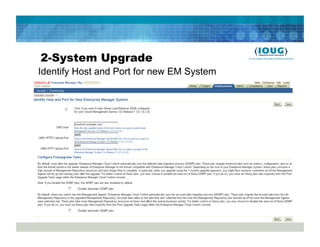
Identify Host and Port for new EM System
2-System Upgrade
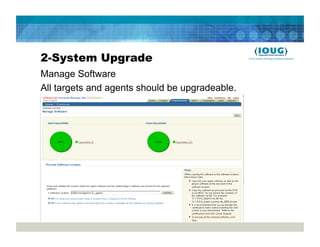
Manage Software
All targets and agents should be upgradeable.
2-System Upgrade
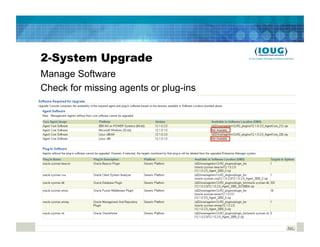
Manage Software
Check for missing agents or plug-ins
2-System Upgrade
Backup Repository
•  DBCA or RMAN recommended
   •  Unlock SYSMAN account if using DBCA
   •  Duplicate from Active feature in 11g makes cloning DB easy
•  For cross-platform migration take a look at note
   388090.1
   •  Datapump instructions not specific to EM12c repository
      upgrade (Open SR with Oracle Support)
   •  Cross platform transportable tablespaces instructions not
      specific to EM12c repository upgrade (Open SR with Oracle
      Support)
   •  RMAN Convert database also possible for supported
      platforms
2-System Upgrade
Backup Repository
•  Using an existing database via Datapump
   •  Enterprise Manager schema needs to be removed from
      target database first
$OMS_HOME/sysman/admin/emdrep/bin/RepManager
  omshost port SID -sys_password <password> -action
  drop
•  Not all objects dropped in some cases
    •  See MOS NOTE [ID 1365820.1]
•  EM 12c R2 has a database template
2-System Upgrade
Backup Repository
•  Copy emkey to repository before taking backup
   emctl config emkey –copy_to_repos –sysman_pwd <password>
   •  Re-secure emkey after taking the backup
•  Verify that SYSMAN schema doesn’t contain invalid
   object
   SELECT count(*) from user_objects
   WHERE status=‘INVALID’
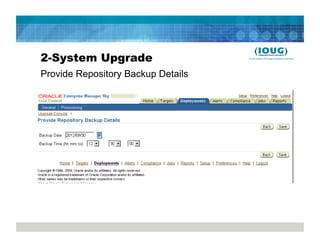
2-System Upgrade
Provide Repository Backup Details
2-System Upgrade
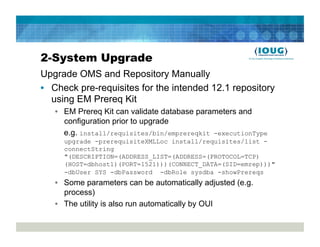
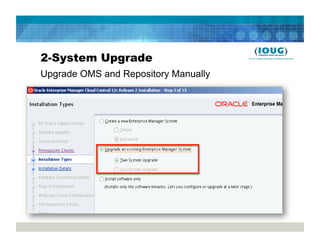
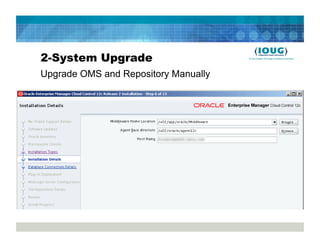
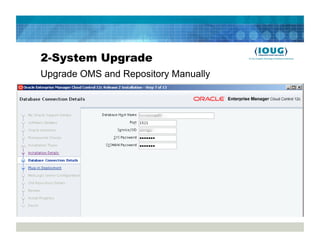
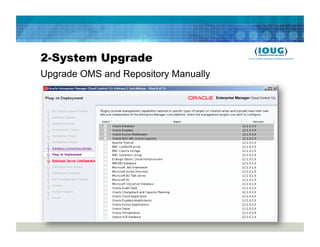
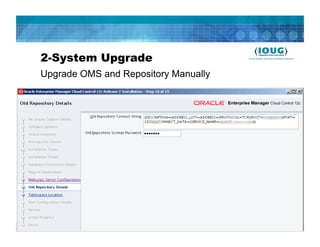
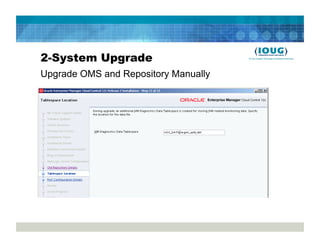
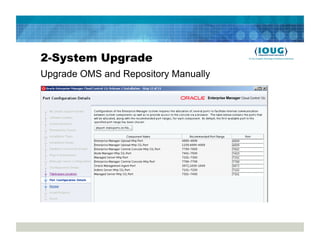
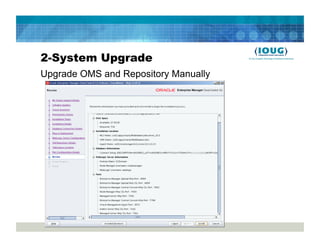
Upgrade OMS and Repository Manually
•  Check pre-requisites for the intended 12.1 repository
   using EM Prereq Kit
   •  EM Prereq Kit can validate database parameters and
      configuration prior to upgrade
      e.g. install/requisites/bin/emprereqkit -executionType
     upgrade -prerequisiteXMLLoc install/requisites/list -
     connectString
     "(DESCRIPTION=(ADDRESS_LIST=(ADDRESS=(PROTOCOL=TCP)
     (HOST=dbhost1)(PORT=1521)))(CONNECT_DATA=(SID=emrep)))"
     -dbUser SYS -dbPassword -dbRole sysdba -showPrereqs
   •  Some parameters can be automatically adjusted (e.g.
      process)
   •  The utility is also run automatically by OUI
2-System Upgrade
Upgrade OMS and Repository Manually
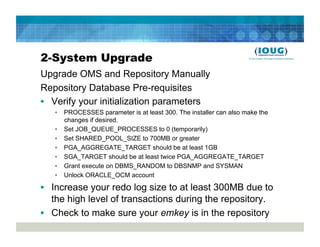
Repository Database Pre-requisites
•  Verify your initialization parameters
   •  PROCESSES parameter is at least 300. The installer can also make the
      changes if desired.
   •  Set JOB_QUEUE_PROCESSES to 0 (temporarily)
   •  Set SHARED_POOL_SIZE to 700MB or greater
   •  PGA_AGGREGATE_TARGET should be at least 1GB
   •  SGA_TARGET should be at least twice PGA_AGGREGATE_TARGET
   •  Grant execute on DBMS_RANDOM to DBSNMP and SYSMAN
   •  Unlock ORACLE_OCM account

•  Increase your redo log size to at least 300MB due to
   the high level of transactions during the repository.
•  Check to make sure your emkey is in the repository
2-System Upgrade
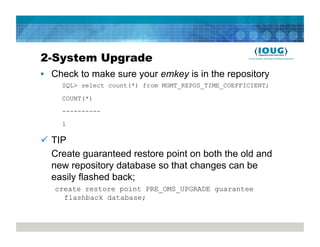
•  Check to make sure your emkey is in the repository
     SQL> select count(*) from MGMT_REPOS_TIME_COEFFICIENT;

     COUNT(*)

     ----------
     1

  TIP
   Create guaranteed restore point on both the old and
   new repository database so that changes can be
   easily flashed back;
   create restore point PRE_OMS_UPGRADE guarantee
     flashback database;
2-System Upgrade
Upgrade OMS and Repository Manually
OMS Server Verification
•  Verify that server meets pre-requisites
   •  Check ulimit to make sure it’s at least 4096
       •  ulimit –n
•  If using RHEL 6 or Oracle Linux 6 – make sure you
   have the following package installed or else your
   installation may fail at OMS Configuration Assistant.
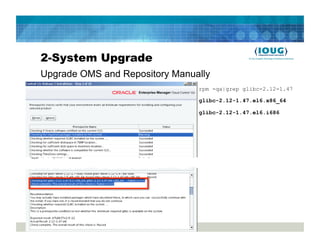
   •  glibc-2.12-1.47.0.2.el6_2.12.x86_64
       •  See MOS Note: EM12c: Installation Fails On Linux 6 at "Start
          Oracle Management Service" step (Doc ID 1472216.1) for
          workaround
2-System Upgrade
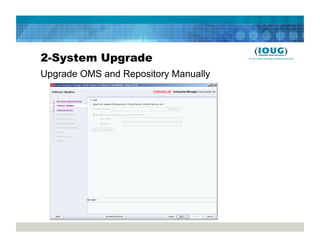
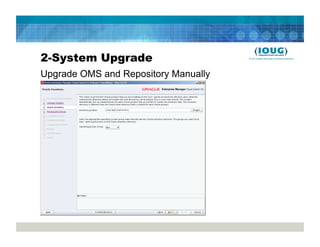
Upgrade OMS and Repository Manually
cd /stage/
./runInstaller
2-System Upgrade
Upgrade OMS and Repository Manually
2-System Upgrade
Upgrade OMS and Repository Manually
2-System Upgrade
Upgrade OMS and Repository Manually
                                rpm -qa|grep glibc-2.12-1.47

                                glibc-2.12-1.47.el6.x86_64

                                glibc-2.12-1.47.el6.i686
2-System Upgrade
Upgrade OMS and Repository Manually
2-System Upgrade
Upgrade OMS and Repository Manually
2-System Upgrade
Upgrade OMS and Repository Manually
2-System Upgrade
Upgrade OMS and Repository Manually

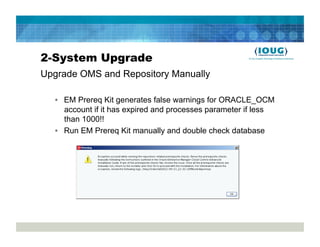
  •  EM Prereq Kit generates false warnings for ORACLE_OCM
     account if it has expired and processes parameter if less
     than 1000!!
  •  Run EM Prereq Kit manually and double check database
2-System Upgrade
Upgrade OMS and Repository Manually
2-System Upgrade
Upgrade OMS and Repository Manually
2-System Upgrade
Upgrade OMS and Repository Manually
2-System Upgrade
Upgrade OMS and Repository Manually
2-System Upgrade
Upgrade OMS and Repository Manually
2-System Upgrade
Upgrade OMS and Repository Manually
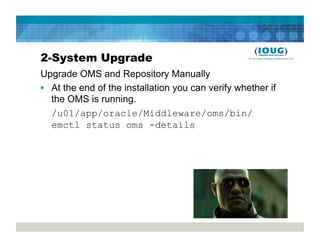
•  At the end of the installation you can verify whether if
   the OMS is running.
   /u01/app/oracle/Middleware/oms/bin/
   emctl status oms -details
2-System Upgrade
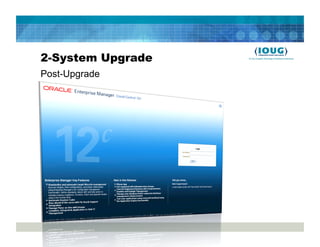
Post-Upgrade
2-System Upgrade
Post-Upgrade
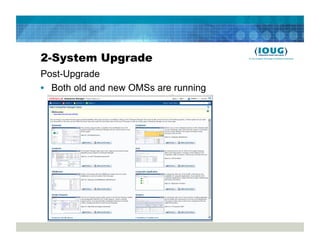
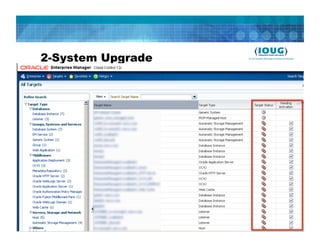
•  Both old and new OMSs are running
2-System Upgrade
2-System Upgrade
Post-Upgrade
•  Create a DB link between the old and new
   repositories
•  Upgrade Console in old EM creates/recreates link
•  The link between the two repositories allows
   operations performed on the old repository to be
   propagated to the new repository.
•  Link also enables DDMP and ADDMP
2-System Upgrade
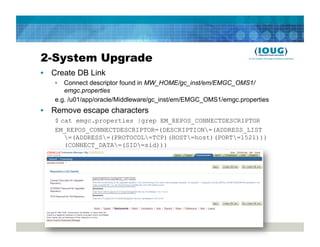
•  Create DB Link
   •  Connect descriptor found in MW_HOME/gc_inst/em/EMGC_OMS1/
      emgc.properties
   e.g. /u01/app/oracle/Middleware/gc_inst/em/EMGC_OMS1/emgc.properties
•  Remove escape characters
   $ cat emgc.properties |grep EM_REPOS_CONNECTDESCRIPTOR
   EM_REPOS_CONNECTDESCRIPTOR=(DESCRIPTION=(ADDRESS_LIST
      =(ADDRESS=(PROTOCOL=TCP)(HOST=host)(PORT=1521)))
      (CONNECT_DATA=(SID=sid)))
2-System Upgrade
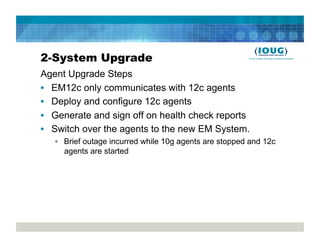
Agent Upgrade Steps
•  EM12c only communicates with 12c agents
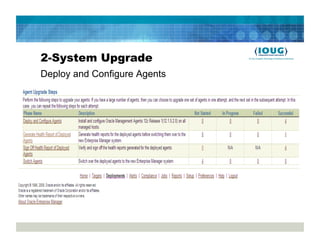
•  Deploy and configure 12c agents
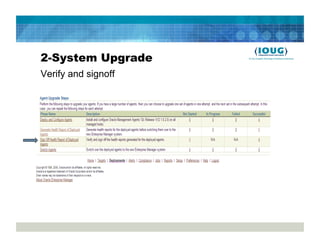
•  Generate and sign off on health check reports
•  Switch over the agents to the new EM System.
   •  Brief outage incurred while 10g agents are stopped and 12c
      agents are started
2-System Upgrade
Deploy and Configure Agents
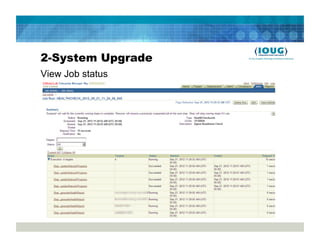
2-System Upgrade
View Job status
2-System Upgrade
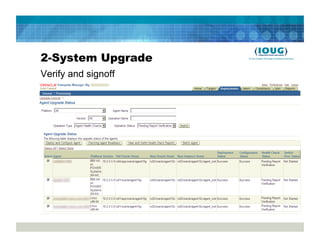
Verify and signoff
2-System Upgrade
Verify and signoff
2-System Upgrade
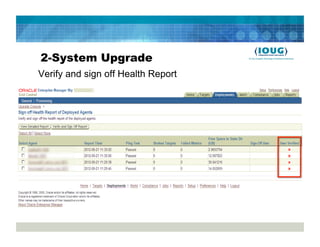
Verify and sign off Health Report
2-System Upgrade
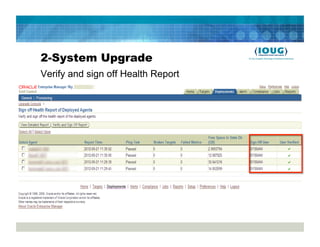
Verify and sign off Health Report
2-System Upgrade
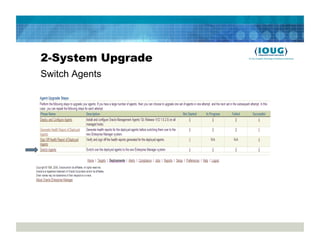
Switch Agents
2-System Upgrade
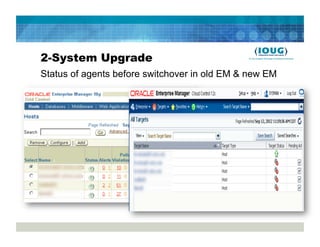
Status of agents before switchover in old EM & new EM
2-System Upgrade
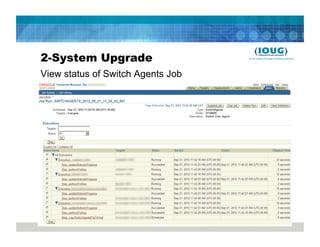
View status of Switch Agents Job
2-System Upgrade
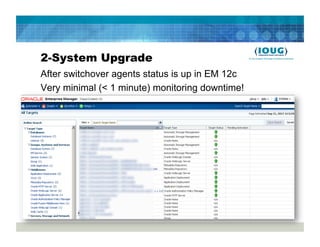
After switchover agents status is up in EM 12c
Very minimal (< 1 minute) monitoring downtime!
2-System Upgrade
Post-Upgrade Steps
•  Stop the OCM Scheduler in the 10.2.0.5 OMS
•  Delete Obsolete targets (via console or EMCLI)
   •  EM Website
   •  EM Website System
   •  Oracle Application Server target of 10g OMS ORACLE
      HOME consisting of:
      •    Oracle Application Server
      •    OC4J
      •    Oracle HTTP Server
      •    Web Cache
•  Delete default incident Rule sets
2-System Upgrade
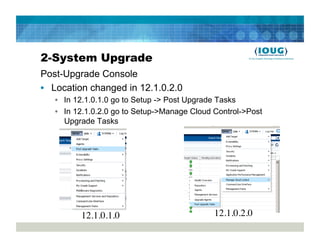
Post-Upgrade Console
•  Location changed in 12.1.0.2.0
   •  In 12.1.0.1.0 go to Setup -> Post Upgrade Tasks
   •  In 12.1.0.2.0 go to Setup->Manage Cloud Control->Post
      Upgrade Tasks


          12.1.0.1.0	

                       12.1.0.2.0
2-System Upgrade
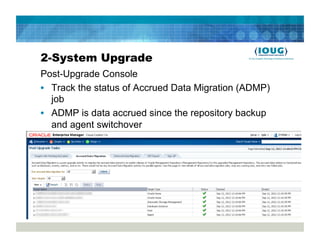
Post-Upgrade Console
•  Track the status of Accrued Data Migration (ADMP)
   job
•  ADMP is data accrued since the repository backup
   and agent switchover
2-System Upgrade
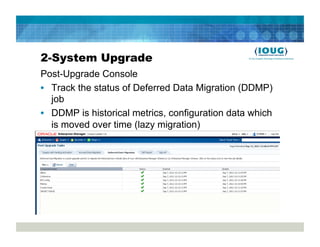
Post-Upgrade Console
•  Track the status of Deferred Data Migration (DDMP)
   job
•  DDMP is historical metrics, configuration data which
   is moved over time (lazy migration)
2-System Upgrade
Post-Upgrade Console
•  Diff Report
   •  Shows configuration differences between old and new OMS
•  Sign Off
   •  Removes old 10.2.0.5 agents
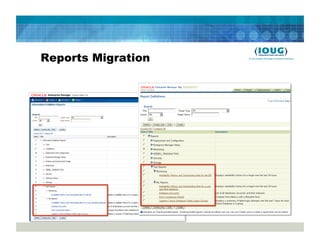
Reports Migration
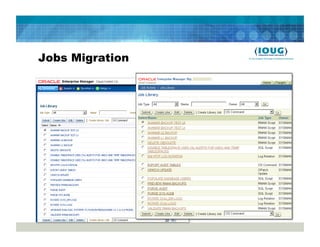
Jobs Migration
How far did the rabbit hole go?
•  Host level jobs on 10.2.0.5 EM should work before
   starting agent deployment
   •  Configure PAM on Linux/UNIX for 3rd party authentication if
      in use. E.g. LDAP, Kerberos, SecureID
   •  Configure Privilege Delegation Provisioning (PDP). i.e. sudo
      or Powerbroker for easier deployment
•  Verify that OMS host server can send emails for
   notifications
   •  Some servers require authentication for SMTP relay
•  Cross-platform repository migration is your
   responsibility!
•  Complex but not scary. Read instructions carefully.
•  Test, Test and Test Again!
Managing Databases with EM12c

•  Demo
•  Website - blogs.griddba.com
•  LinkedIn – Leighton Nelson
•  Twitter - @leight0nn
•  Email: leighton.nelson@mercy.net
References
•    OTN Enterprise Manager Page
•    Announcing Enterprise Manager Cloud Control 12c Release 12.1.0.1
     Bundle Patch 1(BP1) and 12.1.0.2 Plug-ins [ID 1395505.1]
•    Upgrade Advisor: Enterprise Manager 2-System Upgrade from 10.2.0.5
     or from 11.1.0.1 to 12.1.0.1 [ID 327.1]
•    EM 12c: Upgrading to Enterprise Manager Cloud Control 12.1.0.1 on
     Linux x86_64 with the 2-System Method [ID 1367919.1]
•    Grid Control Repository: Steps for Cross Platform Migration of the 10g
     Grid Control Repository [ID 388090.1]
•    EM12c R2: How to Upgrade to EM 12c R2 - Two System Method [ID
     1363162.1]
•    EM 12c R2: How to Apply Upgrade Console Patch for Upgrading to EM
     12.1.0.2 [ID 1362537.1]
•    Grid Control Repository: How to Recompile Invalid SYSMAN Objects?
     [ID 372706.1]
SAVE THE DATE!

     COLLABORATE 13
      April 7-11, 2013
Colorado Convention Center
     Denver, Colorado

http://collaborate13.ioug.org

Migrating from Oracle Enterprise Manager 10g to 12c Cloud Control

  • 1.
    Migrating from Oracle EnterpriseManager 10g to 12c Cloud Control Leighton L. Nelson
  • 2.
    About Me •  Oracle DBA for 10+ years •  Oracle RAC SIG US Events Chair/IOUG Liaison •  Blogs at blogs.griddba.com •  Started presenting in 2012 (Collaborate 12)
  • 3.
    Agenda •  Oracle EnterpriseManger Cloud Control12c Architecture •  Upgrade Path •  Overview •  Pre-Requisites •  Patches •  Certification Matrix •  2-System Upgrade •  Repository Database Upgrade •  OMS Migration & Upgrade •  Lessons Learned •  Managing Databases (Demo)
  • 4.
    Current and ProposedStates •  Current Architecture (IBM JS21 Blades) •  OMS – 10.2.0.5 / AIX 6.1 •  Repository Database – 11.1.0.6 / AIX 6.1 •  Agents – 100 (AIX + Linux) •  Targets – 500+ •  Proposed Architecture (VMware vSphere) •  OMS – 12.1.0.2 / RHEL 6.2 •  Repository Database – 11.2.0.3 / RHEL 6.2 •  Agents – 100 (AIX + Linux) •  Targets – 500+ •  Database + OS + EM Upgrade = Trinity!
  • 5.
    Enterprise Manager 12cUpgrade Paths •  1-System Upgrade •  Upgrade done on same host as 10.2.0.5/11.1 EM •  All agents, OMS and repository upgraded at once •  Requires significant downtime •  2-System Upgrade •  New OMS created on separate host (platform migration possible) •  Both 10.2.0.5/11.1 and 12.1 EM run concurrently •  Requires almost zero downtime •  Migrates existing metrics, jobs, report etc.
  • 6.
    Which Path toChoose? •  Migrate/consolidate onto VMware •  EM 10.2.0.5 primary monitoring tool for Oracle databases. Minimal downtime required •  User-defined metrics, scheduled reports and jobs in EM 10.2.0.5. Don’t want to recreate
  • 7.
    Upgrade Overview 1.  ApplyUpgrade Console patch to 10.2.0.5 OMS 2.  Deploy 12.1 agents to monitored targets from Upgrade Console •  Only 12c agents monitored by EM 12c 3.  Backup repository database. This will be used as the 12.1 repository. •  DBCA, RMAN can be used for backups (same platform) •  Datapump, Cross-Platform tablespaces/databases (different platforms) 4.  Install and upgrade OMS on new RHEL 6.2 host 5.  Shutdown 10.2.0.5 agents and startup 12c agents 6.  Decommission 10.2.0.x agents/OMS or rollback
  • 8.
  • 9.
    Pre-requisites •  Patches •  OMS requires PSU 3 or higher •  opatch lsinventory –bugs_fixed | grep PSU •  Pre-Upgrade Console •  Certification Matrix •  Database, OMS, Agent and OS •  Plug-ins and agent software •  Plug-ins required can be identified from the Upgrade Console Manage Software •  Plug-ins will be migrated/upgraded to new OMS •  Agents required for each OS being monitored
  • 10.
  • 11.
  • 12.
    2-System Upgrade Repository DatabaseUpgrade •  The EM installer does not upgrade the database •  Database can be upgraded before EM upgrade or after repository backup 11.1.0.6 11.2.0.2
  • 13.
  • 14.
  • 15.
    2-System Upgrade Identify Hostand Port for new EM System
  • 16.
    2-System Upgrade Manage Software Alltargets and agents should be upgradeable.
  • 17.
    2-System Upgrade Manage Software Checkfor missing agents or plug-ins
  • 18.
    2-System Upgrade Backup Repository • DBCA or RMAN recommended •  Unlock SYSMAN account if using DBCA •  Duplicate from Active feature in 11g makes cloning DB easy •  For cross-platform migration take a look at note 388090.1 •  Datapump instructions not specific to EM12c repository upgrade (Open SR with Oracle Support) •  Cross platform transportable tablespaces instructions not specific to EM12c repository upgrade (Open SR with Oracle Support) •  RMAN Convert database also possible for supported platforms
  • 19.
    2-System Upgrade Backup Repository • Using an existing database via Datapump •  Enterprise Manager schema needs to be removed from target database first $OMS_HOME/sysman/admin/emdrep/bin/RepManager omshost port SID -sys_password <password> -action drop •  Not all objects dropped in some cases •  See MOS NOTE [ID 1365820.1] •  EM 12c R2 has a database template
  • 20.
    2-System Upgrade Backup Repository • Copy emkey to repository before taking backup emctl config emkey –copy_to_repos –sysman_pwd <password> •  Re-secure emkey after taking the backup •  Verify that SYSMAN schema doesn’t contain invalid object SELECT count(*) from user_objects WHERE status=‘INVALID’
  • 21.
  • 22.
    2-System Upgrade Upgrade OMSand Repository Manually •  Check pre-requisites for the intended 12.1 repository using EM Prereq Kit •  EM Prereq Kit can validate database parameters and configuration prior to upgrade e.g. install/requisites/bin/emprereqkit -executionType upgrade -prerequisiteXMLLoc install/requisites/list - connectString "(DESCRIPTION=(ADDRESS_LIST=(ADDRESS=(PROTOCOL=TCP) (HOST=dbhost1)(PORT=1521)))(CONNECT_DATA=(SID=emrep)))" -dbUser SYS -dbPassword -dbRole sysdba -showPrereqs •  Some parameters can be automatically adjusted (e.g. process) •  The utility is also run automatically by OUI
  • 23.
    2-System Upgrade Upgrade OMSand Repository Manually Repository Database Pre-requisites •  Verify your initialization parameters •  PROCESSES parameter is at least 300. The installer can also make the changes if desired. •  Set JOB_QUEUE_PROCESSES to 0 (temporarily) •  Set SHARED_POOL_SIZE to 700MB or greater •  PGA_AGGREGATE_TARGET should be at least 1GB •  SGA_TARGET should be at least twice PGA_AGGREGATE_TARGET •  Grant execute on DBMS_RANDOM to DBSNMP and SYSMAN •  Unlock ORACLE_OCM account •  Increase your redo log size to at least 300MB due to the high level of transactions during the repository. •  Check to make sure your emkey is in the repository
  • 24.
    2-System Upgrade •  Checkto make sure your emkey is in the repository SQL> select count(*) from MGMT_REPOS_TIME_COEFFICIENT; COUNT(*) ---------- 1   TIP Create guaranteed restore point on both the old and new repository database so that changes can be easily flashed back; create restore point PRE_OMS_UPGRADE guarantee flashback database;
  • 25.
    2-System Upgrade Upgrade OMSand Repository Manually OMS Server Verification •  Verify that server meets pre-requisites •  Check ulimit to make sure it’s at least 4096 •  ulimit –n •  If using RHEL 6 or Oracle Linux 6 – make sure you have the following package installed or else your installation may fail at OMS Configuration Assistant. •  glibc-2.12-1.47.0.2.el6_2.12.x86_64 •  See MOS Note: EM12c: Installation Fails On Linux 6 at "Start Oracle Management Service" step (Doc ID 1472216.1) for workaround
  • 26.
    2-System Upgrade Upgrade OMSand Repository Manually cd /stage/ ./runInstaller
  • 27.
    2-System Upgrade Upgrade OMSand Repository Manually
  • 28.
    2-System Upgrade Upgrade OMSand Repository Manually
  • 29.
    2-System Upgrade Upgrade OMSand Repository Manually rpm -qa|grep glibc-2.12-1.47 glibc-2.12-1.47.el6.x86_64 glibc-2.12-1.47.el6.i686
  • 30.
    2-System Upgrade Upgrade OMSand Repository Manually
  • 31.
    2-System Upgrade Upgrade OMSand Repository Manually
  • 32.
    2-System Upgrade Upgrade OMSand Repository Manually
  • 33.
    2-System Upgrade Upgrade OMSand Repository Manually •  EM Prereq Kit generates false warnings for ORACLE_OCM account if it has expired and processes parameter if less than 1000!! •  Run EM Prereq Kit manually and double check database
  • 34.
    2-System Upgrade Upgrade OMSand Repository Manually
  • 35.
    2-System Upgrade Upgrade OMSand Repository Manually
  • 36.
    2-System Upgrade Upgrade OMSand Repository Manually
  • 37.
    2-System Upgrade Upgrade OMSand Repository Manually
  • 38.
    2-System Upgrade Upgrade OMSand Repository Manually
  • 39.
    2-System Upgrade Upgrade OMSand Repository Manually •  At the end of the installation you can verify whether if the OMS is running. /u01/app/oracle/Middleware/oms/bin/ emctl status oms -details
  • 40.
  • 41.
    2-System Upgrade Post-Upgrade •  Bothold and new OMSs are running
  • 42.
  • 43.
    2-System Upgrade Post-Upgrade •  Createa DB link between the old and new repositories •  Upgrade Console in old EM creates/recreates link •  The link between the two repositories allows operations performed on the old repository to be propagated to the new repository. •  Link also enables DDMP and ADDMP
  • 44.
    2-System Upgrade •  CreateDB Link •  Connect descriptor found in MW_HOME/gc_inst/em/EMGC_OMS1/ emgc.properties e.g. /u01/app/oracle/Middleware/gc_inst/em/EMGC_OMS1/emgc.properties •  Remove escape characters $ cat emgc.properties |grep EM_REPOS_CONNECTDESCRIPTOR EM_REPOS_CONNECTDESCRIPTOR=(DESCRIPTION=(ADDRESS_LIST =(ADDRESS=(PROTOCOL=TCP)(HOST=host)(PORT=1521))) (CONNECT_DATA=(SID=sid)))
  • 45.
    2-System Upgrade Agent UpgradeSteps •  EM12c only communicates with 12c agents •  Deploy and configure 12c agents •  Generate and sign off on health check reports •  Switch over the agents to the new EM System. •  Brief outage incurred while 10g agents are stopped and 12c agents are started
  • 46.
  • 47.
  • 48.
  • 49.
  • 50.
    2-System Upgrade Verify andsign off Health Report
  • 51.
    2-System Upgrade Verify andsign off Health Report
  • 52.
  • 53.
    2-System Upgrade Status ofagents before switchover in old EM & new EM
  • 54.
    2-System Upgrade View statusof Switch Agents Job
  • 55.
    2-System Upgrade After switchoveragents status is up in EM 12c Very minimal (< 1 minute) monitoring downtime!
  • 56.
    2-System Upgrade Post-Upgrade Steps • Stop the OCM Scheduler in the 10.2.0.5 OMS •  Delete Obsolete targets (via console or EMCLI) •  EM Website •  EM Website System •  Oracle Application Server target of 10g OMS ORACLE HOME consisting of: •  Oracle Application Server •  OC4J •  Oracle HTTP Server •  Web Cache •  Delete default incident Rule sets
  • 57.
    2-System Upgrade Post-Upgrade Console • Location changed in 12.1.0.2.0 •  In 12.1.0.1.0 go to Setup -> Post Upgrade Tasks •  In 12.1.0.2.0 go to Setup->Manage Cloud Control->Post Upgrade Tasks 12.1.0.1.0 12.1.0.2.0
  • 58.
    2-System Upgrade Post-Upgrade Console • Track the status of Accrued Data Migration (ADMP) job •  ADMP is data accrued since the repository backup and agent switchover
  • 59.
    2-System Upgrade Post-Upgrade Console • Track the status of Deferred Data Migration (DDMP) job •  DDMP is historical metrics, configuration data which is moved over time (lazy migration)
  • 60.
    2-System Upgrade Post-Upgrade Console • Diff Report •  Shows configuration differences between old and new OMS •  Sign Off •  Removes old 10.2.0.5 agents
  • 61.
  • 62.
  • 63.
    How far didthe rabbit hole go? •  Host level jobs on 10.2.0.5 EM should work before starting agent deployment •  Configure PAM on Linux/UNIX for 3rd party authentication if in use. E.g. LDAP, Kerberos, SecureID •  Configure Privilege Delegation Provisioning (PDP). i.e. sudo or Powerbroker for easier deployment •  Verify that OMS host server can send emails for notifications •  Some servers require authentication for SMTP relay •  Cross-platform repository migration is your responsibility! •  Complex but not scary. Read instructions carefully. •  Test, Test and Test Again!
  • 64.
    Managing Databases withEM12c •  Demo
  • 65.
    •  Website -blogs.griddba.com •  LinkedIn – Leighton Nelson •  Twitter - @leight0nn •  Email: leighton.nelson@mercy.net
  • 66.
    References •  OTN Enterprise Manager Page •  Announcing Enterprise Manager Cloud Control 12c Release 12.1.0.1 Bundle Patch 1(BP1) and 12.1.0.2 Plug-ins [ID 1395505.1] •  Upgrade Advisor: Enterprise Manager 2-System Upgrade from 10.2.0.5 or from 11.1.0.1 to 12.1.0.1 [ID 327.1] •  EM 12c: Upgrading to Enterprise Manager Cloud Control 12.1.0.1 on Linux x86_64 with the 2-System Method [ID 1367919.1] •  Grid Control Repository: Steps for Cross Platform Migration of the 10g Grid Control Repository [ID 388090.1] •  EM12c R2: How to Upgrade to EM 12c R2 - Two System Method [ID 1363162.1] •  EM 12c R2: How to Apply Upgrade Console Patch for Upgrading to EM 12.1.0.2 [ID 1362537.1] •  Grid Control Repository: How to Recompile Invalid SYSMAN Objects? [ID 372706.1]
  • 67.
    SAVE THE DATE! COLLABORATE 13 April 7-11, 2013 Colorado Convention Center Denver, Colorado http://collaborate13.ioug.org