Looking at RAC,
        GI/Clusterware Diagnostic Tools

Leighton L. Nelson
Oracle DBA Team Lead (10 yrs experience, 6 years with RAC)
RAC SIG US Events Chair and IOUG Liaison


Session# 373
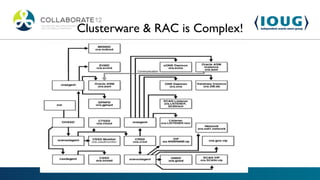
Clusterware & RAC is Complex!
Where do I begin?
Clusterware, ASM & RAC Diagnostics

•   Diagcollection

•   Cluster Verification Utility (cluvfy)

•   Cluster Health Monitor (CHM)

•   Remote Diagnostics Agent (RDA)

•   ADRCI/Support Workbench

•   OS Utilities
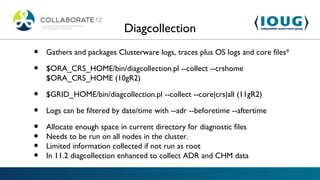
Diagcollection
•   Gathers and packages Clusterware logs, traces plus OS logs and core files*

•   $ORA_CRS_HOME/bin/diagcollection.pl --collect --crshome
    $ORA_CRS_HOME (10gR2)

•   $GRID_HOME/bin/diagcollection.pl --collect --core|crs|all (11gR2)

•   Logs can be filtered by date/time with --adr --beforetime --aftertime

•   Allocate enough space in current directory for diagnostic files
•   Needs to be run on all nodes in the cluster.
•   Limited information collected if not run as root
•   In 11.2 diagcollection enhanced to collect ADR and CHM data
diagcollection example
[root@oelgrid02 u02]# /u01/app/11.2.0/grid/bin/diagcollection.sh --collect

Production Copyright 2004, 2010, Oracle.   All rights reserved

Cluster Ready Services (CRS) diagnostic collection tool

The following CRS diagnostic archives will be created in the local directory:

crsData_oelgrid02_20120225_1723.tar.gz -> logs, traces and cores from CRS home.
    Note: core files will be packaged only with the --core option.

ocrData_oelgrid02_20120225_1723.tar.gz -> ocrdump, ocrcheck etc

coreData_oelgrid02_20120225_1723.tar.gz -> contents of CRS core files in text
    format

osData_oelgrid02_20120225_1723.tar.gz -> logs from Operating System

Collecting crs data
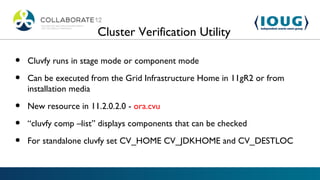
Cluster Verification Utility

•   Cluvfy runs in stage mode or component mode

•   Can be executed from the Grid Infrastructure Home in 11gR2 or from
    installation media

•   New resource in 11.2.0.2.0 - ora.cvu

•   “cluvfy comp –list” displays components that can be checked

•   For standalone cluvfy set CV_HOME CV_JDKHOME and CV_DESTLOC
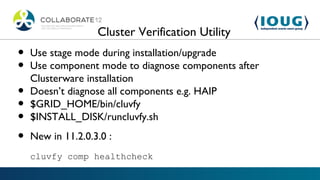
Cluster Verification Utility
•   Use stage mode during installation/upgrade
•   Use component mode to diagnose components after
    Clusterware installation
•   Doesn’t diagnose all components e.g. HAIP
•   $GRID_HOME/bin/cluvfy
•   $INSTALL_DISK/runcluvfy.sh

•   New in 11.2.0.3.0 :
    cluvfy comp healthcheck
Cluster Verification Utility


cluvfy comp –list output
Cluster Health Monitor (CHM)

•   Cluster Health Monitor (CHM) monitors and collect OS and
    clusterware metrics in real-time

•   Installed by default in 11.2.0.2+

•   Collects metrics at 1 sec interval in 11.2.0.2 and 5 sec interval in
    11.2.0.3

•   Command Line Interface $GRID_HOME/bin/oclumon

•   Collects CHM data using diagcollection.pl --collect --chmos
Cluster Health Monitor (CHM)

•   Useful for troubleshooting root cause analysis - node
    reboots/hangs, instance evictions, performance degradations etc
•   OTN version of CHM and 11.2.0.2 version are incompatible. If
    you have 11.2.0.2 then you cannot install OTN version.
•   Uses OS API to collect metrics reducing overhead
•   Clusterware resource called ora.crf
•   CHM doesn’t require RAC or Clusterware
OS Watcher Black Box
•   OS Watcher v4.0 has been renamed to OS Watcher Black Box (OSWbb)

•   UNIX shell scripts for monitoring the OS (ps, top, mpstat, iostat, netstat, vmstat)

•   Useful for diagnosing OS resource and performance problems, node reboots

•   Should run on all nodes in a cluster

•   Setup private interconnect monitoring

•   Execute startOSWbb.sh arg1 arg2 where arg1=collection frequency and
    arg2=retention time
    nohup ./startOSWbb.sh 60 48 &
OS Watcher Black Box

•   Bundled with OS Watcher Black Box Analyzer
    (OSWbba)

•   Requires Java 1.4.2 or greater

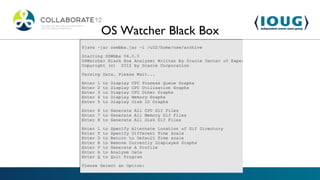
•   Correlate OS statistics using the analyzer profile

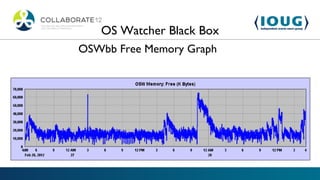
•   Generates graphs and reports for memory, cpu, disk

•   Use CLI option to script profile generation for
    troubleshooting
OS Watcher Black Box
OSWbb Free Memory Graph
RACcheck –
            RAC Configuration Audit Tool


•   RACCHECK OUTPUT
RACcheck –
                 RAC Configuration Audit Tool


•   Assess the configuration of RAC, Clusterware and ASM

•   Useful for pre-upgrade and post-upgrade system verification

•   Uses “Best Practices” to report configuration problems –
    PASS/WARNING/FAIL/INFO

•   Generates detailed and summary reports with scorecard
Remote Diagnostics Assistant

•   The diagnostics tool recommended by MOS

•   Collects a wealth of information based on configuration –
    OS/Clusterware/Database logs

•   Runs AWR/Statspack report for Performance problems

•   Generates reports in HTML format
Procwatcher
•   Debug Oracle & Clusterware processes using
    oradebug short_stack or OS debugger (e.g. gdb,
    pstack)

•   Run as Oracle process owner to debug database or as
    root for clusterware processes

•   Can be deployed as a Clusterware resource

•   Useful for troubleshooting session hangs, severe
    performance problems, instance evictions
Procwatcher
grid@node1[+ASM1]-/u02 >./prw.sh start all

Wed Feb 25 02:30:26 CDT 2012: Starting Procwatcher

Wed Feb 25 02:30:26 CDT 2012: Thank you for using Procwatcher.
   :-)

Wed Feb 25 02:30:26 CDT 2012: Please add a comment to Oracle
   Support Note 459694.1

Wed Feb 25 02:30:26 CDT 2012: if you have any comments,
   suggestions, or issues with this tool.

Wed Feb 25 02:30:26 CDT 2012: Started Procwatcher
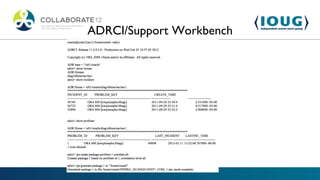
ADRCI/Support Workbench

•   Automatic Diagnostic Repository (ADR) stores database
    diagnostic information

•   Package diagnostics files using ADRCI or Support Workbench

•   Manages incidents and problems from alert logs

•   Enterprise Manager provides GUI interface to ADR called Support
    Workbench
ADRCI/Support Workbench
RACDIAG.SQL


•   Gathers debug information for RAC Session Hangs

•   One-time data capture

•   Performs hanganalyze dumps

•   Certain types of hangs will prevent it from running
OS Utilities


•   truss/strace – trace system calls and signals

•   pstack – dump stack trace for process

•   pmap/procmap – maps process memory

•   nmon/nmon analyzer – collects and analyzes OS stats

•   collectl /collectl utils – collects and analyzes OS stats
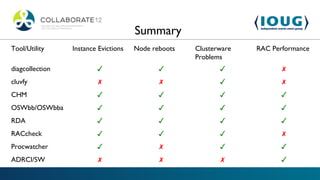
Summary
Tool/Utility     Instance Evictions   Node reboots   Clusterware   RAC Performance
                                                     Problems
diagcollection           ✓                   ✓              ✓             ✗
cluvfy                    ✗                  ✗              ✓             ✗
CHM                      ✓                   ✓              ✓             ✓
OSWbb/OSWbba             ✓                   ✓              ✓             ✓
RDA                      ✓                   ✓              ✓             ✓
RACcheck                 ✓                   ✓              ✓             ✗
Procwatcher              ✓                   ✗              ✓             ✓
ADRCI/SW                  ✗                  ✗              ✗             ✓
MOS Notes
•   OS Watcher Black Box User Guide [ID 301137.1]

•   OS Watcher Black Box Analyzer User Guide [ID 461053.1]

•   Data Gathering for Troubleshooting Oracle Clusterware (CRS or GI) Issues [ID 289690.1]

•   CRS 10gR2/ 11gR1/ 11gR2 Diagnostic Collection Guide [ID 330358.1]

•   Diagnosability for Oracle Clusterware (CRS or Grid Infrastructure) Component and Resource [ID 357808.1]

•   Data Gathering for Troubleshooting RAC Issues [ID 556679.1]

•   Cluster Health Monitor (CHM) FAQ [ID 1328466.1]

•   Introducing Cluster Health Monitor (IPD/OS) [ID 736752.1]

•   RACcheck - RAC Configuration Audit Tool [ID 1268927.1]

•   Procwatcher: Script to Monitor and Examine Oracle DB and Clusterware Processes [ID 459694.1]

•   Script to Collect RAC Diagnostic Information (racdiag.sql) [ID 135714.1]
Contact Information


•   Website - blogs.griddba.com

•   LinkedIn – Leighton Nelson

•   Twitter - @leight0nn

•   Email: leighton.nelson@mercy.net

Looking at RAC, GI/Clusterware Diagnostic Tools

  • 2.
    Looking at RAC, GI/Clusterware Diagnostic Tools Leighton L. Nelson Oracle DBA Team Lead (10 yrs experience, 6 years with RAC) RAC SIG US Events Chair and IOUG Liaison Session# 373
  • 3.
    Clusterware & RACis Complex!
  • 4.
    Where do Ibegin?
  • 5.
    Clusterware, ASM &RAC Diagnostics • Diagcollection • Cluster Verification Utility (cluvfy) • Cluster Health Monitor (CHM) • Remote Diagnostics Agent (RDA) • ADRCI/Support Workbench • OS Utilities
  • 6.
    Diagcollection • Gathers and packages Clusterware logs, traces plus OS logs and core files* • $ORA_CRS_HOME/bin/diagcollection.pl --collect --crshome $ORA_CRS_HOME (10gR2) • $GRID_HOME/bin/diagcollection.pl --collect --core|crs|all (11gR2) • Logs can be filtered by date/time with --adr --beforetime --aftertime • Allocate enough space in current directory for diagnostic files • Needs to be run on all nodes in the cluster. • Limited information collected if not run as root • In 11.2 diagcollection enhanced to collect ADR and CHM data
  • 7.
    diagcollection example [root@oelgrid02 u02]#/u01/app/11.2.0/grid/bin/diagcollection.sh --collect Production Copyright 2004, 2010, Oracle. All rights reserved Cluster Ready Services (CRS) diagnostic collection tool The following CRS diagnostic archives will be created in the local directory: crsData_oelgrid02_20120225_1723.tar.gz -> logs, traces and cores from CRS home. Note: core files will be packaged only with the --core option. ocrData_oelgrid02_20120225_1723.tar.gz -> ocrdump, ocrcheck etc coreData_oelgrid02_20120225_1723.tar.gz -> contents of CRS core files in text format osData_oelgrid02_20120225_1723.tar.gz -> logs from Operating System Collecting crs data
  • 8.
    Cluster Verification Utility • Cluvfy runs in stage mode or component mode • Can be executed from the Grid Infrastructure Home in 11gR2 or from installation media • New resource in 11.2.0.2.0 - ora.cvu • “cluvfy comp –list” displays components that can be checked • For standalone cluvfy set CV_HOME CV_JDKHOME and CV_DESTLOC
  • 9.
    Cluster Verification Utility • Use stage mode during installation/upgrade • Use component mode to diagnose components after Clusterware installation • Doesn’t diagnose all components e.g. HAIP • $GRID_HOME/bin/cluvfy • $INSTALL_DISK/runcluvfy.sh • New in 11.2.0.3.0 : cluvfy comp healthcheck
  • 10.
  • 11.
    Cluster Health Monitor(CHM) • Cluster Health Monitor (CHM) monitors and collect OS and clusterware metrics in real-time • Installed by default in 11.2.0.2+ • Collects metrics at 1 sec interval in 11.2.0.2 and 5 sec interval in 11.2.0.3 • Command Line Interface $GRID_HOME/bin/oclumon • Collects CHM data using diagcollection.pl --collect --chmos
  • 12.
    Cluster Health Monitor(CHM) • Useful for troubleshooting root cause analysis - node reboots/hangs, instance evictions, performance degradations etc • OTN version of CHM and 11.2.0.2 version are incompatible. If you have 11.2.0.2 then you cannot install OTN version. • Uses OS API to collect metrics reducing overhead • Clusterware resource called ora.crf • CHM doesn’t require RAC or Clusterware
  • 13.
    OS Watcher BlackBox • OS Watcher v4.0 has been renamed to OS Watcher Black Box (OSWbb) • UNIX shell scripts for monitoring the OS (ps, top, mpstat, iostat, netstat, vmstat) • Useful for diagnosing OS resource and performance problems, node reboots • Should run on all nodes in a cluster • Setup private interconnect monitoring • Execute startOSWbb.sh arg1 arg2 where arg1=collection frequency and arg2=retention time nohup ./startOSWbb.sh 60 48 &
  • 14.
    OS Watcher BlackBox • Bundled with OS Watcher Black Box Analyzer (OSWbba) • Requires Java 1.4.2 or greater • Correlate OS statistics using the analyzer profile • Generates graphs and reports for memory, cpu, disk • Use CLI option to script profile generation for troubleshooting
  • 15.
  • 16.
    OS Watcher BlackBox OSWbb Free Memory Graph
  • 17.
    RACcheck – RAC Configuration Audit Tool • RACCHECK OUTPUT
  • 18.
    RACcheck – RAC Configuration Audit Tool • Assess the configuration of RAC, Clusterware and ASM • Useful for pre-upgrade and post-upgrade system verification • Uses “Best Practices” to report configuration problems – PASS/WARNING/FAIL/INFO • Generates detailed and summary reports with scorecard
  • 19.
    Remote Diagnostics Assistant • The diagnostics tool recommended by MOS • Collects a wealth of information based on configuration – OS/Clusterware/Database logs • Runs AWR/Statspack report for Performance problems • Generates reports in HTML format
  • 20.
    Procwatcher • Debug Oracle & Clusterware processes using oradebug short_stack or OS debugger (e.g. gdb, pstack) • Run as Oracle process owner to debug database or as root for clusterware processes • Can be deployed as a Clusterware resource • Useful for troubleshooting session hangs, severe performance problems, instance evictions
  • 21.
    Procwatcher grid@node1[+ASM1]-/u02 >./prw.sh startall Wed Feb 25 02:30:26 CDT 2012: Starting Procwatcher Wed Feb 25 02:30:26 CDT 2012: Thank you for using Procwatcher. :-) Wed Feb 25 02:30:26 CDT 2012: Please add a comment to Oracle Support Note 459694.1 Wed Feb 25 02:30:26 CDT 2012: if you have any comments, suggestions, or issues with this tool. Wed Feb 25 02:30:26 CDT 2012: Started Procwatcher
  • 22.
    ADRCI/Support Workbench • Automatic Diagnostic Repository (ADR) stores database diagnostic information • Package diagnostics files using ADRCI or Support Workbench • Manages incidents and problems from alert logs • Enterprise Manager provides GUI interface to ADR called Support Workbench
  • 23.
  • 24.
    RACDIAG.SQL • Gathers debug information for RAC Session Hangs • One-time data capture • Performs hanganalyze dumps • Certain types of hangs will prevent it from running
  • 25.
    OS Utilities • truss/strace – trace system calls and signals • pstack – dump stack trace for process • pmap/procmap – maps process memory • nmon/nmon analyzer – collects and analyzes OS stats • collectl /collectl utils – collects and analyzes OS stats
  • 26.
    Summary Tool/Utility Instance Evictions Node reboots Clusterware RAC Performance Problems diagcollection ✓ ✓ ✓ ✗ cluvfy ✗ ✗ ✓ ✗ CHM ✓ ✓ ✓ ✓ OSWbb/OSWbba ✓ ✓ ✓ ✓ RDA ✓ ✓ ✓ ✓ RACcheck ✓ ✓ ✓ ✗ Procwatcher ✓ ✗ ✓ ✓ ADRCI/SW ✗ ✗ ✗ ✓
  • 27.
    MOS Notes • OS Watcher Black Box User Guide [ID 301137.1] • OS Watcher Black Box Analyzer User Guide [ID 461053.1] • Data Gathering for Troubleshooting Oracle Clusterware (CRS or GI) Issues [ID 289690.1] • CRS 10gR2/ 11gR1/ 11gR2 Diagnostic Collection Guide [ID 330358.1] • Diagnosability for Oracle Clusterware (CRS or Grid Infrastructure) Component and Resource [ID 357808.1] • Data Gathering for Troubleshooting RAC Issues [ID 556679.1] • Cluster Health Monitor (CHM) FAQ [ID 1328466.1] • Introducing Cluster Health Monitor (IPD/OS) [ID 736752.1] • RACcheck - RAC Configuration Audit Tool [ID 1268927.1] • Procwatcher: Script to Monitor and Examine Oracle DB and Clusterware Processes [ID 459694.1] • Script to Collect RAC Diagnostic Information (racdiag.sql) [ID 135714.1]
  • 28.
    Contact Information • Website - blogs.griddba.com • LinkedIn – Leighton Nelson • Twitter - @leight0nn • Email: leighton.nelson@mercy.net

Editor's Notes

  • #4 RAC is complex When something goes wrong where to start?
  • #5 Logs
  • #7 Diagcollection script needs to be run on all nodes in the cluster. Limited information collected if not run as root In 11.2 diagcollection enhanced to collect ADR and CHM data Core files only packaged with the –core option.
  • #9 Use stage mode during installation Use component mode to diagnose components after Clusterware installation Doesn’t diagnose all components e.g. HAIP $GRID_HOME/bin/cluvfy $INSTALL_DISK/runcluvfy.sh ora.cvu New option in 11.2.0.3.0 : cluvfy comp healthcheck [-collect {cluster|databas[-db db_unique_name] [-bestpractice|-mandatory] [- deviations] [-html] [-save [-savedir directory_path]
  • #10 Use stage mode during installation Use component mode to diagnose components after Clusterware installation Doesn’t diagnose all components e.g. HAIP $GRID_HOME/bin/cluvfy $INSTALL_DISK/runcluvfy.sh ora.cvu New option in 11.2.0.3.0 : cluvfy comp healthcheck [-collect {cluster|databas[-db db_unique_name] [-bestpractice|-mandatory] [- deviations] [-html] [-save [-savedir directory_path]
  • #11 Use stage mode during installation Use component mode to diagnose components after Clusterware installation Doesn’t diagnose all components e.g. HAIP $GRID_HOME/bin/cluvfy $INSTALL_DISK/runcluvfy.sh ora.cvu New option in 11.2.0.3.0 : cluvfy comp healthcheck [-collect {cluster|databas[-db db_unique_name] [-bestpractice|-mandatory] [- deviations] [-html] [-save [-savedir directory_path]
  • #12 Useful for troubleshooting root cause analysis - node reboots/hangs, instance evictions, performance degradations etc OTN version of CHM and 11.2.0.2 version are incompatible. If you have 11.2.0.2 then you cannot install OTN version. Uses OS API to collect metrics reducing overhead Clusterware resource called ora.crf CHM doesn’t require RAC or Clusterware
  • #13 Useful for troubleshooting root cause analysis - node reboots/hangs, instance evictions, performance degradations etc OTN version of CHM and 11.2.0.2 version are incompatible. If you have 11.2.0.2 then you cannot install OTN version. Uses OS API to collect metrics reducing overhead Clusterware resource called ora.crf CHM doesn’t require RAC or Clusterware
  • #14 OSWatcher Black Box is certified to run on AIX, Solaris, HP-UX, and Linux. Collects data every 30 minutes and archives 48 hrs worth of data by default ps top mpstat iostat netstat traceroute vmstat
  • #15 Requires Java 1.4.2 or greater Parses OSWbb data Menu driven or CLI Disks graphs will only be generated if iostat is used with extended statistics Correlate OS statistics using the analyzer profile OS Watcher Black Box User Guide [301137.1]
  • #16 Requires Java 1.4.2 or greater Parses OSWbb data Menu driven or CLI Disks graphs will only be generated if iostat is used with extended statistics Correlate OS statistics using the analyzer profile OS Watcher Black Box User Guide [301137.1]
  • #17 Requires Java 1.4.2 or greater Parses OSWbb data Menu driven or CLI Disks graphs will only be generated if iostat is used with extended statistics Correlate OS statistics using the analyzer profile OS Watcher Black Box User Guide [301137.1]
  • #18 Supported on Linux, AIX (bash) and Solaris SPARC RACcheck - RAC Configuration Audit Tool [ID 1268927.1]
  • #19 Supported on Linux, AIX (bash) and Solaris SPARC RACcheck - RAC Configuration Audit Tool [ID 1268927.1]
  • #20 RDA for RAC requires initial setup. Run RDA regularly to detect problems proactively
  • #21 Procwatcher: Script to Monitor and Examine Oracle DB and Clusterware Processes [ID 459694.1] Calls pstack by default Procwatcher is a tool to examine and monitor Oracle database and/or clusterware processes at an interval. The tool will collect stack traces of these processes using Oracle tools like oradebug short_stack and/or OS debuggers like pstack, gdb, dbx, or ladebug and collect SQL data if specified. Session level hangs or severe contention in the database/instance. Severe performance issues. Instance evictions and/or DRM timeouts. Clusterware or DB processes stuck or consuming high CPU (must set EXAMINE_CLUSTER=true and run as root for clusterware processes) ORA-4031 and SGA memory management issues. (Set USE_SQL=true and sgastat=y which are the defaults, also set heapdetails=y (not the default). ORA-4030 and DB process memory issues. (Set USE_SQL=true and process_memory=y). RMAN slowness/contention during a backup. (Set USE_SQL=true and rmanclient=y).
  • #22 Procwatcher: Script to Monitor and Examine Oracle DB and Clusterware Processes [ID 459694.1] Calls pstack by default Procwatcher is a tool to examine and monitor Oracle database and/or clusterware processes at an interval. The tool will collect stack traces of these processes using Oracle tools like oradebug short_stack and/or OS debuggers like pstack, gdb, dbx, or ladebug and collect SQL data if specified. Session level hangs or severe contention in the database/instance. Severe performance issues. Instance evictions and/or DRM timeouts. Clusterware or DB processes stuck or consuming high CPU (must set EXAMINE_CLUSTER=true and run as root for clusterware processes) ORA-4031 and SGA memory management issues. (Set USE_SQL=true and sgastat=y which are the defaults, also set heapdetails=y (not the default). ORA-4030 and DB process memory issues. (Set USE_SQL=true and process_memory=y). RMAN slowness/contention during a backup. (Set USE_SQL=true and rmanclient=y).
  • #23 ADRCI is a command-line tool that is part of the fault diagnosability infrastructure introduced in Oracle Database Release 11g. ADRCI enables you to: View diagnostic data within the Automatic Diagnostic Repository (ADR). View Health Monitor reports. Package incident and problem information into a zip file for transmission to Oracle Support.
  • #24 ADRCI is a command-line tool that is part of the fault diagnosability infrastructure introduced in Oracle Database Release 11g. ADRCI enables you to: View diagnostic data within the Automatic Diagnostic Repository (ADR). View Health Monitor reports. Package incident and problem information into a zip file for transmission to Oracle Support.
  • #25 ADRCI is a command-line tool that is part of the fault diagnosability infrastructure introduced in Oracle Database Release 11g. ADRCI enables you to: View diagnostic data within the Automatic Diagnostic Repository (ADR). View Health Monitor reports. Package incident and problem information into a zip file for transmission to Oracle Support.
  • #27 Data Gathering for Troubleshooting RAC Issues [ID 556679.1]