2014 © Trivadis 
BASEL BERN BRUGG LAUSANNE ZUERICH DUESSELDORF FRANKFURT A.M. FREIBURG I.BR. HAMBURG MUNICH STUTTGART VIENNA 
Oracle Failover Database Cluster with Grid Infrastructure 12c Release 1 
Robert Bialek, MU-IMS Principal Consultant 
16.07.2014 
Oracle Failover Database Cluster with Grid Infrastructure 12c Release 1 
1
2014 © Trivadis 
Who Am I 
Principal Consultant, Partner and Trainer at Trivadis GmbH 
robert.bialek@trivadis.com 
Focus: Oracle Database High Availability 
Grid Infrastructure, Real Application Cluster, Data Guard, Maximum Availability Architecture, Failover Cluster 
Architecture design 
Review, troubleshooting, coaching 
Backup and recovery 
Performance tuning 
Linux administration 
Trainer for the following Trivadis courses 
Oracle Grid Infrastructure (O-GRINF) 
Oracle Real Application Cluster (O-RAC) 
Oracle Data Guard (O-DG) 
16.07.2014 
Oracle Failover Database Cluster with Grid Infrastructure 12c Release 1 
2
2014 © Trivadis 
AGENDA 
1.Introduction 
2.Cluster Resource Management 
3.Registering Resources 
4.Resource Monitoring 
5.Resource Placement 
16.07.2014 
Oracle Failover Database Cluster with Grid Infrastructure 12c Release 1 
3
2014 © Trivadis 
16.07.2014 
Oracle Failover Database Cluster with Grid Infrastructure 12c Release 1 
Introduction 
4
2014 © Trivadis 
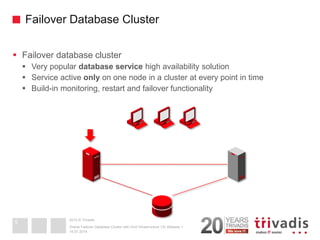
Failover Database Cluster 
Failover database cluster 
Very popular database service high availability solution 
Service active only on one node in a cluster at every point in time 
Build-in monitoring, restart and failover functionality 
16.07.2014 
Oracle Failover Database Cluster with Grid Infrastructure 12c Release 1 
5
2014 © Trivadis 
Why Oracle Grid Infrastructure ? 
Oracle Grid Infrastructure software stack includes 
Oracle Clusterware (Cluster manager) 
Oracle Automatic Storage Management (Logical Volume Manager) 
Why Oracle Grid Infrastructure (Oracle Clusterware) as the failover cluster software stack ? 
Stable and feature reach cluster manager – proved especially in combination with RAC and RAC One Node 
From 10g Release 2 onwards able to protect any kind of application 
-Assumption: CLI API available to start/stop/check and clean an application 
Includes volume manager and a file system for Oracle database files 
Available for all operating systems supported for Oracle database 
Support from one software vendor 
16.07.2014 
Oracle Failover Database Cluster with Grid Infrastructure 12c Release 1 
6
2014 © Trivadis 
Oracle Grid Infrastructure – Licensing 
Oracle Clusterware is free of charge for Oracle customers 
Oracle Database Licensing Information 12c Release 1 (12.1) 
Special-Use Licensing  Oracle Clusterware 
Automatic Storage Management “basic” functionality is free of charge 
For active/passive failover database cluster you may benefit from the “10-day rule usage” 
One unlicensed spare computer per cluster can be used for up to a total of 10 days per year 
Reference: http://www.oracle.com/us/corporate/pricing/data-recovery- licensing-070587.pdf 
16.07.2014 
Oracle Failover Database Cluster with Grid Infrastructure 12c Release 1 
7 
Oracle Clusterware may be used to protect any application (restarting or failing over the application in the event of a failure) on any server, free of charge. Oracle will provide support for Clusterware only if the server is running an Oracle product, which may include Oracle Linux or Oracle Solaris, that is also under Oracle support.
2014 © Trivadis 
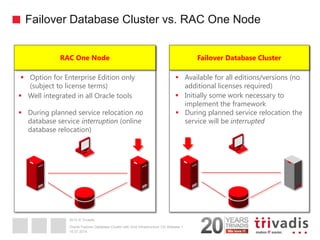
Failover Database Cluster vs. RAC One Node 
16.07.2014 
Oracle Failover Database Cluster with Grid Infrastructure 12c Release 1 
RAC One Node 
Failover Database Cluster 
Option for Enterprise Edition only (subject to license terms) 
Available for all editions/versions (no additional licenses required) 
Well integrated in all Oracle tools 
Initially some work necessary to implement the framework 
During planned service relocation no database service interruption (online database relocation) 
During planned service relocation the service will be interrupted
2014 © Trivadis 
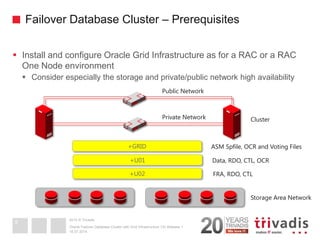
Failover Database Cluster – Prerequisites 
Install and configure Oracle Grid Infrastructure as for a RAC or a RAC One Node environment 
Consider especially the storage and private/public network high availability 
16.07.2014 
Oracle Failover Database Cluster with Grid Infrastructure 12c Release 1 
9 
+GRID 
+U01 
+U02 
Storage Area Network 
Data, RDO, CTL, OCR 
Cluster 
Private Network 
Public Network 
ASM Spfile, OCR and Voting Files 
FRA, RDO, CTL
2014 © Trivadis 
16.07.2014 
Oracle Failover Database Cluster with Grid Infrastructure 12c Release 1 
Cluster Resource Management 
10
2014 © Trivadis 
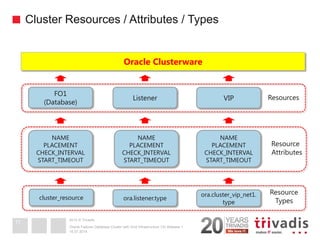
Cluster Resources / Attributes / Types 
16.07.2014 
Oracle Failover Database Cluster with Grid Infrastructure 12c Release 1 
11 
Oracle Clusterware 
FO1 (Database) 
Listener 
VIP 
Resources 
NAME PLACEMENT CHECK_INTERVAL START_TIMEOUT 
NAME 
PLACEMENT 
CHECK_INTERVAL 
START_TIMEOUT 
Resource Attributes 
ora.cluster_vip_net1. type 
ora.listener.type 
cluster_resource 
Resource Types
2014 © Trivadis 
Resources Attributes 
November 16, 2011 
Oracle Database Failover Cluster with Grid Infrastructure 11g Release 2 
12 
NAME 
TYPE 
ACL 
ACTION_SCRIPT 
AGENT_FILENAME 
START_DEPENDENCIES 
STOP_DEPENDENCIES 
Configuration 
SCRIPT_TIMEOUT 
CHECK_INTERVAL 
RESTART_ATTEMPTS 
FAILURE_INTERVAL 
FAILURE_THRESHOLD 
UPTIME_THRESHOLD 
Monitoring 
PLACEMENT 
SERVER_POOLS 
LOAD 
USE_STICKINESS 
START_DEPENDENCIES 
DISPERSION 
EXCLUSION 
Placement 
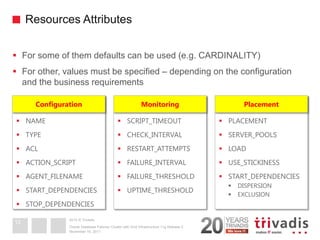
For some of them defaults can be used (e.g. CARDINALITY) 
For other, values must be specified – depending on the configuration and the business requirements
2014 © Trivadis 
Resources Attributes – START|STOP DEPENDENCIES 
November 16, 2011 
Oracle Database Failover Cluster with Grid Infrastructure 11g Release 2 
13 
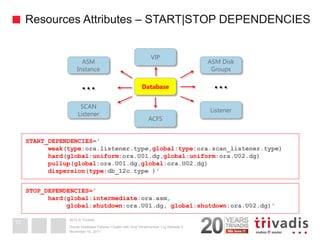
START_DEPENDENCIES=' 
weak(type:ora.listener.type,global:type:ora.scan_listener.type) 
hard(global:uniform:ora.U01.dg,global:uniform:ora.U02.dg) 
pullup(global:ora.U01.dg,global:ora.U02.dg) 
dispersion(type:db_12c.type )' 
STOP_DEPENDENCIES=' hard(global:intermediate:ora.asm, global:shutdown:ora.U01.dg, global:shutdown:ora.U02.dg)' 
Database 
ASM Instance 
ASM Disk Groups 
Listener 
SCAN 
Listener 
VIP 
ACFS 
… 
…
2014 © Trivadis 
Resource Types 
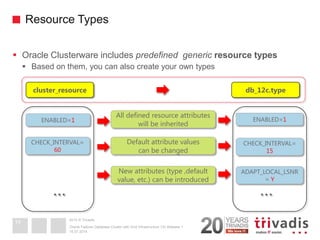
Oracle Clusterware includes predefined generic resource types 
Based on them, you can also create your own types 
16.07.2014 
Oracle Failover Database Cluster with Grid Infrastructure 12c Release 1 
14 
db_12c.type 
cluster_resource 
All defined resource attributes will be inherited 
Default attribute values can be changed 
New attributes (type ,default value, etc.) can be introduced 
ENABLED=1 
ENABLED=1 
CHECK_INTERVAL= 
60 
CHECK_INTERVAL= 15 
ADAPT_LOCAL_LSNR= Y 
… 
…
2014 © Trivadis 
Agents / Action Scripts 
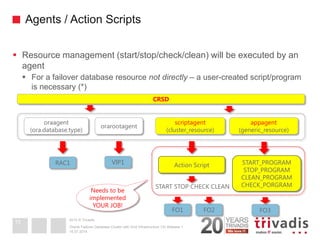
Resource management (start/stop/check/clean) will be executed by an agent 
For a failover database resource not directly – a user-created script/program is necessary (*) 
16.07.2014 
Oracle Failover Database Cluster with Grid Infrastructure 12c Release 1 
15 
CRSD 
oraagent 
(ora.database.type) 
orarootagent 
scriptagent 
(cluster_resource) 
appagent (generic_resource) 
RAC1 
VIP1 
FO1 
FO3 
Action Script 
START STOP CHECK CLEAN 
START_PROGRAM 
STOP_PROGRAM 
CLEAN_PROGRAM 
CHECK_PORGRAM 
Needs to be implemented YOUR JOB! 
FO2
2014 © Trivadis 
Action Scripts 
Action script must follow a certain structure 
Must return an exit code 0 in case of a success and other in case of a failure 
16.07.2014 
Oracle Failover Database Cluster with Grid Infrastructure 12c Release 1 
16 
case $1 in start) if start_action succeed ; then exit 0 else exit 1 fi ;; stop) if stop_action succeed ... ;; check) if check_action succeed ... ;; clean) if clean_action succeed ... ;; esac 
SHUTDOWN IMMEDIATE 
STARTUP [MOUNT|OPEN] 
ps –ef | grep ora_pmon_<SID> 
SHUTDOWN ABORT
2014 © Trivadis 
16.07.2014 
Oracle Failover Database Cluster with Grid Infrastructure 12c Release 1 
Registering Resources 
17
2014 © Trivadis 
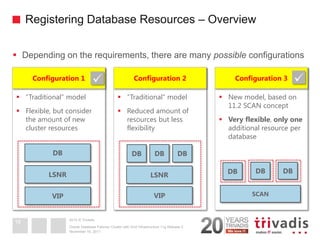
Registering Database Resources – Overview 
Depending on the requirements, there are many possible configurations 
November 16, 2011 
Oracle Database Failover Cluster with Grid Infrastructure 11g Release 2 
18 
“Traditional“ model 
Flexible, but consider the amount of new cluster resources 
Configuration 1 
“Traditional“ model 
Reduced amount of resources but less flexibility 
Configuration 2 
New model, based on 11.2 SCAN concept 
Very flexible, only one additional resource per database 
Configuration 3 
VIP 
LSNR 
DB 
VIP 
LSNR 
DB 
DB 
DB 
SCAN 
DB 
DB 
DB
2014 © Trivadis 
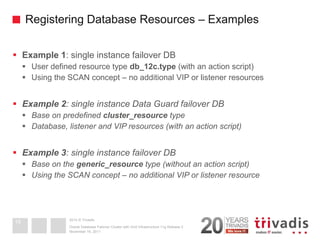
Registering Database Resources – Examples 
Example 1: single instance failover DB 
User defined resource type db_12c.type (with an action script) 
Using the SCAN concept – no additional VIP or listener resources 
Example 2: single instance Data Guard failover DB 
Base on predefined cluster_resource type 
Database, listener and VIP resources (with an action script) 
Example 3: single instance failover DB 
Base on the generic_resource type (without an action script) 
Using the SCAN concept – no additional VIP or listener resource 
November 16, 2011 
Oracle Database Failover Cluster with Grid Infrastructure 11g Release 2 
19
2014 © Trivadis 
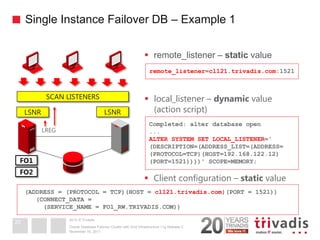
Single Instance Failover DB – Example 1 
November 16, 2011 
Oracle Database Failover Cluster with Grid Infrastructure 11g Release 2 
20 
SCAN LISTENERS 
FO1 
FO2 
remote_listener=cl121.trivadis.com:1521 
(ADDRESS = (PROTOCOL = TCP)(HOST = cl121.trivadis.com)(PORT = 1521)) (CONNECT_DATA = (SERVICE_NAME = FO1_RW.TRIVADIS.COM)) 
Completed: alter database open 
... 
ALTER SYSTEM SET LOCAL_LISTENER=' 
(DESCRIPTION=(ADDRESS_LIST=(ADDRESS= 
(PROTOCOL=TCP)(HOST=192.168.122.12) 
(PORT=1521))))' SCOPE=MEMORY; 
remote_listener – static value 
local_listener – dynamic value (action script) 
Client configuration – static value 
LSNR 
LSNR 
LREG
2014 © Trivadis 
Single Instance Failover DB – Example 1 
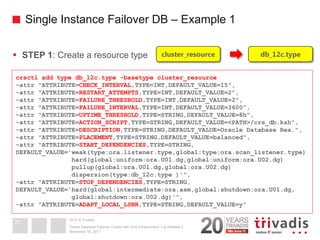
STEP 1: Create a resource type 
November 16, 2011 
Oracle Database Failover Cluster with Grid Infrastructure 11g Release 2 
21 
crsctl add type db_12c.type -basetype cluster_resource 
-attr "ATTRIBUTE=CHECK_INTERVAL,TYPE=INT,DEFAULT_VALUE=15", 
-attr "ATTRIBUTE=RESTART_ATTEMPTS,TYPE=INT,DEFAULT_VALUE=2", 
-attr "ATTRIBUTE=FAILURE_THRESHOLD,TYPE=INT,DEFAULT_VALUE=2", 
-attr "ATTRIBUTE=FAILURE_INTERVAL,TYPE=INT,DEFAULT_VALUE=3600", 
-attr "ATTRIBUTE=UPTIME_THRESHOLD,TYPE=STRING,DEFAULT_VALUE=8h", 
-attr "ATTRIBUTE=ACTION_SCRIPT,TYPE=STRING,DEFAULT_VALUE=<PATH>/crs_db.ksh", 
-attr "ATTRIBUTE=DESCRIPTION,TYPE=STRING,DEFAULT_VALUE=Oracle Database Res.", 
-attr "ATTRIBUTE=PLACEMENT,TYPE=STRING,DEFAULT_VALUE=balanced", 
-attr "ATTRIBUTE=START_DEPENDENCIES,TYPE=STRING, DEFAULT_VALUE='weak(type:ora.listener.type,global:type:ora.scan_listener.type) 
hard(global:uniform:ora.U01.dg,global:uniform:ora.U02.dg) 
pullup(global:ora.U01.dg,global:ora.U02.dg) 
dispersion(type:db_12c.type )'", 
-attr "ATTRIBUTE=STOP_DEPENDENCIES,TYPE=STRING, 
DEFAULT_VALUE='hard(global:intermediate:ora.asm,global:shutdown:ora.U01.dg, 
global:shutdown:ora.U02.dg)'", 
-attr "ATTRIBUTE=ADAPT_LOCAL_LSNR,TYPE=STRING,DEFAULT_VALUE=y" 
db_12c.type 
cluster_resource
2014 © Trivadis 
Single Instance Failover DB – Example 1 
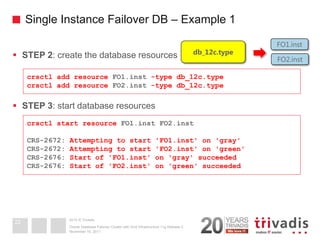
STEP 2: create the database resources 
STEP 3: start database resources 
November 16, 2011 
Oracle Database Failover Cluster with Grid Infrastructure 11g Release 2 
22 
crsctl add resource FO1.inst -type db_12c.type 
crsctl add resource FO2.inst -type db_12c.type 
crsctl start resource FO1.inst FO2.inst 
CRS-2672: Attempting to start 'FO1.inst' on 'gray' 
CRS-2672: Attempting to start 'FO2.inst' on 'green' 
CRS-2676: Start of 'FO1.inst' on 'gray' succeeded 
CRS-2676: Start of 'FO2.inst' on 'green' succeeded 
db_12c.type 
FO1.inst 
FO2.inst
2014 © Trivadis 
Single Instance Data Guard Failover DB – Example 2 
November 16, 2011 
Oracle Database Failover Cluster with Grid Infrastructure 11g Release 2 
23 
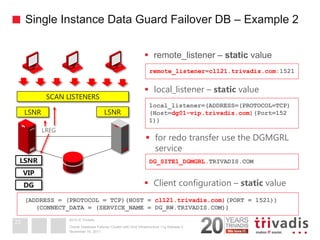
SCAN LISTENERS 
LSNR 
VIP 
remote_listener=cl121.trivadis.com:1521 
(ADDRESS = (PROTOCOL = TCP)(HOST = cl121.trivadis.com)(PORT = 1521)) 
(CONNECT_DATA = (SERVICE_NAME = DG_RW.TRIVADIS.COM)) 
local_listener=(ADDRESS=(PROTOCOL=TCP) (Host=dg01-vip.trivadis.com)(Port=152 
1)) 
remote_listener – static value 
local_listener – static value 
Client configuration – static value 
LSNR 
LSNR 
LREG 
DG 
for redo transfer use the DGMGRL service 
DG_SITE1_DGMGRL.TRIVADIS.COM
2014 © Trivadis 
Data Guard Failover DB – Example 2 
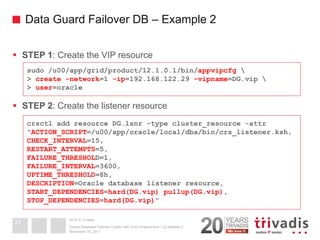
STEP 1: Create the VIP resource 
STEP 2: Create the listener resource 
November 16, 2011 
Oracle Database Failover Cluster with Grid Infrastructure 11g Release 2 
24 
sudo /u00/app/grid/product/12.1.0.1/bin/appvipcfg  > create -network=1 -ip=192.168.122.29 -vipname=DG.vip  > user=oracle 
crsctl add resource DG.lsnr -type cluster_resource -attr "ACTION_SCRIPT=/u00/app/oracle/local/dba/bin/crs_listener.ksh, CHECK_INTERVAL=15, RESTART_ATTEMPTS=5, FAILURE_THRESHOLD=1, FAILURE_INTERVAL=3600, UPTIME_THRESHOLD=8h, DESCRIPTION=Oracle database listener resource, START_DEPENDENCIES=hard(DG.vip) pullup(DG.vip), STOP_DEPENDENCIES=hard(DG.vip)"
2014 © Trivadis 
Data Guard Failover DB – Example 2 
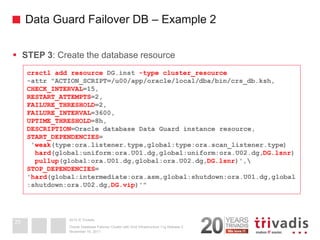
STEP 3: Create the database resource 
November 16, 2011 
Oracle Database Failover Cluster with Grid Infrastructure 11g Release 2 
25 
crsctl add resource DG.inst -type cluster_resource -attr "ACTION_SCRIPT=/u00/app/oracle/local/dba/bin/crs_db.ksh, CHECK_INTERVAL=15, RESTART_ATTEMPTS=2, FAILURE_THRESHOLD=2, FAILURE_INTERVAL=3600, UPTIME_THRESHOLD=8h, DESCRIPTION=Oracle database Data Guard instance resource, START_DEPENDENCIES= 'weak(type:ora.listener.type,global:type:ora.scan_listener.type) hard(global:uniform:ora.U01.dg,global:uniform:ora.U02.dg,DG.lsnr) pullup(global:ora.U01.dg,global:ora.U02.dg,DG.lsnr)', STOP_DEPENDENCIES= 'hard(global:intermediate:ora.asm,global:shutdown:ora.U01.dg,global:shutdown:ora.U02.dg,DG.vip)'"
2014 © Trivadis 
Data Guard Failover DB – Example 2 
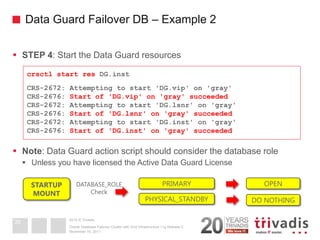
STEP 4: Start the Data Guard resources 
Note: Data Guard action script should consider the database role 
Unless you have licensed the Active Data Guard License 
November 16, 2011 
Oracle Database Failover Cluster with Grid Infrastructure 11g Release 2 
26 
crsctl start res DG.inst 
CRS-2672: Attempting to start 'DG.vip' on 'gray' 
CRS-2676: Start of 'DG.vip' on 'gray' succeeded 
CRS-2672: Attempting to start 'DG.lsnr' on 'gray' 
CRS-2676: Start of 'DG.lsnr' on 'gray' succeeded 
CRS-2672: Attempting to start 'DG.inst' on 'gray' 
CRS-2676: Start of 'DG.inst' on 'gray' succeeded 
STARTUP MOUNT 
DATABASE_ROLE 
Check 
PRIMARY 
PHYSICAL_STANDBY 
OPEN 
DO NOTHING
2014 © Trivadis 
Single Instance Failover DB – Example 3 
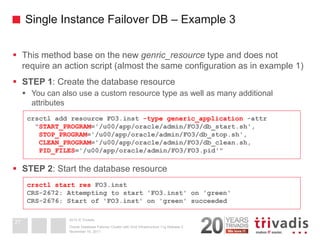
This method base on the new genric_resource type and does not require an action script (almost the same configuration as in example 1) 
STEP 1: Create the database resource 
You can also use a custom resource type as well as many additional attributes 
STEP 2: Start the database resource 
November 16, 2011 
Oracle Database Failover Cluster with Grid Infrastructure 11g Release 2 
27 
crsctl add resource FO3.inst -type generic_application -attr "START_PROGRAM='/u00/app/oracle/admin/FO3/db_start.sh', STOP_PROGRAM='/u00/app/oracle/admin/FO3/db_stop.sh', CLEAN_PROGRAM='/u00/app/oracle/admin/FO3/db_clean.sh, PID_FILES='/u00/app/oracle/admin/FO3/FO3.pid'" 
crsctl start res FO3.inst CRS-2672: Attempting to start 'FO3.inst' on 'green' CRS-2676: Start of 'FO3.inst' on 'green' succeeded
2014 © Trivadis 
16.07.2014 
Oracle Failover Database Cluster with Grid Infrastructure 12c Release 1 
Resource Monitoring 
28 
14
2014 © Trivadis 
Resource Monitoring 
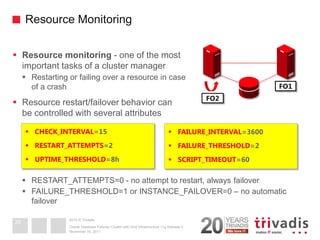
Resource monitoring - one of the most important tasks of a cluster manager 
Restarting or failing over a resource in case of a crash 
Resource restart/failover behavior can be controlled with several attributes 
RESTART_ATTEMPTS=0 - no attempt to restart, always failover 
FAILURE_THRESHOLD=1 or INSTANCE_FAILOVER=0 – no automatic failover 
November 16, 2011 
Oracle Database Failover Cluster with Grid Infrastructure 11g Release 2 
29 
FO2 
FO1 
CHECK_INTERVAL=15 
RESTART_ATTEMPTS=2 
UPTIME_THRESHOLD=8h 
FAILURE_INTERVAL=3600 
FAILURE_THRESHOLD=2 
SCRIPT_TIMEOUT=60
2014 © Trivadis 
Resource Monitoring 
Oracle Clusterware monitors resources only if the resource attribute ENABLED is set to 1 
During Data Guard switchover, disable the resource monitoring 
Do not shut down the database resources using SQL*Plus 
In case of resource dependencies, you may need to use the force option 
November 16, 2011 
Oracle Database Failover Cluster with Grid Infrastructure 11g Release 2 
30 
crsctl modify resource FO1.inst –attr "ENABLED=0" 
crsctl status resource FO1.inst -p | grep ENABLED ENABLED=1 
crsctl stop resource FO1.inst [-f] 
CRS-2673: Attempting to stop 'FO1.inst' on 'gray' 
CRS-2677: Stop of 'FO1.inst' on 'gray' succeeded
2014 © Trivadis 
16.07.2014 
Oracle Failover Database Cluster with Grid Infrastructure 12c Release 1 
Resource Placement 
31
2014 © Trivadis 
Resource Placement 
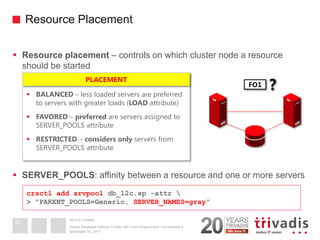
Resource placement – controls on which cluster node a resource should be started 
SERVER_POOLS: affinity between a resource and one or more servers 
November 16, 2011 
Oracle Database Failover Cluster with Grid Infrastructure 11g Release 2 
32 
FO1 
? 
BALANCED – less loaded servers are preferred to servers with greater loads (LOAD attribute) 
FAVORED – preferred are servers assigned to SERVER_POOLS attribute 
RESTRICTED – considers only servers from SERVER_POOLS attribute 
PLACEMENT 
crsctl add srvpool db_12c.sp -attr  > "PARENT_POOLS=Generic, SERVER_NAMES=gray"
2014 © Trivadis 
Resource Placement 
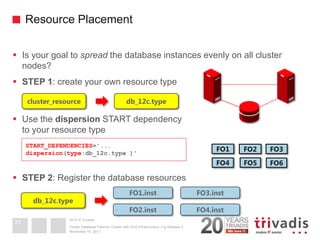
Is your goal to spread the database instances evenly on all cluster nodes? 
STEP 1: create your own resource type 
Use the dispersion START dependency to your resource type 
STEP 2: Register the database resources 
November 16, 2011 
Oracle Database Failover Cluster with Grid Infrastructure 11g Release 2 
33 
FO1 
FO4 
FO5 
FO3 
FO6 
FO2 
db_12c.type 
cluster_resource 
START_DEPENDENCIES='... dispersion(type:db_12c.type )' 
FO1.inst 
db_12c.type 
FO2.inst 
FO3.inst 
FO4.inst
2014 © Trivadis 
Resource Placement – Prod/Test Cluster 
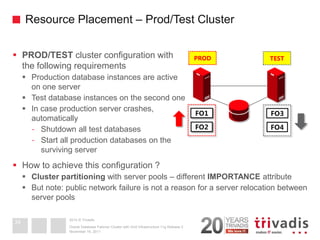
PROD/TEST cluster configuration with the following requirements 
Production database instances are active on one server 
Test database instances on the second one 
In case production server crashes, automatically 
-Shutdown all test databases 
-Start all production databases on the surviving server 
How to achieve this configuration ? 
Cluster partitioning with server pools – different IMPORTANCE attribute 
But note: public network failure is not a reason for a server relocation between server pools 
November 16, 2011 
Oracle Database Failover Cluster with Grid Infrastructure 11g Release 2 
34 
FO1 
FO2 
PROD 
FO3 
FO4 
TEST
2014 © Trivadis 
Resource Placement – Prod/Test Cluster 
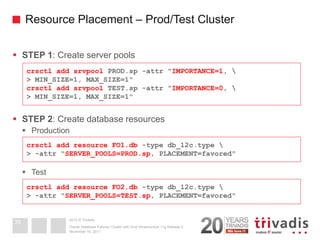
STEP 1: Create server pools 
STEP 2: Create database resources 
Production 
Test 
November 16, 2011 
Oracle Database Failover Cluster with Grid Infrastructure 11g Release 2 
35 
crsctl add srvpool PROD.sp -attr "IMPORTANCE=1,  > MIN_SIZE=1, MAX_SIZE=1" crsctl add srvpool TEST.sp -attr "IMPORTANCE=0,  > MIN_SIZE=1, MAX_SIZE=1" 
crsctl add resource FO1.db -type db_12c.type  > -attr "SERVER_POOLS=PROD.sp, PLACEMENT=favored" 
crsctl add resource FO2.db -type db_12c.type  
> -attr "SERVER_POOLS=TEST.sp, PLACEMENT=favored"
2014 © Trivadis 
Core Messages 
Oracle Grid Infrastructure (Clusterware) offers sufficient functionality to implement a failover database cluster 
Useful not only for databases 
Many ways to customize the environment, to suit your exact needs 
No additional license fees, support from one vendor 
Very good CLI tools 
EM integration possible, but not out of the box 
November 16, 2011 
Oracle Database Failover Cluster with Grid Infrastructure 11g Release 2 
36
2014 © Trivadis 
Questions and answers ... 
BASEL BERN BRUGG LAUSANNE ZUERICH DUESSELDORF FRANKFURT A.M. FREIBURG I.BR. HAMBURG MUNICH STUTTGART VIENNA 
Robert Bialek Principal Consultant 
Tel.: +49 89 99275930 
robert.bialek@trivadis.com 
16.07.2014 
Oracle Failover Database Cluster with Grid Infrastructure 12c Release 1 
37

Oracle Failover Database Cluster with Grid Infrastructure 12c

  • 1.
    2014 © Trivadis BASEL BERN BRUGG LAUSANNE ZUERICH DUESSELDORF FRANKFURT A.M. FREIBURG I.BR. HAMBURG MUNICH STUTTGART VIENNA Oracle Failover Database Cluster with Grid Infrastructure 12c Release 1 Robert Bialek, MU-IMS Principal Consultant 16.07.2014 Oracle Failover Database Cluster with Grid Infrastructure 12c Release 1 1
  • 2.
    2014 © Trivadis Who Am I Principal Consultant, Partner and Trainer at Trivadis GmbH robert.bialek@trivadis.com Focus: Oracle Database High Availability Grid Infrastructure, Real Application Cluster, Data Guard, Maximum Availability Architecture, Failover Cluster Architecture design Review, troubleshooting, coaching Backup and recovery Performance tuning Linux administration Trainer for the following Trivadis courses Oracle Grid Infrastructure (O-GRINF) Oracle Real Application Cluster (O-RAC) Oracle Data Guard (O-DG) 16.07.2014 Oracle Failover Database Cluster with Grid Infrastructure 12c Release 1 2
  • 3.
    2014 © Trivadis AGENDA 1.Introduction 2.Cluster Resource Management 3.Registering Resources 4.Resource Monitoring 5.Resource Placement 16.07.2014 Oracle Failover Database Cluster with Grid Infrastructure 12c Release 1 3
  • 4.
    2014 © Trivadis 16.07.2014 Oracle Failover Database Cluster with Grid Infrastructure 12c Release 1 Introduction 4
  • 5.
    2014 © Trivadis Failover Database Cluster Failover database cluster Very popular database service high availability solution Service active only on one node in a cluster at every point in time Build-in monitoring, restart and failover functionality 16.07.2014 Oracle Failover Database Cluster with Grid Infrastructure 12c Release 1 5
  • 6.
    2014 © Trivadis Why Oracle Grid Infrastructure ? Oracle Grid Infrastructure software stack includes Oracle Clusterware (Cluster manager) Oracle Automatic Storage Management (Logical Volume Manager) Why Oracle Grid Infrastructure (Oracle Clusterware) as the failover cluster software stack ? Stable and feature reach cluster manager – proved especially in combination with RAC and RAC One Node From 10g Release 2 onwards able to protect any kind of application -Assumption: CLI API available to start/stop/check and clean an application Includes volume manager and a file system for Oracle database files Available for all operating systems supported for Oracle database Support from one software vendor 16.07.2014 Oracle Failover Database Cluster with Grid Infrastructure 12c Release 1 6
  • 7.
    2014 © Trivadis Oracle Grid Infrastructure – Licensing Oracle Clusterware is free of charge for Oracle customers Oracle Database Licensing Information 12c Release 1 (12.1) Special-Use Licensing  Oracle Clusterware Automatic Storage Management “basic” functionality is free of charge For active/passive failover database cluster you may benefit from the “10-day rule usage” One unlicensed spare computer per cluster can be used for up to a total of 10 days per year Reference: http://www.oracle.com/us/corporate/pricing/data-recovery- licensing-070587.pdf 16.07.2014 Oracle Failover Database Cluster with Grid Infrastructure 12c Release 1 7 Oracle Clusterware may be used to protect any application (restarting or failing over the application in the event of a failure) on any server, free of charge. Oracle will provide support for Clusterware only if the server is running an Oracle product, which may include Oracle Linux or Oracle Solaris, that is also under Oracle support.
  • 8.
    2014 © Trivadis Failover Database Cluster vs. RAC One Node 16.07.2014 Oracle Failover Database Cluster with Grid Infrastructure 12c Release 1 RAC One Node Failover Database Cluster Option for Enterprise Edition only (subject to license terms) Available for all editions/versions (no additional licenses required) Well integrated in all Oracle tools Initially some work necessary to implement the framework During planned service relocation no database service interruption (online database relocation) During planned service relocation the service will be interrupted
  • 9.
    2014 © Trivadis Failover Database Cluster – Prerequisites Install and configure Oracle Grid Infrastructure as for a RAC or a RAC One Node environment Consider especially the storage and private/public network high availability 16.07.2014 Oracle Failover Database Cluster with Grid Infrastructure 12c Release 1 9 +GRID +U01 +U02 Storage Area Network Data, RDO, CTL, OCR Cluster Private Network Public Network ASM Spfile, OCR and Voting Files FRA, RDO, CTL
  • 10.
    2014 © Trivadis 16.07.2014 Oracle Failover Database Cluster with Grid Infrastructure 12c Release 1 Cluster Resource Management 10
  • 11.
    2014 © Trivadis Cluster Resources / Attributes / Types 16.07.2014 Oracle Failover Database Cluster with Grid Infrastructure 12c Release 1 11 Oracle Clusterware FO1 (Database) Listener VIP Resources NAME PLACEMENT CHECK_INTERVAL START_TIMEOUT NAME PLACEMENT CHECK_INTERVAL START_TIMEOUT NAME PLACEMENT CHECK_INTERVAL START_TIMEOUT Resource Attributes ora.cluster_vip_net1. type ora.listener.type cluster_resource Resource Types
  • 12.
    2014 © Trivadis Resources Attributes November 16, 2011 Oracle Database Failover Cluster with Grid Infrastructure 11g Release 2 12 NAME TYPE ACL ACTION_SCRIPT AGENT_FILENAME START_DEPENDENCIES STOP_DEPENDENCIES Configuration SCRIPT_TIMEOUT CHECK_INTERVAL RESTART_ATTEMPTS FAILURE_INTERVAL FAILURE_THRESHOLD UPTIME_THRESHOLD Monitoring PLACEMENT SERVER_POOLS LOAD USE_STICKINESS START_DEPENDENCIES DISPERSION EXCLUSION Placement For some of them defaults can be used (e.g. CARDINALITY) For other, values must be specified – depending on the configuration and the business requirements
  • 13.
    2014 © Trivadis Resources Attributes – START|STOP DEPENDENCIES November 16, 2011 Oracle Database Failover Cluster with Grid Infrastructure 11g Release 2 13 START_DEPENDENCIES=' weak(type:ora.listener.type,global:type:ora.scan_listener.type) hard(global:uniform:ora.U01.dg,global:uniform:ora.U02.dg) pullup(global:ora.U01.dg,global:ora.U02.dg) dispersion(type:db_12c.type )' STOP_DEPENDENCIES=' hard(global:intermediate:ora.asm, global:shutdown:ora.U01.dg, global:shutdown:ora.U02.dg)' Database ASM Instance ASM Disk Groups Listener SCAN Listener VIP ACFS … …
  • 14.
    2014 © Trivadis Resource Types Oracle Clusterware includes predefined generic resource types Based on them, you can also create your own types 16.07.2014 Oracle Failover Database Cluster with Grid Infrastructure 12c Release 1 14 db_12c.type cluster_resource All defined resource attributes will be inherited Default attribute values can be changed New attributes (type ,default value, etc.) can be introduced ENABLED=1 ENABLED=1 CHECK_INTERVAL= 60 CHECK_INTERVAL= 15 ADAPT_LOCAL_LSNR= Y … …
  • 15.
    2014 © Trivadis Agents / Action Scripts Resource management (start/stop/check/clean) will be executed by an agent For a failover database resource not directly – a user-created script/program is necessary (*) 16.07.2014 Oracle Failover Database Cluster with Grid Infrastructure 12c Release 1 15 CRSD oraagent (ora.database.type) orarootagent scriptagent (cluster_resource) appagent (generic_resource) RAC1 VIP1 FO1 FO3 Action Script START STOP CHECK CLEAN START_PROGRAM STOP_PROGRAM CLEAN_PROGRAM CHECK_PORGRAM Needs to be implemented YOUR JOB! FO2
  • 16.
    2014 © Trivadis Action Scripts Action script must follow a certain structure Must return an exit code 0 in case of a success and other in case of a failure 16.07.2014 Oracle Failover Database Cluster with Grid Infrastructure 12c Release 1 16 case $1 in start) if start_action succeed ; then exit 0 else exit 1 fi ;; stop) if stop_action succeed ... ;; check) if check_action succeed ... ;; clean) if clean_action succeed ... ;; esac SHUTDOWN IMMEDIATE STARTUP [MOUNT|OPEN] ps –ef | grep ora_pmon_<SID> SHUTDOWN ABORT
  • 17.
    2014 © Trivadis 16.07.2014 Oracle Failover Database Cluster with Grid Infrastructure 12c Release 1 Registering Resources 17
  • 18.
    2014 © Trivadis Registering Database Resources – Overview Depending on the requirements, there are many possible configurations November 16, 2011 Oracle Database Failover Cluster with Grid Infrastructure 11g Release 2 18 “Traditional“ model Flexible, but consider the amount of new cluster resources Configuration 1 “Traditional“ model Reduced amount of resources but less flexibility Configuration 2 New model, based on 11.2 SCAN concept Very flexible, only one additional resource per database Configuration 3 VIP LSNR DB VIP LSNR DB DB DB SCAN DB DB DB
  • 19.
    2014 © Trivadis Registering Database Resources – Examples Example 1: single instance failover DB User defined resource type db_12c.type (with an action script) Using the SCAN concept – no additional VIP or listener resources Example 2: single instance Data Guard failover DB Base on predefined cluster_resource type Database, listener and VIP resources (with an action script) Example 3: single instance failover DB Base on the generic_resource type (without an action script) Using the SCAN concept – no additional VIP or listener resource November 16, 2011 Oracle Database Failover Cluster with Grid Infrastructure 11g Release 2 19
  • 20.
    2014 © Trivadis Single Instance Failover DB – Example 1 November 16, 2011 Oracle Database Failover Cluster with Grid Infrastructure 11g Release 2 20 SCAN LISTENERS FO1 FO2 remote_listener=cl121.trivadis.com:1521 (ADDRESS = (PROTOCOL = TCP)(HOST = cl121.trivadis.com)(PORT = 1521)) (CONNECT_DATA = (SERVICE_NAME = FO1_RW.TRIVADIS.COM)) Completed: alter database open ... ALTER SYSTEM SET LOCAL_LISTENER=' (DESCRIPTION=(ADDRESS_LIST=(ADDRESS= (PROTOCOL=TCP)(HOST=192.168.122.12) (PORT=1521))))' SCOPE=MEMORY; remote_listener – static value local_listener – dynamic value (action script) Client configuration – static value LSNR LSNR LREG
  • 21.
    2014 © Trivadis Single Instance Failover DB – Example 1 STEP 1: Create a resource type November 16, 2011 Oracle Database Failover Cluster with Grid Infrastructure 11g Release 2 21 crsctl add type db_12c.type -basetype cluster_resource -attr "ATTRIBUTE=CHECK_INTERVAL,TYPE=INT,DEFAULT_VALUE=15", -attr "ATTRIBUTE=RESTART_ATTEMPTS,TYPE=INT,DEFAULT_VALUE=2", -attr "ATTRIBUTE=FAILURE_THRESHOLD,TYPE=INT,DEFAULT_VALUE=2", -attr "ATTRIBUTE=FAILURE_INTERVAL,TYPE=INT,DEFAULT_VALUE=3600", -attr "ATTRIBUTE=UPTIME_THRESHOLD,TYPE=STRING,DEFAULT_VALUE=8h", -attr "ATTRIBUTE=ACTION_SCRIPT,TYPE=STRING,DEFAULT_VALUE=<PATH>/crs_db.ksh", -attr "ATTRIBUTE=DESCRIPTION,TYPE=STRING,DEFAULT_VALUE=Oracle Database Res.", -attr "ATTRIBUTE=PLACEMENT,TYPE=STRING,DEFAULT_VALUE=balanced", -attr "ATTRIBUTE=START_DEPENDENCIES,TYPE=STRING, DEFAULT_VALUE='weak(type:ora.listener.type,global:type:ora.scan_listener.type) hard(global:uniform:ora.U01.dg,global:uniform:ora.U02.dg) pullup(global:ora.U01.dg,global:ora.U02.dg) dispersion(type:db_12c.type )'", -attr "ATTRIBUTE=STOP_DEPENDENCIES,TYPE=STRING, DEFAULT_VALUE='hard(global:intermediate:ora.asm,global:shutdown:ora.U01.dg, global:shutdown:ora.U02.dg)'", -attr "ATTRIBUTE=ADAPT_LOCAL_LSNR,TYPE=STRING,DEFAULT_VALUE=y" db_12c.type cluster_resource
  • 22.
    2014 © Trivadis Single Instance Failover DB – Example 1 STEP 2: create the database resources STEP 3: start database resources November 16, 2011 Oracle Database Failover Cluster with Grid Infrastructure 11g Release 2 22 crsctl add resource FO1.inst -type db_12c.type crsctl add resource FO2.inst -type db_12c.type crsctl start resource FO1.inst FO2.inst CRS-2672: Attempting to start 'FO1.inst' on 'gray' CRS-2672: Attempting to start 'FO2.inst' on 'green' CRS-2676: Start of 'FO1.inst' on 'gray' succeeded CRS-2676: Start of 'FO2.inst' on 'green' succeeded db_12c.type FO1.inst FO2.inst
  • 23.
    2014 © Trivadis Single Instance Data Guard Failover DB – Example 2 November 16, 2011 Oracle Database Failover Cluster with Grid Infrastructure 11g Release 2 23 SCAN LISTENERS LSNR VIP remote_listener=cl121.trivadis.com:1521 (ADDRESS = (PROTOCOL = TCP)(HOST = cl121.trivadis.com)(PORT = 1521)) (CONNECT_DATA = (SERVICE_NAME = DG_RW.TRIVADIS.COM)) local_listener=(ADDRESS=(PROTOCOL=TCP) (Host=dg01-vip.trivadis.com)(Port=152 1)) remote_listener – static value local_listener – static value Client configuration – static value LSNR LSNR LREG DG for redo transfer use the DGMGRL service DG_SITE1_DGMGRL.TRIVADIS.COM
  • 24.
    2014 © Trivadis Data Guard Failover DB – Example 2 STEP 1: Create the VIP resource STEP 2: Create the listener resource November 16, 2011 Oracle Database Failover Cluster with Grid Infrastructure 11g Release 2 24 sudo /u00/app/grid/product/12.1.0.1/bin/appvipcfg > create -network=1 -ip=192.168.122.29 -vipname=DG.vip > user=oracle crsctl add resource DG.lsnr -type cluster_resource -attr "ACTION_SCRIPT=/u00/app/oracle/local/dba/bin/crs_listener.ksh, CHECK_INTERVAL=15, RESTART_ATTEMPTS=5, FAILURE_THRESHOLD=1, FAILURE_INTERVAL=3600, UPTIME_THRESHOLD=8h, DESCRIPTION=Oracle database listener resource, START_DEPENDENCIES=hard(DG.vip) pullup(DG.vip), STOP_DEPENDENCIES=hard(DG.vip)"
  • 25.
    2014 © Trivadis Data Guard Failover DB – Example 2 STEP 3: Create the database resource November 16, 2011 Oracle Database Failover Cluster with Grid Infrastructure 11g Release 2 25 crsctl add resource DG.inst -type cluster_resource -attr "ACTION_SCRIPT=/u00/app/oracle/local/dba/bin/crs_db.ksh, CHECK_INTERVAL=15, RESTART_ATTEMPTS=2, FAILURE_THRESHOLD=2, FAILURE_INTERVAL=3600, UPTIME_THRESHOLD=8h, DESCRIPTION=Oracle database Data Guard instance resource, START_DEPENDENCIES= 'weak(type:ora.listener.type,global:type:ora.scan_listener.type) hard(global:uniform:ora.U01.dg,global:uniform:ora.U02.dg,DG.lsnr) pullup(global:ora.U01.dg,global:ora.U02.dg,DG.lsnr)', STOP_DEPENDENCIES= 'hard(global:intermediate:ora.asm,global:shutdown:ora.U01.dg,global:shutdown:ora.U02.dg,DG.vip)'"
  • 26.
    2014 © Trivadis Data Guard Failover DB – Example 2 STEP 4: Start the Data Guard resources Note: Data Guard action script should consider the database role Unless you have licensed the Active Data Guard License November 16, 2011 Oracle Database Failover Cluster with Grid Infrastructure 11g Release 2 26 crsctl start res DG.inst CRS-2672: Attempting to start 'DG.vip' on 'gray' CRS-2676: Start of 'DG.vip' on 'gray' succeeded CRS-2672: Attempting to start 'DG.lsnr' on 'gray' CRS-2676: Start of 'DG.lsnr' on 'gray' succeeded CRS-2672: Attempting to start 'DG.inst' on 'gray' CRS-2676: Start of 'DG.inst' on 'gray' succeeded STARTUP MOUNT DATABASE_ROLE Check PRIMARY PHYSICAL_STANDBY OPEN DO NOTHING
  • 27.
    2014 © Trivadis Single Instance Failover DB – Example 3 This method base on the new genric_resource type and does not require an action script (almost the same configuration as in example 1) STEP 1: Create the database resource You can also use a custom resource type as well as many additional attributes STEP 2: Start the database resource November 16, 2011 Oracle Database Failover Cluster with Grid Infrastructure 11g Release 2 27 crsctl add resource FO3.inst -type generic_application -attr "START_PROGRAM='/u00/app/oracle/admin/FO3/db_start.sh', STOP_PROGRAM='/u00/app/oracle/admin/FO3/db_stop.sh', CLEAN_PROGRAM='/u00/app/oracle/admin/FO3/db_clean.sh, PID_FILES='/u00/app/oracle/admin/FO3/FO3.pid'" crsctl start res FO3.inst CRS-2672: Attempting to start 'FO3.inst' on 'green' CRS-2676: Start of 'FO3.inst' on 'green' succeeded
  • 28.
    2014 © Trivadis 16.07.2014 Oracle Failover Database Cluster with Grid Infrastructure 12c Release 1 Resource Monitoring 28 14
  • 29.
    2014 © Trivadis Resource Monitoring Resource monitoring - one of the most important tasks of a cluster manager Restarting or failing over a resource in case of a crash Resource restart/failover behavior can be controlled with several attributes RESTART_ATTEMPTS=0 - no attempt to restart, always failover FAILURE_THRESHOLD=1 or INSTANCE_FAILOVER=0 – no automatic failover November 16, 2011 Oracle Database Failover Cluster with Grid Infrastructure 11g Release 2 29 FO2 FO1 CHECK_INTERVAL=15 RESTART_ATTEMPTS=2 UPTIME_THRESHOLD=8h FAILURE_INTERVAL=3600 FAILURE_THRESHOLD=2 SCRIPT_TIMEOUT=60
  • 30.
    2014 © Trivadis Resource Monitoring Oracle Clusterware monitors resources only if the resource attribute ENABLED is set to 1 During Data Guard switchover, disable the resource monitoring Do not shut down the database resources using SQL*Plus In case of resource dependencies, you may need to use the force option November 16, 2011 Oracle Database Failover Cluster with Grid Infrastructure 11g Release 2 30 crsctl modify resource FO1.inst –attr "ENABLED=0" crsctl status resource FO1.inst -p | grep ENABLED ENABLED=1 crsctl stop resource FO1.inst [-f] CRS-2673: Attempting to stop 'FO1.inst' on 'gray' CRS-2677: Stop of 'FO1.inst' on 'gray' succeeded
  • 31.
    2014 © Trivadis 16.07.2014 Oracle Failover Database Cluster with Grid Infrastructure 12c Release 1 Resource Placement 31
  • 32.
    2014 © Trivadis Resource Placement Resource placement – controls on which cluster node a resource should be started SERVER_POOLS: affinity between a resource and one or more servers November 16, 2011 Oracle Database Failover Cluster with Grid Infrastructure 11g Release 2 32 FO1 ? BALANCED – less loaded servers are preferred to servers with greater loads (LOAD attribute) FAVORED – preferred are servers assigned to SERVER_POOLS attribute RESTRICTED – considers only servers from SERVER_POOLS attribute PLACEMENT crsctl add srvpool db_12c.sp -attr > "PARENT_POOLS=Generic, SERVER_NAMES=gray"
  • 33.
    2014 © Trivadis Resource Placement Is your goal to spread the database instances evenly on all cluster nodes? STEP 1: create your own resource type Use the dispersion START dependency to your resource type STEP 2: Register the database resources November 16, 2011 Oracle Database Failover Cluster with Grid Infrastructure 11g Release 2 33 FO1 FO4 FO5 FO3 FO6 FO2 db_12c.type cluster_resource START_DEPENDENCIES='... dispersion(type:db_12c.type )' FO1.inst db_12c.type FO2.inst FO3.inst FO4.inst
  • 34.
    2014 © Trivadis Resource Placement – Prod/Test Cluster PROD/TEST cluster configuration with the following requirements Production database instances are active on one server Test database instances on the second one In case production server crashes, automatically -Shutdown all test databases -Start all production databases on the surviving server How to achieve this configuration ? Cluster partitioning with server pools – different IMPORTANCE attribute But note: public network failure is not a reason for a server relocation between server pools November 16, 2011 Oracle Database Failover Cluster with Grid Infrastructure 11g Release 2 34 FO1 FO2 PROD FO3 FO4 TEST
  • 35.
    2014 © Trivadis Resource Placement – Prod/Test Cluster STEP 1: Create server pools STEP 2: Create database resources Production Test November 16, 2011 Oracle Database Failover Cluster with Grid Infrastructure 11g Release 2 35 crsctl add srvpool PROD.sp -attr "IMPORTANCE=1, > MIN_SIZE=1, MAX_SIZE=1" crsctl add srvpool TEST.sp -attr "IMPORTANCE=0, > MIN_SIZE=1, MAX_SIZE=1" crsctl add resource FO1.db -type db_12c.type > -attr "SERVER_POOLS=PROD.sp, PLACEMENT=favored" crsctl add resource FO2.db -type db_12c.type > -attr "SERVER_POOLS=TEST.sp, PLACEMENT=favored"
  • 36.
    2014 © Trivadis Core Messages Oracle Grid Infrastructure (Clusterware) offers sufficient functionality to implement a failover database cluster Useful not only for databases Many ways to customize the environment, to suit your exact needs No additional license fees, support from one vendor Very good CLI tools EM integration possible, but not out of the box November 16, 2011 Oracle Database Failover Cluster with Grid Infrastructure 11g Release 2 36
  • 37.
    2014 © Trivadis Questions and answers ... BASEL BERN BRUGG LAUSANNE ZUERICH DUESSELDORF FRANKFURT A.M. FREIBURG I.BR. HAMBURG MUNICH STUTTGART VIENNA Robert Bialek Principal Consultant Tel.: +49 89 99275930 robert.bialek@trivadis.com 16.07.2014 Oracle Failover Database Cluster with Grid Infrastructure 12c Release 1 37