A First Look at vSphere Integrated
Containers and Photon Platform
Dan Wendlandt, VMware, Inc
INF5616
#INF5616
• This presentation may contain product features that are currently under development.
• This overview of new technology represents no commitment from VMware to deliver these
features in any generally available product.
• Features are subject to change, and must not be included in contracts, purchase orders, or
sales agreements of any kind.
• Technical feasibility and market demand will affect final delivery.
• Pricing and packaging for any new technologies or features discussed or presented have not
been determined.
Disclaimer
CONFIDENTIAL 2
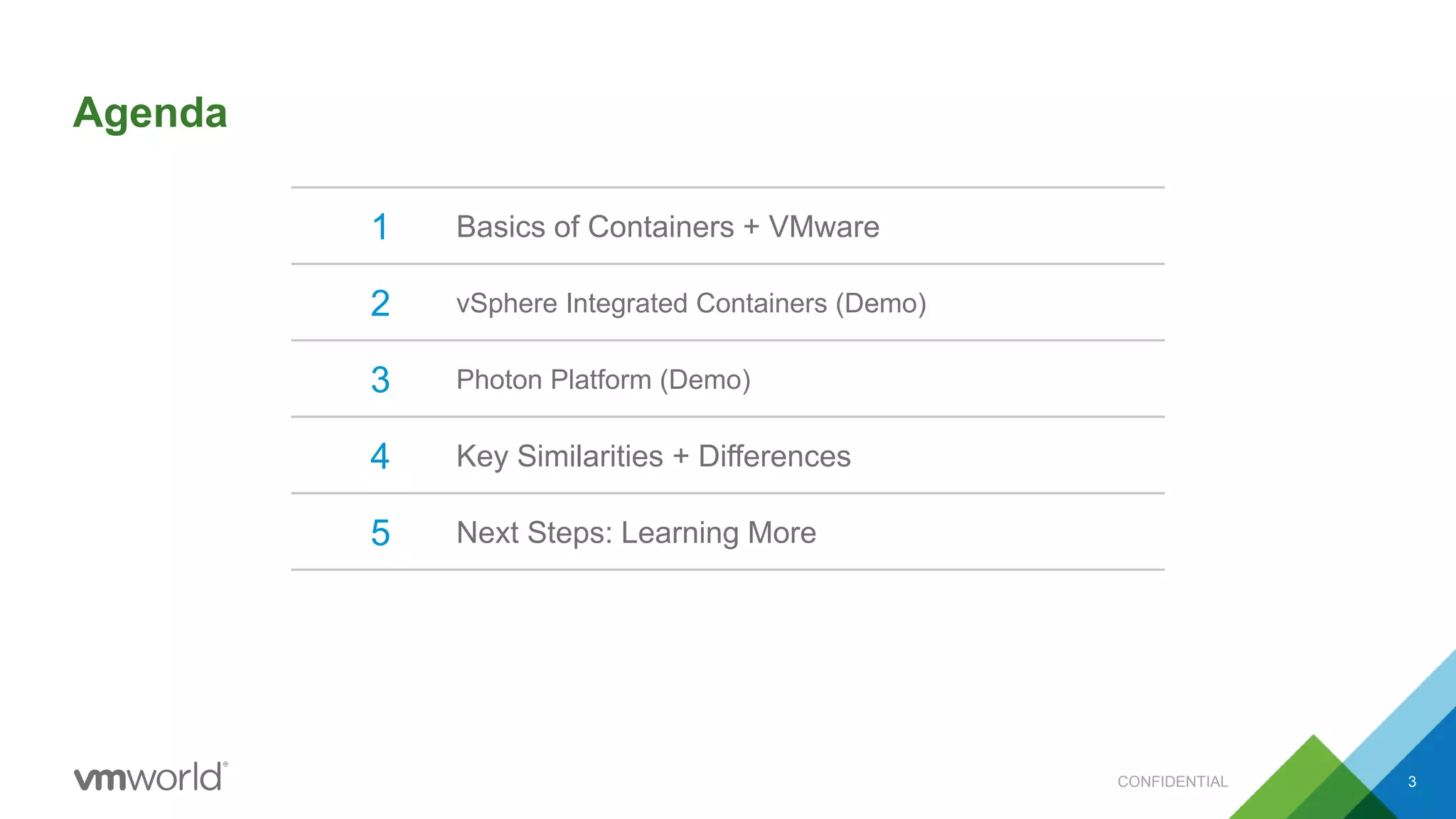
Agenda
CONFIDENTIAL 3
1 Basics of Containers + VMware
2 vSphere Integrated Containers (Demo)
3 Photon Platform (Demo)
4 Key Similarities + Differences
5 Next Steps: Learning More
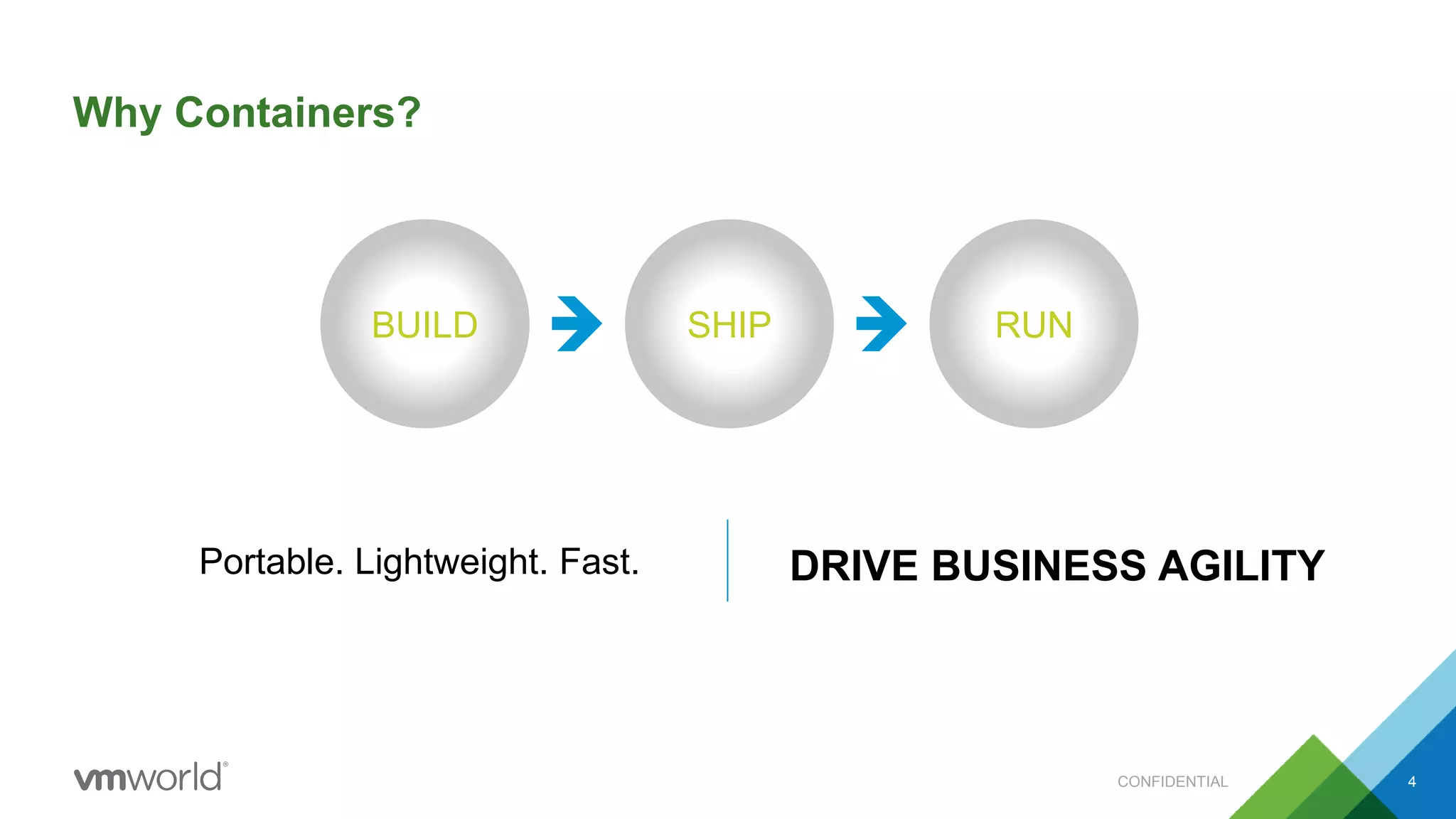
BUILD SHIP RUN
Portable. Lightweight. Fast. DRIVE BUSINESS AGILITY
Why Containers?
CONFIDENTIAL 4
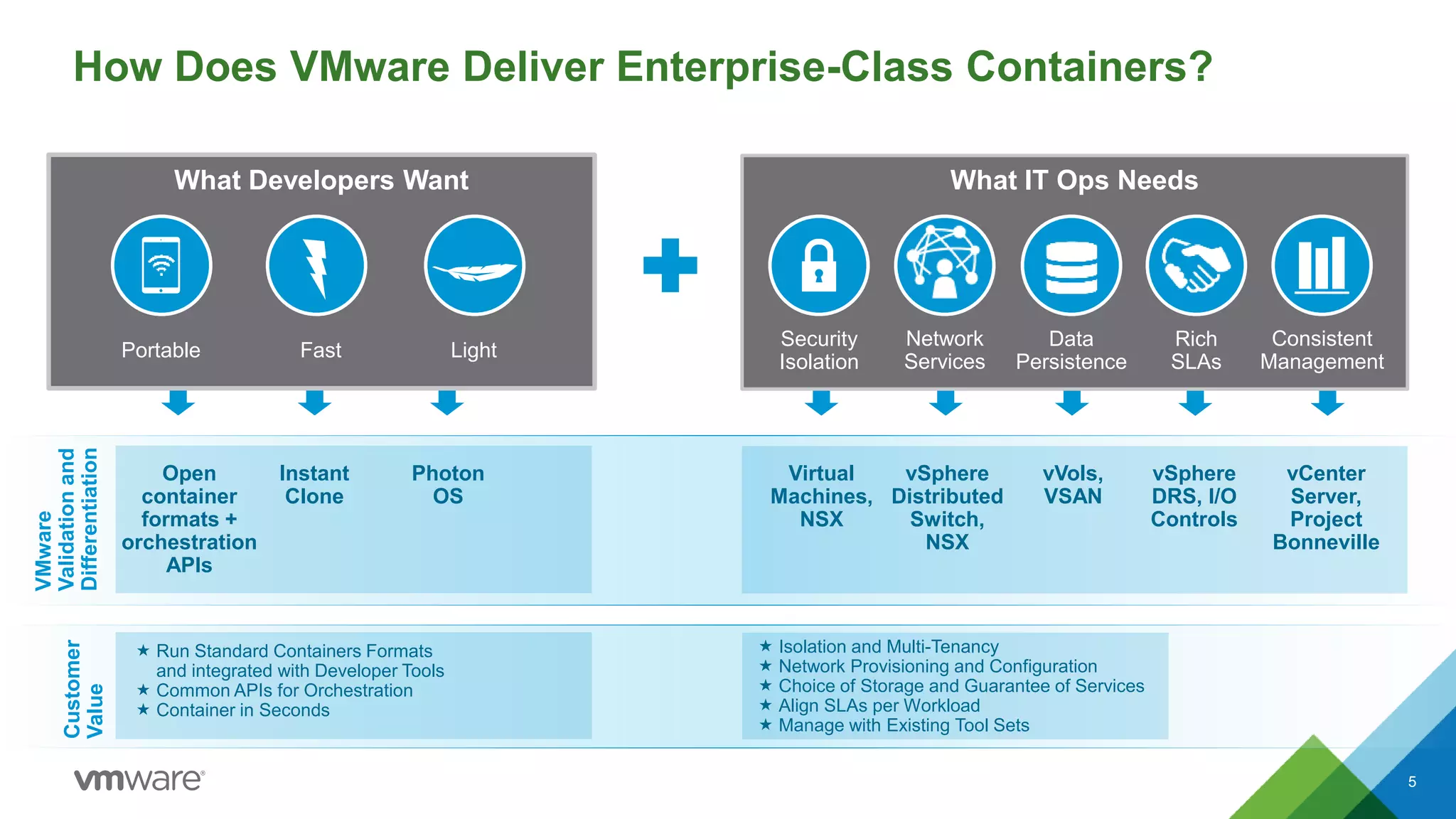
How Does VMware Deliver Enterprise-Class Containers?
5
What Developers Want
Light
What IT Ops Needs
Security
Isolation
Data
Persistence
Rich
SLAs
Portable Fast
Network
Services
Consistent
Management
VMware
Validationand
Differentiation
Virtual
Machines,
NSX
vSphere
Distributed
Switch,
NSX
vVols,
VSAN
vSphere
DRS, I/O
Controls
vCenter
Server,
Project
Bonneville
Customer
Value
 Run Standard Containers Formats
and integrated with Developer Tools
 Common APIs for Orchestration
 Container in Seconds
 Isolation and Multi-Tenancy
 Network Provisioning and Configuration
 Choice of Storage and Guarantee of Services
 Align SLAs per Workload
 Manage with Existing Tool Sets
Open
container
formats +
orchestration
APIs
Instant
Clone
Photon
OS
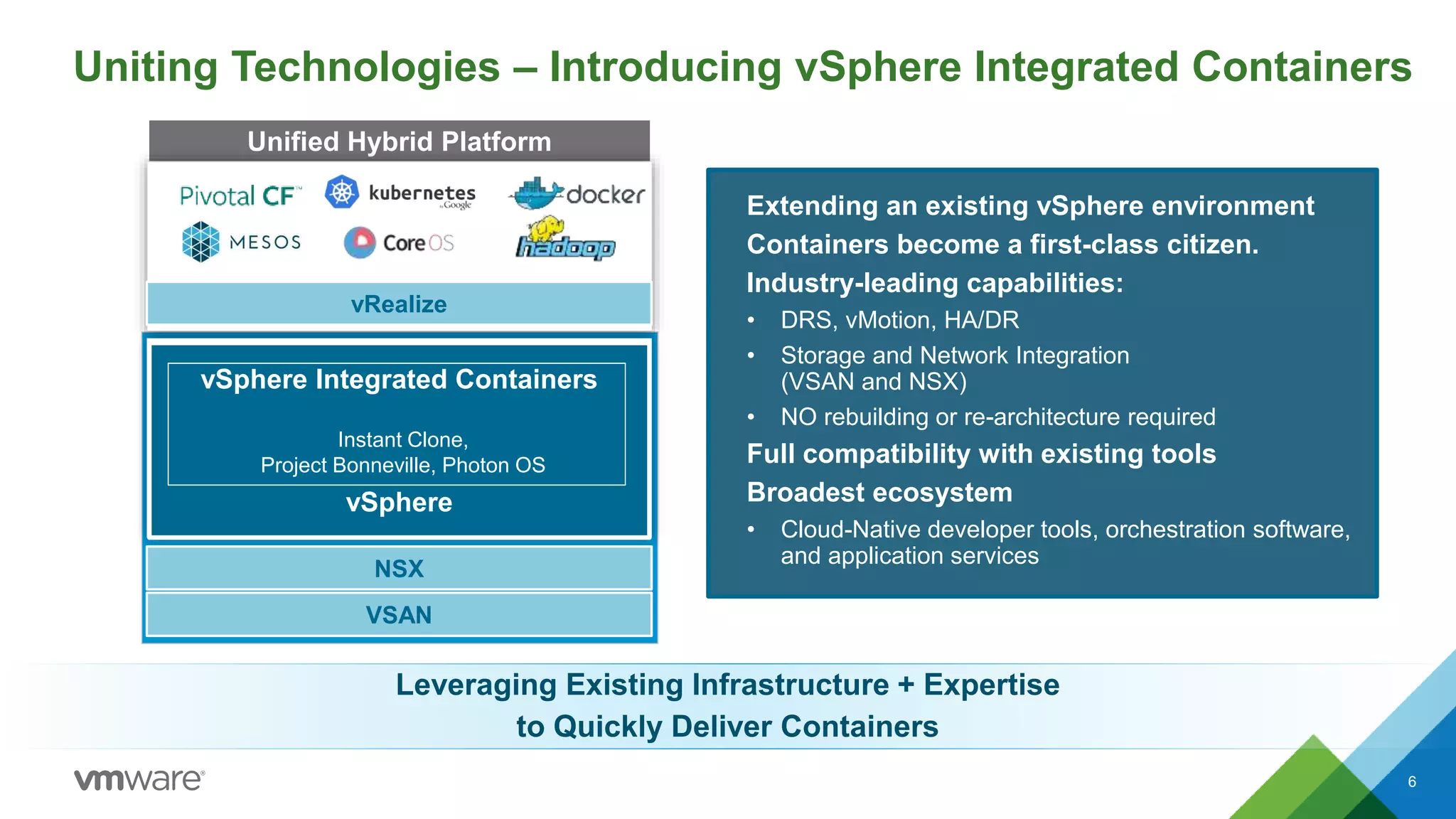
Uniting Technologies – Introducing vSphere Integrated Containers
6
Extending an existing vSphere environment
Containers become a first-class citizen.
Industry-leading capabilities:
• DRS, vMotion, HA/DR
• Storage and Network Integration
(VSAN and NSX)
• NO rebuilding or re-architecture required
Full compatibility with existing tools
Broadest ecosystem
• Cloud-Native developer tools, orchestration software,
and application services
Unified Hybrid Platform
vSphere Integrated Containers
vSphere
NSX
VSAN
vRealize
Instant Clone,
Project Bonneville, Photon OS
@cloudnativeapps #vmwcna
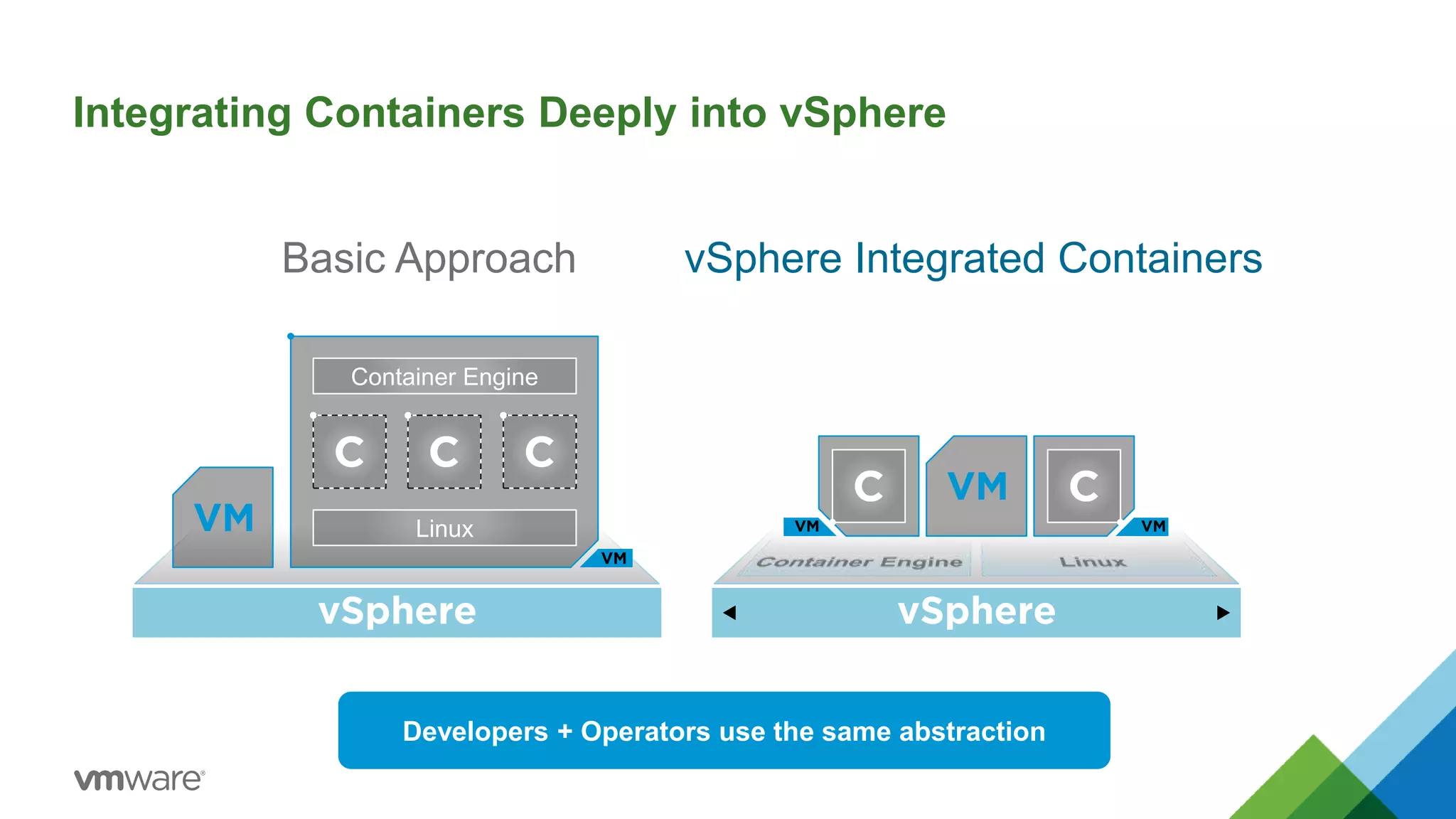
Integrating Containers Deeply into vSphere
Basic Approach vSphere Integrated Containers
Container Engine
Linux
Developers + Operators use the same abstraction
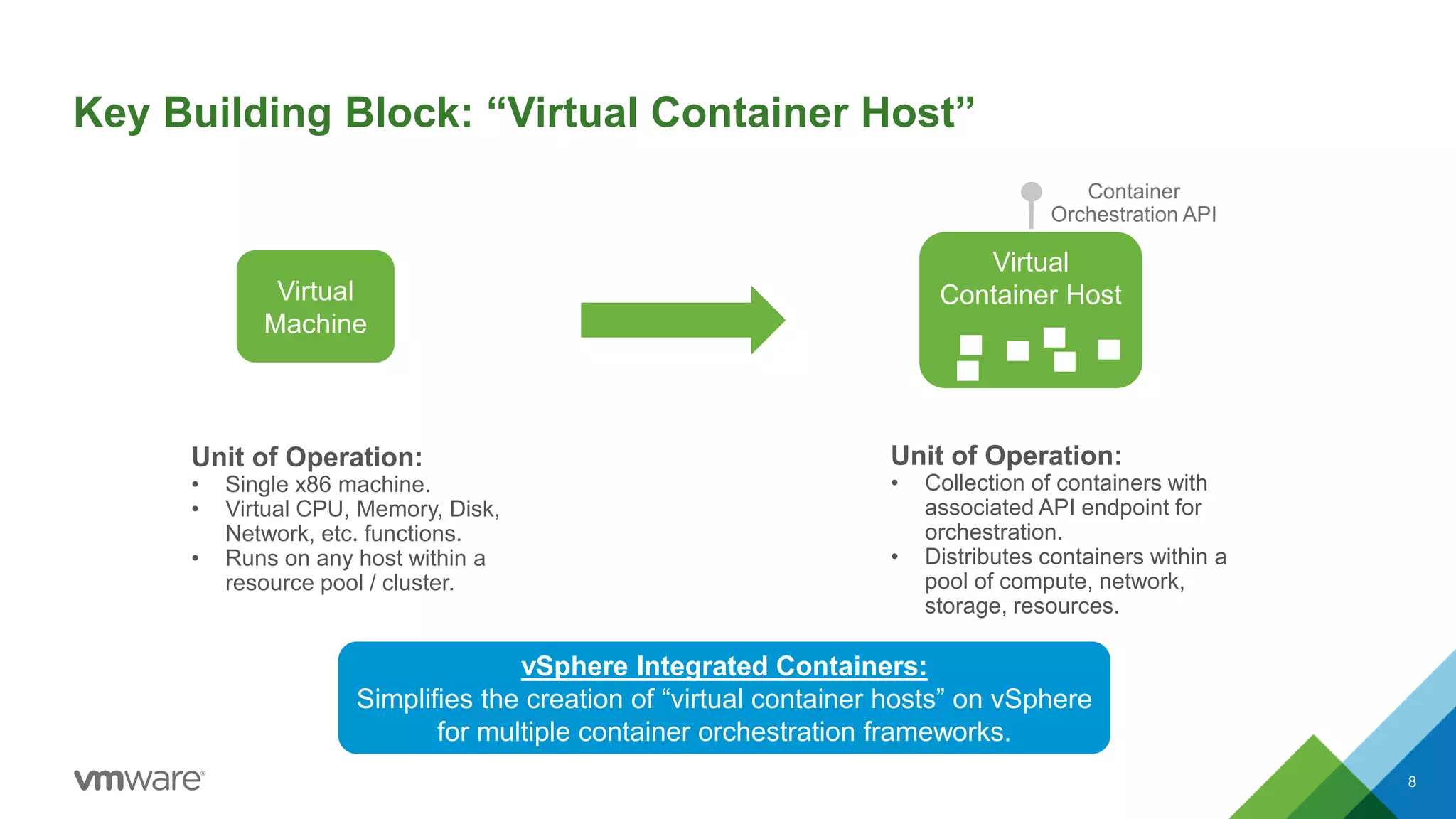
Key Building Block: “Virtual Container Host”
8
Virtual
Machine
Unit of Operation:
• Single x86 machine.
• Virtual CPU, Memory, Disk,
Network, etc. functions.
• Runs on any host within a
resource pool / cluster.
Virtual
Container Host
Container
Orchestration API
Unit of Operation:
• Collection of containers with
associated API endpoint for
orchestration.
• Distributes containers within a
pool of compute, network,
storage, resources.
vSphere Integrated Containers:
Simplifies the creation of “virtual container hosts” on vSphere
for multiple container orchestration frameworks.
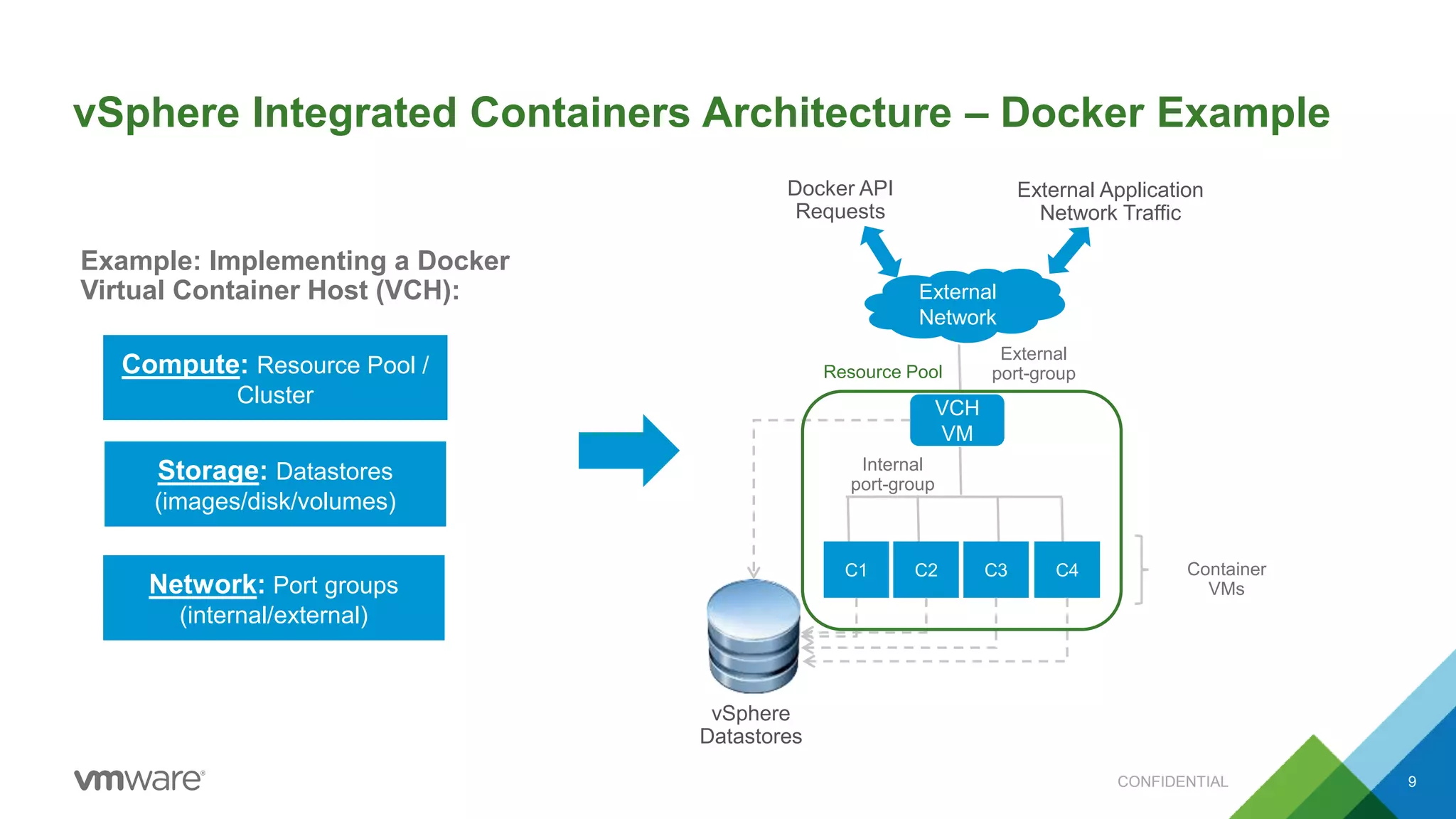
vSphere Integrated Containers Architecture – Docker Example
CONFIDENTIAL 9
Example: Implementing a Docker
Virtual Container Host (VCH):
VCH
VM
vSphere
Datastores
C1 C2 C3 C4
External
Network
Internal
port-group
External
port-groupResource Pool
Docker API
Requests
External Application
Network Traffic
Container
VMs
Compute: Resource Pool /
Cluster
Storage: Datastores
(images/disk/volumes)
Network: Port groups
(internal/external)
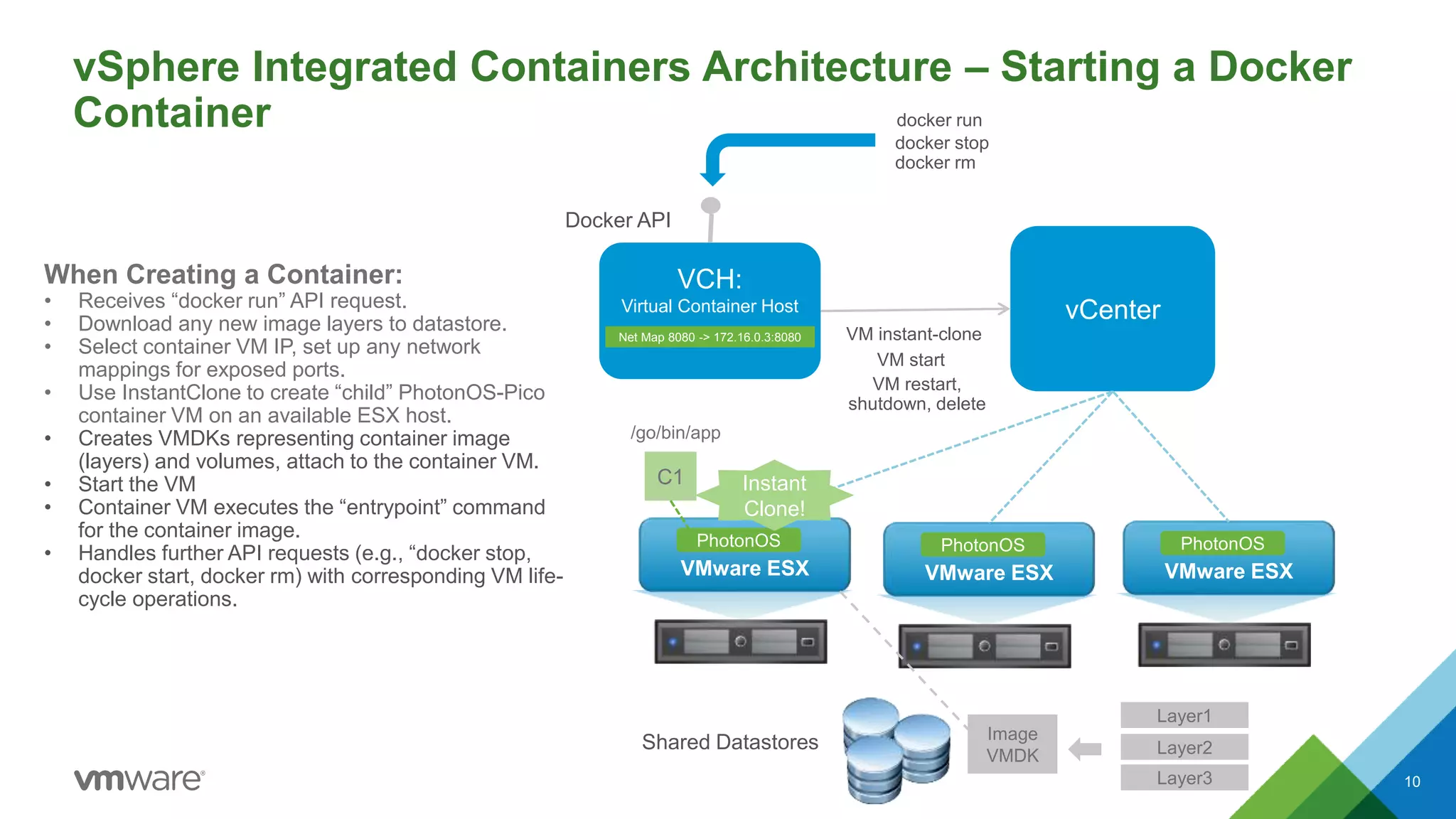
vSphere Integrated Containers Architecture – Starting a Docker
Container
10
When Creating a Container:
• Receives “docker run” API request.
• Download any new image layers to datastore.
• Select container VM IP, set up any network
mappings for exposed ports.
• Use InstantClone to create “child” PhotonOS-Pico
container VM on an available ESX host.
• Creates VMDKs representing container image
(layers) and volumes, attach to the container VM.
• Start the VM
• Container VM executes the “entrypoint” command
for the container image.
• Handles further API requests (e.g., “docker stop,
docker start, docker rm) with corresponding VM life-
cycle operations.
VCH:
Virtual Container Host
Docker API
vCenter
VMware ESX
PhotonOS
VMware ESX
PhotonOS
VMware ESX
PhotonOS
Shared Datastores
C1
Layer1
Layer2
Layer3
Image
VMDK
VM instant-clone
docker run
Instant
Clone!
VM restart,
shutdown, delete
docker stop
docker rm
Net Map 8080 -> 172.16.0.3:8080
/go/bin/app
VM start
vSphere Integrated Container Demo
CONFIDENTIAL 11
vSphere Docker
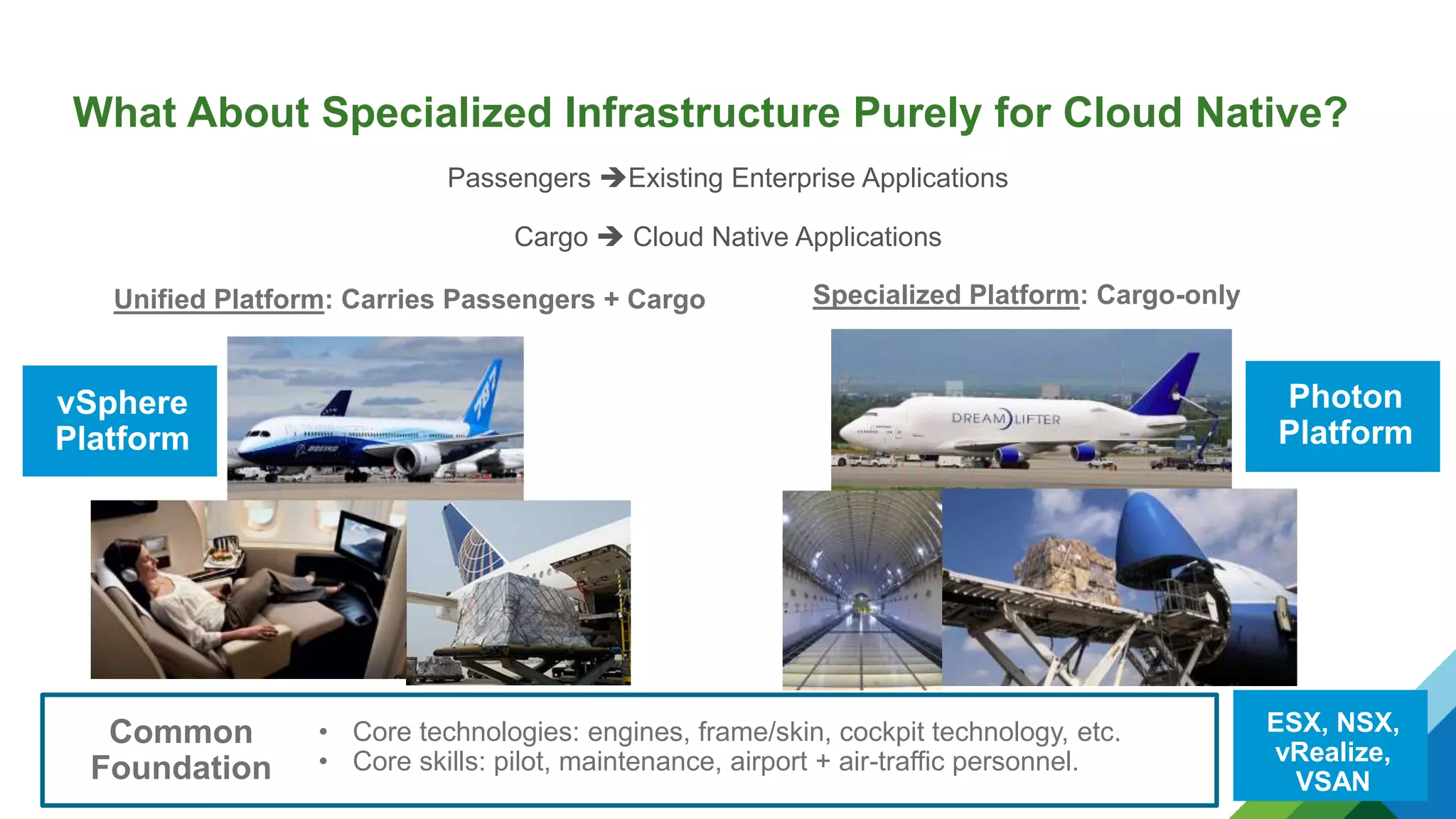
What About Specialized Infrastructure Purely for Cloud Native?
12
Unified Platform: Carries Passengers + Cargo Specialized Platform: Cargo-only
Passengers Existing Enterprise Applications
Cargo  Cloud Native Applications
• Core technologies: engines, frame/skin, cockpit technology, etc.
• Core skills: pilot, maintenance, airport + air-traffic personnel.
Common
Foundation
vSphere
Platform
ESX, NSX,
vRealize,
VSAN
Photon
Platform
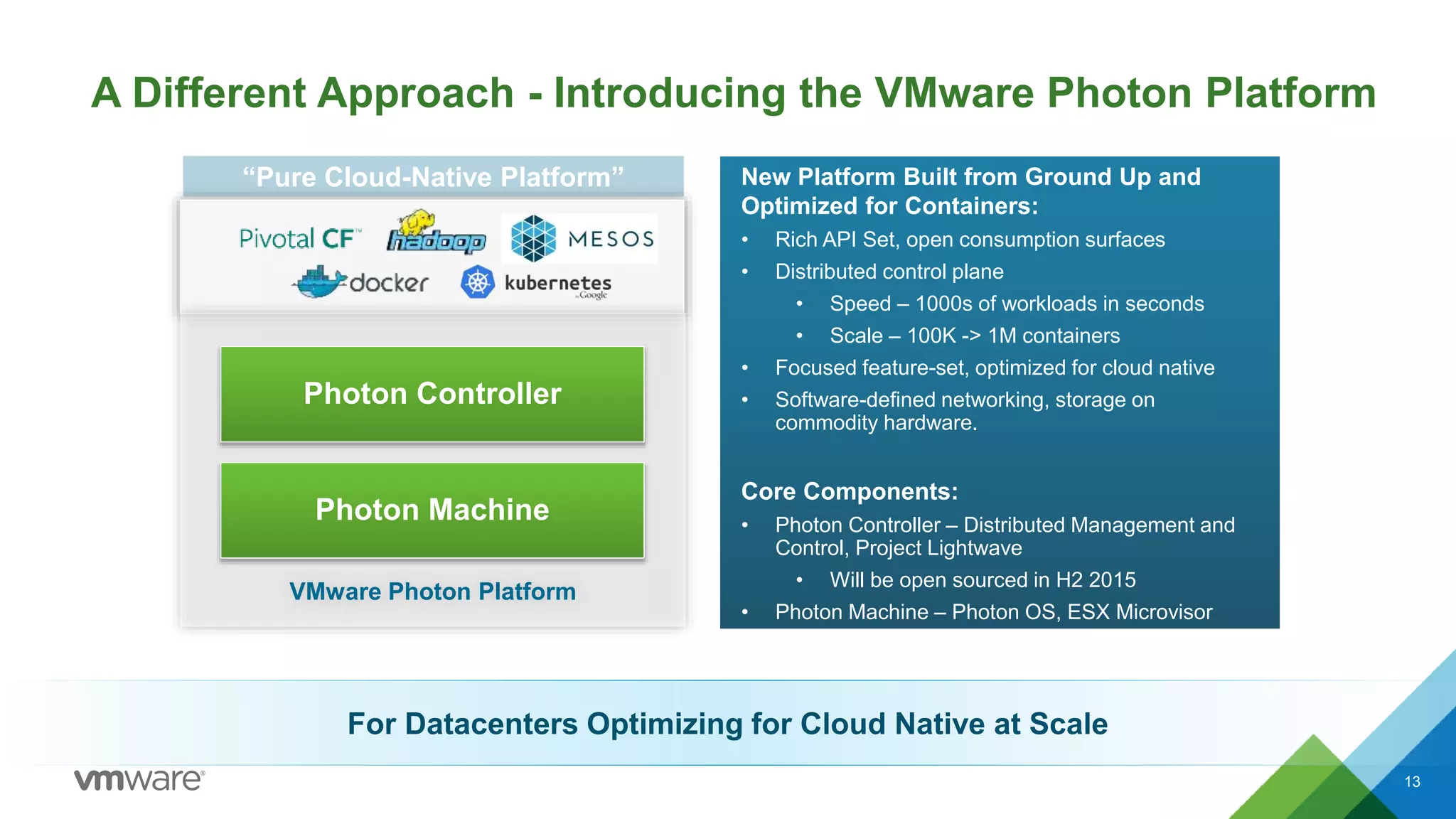
A Different Approach – Introducing the VMware Photon Platform
13
New Platform Built from Ground Up and
Optimized for Containers:
• Rich API Set, open consumption surfaces
• Distributed control plane
• Speed – 1000s of workloads in seconds
• Scale – 100K -> 1M containers
• Focused feature-set, optimized for cloud native
• Software-defined networking, storage on
commodity hardware.
Core Components:
• Photon Controller – Distributed Management and
Control, Project Lightwave
• Will be open sourced in H2 2015
• Photon Machine – Photon OS, ESX Microvisor
“Pure Cloud-Native Platform”
VMware Photon Platform
Photon Controller
Photon Machine
A Different Approach - Introducing the VMware Photon Platform
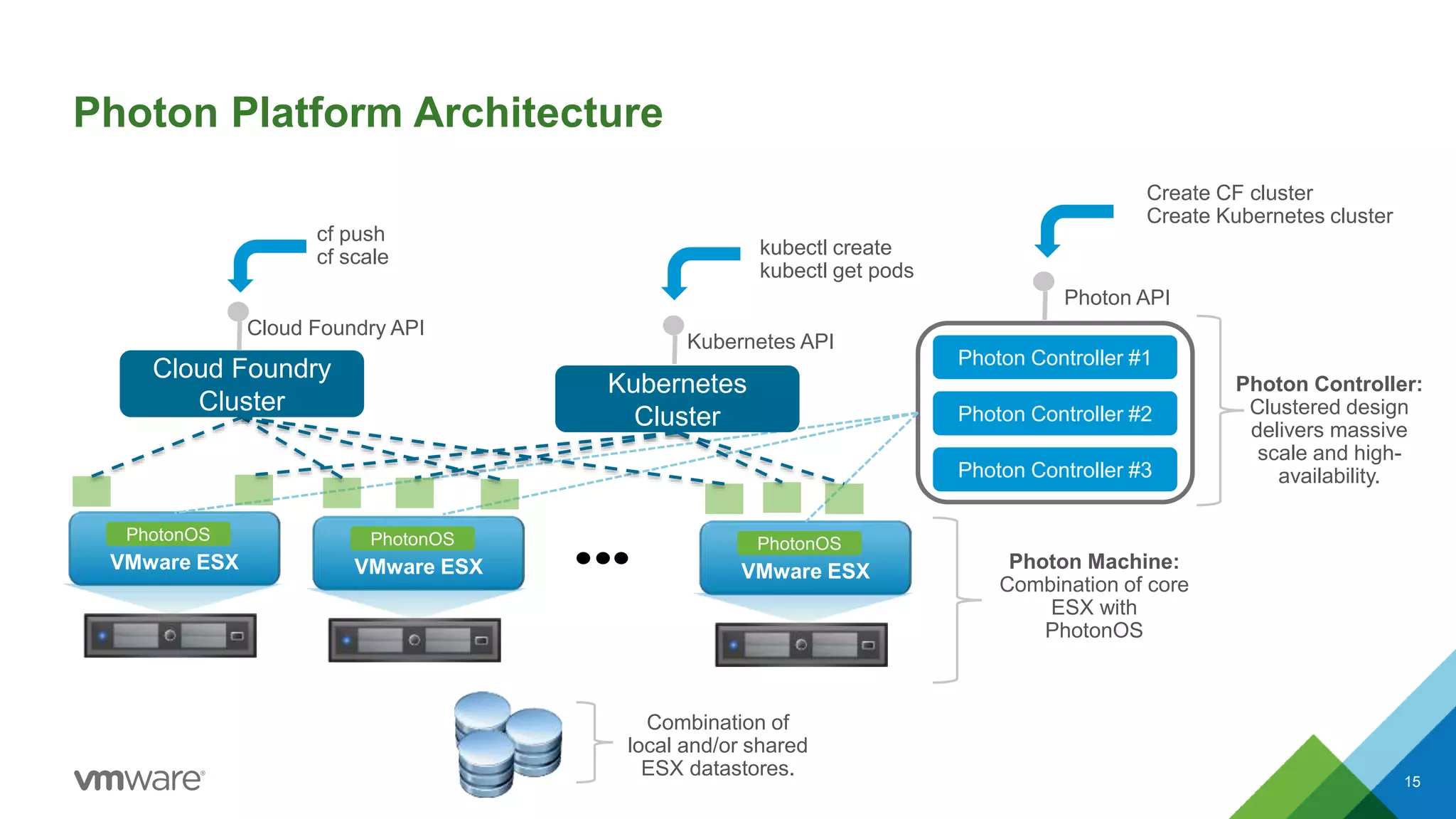
Photon Platform Architecture
15
VMware ESX
PhotonOS
VMware ESX
PhotonOS
VMware ESX
PhotonOS
Photon Controller #1
Photon API
Photon Controller:
Clustered design
delivers massive
scale and high-
availability.
Cloud Foundry
Cluster
Kubernetes
Cluster
Combination of
local and/or shared
ESX datastores.
Photon Controller #2
Photon Controller #3
Photon Machine:
Combination of core
ESX with
PhotonOS
Cloud Foundry API
Kubernetes API
Create CF cluster
Create Kubernetes cluster
cf push
cf scale kubectl create
kubectl get pods
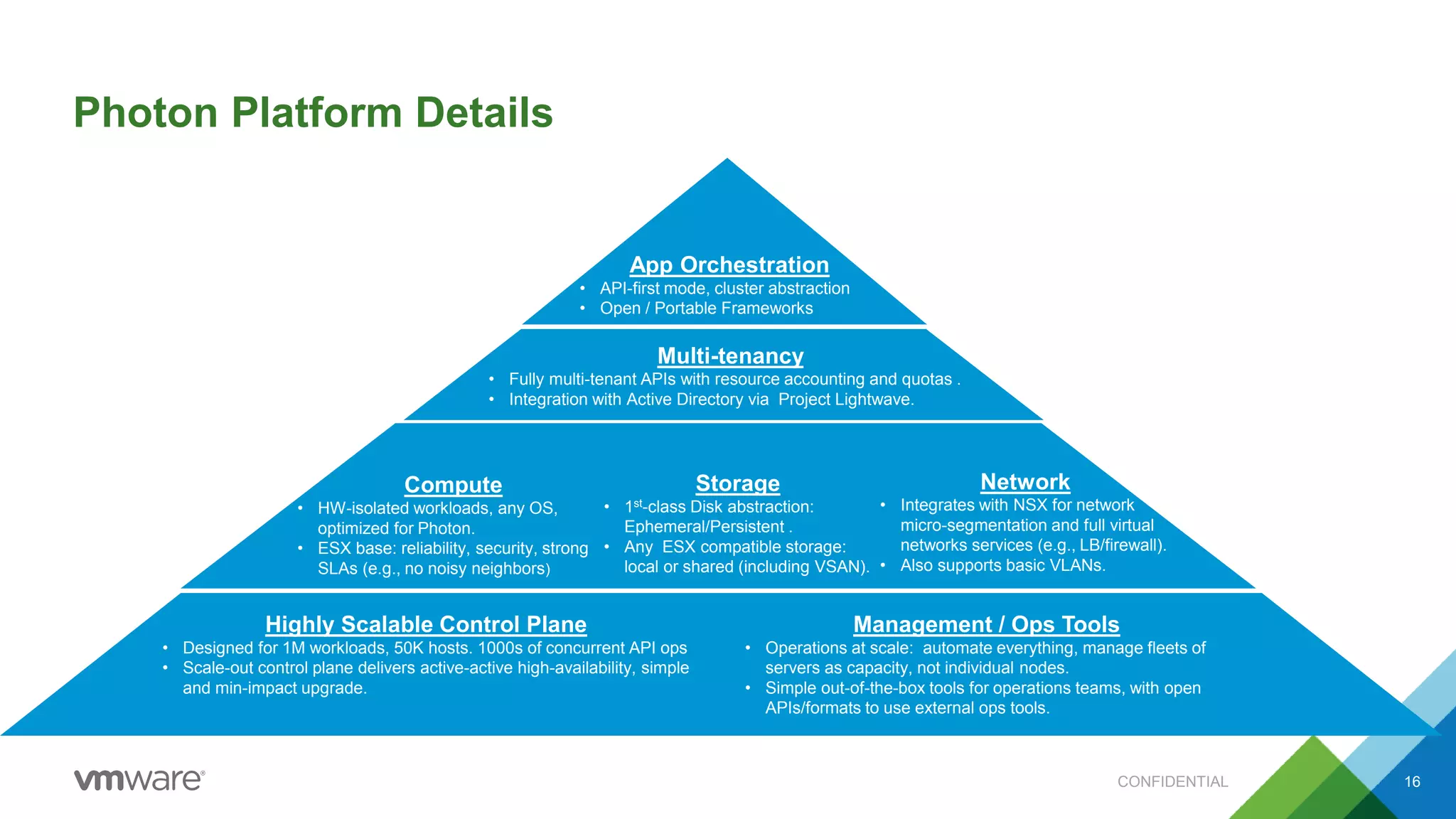
Photon Platform Details
CONFIDENTIAL 16
Highly Scalable Control Plane
• Designed for 1M workloads, 50K hosts. 1000s of concurrent API ops
• Scale-out control plane delivers active-active high-availability, simple
and min-impact upgrade.
Management / Ops Tools
• Operations at scale: automate everything, manage fleets of
servers as capacity, not individual nodes.
• Simple out-of-the-box tools for operations teams, with open
APIs/formats to use external ops tools.
Compute
• HW-isolated workloads, any OS,
optimized for Photon.
• ESX base: reliability, security, strong
SLAs (e.g., no noisy neighbors)
Storage
• 1st-class Disk abstraction:
Ephemeral/Persistent .
• Any ESX compatible storage:
local or shared (including VSAN).
Network
• Integrates with NSX for network
micro-segmentation and full virtual
networks services (e.g., LB/firewall).
• Also supports basic VLANs.
Multi-tenancy
• Fully multi-tenant APIs with resource accounting and quotas .
• Integration with Active Directory via Project Lightwave.
App Orchestration
• API-first mode, cluster abstraction
• Open / Portable Frameworks
Photon Platform Demo
CONFIDENTIAL 17
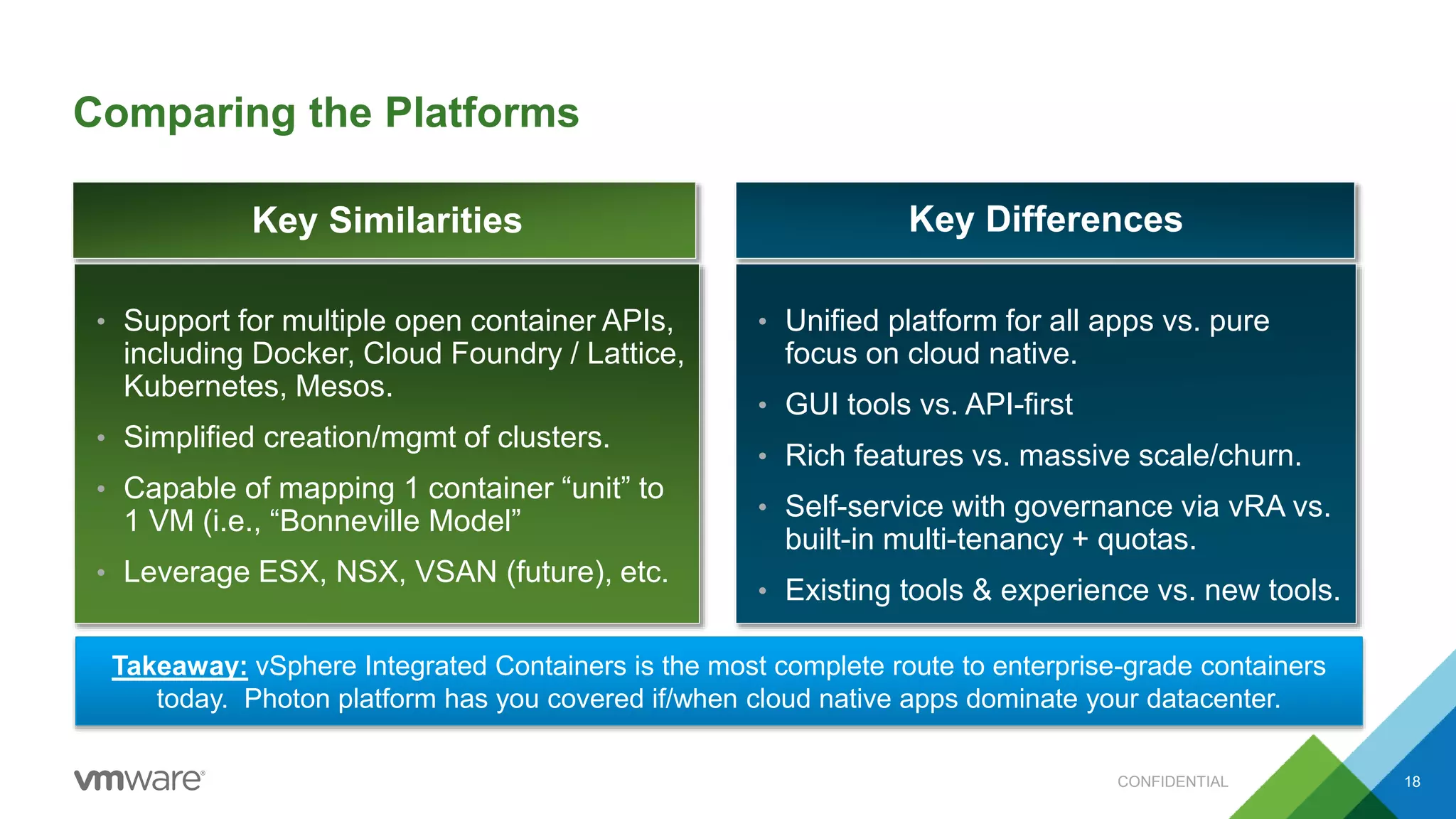
Comparing the Platforms
CONFIDENTIAL 18
• Unified platform for all apps vs. pure
focus on cloud native.
• GUI tools vs. API-first
• Rich features vs. massive scale/churn.
• Self-service with governance via vRA vs.
built-in multi-tenancy + quotas.
• Existing tools & experience vs. new tools.
• Support for multiple open container APIs,
including Docker, Cloud Foundry / Lattice,
Kubernetes, Mesos.
• Simplified creation/mgmt of clusters.
• Capable of mapping 1 container “unit” to
1 VM (i.e., “Bonneville Model”
• Leverage ESX, NSX, VSAN (future), etc.
Takeaway: vSphere Integrated Containers is the most complete route to enterprise-grade containers
today. Photon platform has you covered if/when cloud native apps dominate your datacenter.
Key Similarities Key Differences
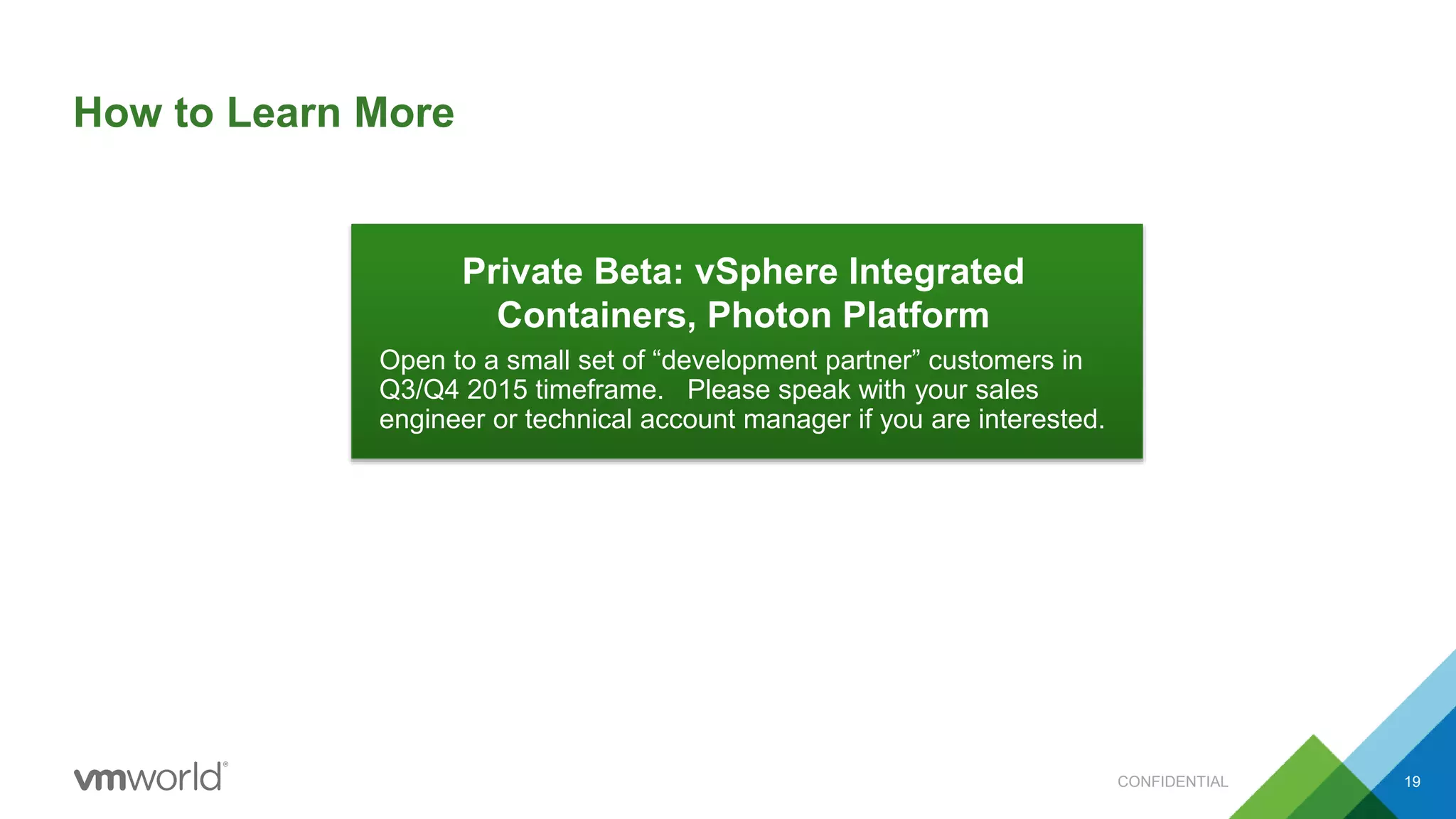
How to Learn More
CONFIDENTIAL 19
Private Beta: vSphere Integrated
Containers, Photon Platform
Open to a small set of “development partner” customers in
Q3/Q4 2015 timeframe. Please speak with your sales
engineer or technical account manager if you are interested.
Case Study:
Architecting Your Datacenter
for Cloud Native Applications
Dan Wendlandt, VMware, Inc
INF5616
#INF5616

A First Look at vSphere Integrated Containers and Photon Platform

  • 1.
    A First Lookat vSphere Integrated Containers and Photon Platform Dan Wendlandt, VMware, Inc INF5616 #INF5616
  • 2.
    • This presentationmay contain product features that are currently under development. • This overview of new technology represents no commitment from VMware to deliver these features in any generally available product. • Features are subject to change, and must not be included in contracts, purchase orders, or sales agreements of any kind. • Technical feasibility and market demand will affect final delivery. • Pricing and packaging for any new technologies or features discussed or presented have not been determined. Disclaimer CONFIDENTIAL 2
  • 3.
    Agenda CONFIDENTIAL 3 1 Basicsof Containers + VMware 2 vSphere Integrated Containers (Demo) 3 Photon Platform (Demo) 4 Key Similarities + Differences 5 Next Steps: Learning More
  • 4.
    BUILD SHIP RUN Portable.Lightweight. Fast. DRIVE BUSINESS AGILITY Why Containers? CONFIDENTIAL 4
  • 5.
    How Does VMwareDeliver Enterprise-Class Containers? 5 What Developers Want Light What IT Ops Needs Security Isolation Data Persistence Rich SLAs Portable Fast Network Services Consistent Management VMware Validationand Differentiation Virtual Machines, NSX vSphere Distributed Switch, NSX vVols, VSAN vSphere DRS, I/O Controls vCenter Server, Project Bonneville Customer Value  Run Standard Containers Formats and integrated with Developer Tools  Common APIs for Orchestration  Container in Seconds  Isolation and Multi-Tenancy  Network Provisioning and Configuration  Choice of Storage and Guarantee of Services  Align SLAs per Workload  Manage with Existing Tool Sets Open container formats + orchestration APIs Instant Clone Photon OS
  • 6.
    Uniting Technologies –Introducing vSphere Integrated Containers 6 Extending an existing vSphere environment Containers become a first-class citizen. Industry-leading capabilities: • DRS, vMotion, HA/DR • Storage and Network Integration (VSAN and NSX) • NO rebuilding or re-architecture required Full compatibility with existing tools Broadest ecosystem • Cloud-Native developer tools, orchestration software, and application services Unified Hybrid Platform vSphere Integrated Containers vSphere NSX VSAN vRealize Instant Clone, Project Bonneville, Photon OS
  • 7.
    @cloudnativeapps #vmwcna Integrating ContainersDeeply into vSphere Basic Approach vSphere Integrated Containers Container Engine Linux Developers + Operators use the same abstraction
  • 8.
    Key Building Block:“Virtual Container Host” 8 Virtual Machine Unit of Operation: • Single x86 machine. • Virtual CPU, Memory, Disk, Network, etc. functions. • Runs on any host within a resource pool / cluster. Virtual Container Host Container Orchestration API Unit of Operation: • Collection of containers with associated API endpoint for orchestration. • Distributes containers within a pool of compute, network, storage, resources. vSphere Integrated Containers: Simplifies the creation of “virtual container hosts” on vSphere for multiple container orchestration frameworks.
  • 9.
    vSphere Integrated ContainersArchitecture – Docker Example CONFIDENTIAL 9 Example: Implementing a Docker Virtual Container Host (VCH): VCH VM vSphere Datastores C1 C2 C3 C4 External Network Internal port-group External port-groupResource Pool Docker API Requests External Application Network Traffic Container VMs Compute: Resource Pool / Cluster Storage: Datastores (images/disk/volumes) Network: Port groups (internal/external)
  • 10.
    vSphere Integrated ContainersArchitecture – Starting a Docker Container 10 When Creating a Container: • Receives “docker run” API request. • Download any new image layers to datastore. • Select container VM IP, set up any network mappings for exposed ports. • Use InstantClone to create “child” PhotonOS-Pico container VM on an available ESX host. • Creates VMDKs representing container image (layers) and volumes, attach to the container VM. • Start the VM • Container VM executes the “entrypoint” command for the container image. • Handles further API requests (e.g., “docker stop, docker start, docker rm) with corresponding VM life- cycle operations. VCH: Virtual Container Host Docker API vCenter VMware ESX PhotonOS VMware ESX PhotonOS VMware ESX PhotonOS Shared Datastores C1 Layer1 Layer2 Layer3 Image VMDK VM instant-clone docker run Instant Clone! VM restart, shutdown, delete docker stop docker rm Net Map 8080 -> 172.16.0.3:8080 /go/bin/app VM start
  • 11.
    vSphere Integrated ContainerDemo CONFIDENTIAL 11 vSphere Docker
  • 12.
    What About SpecializedInfrastructure Purely for Cloud Native? 12 Unified Platform: Carries Passengers + Cargo Specialized Platform: Cargo-only Passengers Existing Enterprise Applications Cargo  Cloud Native Applications • Core technologies: engines, frame/skin, cockpit technology, etc. • Core skills: pilot, maintenance, airport + air-traffic personnel. Common Foundation vSphere Platform ESX, NSX, vRealize, VSAN Photon Platform
  • 13.
    A Different Approach– Introducing the VMware Photon Platform 13 New Platform Built from Ground Up and Optimized for Containers: • Rich API Set, open consumption surfaces • Distributed control plane • Speed – 1000s of workloads in seconds • Scale – 100K -> 1M containers • Focused feature-set, optimized for cloud native • Software-defined networking, storage on commodity hardware. Core Components: • Photon Controller – Distributed Management and Control, Project Lightwave • Will be open sourced in H2 2015 • Photon Machine – Photon OS, ESX Microvisor “Pure Cloud-Native Platform” VMware Photon Platform Photon Controller Photon Machine A Different Approach - Introducing the VMware Photon Platform
  • 14.
    Photon Platform Architecture 15 VMwareESX PhotonOS VMware ESX PhotonOS VMware ESX PhotonOS Photon Controller #1 Photon API Photon Controller: Clustered design delivers massive scale and high- availability. Cloud Foundry Cluster Kubernetes Cluster Combination of local and/or shared ESX datastores. Photon Controller #2 Photon Controller #3 Photon Machine: Combination of core ESX with PhotonOS Cloud Foundry API Kubernetes API Create CF cluster Create Kubernetes cluster cf push cf scale kubectl create kubectl get pods
  • 15.
    Photon Platform Details CONFIDENTIAL16 Highly Scalable Control Plane • Designed for 1M workloads, 50K hosts. 1000s of concurrent API ops • Scale-out control plane delivers active-active high-availability, simple and min-impact upgrade. Management / Ops Tools • Operations at scale: automate everything, manage fleets of servers as capacity, not individual nodes. • Simple out-of-the-box tools for operations teams, with open APIs/formats to use external ops tools. Compute • HW-isolated workloads, any OS, optimized for Photon. • ESX base: reliability, security, strong SLAs (e.g., no noisy neighbors) Storage • 1st-class Disk abstraction: Ephemeral/Persistent . • Any ESX compatible storage: local or shared (including VSAN). Network • Integrates with NSX for network micro-segmentation and full virtual networks services (e.g., LB/firewall). • Also supports basic VLANs. Multi-tenancy • Fully multi-tenant APIs with resource accounting and quotas . • Integration with Active Directory via Project Lightwave. App Orchestration • API-first mode, cluster abstraction • Open / Portable Frameworks
  • 16.
  • 17.
    Comparing the Platforms CONFIDENTIAL18 • Unified platform for all apps vs. pure focus on cloud native. • GUI tools vs. API-first • Rich features vs. massive scale/churn. • Self-service with governance via vRA vs. built-in multi-tenancy + quotas. • Existing tools & experience vs. new tools. • Support for multiple open container APIs, including Docker, Cloud Foundry / Lattice, Kubernetes, Mesos. • Simplified creation/mgmt of clusters. • Capable of mapping 1 container “unit” to 1 VM (i.e., “Bonneville Model” • Leverage ESX, NSX, VSAN (future), etc. Takeaway: vSphere Integrated Containers is the most complete route to enterprise-grade containers today. Photon platform has you covered if/when cloud native apps dominate your datacenter. Key Similarities Key Differences
  • 18.
    How to LearnMore CONFIDENTIAL 19 Private Beta: vSphere Integrated Containers, Photon Platform Open to a small set of “development partner” customers in Q3/Q4 2015 timeframe. Please speak with your sales engineer or technical account manager if you are interested.
  • 21.
    Case Study: Architecting YourDatacenter for Cloud Native Applications Dan Wendlandt, VMware, Inc INF5616 #INF5616

Editor's Notes

  • #15 VMware is committed to the OpenStack project. VMware was the #4 contributor to OpenStack integrated projects in the Icehouse release. VMware has a growing number of developers contributing to OpenStack. Contributions span across a number of OpenStack projects listed in this slide.