© 2010 VMware Inc. All rights reserved 
VMware + OpenStack 
VIO - VMware Integrated Openstack 
Nov. 13, 2014 
Phil Philbin, SLED SE – pphilbin@vmware.com 
Confidential
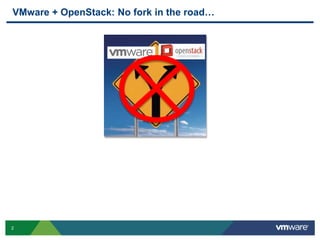
VMware + OpenStack: No fork in the road… 
2
Embracing Customer Choice… 
3 
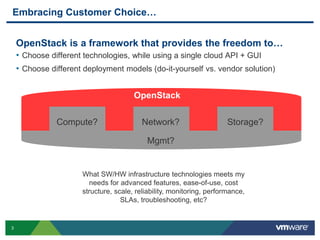
OpenStack is a framework that provides the freedom to… 
• Choose different technologies, while using a single cloud API + GUI 
• Choose different deployment models (do-it-yourself vs. vendor solution) 
OpenStack 
Compute? Network? Storage? 
Mgmt? 
What SW/HW infrastructure technologies meets my 
needs for advanced features, ease-of-use, cost 
structure, scale, reliability, monitoring, performance, 
SLAs, troubleshooting, etc?
OpenStack as a Framework 
4 
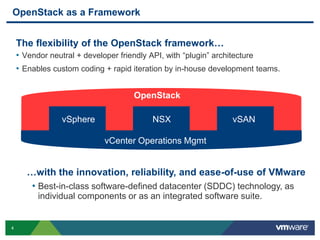
The flexibility of the OpenStack framework… 
• Vendor neutral + developer friendly API, with “plugin” architecture 
• Enables custom coding + rapid iteration by in-house development teams. 
OpenStack 
vSphere NSX vSAN 
Compute? Network? Storage? 
vCenter Operations Mgmt? 
Mgmt 
…with the innovation, reliability, and ease-of-use of VMware 
• Best-in-class software-defined datacenter (SDDC) technology, as 
individual components or as an integrated software suite.
Embracing Customer Choice + OpenStack 
VMware’s focus on SDDC allows VMware to embrace customer choice. 
 Contribute to OpenStack 
• Integrate VMware compute, network, storage SW with OpenStack. 
• Make OpenStack better, helping customers succeed with their cloud effort. 
 Like all OpenStack vendors, compete for your business. 
• Show customers how VMware components helps them run a better cloud. 
• Work with ecosystem to make sure it is easy to deploy OpenStack + VMware 
5 
Our Goal: Make VMware the best and easiest way to run OpenStack
VMware Technologies and OpenStack 
6 
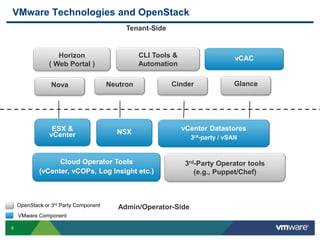
Tenant-Side 
Admin/Operator-Side 
Horizon 
( Web Portal ) 
ESX & 
vCenter 
CLI Tools & 
Automation 
vCAC 
Nova Neutron Cinder Glance 
NSX 
vCenter Datastores 
3rd-party / vSAN 
Cloud Operator Tools 
(vCenter, vCOPs, Log Insight etc.) 
3rd-Party Operator tools 
(e.g., Puppet/Chef) 
OpenStack or 3rd Party Component 
VMware Component
7 
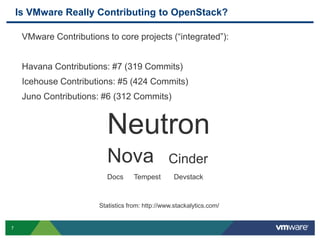
Is VMware Really Contributing to OpenStack? 
VMware Contributions to core projects (“integrated”): 
Havana Contributions: #7 (319 Commits) 
Icehouse Contributions: #5 (424 Commits) 
Juno Contributions: #6 (312 Commits) 
Neutron 
Nova Cinder 
Docs Tempest Devstack 
Statistics from: http://www.stackalytics.com/
OpenStack on vSphere Early Adopters 
8
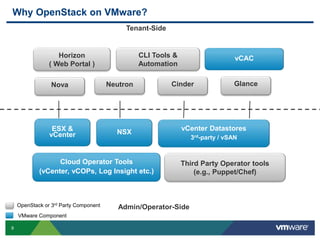
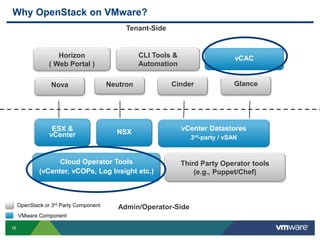
Why OpenStack on VMware? 
9 
Tenant-Side 
Admin/Operator-Side 
Horizon 
( Web Portal ) 
ESX & 
vCenter 
CLI Tools & 
Automation 
vCAC 
Nova Neutron Cinder Glance 
NSX 
vCenter Datastores 
3rd-party / vSAN 
Cloud Operator Tools 
(vCenter, vCOPs, Log Insight etc.) 
Third Party Operator tools 
(e.g., Puppet/Chef) 
OpenStack or 3rd Party Component 
VMware Component
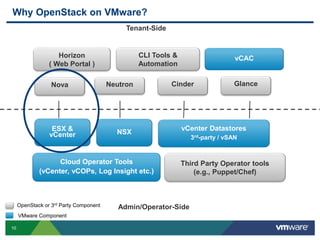
Why OpenStack on VMware? 
10 
Tenant-Side 
Admin/Operator-Side 
Horizon 
( Web Portal ) 
ESX & 
vCenter 
CLI Tools & 
Automation 
vCAC 
Nova Neutron Cinder Glance 
NSX 
vCenter Datastores 
3rd-party / vSAN 
Cloud Operator Tools 
(vCenter, vCOPs, Log Insight etc.) 
Third Party Operator tools 
(e.g., Puppet/Chef) 
OpenStack or 3rd Party Component 
VMware Component
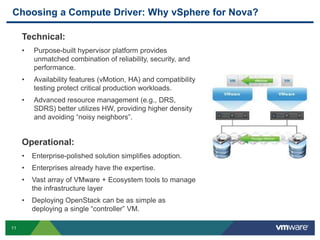
Choosing a Compute Driver: Why vSphere for Nova? 
11 
Technical: 
• Purpose-built hypervisor platform provides 
unmatched combination of reliability, security, and 
performance. 
• Availability features (vMotion, HA) and compatibility 
testing protect critical production workloads. 
• Advanced resource management (e.g., DRS, 
SDRS) better utilizes HW, providing higher density 
and avoiding “noisy neighbors”. 
Operational: 
• Enterprise-polished solution simplifies adoption. 
• Enterprises already have the expertise. 
• Vast array of VMware + Ecosystem tools to manage 
the infrastructure layer 
• Deploying OpenStack can be as simple as 
deploying a single “controller” VM.
Why OpenStack on VMware? 
12 
Tenant-Side 
Admin/Operator-Side 
Horizon 
( Web Portal ) 
ESX & 
vCenter 
CLI Tools & 
Automation 
vCAC 
Nova Neutron Cinder Glance 
NSX 
vCenter Datastores 
3rd-party / vSAN 
Cloud Operator Tools 
(vCenter, vCOPs, Log Insight etc.) 
Third Party Operator tools 
(e.g., Puppet/Chef) 
OpenStack or 3rd Party Component 
VMware Component
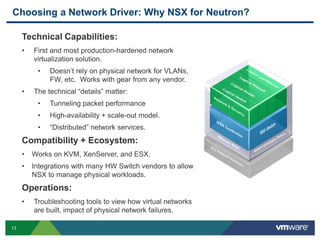
Choosing a Network Driver: Why NSX for Neutron? 
13 
Technical Capabilities: 
• First and most production-hardened network 
virtualization solution. 
• Doesn’t rely on physical network for VLANs, 
FW, etc. Works with gear from any vendor. 
• The technical “details” matter: 
• Tunneling packet performance 
• High-availability + scale-out model. 
• “Distributed” network services. 
Compatibility + Ecosystem: 
• Works on KVM, XenServer, and ESX. 
• Integrations with many HW Switch vendors to allow 
NSX to manage physical workloads. 
Operations: 
• Troubleshooting tools to view how virtual networks 
are built, impact of physical network failures.
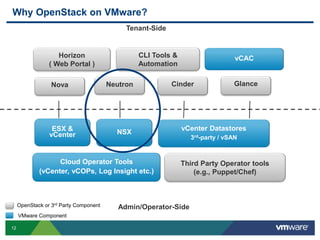
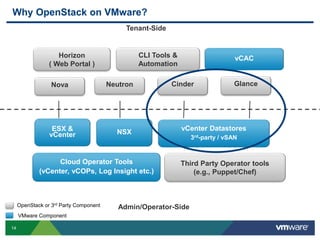
Why OpenStack on VMware? 
14 
Tenant-Side 
Admin/Operator-Side 
Horizon 
( Web Portal ) 
ESX & 
vCenter 
CLI Tools & 
Automation 
vCAC 
Nova Neutron Cinder Glance 
NSX 
vCenter Datastores 
3rd-party / vSAN 
Cloud Operator Tools 
(vCenter, vCOPs, Log Insight etc.) 
Third Party Operator tools 
(e.g., Puppet/Chef) 
OpenStack or 3rd Party Component 
VMware Component
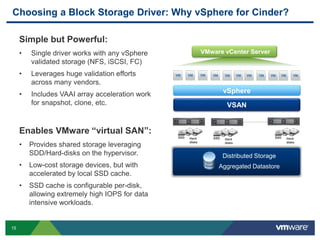
Choosing a Block Storage Driver: Why vSphere for Cinder? 
15 
Simple but Powerful: 
• Single driver works with any vSphere 
validated storage (NFS, iSCSI, FC) 
• Leverages huge validation efforts 
across many vendors. 
• Includes VAAI array acceleration work 
for snapshot, clone, etc. 
Enables VMware “virtual SAN”: 
• Provides shared storage leveraging 
SDD/Hard-disks on the hypervisor. 
• Low-cost storage devices, but with 
accelerated by local SSD cache. 
• SSD cache is configurable per-disk, 
allowing extremely high IOPS for data 
intensive workloads. 
VMware vCenter Server 
vSphere 
VSAN 
Hard 
disks 
SSD 
……………. 
SSD Hard 
Hard 
disks 
disks 
SSD 
Distributed Storage 
Aggregated Datastore
Why OpenStack on VMware? 
16 
Tenant-Side 
Admin/Operator-Side 
Horizon 
( Web Portal ) 
ESX & 
vCenter 
CLI Tools & 
Automation 
vCAC 
Nova Neutron Cinder Glance 
NSX 
vCenter Datastores 
3rd-party / vSAN 
Cloud Operator Tools 
(vCenter, vCOPs, Log Insight etc.) 
Third Party Operator tools 
(e.g., Puppet/Chef) 
OpenStack or 3rd Party Component 
VMware Component
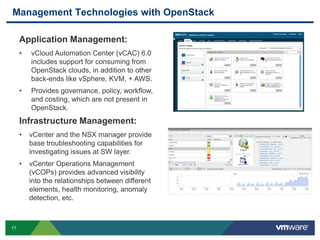
Management Technologies with OpenStack 
17 
Application Management: 
• vCloud Automation Center (vCAC) 6.0 
includes support for consuming from 
OpenStack clouds, in addition to other 
back-ends like vSphere, KVM, + AWS. 
• Provides governance, policy, workflow, 
and costing, which are not present in 
OpenStack. 
Infrastructure Management: 
• vCenter and the NSX manager provide 
base troubleshooting capabilities for 
investigating issues at SW layer. 
• vCenter Operations Management 
(vCOPs) provides advanced visibility 
into the relationships between different 
elements, health monitoring, anomaly 
detection, etc.
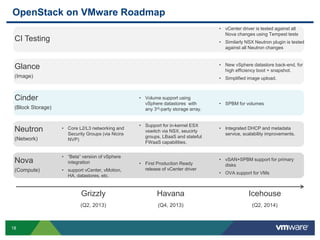
OpenStack on VMware Roadmap 
Glance 
(Image) 
Cinder 
(Block Storage) 
Neutron 
(Network) 
Nova 
(Compute) 
18 
• Core L2/L3 networking and 
Security Groups (via Nicira 
NVP) 
• “Beta” version of vSphere 
integration 
• support vCenter, vMotion, 
HA, datastores, etc. 
• First Production Ready 
release of vCenter driver 
• New vSphere datastore back-end, for 
high efficiency boot + snapshot. 
• Simplified image upload. 
• SPBM for volumes 
• vSAN+SPBM support for primary 
disks 
• OVA support for VMs 
Grizzly 
(Q2, 2013) 
Havana 
(Q4, 2013) 
Icehouse 
(Q2, 2014) 
• Volume support using 
vSphere datastores with 
any 3rd-party storage array. 
• Support for in-kernel ESX 
vswitch via NSX, seucirty 
groups, LBaaS and stateful 
FWaaS capabilities. 
• Integrated DHCP and metadata 
service, scalability improvements. 
CI Testing 
• vCenter driver is tested against all 
Nova changes using Tempest tests 
• Similarly NSX Neutron plugin is tested 
against all Neutron changes
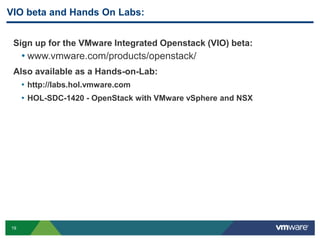
VIO beta and Hands On Labs: 
Sign up for the VMware Integrated Openstack (VIO) beta: 
• www.vmware.com/products/openstack/ 
Also available as a Hands-on-Lab: 
19 
• http://labs.hol.vmware.com 
• HOL-SDC-1420 - OpenStack with VMware vSphere and NSX
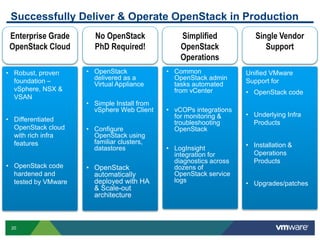
Successfully Deliver & Operate OpenStack in Production 
20 
Simplified 
OpenStack 
Operations 
• Common 
OpenStack admin 
tasks automated 
from vCenter 
• vCOPs integrations 
for monitoring & 
troubleshooting 
OpenStack 
• LogInsight 
integration for 
diagnostics across 
dozens of 
OpenStack service 
logs 
No OpenStack 
PhD Required! 
• OpenStack 
delivered as a 
Virtual Appliance 
• Simple Install from 
vSphere Web Client 
• Configure 
OpenStack using 
familiar clusters, 
datastores 
• OpenStack 
automatically 
deployed with HA 
& Scale-out 
architecture 
Enterprise Grade 
OpenStack Cloud 
• Robust, proven 
foundation – 
vSphere, NSX & 
VSAN 
• Differentiated 
OpenStack cloud 
with rich infra 
features 
• OpenStack code 
hardened and 
tested by VMware 
Single Vendor 
Support 
Unified VMware 
Support for 
• OpenStack code 
• Underlying Infra 
Products 
• Installation & 
Operations 
Products 
• Upgrades/patches
Questions? 
21

Successfully Deliver and Operate OpenStack in Production with VMware VIO

  • 1.
    © 2010 VMwareInc. All rights reserved VMware + OpenStack VIO - VMware Integrated Openstack Nov. 13, 2014 Phil Philbin, SLED SE – pphilbin@vmware.com Confidential
  • 2.
    VMware + OpenStack:No fork in the road… 2
  • 3.
    Embracing Customer Choice… 3 OpenStack is a framework that provides the freedom to… • Choose different technologies, while using a single cloud API + GUI • Choose different deployment models (do-it-yourself vs. vendor solution) OpenStack Compute? Network? Storage? Mgmt? What SW/HW infrastructure technologies meets my needs for advanced features, ease-of-use, cost structure, scale, reliability, monitoring, performance, SLAs, troubleshooting, etc?
  • 4.
    OpenStack as aFramework 4 The flexibility of the OpenStack framework… • Vendor neutral + developer friendly API, with “plugin” architecture • Enables custom coding + rapid iteration by in-house development teams. OpenStack vSphere NSX vSAN Compute? Network? Storage? vCenter Operations Mgmt? Mgmt …with the innovation, reliability, and ease-of-use of VMware • Best-in-class software-defined datacenter (SDDC) technology, as individual components or as an integrated software suite.
  • 5.
    Embracing Customer Choice+ OpenStack VMware’s focus on SDDC allows VMware to embrace customer choice.  Contribute to OpenStack • Integrate VMware compute, network, storage SW with OpenStack. • Make OpenStack better, helping customers succeed with their cloud effort.  Like all OpenStack vendors, compete for your business. • Show customers how VMware components helps them run a better cloud. • Work with ecosystem to make sure it is easy to deploy OpenStack + VMware 5 Our Goal: Make VMware the best and easiest way to run OpenStack
  • 6.
    VMware Technologies andOpenStack 6 Tenant-Side Admin/Operator-Side Horizon ( Web Portal ) ESX & vCenter CLI Tools & Automation vCAC Nova Neutron Cinder Glance NSX vCenter Datastores 3rd-party / vSAN Cloud Operator Tools (vCenter, vCOPs, Log Insight etc.) 3rd-Party Operator tools (e.g., Puppet/Chef) OpenStack or 3rd Party Component VMware Component
  • 7.
    7 Is VMwareReally Contributing to OpenStack? VMware Contributions to core projects (“integrated”): Havana Contributions: #7 (319 Commits) Icehouse Contributions: #5 (424 Commits) Juno Contributions: #6 (312 Commits) Neutron Nova Cinder Docs Tempest Devstack Statistics from: http://www.stackalytics.com/
  • 8.
    OpenStack on vSphereEarly Adopters 8
  • 9.
    Why OpenStack onVMware? 9 Tenant-Side Admin/Operator-Side Horizon ( Web Portal ) ESX & vCenter CLI Tools & Automation vCAC Nova Neutron Cinder Glance NSX vCenter Datastores 3rd-party / vSAN Cloud Operator Tools (vCenter, vCOPs, Log Insight etc.) Third Party Operator tools (e.g., Puppet/Chef) OpenStack or 3rd Party Component VMware Component
  • 10.
    Why OpenStack onVMware? 10 Tenant-Side Admin/Operator-Side Horizon ( Web Portal ) ESX & vCenter CLI Tools & Automation vCAC Nova Neutron Cinder Glance NSX vCenter Datastores 3rd-party / vSAN Cloud Operator Tools (vCenter, vCOPs, Log Insight etc.) Third Party Operator tools (e.g., Puppet/Chef) OpenStack or 3rd Party Component VMware Component
  • 11.
    Choosing a ComputeDriver: Why vSphere for Nova? 11 Technical: • Purpose-built hypervisor platform provides unmatched combination of reliability, security, and performance. • Availability features (vMotion, HA) and compatibility testing protect critical production workloads. • Advanced resource management (e.g., DRS, SDRS) better utilizes HW, providing higher density and avoiding “noisy neighbors”. Operational: • Enterprise-polished solution simplifies adoption. • Enterprises already have the expertise. • Vast array of VMware + Ecosystem tools to manage the infrastructure layer • Deploying OpenStack can be as simple as deploying a single “controller” VM.
  • 12.
    Why OpenStack onVMware? 12 Tenant-Side Admin/Operator-Side Horizon ( Web Portal ) ESX & vCenter CLI Tools & Automation vCAC Nova Neutron Cinder Glance NSX vCenter Datastores 3rd-party / vSAN Cloud Operator Tools (vCenter, vCOPs, Log Insight etc.) Third Party Operator tools (e.g., Puppet/Chef) OpenStack or 3rd Party Component VMware Component
  • 13.
    Choosing a NetworkDriver: Why NSX for Neutron? 13 Technical Capabilities: • First and most production-hardened network virtualization solution. • Doesn’t rely on physical network for VLANs, FW, etc. Works with gear from any vendor. • The technical “details” matter: • Tunneling packet performance • High-availability + scale-out model. • “Distributed” network services. Compatibility + Ecosystem: • Works on KVM, XenServer, and ESX. • Integrations with many HW Switch vendors to allow NSX to manage physical workloads. Operations: • Troubleshooting tools to view how virtual networks are built, impact of physical network failures.
  • 14.
    Why OpenStack onVMware? 14 Tenant-Side Admin/Operator-Side Horizon ( Web Portal ) ESX & vCenter CLI Tools & Automation vCAC Nova Neutron Cinder Glance NSX vCenter Datastores 3rd-party / vSAN Cloud Operator Tools (vCenter, vCOPs, Log Insight etc.) Third Party Operator tools (e.g., Puppet/Chef) OpenStack or 3rd Party Component VMware Component
  • 15.
    Choosing a BlockStorage Driver: Why vSphere for Cinder? 15 Simple but Powerful: • Single driver works with any vSphere validated storage (NFS, iSCSI, FC) • Leverages huge validation efforts across many vendors. • Includes VAAI array acceleration work for snapshot, clone, etc. Enables VMware “virtual SAN”: • Provides shared storage leveraging SDD/Hard-disks on the hypervisor. • Low-cost storage devices, but with accelerated by local SSD cache. • SSD cache is configurable per-disk, allowing extremely high IOPS for data intensive workloads. VMware vCenter Server vSphere VSAN Hard disks SSD ……………. SSD Hard Hard disks disks SSD Distributed Storage Aggregated Datastore
  • 16.
    Why OpenStack onVMware? 16 Tenant-Side Admin/Operator-Side Horizon ( Web Portal ) ESX & vCenter CLI Tools & Automation vCAC Nova Neutron Cinder Glance NSX vCenter Datastores 3rd-party / vSAN Cloud Operator Tools (vCenter, vCOPs, Log Insight etc.) Third Party Operator tools (e.g., Puppet/Chef) OpenStack or 3rd Party Component VMware Component
  • 17.
    Management Technologies withOpenStack 17 Application Management: • vCloud Automation Center (vCAC) 6.0 includes support for consuming from OpenStack clouds, in addition to other back-ends like vSphere, KVM, + AWS. • Provides governance, policy, workflow, and costing, which are not present in OpenStack. Infrastructure Management: • vCenter and the NSX manager provide base troubleshooting capabilities for investigating issues at SW layer. • vCenter Operations Management (vCOPs) provides advanced visibility into the relationships between different elements, health monitoring, anomaly detection, etc.
  • 18.
    OpenStack on VMwareRoadmap Glance (Image) Cinder (Block Storage) Neutron (Network) Nova (Compute) 18 • Core L2/L3 networking and Security Groups (via Nicira NVP) • “Beta” version of vSphere integration • support vCenter, vMotion, HA, datastores, etc. • First Production Ready release of vCenter driver • New vSphere datastore back-end, for high efficiency boot + snapshot. • Simplified image upload. • SPBM for volumes • vSAN+SPBM support for primary disks • OVA support for VMs Grizzly (Q2, 2013) Havana (Q4, 2013) Icehouse (Q2, 2014) • Volume support using vSphere datastores with any 3rd-party storage array. • Support for in-kernel ESX vswitch via NSX, seucirty groups, LBaaS and stateful FWaaS capabilities. • Integrated DHCP and metadata service, scalability improvements. CI Testing • vCenter driver is tested against all Nova changes using Tempest tests • Similarly NSX Neutron plugin is tested against all Neutron changes
  • 19.
    VIO beta andHands On Labs: Sign up for the VMware Integrated Openstack (VIO) beta: • www.vmware.com/products/openstack/ Also available as a Hands-on-Lab: 19 • http://labs.hol.vmware.com • HOL-SDC-1420 - OpenStack with VMware vSphere and NSX
  • 20.
    Successfully Deliver &Operate OpenStack in Production 20 Simplified OpenStack Operations • Common OpenStack admin tasks automated from vCenter • vCOPs integrations for monitoring & troubleshooting OpenStack • LogInsight integration for diagnostics across dozens of OpenStack service logs No OpenStack PhD Required! • OpenStack delivered as a Virtual Appliance • Simple Install from vSphere Web Client • Configure OpenStack using familiar clusters, datastores • OpenStack automatically deployed with HA & Scale-out architecture Enterprise Grade OpenStack Cloud • Robust, proven foundation – vSphere, NSX & VSAN • Differentiated OpenStack cloud with rich infra features • OpenStack code hardened and tested by VMware Single Vendor Support Unified VMware Support for • OpenStack code • Underlying Infra Products • Installation & Operations Products • Upgrades/patches
  • 21.