CASCINA MEDICI DEL VASCELLO – REGGIA DI VENARIA
9 FEBBRAIO 2017
APPUNTAMENTO CON LA FORMAZIONE VMWARE
E LA TECNOLOGIA LENOVO
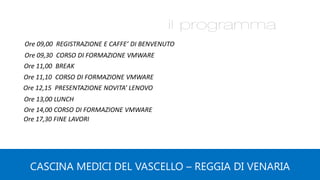
Ore 09,00 REGISTRAZIONE E CAFFE’ DI BENVENUTO
Ore 09,30 CORSO DI FORMAZIONE VMWARE
Ore 11,00 BREAK
Ore 11,10 CORSO DI FORMAZIONE VMWARE
Ore 13,00 LUNCH
Ore 12,15 PRESENTAZIONE NOVITA’ LENOVO
CASCINA MEDICI DEL VASCELLO – REGGIA DI VENARIA
Ore 14,00 CORSO DI FORMAZIONE VMWARE
Ore 17,30 FINE LAVORI
vSphere 6.5 Overview
Torino, 9 febbraio 2017
About me
Pietro Ciotola
Ingegnere Informatico
Dal 2008 Trainer ufficiale VMware (VCI)
VCP6-DCV
Linkedin : https://www.linkedin.com/in/pietroc/
Torino 9 febbraio 2017
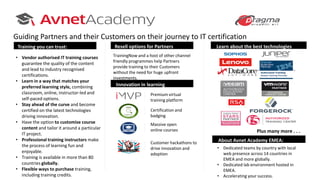
About Avnet Academy EMEA:
Learn about the best technologiesResell options for Partners
Innovation in learning
• Vendor authorised IT training courses
guarantee the quality of the content
and lead to industry recognised
certifications.
• Learn in a way that matches your
preferred learning style, combining
classroom, online, instructor-led and
self-paced options.
• Stay ahead of the curve and become
certified on the latest technologies
driving innovation.
• Have the option to customise course
content and tailor it around a particular
IT project.
• Professional training instructors make
the process of learning fun and
enjoyable.
• Training is available in more than 80
countries globally.
• Flexible ways to purchase training,
including training credits.
TrainingNow and a host of other channel
friendly programmes help Partners
provide training to their Customers
without the need for huge upfront
investments.
Premium virtual
training platform
Massive open
online courses
Certification and
badging
Customer hackathons to
drive innovation and
adoption
Training you can trust:
• Dedicated teams by country with local
web presence across 14 countries in
EMEA and more globally.
• Dedicated lab environment hosted in
EMEA.
• Accelerating your success.
Guiding Partners and their Customers on their journey to IT certification
Plus many more . . .
Agenda
• Introduzione a VMware vSphere
• Le novità della versione 6.5
• Le interfacce WEB di Management
• Il Vcenter e l’applicance VCSA
• Scenari di migrazione ed upgrade
• Il nuovo filesystem VMFS6
• Le Virtual Machines
• vSphere HA e vSphere DRS
Torino 9 febbraio 2017
What’s New
What’s new in vSphere 6.5
• New Admin Interfaces
• Improved vCenter management
• Improved VMFS
• Improved VM security with encription
• Improved Networking
• Proactive HA
• Predictive DRS
Torino 9 febbraio 2017
The Virtual Enviroment
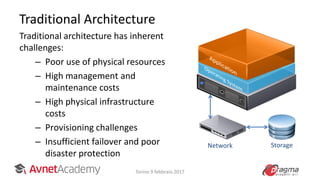
Traditional Architecture
Traditional architecture has inherent
challenges:
– Poor use of physical resources
– High management and
maintenance costs
– High physical infrastructure
costs
– Provisioning challenges
– Insufficient failover and poor
disaster protection
StorageNetwork
Torino 9 febbraio 2017
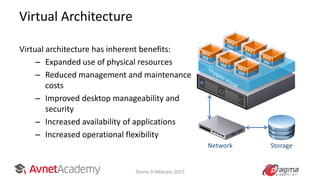
Virtual Architecture
Virtual architecture has inherent benefits:
– Expanded use of physical resources
– Reduced management and maintenance
costs
– Improved desktop manageability and
security
– Increased availability of applications
– Increased operational flexibility
Network Storage
Torino 9 febbraio 2017
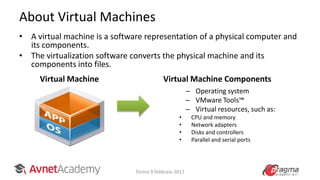
About Virtual Machines
• A virtual machine is a software representation of a physical computer and
its components.
• The virtualization software converts the physical machine and its
components into files.
– Operating system
– VMware Tools™
– Virtual resources, such as:
• CPU and memory
• Network adapters
• Disks and controllers
• Parallel and serial ports
Virtual Machine Virtual Machine Components
Torino 9 febbraio 2017
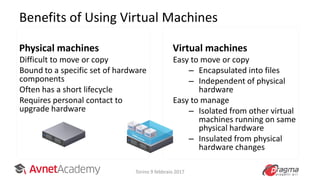
Benefits of Using Virtual Machines
Physical machines
Difficult to move or copy
Bound to a specific set of hardware
components
Often has a short lifecycle
Requires personal contact to
upgrade hardware
Virtual machines
Easy to move or copy
– Encapsulated into files
– Independent of physical
hardware
Easy to manage
– Isolated from other virtual
machines running on same
physical hardware
– Insulated from physical
hardware changes
Torino 9 febbraio 2017
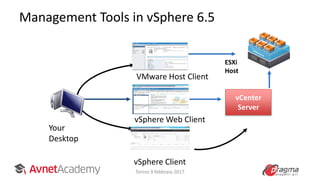
Management Tools in vSphere 6.5
VMware Host Client
vSphere Client
ESXi
Host
Your
Desktop
vCenter
Server
vSphere Web Client
Torino 9 febbraio 2017
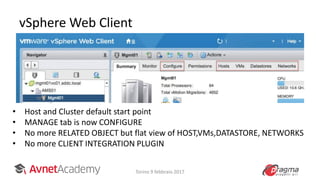
vSphere Web Client
Torino 9 febbraio 2017
• Host and Cluster default start point
• MANAGE tab is now CONFIGURE
• No more RELATED OBJECT but flat view of HOST,VMs,DATASTORE, NETWORKS
• No more CLIENT INTEGRATION PLUGIN
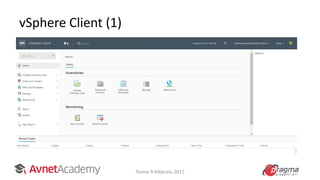
vSphere Client (1)
Torino 9 febbraio 2017
vSphere Client (2)
• HTML-5 version of vSphere Client
• https://vcenterFQDN or IPaddress/ui
• No browser plug-ins to install and manage
• Fully supports Enhanced Linked Mode
• Integrated into vCenter Server 6.5 and fully
supported
Torino 9 febbraio 2017
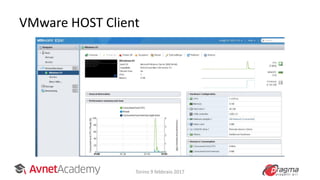
VMware HOST Client
Torino 9 febbraio 2017
vCenter Server and VCSA
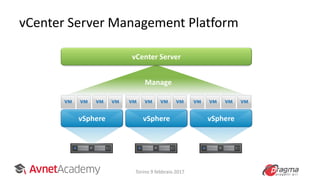
vCenter Server Management Platform
vSphere vSphere vSphere
vCenter Server
Manage
Torino 9 febbraio 2017
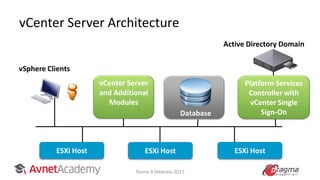
vCenter Server Architecture
ESXi Host ESXi HostESXi Host
vSphere Clients
vCenter Server
and Additional
Modules
Database
Active Directory Domain
Platform Services
Controller with
vCenter Single
Sign-On
Torino 9 febbraio 2017
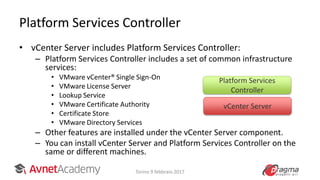
Platform Services Controller
• vCenter Server includes Platform Services Controller:
– Platform Services Controller includes a set of common infrastructure
services:
• VMware vCenter® Single Sign-On
• VMware License Server
• Lookup Service
• VMware Certificate Authority
• Certificate Store
• VMware Directory Services
– Other features are installed under the vCenter Server component.
– You can install vCenter Server and Platform Services Controller on the
same or different machines.
vCenter Server
Platform Services
Controller
Torino 9 febbraio 2017
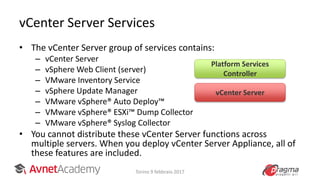
vCenter Server Services
• The vCenter Server group of services contains:
– vCenter Server
– vSphere Web Client (server)
– VMware Inventory Service
– vSphere Update Manager
– VMware vSphere® Auto Deploy™
– VMware vSphere® ESXi™ Dump Collector
– VMware vSphere® Syslog Collector
• You cannot distribute these vCenter Server functions across
multiple servers. When you deploy vCenter Server Appliance, all of
these features are included.
Platform Services
Controller
vCenter Server
Torino 9 febbraio 2017
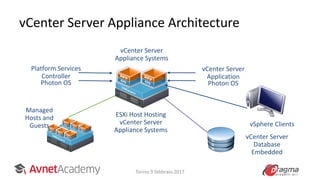
vCenter Server Appliance Architecture
vSphere Clients
ESXi Host Hosting
vCenter Server
Appliance Systems
Photon OS
vCenter Server
Application
vCenter Server
Database
Embedded
vCenter Server
Appliance Systems
Managed
Hosts and
Guests
Photon OS
Platform Services
Controller
Torino 9 febbraio 2017
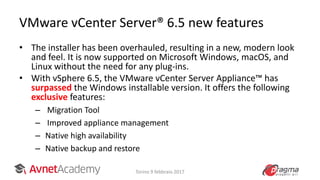
VMware vCenter Server® 6.5 new features
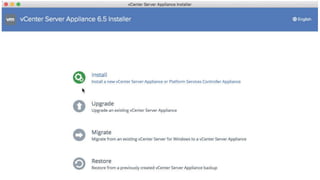
• The installer has been overhauled, resulting in a new, modern look
and feel. It is now supported on Microsoft Windows, macOS, and
Linux without the need for any plug-ins.
• With vSphere 6.5, the VMware vCenter Server Appliance™ has
surpassed the Windows installable version. It offers the following
exclusive features:
– Migration Tool
– Improved appliance management
– Native high availability
– Native backup and restore
Torino 9 febbraio 2017
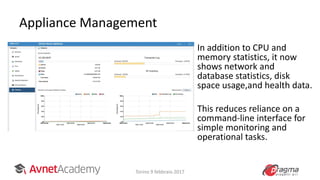
Appliance Management
Torino 9 febbraio 2017
In addition to CPU and
memory statistics, it now
shows network and
database statistics, disk
space usage,and health data.
This reduces reliance on a
command-line interface for
simple monitoring and
operational tasks.
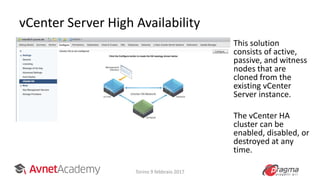
vCenter Server High Availability
Torino 9 febbraio 2017
This solution
consists of active,
passive, and witness
nodes that are
cloned from the
existing vCenter
Server instance.
The vCenter HA
cluster can be
enabled, disabled, or
destroyed at any
time.
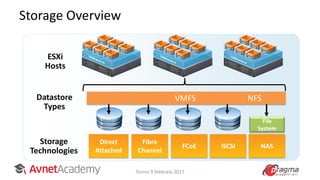
VMware Virtual Storage
Storage Overview
Storage
Technologies
Datastore
Types
FCoE iSCSI
Fibre
Channel
Direct
Attached
File
System
NAS
VMFS NFS
ESXi
Hosts
Torino 9 febbraio 2017
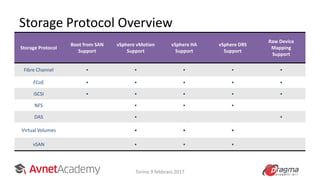
Storage Protocol Overview
Storage Protocol
Boot from SAN
Support
vSphere vMotion
Support
vSphere HA
Support
vSphere DRS
Support
Raw Device
Mapping
Support
Fibre Channel ● ● ● ● ●
FCoE ● ● ● ● ●
iSCSI ● ● ● ● ●
NFS ● ● ●
DAS ● ●
Virtual Volumes ● ● ●
vSAN ● ● ●
Torino 9 febbraio 2017
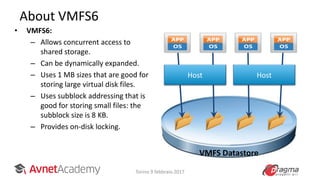
About VMFS6
• VMFS6:
– Allows concurrent access to
shared storage.
– Can be dynamically expanded.
– Uses 1 MB sizes that are good for
storing large virtual disk files.
– Uses subblock addressing that is
good for storing small files: the
subblock size is 8 KB.
– Provides on-disk locking.
HostHost
VMFS Datastore
Torino 9 febbraio 2017
Automated UNMAP
• UNMAP is a vSphere Storage APIs primitive that enables
reclamation of dead or stranded space on thinly provisioned VMFS
volumes.
• In vSphere 6.0, this can be initiated by running a simple ESXCLI
command that can free up deleted blocks from storage. vSphere 6.5
automates the UNMAP process by which VMFS tracks the deleted
blocks and reclaims deleted space from the backend array in
background.
• This background operation ensures a minimal storage I/O impact
due to UNMAP operations. UNMAP works at a guest OS level with
newer versions of Windows and Linux.
Torino 9 febbraio 2017
LUN Scalability
• In vSphere 6 the maximum number of LUNs is
256 and paths is 1,024
• vSphere 6.5 now supports up to 512 LUNs and
2,000 paths
Torino 9 febbraio 2017
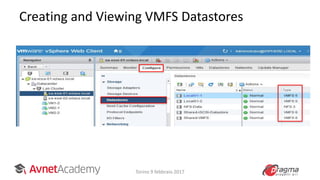
Creating and Viewing VMFS Datastores
Torino 9 febbraio 2017
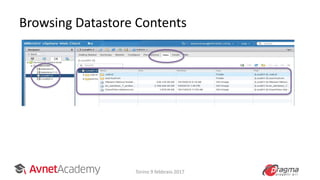
Browsing Datastore Contents
Torino 9 febbraio 2017
Virtual Networks
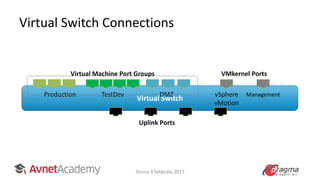
Virtual Switch Connections
Virtual Switch
Production TestDev DMZ vSphere
vMotion
Management
Uplink Ports
Virtual Machine Port Groups VMkernel Ports
Torino 9 febbraio 2017
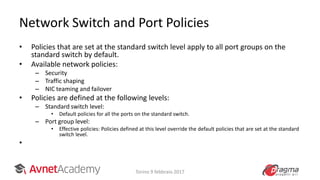
Network Switch and Port Policies
• Policies that are set at the standard switch level apply to all port groups on the
standard switch by default.
• Available network policies:
– Security
– Traffic shaping
– NIC teaming and failover
• Policies are defined at the following levels:
– Standard switch level:
• Default policies for all the ports on the standard switch.
– Port group level:
• Effective policies: Policies defined at this level override the default policies that are set at the standard
switch level.
•
Torino 9 febbraio 2017
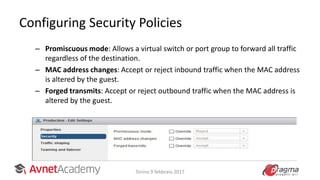
Configuring Security Policies
– Promiscuous mode: Allows a virtual switch or port group to forward all traffic
regardless of the destination.
– MAC address changes: Accept or reject inbound traffic when the MAC address
is altered by the guest.
– Forged transmits: Accept or reject outbound traffic when the MAC address is
altered by the guest.
Torino 9 febbraio 2017
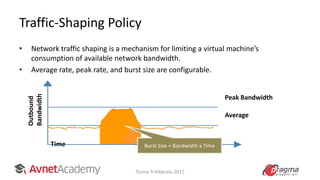
Traffic-Shaping Policy
• Network traffic shaping is a mechanism for limiting a virtual machine’s
consumption of available network bandwidth.
• Average rate, peak rate, and burst size are configurable.
Peak Bandwidth
Average
Outbound
Bandwidth
Time Burst Size = Bandwidth x Time
Torino 9 febbraio 2017
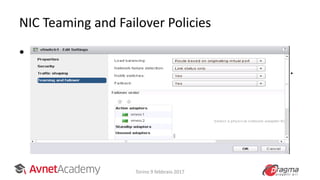
NIC Teaming and Failover Policies
• Administrators can edit the NIC teaming and
failover policy by configuring specific options.
Torino 9 febbraio 2017
Creating Virtual Machines
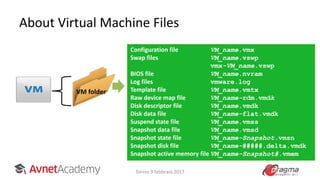
About Virtual Machine Files
VM folder
Configuration file VM_name.vmx
Swap files VM_name.vswp
vmx-VM_name.vswp
BIOS file VM_name.nvram
Log files vmware.log
Template file VM_name.vmtx
Raw device map file VM_name-rdm.vmdk
Disk descriptor file VM_name.vmdk
Disk data file VM_name-flat.vmdk
Suspend state file VM_name.vmss
Snapshot data file VM_name.vmsd
Snapshot state file VM_name-Snapshot.vmsn
Snapshot disk file VM_name-#####.delta.vmdk
Snapshot active memory file VM_name-Snapshot#.vmem
Torino 9 febbraio 2017
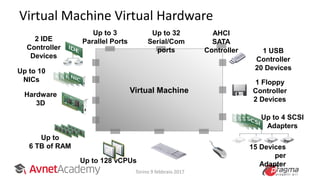
Virtual Machine
Virtual Machine Virtual Hardware
Hardware
3D
2 IDE
Controller
Devices
Up to 3
Parallel Ports
Up to 32
Serial/Com
ports 1 USB
Controller
20 Devices
1 Floppy
Controller
2 Devices
Up to 10
NICs
15 Devices
per
Adapter
Up to
6 TB of RAM
Up to 4 SCSI
Adapters
Up to 128 vCPUs
AHCI
SATA
Controller
Torino 9 febbraio 2017
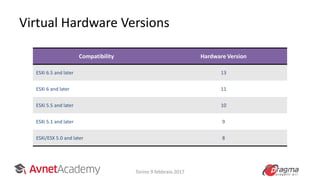
Virtual Hardware Versions
Compatibility Hardware Version
ESXi 6.5 and later 13
ESXi 6 and later 11
ESXi 5.5 and later 10
ESXi 5.1 and later 9
ESXi/ESX 5.0 and later 8
Torino 9 febbraio 2017
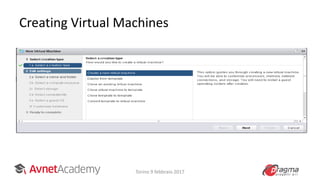
Creating Virtual Machines
Torino 9 febbraio 2017
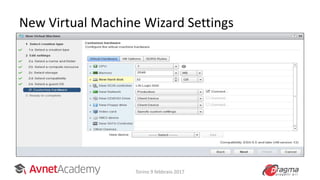
New Virtual Machine Wizard Settings
Torino 9 febbraio 2017
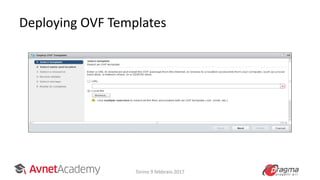
Deploying OVF Templates
Torino 9 febbraio 2017
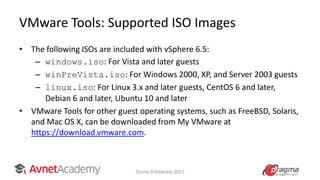
VMware Tools: Supported ISO Images
• The following ISOs are included with vSphere 6.5:
– windows.iso: For Vista and later guests
– winPreVista.iso: For Windows 2000, XP, and Server 2003 guests
– linux.iso: For Linux 3.x and later guests, CentOS 6 and later,
Debian 6 and later, Ubuntu 10 and later
• VMware Tools for other guest operating systems, such as FreeBSD, Solaris,
and Mac OS X, can be downloaded from My VMware at
https://download.vmware.com.
Torino 9 febbraio 2017
Virtual Machine Management
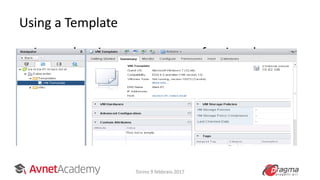
Using a Template
• A template is a master copy of a virtual
machine. A template is used to create and
provision new virtual machines.
Torino 9 febbraio 2017
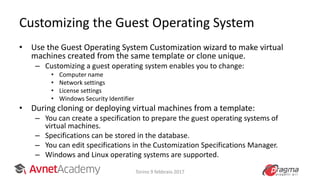
Customizing the Guest Operating System
• Use the Guest Operating System Customization wizard to make virtual
machines created from the same template or clone unique.
– Customizing a guest operating system enables you to change:
• Computer name
• Network settings
• License settings
• Windows Security Identifier
• During cloning or deploying virtual machines from a template:
– You can create a specification to prepare the guest operating systems of
virtual machines.
– Specifications can be stored in the database.
– You can edit specifications in the Customization Specifications Manager.
– Windows and Linux operating systems are supported.
Torino 9 febbraio 2017
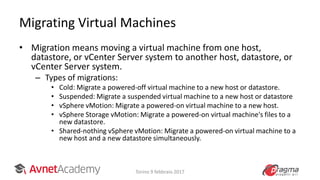
Migrating Virtual Machines
• Migration means moving a virtual machine from one host,
datastore, or vCenter Server system to another host, datastore, or
vCenter Server system.
– Types of migrations:
• Cold: Migrate a powered-off virtual machine to a new host or datastore.
• Suspended: Migrate a suspended virtual machine to a new host or datastore
• vSphere vMotion: Migrate a powered-on virtual machine to a new host.
• vSphere Storage vMotion: Migrate a powered-on virtual machine's files to a
new datastore.
• Shared-nothing vSphere vMotion: Migrate a powered-on virtual machine to a
new host and a new datastore simultaneously.
Torino 9 febbraio 2017
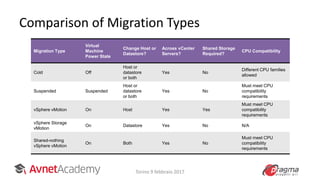
Comparison of Migration Types
Migration Type
Virtual
Machine
Power State
Change Host or
Datastore?
Across vCenter
Servers?
Shared Storage
Required?
CPU Compatibility
Cold Off
Host or
datastore
or both
Yes No
Different CPU families
allowed
Suspended Suspended
Host or
datastore
or both
Yes No
Must meet CPU
compatibility
requirements
vSphere vMotion On Host Yes Yes
Must meet CPU
compatibility
requirements
vSphere Storage
vMotion
On Datastore Yes No N/A
Shared-nothing
vSphere vMotion
On Both Yes No
Must meet CPU
compatibility
requirements
Torino 9 febbraio 2017
Resource Management and Monitoring
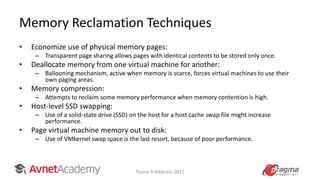
Memory Reclamation Techniques
• Economize use of physical memory pages:
– Transparent page sharing allows pages with identical contents to be stored only once.
• Deallocate memory from one virtual machine for another:
– Ballooning mechanism, active when memory is scarce, forces virtual machines to use their
own paging areas.
• Memory compression:
– Attempts to reclaim some memory performance when memory contention is high.
• Host-level SSD swapping:
– Use of a solid-state drive (SSD) on the host for a host cache swap file might increase
performance.
• Page virtual machine memory out to disk:
– Use of VMkernel swap space is the last resort, because of poor performance.
Torino 9 febbraio 2017
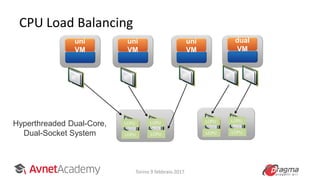
CPU Load Balancing
uni
VM
dual
VM
LCPU LCPU
Hyperthreaded Dual-Core,
Dual-Socket System LCPU LCPU
LCPU LCPU
LCPU LCPU
uni
VM
uni
VM
Torino 9 febbraio 2017
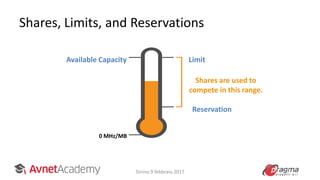
Shares, Limits, and Reservations
Available Capacity
0 MHz/MB
Limit
Shares are used to
compete in this range.
Reservation
Torino 9 febbraio 2017
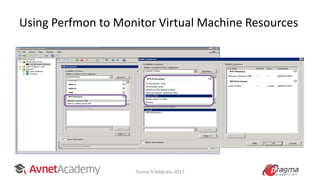
Using Perfmon to Monitor Virtual Machine Resources
Torino 9 febbraio 2017
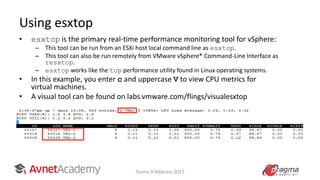
• esxtop is the primary real-time performance monitoring tool for vSphere:
– This tool can be run from an ESXi host local command line as esxtop.
– This tool can also be run remotely from VMware vSphere® Command-Line Interface as
resxtop.
– esxtop works like the top performance utility found in Linux operating systems.
• In this example, you enter c and uppercase V to view CPU metrics for
virtual machines.
• A visual tool can be found on labs.vmware.com/flings/visualesxtop
•
Using esxtop
Torino 9 febbraio 2017
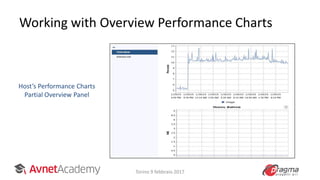
Working with Overview Performance Charts
Host’s Performance Charts
Partial Overview Panel
Torino 9 febbraio 2017
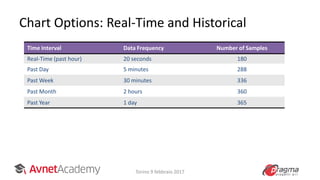
Chart Options: Real-Time and Historical
vCenter Server stores statistics at different
specificities.
Time Interval Data Frequency Number of Samples
Real-Time (past hour) 20 seconds 180
Past Day 5 minutes 288
Past Week 30 minutes 336
Past Month 2 hours 360
Past Year 1 day 365
Torino 9 febbraio 2017
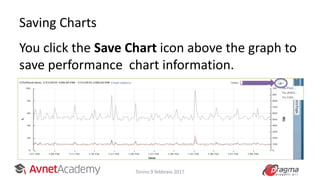
Saving Charts
You click the Save Chart icon above the graph to
save performance chart information.
• You can save information in these formats:
– PNG
– JPEG
– CSV
Torino 9 febbraio 2017
vSphere HA
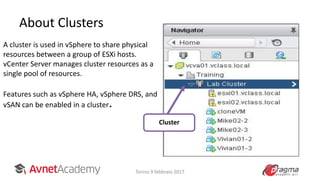
About Clusters
A cluster is used in vSphere to share physical
resources between a group of ESXi hosts.
vCenter Server manages cluster resources as a
single pool of resources.
Features such as vSphere HA, vSphere DRS, and
vSAN can be enabled in a cluster.
Cluster
Torino 9 febbraio 2017
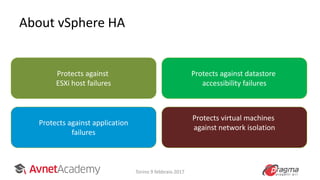
About vSphere HA
Protects against
ESXi host failures
Protects against application
failures
Protects against datastore
accessibility failures
Protects virtual machines
against network isolation
Torino 9 febbraio 2017
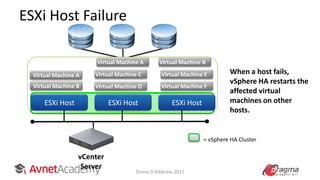
ESXi Host Failure
Virtual Machine A
Virtual Machine B
Virtual Machine C
Virtual Machine F
vCenter
Server
ESXi Host ESXi HostESXi Host
Virtual Machine D
Virtual Machine E
Virtual Machine A Virtual Machine B
When a host fails,
vSphere HA restarts the
affected virtual
machines on other
hosts.
= vSphere HA Cluster
Torino 9 febbraio 2017
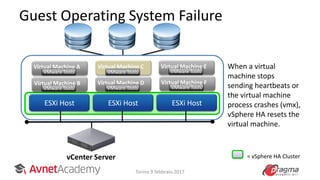
Guest Operating System Failure
vCenter Server
ESXi Host ESXi Host
= vSphere HA Cluster
ESXi Host
When a virtual
machine stops
sending heartbeats or
the virtual machine
process crashes (vmx),
vSphere HA resets the
virtual machine.
Virtual Machine C
VMware Tools VMware Tools
Virtual Machine E
VMware Tools
Virtual Machine F
VMware Tools
Virtual Machine A
VMware Tools
Virtual Machine B
VMware Tools
Virtual Machine D
Torino 9 febbraio 2017
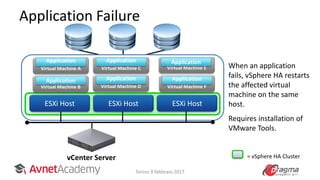
Application Failure
vCenter Server
ESXi Host ESXi HostESXi Host
Virtual Machine E
Application
When an application
fails, vSphere HA restarts
the affected virtual
machine on the same
host.
Requires installation of
VMware Tools.
Virtual Machine C
Application
Virtual Machine F
Application
Virtual Machine D
Application
Virtual Machine A
Application
Virtual Machine B
Application
= vSphere HA Cluster
Torino 9 febbraio 2017
Proactive HA
• Proactive HA integrates with select hardware partners to detect
degraded components and evacuate VMs from affected vSphere
hosts before an incident causes a service interruption.
• Hardware partners offer a vCenter Server plug-in to provide the
health status of the system memory, local storage, power supplies,
cooling fans, and network adapters. As hardware components
become degraded, Proactive HA determines which hosts are at risk
and places them into a new state, Quarantine Mode. While in
Quarantine Mode, VMs are migrated to healthy hosts, as long as
affinity or antiaffinity rules are not violated and there is no impact
to VM performance. In addition, the affected hosts are avoided
when new VMs are added to the cluster.
Torino 9 febbraio 2017
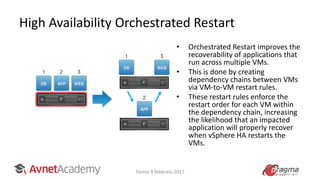
High Availability Orchestrated Restart
Torino 9 febbraio 2017
• Orchestrated Restart improves the
recoverability of applications that
run across multiple VMs.
• This is done by creating
dependency chains between VMs
via VM-to-VM restart rules.
• These restart rules enforce the
restart order for each VM within
the dependency chain, increasing
the likelihood that an impacted
application will properly recover
when vSphere HA restarts the
VMs.
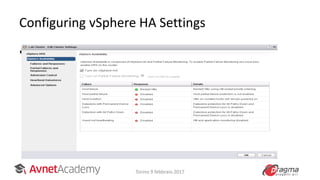
Configuring vSphere HA Settings
• When you create a vSphere HA cluster or
configure a cluster, you must configure
settings that determine how the feature
works.
Torino 9 febbraio 2017
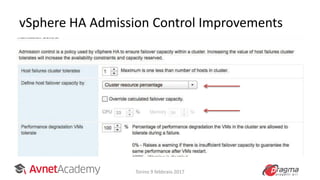
vSphere HA Admission Control Improvements
Torino 9 febbraio 2017
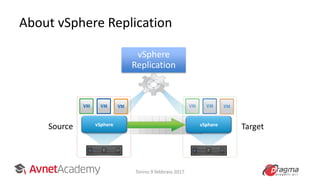
About vSphere Replication
vSphere vSphere
Source Target
vSphere
Replication
Torino 9 febbraio 2017
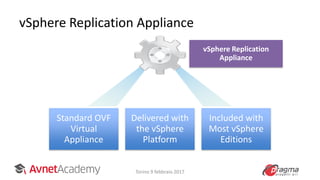
vSphere Replication Appliance
Standard OVF
Virtual
Appliance
Delivered with
the vSphere
Platform
Included with
Most vSphere
Editions
vSphere Replication
Appliance
Torino 9 febbraio 2017
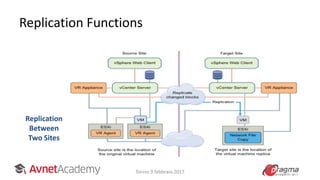
Replication Functions
Replication
Between
Two Sites
Torino 9 febbraio 2017
vSphere DRS
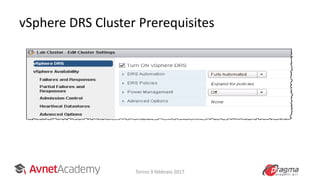
vSphere DRS Cluster Prerequisites
Torino 9 febbraio 2017
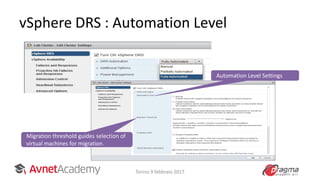
vSphere DRS : Automation Level
Migration threshold guides selection of
virtual machines for migration.
Automation Level Settings
Torino 9 febbraio 2017
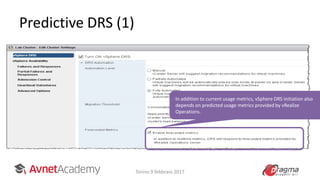
Predictive DRS (1)
In addition to current usage metrics, vSphere DRS initiation also
depends on predicted usage metrics provided by vRealize
Operations.
Torino 9 febbraio 2017
Predictive DRS
• Predictive DRS is a new feature that leverages the predictive analytics of
vRealize Operations Manager with the powerful resource scheduler algorithm
of vSphere DRS. Together, these two products enable workload balancing for
certain VMs before resource utilization spikes occur, potentially eliminating a
great amount of resource contention that might have occurred in the past.
• vRealize Operations Manager runs its dynamic thresholds algorithm nightly
against the VMs on which it collects data. These dynamic thresholds create
forecasted metrics for the future utilization of the VMs.
• The metrics are then passed to vSphere DRS to determine the best placement
and balance of VMs before resource utilization spikes occur. Predictive DRS
helps prevent resource contention on hosts that run VMs with predictable
utilization patterns.
Torino 9 febbraio 2017
THANK YOU !
Torino 9 febbraio 2017

Presentazione Corso VMware vSphere 6.5

  • 1.
    CASCINA MEDICI DELVASCELLO – REGGIA DI VENARIA 9 FEBBRAIO 2017 APPUNTAMENTO CON LA FORMAZIONE VMWARE E LA TECNOLOGIA LENOVO
  • 2.
    Ore 09,00 REGISTRAZIONEE CAFFE’ DI BENVENUTO Ore 09,30 CORSO DI FORMAZIONE VMWARE Ore 11,00 BREAK Ore 11,10 CORSO DI FORMAZIONE VMWARE Ore 13,00 LUNCH Ore 12,15 PRESENTAZIONE NOVITA’ LENOVO CASCINA MEDICI DEL VASCELLO – REGGIA DI VENARIA Ore 14,00 CORSO DI FORMAZIONE VMWARE Ore 17,30 FINE LAVORI
  • 3.
  • 4.
    About me Pietro Ciotola IngegnereInformatico Dal 2008 Trainer ufficiale VMware (VCI) VCP6-DCV Linkedin : https://www.linkedin.com/in/pietroc/ Torino 9 febbraio 2017
  • 5.
    About Avnet AcademyEMEA: Learn about the best technologiesResell options for Partners Innovation in learning • Vendor authorised IT training courses guarantee the quality of the content and lead to industry recognised certifications. • Learn in a way that matches your preferred learning style, combining classroom, online, instructor-led and self-paced options. • Stay ahead of the curve and become certified on the latest technologies driving innovation. • Have the option to customise course content and tailor it around a particular IT project. • Professional training instructors make the process of learning fun and enjoyable. • Training is available in more than 80 countries globally. • Flexible ways to purchase training, including training credits. TrainingNow and a host of other channel friendly programmes help Partners provide training to their Customers without the need for huge upfront investments. Premium virtual training platform Massive open online courses Certification and badging Customer hackathons to drive innovation and adoption Training you can trust: • Dedicated teams by country with local web presence across 14 countries in EMEA and more globally. • Dedicated lab environment hosted in EMEA. • Accelerating your success. Guiding Partners and their Customers on their journey to IT certification Plus many more . . .
  • 6.
    Agenda • Introduzione aVMware vSphere • Le novità della versione 6.5 • Le interfacce WEB di Management • Il Vcenter e l’applicance VCSA • Scenari di migrazione ed upgrade • Il nuovo filesystem VMFS6 • Le Virtual Machines • vSphere HA e vSphere DRS Torino 9 febbraio 2017
  • 7.
  • 8.
    What’s new invSphere 6.5 • New Admin Interfaces • Improved vCenter management • Improved VMFS • Improved VM security with encription • Improved Networking • Proactive HA • Predictive DRS Torino 9 febbraio 2017
  • 9.
  • 10.
    Traditional Architecture Traditional architecturehas inherent challenges: – Poor use of physical resources – High management and maintenance costs – High physical infrastructure costs – Provisioning challenges – Insufficient failover and poor disaster protection StorageNetwork Torino 9 febbraio 2017
  • 11.
    Virtual Architecture Virtual architecturehas inherent benefits: – Expanded use of physical resources – Reduced management and maintenance costs – Improved desktop manageability and security – Increased availability of applications – Increased operational flexibility Network Storage Torino 9 febbraio 2017
  • 12.
    About Virtual Machines •A virtual machine is a software representation of a physical computer and its components. • The virtualization software converts the physical machine and its components into files. – Operating system – VMware Tools™ – Virtual resources, such as: • CPU and memory • Network adapters • Disks and controllers • Parallel and serial ports Virtual Machine Virtual Machine Components Torino 9 febbraio 2017
  • 13.
    Benefits of UsingVirtual Machines Physical machines Difficult to move or copy Bound to a specific set of hardware components Often has a short lifecycle Requires personal contact to upgrade hardware Virtual machines Easy to move or copy – Encapsulated into files – Independent of physical hardware Easy to manage – Isolated from other virtual machines running on same physical hardware – Insulated from physical hardware changes Torino 9 febbraio 2017
  • 14.
    Management Tools invSphere 6.5 VMware Host Client vSphere Client ESXi Host Your Desktop vCenter Server vSphere Web Client Torino 9 febbraio 2017
  • 15.
    vSphere Web Client Torino9 febbraio 2017 • Host and Cluster default start point • MANAGE tab is now CONFIGURE • No more RELATED OBJECT but flat view of HOST,VMs,DATASTORE, NETWORKS • No more CLIENT INTEGRATION PLUGIN
  • 16.
  • 17.
    vSphere Client (2) •HTML-5 version of vSphere Client • https://vcenterFQDN or IPaddress/ui • No browser plug-ins to install and manage • Fully supports Enhanced Linked Mode • Integrated into vCenter Server 6.5 and fully supported Torino 9 febbraio 2017
  • 18.
  • 19.
  • 20.
    vCenter Server ManagementPlatform vSphere vSphere vSphere vCenter Server Manage Torino 9 febbraio 2017
  • 21.
    vCenter Server Architecture ESXiHost ESXi HostESXi Host vSphere Clients vCenter Server and Additional Modules Database Active Directory Domain Platform Services Controller with vCenter Single Sign-On Torino 9 febbraio 2017
  • 22.
    Platform Services Controller •vCenter Server includes Platform Services Controller: – Platform Services Controller includes a set of common infrastructure services: • VMware vCenter® Single Sign-On • VMware License Server • Lookup Service • VMware Certificate Authority • Certificate Store • VMware Directory Services – Other features are installed under the vCenter Server component. – You can install vCenter Server and Platform Services Controller on the same or different machines. vCenter Server Platform Services Controller Torino 9 febbraio 2017
  • 23.
    vCenter Server Services •The vCenter Server group of services contains: – vCenter Server – vSphere Web Client (server) – VMware Inventory Service – vSphere Update Manager – VMware vSphere® Auto Deploy™ – VMware vSphere® ESXi™ Dump Collector – VMware vSphere® Syslog Collector • You cannot distribute these vCenter Server functions across multiple servers. When you deploy vCenter Server Appliance, all of these features are included. Platform Services Controller vCenter Server Torino 9 febbraio 2017
  • 24.
    vCenter Server ApplianceArchitecture vSphere Clients ESXi Host Hosting vCenter Server Appliance Systems Photon OS vCenter Server Application vCenter Server Database Embedded vCenter Server Appliance Systems Managed Hosts and Guests Photon OS Platform Services Controller Torino 9 febbraio 2017
  • 25.
    VMware vCenter Server®6.5 new features • The installer has been overhauled, resulting in a new, modern look and feel. It is now supported on Microsoft Windows, macOS, and Linux without the need for any plug-ins. • With vSphere 6.5, the VMware vCenter Server Appliance™ has surpassed the Windows installable version. It offers the following exclusive features: – Migration Tool – Improved appliance management – Native high availability – Native backup and restore Torino 9 febbraio 2017
  • 26.
  • 27.
    Appliance Management Torino 9febbraio 2017 In addition to CPU and memory statistics, it now shows network and database statistics, disk space usage,and health data. This reduces reliance on a command-line interface for simple monitoring and operational tasks.
  • 28.
    vCenter Server HighAvailability Torino 9 febbraio 2017 This solution consists of active, passive, and witness nodes that are cloned from the existing vCenter Server instance. The vCenter HA cluster can be enabled, disabled, or destroyed at any time.
  • 29.
  • 30.
  • 31.
    Storage Protocol Overview StorageProtocol Boot from SAN Support vSphere vMotion Support vSphere HA Support vSphere DRS Support Raw Device Mapping Support Fibre Channel ● ● ● ● ● FCoE ● ● ● ● ● iSCSI ● ● ● ● ● NFS ● ● ● DAS ● ● Virtual Volumes ● ● ● vSAN ● ● ● Torino 9 febbraio 2017
  • 32.
    About VMFS6 • VMFS6: –Allows concurrent access to shared storage. – Can be dynamically expanded. – Uses 1 MB sizes that are good for storing large virtual disk files. – Uses subblock addressing that is good for storing small files: the subblock size is 8 KB. – Provides on-disk locking. HostHost VMFS Datastore Torino 9 febbraio 2017
  • 33.
    Automated UNMAP • UNMAPis a vSphere Storage APIs primitive that enables reclamation of dead or stranded space on thinly provisioned VMFS volumes. • In vSphere 6.0, this can be initiated by running a simple ESXCLI command that can free up deleted blocks from storage. vSphere 6.5 automates the UNMAP process by which VMFS tracks the deleted blocks and reclaims deleted space from the backend array in background. • This background operation ensures a minimal storage I/O impact due to UNMAP operations. UNMAP works at a guest OS level with newer versions of Windows and Linux. Torino 9 febbraio 2017
  • 34.
    LUN Scalability • InvSphere 6 the maximum number of LUNs is 256 and paths is 1,024 • vSphere 6.5 now supports up to 512 LUNs and 2,000 paths Torino 9 febbraio 2017
  • 35.
    Creating and ViewingVMFS Datastores Torino 9 febbraio 2017
  • 36.
  • 37.
  • 38.
    Virtual Switch Connections VirtualSwitch Production TestDev DMZ vSphere vMotion Management Uplink Ports Virtual Machine Port Groups VMkernel Ports Torino 9 febbraio 2017
  • 39.
    Network Switch andPort Policies • Policies that are set at the standard switch level apply to all port groups on the standard switch by default. • Available network policies: – Security – Traffic shaping – NIC teaming and failover • Policies are defined at the following levels: – Standard switch level: • Default policies for all the ports on the standard switch. – Port group level: • Effective policies: Policies defined at this level override the default policies that are set at the standard switch level. • Torino 9 febbraio 2017
  • 40.
    Configuring Security Policies –Promiscuous mode: Allows a virtual switch or port group to forward all traffic regardless of the destination. – MAC address changes: Accept or reject inbound traffic when the MAC address is altered by the guest. – Forged transmits: Accept or reject outbound traffic when the MAC address is altered by the guest. Torino 9 febbraio 2017
  • 41.
    Traffic-Shaping Policy • Networktraffic shaping is a mechanism for limiting a virtual machine’s consumption of available network bandwidth. • Average rate, peak rate, and burst size are configurable. Peak Bandwidth Average Outbound Bandwidth Time Burst Size = Bandwidth x Time Torino 9 febbraio 2017
  • 42.
    NIC Teaming andFailover Policies • Administrators can edit the NIC teaming and failover policy by configuring specific options. Torino 9 febbraio 2017
  • 43.
  • 44.
    About Virtual MachineFiles VM folder Configuration file VM_name.vmx Swap files VM_name.vswp vmx-VM_name.vswp BIOS file VM_name.nvram Log files vmware.log Template file VM_name.vmtx Raw device map file VM_name-rdm.vmdk Disk descriptor file VM_name.vmdk Disk data file VM_name-flat.vmdk Suspend state file VM_name.vmss Snapshot data file VM_name.vmsd Snapshot state file VM_name-Snapshot.vmsn Snapshot disk file VM_name-#####.delta.vmdk Snapshot active memory file VM_name-Snapshot#.vmem Torino 9 febbraio 2017
  • 45.
    Virtual Machine Virtual MachineVirtual Hardware Hardware 3D 2 IDE Controller Devices Up to 3 Parallel Ports Up to 32 Serial/Com ports 1 USB Controller 20 Devices 1 Floppy Controller 2 Devices Up to 10 NICs 15 Devices per Adapter Up to 6 TB of RAM Up to 4 SCSI Adapters Up to 128 vCPUs AHCI SATA Controller Torino 9 febbraio 2017
  • 46.
    Virtual Hardware Versions CompatibilityHardware Version ESXi 6.5 and later 13 ESXi 6 and later 11 ESXi 5.5 and later 10 ESXi 5.1 and later 9 ESXi/ESX 5.0 and later 8 Torino 9 febbraio 2017
  • 47.
  • 48.
    New Virtual MachineWizard Settings Torino 9 febbraio 2017
  • 49.
  • 50.
    VMware Tools: SupportedISO Images • The following ISOs are included with vSphere 6.5: – windows.iso: For Vista and later guests – winPreVista.iso: For Windows 2000, XP, and Server 2003 guests – linux.iso: For Linux 3.x and later guests, CentOS 6 and later, Debian 6 and later, Ubuntu 10 and later • VMware Tools for other guest operating systems, such as FreeBSD, Solaris, and Mac OS X, can be downloaded from My VMware at https://download.vmware.com. Torino 9 febbraio 2017
  • 51.
  • 52.
    Using a Template •A template is a master copy of a virtual machine. A template is used to create and provision new virtual machines. Torino 9 febbraio 2017
  • 53.
    Customizing the GuestOperating System • Use the Guest Operating System Customization wizard to make virtual machines created from the same template or clone unique. – Customizing a guest operating system enables you to change: • Computer name • Network settings • License settings • Windows Security Identifier • During cloning or deploying virtual machines from a template: – You can create a specification to prepare the guest operating systems of virtual machines. – Specifications can be stored in the database. – You can edit specifications in the Customization Specifications Manager. – Windows and Linux operating systems are supported. Torino 9 febbraio 2017
  • 54.
    Migrating Virtual Machines •Migration means moving a virtual machine from one host, datastore, or vCenter Server system to another host, datastore, or vCenter Server system. – Types of migrations: • Cold: Migrate a powered-off virtual machine to a new host or datastore. • Suspended: Migrate a suspended virtual machine to a new host or datastore • vSphere vMotion: Migrate a powered-on virtual machine to a new host. • vSphere Storage vMotion: Migrate a powered-on virtual machine's files to a new datastore. • Shared-nothing vSphere vMotion: Migrate a powered-on virtual machine to a new host and a new datastore simultaneously. Torino 9 febbraio 2017
  • 55.
    Comparison of MigrationTypes Migration Type Virtual Machine Power State Change Host or Datastore? Across vCenter Servers? Shared Storage Required? CPU Compatibility Cold Off Host or datastore or both Yes No Different CPU families allowed Suspended Suspended Host or datastore or both Yes No Must meet CPU compatibility requirements vSphere vMotion On Host Yes Yes Must meet CPU compatibility requirements vSphere Storage vMotion On Datastore Yes No N/A Shared-nothing vSphere vMotion On Both Yes No Must meet CPU compatibility requirements Torino 9 febbraio 2017
  • 56.
  • 57.
    Memory Reclamation Techniques •Economize use of physical memory pages: – Transparent page sharing allows pages with identical contents to be stored only once. • Deallocate memory from one virtual machine for another: – Ballooning mechanism, active when memory is scarce, forces virtual machines to use their own paging areas. • Memory compression: – Attempts to reclaim some memory performance when memory contention is high. • Host-level SSD swapping: – Use of a solid-state drive (SSD) on the host for a host cache swap file might increase performance. • Page virtual machine memory out to disk: – Use of VMkernel swap space is the last resort, because of poor performance. Torino 9 febbraio 2017
  • 58.
    CPU Load Balancing uni VM dual VM LCPULCPU Hyperthreaded Dual-Core, Dual-Socket System LCPU LCPU LCPU LCPU LCPU LCPU uni VM uni VM Torino 9 febbraio 2017
  • 59.
    Shares, Limits, andReservations Available Capacity 0 MHz/MB Limit Shares are used to compete in this range. Reservation Torino 9 febbraio 2017
  • 60.
    Using Perfmon toMonitor Virtual Machine Resources Torino 9 febbraio 2017
  • 61.
    • esxtop isthe primary real-time performance monitoring tool for vSphere: – This tool can be run from an ESXi host local command line as esxtop. – This tool can also be run remotely from VMware vSphere® Command-Line Interface as resxtop. – esxtop works like the top performance utility found in Linux operating systems. • In this example, you enter c and uppercase V to view CPU metrics for virtual machines. • A visual tool can be found on labs.vmware.com/flings/visualesxtop • Using esxtop Torino 9 febbraio 2017
  • 62.
    Working with OverviewPerformance Charts Host’s Performance Charts Partial Overview Panel Torino 9 febbraio 2017
  • 63.
    Chart Options: Real-Timeand Historical vCenter Server stores statistics at different specificities. Time Interval Data Frequency Number of Samples Real-Time (past hour) 20 seconds 180 Past Day 5 minutes 288 Past Week 30 minutes 336 Past Month 2 hours 360 Past Year 1 day 365 Torino 9 febbraio 2017
  • 64.
    Saving Charts You clickthe Save Chart icon above the graph to save performance chart information. • You can save information in these formats: – PNG – JPEG – CSV Torino 9 febbraio 2017
  • 65.
  • 66.
    About Clusters A clusteris used in vSphere to share physical resources between a group of ESXi hosts. vCenter Server manages cluster resources as a single pool of resources. Features such as vSphere HA, vSphere DRS, and vSAN can be enabled in a cluster. Cluster Torino 9 febbraio 2017
  • 67.
    About vSphere HA Protectsagainst ESXi host failures Protects against application failures Protects against datastore accessibility failures Protects virtual machines against network isolation Torino 9 febbraio 2017
  • 68.
    ESXi Host Failure VirtualMachine A Virtual Machine B Virtual Machine C Virtual Machine F vCenter Server ESXi Host ESXi HostESXi Host Virtual Machine D Virtual Machine E Virtual Machine A Virtual Machine B When a host fails, vSphere HA restarts the affected virtual machines on other hosts. = vSphere HA Cluster Torino 9 febbraio 2017
  • 69.
    Guest Operating SystemFailure vCenter Server ESXi Host ESXi Host = vSphere HA Cluster ESXi Host When a virtual machine stops sending heartbeats or the virtual machine process crashes (vmx), vSphere HA resets the virtual machine. Virtual Machine C VMware Tools VMware Tools Virtual Machine E VMware Tools Virtual Machine F VMware Tools Virtual Machine A VMware Tools Virtual Machine B VMware Tools Virtual Machine D Torino 9 febbraio 2017
  • 70.
    Application Failure vCenter Server ESXiHost ESXi HostESXi Host Virtual Machine E Application When an application fails, vSphere HA restarts the affected virtual machine on the same host. Requires installation of VMware Tools. Virtual Machine C Application Virtual Machine F Application Virtual Machine D Application Virtual Machine A Application Virtual Machine B Application = vSphere HA Cluster Torino 9 febbraio 2017
  • 71.
    Proactive HA • ProactiveHA integrates with select hardware partners to detect degraded components and evacuate VMs from affected vSphere hosts before an incident causes a service interruption. • Hardware partners offer a vCenter Server plug-in to provide the health status of the system memory, local storage, power supplies, cooling fans, and network adapters. As hardware components become degraded, Proactive HA determines which hosts are at risk and places them into a new state, Quarantine Mode. While in Quarantine Mode, VMs are migrated to healthy hosts, as long as affinity or antiaffinity rules are not violated and there is no impact to VM performance. In addition, the affected hosts are avoided when new VMs are added to the cluster. Torino 9 febbraio 2017
  • 72.
    High Availability OrchestratedRestart Torino 9 febbraio 2017 • Orchestrated Restart improves the recoverability of applications that run across multiple VMs. • This is done by creating dependency chains between VMs via VM-to-VM restart rules. • These restart rules enforce the restart order for each VM within the dependency chain, increasing the likelihood that an impacted application will properly recover when vSphere HA restarts the VMs.
  • 73.
    Configuring vSphere HASettings • When you create a vSphere HA cluster or configure a cluster, you must configure settings that determine how the feature works. Torino 9 febbraio 2017
  • 74.
    vSphere HA AdmissionControl Improvements Torino 9 febbraio 2017
  • 75.
    About vSphere Replication vSpherevSphere Source Target vSphere Replication Torino 9 febbraio 2017
  • 76.
    vSphere Replication Appliance StandardOVF Virtual Appliance Delivered with the vSphere Platform Included with Most vSphere Editions vSphere Replication Appliance Torino 9 febbraio 2017
  • 77.
  • 78.
  • 79.
    vSphere DRS ClusterPrerequisites Torino 9 febbraio 2017
  • 80.
    vSphere DRS :Automation Level Migration threshold guides selection of virtual machines for migration. Automation Level Settings Torino 9 febbraio 2017
  • 81.
    Predictive DRS (1) Inaddition to current usage metrics, vSphere DRS initiation also depends on predicted usage metrics provided by vRealize Operations. Torino 9 febbraio 2017
  • 82.
    Predictive DRS • PredictiveDRS is a new feature that leverages the predictive analytics of vRealize Operations Manager with the powerful resource scheduler algorithm of vSphere DRS. Together, these two products enable workload balancing for certain VMs before resource utilization spikes occur, potentially eliminating a great amount of resource contention that might have occurred in the past. • vRealize Operations Manager runs its dynamic thresholds algorithm nightly against the VMs on which it collects data. These dynamic thresholds create forecasted metrics for the future utilization of the VMs. • The metrics are then passed to vSphere DRS to determine the best placement and balance of VMs before resource utilization spikes occur. Predictive DRS helps prevent resource contention on hosts that run VMs with predictable utilization patterns. Torino 9 febbraio 2017
  • 83.
    THANK YOU ! Torino9 febbraio 2017