Figures in LaTex
© Sarita Bopalkar
Import Figures in LaTex
• To insert images into your LaTeX document,
• specify the graphicx package in the preamble (above begin{document} and
below end{document}
• command usepackage{graphicx}
• Latex allows you to insert Encapsulated PostScript image i.e ‘.eps’
begin{figure}[options]
centering
includegraphics[width=4in]{sample-fig.eps}
caption{Name of the Figure} label{fig1}
end{figure}
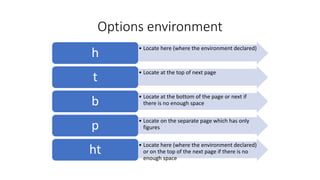
Options environment
• Locate here (where the environment declared)
h
• Locate at the top of next page
t
• Locate at the bottom of the page or next if
there is no enough spaceb
• Locate on the separate page which has only
figuresp
• Locate here (where the environment declared)
or on the top of the next page if there is no
enough space
ht
Format for images
• PostScript file (*.ps) or Encapsulated PostScript file (*.eps) format
figures can be included in LaTex
• Most mathematical or scientific graphics software allows you to
export graphics (figures, diagrams, graphs) in ps or eps forms;
• Eg Mathematica, Maple, Matlab, IDL, and xfig.
• In the Matlab figure window, choosing the Export option under File menu, a
figure file can be created in the eps format
• GIF, JPEG, TIFF images can be converted to PostScript or Encapsulated
PostScript format using Adobe Photoshop or online free softwares
are also available
© Sarita Bopalkar
Thank you
© Sarita Bopalkar

9-Figures in LaTex

  • 1.
    Figures in LaTex ©Sarita Bopalkar
  • 2.
    Import Figures inLaTex • To insert images into your LaTeX document, • specify the graphicx package in the preamble (above begin{document} and below end{document} • command usepackage{graphicx} • Latex allows you to insert Encapsulated PostScript image i.e ‘.eps’ begin{figure}[options] centering includegraphics[width=4in]{sample-fig.eps} caption{Name of the Figure} label{fig1} end{figure}
  • 3.
    Options environment • Locatehere (where the environment declared) h • Locate at the top of next page t • Locate at the bottom of the page or next if there is no enough spaceb • Locate on the separate page which has only figuresp • Locate here (where the environment declared) or on the top of the next page if there is no enough space ht
  • 4.
    Format for images •PostScript file (*.ps) or Encapsulated PostScript file (*.eps) format figures can be included in LaTex • Most mathematical or scientific graphics software allows you to export graphics (figures, diagrams, graphs) in ps or eps forms; • Eg Mathematica, Maple, Matlab, IDL, and xfig. • In the Matlab figure window, choosing the Export option under File menu, a figure file can be created in the eps format • GIF, JPEG, TIFF images can be converted to PostScript or Encapsulated PostScript format using Adobe Photoshop or online free softwares are also available © Sarita Bopalkar
  • 5.

Editor's Notes

  • #3 In this document most tables and figures are specified with [ht], which means they are to be placed “here,” the place where it is specified in the source, if possible. If there is not enough room, it is to be located at the top of the following page. h Locate here (where the environment is declared). t Locate at the top of the next page. b Locate at the bottom of the page (or the next page, if this page does not have enough room). p Locate on a separate page, called a float page, which has no text, only figures and tables. We might specify [ht] and find the float in an unexpected place, perhaps on a page by itself. One cause could be an accumulation of floats that should be cleared at some point before continuing. This is done with the \clearpage command.