Basic Document Formatting
© Sarita Bopalkar
© Sarita Bopalkar
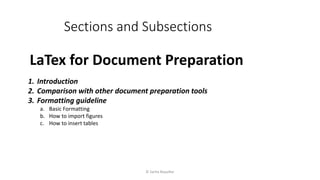
Sections and Subsections
LaTex for Document Preparation
1. Introduction
2. Comparison with other document preparation tools
3. Formatting guideline
a. Basic Formatting
b. How to import figures
c. How to insert tables
Sections and Subsections
%Course on Document Preparation software: Latex
documentclass[12pt]{article}
% optional specifications : Here defined article with font 12pt
%Blank lines mean nothing, in the preamble
begin{document}
section{This is a section}
% here body of section
Here lots of blanks no effect , after running, text looks normal
Skipping 4 lines is the same as skipping one line And it starts a new paragraph
subsection{This is a subsection}
% here you can write body of subsection
subsection{This is a another subsection}
section{Here is another section}
end{document} © Sarita Bopalkar
Fonts and Paragraphs
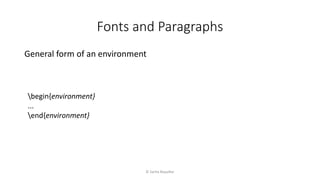
General form of an environment
begin{environment}
...
end{environment}
© Sarita Bopalkar
Fonts and Paragraphs
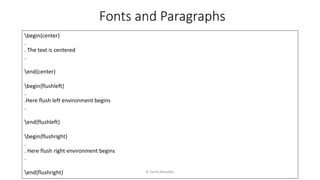
begin{center}
.
. The text is centered
.
end{center}
begin{flushleft}
.
.Here flush left environment begins
.
end{flushleft}
begin{flushright}
.
. Here flush right environment begins
.
end{flushright} © Sarita Bopalkar
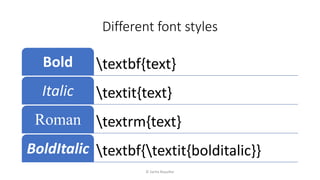
Different font styles
textbf{text}Bold
textit{text}Italic
textrm{text}Roman
textbf{textit{bolditalic}}BoldItalic
© Sarita Bopalkar
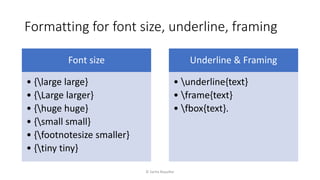
Formatting for font size, underline, framing
© Sarita Bopalkar
Font size
• {large large}
• {Large larger}
• {huge huge}
• {small small}
• {footnotesize smaller}
• {tiny tiny}
Underline & Framing
• underline{text}
• frame{text}
• fbox{text}.
Thank you
© Sarita Bopalkar

4 basic document formatting

  • 1.
  • 2.
    © Sarita Bopalkar Sectionsand Subsections LaTex for Document Preparation 1. Introduction 2. Comparison with other document preparation tools 3. Formatting guideline a. Basic Formatting b. How to import figures c. How to insert tables
  • 3.
    Sections and Subsections %Courseon Document Preparation software: Latex documentclass[12pt]{article} % optional specifications : Here defined article with font 12pt %Blank lines mean nothing, in the preamble begin{document} section{This is a section} % here body of section Here lots of blanks no effect , after running, text looks normal Skipping 4 lines is the same as skipping one line And it starts a new paragraph subsection{This is a subsection} % here you can write body of subsection subsection{This is a another subsection} section{Here is another section} end{document} © Sarita Bopalkar
  • 4.
    Fonts and Paragraphs Generalform of an environment begin{environment} ... end{environment} © Sarita Bopalkar
  • 5.
    Fonts and Paragraphs begin{center} . .The text is centered . end{center} begin{flushleft} . .Here flush left environment begins . end{flushleft} begin{flushright} . . Here flush right environment begins . end{flushright} © Sarita Bopalkar
  • 6.
  • 7.
    Formatting for fontsize, underline, framing © Sarita Bopalkar Font size • {large large} • {Large larger} • {huge huge} • {small small} • {footnotesize smaller} • {tiny tiny} Underline & Framing • underline{text} • frame{text} • fbox{text}.
  • 8.

Editor's Notes

  • #3 ADD Practicles
  • #4 ADD Practicles
  • #5 The general form of an environment uses the following syntax: In place of environment we can put center, flushleft, flushright like different environment . Let’s see
  • #6 Now we begin by illustrating the most common text formatting, like setting session, font, centering text, . to produce different paragraph positions: centered, flush left, flush right, and justified (the default). Out the brackets it is normal to justifications
  • #7 In technical writing, you will have particular use for the italic font, as it is used when introducing a new term. For example, A \textit{group} is defined on a set of elements \dots