Array and Equation in LaTex
© Sarita Bopalkar
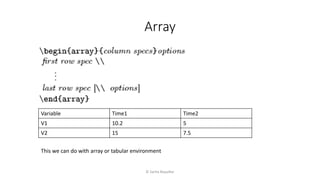
Array
© Sarita Bopalkar
Variable Time1 Time2
V1 10.2 5
V2 15 7.5
This we can do with array or tabular environment
© Sarita Bopalkar
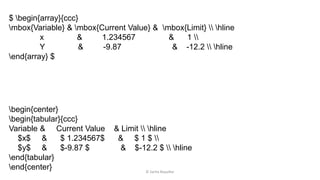
begin{center}
begin{tabular}{ccc}
Variable & Current Value & Limit  hline
$x$ & $ 1.234567$ & $ 1 $ 
$y$ & $-9.87 $ & $-12.2 $  hline
end{tabular}
end{center}
$ begin{array}{ccc}
mbox{Variable} & mbox{Current Value} & mbox{Limit}  hline
x & 1.234567 & 1 
Y & -9.87 & -12.2  hline
end{array} $
© Sarita Bopalkar
𝑓 𝑥 =
−1 𝑖𝑓 𝑥 < 0
1 𝑖𝑓 𝑥 > 0
[ f(x) = left{ begin{array}{rll}
-1 & mbox{if} & x < 0; 
1 & mbox{if} & x > 0
end{array}right.
]
Example
Eqarray Environment
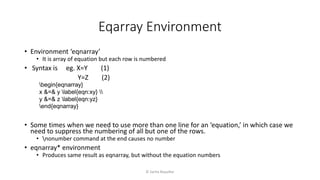
• Environment ‘eqnarray’
• It is array of equation but each row is numbered
• Syntax is eg. X=Y (1)
Y=Z (2)
• Some times when we need to use more than one line for an ‘equation,’ in which case we
need to suppress the numbering of all but one of the rows.
• nonumber command at the end causes no number
• eqnarray* environment
• Produces same result as eqnarray, but without the equation numbers
© Sarita Bopalkar
begin{eqnarray}
x &=& y label{eqn:xy} 
y &=& z label{eqn:yz}
end{eqnarray}
• Equation Environment
• For a single, numbered equation
• Same as specifying eqnarray with one row entering
• except that column separators (&) are not used in the equation environment
• ‘equation*’ environment, which suppresses the equation numbering.
© Sarita Bopalkar
Equation Environment
Thank you
© Sarita Bopalkar

8-Array and Equation environment

  • 1.
    Array and Equationin LaTex © Sarita Bopalkar
  • 2.
    Array © Sarita Bopalkar VariableTime1 Time2 V1 10.2 5 V2 15 7.5 This we can do with array or tabular environment
  • 3.
    © Sarita Bopalkar begin{center} begin{tabular}{ccc} Variable& Current Value & Limit hline $x$ & $ 1.234567$ & $ 1 $ $y$ & $-9.87 $ & $-12.2 $ hline end{tabular} end{center} $ begin{array}{ccc} mbox{Variable} & mbox{Current Value} & mbox{Limit} hline x & 1.234567 & 1 Y & -9.87 & -12.2 hline end{array} $
  • 4.
    © Sarita Bopalkar 𝑓𝑥 = −1 𝑖𝑓 𝑥 < 0 1 𝑖𝑓 𝑥 > 0 [ f(x) = left{ begin{array}{rll} -1 & mbox{if} & x < 0; 1 & mbox{if} & x > 0 end{array}right. ] Example
  • 5.
    Eqarray Environment • Environment‘eqnarray’ • It is array of equation but each row is numbered • Syntax is eg. X=Y (1) Y=Z (2) • Some times when we need to use more than one line for an ‘equation,’ in which case we need to suppress the numbering of all but one of the rows. • nonumber command at the end causes no number • eqnarray* environment • Produces same result as eqnarray, but without the equation numbers © Sarita Bopalkar begin{eqnarray} x &=& y label{eqn:xy} y &=& z label{eqn:yz} end{eqnarray}
  • 6.
    • Equation Environment •For a single, numbered equation • Same as specifying eqnarray with one row entering • except that column separators (&) are not used in the equation environment • ‘equation*’ environment, which suppresses the equation numbering. © Sarita Bopalkar Equation Environment
  • 7.

Editor's Notes

  • #2 Hello & Welcome In this video we will see how to install LaTex
  • #3 Array environment is same as tabular environment only it is in math mode. The column specifications and options are the same as in the tabular environment, but the body is in math mode. The following table has text headers and math body, so it can be generated in either of two ways: with the tabular environment, using the math mode designation for each body entry: $. . . $, or with the array environment, using \mbox for each header entry.
  • #6 Another environment is eqnarray. This is like a 3-column array with specifications {lcl}, as above, but each row is numbered: x = y (1) y = z (2) (Another difference is that the eqnarray environment uses displaystyle.) We use the eqnarray environment directly (without entering math display mode)