Guide to Network Security
First Edition
Chapter Six
Network Monitoring and Intrusion
Detection and Prevention Systems
© 2013 Course Technology/Cengage Learning. All Rights Reserved
Objectives
• Define the basic concepts of network packet
analysis
• Explain the various network packet formats and
standards
• Describe how packet analysis forms the basis of
network intrusion detection
• Discuss the various types of intrusion detection and
prevention
2
© 2013 Course Technology/Cengage Learning. All Rights Reserved
Objectives (cont’d.)
• Explain intrusion detection and prevention
deployments and response strategies
• Describe various honeypot technologies
3
© 2013 Course Technology/Cengage Learning. All Rights Reserved
Introduction
• Key components of a network monitoring program
– Network-monitoring software
• Packet sniffers
• Data collection utility
– Intrusion detection and prevention systems (IDPSs)
• Analyze abnormal activity or suspicious traffic
4
© 2013 Course Technology/Cengage Learning. All Rights Reserved
Network-Monitoring Software: Packet
Sniffers
• Packet sniffer
– Program or device that views data traversing a
network
– Can be used by network administrators for
troubleshooting
• Or for malicious purposes
5
© 2013 Course Technology/Cengage Learning. All Rights Reserved
Capturing Network Traffic
• Network adapter in promiscuous mode
– Allows adapter to see all traffic
• Destined to host or not
• Considerations for capturing network traffic
– May be illegal if unauthorized
– Computer must be placed on network segment on
which you want to capture traffic
– Must know how sniffer is connected to the network
– Sniffer cannot decipher encrypted traffic
6
© 2013 Course Technology/Cengage Learning. All Rights Reserved
Packet Analysis
• First step: understand normal TCP/IP
communications
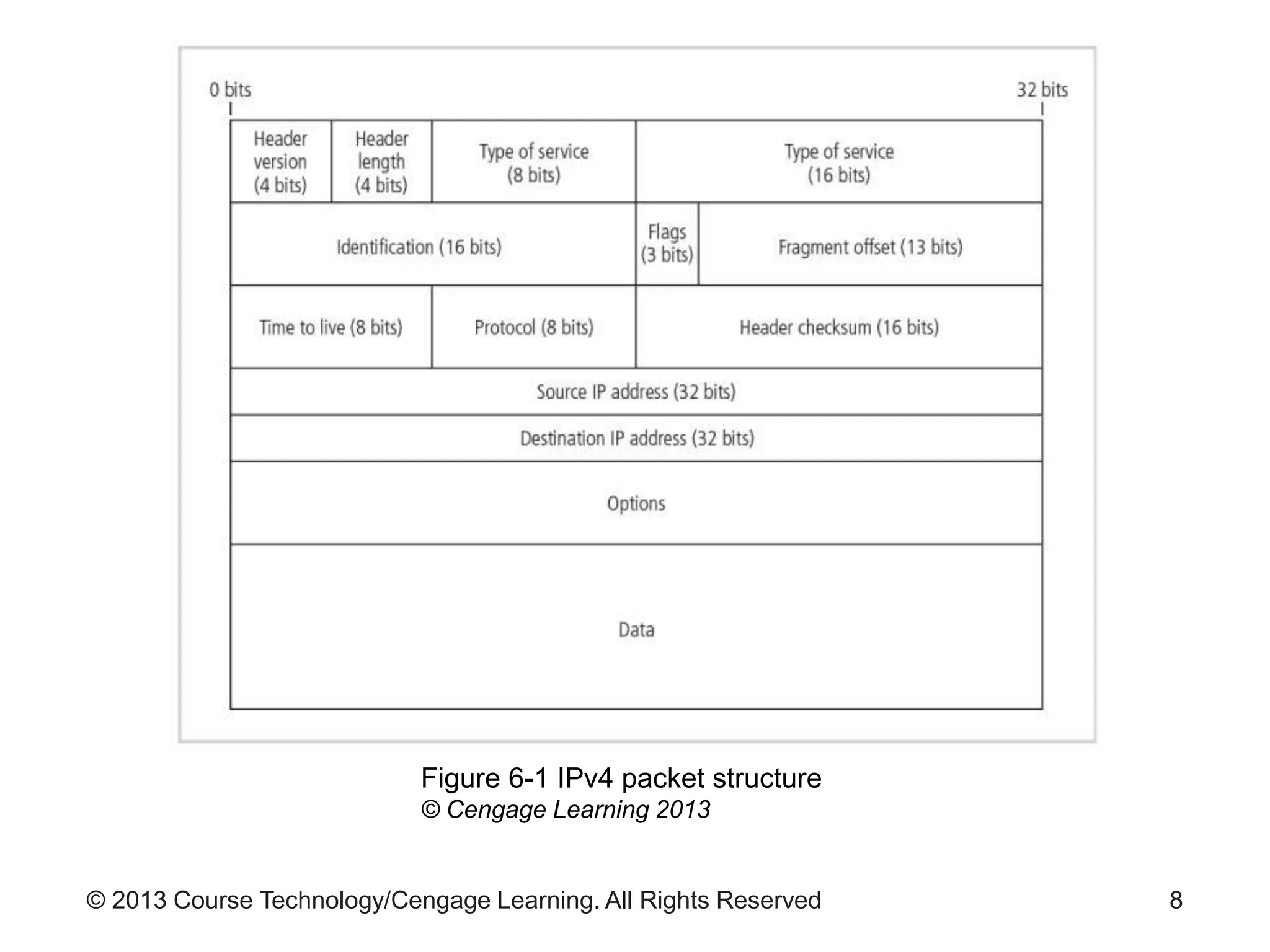
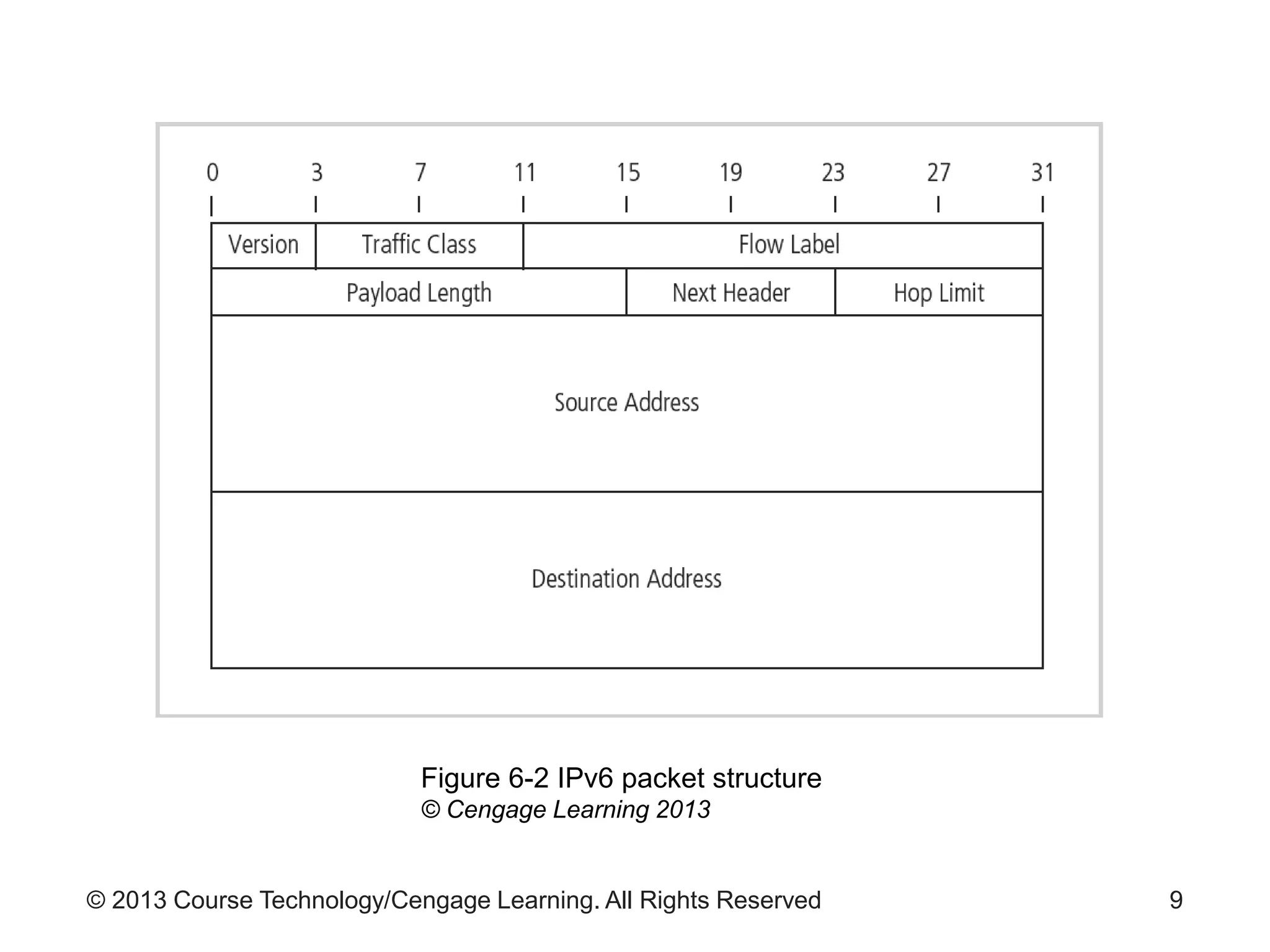
– See Figures 6-1 and 6-2 for IPv4 and IPv6 packet
details
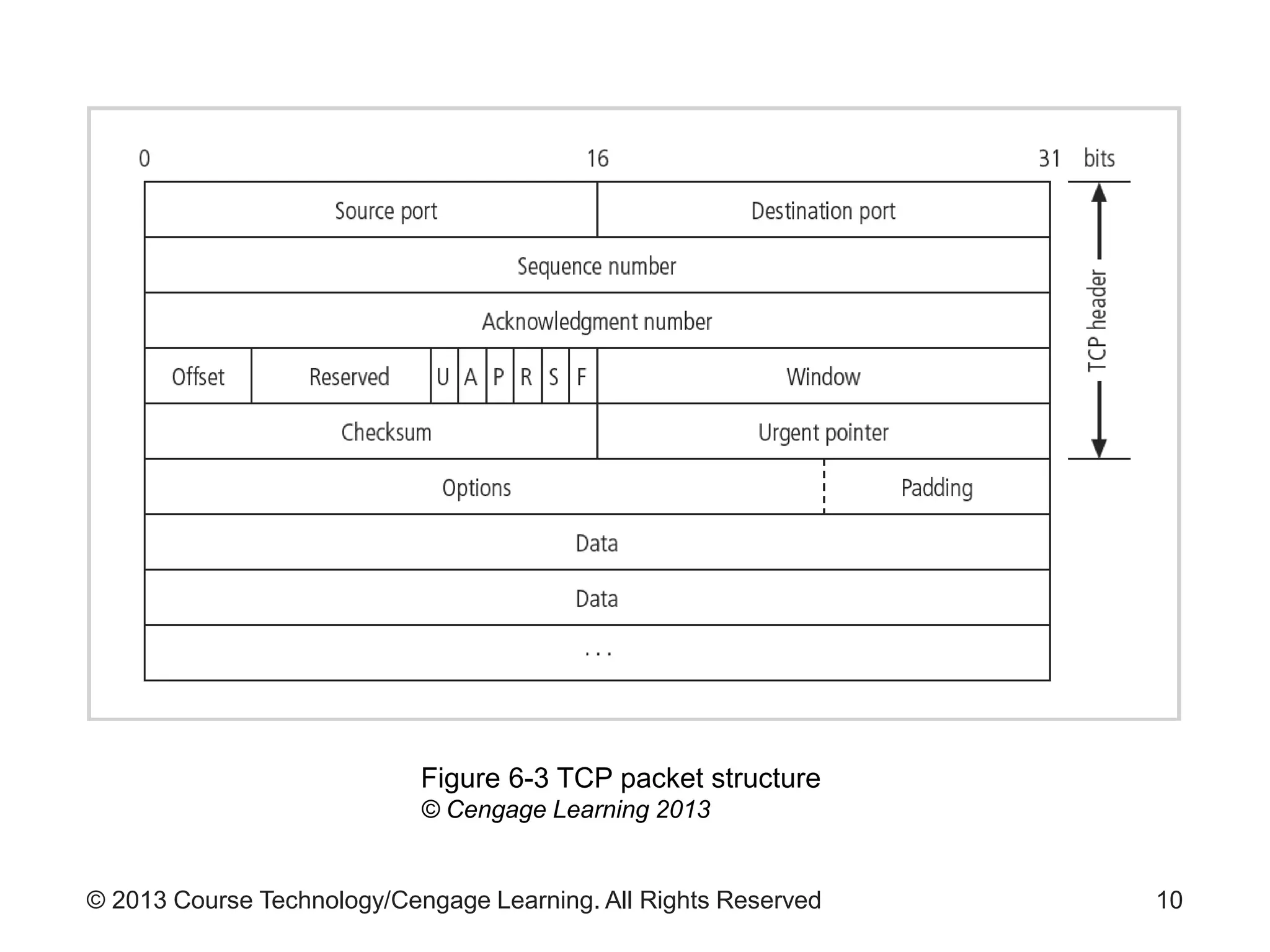
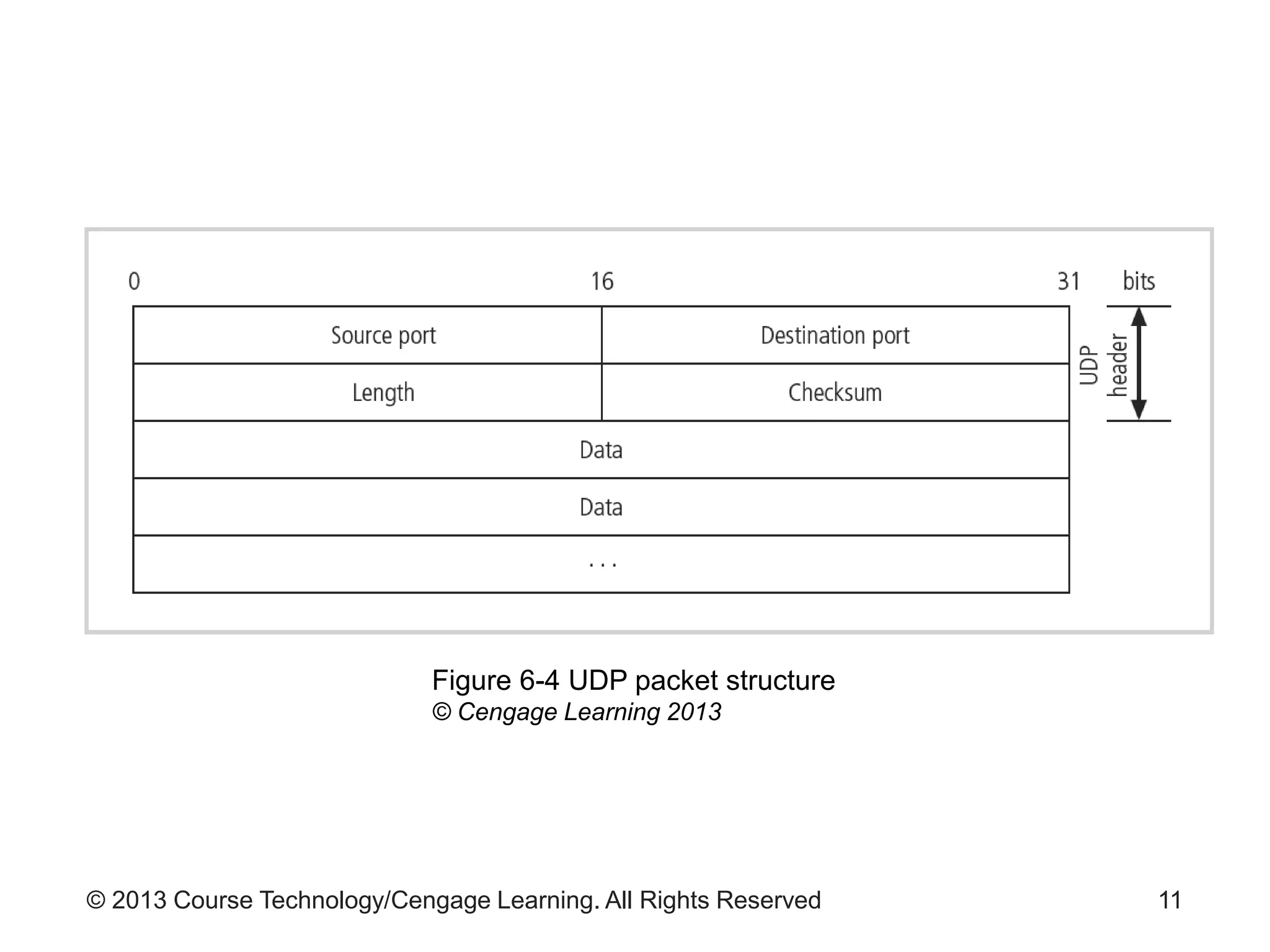
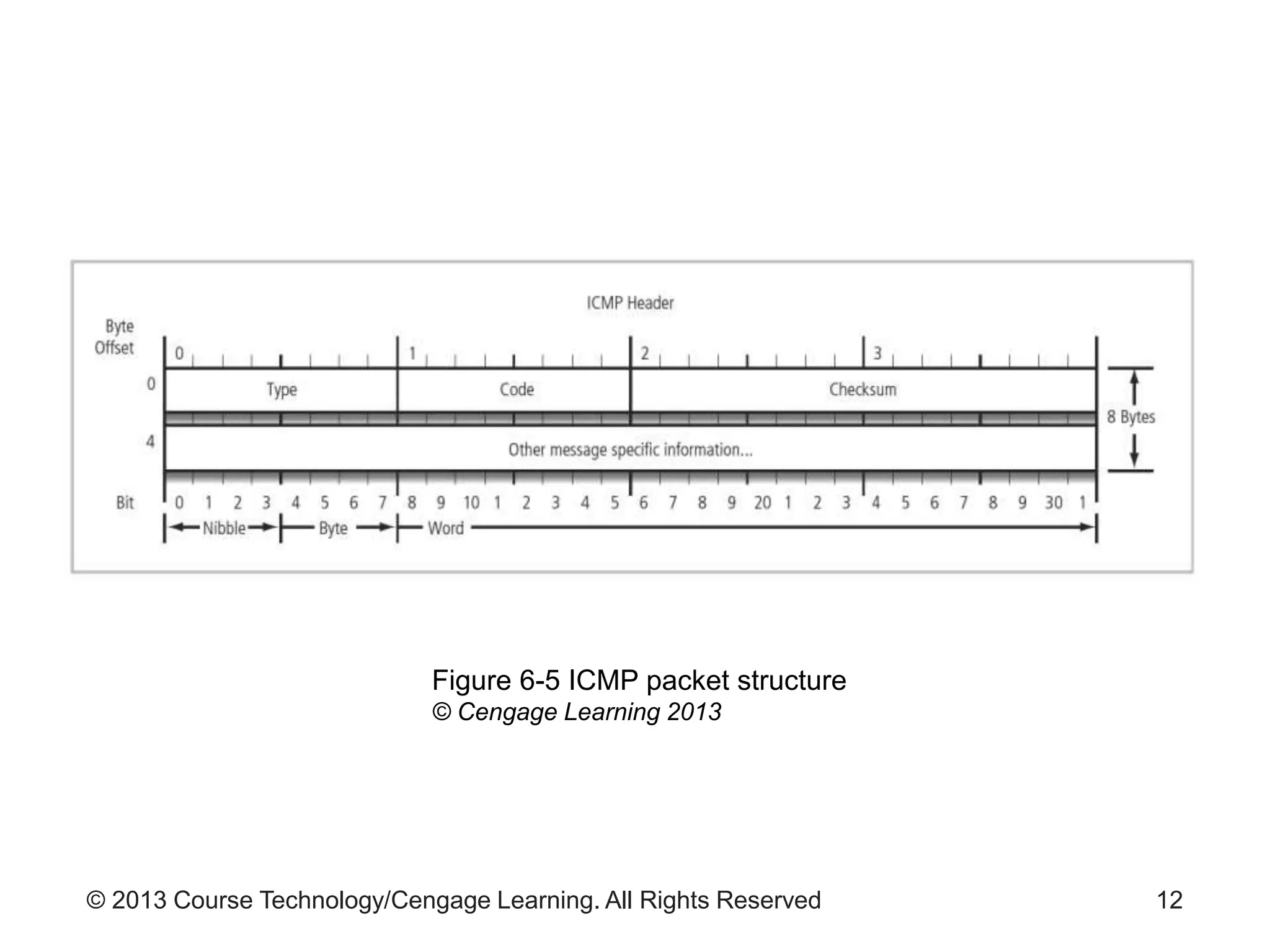
– See Figures 6-3, 6-4, and 6-5 for TCP, UDP, and
ICMP packet structure details
7
© 2013 Course Technology/Cengage Learning. All Rights Reserved 8
Figure 6-1 IPv4 packet structure
© Cengage Learning 2013
© 2013 Course Technology/Cengage Learning. All Rights Reserved 9
Figure 6-2 IPv6 packet structure
© Cengage Learning 2013
© 2013 Course Technology/Cengage Learning. All Rights Reserved 10
Figure 6-3 TCP packet structure
© Cengage Learning 2013
© 2013 Course Technology/Cengage Learning. All Rights Reserved 11
Figure 6-4 UDP packet structure
© Cengage Learning 2013
© 2013 Course Technology/Cengage Learning. All Rights Reserved 12
Figure 6-5 ICMP packet structure
© Cengage Learning 2013
© 2013 Course Technology/Cengage Learning. All Rights Reserved
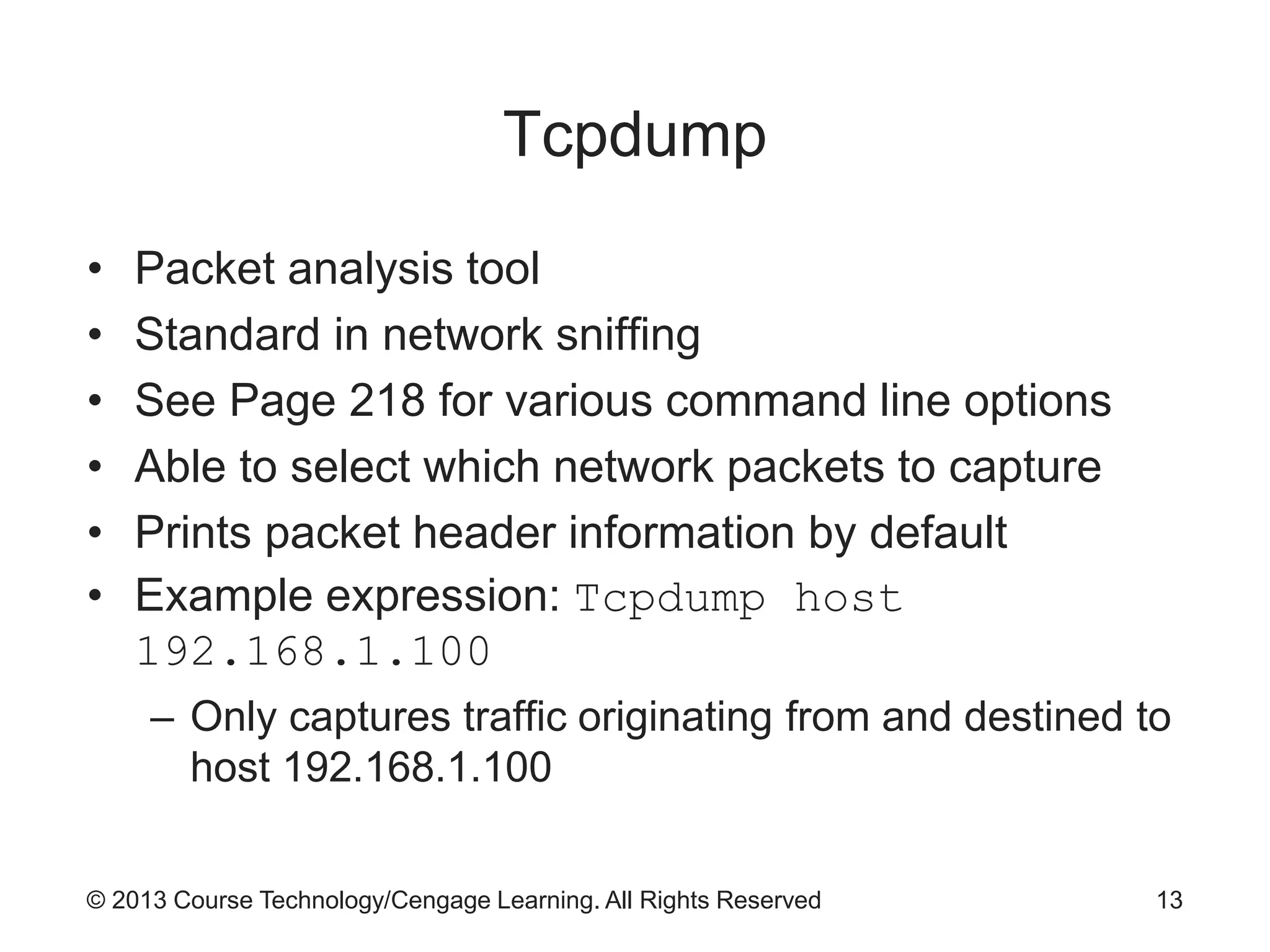
Tcpdump
• Packet analysis tool
• Standard in network sniffing
• See Page 218 for various command line options
• Able to select which network packets to capture
• Prints packet header information by default
• Example expression: Tcpdump host
192.168.1.100
– Only captures traffic originating from and destined to
host 192.168.1.100
13
© 2013 Course Technology/Cengage Learning. All Rights Reserved
Intrusion Detection and Prevention
Systems
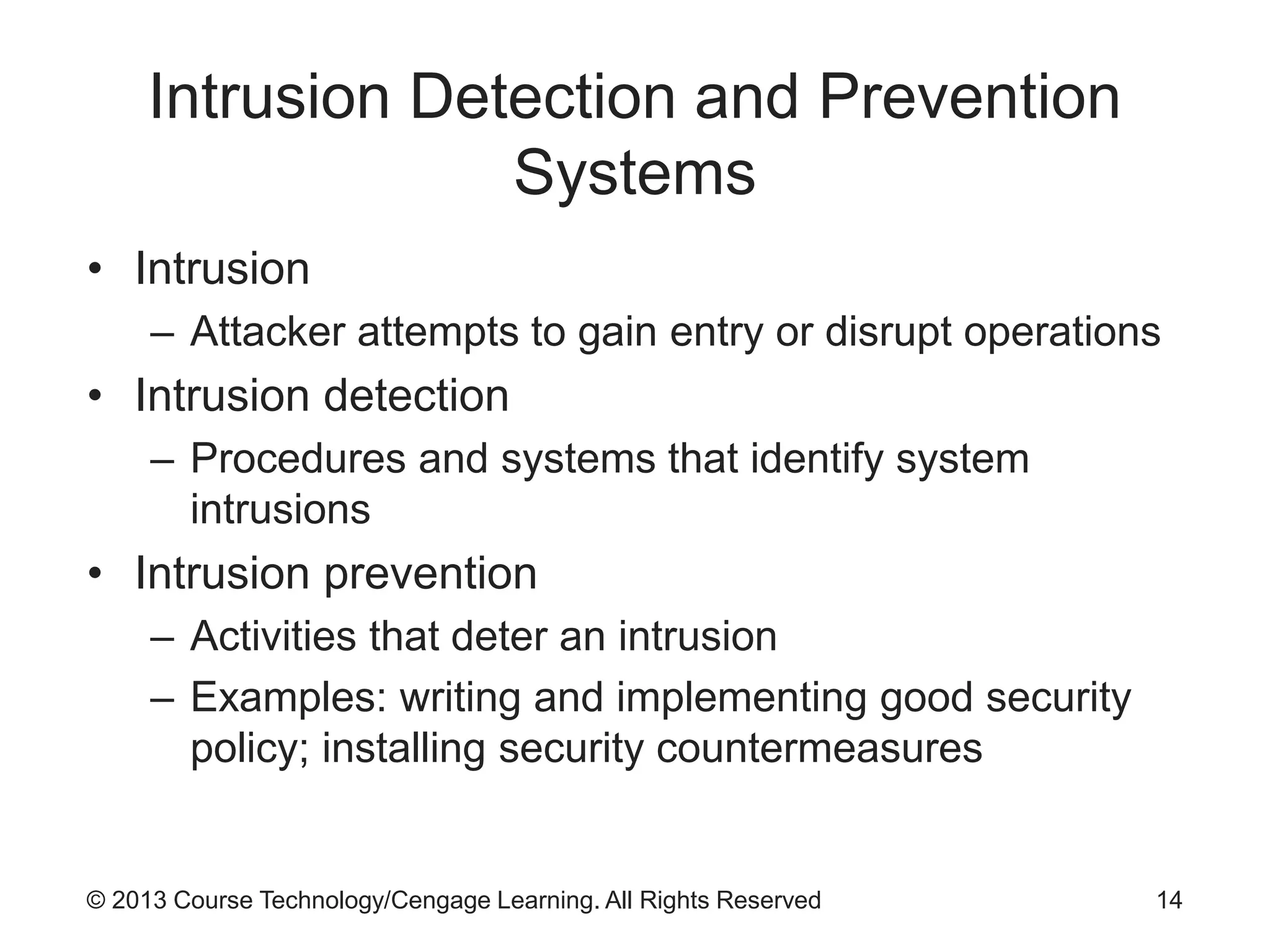
• Intrusion
– Attacker attempts to gain entry or disrupt operations
• Intrusion detection
– Procedures and systems that identify system
intrusions
• Intrusion prevention
– Activities that deter an intrusion
– Examples: writing and implementing good security
policy; installing security countermeasures
14
© 2013 Course Technology/Cengage Learning. All Rights Reserved
Intrusion Detection and Prevention
Systems (cont’d.)
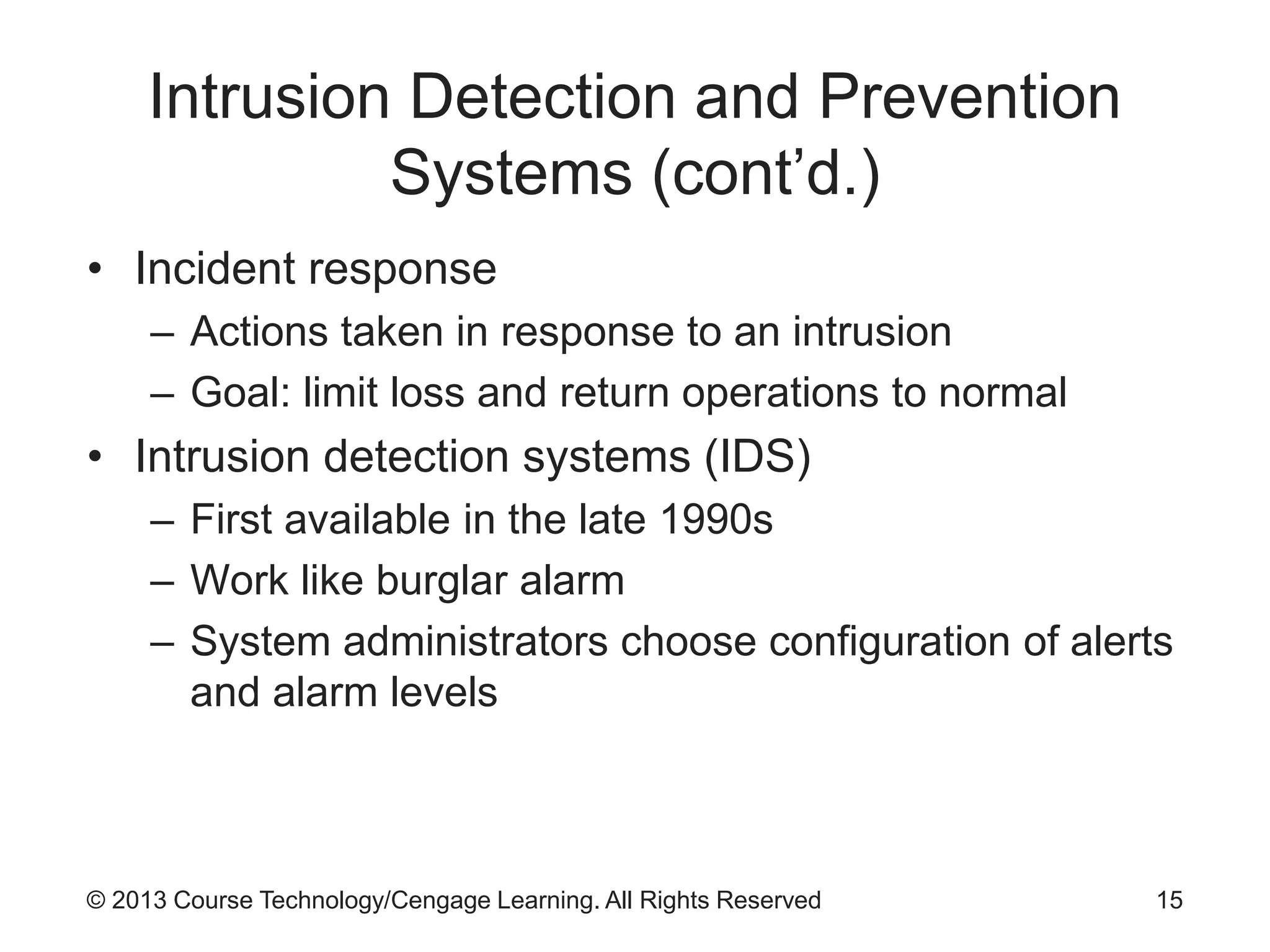
• Incident response
– Actions taken in response to an intrusion
– Goal: limit loss and return operations to normal
• Intrusion detection systems (IDS)
– First available in the late 1990s
– Work like burglar alarm
– System administrators choose configuration of alerts
and alarm levels
15
© 2013 Course Technology/Cengage Learning. All Rights Reserved
Intrusion Detection and Prevention
Systems (cont’d.)
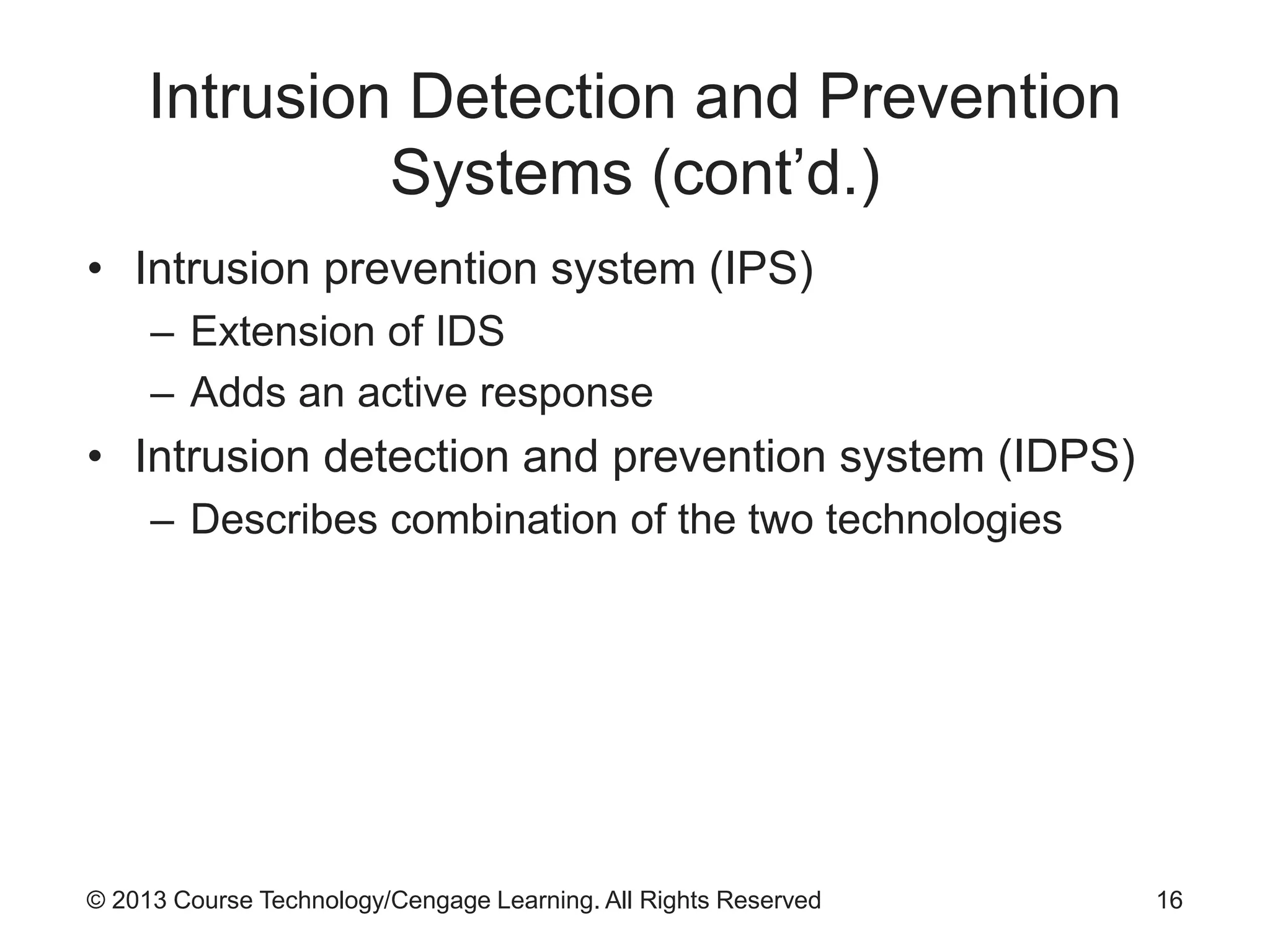
• Intrusion prevention system (IPS)
– Extension of IDS
– Adds an active response
• Intrusion detection and prevention system (IDPS)
– Describes combination of the two technologies
16
© 2013 Course Technology/Cengage Learning. All Rights Reserved
IDPS Terminology
• Alert
– Indication that system has detected possible attack
• Confidence
– Measure of IDPSs ability to correctly detect and
identify certain attack types
• Evasion
– Attacker changes network packet format or timing to
avoid detection
17
© 2013 Course Technology/Cengage Learning. All Rights Reserved
IDPS Terminology (cont’d.)
• Events
– IDPS events that are noteworthy but do not pose a
threat
• False negative
– Failure of IDPS to react to actual attack event
• False positive
– Alert or alarm that occurs without actual attack
• Filtering
– Process of reducing IDPS events to receive better
confidence in alerts received
18
© 2013 Course Technology/Cengage Learning. All Rights Reserved
IDPS Terminology (cont’d.)
• Tuning
– Adjusting an IDPS to maximize efficiency
– May include:
• Grouping similar alarms that happen close to the
same time into one alarm
19
© 2013 Course Technology/Cengage Learning. All Rights Reserved
Why Use an IDPS?
• Reasons to use an IDPS
– Reduce likelihood of bad behavior
– Detect attacks that are not prevented by other
security measures
– Detect and react to common preambles of attacks
– Document existing threats
– Act as quality control measure for security design
and operation
– Provide useful information about intrusions
20
© 2013 Course Technology/Cengage Learning. All Rights Reserved
Why Use an IDPS? (cont’d.)
• Factors undermining organization’s ability to make
systems safe from loss
– Information security technologies may fail to correct
a known deficiency
– Vulnerability detection process too infrequent
– Time is needed to develop corrective measures
– Vulnerable services may be essential to operations
21
© 2013 Course Technology/Cengage Learning. All Rights Reserved
Types of IDPSs
• Types of network-based IDPSs
– Wireless IDPS
• Focuses on wireless networks
– Network behavior analysis (NBA) IDPS
• Looks for abnormal traffic patterns
22
© 2013 Course Technology/Cengage Learning. All Rights Reserved 23
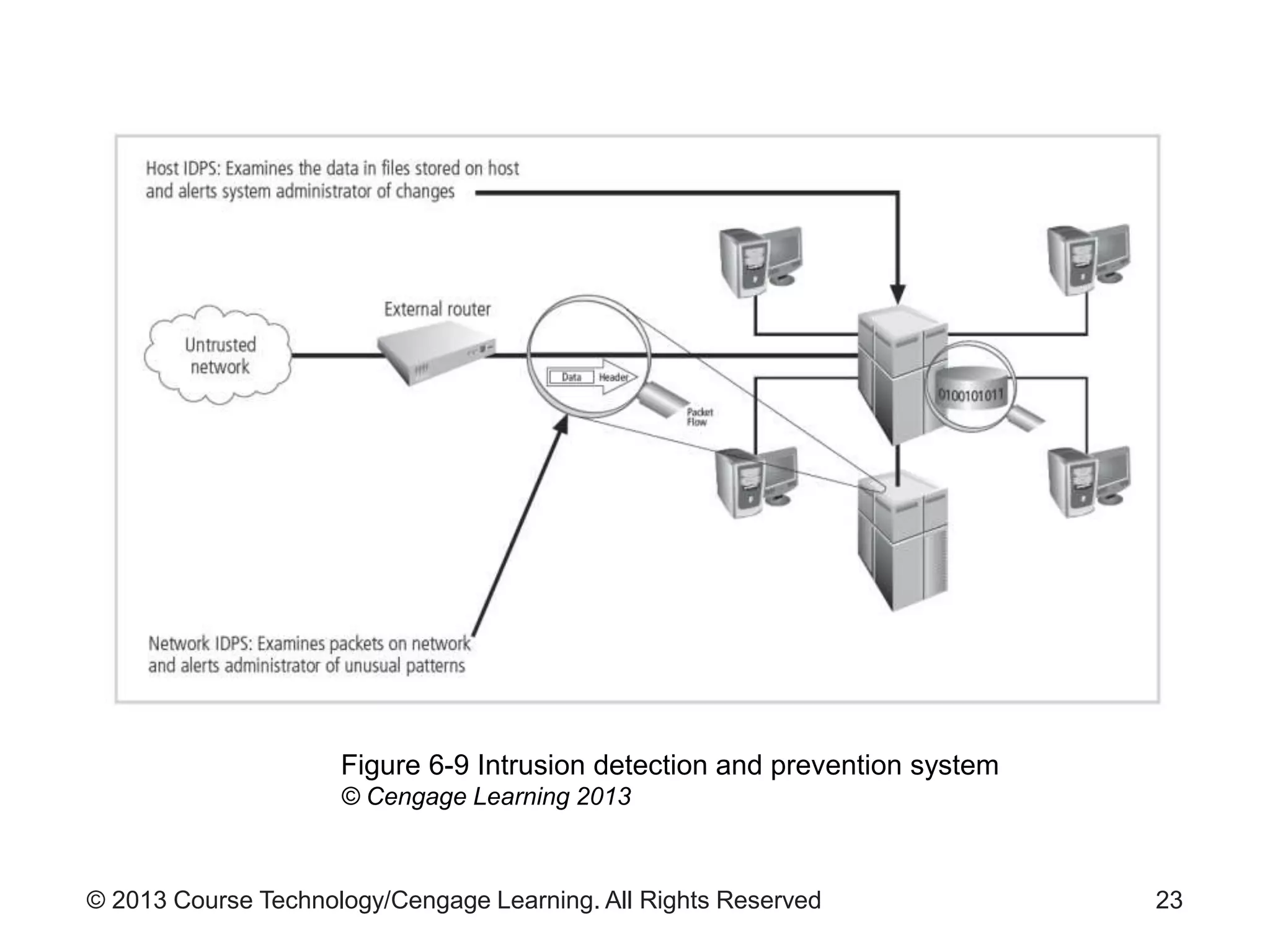
Figure 6-9 Intrusion detection and prevention system
© Cengage Learning 2013
© 2013 Course Technology/Cengage Learning. All Rights Reserved
Types of IDPSs (cont’d.)
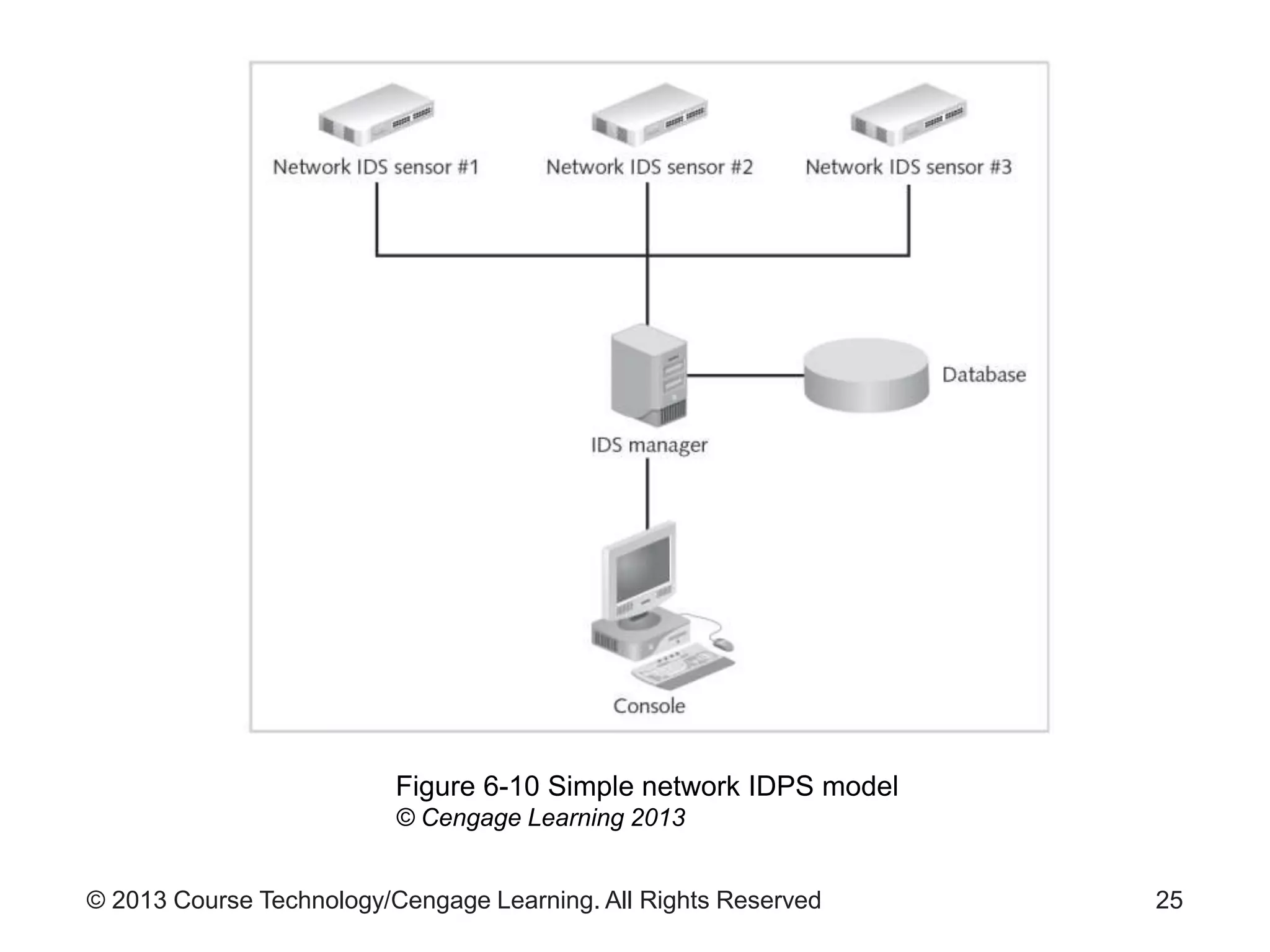
• Network-based IDPS (NIDPS)
– Resides on computer or appliance connected to a
network segment
– Monitors traffic on the network segment
– Looks for patterns
• Example: large collections of related items of a certain
type
– Requires complex configuration and maintenance
program
• See Pages 226-228 for NIDPS advantages and
disadvantages
24
© 2013 Course Technology/Cengage Learning. All Rights Reserved 25
Figure 6-10 Simple network IDPS model
© Cengage Learning 2013
© 2013 Course Technology/Cengage Learning. All Rights Reserved
Types of IDPSs (cont’d.)
• Wireless IDPS
– Monitors and analyzes wireless network traffic
– Can help detect:
• Unauthorized WLANs and WLAN devices
• Poorly secured WLAN devices
• Unusual usage patterns
• Use of wireless network scanners
• Denial-of-service attacks and conditions
• Impersonation and man-in-the-middle attacks
26
© 2013 Course Technology/Cengage Learning. All Rights Reserved
Types of IDPSs (cont’d.)
• Wireless IDPS issues
– Unable to detect passive wireless protocol attacks
• Attacker does not use active scanning and probing
– Physical security of the devices
– Sensor range
– Access point and switch locations
– Wired network connections
– Cost
27
© 2013 Course Technology/Cengage Learning. All Rights Reserved
Types of IDPSs (cont’d.)
• Network behavior analysis system
– Most sensors can be deployed in passive mode only
• Types of events detected by NBA sensors
– Denial-of-service attacks
– Scanning
– Worms
– Unexpected application services
– Policy violations
28
© 2013 Course Technology/Cengage Learning. All Rights Reserved
Types of IDPSs (cont’d.)
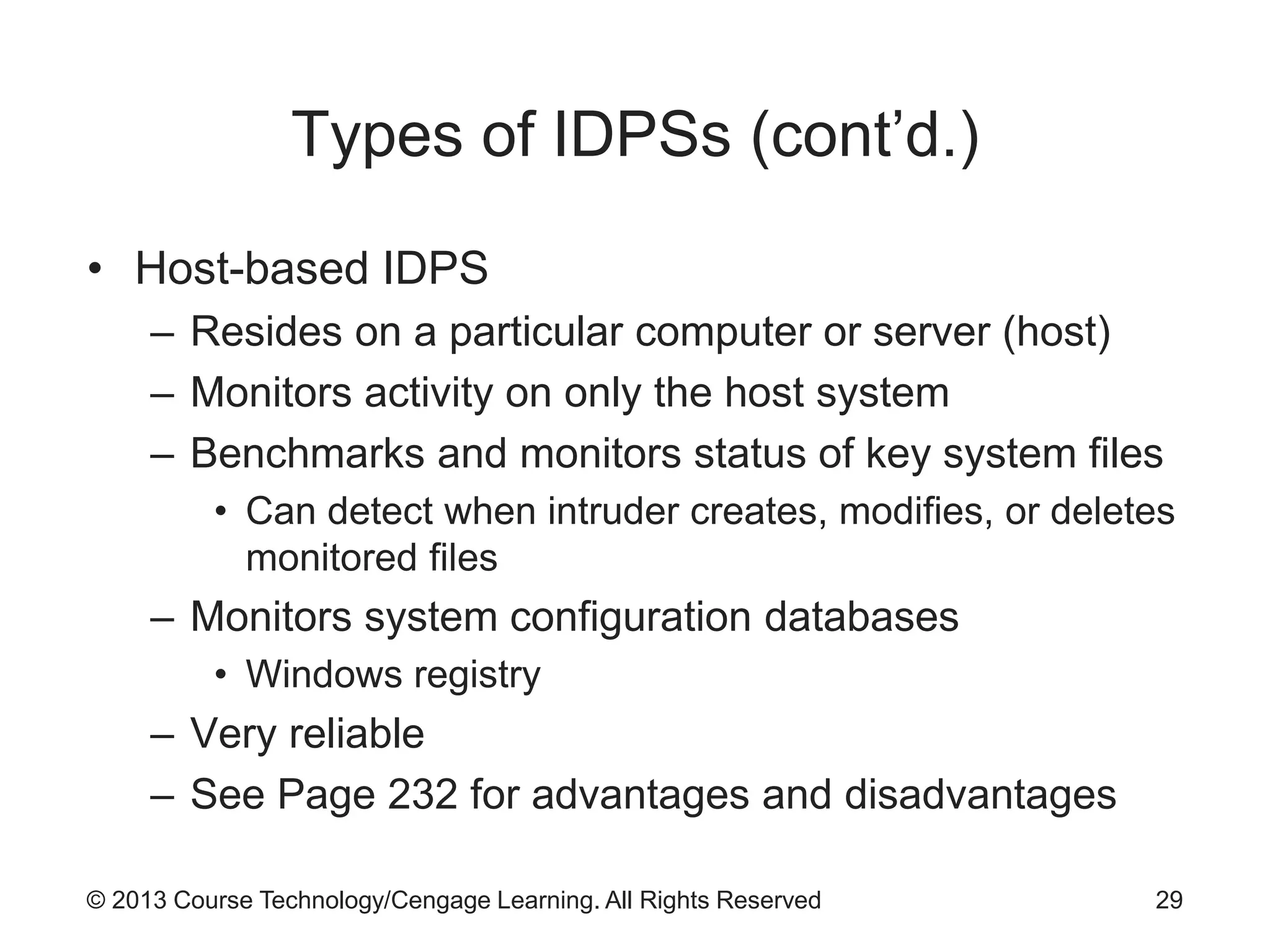
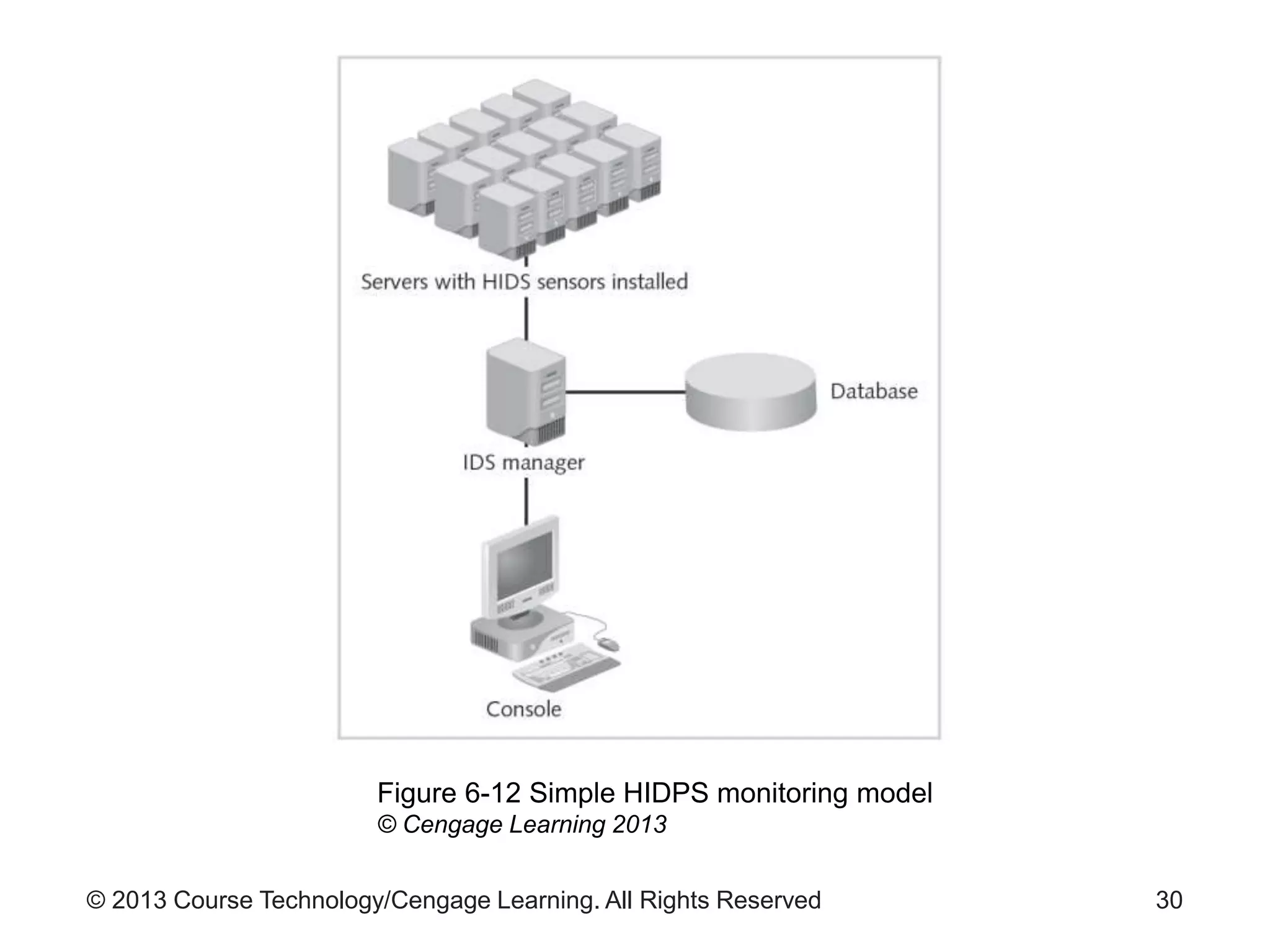
• Host-based IDPS
– Resides on a particular computer or server (host)
– Monitors activity on only the host system
– Benchmarks and monitors status of key system files
• Can detect when intruder creates, modifies, or deletes
monitored files
– Monitors system configuration databases
• Windows registry
– Very reliable
– See Page 232 for advantages and disadvantages
29
© 2013 Course Technology/Cengage Learning. All Rights Reserved 30
Figure 6-12 Simple HIDPS monitoring model
© Cengage Learning 2013
© 2013 Course Technology/Cengage Learning. All Rights Reserved
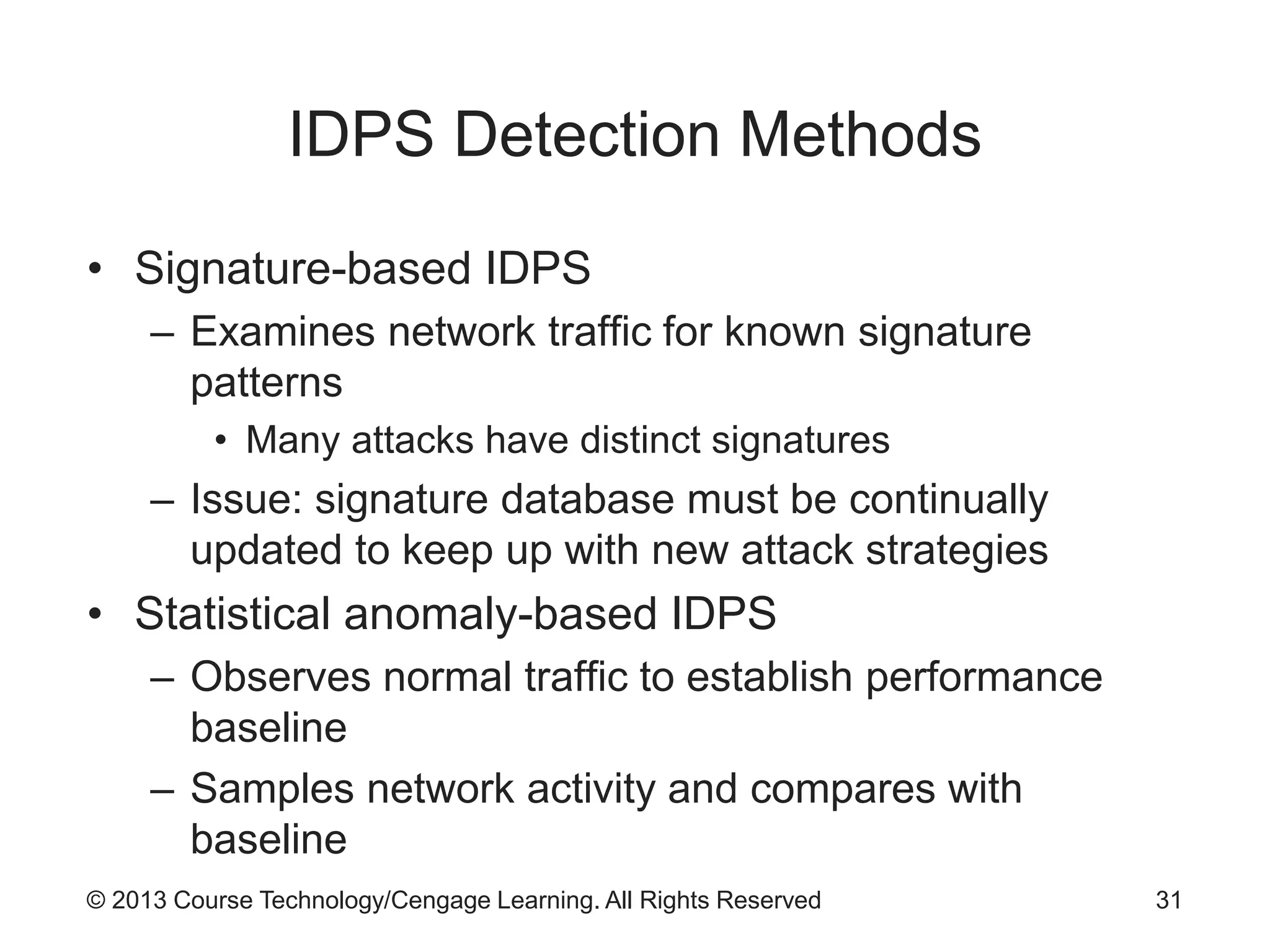
IDPS Detection Methods
• Signature-based IDPS
– Examines network traffic for known signature
patterns
• Many attacks have distinct signatures
– Issue: signature database must be continually
updated to keep up with new attack strategies
• Statistical anomaly-based IDPS
– Observes normal traffic to establish performance
baseline
– Samples network activity and compares with
baseline
31
© 2013 Course Technology/Cengage Learning. All Rights Reserved
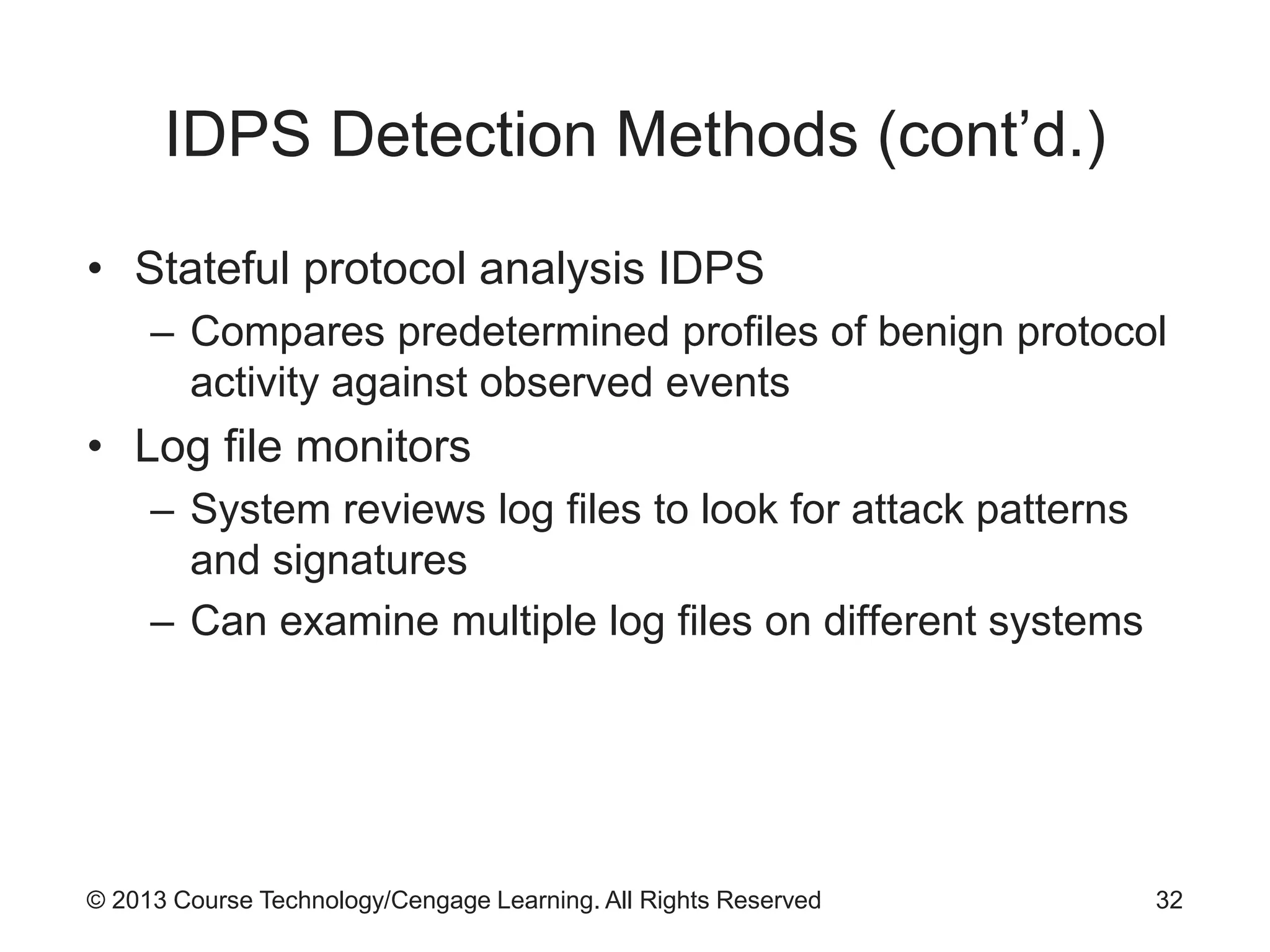
IDPS Detection Methods (cont’d.)
• Stateful protocol analysis IDPS
– Compares predetermined profiles of benign protocol
activity against observed events
• Log file monitors
– System reviews log files to look for attack patterns
and signatures
– Can examine multiple log files on different systems
32
© 2013 Course Technology/Cengage Learning. All Rights Reserved
IDPS Response Behavior
• Response behavior depends on configurations and
functions
– Response may be active or passive
• IDPS response options
– Audible/visual alarm
– SNMP traps and plug-ins
– E-mail message
– Text or phone message
– Log entry
– Evidentiary packet dump
33
© 2013 Course Technology/Cengage Learning. All Rights Reserved
IDPS Response Behavior (cont’d.)
• IDPS response options (cont’d.)
– Take action against intruder
– Launch program
– Reconfigure firewall
• Block traffic from attacker’s IP address
• Block specific TCP or UDP port traffic from attacker’s
address
• Block all traffic to or from a network interface
• Terminate the session
• Terminate internal or external network connections
34
© 2013 Course Technology/Cengage Learning. All Rights Reserved
IDPS Response Behavior (cont’d.)
• Reporting and archiving capabilities
– Routine reports
– Detailed information documents
– Provide details of events and intrusions detected
• Fail-safe considerations for IDPS responses
– Protect IDPS from being defeated by an attacker
– Example: encrypted tunnels to hide IDPS
communications
35
© 2013 Course Technology/Cengage Learning. All Rights Reserved
Selecting IDPS Approaches and
Products
• Technical and policy considerations
– Technical specifications of systems environment
– Technical specifications of current security
protections
– Enterprise goals
– Formality of system environment and management
culture
– Security goals and objectives
– Existing security policy
36
© 2013 Course Technology/Cengage Learning. All Rights Reserved
Selecting IDPS Approaches and
Products (cont’d.)
• Organizational requirements and constraints
– Requirements from outside the organization
– Organization’s resource constraints
– Budget
37
© 2013 Course Technology/Cengage Learning. All Rights Reserved
IDPS Product Features and Quality
• Product evaluation questions
– Is the product sufficiently scalable for your
environment?
– How has the product been tested?
– What is the user level of expertise targeted by the
product?
– Is the product designed to evolve as the organization
grows?
– What are the support provisions for the product?
38
© 2013 Course Technology/Cengage Learning. All Rights Reserved
Strengths and Limitations of IDPSs
• Examples of IDPS strengths
– Monitor and analyze system events and user
behaviors
– Test security states of system configurations
– Alert appropriate staff when attacks detected
• Examples of IDPS limitations
– Compensating for weak or missing security
measures
– Detecting newly published attacks or variants of
existing attacks
– Dealing with switched networks
39
© 2013 Course Technology/Cengage Learning. All Rights Reserved
Deployment and Implementation of an
IDPS
• Must consider how IDPS will be managed
• IDPS control strategies
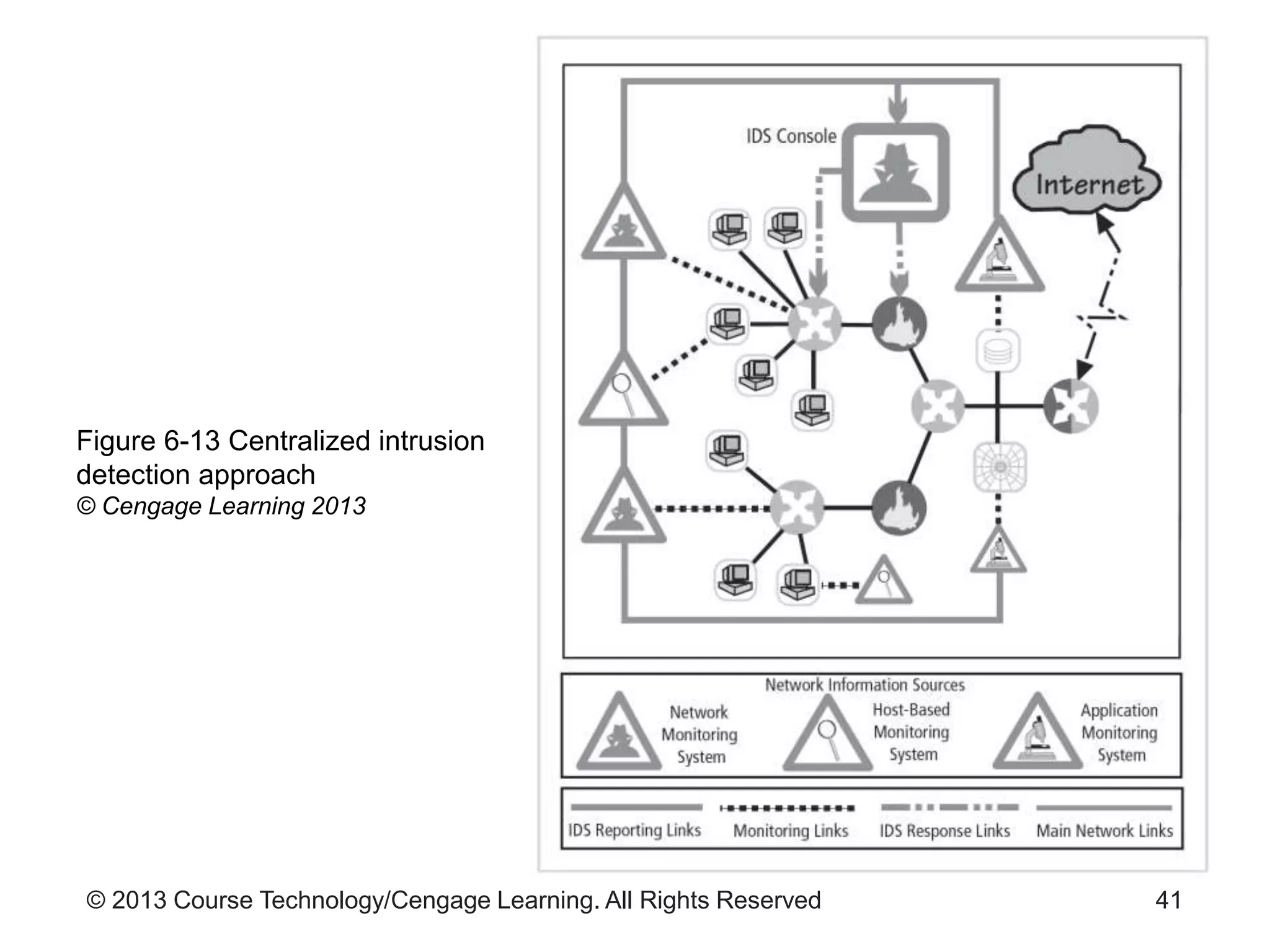
– Centralized control strategy
• See Figure 6-13
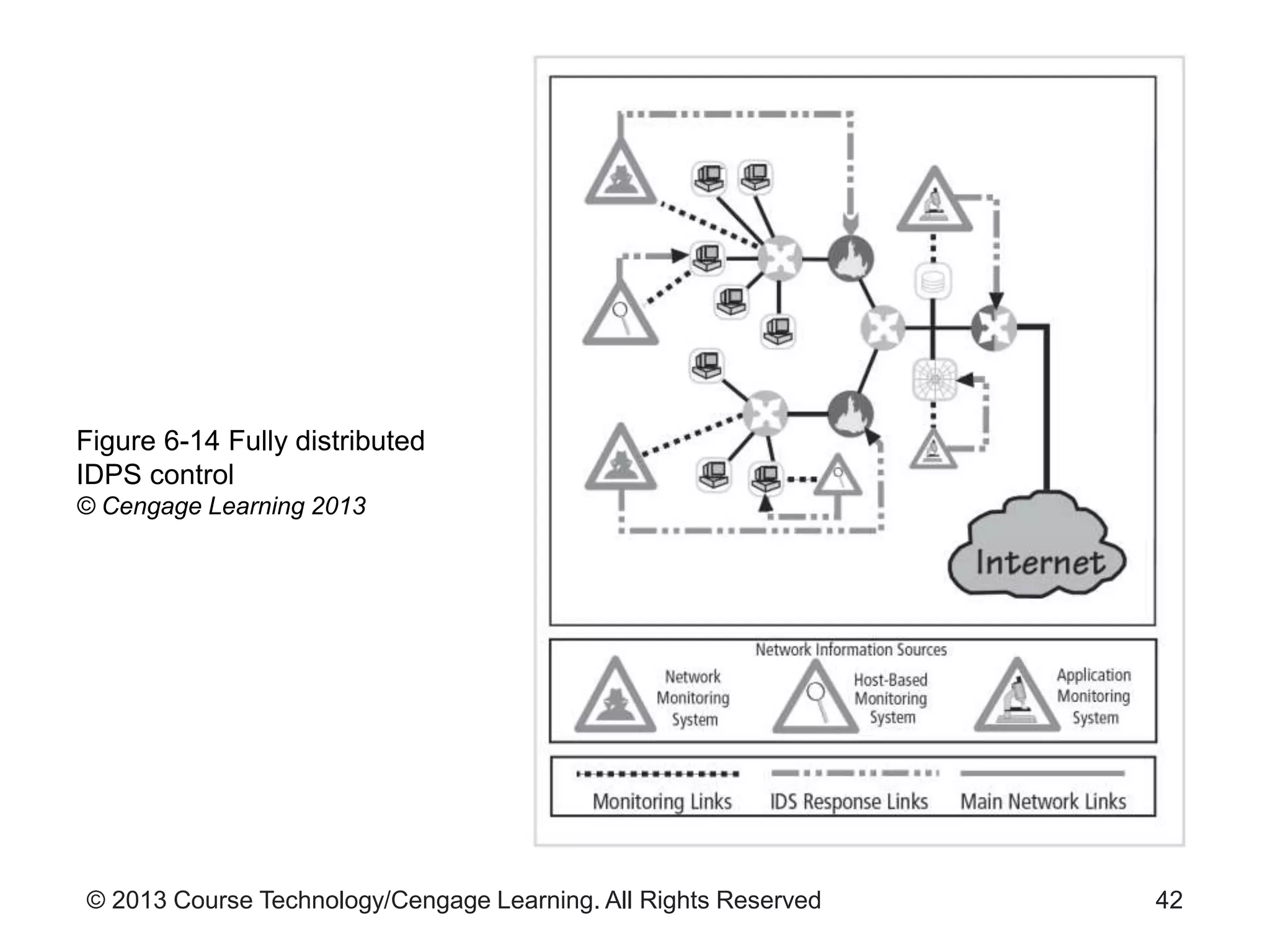
– Fully distributed control strategy
• Opposite of the centralized strategy
• See Figure 6-14
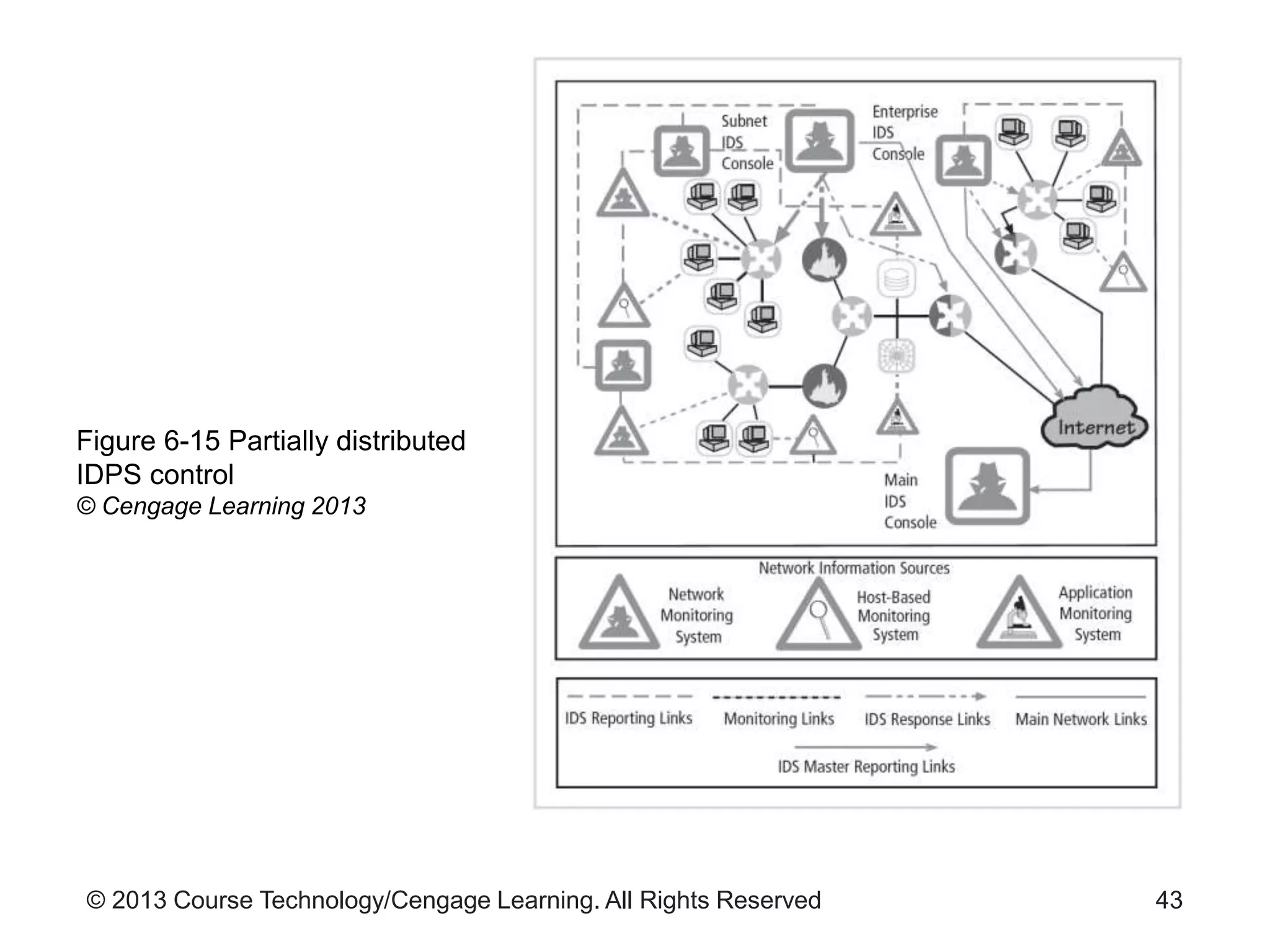
– Partially distributed control strategy
• See Figure 6-15
40
© 2013 Course Technology/Cengage Learning. All Rights Reserved
Figure 6-13 Centralized intrusion
detection approach
© Cengage Learning 2013
41
© 2013 Course Technology/Cengage Learning. All Rights Reserved
Figure 6-14 Fully distributed
IDPS control
© Cengage Learning 2013
42
© 2013 Course Technology/Cengage Learning. All Rights Reserved
Figure 6-15 Partially distributed
IDPS control
© Cengage Learning 2013
43
© 2013 Course Technology/Cengage Learning. All Rights Reserved
Deployment and Implementation of an
IDPS (cont’d.)
• IDPS deployment
– Decisions about where to locate components
important
– Consider skill level of personnel required to install,
configure, and maintain systems
• Recommended locations for NIDPS sensors
– Behind each firewall, in the network DMZ
– Outside an external firewall
– On the major network backbones
– On critical subnets
44
© 2013 Course Technology/Cengage Learning. All Rights Reserved
Deployment and Implementation of an
IDPS (cont’d.)
• Deploying host-based IDPSs
– Time consuming task
– Each HIDPS must be custom configured
– Good practice to train on nonproduction systems
• Measures to consider when selecting an IDPS
– Thresholds
– Blacklists and whitelists
– Alert settings
– Code viewing and editing
45
© 2013 Course Technology/Cengage Learning. All Rights Reserved
Deployment and Implementation of an
IDPS (cont’d.)
• IDPSs evaluated using two sets of measurements
– Number of attacks detected
– Level of use at which failure occurs
– Example: At 100 Mbps, the IDPS was able to detect
97 percent of directed attacks
• Test process
– Should be as realistic as possible
• Realistic traffic loads and attack levels
46
© 2013 Course Technology/Cengage Learning. All Rights Reserved
Honeypots and Honeynets
• Decoy systems designed to lure potential attackers
away from critical systems
• Also called decoys, lures, and fly-traps
• Honeypot goals
– Divert attacker from critical systems
– Collect information about attacker’s activity
– Encourage attacker to stay on system long enough
for administrators to document and/or respond
• See Page 252 for advantages and disadvantages
47
© 2013 Course Technology/Cengage Learning. All Rights Reserved
Trap-and-Trace Systems
• Trap consists of a honeypot and an alarm
• Trace is a process for determining attacker’s
identity
– Inside the organization
– Outside the organization
• Legal drawbacks
– Enticement (legal and ethical)
– Entrapment (not legal or ethical)
48
© 2013 Course Technology/Cengage Learning. All Rights Reserved
Active Intrusion Prevention
• LaBrea
– Tool that provides active intrusion prevention
– Works by taking up unused IP address space within
a network
– Holds connections open and inactive
– Slows down network-based worms and other attacks
– Allows time to notify system administrators of
anomalous behavior
49
© 2013 Course Technology/Cengage Learning. All Rights Reserved
Summary
• Intrusion detection and prevention system types
– Network-based
• Monitors network traffic and responds to predefined
events
– Host-based
• Resides on a particular computer and monitor’s
system activity
– Signature-based
• Examines data traffic for patterns that match known
attack signatures
50
© 2013 Course Technology/Cengage Learning. All Rights Reserved
Summary (cont’d.)
• Honeypots
– Decoy systems to lure attackers away from critical
systems
• Trap-and-trace applications react to intrusion
events by tracing back to source(s)
51

9780840024220 ppt ch06

  • 1.
    Guide to NetworkSecurity First Edition Chapter Six Network Monitoring and Intrusion Detection and Prevention Systems
  • 2.
    © 2013 CourseTechnology/Cengage Learning. All Rights Reserved Objectives • Define the basic concepts of network packet analysis • Explain the various network packet formats and standards • Describe how packet analysis forms the basis of network intrusion detection • Discuss the various types of intrusion detection and prevention 2
  • 3.
    © 2013 CourseTechnology/Cengage Learning. All Rights Reserved Objectives (cont’d.) • Explain intrusion detection and prevention deployments and response strategies • Describe various honeypot technologies 3
  • 4.
    © 2013 CourseTechnology/Cengage Learning. All Rights Reserved Introduction • Key components of a network monitoring program – Network-monitoring software • Packet sniffers • Data collection utility – Intrusion detection and prevention systems (IDPSs) • Analyze abnormal activity or suspicious traffic 4
  • 5.
    © 2013 CourseTechnology/Cengage Learning. All Rights Reserved Network-Monitoring Software: Packet Sniffers • Packet sniffer – Program or device that views data traversing a network – Can be used by network administrators for troubleshooting • Or for malicious purposes 5
  • 6.
    © 2013 CourseTechnology/Cengage Learning. All Rights Reserved Capturing Network Traffic • Network adapter in promiscuous mode – Allows adapter to see all traffic • Destined to host or not • Considerations for capturing network traffic – May be illegal if unauthorized – Computer must be placed on network segment on which you want to capture traffic – Must know how sniffer is connected to the network – Sniffer cannot decipher encrypted traffic 6
  • 7.
    © 2013 CourseTechnology/Cengage Learning. All Rights Reserved Packet Analysis • First step: understand normal TCP/IP communications – See Figures 6-1 and 6-2 for IPv4 and IPv6 packet details – See Figures 6-3, 6-4, and 6-5 for TCP, UDP, and ICMP packet structure details 7
  • 8.
    © 2013 CourseTechnology/Cengage Learning. All Rights Reserved 8 Figure 6-1 IPv4 packet structure © Cengage Learning 2013
  • 9.
    © 2013 CourseTechnology/Cengage Learning. All Rights Reserved 9 Figure 6-2 IPv6 packet structure © Cengage Learning 2013
  • 10.
    © 2013 CourseTechnology/Cengage Learning. All Rights Reserved 10 Figure 6-3 TCP packet structure © Cengage Learning 2013
  • 11.
    © 2013 CourseTechnology/Cengage Learning. All Rights Reserved 11 Figure 6-4 UDP packet structure © Cengage Learning 2013
  • 12.
    © 2013 CourseTechnology/Cengage Learning. All Rights Reserved 12 Figure 6-5 ICMP packet structure © Cengage Learning 2013
  • 13.
    © 2013 CourseTechnology/Cengage Learning. All Rights Reserved Tcpdump • Packet analysis tool • Standard in network sniffing • See Page 218 for various command line options • Able to select which network packets to capture • Prints packet header information by default • Example expression: Tcpdump host 192.168.1.100 – Only captures traffic originating from and destined to host 192.168.1.100 13
  • 14.
    © 2013 CourseTechnology/Cengage Learning. All Rights Reserved Intrusion Detection and Prevention Systems • Intrusion – Attacker attempts to gain entry or disrupt operations • Intrusion detection – Procedures and systems that identify system intrusions • Intrusion prevention – Activities that deter an intrusion – Examples: writing and implementing good security policy; installing security countermeasures 14
  • 15.
    © 2013 CourseTechnology/Cengage Learning. All Rights Reserved Intrusion Detection and Prevention Systems (cont’d.) • Incident response – Actions taken in response to an intrusion – Goal: limit loss and return operations to normal • Intrusion detection systems (IDS) – First available in the late 1990s – Work like burglar alarm – System administrators choose configuration of alerts and alarm levels 15
  • 16.
    © 2013 CourseTechnology/Cengage Learning. All Rights Reserved Intrusion Detection and Prevention Systems (cont’d.) • Intrusion prevention system (IPS) – Extension of IDS – Adds an active response • Intrusion detection and prevention system (IDPS) – Describes combination of the two technologies 16
  • 17.
    © 2013 CourseTechnology/Cengage Learning. All Rights Reserved IDPS Terminology • Alert – Indication that system has detected possible attack • Confidence – Measure of IDPSs ability to correctly detect and identify certain attack types • Evasion – Attacker changes network packet format or timing to avoid detection 17
  • 18.
    © 2013 CourseTechnology/Cengage Learning. All Rights Reserved IDPS Terminology (cont’d.) • Events – IDPS events that are noteworthy but do not pose a threat • False negative – Failure of IDPS to react to actual attack event • False positive – Alert or alarm that occurs without actual attack • Filtering – Process of reducing IDPS events to receive better confidence in alerts received 18
  • 19.
    © 2013 CourseTechnology/Cengage Learning. All Rights Reserved IDPS Terminology (cont’d.) • Tuning – Adjusting an IDPS to maximize efficiency – May include: • Grouping similar alarms that happen close to the same time into one alarm 19
  • 20.
    © 2013 CourseTechnology/Cengage Learning. All Rights Reserved Why Use an IDPS? • Reasons to use an IDPS – Reduce likelihood of bad behavior – Detect attacks that are not prevented by other security measures – Detect and react to common preambles of attacks – Document existing threats – Act as quality control measure for security design and operation – Provide useful information about intrusions 20
  • 21.
    © 2013 CourseTechnology/Cengage Learning. All Rights Reserved Why Use an IDPS? (cont’d.) • Factors undermining organization’s ability to make systems safe from loss – Information security technologies may fail to correct a known deficiency – Vulnerability detection process too infrequent – Time is needed to develop corrective measures – Vulnerable services may be essential to operations 21
  • 22.
    © 2013 CourseTechnology/Cengage Learning. All Rights Reserved Types of IDPSs • Types of network-based IDPSs – Wireless IDPS • Focuses on wireless networks – Network behavior analysis (NBA) IDPS • Looks for abnormal traffic patterns 22
  • 23.
    © 2013 CourseTechnology/Cengage Learning. All Rights Reserved 23 Figure 6-9 Intrusion detection and prevention system © Cengage Learning 2013
  • 24.
    © 2013 CourseTechnology/Cengage Learning. All Rights Reserved Types of IDPSs (cont’d.) • Network-based IDPS (NIDPS) – Resides on computer or appliance connected to a network segment – Monitors traffic on the network segment – Looks for patterns • Example: large collections of related items of a certain type – Requires complex configuration and maintenance program • See Pages 226-228 for NIDPS advantages and disadvantages 24
  • 25.
    © 2013 CourseTechnology/Cengage Learning. All Rights Reserved 25 Figure 6-10 Simple network IDPS model © Cengage Learning 2013
  • 26.
    © 2013 CourseTechnology/Cengage Learning. All Rights Reserved Types of IDPSs (cont’d.) • Wireless IDPS – Monitors and analyzes wireless network traffic – Can help detect: • Unauthorized WLANs and WLAN devices • Poorly secured WLAN devices • Unusual usage patterns • Use of wireless network scanners • Denial-of-service attacks and conditions • Impersonation and man-in-the-middle attacks 26
  • 27.
    © 2013 CourseTechnology/Cengage Learning. All Rights Reserved Types of IDPSs (cont’d.) • Wireless IDPS issues – Unable to detect passive wireless protocol attacks • Attacker does not use active scanning and probing – Physical security of the devices – Sensor range – Access point and switch locations – Wired network connections – Cost 27
  • 28.
    © 2013 CourseTechnology/Cengage Learning. All Rights Reserved Types of IDPSs (cont’d.) • Network behavior analysis system – Most sensors can be deployed in passive mode only • Types of events detected by NBA sensors – Denial-of-service attacks – Scanning – Worms – Unexpected application services – Policy violations 28
  • 29.
    © 2013 CourseTechnology/Cengage Learning. All Rights Reserved Types of IDPSs (cont’d.) • Host-based IDPS – Resides on a particular computer or server (host) – Monitors activity on only the host system – Benchmarks and monitors status of key system files • Can detect when intruder creates, modifies, or deletes monitored files – Monitors system configuration databases • Windows registry – Very reliable – See Page 232 for advantages and disadvantages 29
  • 30.
    © 2013 CourseTechnology/Cengage Learning. All Rights Reserved 30 Figure 6-12 Simple HIDPS monitoring model © Cengage Learning 2013
  • 31.
    © 2013 CourseTechnology/Cengage Learning. All Rights Reserved IDPS Detection Methods • Signature-based IDPS – Examines network traffic for known signature patterns • Many attacks have distinct signatures – Issue: signature database must be continually updated to keep up with new attack strategies • Statistical anomaly-based IDPS – Observes normal traffic to establish performance baseline – Samples network activity and compares with baseline 31
  • 32.
    © 2013 CourseTechnology/Cengage Learning. All Rights Reserved IDPS Detection Methods (cont’d.) • Stateful protocol analysis IDPS – Compares predetermined profiles of benign protocol activity against observed events • Log file monitors – System reviews log files to look for attack patterns and signatures – Can examine multiple log files on different systems 32
  • 33.
    © 2013 CourseTechnology/Cengage Learning. All Rights Reserved IDPS Response Behavior • Response behavior depends on configurations and functions – Response may be active or passive • IDPS response options – Audible/visual alarm – SNMP traps and plug-ins – E-mail message – Text or phone message – Log entry – Evidentiary packet dump 33
  • 34.
    © 2013 CourseTechnology/Cengage Learning. All Rights Reserved IDPS Response Behavior (cont’d.) • IDPS response options (cont’d.) – Take action against intruder – Launch program – Reconfigure firewall • Block traffic from attacker’s IP address • Block specific TCP or UDP port traffic from attacker’s address • Block all traffic to or from a network interface • Terminate the session • Terminate internal or external network connections 34
  • 35.
    © 2013 CourseTechnology/Cengage Learning. All Rights Reserved IDPS Response Behavior (cont’d.) • Reporting and archiving capabilities – Routine reports – Detailed information documents – Provide details of events and intrusions detected • Fail-safe considerations for IDPS responses – Protect IDPS from being defeated by an attacker – Example: encrypted tunnels to hide IDPS communications 35
  • 36.
    © 2013 CourseTechnology/Cengage Learning. All Rights Reserved Selecting IDPS Approaches and Products • Technical and policy considerations – Technical specifications of systems environment – Technical specifications of current security protections – Enterprise goals – Formality of system environment and management culture – Security goals and objectives – Existing security policy 36
  • 37.
    © 2013 CourseTechnology/Cengage Learning. All Rights Reserved Selecting IDPS Approaches and Products (cont’d.) • Organizational requirements and constraints – Requirements from outside the organization – Organization’s resource constraints – Budget 37
  • 38.
    © 2013 CourseTechnology/Cengage Learning. All Rights Reserved IDPS Product Features and Quality • Product evaluation questions – Is the product sufficiently scalable for your environment? – How has the product been tested? – What is the user level of expertise targeted by the product? – Is the product designed to evolve as the organization grows? – What are the support provisions for the product? 38
  • 39.
    © 2013 CourseTechnology/Cengage Learning. All Rights Reserved Strengths and Limitations of IDPSs • Examples of IDPS strengths – Monitor and analyze system events and user behaviors – Test security states of system configurations – Alert appropriate staff when attacks detected • Examples of IDPS limitations – Compensating for weak or missing security measures – Detecting newly published attacks or variants of existing attacks – Dealing with switched networks 39
  • 40.
    © 2013 CourseTechnology/Cengage Learning. All Rights Reserved Deployment and Implementation of an IDPS • Must consider how IDPS will be managed • IDPS control strategies – Centralized control strategy • See Figure 6-13 – Fully distributed control strategy • Opposite of the centralized strategy • See Figure 6-14 – Partially distributed control strategy • See Figure 6-15 40
  • 41.
    © 2013 CourseTechnology/Cengage Learning. All Rights Reserved Figure 6-13 Centralized intrusion detection approach © Cengage Learning 2013 41
  • 42.
    © 2013 CourseTechnology/Cengage Learning. All Rights Reserved Figure 6-14 Fully distributed IDPS control © Cengage Learning 2013 42
  • 43.
    © 2013 CourseTechnology/Cengage Learning. All Rights Reserved Figure 6-15 Partially distributed IDPS control © Cengage Learning 2013 43
  • 44.
    © 2013 CourseTechnology/Cengage Learning. All Rights Reserved Deployment and Implementation of an IDPS (cont’d.) • IDPS deployment – Decisions about where to locate components important – Consider skill level of personnel required to install, configure, and maintain systems • Recommended locations for NIDPS sensors – Behind each firewall, in the network DMZ – Outside an external firewall – On the major network backbones – On critical subnets 44
  • 45.
    © 2013 CourseTechnology/Cengage Learning. All Rights Reserved Deployment and Implementation of an IDPS (cont’d.) • Deploying host-based IDPSs – Time consuming task – Each HIDPS must be custom configured – Good practice to train on nonproduction systems • Measures to consider when selecting an IDPS – Thresholds – Blacklists and whitelists – Alert settings – Code viewing and editing 45
  • 46.
    © 2013 CourseTechnology/Cengage Learning. All Rights Reserved Deployment and Implementation of an IDPS (cont’d.) • IDPSs evaluated using two sets of measurements – Number of attacks detected – Level of use at which failure occurs – Example: At 100 Mbps, the IDPS was able to detect 97 percent of directed attacks • Test process – Should be as realistic as possible • Realistic traffic loads and attack levels 46
  • 47.
    © 2013 CourseTechnology/Cengage Learning. All Rights Reserved Honeypots and Honeynets • Decoy systems designed to lure potential attackers away from critical systems • Also called decoys, lures, and fly-traps • Honeypot goals – Divert attacker from critical systems – Collect information about attacker’s activity – Encourage attacker to stay on system long enough for administrators to document and/or respond • See Page 252 for advantages and disadvantages 47
  • 48.
    © 2013 CourseTechnology/Cengage Learning. All Rights Reserved Trap-and-Trace Systems • Trap consists of a honeypot and an alarm • Trace is a process for determining attacker’s identity – Inside the organization – Outside the organization • Legal drawbacks – Enticement (legal and ethical) – Entrapment (not legal or ethical) 48
  • 49.
    © 2013 CourseTechnology/Cengage Learning. All Rights Reserved Active Intrusion Prevention • LaBrea – Tool that provides active intrusion prevention – Works by taking up unused IP address space within a network – Holds connections open and inactive – Slows down network-based worms and other attacks – Allows time to notify system administrators of anomalous behavior 49
  • 50.
    © 2013 CourseTechnology/Cengage Learning. All Rights Reserved Summary • Intrusion detection and prevention system types – Network-based • Monitors network traffic and responds to predefined events – Host-based • Resides on a particular computer and monitor’s system activity – Signature-based • Examines data traffic for patterns that match known attack signatures 50
  • 51.
    © 2013 CourseTechnology/Cengage Learning. All Rights Reserved Summary (cont’d.) • Honeypots – Decoy systems to lure attackers away from critical systems • Trap-and-trace applications react to intrusion events by tracing back to source(s) 51