Guide to Network Security
First Edition
Chapter Two
Introduction to Networking
© 2013 Course Technology/Cengage Learning. All Rights Reserved.
Objectives
• Describe the basic elements of computer-based
data communication
• Discuss the key entities and organizations behind
current networking standards, as well as the
purpose of and intent behind the more widely used
standards
• Explain the nature and intent of the OSI reference
model as well as list and describe each of the
model’s seven layers
2
© 2013 Course Technology/Cengage Learning. All Rights Reserved.
Objectives (cont’d.)
• Describe the nature of the Internet and the
relationship between the TCP/IP protocol and the
Internet
3
© 2013 Course Technology/Cengage Learning. All Rights Reserved.
Introduction
• Network
– Transparent entity to computer users
– Provides blood flow for the computing environment
– Designed to allow information to flow efficiently
– Maintained by network administrators
4
© 2013 Course Technology/Cengage Learning. All Rights Reserved.
Networking Fundamentals
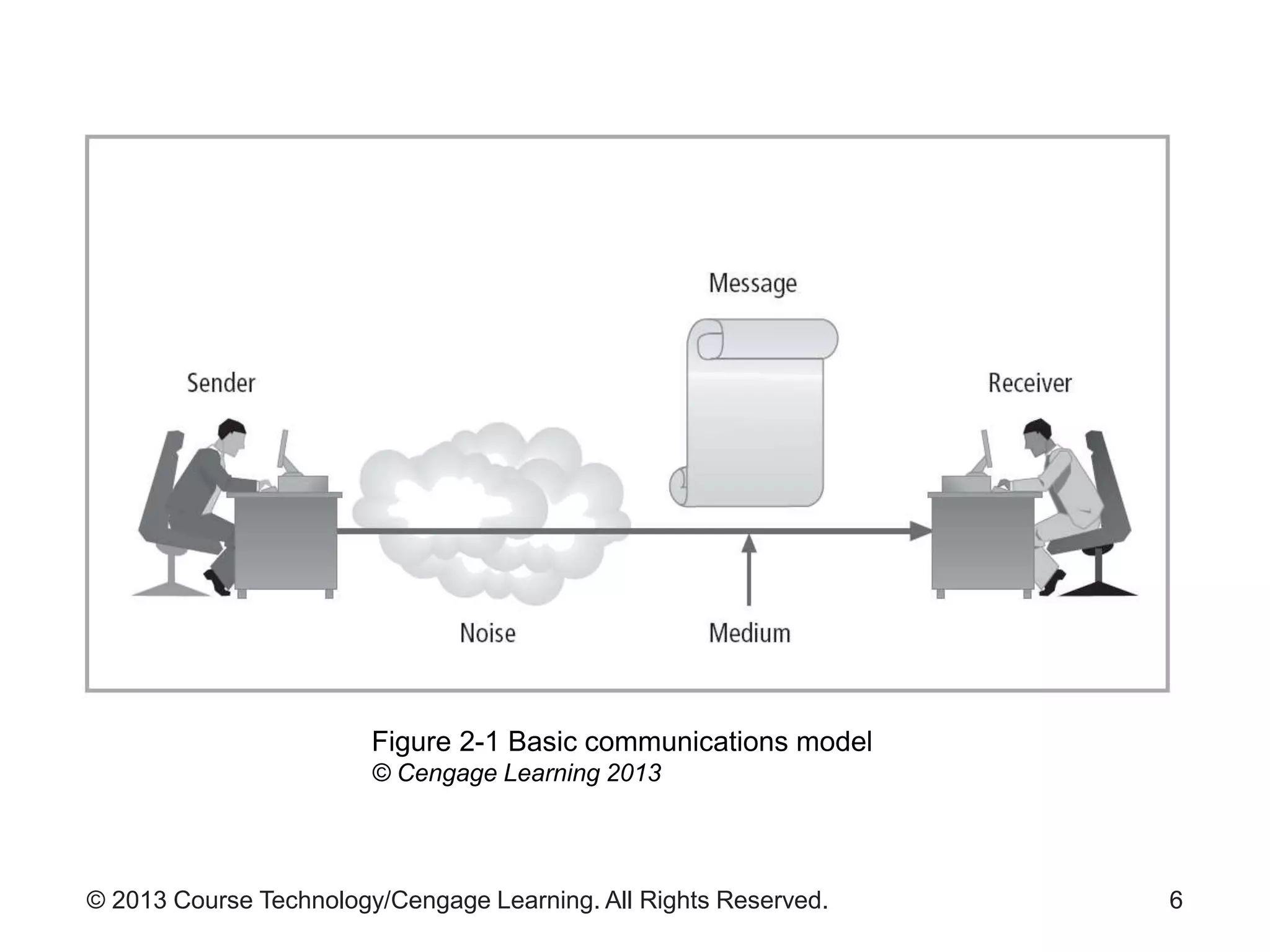
• Sender communicates message to receiver
– Over some medium
• Communication occurs when:
– Recipient receives, processes, and comprehends
the message
• Channel
– One-way flow of information from sender to receiver
• Circuit
– Two-way flow of information
5
© 2013 Course Technology/Cengage Learning. All Rights Reserved. 6
Figure 2-1 Basic communications model
© Cengage Learning 2013
© 2013 Course Technology/Cengage Learning. All Rights Reserved.
Reasons to Network
• Data communications
– Exchange of digital messages across a medium
• Networking
– Interconnecting groups or systems for information
exchange
• Reasons to build a network
– Exchanging information
– Sharing resources
– Allowing distributed organizations to act as if they
are centrally located
7
© 2013 Course Technology/Cengage Learning. All Rights Reserved.
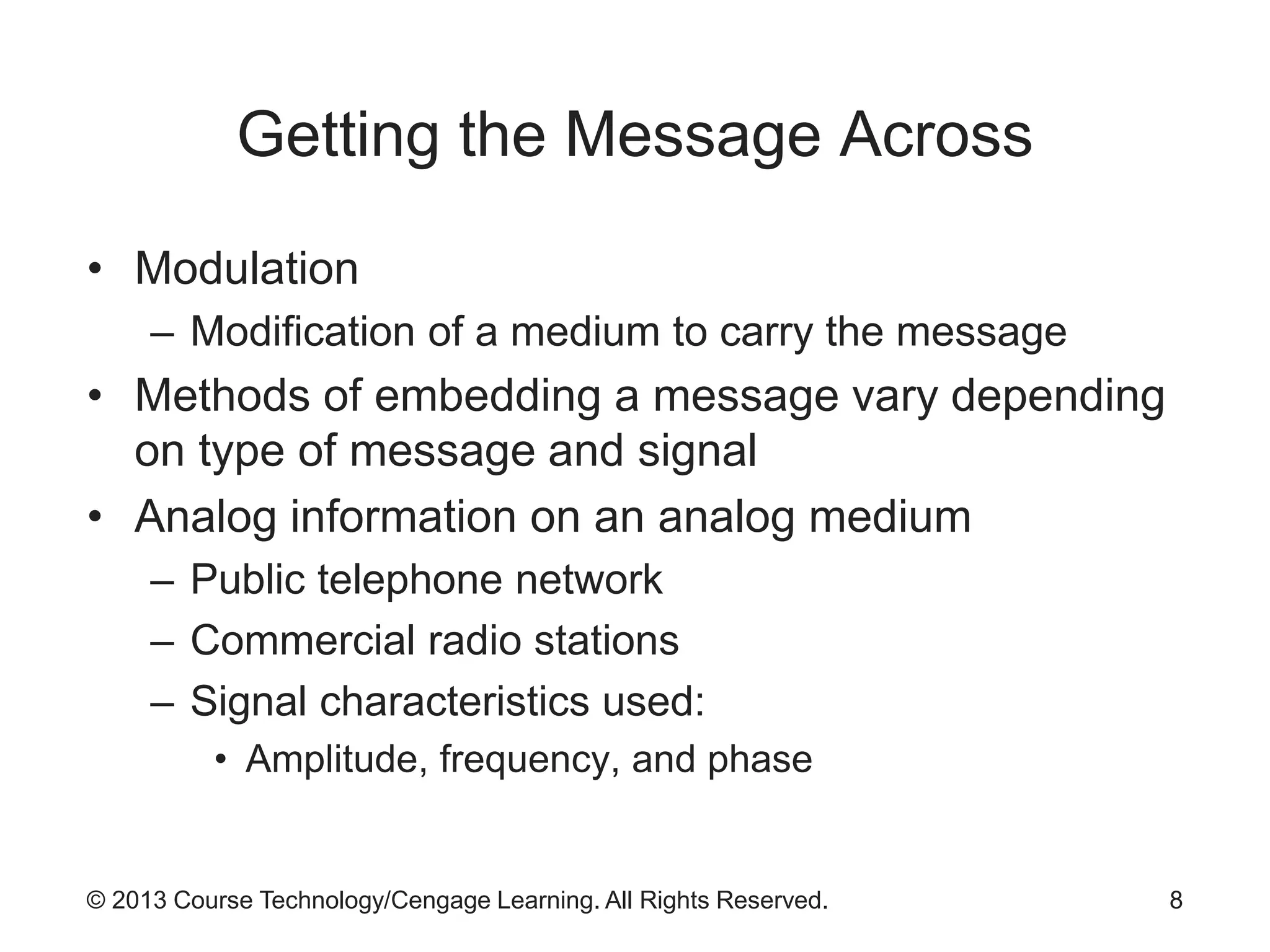
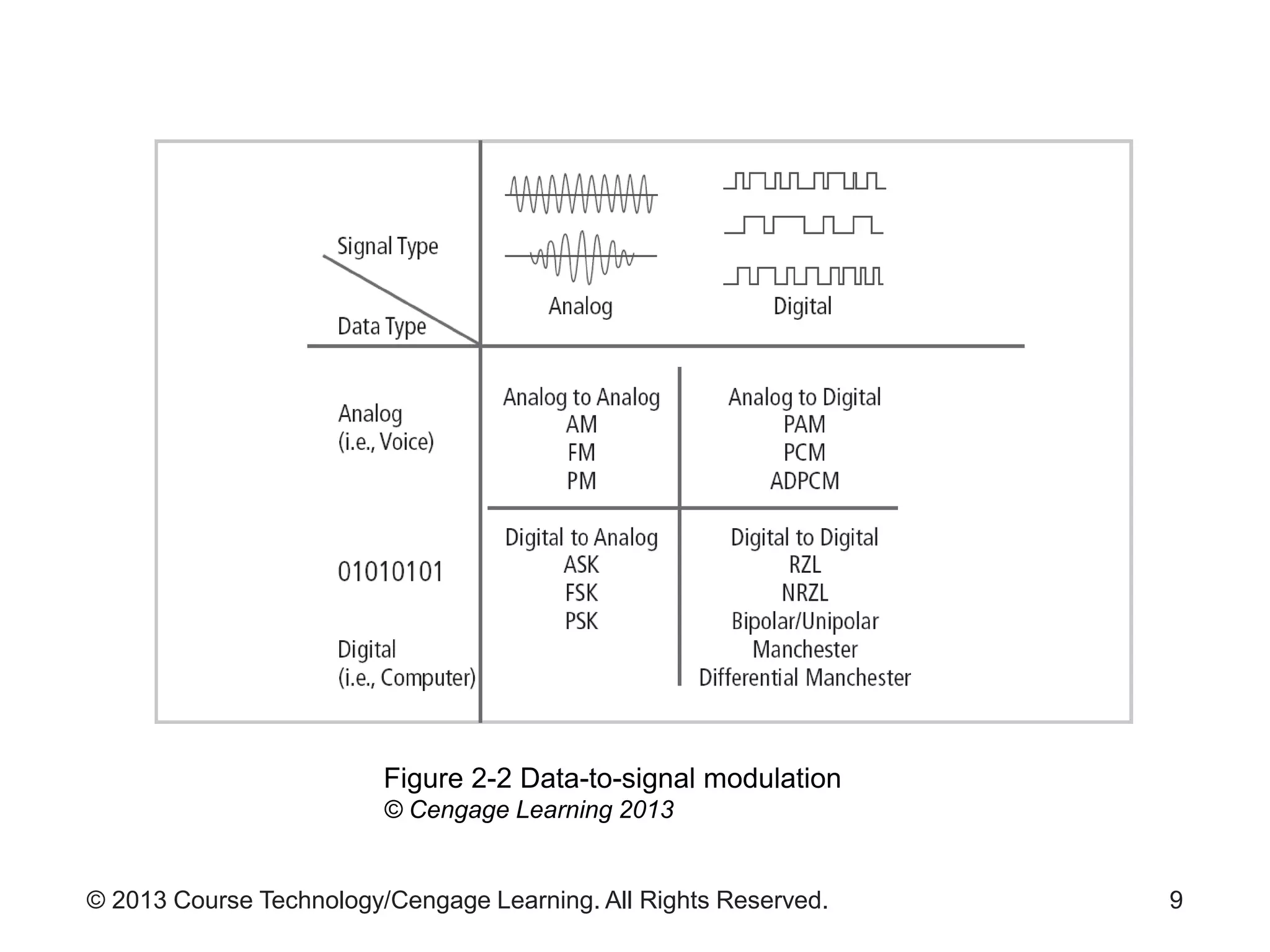
Getting the Message Across
• Modulation
– Modification of a medium to carry the message
• Methods of embedding a message vary depending
on type of message and signal
• Analog information on an analog medium
– Public telephone network
– Commercial radio stations
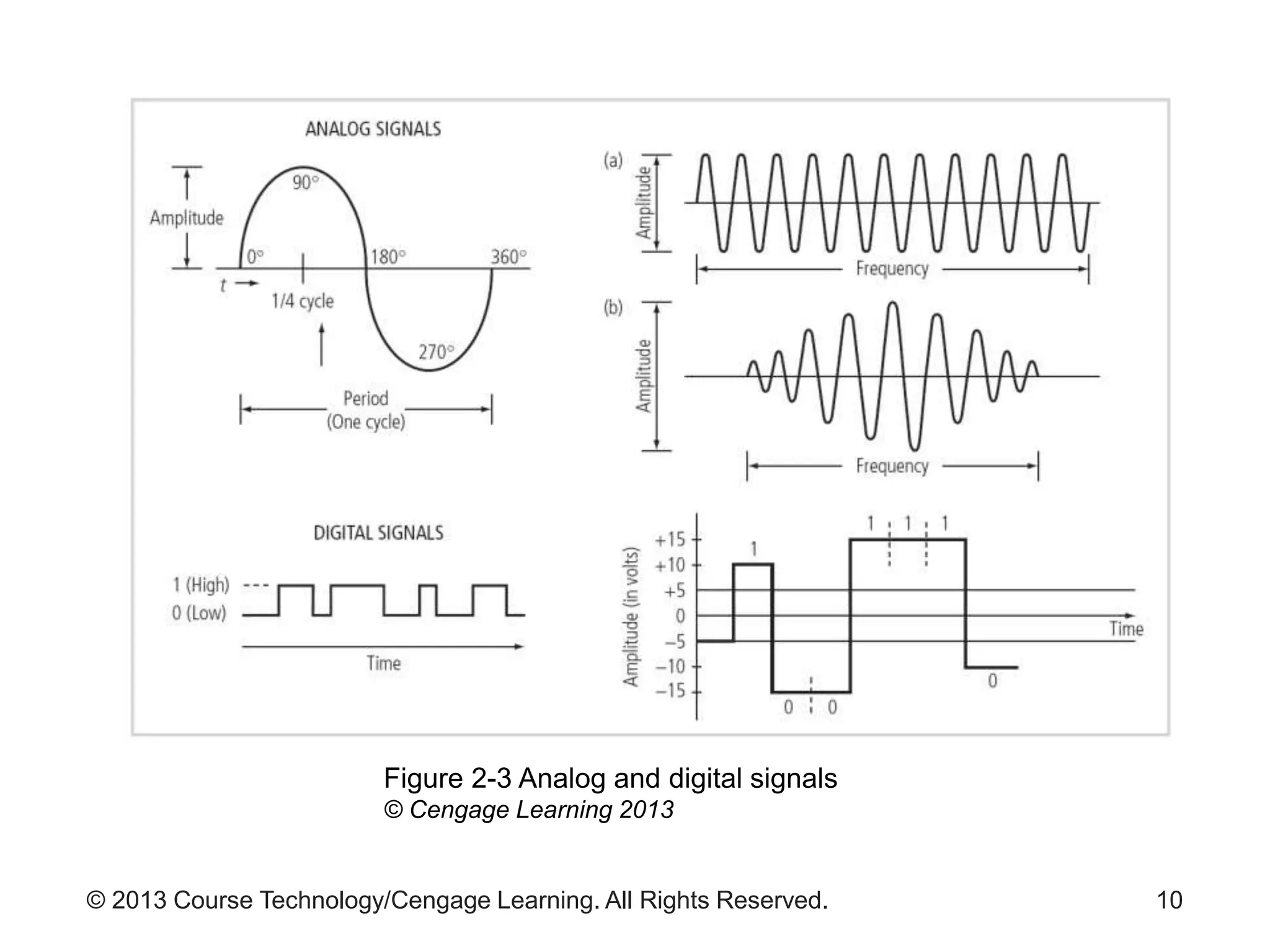
– Signal characteristics used:
• Amplitude, frequency, and phase
8
© 2013 Course Technology/Cengage Learning. All Rights Reserved. 9
Figure 2-2 Data-to-signal modulation
© Cengage Learning 2013
© 2013 Course Technology/Cengage Learning. All Rights Reserved. 10
Figure 2-3 Analog and digital signals
© Cengage Learning 2013
© 2013 Course Technology/Cengage Learning. All Rights Reserved.
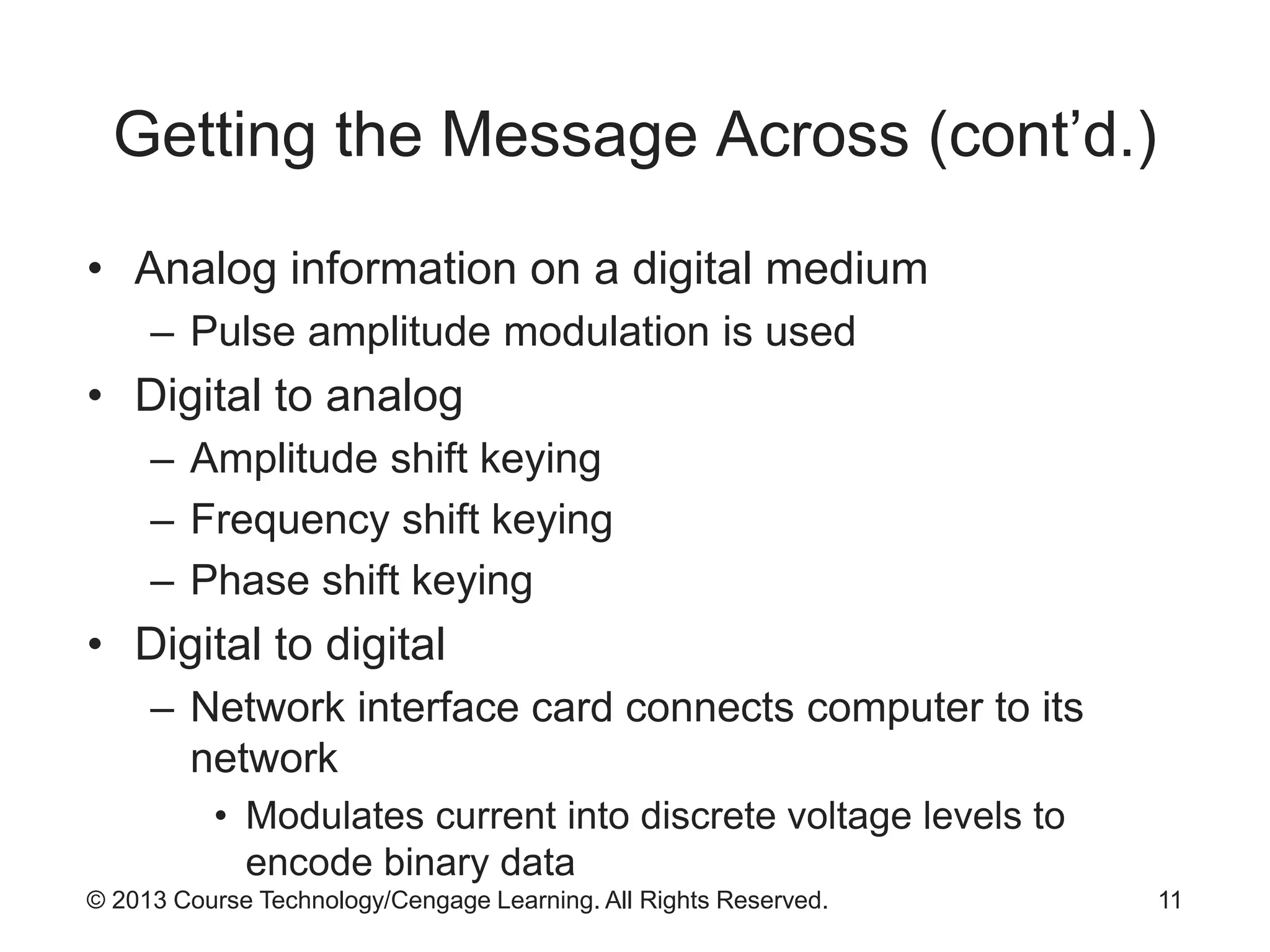
Getting the Message Across (cont’d.)
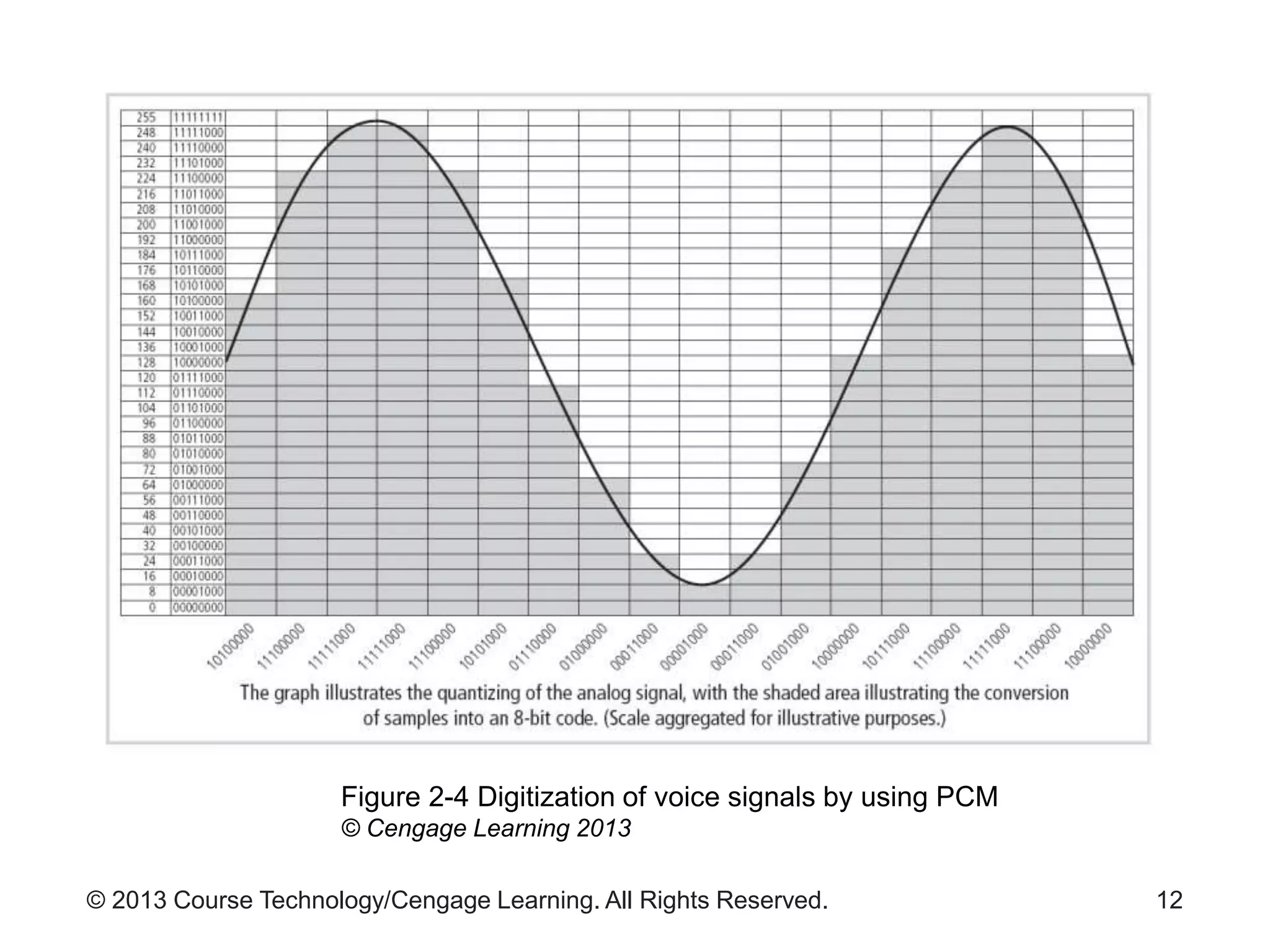
• Analog information on a digital medium
– Pulse amplitude modulation is used
• Digital to analog
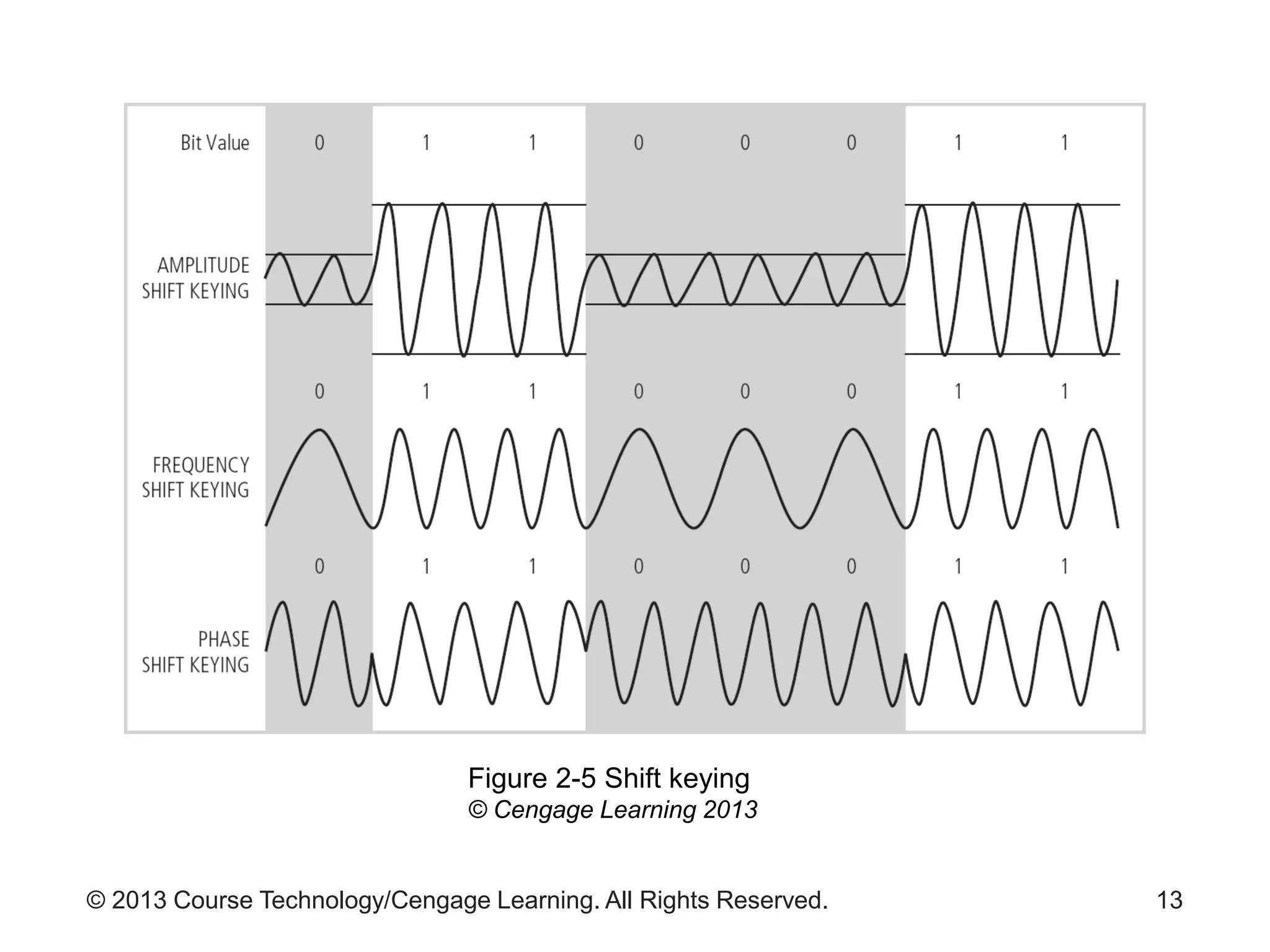
– Amplitude shift keying
– Frequency shift keying
– Phase shift keying
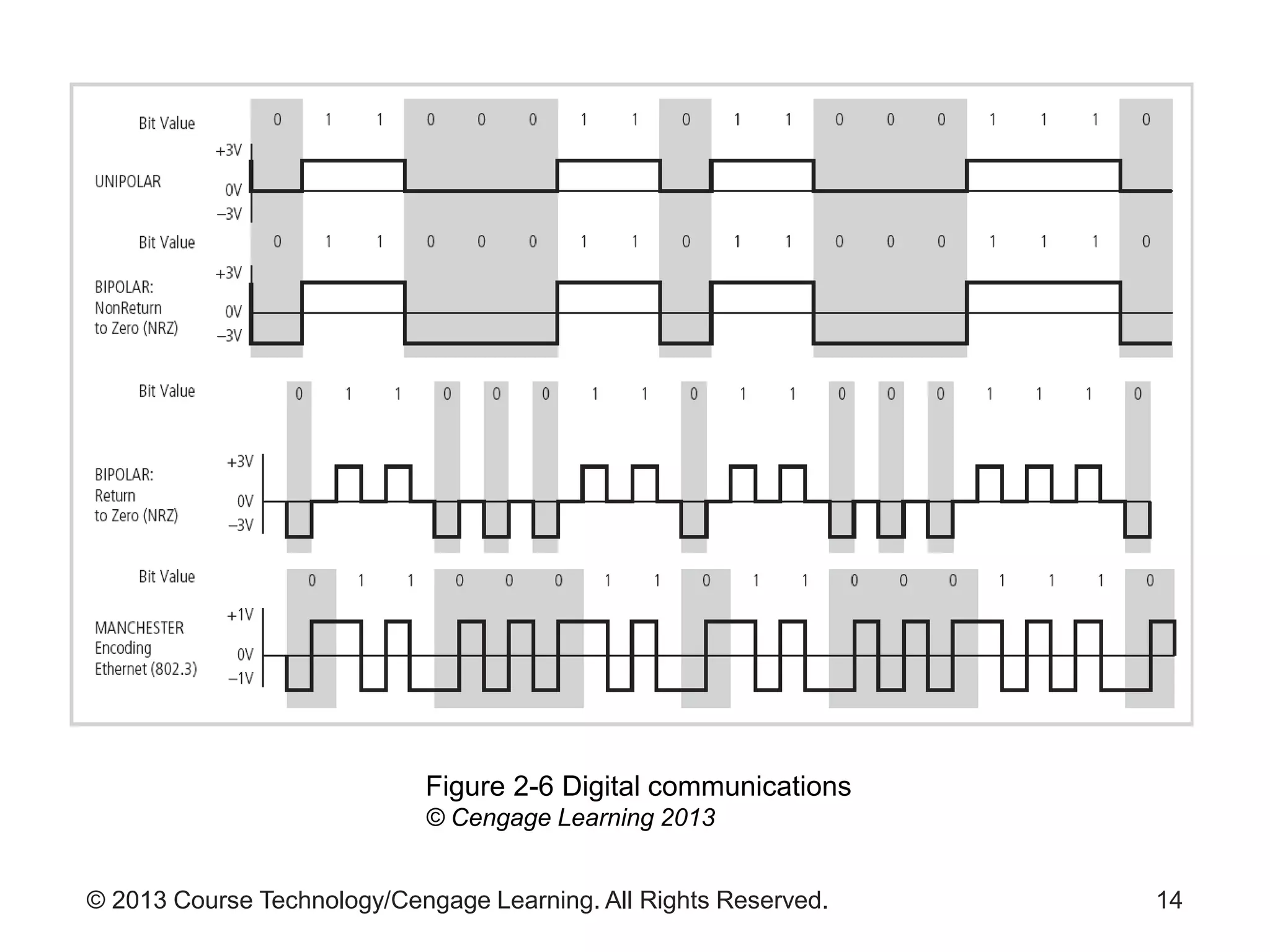
• Digital to digital
– Network interface card connects computer to its
network
• Modulates current into discrete voltage levels to
encode binary data
11
© 2013 Course Technology/Cengage Learning. All Rights Reserved. 12
Figure 2-4 Digitization of voice signals by using PCM
© Cengage Learning 2013
© 2013 Course Technology/Cengage Learning. All Rights Reserved. 13
Figure 2-5 Shift keying
© Cengage Learning 2013
© 2013 Course Technology/Cengage Learning. All Rights Reserved. 14
Figure 2-6 Digital communications
© Cengage Learning 2013
© 2013 Course Technology/Cengage Learning. All Rights Reserved.
Combining Multiple Signals
• Techniques to carry additional data over same
media
– Multi-bit encoding
– Multiplexing
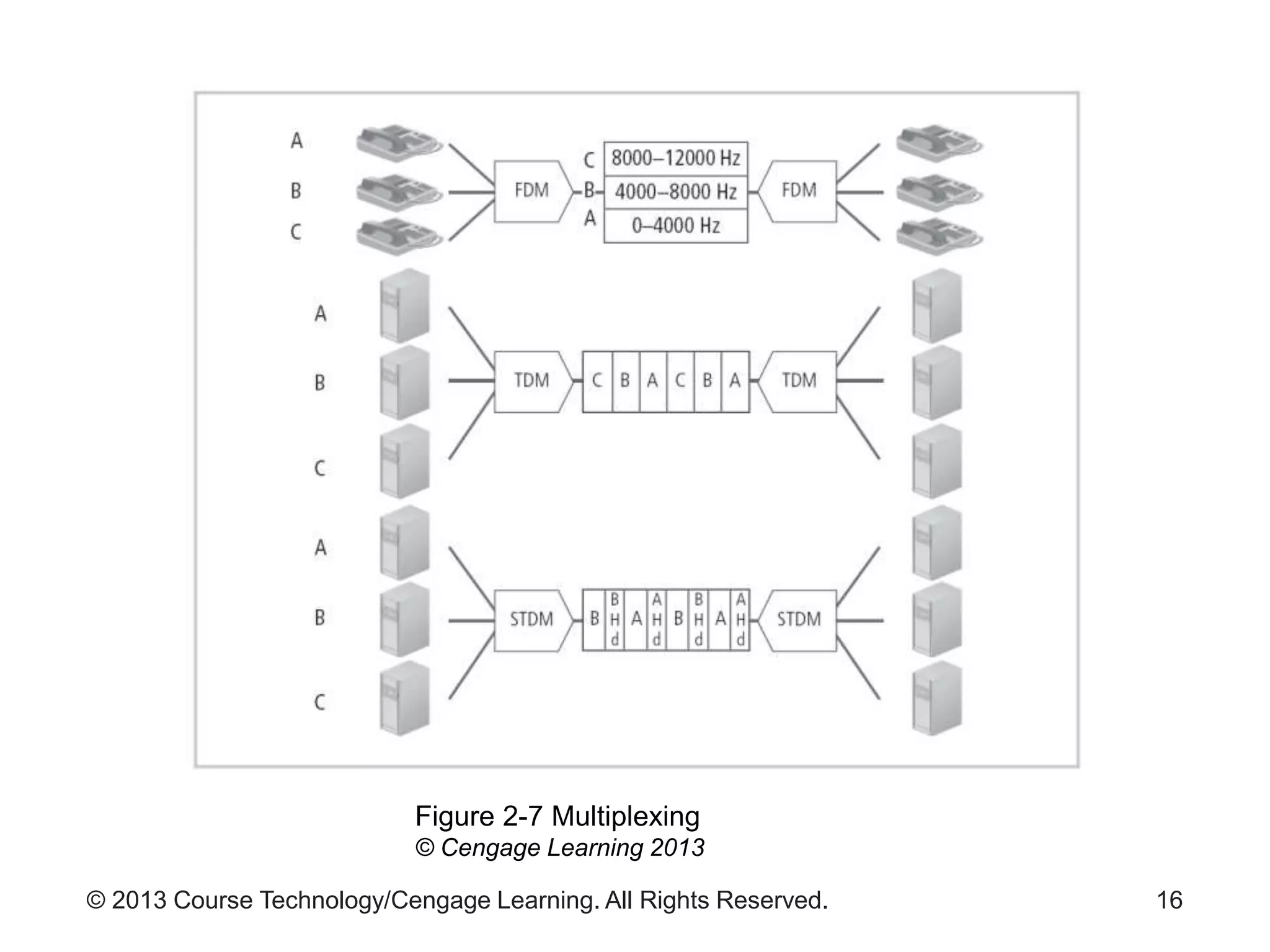
• Frequency division multiplexing
– Used in analog communications to combine voice
channels
• Time division multiplexing
– Used in digital communications
15
© 2013 Course Technology/Cengage Learning. All Rights Reserved. 16
Figure 2-7 Multiplexing
© Cengage Learning 2013
© 2013 Course Technology/Cengage Learning. All Rights Reserved.
Combining Multiple Signals (cont’d.)
• Wave division multiplexing
– Used in fiber-optic communications
– Uses different colors of light to allow multiple signals
to travel on same channel
17
© 2013 Course Technology/Cengage Learning. All Rights Reserved.
Impedance to Communications
• Forms of interference (noise)
– Attenuation
– Crosstalk
– Distortion
– Echo
– Impulse noise
– Jitter
– White noise
18
© 2013 Course Technology/Cengage Learning. All Rights Reserved.
Types of Networks
• Network categorization
– Components
– Size
– Layout (topology)
– Media
19
© 2013 Course Technology/Cengage Learning. All Rights Reserved.
Networks Categorized by Components
• Peer-to-peer (P2P) networks
– Users may share hard drives, directories, or printers
– Servant model
• Music-sharing services
• Server-based networks
– Uses dedicated system to provide specific services
• Distributed multi-server networks
20
© 2013 Course Technology/Cengage Learning. All Rights Reserved.
Networks Categorized by Size
• Local area network (LAN)
– Less than three miles of total cabling
• Metropolitan area network (MAN)
– Covers region the size of a municipality, county, or
district
• Wide area network (WAN)
– Very large network
– Covers large geographic region
• State, country, and even the planet
– Examples: public telephone network, and the
Internet
21
© 2013 Course Technology/Cengage Learning. All Rights Reserved.
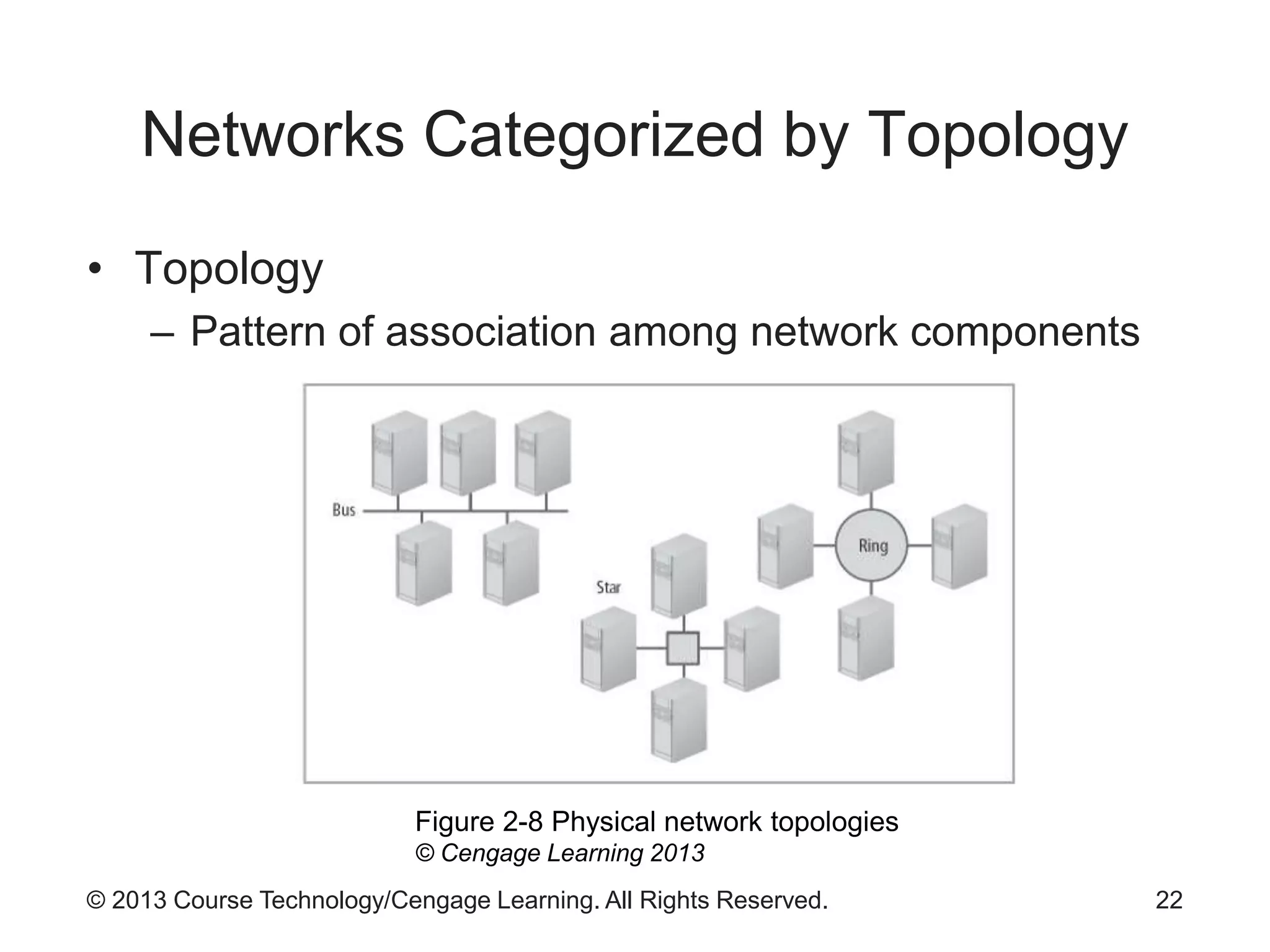
Networks Categorized by Topology
• Topology
– Pattern of association among network components
22
Figure 2-8 Physical network topologies
© Cengage Learning 2013
© 2013 Course Technology/Cengage Learning. All Rights Reserved.
Networks Categorized by Media
• Guided (wired)
– Use electricity or light waves over cables
• Unguided (wireless)
– Use radio or infrared electromagnetic energy
23
© 2013 Course Technology/Cengage Learning. All Rights Reserved.
Standards Organizations
• Protocols
– Rules for communications
– If widely accepted, they become standards
• Formal standards
– De jure
– Reviewed by a group of experts
– Endorsed by a standards body
• Informal standards
– De facto
– Widely adopted without formal review
24
© 2013 Course Technology/Cengage Learning. All Rights Reserved.
The Internet Society (ISOC)
• Formed in 1992
• Umbrella organization over:
– Internet Engineering Task Force (IETF)
– Internet Research Task Force (IRTF)
– Internet Engineering Steering Group (IESG)
– Internet Architecture Board (IAB)
25
© 2013 Course Technology/Cengage Learning. All Rights Reserved.
Internet Assigned Numbers Authority
(IANA)
• Originally part of the ISOC
• Coordinates domain names, IP addresses,
protocols, and port assignments
• Transferred in recent years to ICANN (Internet
Corporation for Assigned Names and Numbers)
26
© 2013 Course Technology/Cengage Learning. All Rights Reserved.
American National Standards Institute
(ANSI)
• Supervises creation and use of thousands of
standards
• Standards affect companies and government
agencies
– Almost every sector of the economy
27
© 2013 Course Technology/Cengage Learning. All Rights Reserved.
International Telecommunications
Union (ITU)
• Principal agency of the United Nations for
communication and information technologies
• Based in Geneva, Switzerland
• Focus for government interests and the private
sector
• Facilitates communication in:
– Radio communication
– Calibration
– Development
28
© 2013 Course Technology/Cengage Learning. All Rights Reserved.
Institute of Electrical and Electronics
Engineers (IEEE)
• Principal trade organization for technology
advancement
• Active in many sectors
– Computers and telecommunications
– Electric power
– Electronics
• Active among university students
29
© 2013 Course Technology/Cengage Learning. All Rights Reserved.
Telecommunications Industry
Association (TIA)
• Partnership among information, communications,
and entertainment companies
• Role in policy development
• Standards published as dual standards with
Electronics Industry Association (EIA)
– Example: EIA/TIA T568A
30
© 2013 Course Technology/Cengage Learning. All Rights Reserved.
International Organization for
Standardization (ISO)
• Global leader in international standards
• Network of national standards bodies
– 157 member countries
• Bridges gap between private and public sectors
31
© 2013 Course Technology/Cengage Learning. All Rights Reserved.
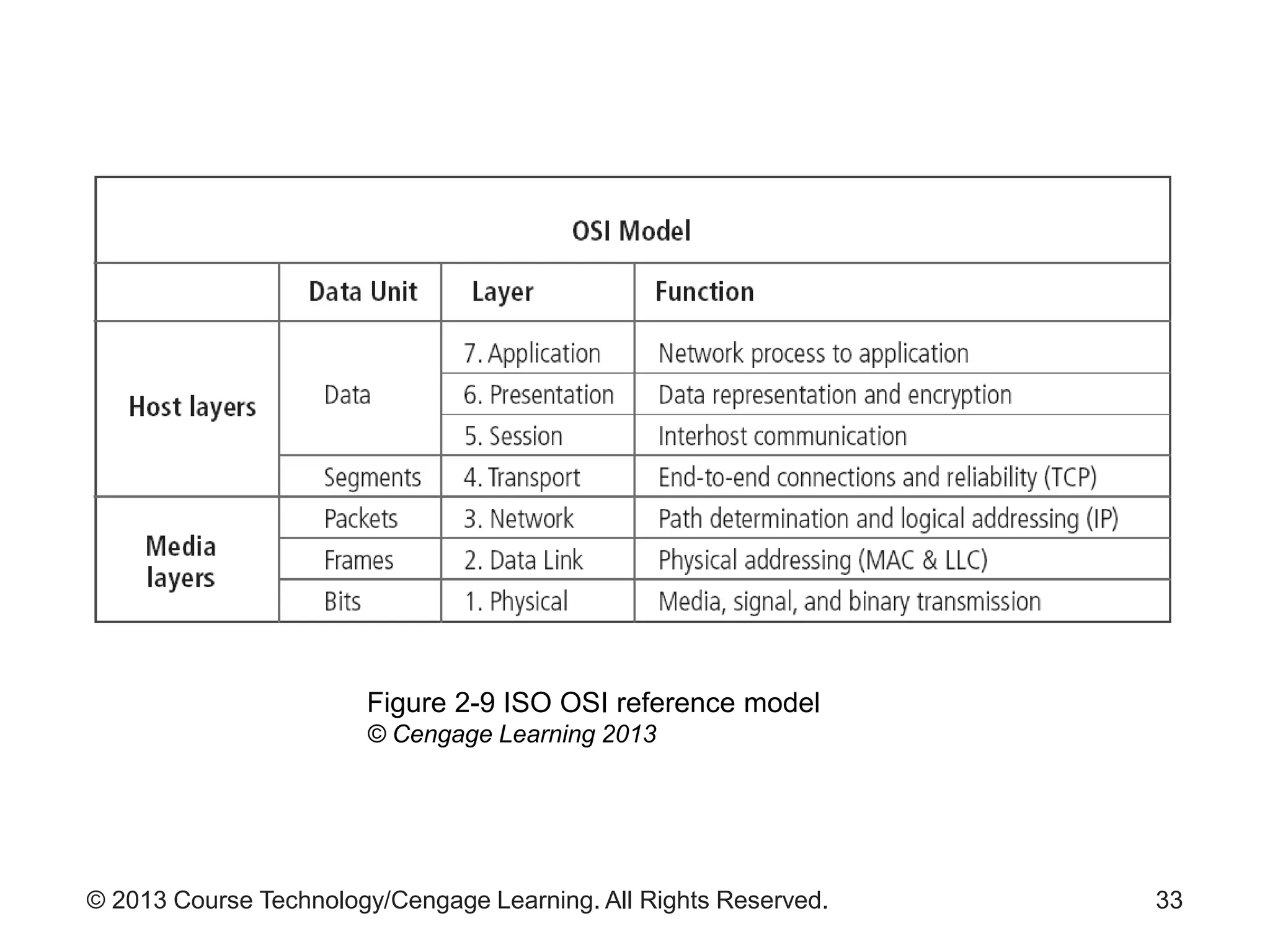
OSI Reference Model
• Developed in 1978
• Dominant model for illustrating network functions
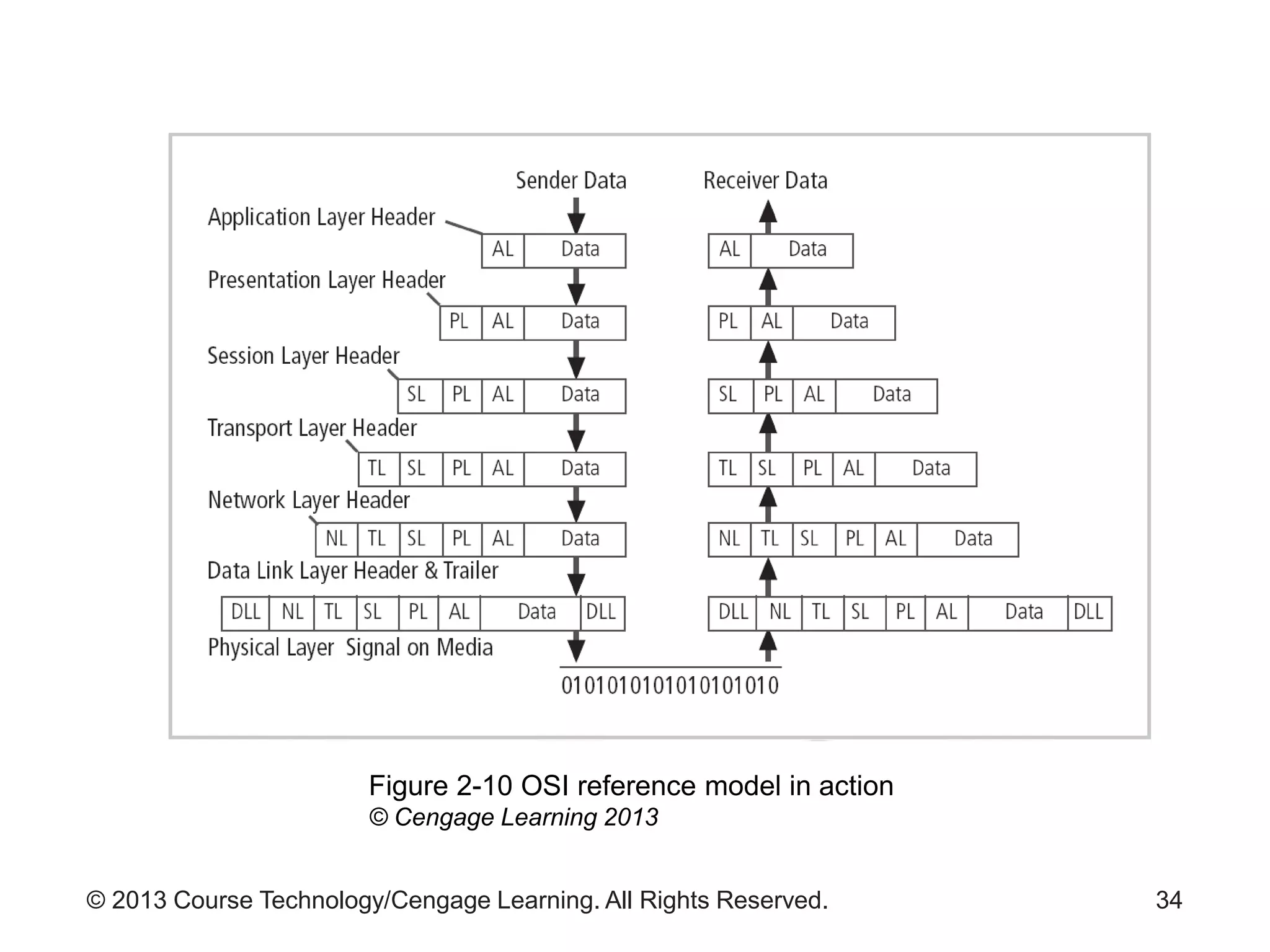
• Breaks down complex communication process
– Seven distinct layers
– Each layer has specific functions and protocols
32
© 2013 Course Technology/Cengage Learning. All Rights Reserved. 33
Figure 2-9 ISO OSI reference model
© Cengage Learning 2013
© 2013 Course Technology/Cengage Learning. All Rights Reserved. 34
Figure 2-10 OSI reference model in action
© Cengage Learning 2013
© 2013 Course Technology/Cengage Learning. All Rights Reserved.
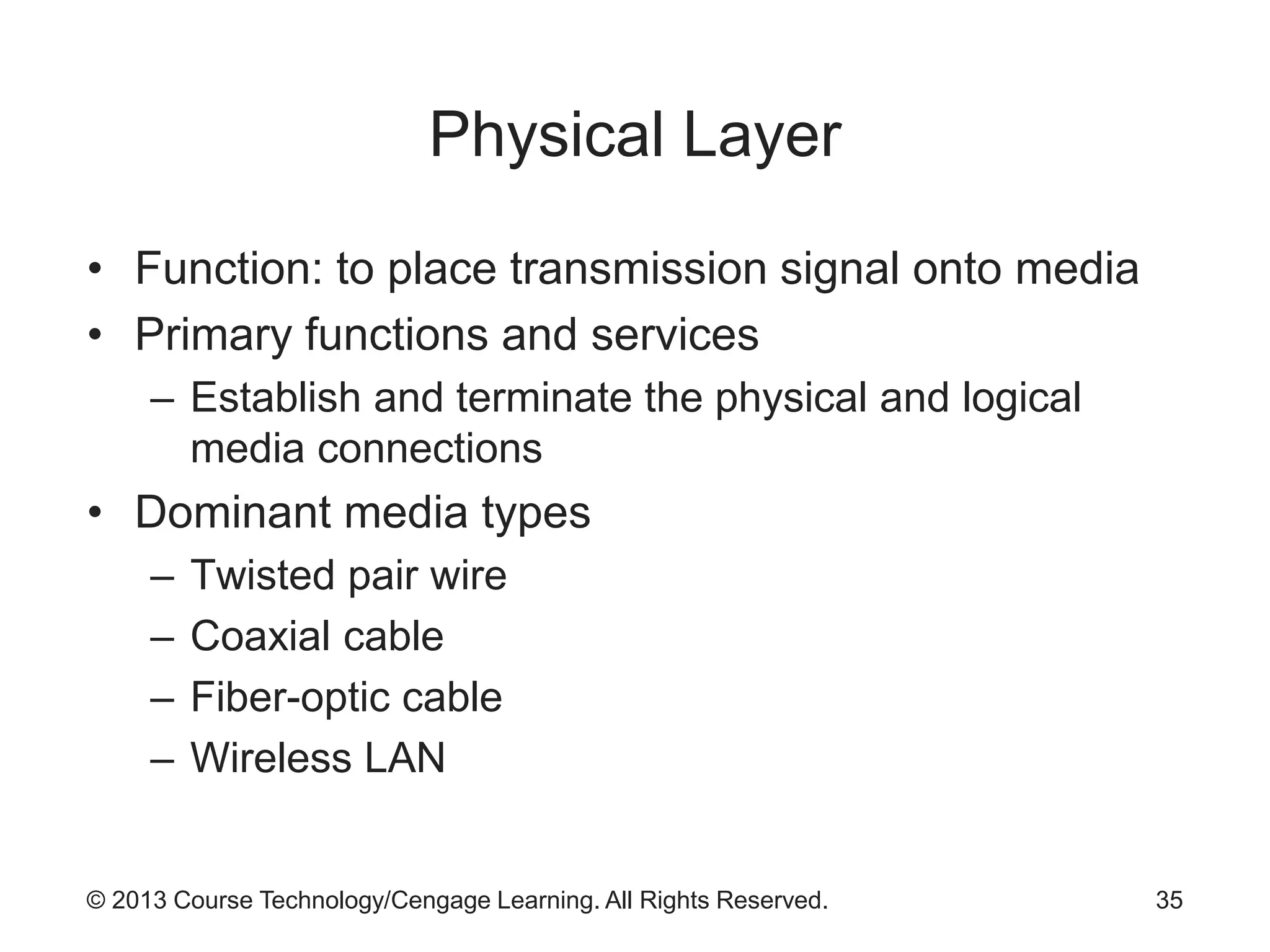
Physical Layer
• Function: to place transmission signal onto media
• Primary functions and services
– Establish and terminate the physical and logical
media connections
• Dominant media types
– Twisted pair wire
– Coaxial cable
– Fiber-optic cable
– Wireless LAN
35
© 2013 Course Technology/Cengage Learning. All Rights Reserved.
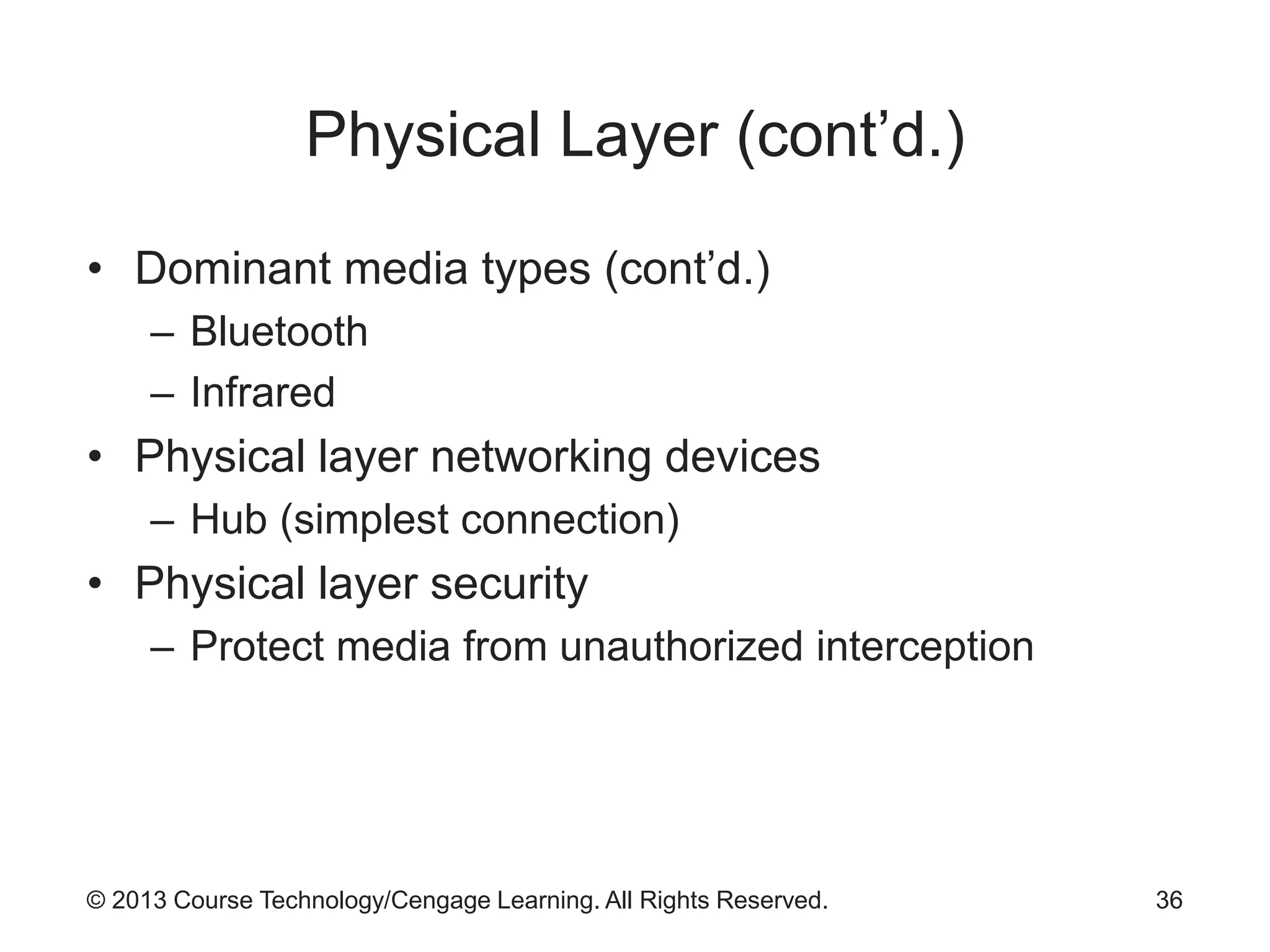
Physical Layer (cont’d.)
• Dominant media types (cont’d.)
– Bluetooth
– Infrared
• Physical layer networking devices
– Hub (simplest connection)
• Physical layer security
– Protect media from unauthorized interception
36
© 2013 Course Technology/Cengage Learning. All Rights Reserved.
Data Link Layer
• Primary layer for networking support
• Called the first subnet layer
• Provides addressing, packetizing, media access
control, error control, some flow control
• DLL layers
– Logic link control sublayer
– Media access control sublayer
37
© 2013 Course Technology/Cengage Learning. All Rights Reserved.
Data Link Layer (cont’d.)
• DLL protocols
– Ethernet
– Wireless Ethernet
– Token ring
– Fiber distributed data interface
– Asynchronous transfer mode
– Frame relay
– PPP, PPTP, L2TP
38
© 2013 Course Technology/Cengage Learning. All Rights Reserved.
Data Link Layer (cont’d.)
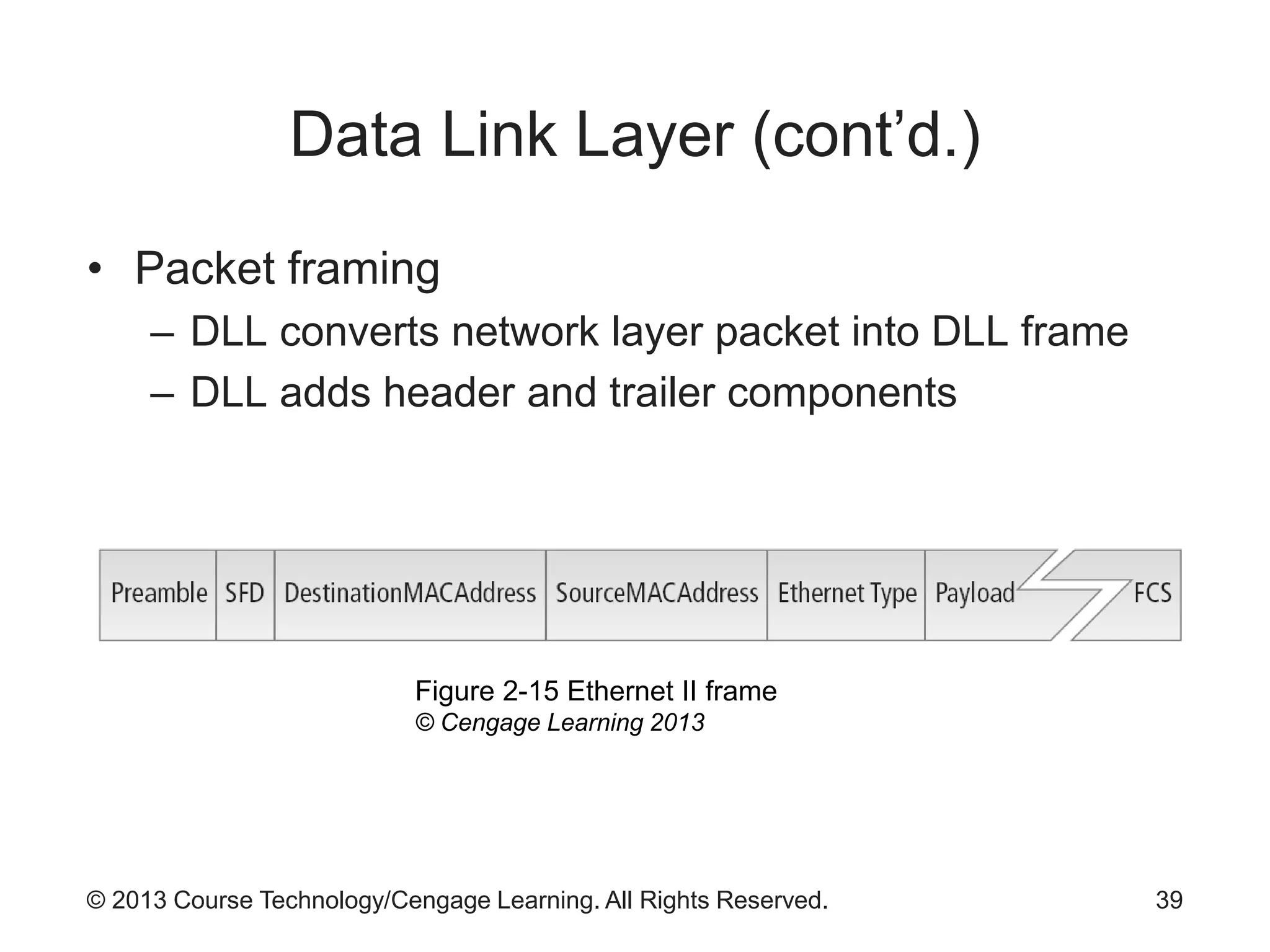
• Packet framing
– DLL converts network layer packet into DLL frame
– DLL adds header and trailer components
39
Figure 2-15 Ethernet II frame
© Cengage Learning 2013
© 2013 Course Technology/Cengage Learning. All Rights Reserved.
Data Link Layer (cont’d.)
• Addressing
– Accomplished by a number embedded in the NIC
• Known as MAC address or hardware address
• Uniquely identifies the client system
• Allows packets to be delivered to an endpoint
• Media access control
– Control of traffic flow
– Two approaches:
• Deterministic and contention
40
© 2013 Course Technology/Cengage Learning. All Rights Reserved.
Network Layer
• Key functions
– Packetizing
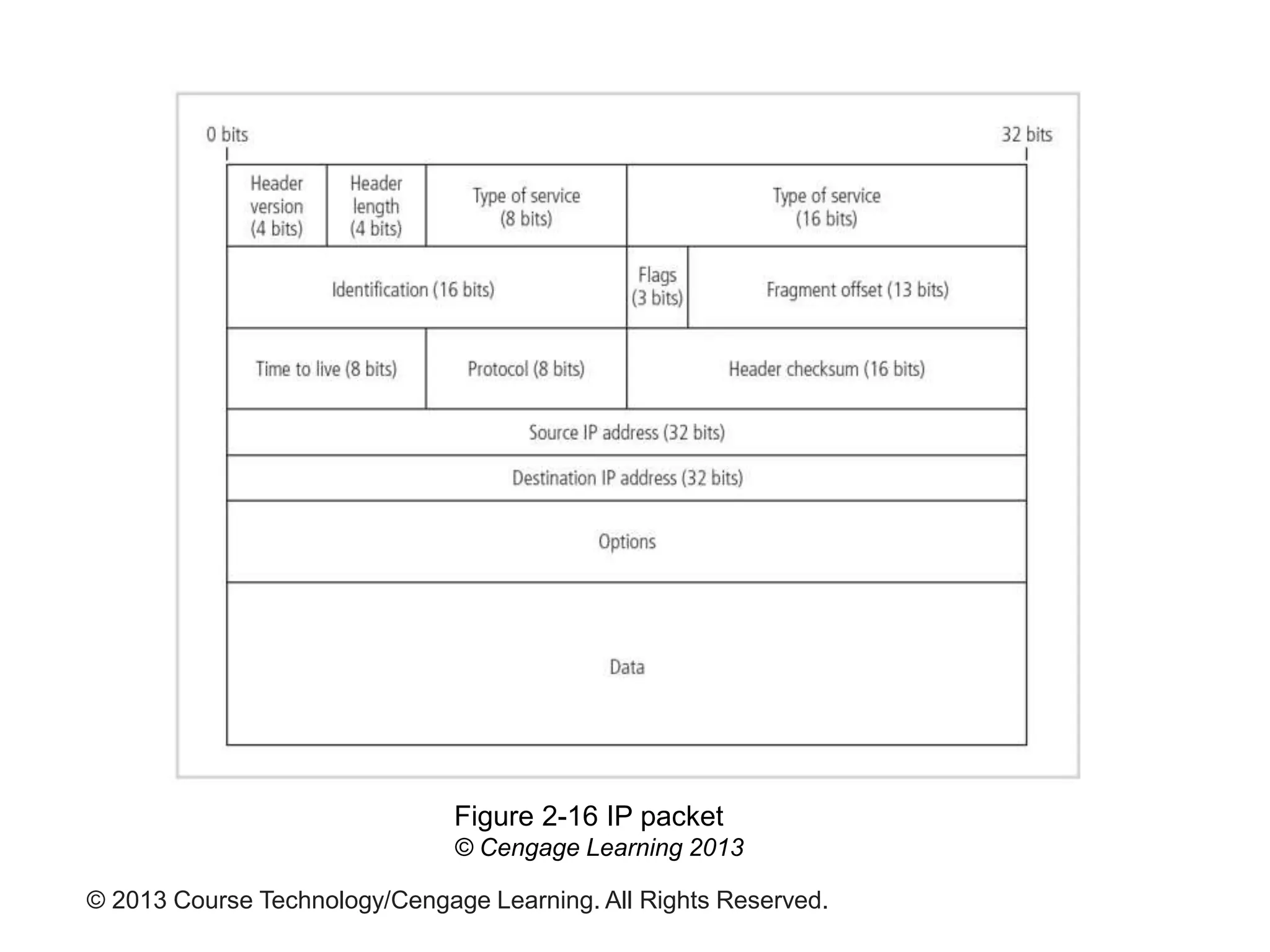
• Organizes segments from Transport layer into packets
• Packets consist of header and data
– Addressing
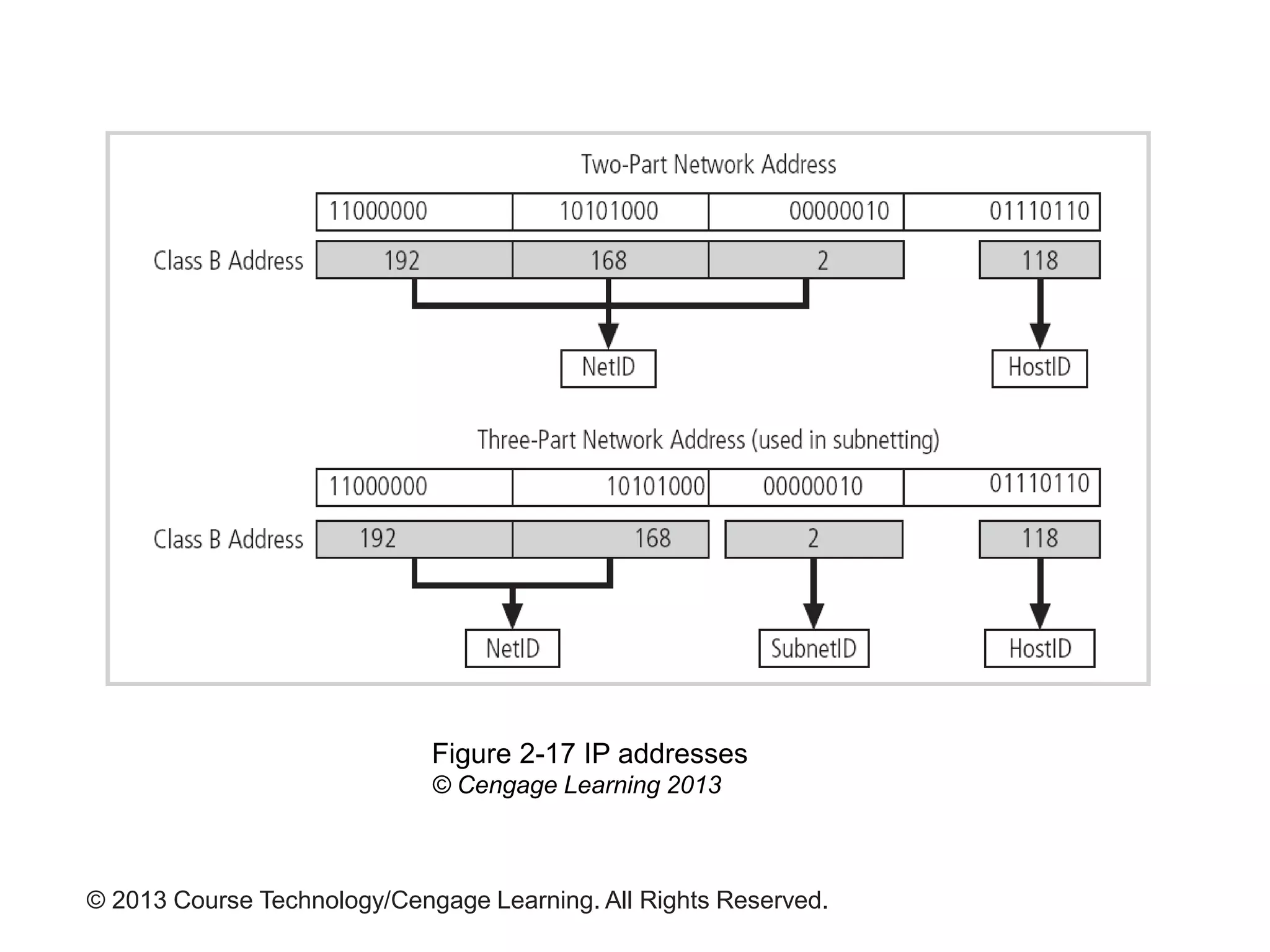
• Dotted decimal notation commonly used
– Routing
• Process of moving a network layer packet across
multiple networks
41
© 2013 Course Technology/Cengage Learning. All Rights Reserved.
Figure 2-16 IP packet
© Cengage Learning 2013
© 2013 Course Technology/Cengage Learning. All Rights Reserved.
Figure 2-17 IP addresses
© Cengage Learning 2013
© 2013 Course Technology/Cengage Learning. All Rights Reserved.
Transport Layer
• Provides reliable transfer of data between user
applications
• Error control
– Process of handling problems with the transfer
process
• Error correction
– Commonly done through retransmission of damaged
segment
• Flow control
– Prevents receiver from being overwhelmed with
segments
44
© 2013 Course Technology/Cengage Learning. All Rights Reserved.
Session Layer
• Establishes, maintains, terminates communication
sessions between systems
– Simplex
– Half-duplex
– Full-duplex
• Session layer security
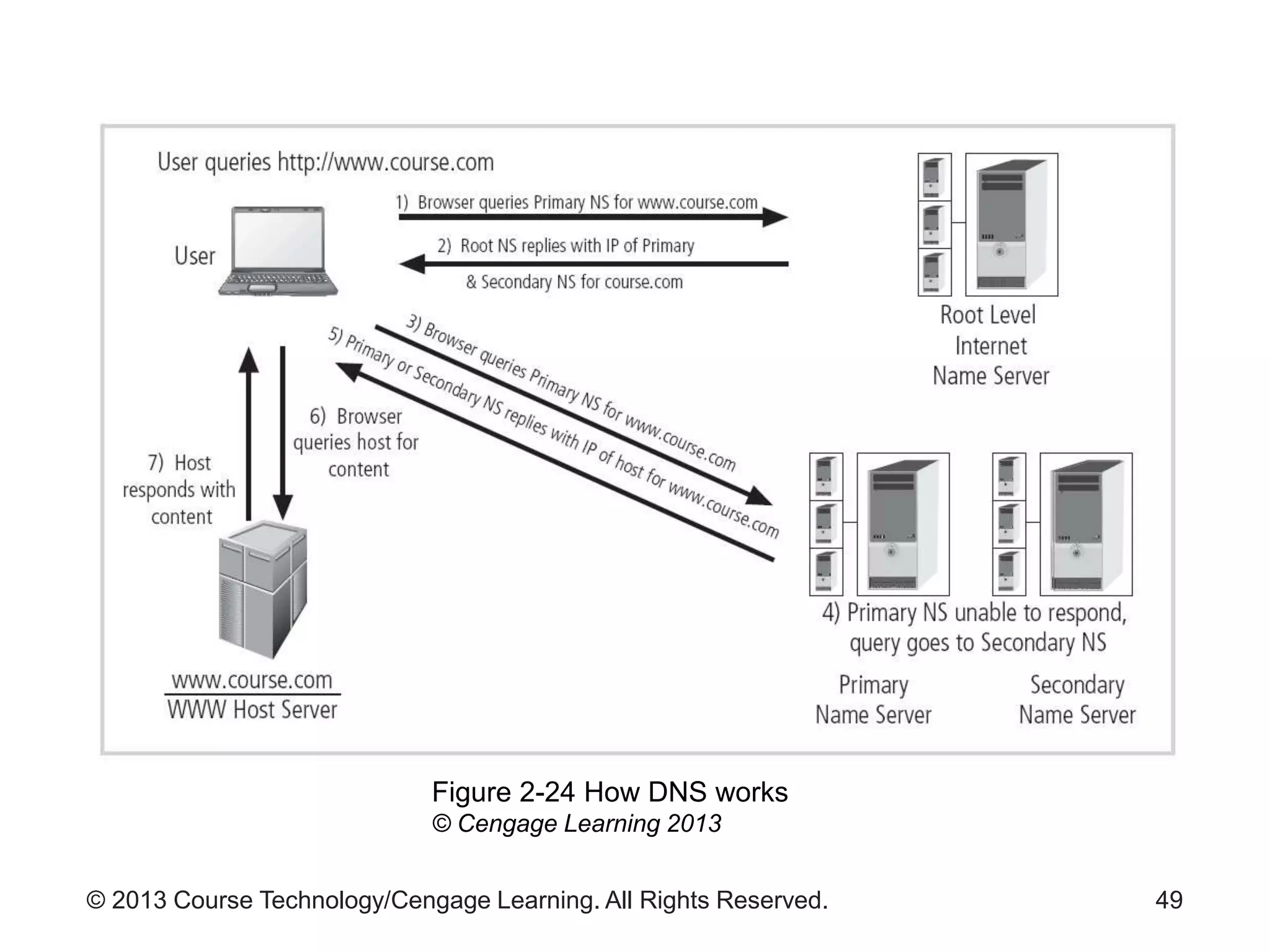
– TCP/IP does not have an explicit session layer
– DNS has inherent weaknesses
45
© 2013 Course Technology/Cengage Learning. All Rights Reserved.
Presentation Layer
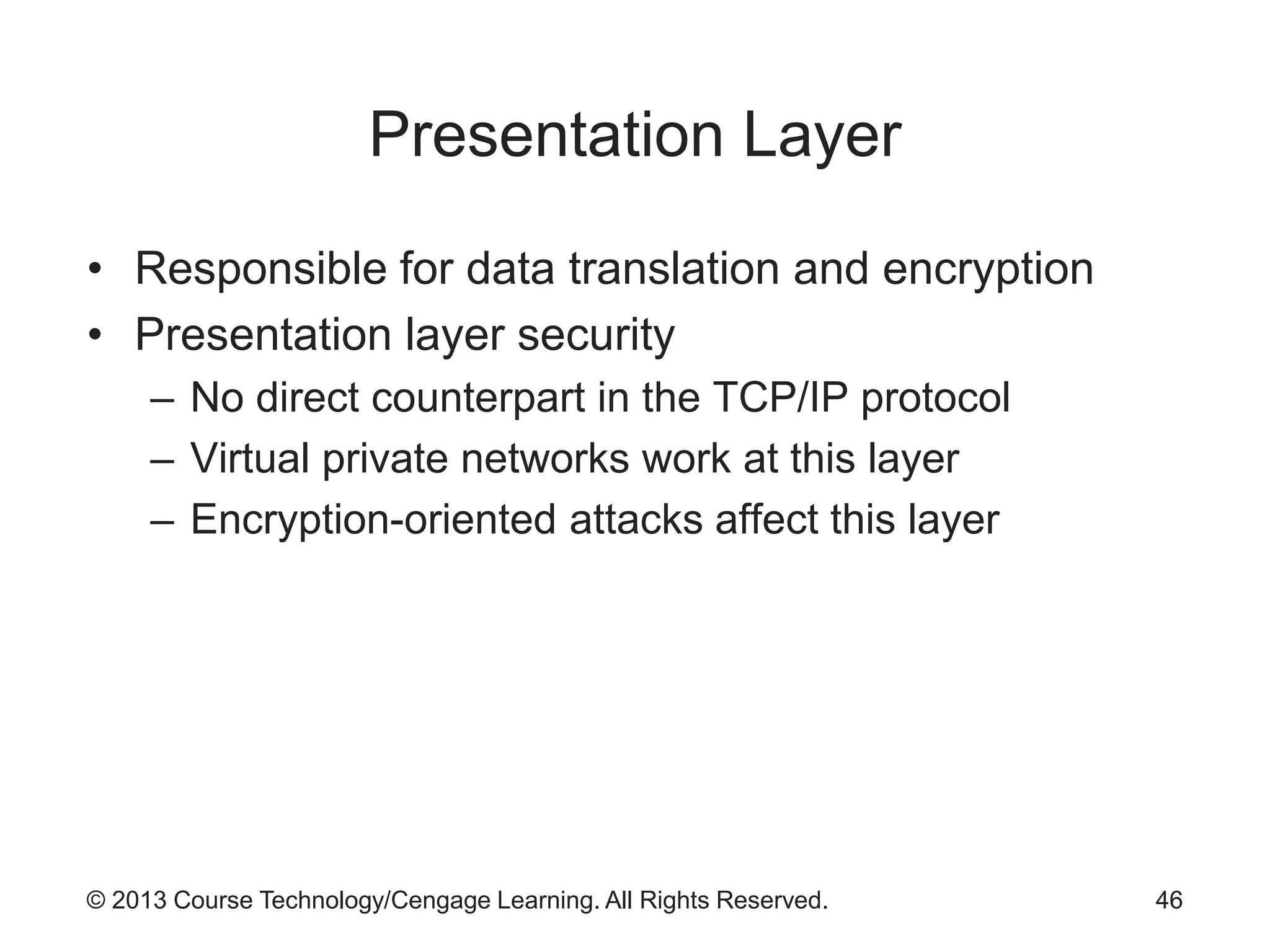
• Responsible for data translation and encryption
• Presentation layer security
– No direct counterpart in the TCP/IP protocol
– Virtual private networks work at this layer
– Encryption-oriented attacks affect this layer
46
© 2013 Course Technology/Cengage Learning. All Rights Reserved.
Application Layer
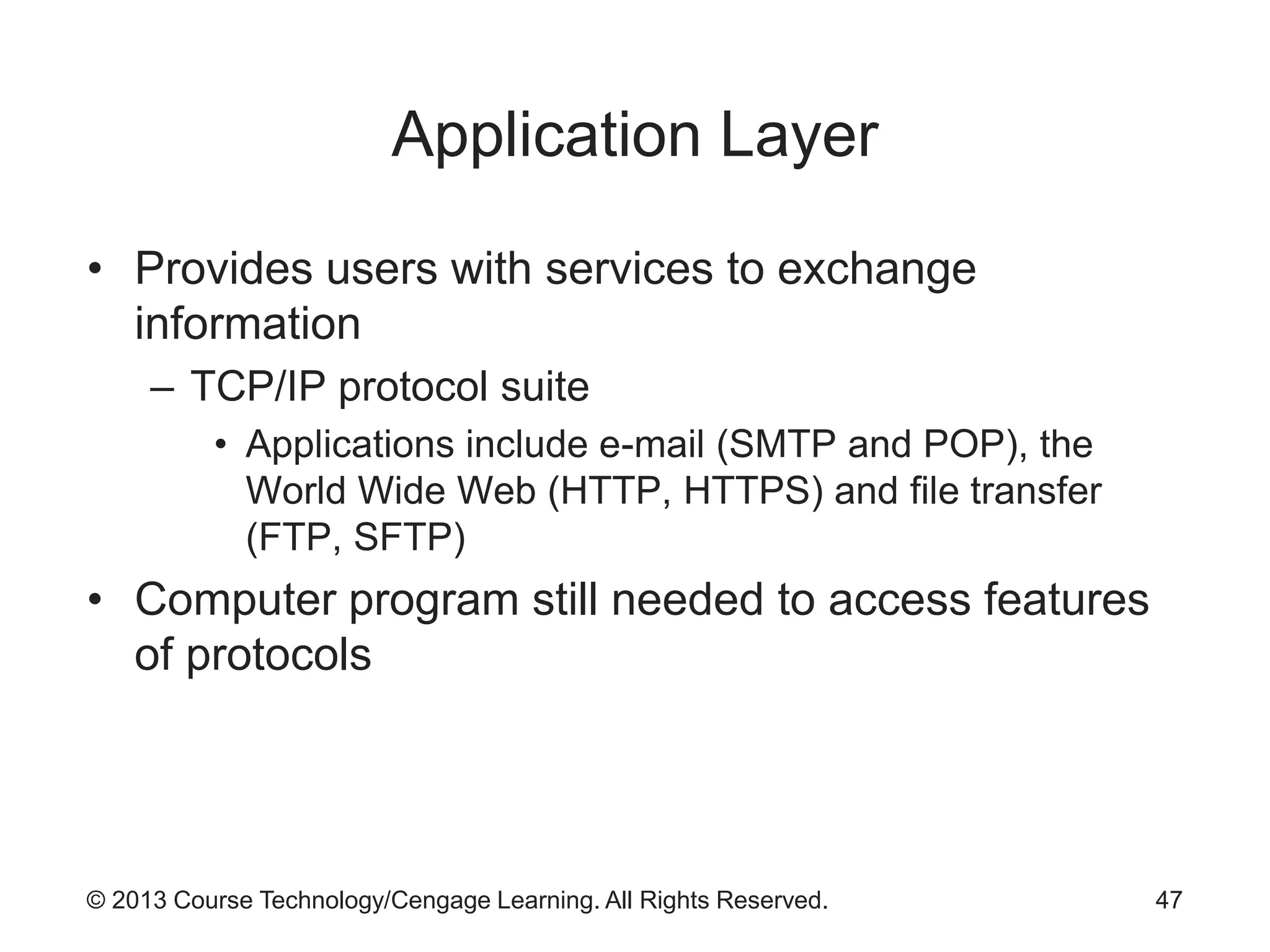
• Provides users with services to exchange
information
– TCP/IP protocol suite
• Applications include e-mail (SMTP and POP), the
World Wide Web (HTTP, HTTPS) and file transfer
(FTP, SFTP)
• Computer program still needed to access features
of protocols
47
© 2013 Course Technology/Cengage Learning. All Rights Reserved.
The Internet, WWW, and TCP/IP
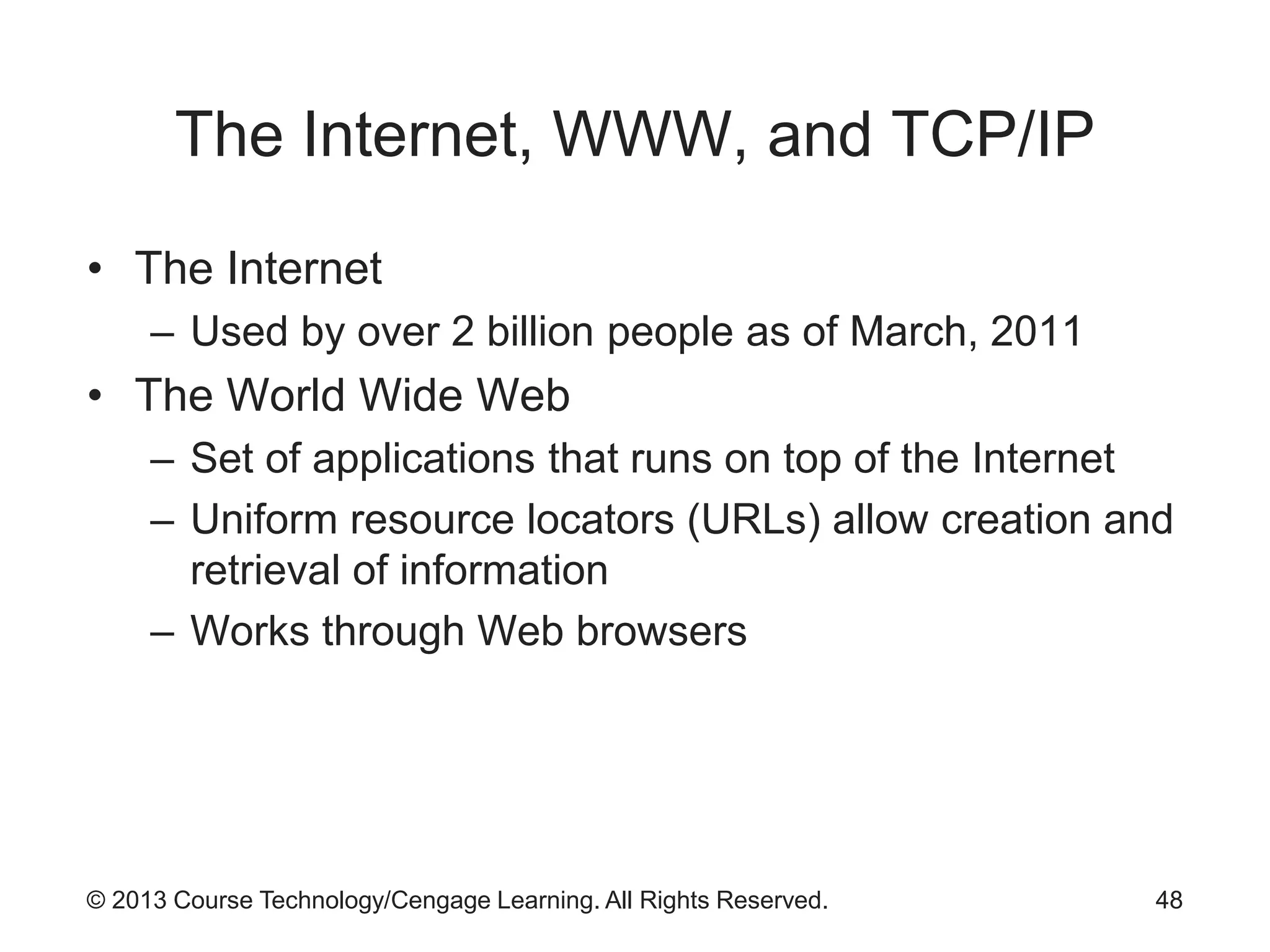
• The Internet
– Used by over 2 billion people as of March, 2011
• The World Wide Web
– Set of applications that runs on top of the Internet
– Uniform resource locators (URLs) allow creation and
retrieval of information
– Works through Web browsers
48
© 2013 Course Technology/Cengage Learning. All Rights Reserved. 49
Figure 2-24 How DNS works
© Cengage Learning 2013
© 2013 Course Technology/Cengage Learning. All Rights Reserved.
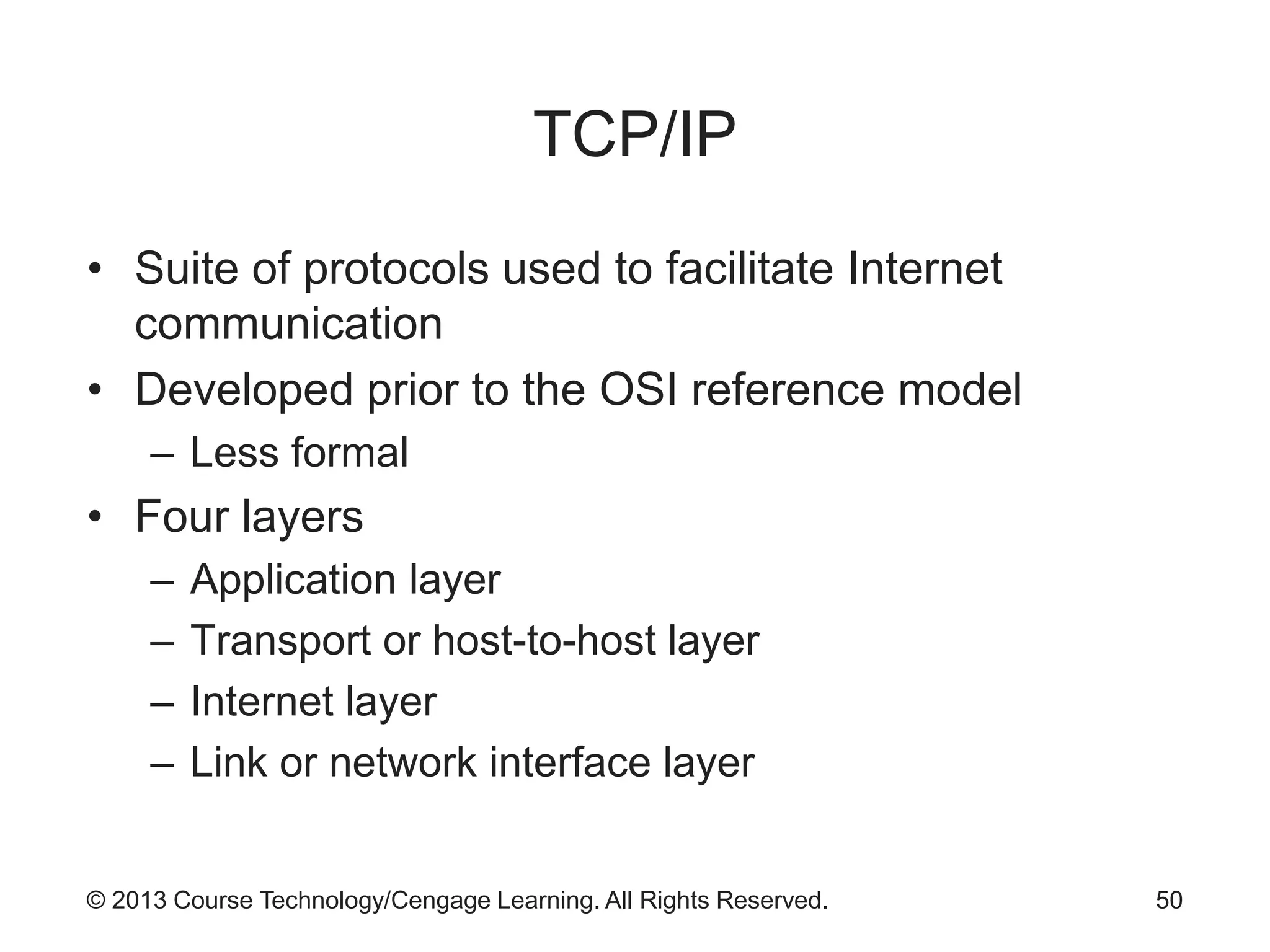
TCP/IP
• Suite of protocols used to facilitate Internet
communication
• Developed prior to the OSI reference model
– Less formal
• Four layers
– Application layer
– Transport or host-to-host layer
– Internet layer
– Link or network interface layer
50
© 2013 Course Technology/Cengage Learning. All Rights Reserved.
Summary
• Communication occurs when the recipient can
receive, process, and comprehend a message
• Data communications is the exchange of
messages across a medium
• Networking is the interconnection of various groups
or systems
– Purpose: exchange information
• Several standards organizations exist
– Examples of data communication standards
agencies: ISOC, ANSI, ITU, IEEE, TIA, and ISO
51

9780840024220 ppt ch02

  • 1.
    Guide to NetworkSecurity First Edition Chapter Two Introduction to Networking
  • 2.
    © 2013 CourseTechnology/Cengage Learning. All Rights Reserved. Objectives • Describe the basic elements of computer-based data communication • Discuss the key entities and organizations behind current networking standards, as well as the purpose of and intent behind the more widely used standards • Explain the nature and intent of the OSI reference model as well as list and describe each of the model’s seven layers 2
  • 3.
    © 2013 CourseTechnology/Cengage Learning. All Rights Reserved. Objectives (cont’d.) • Describe the nature of the Internet and the relationship between the TCP/IP protocol and the Internet 3
  • 4.
    © 2013 CourseTechnology/Cengage Learning. All Rights Reserved. Introduction • Network – Transparent entity to computer users – Provides blood flow for the computing environment – Designed to allow information to flow efficiently – Maintained by network administrators 4
  • 5.
    © 2013 CourseTechnology/Cengage Learning. All Rights Reserved. Networking Fundamentals • Sender communicates message to receiver – Over some medium • Communication occurs when: – Recipient receives, processes, and comprehends the message • Channel – One-way flow of information from sender to receiver • Circuit – Two-way flow of information 5
  • 6.
    © 2013 CourseTechnology/Cengage Learning. All Rights Reserved. 6 Figure 2-1 Basic communications model © Cengage Learning 2013
  • 7.
    © 2013 CourseTechnology/Cengage Learning. All Rights Reserved. Reasons to Network • Data communications – Exchange of digital messages across a medium • Networking – Interconnecting groups or systems for information exchange • Reasons to build a network – Exchanging information – Sharing resources – Allowing distributed organizations to act as if they are centrally located 7
  • 8.
    © 2013 CourseTechnology/Cengage Learning. All Rights Reserved. Getting the Message Across • Modulation – Modification of a medium to carry the message • Methods of embedding a message vary depending on type of message and signal • Analog information on an analog medium – Public telephone network – Commercial radio stations – Signal characteristics used: • Amplitude, frequency, and phase 8
  • 9.
    © 2013 CourseTechnology/Cengage Learning. All Rights Reserved. 9 Figure 2-2 Data-to-signal modulation © Cengage Learning 2013
  • 10.
    © 2013 CourseTechnology/Cengage Learning. All Rights Reserved. 10 Figure 2-3 Analog and digital signals © Cengage Learning 2013
  • 11.
    © 2013 CourseTechnology/Cengage Learning. All Rights Reserved. Getting the Message Across (cont’d.) • Analog information on a digital medium – Pulse amplitude modulation is used • Digital to analog – Amplitude shift keying – Frequency shift keying – Phase shift keying • Digital to digital – Network interface card connects computer to its network • Modulates current into discrete voltage levels to encode binary data 11
  • 12.
    © 2013 CourseTechnology/Cengage Learning. All Rights Reserved. 12 Figure 2-4 Digitization of voice signals by using PCM © Cengage Learning 2013
  • 13.
    © 2013 CourseTechnology/Cengage Learning. All Rights Reserved. 13 Figure 2-5 Shift keying © Cengage Learning 2013
  • 14.
    © 2013 CourseTechnology/Cengage Learning. All Rights Reserved. 14 Figure 2-6 Digital communications © Cengage Learning 2013
  • 15.
    © 2013 CourseTechnology/Cengage Learning. All Rights Reserved. Combining Multiple Signals • Techniques to carry additional data over same media – Multi-bit encoding – Multiplexing • Frequency division multiplexing – Used in analog communications to combine voice channels • Time division multiplexing – Used in digital communications 15
  • 16.
    © 2013 CourseTechnology/Cengage Learning. All Rights Reserved. 16 Figure 2-7 Multiplexing © Cengage Learning 2013
  • 17.
    © 2013 CourseTechnology/Cengage Learning. All Rights Reserved. Combining Multiple Signals (cont’d.) • Wave division multiplexing – Used in fiber-optic communications – Uses different colors of light to allow multiple signals to travel on same channel 17
  • 18.
    © 2013 CourseTechnology/Cengage Learning. All Rights Reserved. Impedance to Communications • Forms of interference (noise) – Attenuation – Crosstalk – Distortion – Echo – Impulse noise – Jitter – White noise 18
  • 19.
    © 2013 CourseTechnology/Cengage Learning. All Rights Reserved. Types of Networks • Network categorization – Components – Size – Layout (topology) – Media 19
  • 20.
    © 2013 CourseTechnology/Cengage Learning. All Rights Reserved. Networks Categorized by Components • Peer-to-peer (P2P) networks – Users may share hard drives, directories, or printers – Servant model • Music-sharing services • Server-based networks – Uses dedicated system to provide specific services • Distributed multi-server networks 20
  • 21.
    © 2013 CourseTechnology/Cengage Learning. All Rights Reserved. Networks Categorized by Size • Local area network (LAN) – Less than three miles of total cabling • Metropolitan area network (MAN) – Covers region the size of a municipality, county, or district • Wide area network (WAN) – Very large network – Covers large geographic region • State, country, and even the planet – Examples: public telephone network, and the Internet 21
  • 22.
    © 2013 CourseTechnology/Cengage Learning. All Rights Reserved. Networks Categorized by Topology • Topology – Pattern of association among network components 22 Figure 2-8 Physical network topologies © Cengage Learning 2013
  • 23.
    © 2013 CourseTechnology/Cengage Learning. All Rights Reserved. Networks Categorized by Media • Guided (wired) – Use electricity or light waves over cables • Unguided (wireless) – Use radio or infrared electromagnetic energy 23
  • 24.
    © 2013 CourseTechnology/Cengage Learning. All Rights Reserved. Standards Organizations • Protocols – Rules for communications – If widely accepted, they become standards • Formal standards – De jure – Reviewed by a group of experts – Endorsed by a standards body • Informal standards – De facto – Widely adopted without formal review 24
  • 25.
    © 2013 CourseTechnology/Cengage Learning. All Rights Reserved. The Internet Society (ISOC) • Formed in 1992 • Umbrella organization over: – Internet Engineering Task Force (IETF) – Internet Research Task Force (IRTF) – Internet Engineering Steering Group (IESG) – Internet Architecture Board (IAB) 25
  • 26.
    © 2013 CourseTechnology/Cengage Learning. All Rights Reserved. Internet Assigned Numbers Authority (IANA) • Originally part of the ISOC • Coordinates domain names, IP addresses, protocols, and port assignments • Transferred in recent years to ICANN (Internet Corporation for Assigned Names and Numbers) 26
  • 27.
    © 2013 CourseTechnology/Cengage Learning. All Rights Reserved. American National Standards Institute (ANSI) • Supervises creation and use of thousands of standards • Standards affect companies and government agencies – Almost every sector of the economy 27
  • 28.
    © 2013 CourseTechnology/Cengage Learning. All Rights Reserved. International Telecommunications Union (ITU) • Principal agency of the United Nations for communication and information technologies • Based in Geneva, Switzerland • Focus for government interests and the private sector • Facilitates communication in: – Radio communication – Calibration – Development 28
  • 29.
    © 2013 CourseTechnology/Cengage Learning. All Rights Reserved. Institute of Electrical and Electronics Engineers (IEEE) • Principal trade organization for technology advancement • Active in many sectors – Computers and telecommunications – Electric power – Electronics • Active among university students 29
  • 30.
    © 2013 CourseTechnology/Cengage Learning. All Rights Reserved. Telecommunications Industry Association (TIA) • Partnership among information, communications, and entertainment companies • Role in policy development • Standards published as dual standards with Electronics Industry Association (EIA) – Example: EIA/TIA T568A 30
  • 31.
    © 2013 CourseTechnology/Cengage Learning. All Rights Reserved. International Organization for Standardization (ISO) • Global leader in international standards • Network of national standards bodies – 157 member countries • Bridges gap between private and public sectors 31
  • 32.
    © 2013 CourseTechnology/Cengage Learning. All Rights Reserved. OSI Reference Model • Developed in 1978 • Dominant model for illustrating network functions • Breaks down complex communication process – Seven distinct layers – Each layer has specific functions and protocols 32
  • 33.
    © 2013 CourseTechnology/Cengage Learning. All Rights Reserved. 33 Figure 2-9 ISO OSI reference model © Cengage Learning 2013
  • 34.
    © 2013 CourseTechnology/Cengage Learning. All Rights Reserved. 34 Figure 2-10 OSI reference model in action © Cengage Learning 2013
  • 35.
    © 2013 CourseTechnology/Cengage Learning. All Rights Reserved. Physical Layer • Function: to place transmission signal onto media • Primary functions and services – Establish and terminate the physical and logical media connections • Dominant media types – Twisted pair wire – Coaxial cable – Fiber-optic cable – Wireless LAN 35
  • 36.
    © 2013 CourseTechnology/Cengage Learning. All Rights Reserved. Physical Layer (cont’d.) • Dominant media types (cont’d.) – Bluetooth – Infrared • Physical layer networking devices – Hub (simplest connection) • Physical layer security – Protect media from unauthorized interception 36
  • 37.
    © 2013 CourseTechnology/Cengage Learning. All Rights Reserved. Data Link Layer • Primary layer for networking support • Called the first subnet layer • Provides addressing, packetizing, media access control, error control, some flow control • DLL layers – Logic link control sublayer – Media access control sublayer 37
  • 38.
    © 2013 CourseTechnology/Cengage Learning. All Rights Reserved. Data Link Layer (cont’d.) • DLL protocols – Ethernet – Wireless Ethernet – Token ring – Fiber distributed data interface – Asynchronous transfer mode – Frame relay – PPP, PPTP, L2TP 38
  • 39.
    © 2013 CourseTechnology/Cengage Learning. All Rights Reserved. Data Link Layer (cont’d.) • Packet framing – DLL converts network layer packet into DLL frame – DLL adds header and trailer components 39 Figure 2-15 Ethernet II frame © Cengage Learning 2013
  • 40.
    © 2013 CourseTechnology/Cengage Learning. All Rights Reserved. Data Link Layer (cont’d.) • Addressing – Accomplished by a number embedded in the NIC • Known as MAC address or hardware address • Uniquely identifies the client system • Allows packets to be delivered to an endpoint • Media access control – Control of traffic flow – Two approaches: • Deterministic and contention 40
  • 41.
    © 2013 CourseTechnology/Cengage Learning. All Rights Reserved. Network Layer • Key functions – Packetizing • Organizes segments from Transport layer into packets • Packets consist of header and data – Addressing • Dotted decimal notation commonly used – Routing • Process of moving a network layer packet across multiple networks 41
  • 42.
    © 2013 CourseTechnology/Cengage Learning. All Rights Reserved. Figure 2-16 IP packet © Cengage Learning 2013
  • 43.
    © 2013 CourseTechnology/Cengage Learning. All Rights Reserved. Figure 2-17 IP addresses © Cengage Learning 2013
  • 44.
    © 2013 CourseTechnology/Cengage Learning. All Rights Reserved. Transport Layer • Provides reliable transfer of data between user applications • Error control – Process of handling problems with the transfer process • Error correction – Commonly done through retransmission of damaged segment • Flow control – Prevents receiver from being overwhelmed with segments 44
  • 45.
    © 2013 CourseTechnology/Cengage Learning. All Rights Reserved. Session Layer • Establishes, maintains, terminates communication sessions between systems – Simplex – Half-duplex – Full-duplex • Session layer security – TCP/IP does not have an explicit session layer – DNS has inherent weaknesses 45
  • 46.
    © 2013 CourseTechnology/Cengage Learning. All Rights Reserved. Presentation Layer • Responsible for data translation and encryption • Presentation layer security – No direct counterpart in the TCP/IP protocol – Virtual private networks work at this layer – Encryption-oriented attacks affect this layer 46
  • 47.
    © 2013 CourseTechnology/Cengage Learning. All Rights Reserved. Application Layer • Provides users with services to exchange information – TCP/IP protocol suite • Applications include e-mail (SMTP and POP), the World Wide Web (HTTP, HTTPS) and file transfer (FTP, SFTP) • Computer program still needed to access features of protocols 47
  • 48.
    © 2013 CourseTechnology/Cengage Learning. All Rights Reserved. The Internet, WWW, and TCP/IP • The Internet – Used by over 2 billion people as of March, 2011 • The World Wide Web – Set of applications that runs on top of the Internet – Uniform resource locators (URLs) allow creation and retrieval of information – Works through Web browsers 48
  • 49.
    © 2013 CourseTechnology/Cengage Learning. All Rights Reserved. 49 Figure 2-24 How DNS works © Cengage Learning 2013
  • 50.
    © 2013 CourseTechnology/Cengage Learning. All Rights Reserved. TCP/IP • Suite of protocols used to facilitate Internet communication • Developed prior to the OSI reference model – Less formal • Four layers – Application layer – Transport or host-to-host layer – Internet layer – Link or network interface layer 50
  • 51.
    © 2013 CourseTechnology/Cengage Learning. All Rights Reserved. Summary • Communication occurs when the recipient can receive, process, and comprehend a message • Data communications is the exchange of messages across a medium • Networking is the interconnection of various groups or systems – Purpose: exchange information • Several standards organizations exist – Examples of data communication standards agencies: ISOC, ANSI, ITU, IEEE, TIA, and ISO 51