Module III
Input/Output Organization
A general purpose computer should have the ability to exchange
information with a wide range of devices in varying environments.
Computers can communicate with other computers over the Internet
and access information around the globe. They are an integral part
of home appliances, manufacturing equipment, transportation
systems, banking and point-of-sale terminals. In this chapter, we
study the various ways in which I/O operations are performed.
Outline
Accessing I/O Devices
Interrupts
Direct Memory Access
Buses
Interface Circuits
Standard I/O Interfaces
2
Content Coverage
Address Data/Instruction
Instruction
Sets
3
Input/Output System
Logic UnitProgrammemory
Central Processing Unit (CPU)
Operational
Registers Arithmetic
Cache
and
Counter
Control Unit
Main Memory System
Accessing I/O Devices
Single-bus structure
‹ The bus enables all the devices connected
exchange information
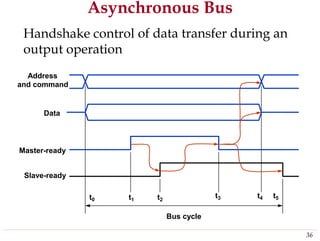
‹ Typically, the bus consists of three sets of
carry address, data, and control signals
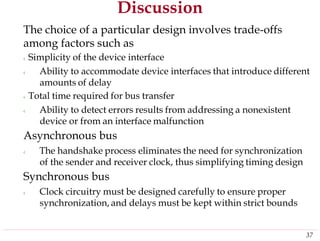
to it to
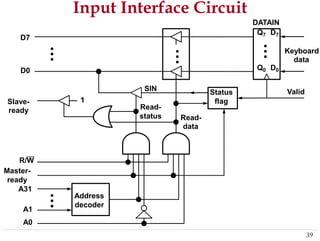
lines used to
‹Each I/O device is assigned a unique set of addresses
Bus
4
I/O device nI/O device 1
MemoryProcessor
I/O Mapping
Memory mapped I/O
‹Devices and memory share an address space
‹I/O looks just like memory read/write
‹No special commands for I/O
†Large selection of memory access commands available
Isolated I/O
‹Separate address spaces
‹Need I/O or memory select
‹Special commands for I/O
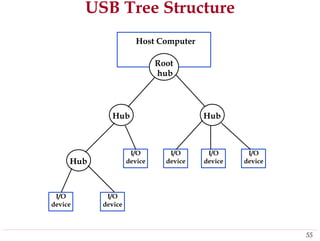
†Limited set
lines
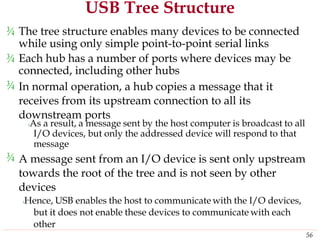
5
Memory-Mapped I/O
When I/O devices and the memory share the same
address space, the arrangement is called memory-
mapped I/O
With memory-mapped I/O, any machine instruction that
can access memory can be used to transfer data to or from
an I/O device
Most computer systems use memory-mapped I/O.
Some processors have special IN and OUT instructions to
perform I/O transfers
‹ When building a computer system based on these processors, the
designer has the option of connecting I/O devices to use the
special I/O address space or simply incorporating them as part of
the memory address space
6
I/O Interface for an Input Device
The
and
I/O
address decoder, the data and status registers,
the control circuitry required to coordinate
interfacetransfers constitute the device’s
circuit
Address lines
Data lines
Control lines
Bus
7
Input device
registerscircuitsdecoder
Address Control Data and status
I/O Techniques
Programmed
Interrupt driven
Direct Memory Access (DMA)
8
Program-Controlled I/O
Consider a simple example of I/O operations
involving
computer
below are
‹The two
a keyboard and a display device in a
system. The four registers shown
used in the data transfer operations
flags KIRQ and DIRQ in STATUS register are
used in conjunction with interrupts
DATAIN
DATAOUT
STATUS
CONTROL
7 6 5 4 3 2 1 0
9
DEN KEN
DIRQ KIRQ SOUT SIN
An Example
A program that reads one line from the keyboard,
stores it in memory buffer,
display
and echoes it back to the
Move
TestBit
Branch=0
Move
TestBit
Branch=0
Move
Move
Compare
Branch=0
Move
Call
#LINE, R0
#0,STATUS
WAITK
DATAIN,R1
#1,STATUS
WAITD
R1,DATAOUT
R1,(R0)+
#$0D,R1
WAITK
#$0A,DATAOUT
PROCESS
Initialize memory pointer
Test SIN
Wait for character to be entered
Read character
Test SOUT
Wait for display to become ready
Send character to display
Store character and advance pointer
Check if Carriage Return
If not, get another character
Otherwise, send Line Feed
Call a subroutine to process the
input line
WAITK
WAITD
10
Program-Controlled I/O
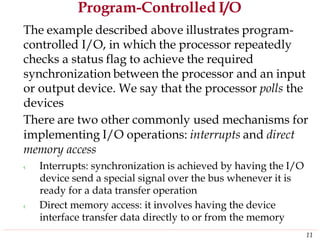
The example described above illustrates program-
controlled I/O, in which the processor repeatedly
checks a status flag to achieve the required
synchronization between the processor and an input
or output device. We say that the processor polls the
devices
There are two other commonly used mechanisms for
implementing I/O operations: interrupts and direct
memory access
‹ Interrupts: synchronization is achieved by having the I/O
device send a special signal over the bus whenever it is
ready for a data transfer operation
‹ Direct memory access: it involves having the device
interface transfer data directly to or from the memory
11
Interrupts
To avoid the processor being not performing any
useful computation, a hardware signal called an
interrupt to the processor can do it. At least one
of the bus control lines, called an interrupt-request
line, is usually dedicated for this purpose
An interrupt-service routine usually is needed and
is executed when an interrupt request is issued
On the other hand, the processor must inform the
device that its request has been recognized so
that it may remove its interrupt-request signal.
An interrupt-acknowledge signal serves this
function
12
Example
Program 2
PRINT routine
Program 1
COMPUTE routine
1
2
Interrupt occurs
here i
i+1
M
13
Interrupt-Service Routine & Subroutine
Treatment of an interrupt-service routine is very
similar to that of a subroutine
An important departure from the similarity should
be
‹
noted
A subroutine performs a function required by the program
from which it is called.
The interrupt-service routine may not have anything in
common with the program being executed at the time the
interrupt request is received. In fact, the two programs
often belong to different users
‹
Before executing the interrupt-service routine, any
information that may be altered during the execution
of that routine must be saved. This information must
be restored before the interrupted program is
resumed
14
Interrupt Latency
The information that needs to be saved and restored
typically includes the condition code flags and the
contents of any registers used by both the interrupted
program and the interrupt-service routine
Saving registers also increases the delay between the
time an interrupt request is received and the start of
execution of the interrupt-service routine. The delay
is called interrupt latency
Typically, the processor saves only the contents of
the program counter and the processor status register.
Any additional information that needs to be saved
must be saved by program instruction at the
beginning of the interrupt-service routine and
restored at the end of the routine
15
Interrupt Hardware
An equivalent circuit for an open-drain bus used
to implement a common interrupt-request line
Vdd
R
INTR
INTR1 INTR2 INTRn
INTR=INTR1+INTR2+…+INTRn
16
Processor
INTR
Handling Multiple Devices
Handling multiple devices gives rise to a number of
questions:
‹ How can the processor recognize the device requesting an
interrupt?
‹ Given that different devices are likely to require different
interrupt-service routines, how can the processor obtain the
starting address of the appropriate routine in each case?
‹ Should a device be allowed to interrupt the processor while
another interrupt is being serviced?
‹ How should two or more simultaneous interrupt request be
handled?
The information needed to determine whether a
device is requesting an interrupt is available in its
status register
‹ When a device raises an interrupt request, it sets to 1 one of
the bits in its status register, which we will call the IRQ bit
17
Identify the Interrupting Device
The simplest way to identify the interrupting device
is to have the interrupt-service routine poll all the
I/O devices connected to the bus
‹ The polling scheme is easy to implement. Its main
disadvantage is the time spent interrogating all the devices
A device requesting an interrupt may identify itself
directly to the processor. Then, the processor can
immediately start executing the corresponding
interrupt-service routine. This is called vectored
interrupts
An interrupt request from a high-priority device
should be accepted while the processor is servicing
another request from a lower-priority device
18
Interrupt Priority
The processor’s priority is usually encoded in a few
bits of the processor status word. It can be changed
by program instructions that write into the program
status register (PS). These are privileged instructions,
which can be executed only while the processor is
running in the supervisor mode
The processor is in the supervisor mode only when
executing operating system routines. It switches to
the user mode before beginning to execute
application program
An attempt to execute a privileged instruction while
in the user mode leads to a special type of interrupt
called a privilege exception
19
Implementation of Interrupt Priority
An example of the implementation of a multiple-
priority scheme
INTR1 INTRp
INTA1
INTAp
Priority arbitration
circuit
20
Processor
Device pDevice 2Device 1
Simultaneous Requests
Consider the problem of simultaneous arrivals of
interrupt requests from two or more devices. The
processor must have some means of deciding
which request to service first
Interrupt priority scheme with daisy chain
INTR
INTA
21
Processor
Device nDevice 2Device 1
Priority Group
Combination of the interrupt priority scheme
with daisy chain and with individual interrupt-
request and interrupt-acknowledge lines
INTR1
INTA1
INTRp
INTAp
Priority arbitration
circuit
22
DeviceDeviceDevice
DeviceDeviceDevice
Processor
Direct Memory Access
To transfer large blocks of data at high speed, a
special control unit may be provided between an
external device and the main memory, without
continuous intervention by the processor. This
approach is called direct memory access (DMA)
DMA transfers are performed by a control circuit that
is part of the I/O device interface. We refer to this
circuit as a DMA controller.
Since it has to transfer blocks of data, the DMA
controller must increment the memory
successive words and keep track of the
transfers
address for
number of
23
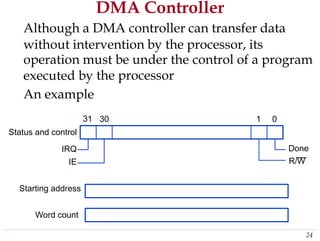
DMA Controller
Although a DMA controller can transfer data
without intervention by the processor, its
operation must be under the control of a program
executed by
An example
31
the processor
30 1 0
Status and control
IRQ
IE
Done
R/W
Starting address
Word count
24
DMA Controller in a Computer System
memory
Interface
25
Processor
Main
System bus
Disk/DMA
controller
DMA
controller
Printer Keyboard
Disk Disk Network
Memory Access Priority
Memory accesses by the processor and the DMA
controllers are interwoven. Request by DMA devices
for using the bus are always given higher priority
than processor requests.
Among different DMA devices, top priority is given
to high-speed peripherals such as a disk, a high-
speed network interface, etc.
Since the processor originates most memory access
cycles, the DMA controller can be said to “steal”
memory cycles from the processor. Hence, this
interweaving technique is usually called cycle stealing
The DMA controller may transfer a block of data
without interruption. This is called block/burst mode
26
Bus Arbitration
A conflict may arise if both the processor and a DMA
controller or two DMA controllers try to use the bus
at the same time to access the main memory. To
resolve this problem, an arbitration procedure on bus
is needed
The device that is allowed to initiate data transfer on
the bus at any given time is called the bus master.
When the current master relinquishes control of the
bus, another device can acquire this status
Bus arbitration is the process by which the next
device to become the bus master take into account
the needs of various devices by establishing a
priority system for gaining access to the bus
27
Bus Arbitration
There are two approaches to bus arbitration
‹Centralized and distributed
In centralized arbitration, a single bus arbiter
performs the required arbitration
In
in
distributed arbitration, all devices participate
the selection of the next bus master
28
Centralized Arbitration
BBSY
BR
BG1 BG2
BR
BG1
BG2
BBSY
Processor DMA controller 2 Processor
29
Processor
DMA
Controller 2
DMA
Controller 1
Distributed Arbitration
Vcc
ARB3
ARB2
ARB1
ARB0
Start-Arbitration
O.C.
30
0 1 0 1 0 1 1 1
Interface circuit for device A
Assume that IDs of A and B are 5 and 6.
Also, the code seen by both devices is 0111
Buses
A bus protocol is the set of rules that govern the
behavior of various devices connected to the bus
as to when to place information on the bus, assert
control signals, and so on
In a synchronous bus, all devices derive timing
information from a common clock line. Equal
spaced pulses on this line define equal time
intervals
In the simplest form of a synchronous bus, each
of these intervals constitutes a bus cycle during
which one data transfer can take place
31
A Synchronous Bus Example
Timing of an input transfer on a synchronous bus
Bus clock
Address and
command
Data
t0 t1
Bus Cycle
32
t2
A Synchronous Bus Example
Detail timing diagram
Bus clock
Seen by master tAM
Address and
command
Data tDM
Seen by slave
tAS
Address and
command
Data
tDS
t2t1t1
33
Slave send the
requested data
Input Transfer Using Multiple Clock Cycles
1 2 3 4
Clock
Address
Command
Data
Slave-ready
34
Asynchronous Bus
¾ An alternative scheme for controlling data
transfers on the bus is based on the use of a
handshake
Address
between the master and slave
and command
Master-ready
Slave-ready
Data
Bus cycle
Jin-Fu Li, EE, NCU 35Advanced Reliable Systems (ARES) Lab.
t0 t1 t2
t3 t4 t5
Asynchronous Bus
Handshake control
output operation
of data transfer during an
Address
and command
Data
Master-ready
Slave-ready
Bus cycle
36
t0 t1 t2
t3 t4 t5
Discussion
The choice of a particular design involves trade-offs
among factors such as
‹ Simplicity of the device interface
‹ Ability to accommodate device interfaces that introduce different
amounts of delay
‹ Total time required for bus transfer
‹ Ability to detect errors results from addressing a nonexistent
device or from an interface malfunction
Asynchronous bus
‹ The handshake process eliminates the need for synchronization
of the sender and receiver clock, thus simplifying timing design
Synchronous bus
‹ Clock circuitry must be designed carefully to ensure proper
synchronization, and delays must be kept within strict bounds
37
Interface Circuits
Keyboard to processor connection
‹ When a key is pressed, the Valid signal changes from 0
o 1, causing the ASCII code to be loaded into DATAIN
and SIN to be set to 1
‹The status flag SIN is cleared to 0 when the processor
reads the contents of the DATAIN register
Data
Data
Address
switches
R/W
ValidMaster-ready
Slave-ready
38
Keyboard
Encoder
and
Debouncing
circuit
DATAIN
SIN
Input
Interface
Processor
Input Interface Circuit
DATAIN
D7
Keyboard
data
D0
Valid
Slave-
ready Read-
status Read-
data
R/W
Master-
ready
A31
A1
A0
39
Address
decoder
Status
flag
Q7 D7
Q0 D0
SIN
1
Circuit for the Status Flag Block
SIN
Read-data
Master-ready
1
Valid
Clear
40
Q D
Q
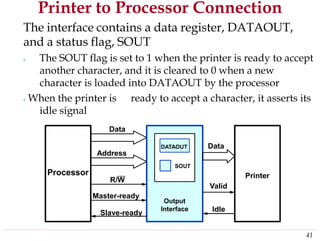
Printer to Processor Connection
The interface contains a data register, DATAOUT,
and a status flag, SOUT
‹ The SOUT flag is set to 1 when the printer is ready to accept
another character, and it is cleared to 0 when a new
character is loaded into DATAOUT by the processor
‹When the printer is ready to accept a character, it asserts its
idle signal
Data
Data
Address
R/W
Valid
Master-ready
IdleSlave-ready
41
Printer
DATAOUT
SOUT
Output
Interface
Processor
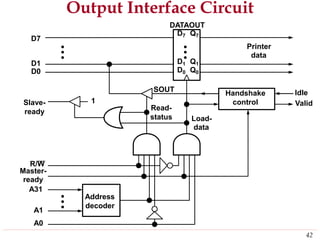
Output Interface Circuit
DATAOUT
D7
Printer
data
D1
D0
Idle
Valid1Slave-
Read-ready
status Load-
data
R/W
Master-
ready
A31
A1
A0
42
Address
decoder
Handshake
control
D7 Q7
D1 Q1
D0 Q0
SOUT
A General 8-Bit Parallel Interface
D7 P7
D0 P0
43
DATAOUT
Data
Direction
Register
DATAIN
Output Interface Circuit for
DATAOUT
a Bus Protocol
D7
Printer
data
D1
D0
Idle
Valid
Read-
status Load-
data
Respond
Go=1
R/W
Slave-
ready
A31
My-address
Go
My-
address
Idle
A1
A0
Clock
44
Timing
Logic
Address
decoder
Handshake
control
D7 Q7
D1 Q1
D0 Q0
SOUT
Timing Diagram for an Output Operation
Time
Clock
Address
R/W
Data
Go
Slave-ready
45
1 2 3
Serial Port
A serial port is used to connect the processor to
I/O devices that require transmission of data one
bit at a time
The key feature of an interface circuit for a serial
port is that it is capable of communicating in a
bit-serial fashion on the device side and in a bit-
parallel fashion on the bus side
The transformation between the parallel and
serial formats is achieved with shift registers
have parallel access capability
that
46
A Serial Interface
Serial input
D7
D0
Serial output
47
Output shift register
DATAOUT
DATAIN
Input shift register
Standard I/O Interfaces
The processor bus is the bus defined by the signals on the
processor chip itself. Devices that require a very high
speed connection to the processor, such as the main
memory, may be connected directly to this bus
The motherboard usually provides another bus that can
support more devices.
The two buses are interconnected by a circuit, which we
called a bridge, that translates the signals and protocols of
one bus into those of the other
It is impossible to define a uniform standards for the
processor bus. The structure of this bus is closely tied to
the architecture of the processor
The expansion bus is not subject to these limitations, and
therefore it can use a standardized signaling structure
48
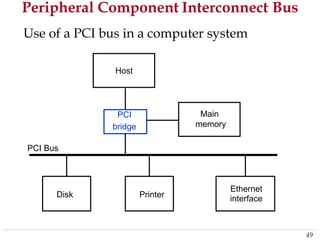
Peripheral Component Interconnect Bus
Use of a PCI bus in a computer system
bridge
PCI Bus
interface
49
Ethernet
PrinterDisk
Main
memory
PCI
Host
PCI Bus
The bus support three independent address spaces:
memory, I/O, and configuration.
The I/O address space is intended for use with
processors, such Pentium, that have a separate I/O
address space.
However, the system designer may choose to use
memory-mapped I/O even when a separate I/O
address space is available
The configuration space is intended to give the PCI
its plug-and-play capability.
‹ A 4-bit command that accompanies the address identifies
which of the three spaces is being used in a given data
transfer operation
50
Data Transfer Signals on the PCI Bus
FunctionName
CLK A 33-MHz or 66MHz clock
FRAME# Sent by the initiator to indicate the duration of a transaction
AD 32 address/data lines, which may be optionally increased to 64
C/BE# 4 command/byte-enable lines (8 for 64-bit bus)
IRDY#, TRDY# Initiator-ready and Target-ready signals
DEVSEL# A response from the device indicating that it has recognized its
Address and is ready for a data transfer transaction
IDSEL# Initialization Device Select
51
A Read Operation on the PCI Bus
1 2 3 4 5 6 7
CLK
Frame#
AD
C/BE#
IRDY#
TRDY#
DEVSEL#
52
Address #1 #2 #3 #4
Cmnd Byte enable
Universal Serial Bus (USB)
¾ The USB has been designed to meet several key
objectives
‹Provide a simple, low-cost, and easy to use
interconnection system that overcomes the difficulties
due to the limited number of I/O ports available on a
computer
‹Accommodate a wide range of data transfer
characteristics for I/O devices, including telephone and
Internet connections
‹Enhance user convenience
mode of operation
through a “plug-and-play”
53
USB Structure
¾ A serial transmission format has been chosen for the USB
because a serial bus satisfies the low-cost and flexibility
requirements
Clock and data information are encoded together and
transmitted as a single signal
‹Hence, there are no limitations on clock frequency or distance
arising from data skew
To accommodate a large number of devices that can be
added or removed at any time, the USB has the tree
structure
‹Each node of the tree has a device called a hub, which acts as an
intermediate control point between the host and the I/O device
‹At the root of the tree, a root hub connects the entire tree to the
host computer
¾
¾
54
USB Tree Structure
Host Computer
hub
Hub Hub
Hub
55
I/O
device
I/O
device
I/O
device
I/O
device
I/O
device
I/O
device
Root
USB Tree Structure
¾ The tree structure enables many devices to be connected
while using only simple point-to-point serial links
¾ Each hub has a number of ports where devices may
connected, including other hubs
In normal operation, a hub copies a message that it
receives from its upstream connection to all its
downstream ports
be
¾
‹As a result, a message sent by the host computer is broadcast to all
I/O devices, but only the addressed device will respond to that
message
A message sent from an I/O device is sent only upstream
towards the root of the tree and is not seen by other
devices
‹Hence, USB enables the host to communicate with the I/O devices,
but it does not enable these devices to communicate with each
other
¾
56
USB Protocols
¾ All information transferred over the USB is
organized in packets, where a packet consists of
one or more bytes of information
¾ The information transferred on the USB can be
divided into two broad categories: control and
data
‹Control packets perform such tasks as addressing a device
to initiate data transfer, acknowledging that data have
been received correctly, or indicating an error
‹Data packets carry information that is delivered to a
device. For example, input and output data are
transferred inside data packets
57

Io pro

  • 1.
  • 2.
    A general purposecomputer should have the ability to exchange information with a wide range of devices in varying environments. Computers can communicate with other computers over the Internet and access information around the globe. They are an integral part of home appliances, manufacturing equipment, transportation systems, banking and point-of-sale terminals. In this chapter, we study the various ways in which I/O operations are performed.
  • 3.
    Outline Accessing I/O Devices Interrupts DirectMemory Access Buses Interface Circuits Standard I/O Interfaces 2
  • 4.
    Content Coverage Address Data/Instruction Instruction Sets 3 Input/OutputSystem Logic UnitProgrammemory Central Processing Unit (CPU) Operational Registers Arithmetic Cache and Counter Control Unit Main Memory System
  • 5.
    Accessing I/O Devices Single-busstructure ‹ The bus enables all the devices connected exchange information ‹ Typically, the bus consists of three sets of carry address, data, and control signals to it to lines used to ‹Each I/O device is assigned a unique set of addresses Bus 4 I/O device nI/O device 1 MemoryProcessor
  • 6.
    I/O Mapping Memory mappedI/O ‹Devices and memory share an address space ‹I/O looks just like memory read/write ‹No special commands for I/O †Large selection of memory access commands available Isolated I/O ‹Separate address spaces ‹Need I/O or memory select ‹Special commands for I/O †Limited set lines 5
  • 7.
    Memory-Mapped I/O When I/Odevices and the memory share the same address space, the arrangement is called memory- mapped I/O With memory-mapped I/O, any machine instruction that can access memory can be used to transfer data to or from an I/O device Most computer systems use memory-mapped I/O. Some processors have special IN and OUT instructions to perform I/O transfers ‹ When building a computer system based on these processors, the designer has the option of connecting I/O devices to use the special I/O address space or simply incorporating them as part of the memory address space 6
  • 8.
    I/O Interface foran Input Device The and I/O address decoder, the data and status registers, the control circuitry required to coordinate interfacetransfers constitute the device’s circuit Address lines Data lines Control lines Bus 7 Input device registerscircuitsdecoder Address Control Data and status
  • 9.
  • 10.
    Program-Controlled I/O Consider asimple example of I/O operations involving computer below are ‹The two a keyboard and a display device in a system. The four registers shown used in the data transfer operations flags KIRQ and DIRQ in STATUS register are used in conjunction with interrupts DATAIN DATAOUT STATUS CONTROL 7 6 5 4 3 2 1 0 9 DEN KEN DIRQ KIRQ SOUT SIN
  • 11.
    An Example A programthat reads one line from the keyboard, stores it in memory buffer, display and echoes it back to the Move TestBit Branch=0 Move TestBit Branch=0 Move Move Compare Branch=0 Move Call #LINE, R0 #0,STATUS WAITK DATAIN,R1 #1,STATUS WAITD R1,DATAOUT R1,(R0)+ #$0D,R1 WAITK #$0A,DATAOUT PROCESS Initialize memory pointer Test SIN Wait for character to be entered Read character Test SOUT Wait for display to become ready Send character to display Store character and advance pointer Check if Carriage Return If not, get another character Otherwise, send Line Feed Call a subroutine to process the input line WAITK WAITD 10
  • 12.
    Program-Controlled I/O The exampledescribed above illustrates program- controlled I/O, in which the processor repeatedly checks a status flag to achieve the required synchronization between the processor and an input or output device. We say that the processor polls the devices There are two other commonly used mechanisms for implementing I/O operations: interrupts and direct memory access ‹ Interrupts: synchronization is achieved by having the I/O device send a special signal over the bus whenever it is ready for a data transfer operation ‹ Direct memory access: it involves having the device interface transfer data directly to or from the memory 11
  • 13.
    Interrupts To avoid theprocessor being not performing any useful computation, a hardware signal called an interrupt to the processor can do it. At least one of the bus control lines, called an interrupt-request line, is usually dedicated for this purpose An interrupt-service routine usually is needed and is executed when an interrupt request is issued On the other hand, the processor must inform the device that its request has been recognized so that it may remove its interrupt-request signal. An interrupt-acknowledge signal serves this function 12
  • 14.
    Example Program 2 PRINT routine Program1 COMPUTE routine 1 2 Interrupt occurs here i i+1 M 13
  • 15.
    Interrupt-Service Routine &Subroutine Treatment of an interrupt-service routine is very similar to that of a subroutine An important departure from the similarity should be ‹ noted A subroutine performs a function required by the program from which it is called. The interrupt-service routine may not have anything in common with the program being executed at the time the interrupt request is received. In fact, the two programs often belong to different users ‹ Before executing the interrupt-service routine, any information that may be altered during the execution of that routine must be saved. This information must be restored before the interrupted program is resumed 14
  • 16.
    Interrupt Latency The informationthat needs to be saved and restored typically includes the condition code flags and the contents of any registers used by both the interrupted program and the interrupt-service routine Saving registers also increases the delay between the time an interrupt request is received and the start of execution of the interrupt-service routine. The delay is called interrupt latency Typically, the processor saves only the contents of the program counter and the processor status register. Any additional information that needs to be saved must be saved by program instruction at the beginning of the interrupt-service routine and restored at the end of the routine 15
  • 17.
    Interrupt Hardware An equivalentcircuit for an open-drain bus used to implement a common interrupt-request line Vdd R INTR INTR1 INTR2 INTRn INTR=INTR1+INTR2+…+INTRn 16 Processor INTR
  • 18.
    Handling Multiple Devices Handlingmultiple devices gives rise to a number of questions: ‹ How can the processor recognize the device requesting an interrupt? ‹ Given that different devices are likely to require different interrupt-service routines, how can the processor obtain the starting address of the appropriate routine in each case? ‹ Should a device be allowed to interrupt the processor while another interrupt is being serviced? ‹ How should two or more simultaneous interrupt request be handled? The information needed to determine whether a device is requesting an interrupt is available in its status register ‹ When a device raises an interrupt request, it sets to 1 one of the bits in its status register, which we will call the IRQ bit 17
  • 19.
    Identify the InterruptingDevice The simplest way to identify the interrupting device is to have the interrupt-service routine poll all the I/O devices connected to the bus ‹ The polling scheme is easy to implement. Its main disadvantage is the time spent interrogating all the devices A device requesting an interrupt may identify itself directly to the processor. Then, the processor can immediately start executing the corresponding interrupt-service routine. This is called vectored interrupts An interrupt request from a high-priority device should be accepted while the processor is servicing another request from a lower-priority device 18
  • 20.
    Interrupt Priority The processor’spriority is usually encoded in a few bits of the processor status word. It can be changed by program instructions that write into the program status register (PS). These are privileged instructions, which can be executed only while the processor is running in the supervisor mode The processor is in the supervisor mode only when executing operating system routines. It switches to the user mode before beginning to execute application program An attempt to execute a privileged instruction while in the user mode leads to a special type of interrupt called a privilege exception 19
  • 21.
    Implementation of InterruptPriority An example of the implementation of a multiple- priority scheme INTR1 INTRp INTA1 INTAp Priority arbitration circuit 20 Processor Device pDevice 2Device 1
  • 22.
    Simultaneous Requests Consider theproblem of simultaneous arrivals of interrupt requests from two or more devices. The processor must have some means of deciding which request to service first Interrupt priority scheme with daisy chain INTR INTA 21 Processor Device nDevice 2Device 1
  • 23.
    Priority Group Combination ofthe interrupt priority scheme with daisy chain and with individual interrupt- request and interrupt-acknowledge lines INTR1 INTA1 INTRp INTAp Priority arbitration circuit 22 DeviceDeviceDevice DeviceDeviceDevice Processor
  • 24.
    Direct Memory Access Totransfer large blocks of data at high speed, a special control unit may be provided between an external device and the main memory, without continuous intervention by the processor. This approach is called direct memory access (DMA) DMA transfers are performed by a control circuit that is part of the I/O device interface. We refer to this circuit as a DMA controller. Since it has to transfer blocks of data, the DMA controller must increment the memory successive words and keep track of the transfers address for number of 23
  • 25.
    DMA Controller Although aDMA controller can transfer data without intervention by the processor, its operation must be under the control of a program executed by An example 31 the processor 30 1 0 Status and control IRQ IE Done R/W Starting address Word count 24
  • 26.
    DMA Controller ina Computer System memory Interface 25 Processor Main System bus Disk/DMA controller DMA controller Printer Keyboard Disk Disk Network
  • 27.
    Memory Access Priority Memoryaccesses by the processor and the DMA controllers are interwoven. Request by DMA devices for using the bus are always given higher priority than processor requests. Among different DMA devices, top priority is given to high-speed peripherals such as a disk, a high- speed network interface, etc. Since the processor originates most memory access cycles, the DMA controller can be said to “steal” memory cycles from the processor. Hence, this interweaving technique is usually called cycle stealing The DMA controller may transfer a block of data without interruption. This is called block/burst mode 26
  • 28.
    Bus Arbitration A conflictmay arise if both the processor and a DMA controller or two DMA controllers try to use the bus at the same time to access the main memory. To resolve this problem, an arbitration procedure on bus is needed The device that is allowed to initiate data transfer on the bus at any given time is called the bus master. When the current master relinquishes control of the bus, another device can acquire this status Bus arbitration is the process by which the next device to become the bus master take into account the needs of various devices by establishing a priority system for gaining access to the bus 27
  • 29.
    Bus Arbitration There aretwo approaches to bus arbitration ‹Centralized and distributed In centralized arbitration, a single bus arbiter performs the required arbitration In in distributed arbitration, all devices participate the selection of the next bus master 28
  • 30.
    Centralized Arbitration BBSY BR BG1 BG2 BR BG1 BG2 BBSY ProcessorDMA controller 2 Processor 29 Processor DMA Controller 2 DMA Controller 1
  • 31.
    Distributed Arbitration Vcc ARB3 ARB2 ARB1 ARB0 Start-Arbitration O.C. 30 0 10 1 0 1 1 1 Interface circuit for device A Assume that IDs of A and B are 5 and 6. Also, the code seen by both devices is 0111
  • 32.
    Buses A bus protocolis the set of rules that govern the behavior of various devices connected to the bus as to when to place information on the bus, assert control signals, and so on In a synchronous bus, all devices derive timing information from a common clock line. Equal spaced pulses on this line define equal time intervals In the simplest form of a synchronous bus, each of these intervals constitutes a bus cycle during which one data transfer can take place 31
  • 33.
    A Synchronous BusExample Timing of an input transfer on a synchronous bus Bus clock Address and command Data t0 t1 Bus Cycle 32 t2
  • 34.
    A Synchronous BusExample Detail timing diagram Bus clock Seen by master tAM Address and command Data tDM Seen by slave tAS Address and command Data tDS t2t1t1 33 Slave send the requested data
  • 35.
    Input Transfer UsingMultiple Clock Cycles 1 2 3 4 Clock Address Command Data Slave-ready 34
  • 36.
    Asynchronous Bus ¾ Analternative scheme for controlling data transfers on the bus is based on the use of a handshake Address between the master and slave and command Master-ready Slave-ready Data Bus cycle Jin-Fu Li, EE, NCU 35Advanced Reliable Systems (ARES) Lab. t0 t1 t2 t3 t4 t5
  • 37.
    Asynchronous Bus Handshake control outputoperation of data transfer during an Address and command Data Master-ready Slave-ready Bus cycle 36 t0 t1 t2 t3 t4 t5
  • 38.
    Discussion The choice ofa particular design involves trade-offs among factors such as ‹ Simplicity of the device interface ‹ Ability to accommodate device interfaces that introduce different amounts of delay ‹ Total time required for bus transfer ‹ Ability to detect errors results from addressing a nonexistent device or from an interface malfunction Asynchronous bus ‹ The handshake process eliminates the need for synchronization of the sender and receiver clock, thus simplifying timing design Synchronous bus ‹ Clock circuitry must be designed carefully to ensure proper synchronization, and delays must be kept within strict bounds 37
  • 39.
    Interface Circuits Keyboard toprocessor connection ‹ When a key is pressed, the Valid signal changes from 0 o 1, causing the ASCII code to be loaded into DATAIN and SIN to be set to 1 ‹The status flag SIN is cleared to 0 when the processor reads the contents of the DATAIN register Data Data Address switches R/W ValidMaster-ready Slave-ready 38 Keyboard Encoder and Debouncing circuit DATAIN SIN Input Interface Processor
  • 40.
    Input Interface Circuit DATAIN D7 Keyboard data D0 Valid Slave- readyRead- status Read- data R/W Master- ready A31 A1 A0 39 Address decoder Status flag Q7 D7 Q0 D0 SIN 1
  • 41.
    Circuit for theStatus Flag Block SIN Read-data Master-ready 1 Valid Clear 40 Q D Q
  • 42.
    Printer to ProcessorConnection The interface contains a data register, DATAOUT, and a status flag, SOUT ‹ The SOUT flag is set to 1 when the printer is ready to accept another character, and it is cleared to 0 when a new character is loaded into DATAOUT by the processor ‹When the printer is ready to accept a character, it asserts its idle signal Data Data Address R/W Valid Master-ready IdleSlave-ready 41 Printer DATAOUT SOUT Output Interface Processor
  • 43.
    Output Interface Circuit DATAOUT D7 Printer data D1 D0 Idle Valid1Slave- Read-ready statusLoad- data R/W Master- ready A31 A1 A0 42 Address decoder Handshake control D7 Q7 D1 Q1 D0 Q0 SOUT
  • 44.
    A General 8-BitParallel Interface D7 P7 D0 P0 43 DATAOUT Data Direction Register DATAIN
  • 45.
    Output Interface Circuitfor DATAOUT a Bus Protocol D7 Printer data D1 D0 Idle Valid Read- status Load- data Respond Go=1 R/W Slave- ready A31 My-address Go My- address Idle A1 A0 Clock 44 Timing Logic Address decoder Handshake control D7 Q7 D1 Q1 D0 Q0 SOUT
  • 46.
    Timing Diagram foran Output Operation Time Clock Address R/W Data Go Slave-ready 45 1 2 3
  • 47.
    Serial Port A serialport is used to connect the processor to I/O devices that require transmission of data one bit at a time The key feature of an interface circuit for a serial port is that it is capable of communicating in a bit-serial fashion on the device side and in a bit- parallel fashion on the bus side The transformation between the parallel and serial formats is achieved with shift registers have parallel access capability that 46
  • 48.
    A Serial Interface Serialinput D7 D0 Serial output 47 Output shift register DATAOUT DATAIN Input shift register
  • 49.
    Standard I/O Interfaces Theprocessor bus is the bus defined by the signals on the processor chip itself. Devices that require a very high speed connection to the processor, such as the main memory, may be connected directly to this bus The motherboard usually provides another bus that can support more devices. The two buses are interconnected by a circuit, which we called a bridge, that translates the signals and protocols of one bus into those of the other It is impossible to define a uniform standards for the processor bus. The structure of this bus is closely tied to the architecture of the processor The expansion bus is not subject to these limitations, and therefore it can use a standardized signaling structure 48
  • 50.
    Peripheral Component InterconnectBus Use of a PCI bus in a computer system bridge PCI Bus interface 49 Ethernet PrinterDisk Main memory PCI Host
  • 51.
    PCI Bus The bussupport three independent address spaces: memory, I/O, and configuration. The I/O address space is intended for use with processors, such Pentium, that have a separate I/O address space. However, the system designer may choose to use memory-mapped I/O even when a separate I/O address space is available The configuration space is intended to give the PCI its plug-and-play capability. ‹ A 4-bit command that accompanies the address identifies which of the three spaces is being used in a given data transfer operation 50
  • 52.
    Data Transfer Signalson the PCI Bus FunctionName CLK A 33-MHz or 66MHz clock FRAME# Sent by the initiator to indicate the duration of a transaction AD 32 address/data lines, which may be optionally increased to 64 C/BE# 4 command/byte-enable lines (8 for 64-bit bus) IRDY#, TRDY# Initiator-ready and Target-ready signals DEVSEL# A response from the device indicating that it has recognized its Address and is ready for a data transfer transaction IDSEL# Initialization Device Select 51
  • 53.
    A Read Operationon the PCI Bus 1 2 3 4 5 6 7 CLK Frame# AD C/BE# IRDY# TRDY# DEVSEL# 52 Address #1 #2 #3 #4 Cmnd Byte enable
  • 54.
    Universal Serial Bus(USB) ¾ The USB has been designed to meet several key objectives ‹Provide a simple, low-cost, and easy to use interconnection system that overcomes the difficulties due to the limited number of I/O ports available on a computer ‹Accommodate a wide range of data transfer characteristics for I/O devices, including telephone and Internet connections ‹Enhance user convenience mode of operation through a “plug-and-play” 53
  • 55.
    USB Structure ¾ Aserial transmission format has been chosen for the USB because a serial bus satisfies the low-cost and flexibility requirements Clock and data information are encoded together and transmitted as a single signal ‹Hence, there are no limitations on clock frequency or distance arising from data skew To accommodate a large number of devices that can be added or removed at any time, the USB has the tree structure ‹Each node of the tree has a device called a hub, which acts as an intermediate control point between the host and the I/O device ‹At the root of the tree, a root hub connects the entire tree to the host computer ¾ ¾ 54
  • 56.
    USB Tree Structure HostComputer hub Hub Hub Hub 55 I/O device I/O device I/O device I/O device I/O device I/O device Root
  • 57.
    USB Tree Structure ¾The tree structure enables many devices to be connected while using only simple point-to-point serial links ¾ Each hub has a number of ports where devices may connected, including other hubs In normal operation, a hub copies a message that it receives from its upstream connection to all its downstream ports be ¾ ‹As a result, a message sent by the host computer is broadcast to all I/O devices, but only the addressed device will respond to that message A message sent from an I/O device is sent only upstream towards the root of the tree and is not seen by other devices ‹Hence, USB enables the host to communicate with the I/O devices, but it does not enable these devices to communicate with each other ¾ 56
  • 58.
    USB Protocols ¾ Allinformation transferred over the USB is organized in packets, where a packet consists of one or more bytes of information ¾ The information transferred on the USB can be divided into two broad categories: control and data ‹Control packets perform such tasks as addressing a device to initiate data transfer, acknowledging that data have been received correctly, or indicating an error ‹Data packets carry information that is delivered to a device. For example, input and output data are transferred inside data packets 57